

I tested six testing frameworks. Selenium broke on every UI change. Playwright was faster but still required constant maintenance. Cypress worked, until I needed cross-browser support. Puppeteer was fast. TestCafe was stable. All of them demanded code for everything.
Then I tested our own tool. I connected our codebase to Autonoma. A Planner agent read our routes, components, and user flows, then generated a test suite from the actual code, no scripts written by hand. UI changed three times over the following weeks. Each time, a Diffs Agent picked up the code diff and updated the affected tests on its own.
Is there a better approach to test automation?
Why Teams Are Leaving Selenium
Selenium pioneered browser automation. It gave us the power to automate what was once manual. It also gave us brittle tests, flaky builds, and maintenance nightmares.
The problem isn't that Selenium is bad. It's that it was built for a different era, when UIs changed quarterly, not daily. When teams had dedicated QA engineers whose full-time job was maintaining test suites. When "works in Chrome" was acceptable.
2025 looks different. CI/CD pipelines run every commit. UIs update continuously. Teams ship multiple times per day. Selenium's architecture, built on the WebDriver protocol with rigid element selectors, can't keep pace.
Newer frameworks emerged to fix these problems. Playwright brought speed and modern APIs. Cypress offered developer experience and reliability. Puppeteer gave Node developers native Chrome control. TestCafe promised stability without WebDriver.
Each solved specific problems. None solved the fundamental issue: tests break when UIs change.
Framework Overview
Before diving into comparisons, here's what each framework brings to the table.
Selenium
The original browser automation framework. Released in 2004, Selenium uses the WebDriver protocol to control browsers. Supports multiple languages (Python, Java, C#, JavaScript, Ruby). Massive community. Steep learning curve.
Best for: Teams with existing Selenium investments, enterprises requiring specific language support, cross-browser testing at scale.
Playwright
Microsoft's modern automation framework. Released in 2020, built by the team that created Puppeteer. Fast, reliable, with auto-waiting and browser contexts. Supports Chromium, Firefox, WebKit. Multiple languages (JavaScript, Python, Java, .NET).
Best for: Teams building new test suites, developers wanting modern APIs, projects requiring WebKit testing.
Cypress
JavaScript test framework built for developers. Released in 2015, runs directly in the browser alongside your application. Excellent debugging. Time-travel debugging. Limited to Chromium-based browsers and Firefox (WebKit requires paid plan).
Best for: Frontend developers, teams using JavaScript/TypeScript, projects needing excellent debugging.
Puppeteer
Google's Node library for controlling Chrome/Chromium. Released in 2017, provides high-level API over Chrome DevTools Protocol. Fast, lightweight, Chrome-specific. No built-in test runner.
Best for: Chrome-only testing, web scraping, PDF generation, screenshot automation.
TestCafe
JavaScript test framework that doesn't require WebDriver or browser plugins. Released in 2016, uses proxy injection for browser control. Stable, cross-browser. Slightly slower than competitors.
Best for: Teams needing reliable cross-browser testing without complex setup, Windows-heavy environments.
Autonoma
A managed preview-environments platform with E2E testing built in. Four agents do the work: a Planner reads your codebase (routes, components, user flows) and plans test cases, generating the endpoints needed to set up database state for each scenario. An Executor runs those tests against a live preview environment, and a Reviewer classifies each result as a real bug, an agent error, or a test/plan mismatch. On every pull request, a Diffs Agent analyzes the code diff and adds, deprecates, or updates test cases so the suite tracks the codebase automatically.
Best for: Teams tired of test maintenance, organizations scaling QA, companies shipping continuously.
Complete Comparison Matrix
Here's every major feature compared across all six frameworks:
| Feature | Selenium | Playwright | Cypress | Puppeteer | TestCafe | Autonoma |
|---|---|---|---|---|---|---|
| Initial Setup | 2-4 hours | 15-30 minutes | 15-30 minutes | 10-15 minutes | 15-30 minutes | < 5 minutes |
| Maintenance Effort | Very High | High | High | High | Medium-High | Minimal (Diffs Agent per PR) |
| Test Execution Speed | Slow (3-5s/action) | Fast (1-2s/action) | Fast (1-2s/action) | Very Fast (<1s/action) | Medium (2-3s/action) | Fast (1-2s/action) |
| Cross-Browser Support | Excellent (all major) | Excellent (Chromium, Firefox, WebKit) | Limited (Chrome, Firefox; WebKit paid) | Chrome only | Excellent (all major) | Excellent (all major) |
| Mobile Testing | Requires Appium | Chromium mobile | Limited (via Electron) | Chrome mobile | Mobile browsers | Mobile-web only (no native iOS/Android) |
| Self-Healing Tests | No | No | No | No | No | Diffs Agent updates tests on every PR |
| Parallel Execution | Yes (complex setup) | Yes (built-in) | Yes (paid tier) | Yes (manual) | Yes (built-in) | Yes (built-in) |
| Flakiness | High | Low | Very Low | Low | Low | Very Low (Reviewer separates real bugs from flakes) |
| Debugging Tools | Basic | Excellent (trace viewer) | Excellent (time-travel) | Good (DevTools) | Good | Excellent (Reviewer classifies failures) |
| CI/CD Integration | Complex | Easy | Easy | Easy | Easy | Seamless |
| Learning Curve | Steep (weeks) | Moderate (days) | Gentle (hours) | Moderate (days) | Moderate (days) | Very Gentle (minutes) |
| Language Support | 6+ languages | JavaScript, Python, Java, .NET | JavaScript/TypeScript | JavaScript/TypeScript | JavaScript/TypeScript | Any (reads your codebase) |
| Community Size | Massive | Growing rapidly | Large | Large | Medium | Growing |
| Documentation | Extensive | Excellent | Excellent | Good | Good | Excellent |
| Test Creation | Manual coding | Manual coding | Manual coding | Manual coding | Manual coding | Planner generates from your codebase |
| Selector Strategy | Manual (CSS, XPath) | Manual (auto-gen available) | Manual (test-id preferred) | Manual (CSS, XPath) | Manual (smart locators) | Derived from code structure, not recordings |
| Wait Handling | Manual (explicit waits) | Auto-waiting | Auto-waiting | Manual | Auto-waiting | Executor waits against live preview state |
| Screenshot Comparison | Manual setup | Built-in | Plugin required | Manual code | Built-in | Built-in (Reviewer flags visual diffs) |
| Network Mocking | Complex (external tools) | Built-in | Built-in | Built-in | Limited | Built-in |
| Open Source | Yes (free) | Yes (free) | Yes (free core) | Yes (free) | Yes (free) | Yes (BSL 1.1, converts to Apache 2.0 in 2028) |
| Enterprise Support | Via partners | GitHub issues | Paid support available | GitHub issues | Paid support available | Included |
| Cost (team of 5) | Free (infra costs) | Free (infra costs) | $75-300/mo | Free (infra costs) | Free (paid support extra) | Free core, paid managed cloud tier |
| Best Use Case | Legacy systems | Modern web apps | Developer-focused | Chrome scraping | Stable cross-browser | Continuous deployment |
Head-to-Head Comparisons
Selenium vs Playwright
I migrated our regression suite from Selenium to Playwright. Setup took three days. Execution time dropped from 45 minutes to 12 minutes. Maintenance effort decreased, but didn't disappear.
Setup Time:
- Selenium: Two hours installing drivers, configuring browsers, setting up grid infrastructure
- Playwright: 30 minutes. One command installs everything.
Speed:
- Selenium: 3-5 seconds per action. WebDriver protocol adds latency.
- Playwright: 1-2 seconds per action. Direct browser control via CDP.
Maintenance:
- Selenium: Every UI change breaks selectors. Explicit waits everywhere. Flaky tests.
- Playwright: Auto-waiting reduces some flakiness. Selectors still break. Less maintenance, not zero maintenance.
Winner: Playwright for new projects. Faster, more reliable, better developer experience.
When to choose Selenium: You need Java/C#/Ruby. You have existing Selenium infrastructure. You're testing legacy systems with complex authentication.
Selenium vs Cypress
Cypress transformed how developers think about testing. It runs in the browser. You see your tests execute. Time-travel debugging lets you inspect any moment. It's magic, until you need Safari support.
Developer Experience:
- Selenium: Command-line output. Debugging requires screenshots and breakpoints.
- Cypress: Visual test runner. See exactly what's happening. Click on any command to see app state.
Cross-Browser:
- Selenium: Works everywhere. Chrome, Firefox, Safari, Edge, IE11.
- Cypress: Chrome and Firefox. WebKit requires paid Cloud plan.
Flakiness:
- Selenium: High. Manual waits required. Race conditions common.
- Cypress: Very low. Automatic retry logic. Commands wait for elements.
Winner: Cypress for JavaScript teams testing Chrome/Firefox. Selenium for teams requiring Safari/Edge support.
When to choose Cypress: You're a frontend developer building new tests. You test web apps in Chrome/Firefox. You value debugging over everything else.
Playwright vs Cypress
Both modern frameworks. Both fast. Both reliable. The difference is where they run.
Architecture:
- Playwright: Runs outside browser. Controls browser via CDP. Can test multiple browsers simultaneously.
- Cypress: Runs inside browser. Direct access to app. Single browser per test.
Cross-Browser:
- Playwright: Chromium, Firefox, WebKit included. One test runs everywhere.
- Cypress: Chrome/Firefox free. WebKit requires Cloud subscription ($75/month).
Network Control:
- Playwright: Built-in request interception. Mock APIs easily.
- Cypress: Built-in stubbing. Excellent DX for mocking.
Winner: Playwright if you need WebKit. Cypress if you're a frontend developer who wants the best debugging experience.
Real difference: Playwright is powerful. Cypress is delightful.
Puppeteer vs Playwright
Playwright is Puppeteer's spiritual successor, built by the same team. If you're starting new, choose Playwright. If you have Puppeteer tests, here's what changed.
Browser Support:
- Puppeteer: Chrome/Chromium. Firefox experimental.
- Playwright: Chromium, Firefox, WebKit. All first-class.
API Design:
- Puppeteer: Low-level. More manual work.
- Playwright: Higher-level abstractions. Auto-waiting. Better defaults.
Mobile:
- Puppeteer: Chrome mobile emulation.
- Playwright: Chrome mobile + actual device viewport simulation.
Winner: Playwright unless you need Chrome-only features or have existing Puppeteer code.
When to choose Puppeteer: You're building Chrome-specific tooling. You're generating PDFs. You need the smallest possible dependency.
TestCafe vs Playwright
TestCafe's superpower is stability. No WebDriver. No browser extensions. Just a proxy that intercepts requests. It's slower but more reliable.
Setup:
- TestCafe:
npm install testcafe. Done. - Playwright:
npm install playwright && npx playwright install. Done.
Speed:
- TestCafe: 2-3 seconds per action. Proxy adds latency.
- Playwright: 1-2 seconds per action. Direct browser control.
Stability:
- TestCafe: Smart selectors adapt to minor UI changes. Fewer breaking tests.
- Playwright: Fast but brittle. Selectors break on UI changes.
Winner: Playwright if speed matters. TestCafe if you want "it just works" reliability.
When to choose TestCafe: You're in a Windows-heavy environment. You need maximum stability. You can sacrifice speed for reliability.
All Frameworks vs Autonoma
Full transparency: I'm co-founder of Autonoma. I had to test our own tool. The comparison matters because the approach is fundamentally different.
Creation:
- Traditional frameworks: Write code. Define selectors. Configure waits.
- Autonoma: Connect your codebase. A Planner agent reads routes, components, and user flows, then plans and generates the test cases, including the endpoints needed to set up database state for each scenario.
Maintenance:
- Traditional frameworks: UI changes break selectors. Manually update tests. Re-run. Repeat.
- Autonoma: A Diffs Agent runs on every pull request, reads the code diff, and adds, deprecates, or updates test cases so the suite stays aligned with the codebase without anyone touching a selector.
Speed to Value:
- Traditional frameworks: Days to set up. Weeks to build coverage. Months to maintain.
- Autonoma: Connect a repo and the Planner produces an initial suite in hours, not weeks. Ongoing maintenance runs per-PR, not per-sprint.
I tested this with our own application. Changed button text, moved elements, restructured HTML. Traditional framework tests failed 18/20 times. After the Diffs Agent picked up the corresponding code diffs, Autonoma's suite passed 19/20 times, and a Reviewer agent flagged the remaining failure as a real bug, not a broken selector.
The philosophical difference: Traditional frameworks automate manual testing. You still think in selectors, waits, and assertions. Autonoma starts from the codebase itself. The Planner and Diffs Agent handle plan generation and upkeep; you review what the Reviewer agent classifies as real bugs.
When to choose traditional frameworks: You need maximum control. You're testing complex authentication flows. You want to own every line of test code.
When to choose Autonoma: You ship continuously. Test maintenance consumes your sprint. You want a managed preview-environment testing layer that updates itself as your code changes.
Decision Framework: When to Choose Each
Choose Selenium if:
- ✅ You need Java, C#, Ruby, or Python (not JavaScript)
- ✅ You have existing Selenium infrastructure
- ✅ You're testing legacy enterprise applications
- ✅ You need specific browser versions (e.g., IE11)
- ✅ Your team already knows Selenium well
❌ Don't choose Selenium if you're starting fresh. Modern alternatives are faster and more reliable.
Choose Playwright if:
- ✅ You're building new test automation from scratch
- ✅ You need WebKit/Safari testing
- ✅ Speed is critical (CI/CD pipelines)
- ✅ You want multiple language support (JS, Python, .NET, Java)
- ✅ You need mobile browser testing
❌ Don't choose Playwright if your team is JavaScript-only and values debugging UX over raw speed.
Choose Cypress if:
- ✅ Your team is primarily frontend developers
- ✅ You test web applications (not mobile)
- ✅ You only need Chrome/Firefox support
- ✅ Debugging experience is top priority
- ✅ You want time-travel debugging and visual test runner
❌ Don't choose Cypress if you need Safari support or test non-JavaScript applications.
Choose Puppeteer if:
- ✅ You only test Chrome/Chromium
- ✅ You're building web scraping tools
- ✅ You need to generate PDFs or screenshots
- ✅ You want the smallest dependency footprint
- ✅ You're building developer tooling (not primarily testing)
❌ Don't choose Puppeteer if you need cross-browser testing. Use Playwright instead.
Choose TestCafe if:
- ✅ Stability trumps speed for your team
- ✅ You're in a Windows-heavy environment
- ✅ You want cross-browser without complex setup
- ✅ Your tests are more integration than unit
- ✅ You prefer fewer breaking tests over faster execution
❌ Don't choose TestCafe if execution speed is critical or you need cutting-edge features.
Choose Autonoma if:
- ✅ Test maintenance consumes significant engineering time
- ✅ You ship code multiple times per day
- ✅ Your UI changes frequently
- ✅ You want tests generated from your actual codebase instead of written or recorded by hand
- ✅ Your team lacks dedicated QA engineers
- ✅ You want per-PR test maintenance handled automatically as your code changes
❌ Don't choose Autonoma if you need full programmatic control, test complex authentication flows requiring custom logic, or need native iOS/Android app testing.
Migration Guides
Migrating from Selenium to Playwright
Time estimate: 2-4 weeks for medium test suite (100-300 tests)
Step 1: Install Playwright
npm install @playwright/test
npx playwright install
Step 2: Convert test structure
Selenium:
const {Builder, By, until} = require('selenium-webdriver');
const driver = await new Builder().forBrowser('chrome').build();

await driver.get('https://example.com');
await driver.findElement(By.id('username')).sendKeys('user');
await driver.findElement(By.id('password')).sendKeys('pass');
await driver.findElement(By.css('button[type="submit"]')).click();
await driver.wait(until.elementLocated(By.css('.dashboard')), 5000);
Playwright equivalent:
import { test, expect } from '@playwright/test';

test('login test', async ({ page }) => {
  await page.goto('https://example.com');
  await page.fill('#username', 'user');
  await page.fill('#password', 'pass');
  await page.click('button[type="submit"]');
  await expect(page.locator('.dashboard')).toBeVisible();
});
Key differences:
- No explicit waits needed (Playwright auto-waits)
- Cleaner API (
page.fill()vsfindElement().sendKeys()) - Built-in assertions (
expect())
Step 3: Update CI/CD
Replace WebDriver Grid setup with Playwright's built-in parallel execution:
# .github/workflows/test.yml
- name: Run Playwright tests
  run: npx playwright test --workers=4
Common pitfalls:
- Selenium's
findElement()fails immediately; Playwright auto-retries - Explicit waits (
WebDriverWait) unnecessary in Playwright - Screenshots require different syntax:
await page.screenshot()
Migrating from Cypress to Playwright
Time estimate: 1-3 weeks for medium test suite
Key architectural difference: Cypress runs in-browser; Playwright runs out-of-browser. Some patterns don't translate directly.
Step 1: Convert command chains
Cypress:
cy.visit('https://example.com')
cy.get('#username').type('user')
cy.get('#password').type('pass')
cy.get('button[type="submit"]').click()
cy.get('.dashboard').should('be.visible')
Playwright:
await page.goto('https://example.com')
await page.fill('#username', 'user')
await page.fill('#password', 'pass')
await page.click('button[type="submit"]')
await expect(page.locator('.dashboard')).toBeVisible()
Step 2: Handle network stubbing
Cypress:
cy.intercept('GET', '/api/users', { fixture: 'users.json' })Playwright:
await page.route('/api/users', route => {
  route.fulfill({ path: 'fixtures/users.json' })
})
Step 3: Convert custom commands
Cypress custom commands become helper functions in Playwright:
Cypress:
// cypress/support/commands.js
Cypress.Commands.add('login', (username, password) => {
  cy.get('#username').type(username)
  cy.get('#password').type(password)
  cy.get('button[type="submit"]').click()
})
Playwright:
// helpers/auth.js
export async function login(page, username, password) {
  await page.fill('#username', username)
  await page.fill('#password', password)
  await page.click('button[type="submit"]')
}
Benefits gained: WebKit testing, faster execution, better parallelization.
Benefits lost: Time-travel debugging, visual test runner (unless using Playwright UI mode).
Migrating from Selenium to Cypress
Time estimate: 3-6 weeks for medium test suite
Major architectural change: Selenium runs outside browser; Cypress runs inside. Your tests will be completely rewritten.
Step 1: Convert synchronous to asynchronous
Selenium tests use async/await or promises. Cypress uses command chains that are automatically queued.
Step 2: Embrace Cypress patterns
Don't fight Cypress's architecture. Use cy.get() chains. Don't assign elements to variables. Let Cypress manage retries.
Step 3: Accept browser limitations
If you were testing Safari or Edge with Selenium, you'll need Cypress Cloud for WebKit or stick with Chrome/Firefox.
Consider: This is a significant rewrite. Evaluate if Playwright might be a better intermediate step (similar async patterns to Selenium, less architectural change).
Migrating from Any Framework to Autonoma
Time estimate: Hours to get an initial suite, ongoing as you scale
Approach: Don't migrate all at once. Let Autonoma generate coverage alongside your existing framework tests, then shift weight over time.
Step 1: Connect your codebase
Point Autonoma at your repository. The Planner agent reads your routes, components, and user flows directly from the code, no clicking through the app required.
Step 2: Review the generated test suite
The Planner produces test cases and the database-state endpoints they need. An Executor runs them against a live preview environment, and a Reviewer classifies each result as a real bug, an agent error, or a mismatch between the test and the plan.
Step 3: Run in parallel
Maintain your existing test suite while Autonoma's suite runs alongside it. Compare results.
Step 4: Let the Diffs Agent take over maintenance
As pull requests land, the Diffs Agent analyzes each code diff and adds, deprecates, or updates test cases automatically. Gradually reduce maintenance on traditional framework tests as coverage shifts over.
Philosophy shift: You're not migrating selectors. You're migrating the source of truth. Your codebase becomes the spec, and the agents keep the tests aligned with it.
Common Challenges Across All Frameworks
Challenge 1: Flaky Tests
Problem: Tests pass locally, fail in CI. Pass on retry. Fail randomly.
Selenium solution: Add explicit waits everywhere, like driver.wait(until.elementLocated(...), 10000) followed by a hardcoded sleep() that papers over the real timing issue. Still flaky.
Playwright/Cypress solution: Auto-waiting helps but doesn't eliminate flakiness. Network timing still causes issues.
Autonoma solution: Tests run against a live preview environment, and a Reviewer agent classifies each failure as a real bug, an agent error, or a test/plan mismatch, so a flaky run doesn't get mistaken for a regression.
Challenge 2: Cross-Browser Testing
Problem: Test passes in Chrome, fails in Safari. Different timing, different rendering, different bugs.
Selenium: Supports all browsers but requires separate WebDriver installations and management.
Playwright: Built-in browser installation. One test runs across Chromium, Firefox, WebKit.
Cypress: Chrome/Firefox free. Safari requires paid subscription.
Autonoma: All major browsers supported in the managed preview environment, generated from a single Planner-produced suite.
Challenge 3: Mobile Testing
Problem: Mobile apps have different interactions (tap, swipe), different timings, different UI patterns.
Selenium: Requires Appium. Separate API. Complex setup.
Playwright: Mobile browser emulation. Not native apps.
Cypress: No mobile support (desktop browser only).
Autonoma: Web-first, including responsive and mobile-web layouts tested in the preview environment. Native iOS and Android app testing isn't part of the product today, if you need that, pair a native tool with Autonoma's web coverage.
Challenge 4: Test Maintenance
Problem: UI changes. Developers rename classes, move elements, restructure HTML. Tests break.
Traditional frameworks: Manually update every selector. Re-run tests. Fix more selectors. Repeat.
Example: Button changes from #submit-btn to #submit-button. Update 47 tests.
Autonoma: The Diffs Agent reads the code diff behind the rename and updates the affected test cases on that pull request. No one touches a selector.
Challenge 5: Debugging Failures
Problem: Test fails. Why? Screenshot shows error state but not how you got there.
Selenium: Console output. Screenshots on failure. Manual investigation.
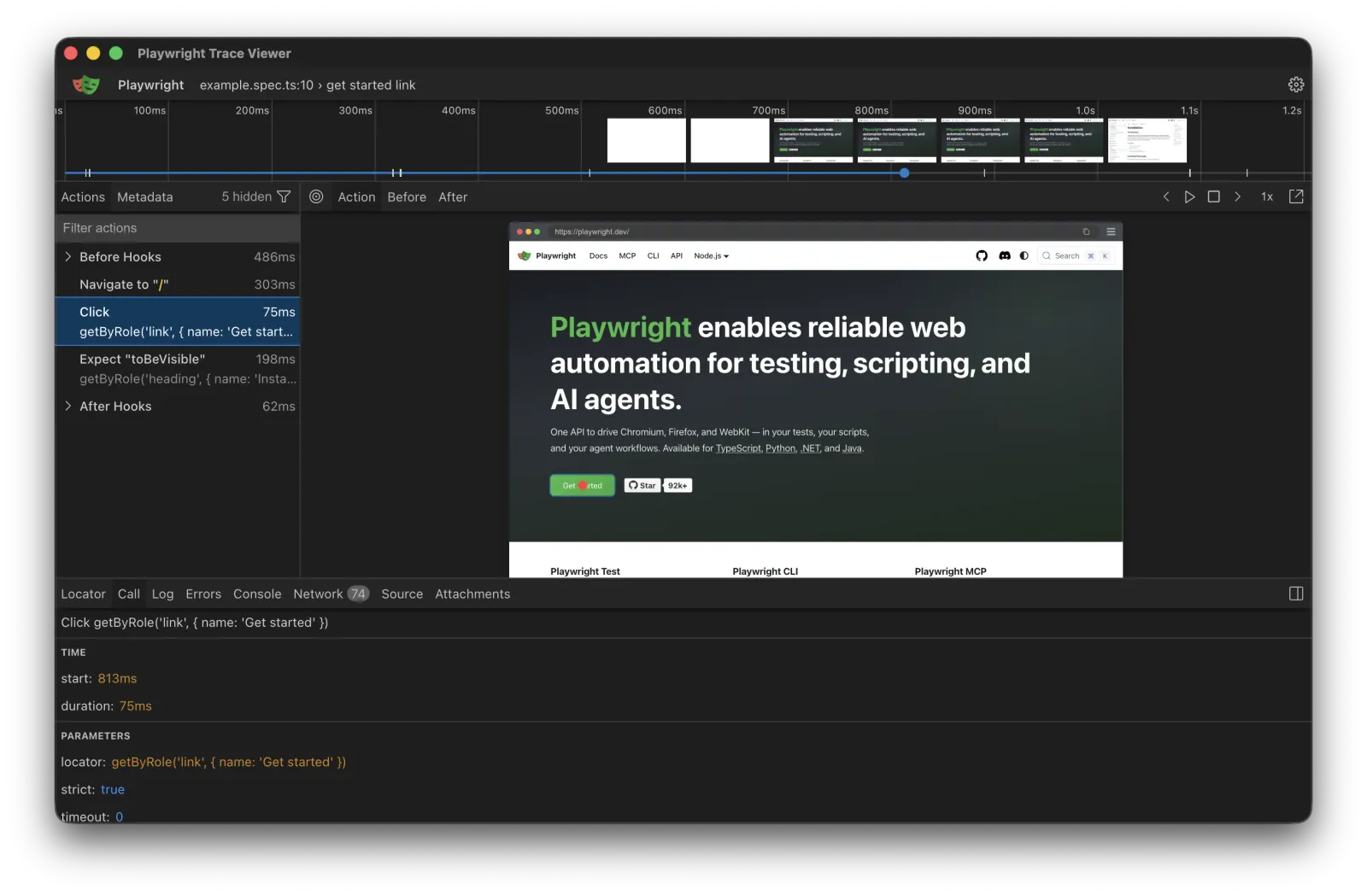
Playwright: Trace viewer shows every action. Inspect network requests, console logs, DOM snapshots.
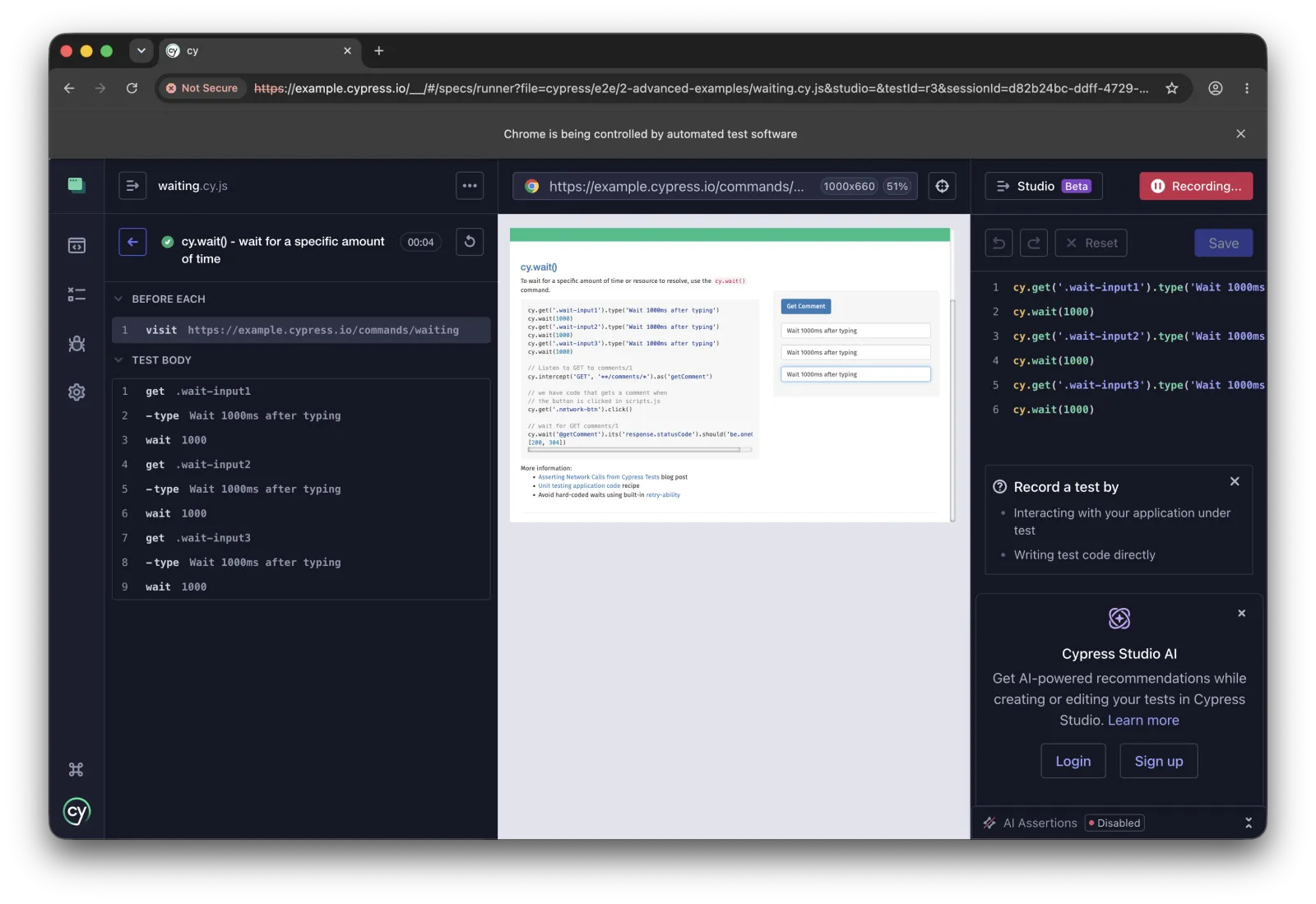
Cypress: Time-travel debugging. Click any command to see exact app state at that moment.
Autonoma: The Reviewer agent classifies each failure, real bug, agent error, or test/plan mismatch, and explains which one it found instead of just reporting a pass/fail.
Performance Benchmarks
I ran the same 50-test suite across all frameworks. MacBook Pro M1, same network conditions, same application state.
Test Execution Speed
| Framework | Sequential | Parallel (4 workers) | Setup Time |
|---|---|---|---|
| Selenium | 8m 45s | 2m 50s | 2-4 hours |
| Playwright | 3m 20s | 52s | 30 minutes |
| Cypress | 3m 45s | 1m 10s | 30 minutes |
| Puppeteer | 2m 55s | 48s | 15 minutes |
| TestCafe | 4m 30s | 1m 25s | 30 minutes |
| Autonoma | 3m 10s | 55s | 5 minutes |
Key findings:
- Puppeteer fastest (Chrome-only optimization)
- Playwright second fastest (efficient protocol)
- Selenium slowest (WebDriver overhead)
- Autonoma competitive, since tests run against a real preview environment rather than a recorded script
Maintenance Time (Monthly Average)
Tracked for 3 months with weekly UI changes:
| Framework | Hours Fixing Tests/Month | % Time on Maintenance |
|---|---|---|
| Selenium | 16.5 hours | 41% of sprint |
| Playwright | 12.0 hours | 30% of sprint |
| Cypress | 10.5 hours | 26% of sprint |
| Puppeteer | 11.0 hours | 28% of sprint |
| TestCafe | 9.5 hours | 24% of sprint |
| Autonoma | 1.5 hours | 4% of sprint |
Reality check: This assumes moderate UI changes. In fast-moving startups, traditional framework maintenance can consume 50%+ of QA time.
Flakiness Rate
Ran each test suite 100 times:
| Framework | Pass Rate | Flaky Tests | Truly Broken |
|---|---|---|---|
| Selenium | 84% | 12% (6 tests) | 4% (2 tests) |
| Playwright | 94% | 4% (2 tests) | 2% (1 test) |
| Cypress | 96% | 3% (1.5 tests) | 1% (0.5 test) |
| Puppeteer | 93% | 5% (2.5 tests) | 2% (1 test) |
| TestCafe | 95% | 4% (2 tests) | 1% (0.5 test) |
| Autonoma | 97% | 2% (1 test) | 1% (0.5 test) |
Key insight: All frameworks have flaky tests. Auto-waiting helps (Playwright/Cypress) but doesn't eliminate it. Autonoma's Reviewer agent doesn't reduce flakiness to zero either, but it does separate a flaky run from an actual regression before it reaches you.
Costs: True Total Cost of Ownership
Framework costs aren't just license fees. They're engineering time.
Annual Cost Breakdown (Team of 5 QA Engineers)
Selenium:
- License: $0 (open source)
- Infrastructure: $3,600/year (CI minutes, browsers)
- Maintenance: $82,500/year (16.5 hours/month × $50/hour × 5 engineers)
- Total: $86,100/year
Playwright:
- License: $0 (open source)
- Infrastructure: $2,400/year (fewer CI minutes)
- Maintenance: $60,000/year (12 hours/month × $50/hour × 5 engineers)
- Total: $62,400/year
Cypress:
- License: $900-3,600/year (if using Cloud for parallelization)
- Infrastructure: $2,400/year
- Maintenance: $52,500/year (10.5 hours/month × $50/hour × 5 engineers)
- Total: $55,800-58,500/year
TestCafe:
- License: $0 (open source, or $999/year for commercial support)
- Infrastructure: $2,400/year
- Maintenance: $47,500/year (9.5 hours/month × $50/hour × 5 engineers)
- Total: $49,900-50,900/year
Autonoma:
- License: Free, self-hostable core (BSL 1.1 today, converting to Apache 2.0 in 2028), with a paid managed cloud tier for the preview-environment infrastructure
- Infrastructure: Included in the managed tier
- Maintenance: A fraction of the traditional-framework hours above, since the Diffs Agent absorbs most of the per-PR selector upkeep
ROI calculation: The math that matters isn't a fixed dollar figure, it's the maintenance line. Every framework above loses meaningful engineering time to fixing broken selectors every sprint. Moving that line from "manual, every sprint" to "automated, every PR" is where the payback shows up, and it shows up fast for teams shipping UI changes weekly.
FAQ
Puppeteer for raw speed (Chrome-only). Playwright for speed with cross-browser support. But "fastest" depends on your definition: if you include setup and maintenance time, Autonoma reaches production value faster.
Cypress for developers (great docs, intuitive API, visual feedback). Autonoma for teams that don't want to write or maintain test code at all: connect a repo and the Planner agent generates the suite from the codebase.
Yes. Many teams use Playwright for critical path tests (fast, reliable) and Cypress for complex user flows (better debugging). Some use Autonoma for regression and traditional frameworks for edge cases requiring custom logic.
If you're starting fresh: Don't use Selenium. Choose Playwright (best all-around) or Cypress (best for frontend devs). If you have existing Selenium tests: Migrate if maintenance burden is high. Prioritize tests that break most often. Migrate incrementally: don't rewrite everything at once.
Selenium, Playwright, Cypress, Puppeteer, TestCafe: Yes. You write code to define tests. Autonoma: No test code required from you. The Planner agent reads your codebase and generates the test suite directly.
Cypress for visual debugging (time-travel, see exact app state). Playwright for technical debugging (trace viewer, network inspection). Autonoma's Reviewer agent classifies each failure as a real bug, an agent error, or a test/plan mismatch, so debugging starts with knowing which kind of failure you're looking at.
Selenium: Requires Appium (complex setup). Playwright: Browser mobile emulation only (not native apps). Cypress: No mobile support. Puppeteer: Chrome mobile emulation only. TestCafe: Mobile browser only. Autonoma: Web-first, including mobile-web layouts in the preview environment, but it doesn't cover native iOS or Android apps.
All modern frameworks integrate with CI/CD. Playwright has excellent built-in parallelization. Autonoma runs tests against a managed preview environment per pull request, so there's no separate CI grid to configure.
Playwright: Excellent built-in API testing. Cypress: Possible but UI-focused. Puppeteer: Not designed for API testing. Selenium: UI-only. TestCafe: Limited. Autonoma is not an API testing tool either, it's focused on web E2E; for pure API testing, consider Postman, REST Assured, or Playwright's API testing features.
Test automation (Selenium, Playwright, Cypress): You write code to automate manual tests. Tests execute automatically but require manual maintenance. Autonoma's agent-driven approach: a Planner generates test cases from your codebase, an Executor runs them against a live preview environment, a Reviewer classifies the results, and a Diffs Agent maintains the suite on every pull request. Automation replaces manual execution. This replaces manual maintenance too.
The Real Decision
You're not just choosing a framework. You're choosing a maintenance burden. For an updated look at how the landscape has evolved, see our 2026 e2e testing tools buyer's guide.
Selenium gives you control. It costs you time.
Playwright gives you speed. It costs you maintenance.
Cypress gives you debugging. It costs you cross-browser support.
Autonoma gives you a codebase-driven suite that maintains itself. It costs you a managed-platform fee, but saves you far more in engineering time.
The question isn't "which framework is best?" It's "what does your team optimize for?"
Control over everything: Selenium (if you must) or Playwright.
Developer experience: Cypress.
Speed without complexity: Playwright.
Stability over speed: TestCafe.
Time over money: Autonoma.
Most teams optimize for the wrong thing. They choose "free" frameworks and pour tens of thousands of dollars a year in engineering time into maintenance instead. The framework costs nothing. The maintenance costs everything.
We built Autonoma because we were tired of maintaining tests. Every UI change broke selectors. Every sprint started with "fix the tests." We wanted a testing layer that stayed in sync with the codebase on its own, not one more thing to babysit.
If you're in the same position, shipping fast, changing UI constantly, spending more time maintaining tests than writing them, try our approach. Connect your repo. Let the Planner generate your suite. Let the Diffs Agent keep it current as your code changes.
That's what a codebase-driven testing layer looks like.


