

Test design techniques in software testing are the seven named methods for choosing test cases: equivalence partitioning, boundary value analysis, decision table testing, state transition testing, pairwise and orthogonal array testing, use case testing, and error guessing. Three started as sampling rules for when running every case was expensive; two were always full specifications. The remaining two, use case testing and error guessing, were never about reducing how many cases to run. Now that execution is cheap, the distinction that actually matters is between the ones that were sampling rules and the ones that were already specifications.
You're here because you're being asked to know these seven names, not because you're deciding whether to use them. Maybe it's an interview question, or you're onboarding a junior engineer who has never heard "pairwise testing." Maybe an auditor wants a term defined in a paragraph they can quote back, or you're settling an argument before it goes on record wrong.
That's a different job than writing a testing strategy, or deciding whether AI-generated tests can be trusted. This page answers the vocabulary question cleanly: one concrete example per technique, one table that puts all seven side by side, and a decision path at the end for picking one.
The seven test design techniques
All seven are black box techniques: each one derives its cases from a specification or from observed behavior rather than from source code. The definitions below use the same terms as the ISTQB glossary, with one concrete example each.
Equivalence partitioning
Equivalence partitioning groups inputs into classes the system should treat identically, then tests one representative value per class. A signup form requiring age 18 or older has two classes, under 18 and 18-or-older; testing 16 and 25 covers the same ground as testing every integer between.
Boundary value analysis
Boundary value analysis tests the values at, and just beside, a range's edge, since that's where an inequality operator (>= versus >) is most likely wrong. A password field with an 8-to-64 character limit gets tested at 7, 8, 9, 63, 64, and 65 characters, six inputs instead of fifty-seven.
Decision table testing
Decision table testing lays out every combination of independent conditions as rows, with the outcome as the last column, so a missing rule shows up as an empty cell. A free-shipping rule with conditions for cart value, membership status, and a promo code collapses into a small table, one row per test case.
State transition testing
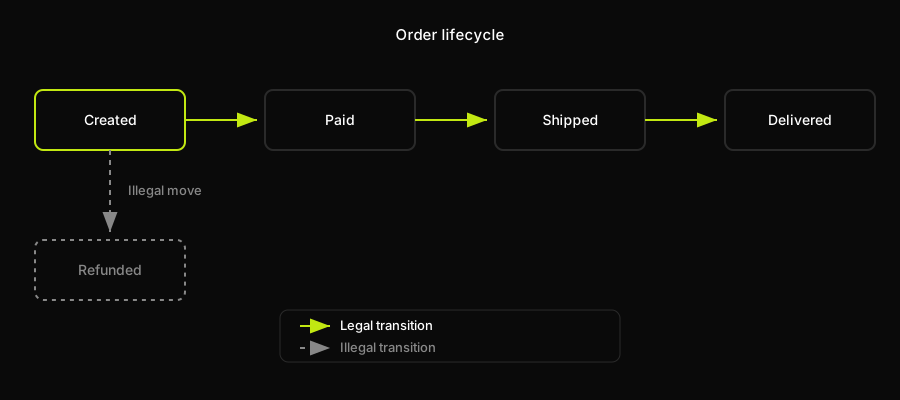
State transition testing models a system as states and the moves allowed between them, then tests both the legal transitions and the illegal ones nobody wrote a happy path for. An order moving through created, paid, shipped, and delivered has one interesting case: refunding an order that was never paid.
Pairwise and orthogonal array testing
Pairwise testing, and its stricter cousin orthogonal array testing, exploits the fact that most software failures are triggered by only one or two parameters, and tests every pair instead of every full combination. Three browsers, three operating systems, and two account tiers is 18 combinations; a pairwise set covering every pair needs about 9. The honest limit of when reducing that set stops mattering is part of the technique itself.
Use case testing
Use case testing doesn't test inputs at all. It tests a path: a real user goal, walked start to finish, the way a person actually experiences it rather than the way a form's fields get validated one at a time. A password reset is the standard example: request the reset, receive the email, click the link before it expires, set a new password, log in with it, five steps where each can independently succeed while the sequence as a whole still fails. It has no dedicated deep-dive in this series, because it doesn't decompose into a table the way the other six do. Its unit is the flow, not the field.
Error guessing
Error guessing has no formal procedure at all. It's a tester, or an engineer who has been burned before, picking inputs because they remember exactly where this system tends to break: a filename with an emoji in it, or a timestamp during the one hour a year daylight saving repeats. The entire method is institutional memory, which is also why it resists automation: it's a specific team's scar tissue, not a rule that generalizes to somebody else's codebase.
The seven test design techniques compared
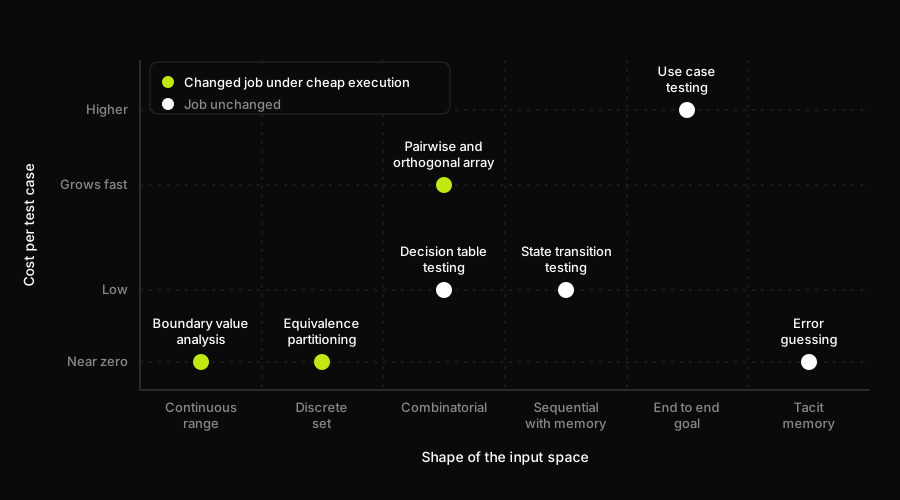
The table below puts all seven test design techniques in software testing side by side: what each one selects, what it assumes about the system, roughly what it costs per case, and whether cheap test execution changed the technique's job or left it unchanged.
| Technique | What it selects | What it assumes | Cost per case | Effect of cheap execution |
|---|---|---|---|---|
| Equivalence partitioning | One value per equivalence class | Inputs in a class behave identically | Near zero, one per class | Now a specification |
| Boundary value analysis | Values at and beside each boundary | Bugs cluster at range edges | Near zero, 2-3 per edge | Now a specification |
| Decision table testing | One case per rule combination | Outcome is a deterministic function of rules | Low, one per table row | Unchanged |
| State transition testing | One case per transition, valid and invalid | System has discrete states and legal moves | Low, one per transition | Unchanged |
| Pairwise / orthogonal array | A reduced set covering every parameter pair | Defects come from pairs, not triples | Low per case, but the full set grows fast | Still a selection rule |
| Use case testing | A full path matching a real user goal | Correctness judged end to end | Higher, one full flow per case | Unchanged |
| Error guessing | Inputs targeting a known-risky area | This team's specific defect history | Near zero, needs domain memory | Unchanged |
Why the seven techniques split into two groups
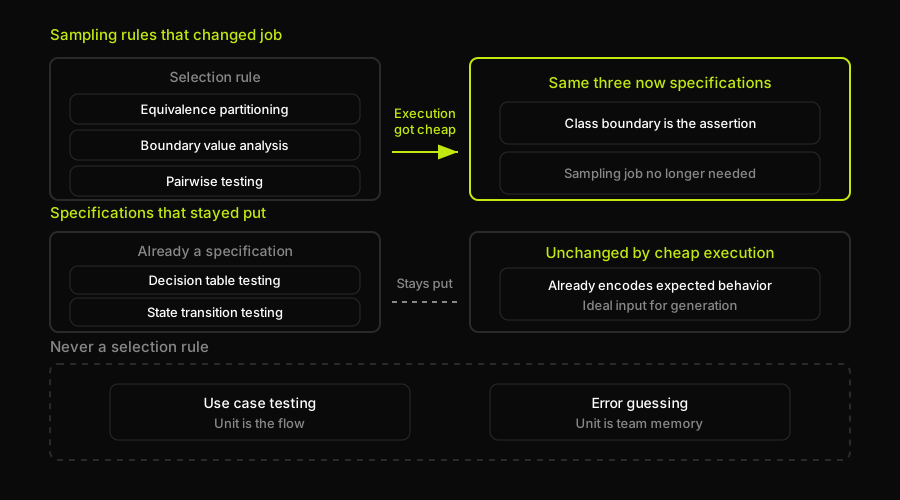
That last column shows a pattern: three techniques changed job, and four didn't.
Equivalence partitioning, boundary value analysis, and, situationally, pairwise testing all answered the same question: with limited time, which handful of cases should we run? That sampling problem made sense when a test case meant a person at a keyboard. Remove the constraint, and it disappears. What survives is the class boundary itself, the specification's claim that certain inputs behave identically, which becomes the thing you assert, not an excuse to skip cases.
Decision table testing and state transition testing never had that problem: a decision table specifies the outcome for every combination that exists, and a state transition table defines a state machine, invalid moves included. Both survive cheap execution unchanged, since they already encode the expected answer, not just the input. Grey box testing is the same move made explicit at a category level: read a system's structure to derive what to verify.
Use case testing and error guessing sit outside this split: neither was ever a way to reduce a count. One is about the shape of a flow; the other is a team's memory, not a rule. Cheap execution changes neither.
How Autonoma derives test design techniques from a codebase
Every technique above assumes a person is looking at a spec, a form, or a set of business rules and manually deriving classes, boundaries, tables, or a state machine by hand. Once code exists, most of that derivation is redundant, because the classes, the boundaries, the rules, and the states are already written down in the implementation. A testing strategy that still treats this derivation as a manual step, redone from scratch on every ticket, is the actual pain point underneath the question "which test design technique should I use."
That's the specific job Autonoma's Planner agent does. It reads the codebase, its routes, components, and the validators and conditions branching through them, and derives from that reading exactly the artifacts this article just walked through by hand: equivalence classes off a validator's own conditionals, boundary values off a comparison operator in that same validator, a decision table off nested branching logic (the same branches white box testing counts coverage against), and a state machine off a model's status field and the routes allowed to change it. Those four map directly onto equivalence partitioning, boundary value analysis, decision table testing, and state transition testing, and that's not a coincidence: those are exactly the four techniques with a written artifact for an agent to read in the first place. Pairwise and orthogonal array testing sit in between: an agent can enumerate the parameters a route or form actually accepts and generate a reduced combination set from that, but whether the combinatorial explosion is even worth reducing is still a judgment call about how expensive a given case is to run.
Use case testing survives the same way it did above, mapped onto whichever end-to-end flow the Planner reconstructs from the routes a real user session walks through. Error guessing does not survive, and it's worth saying that plainly rather than pretending otherwise. It's a specific team's memory of exactly where this specific codebase has broken before: the emoji in a filename, the daylight saving hour, the double-submitted form. No amount of reading a codebase in its current state recovers a history the code itself doesn't contain. An agent can read what the system is. It cannot read what has personally embarrassed your team in production before. That part stays a person's job, and pretending otherwise would be exactly the kind of overclaim this reference page has spent its whole length arguing against.
Which test design technique to use
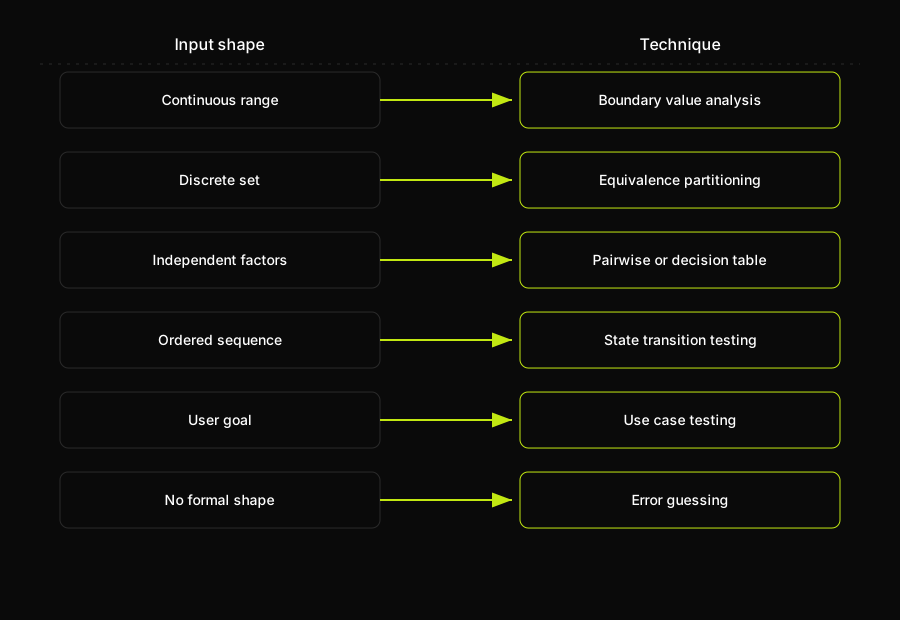
Skip the taxonomy and ask what shape the input actually has, and the right technique falls out on its own.
A continuous range, an age, a price, a quantity, points at boundary value analysis. A discrete set of inputs that should all behave the same way points at equivalence partitioning. A handful of independent factors that combine, browser, plan tier, region, points at pairwise testing if the combination count is large, or plain decision table testing if the rules matter more than the coverage math. An ordered sequence where the system has to remember what happened before, a lifecycle, a checkout, an approval flow, points at state transition testing. A goal a real user is trying to accomplish, spanning several of the above at once, is use case testing. And an area with no formal shape at all, just a place this specific system has broken before, is what error guessing is for; none of the other six replace it.
Where you write any of this down, and how it fits into the rest of a test plan, is a separate question from which technique to reach for; our guide to organizing a test plan covers that layer. And once you've picked your cases, what makes a test assertion actually check something is the layer above the technique: deciding what a passing result is even supposed to prove.
None of the seven techniques above are new, and that's rather the point of writing them down properly instead of restating a textbook entry. What changed isn't the list, it's which column in that table is worth optimizing. For thirty years the scarce resource was execution time, so every technique on this page did double duty: a way to say what to test, and a way to avoid running too much of it. That second job is mostly gone now. What's left, on every technique whose job changed, is a specification your team already had implicitly and just needs to say out loud.
If the reason you're reading this is closer to "my team hand-derives these on every ticket" than "I needed a definition for an interview," that's the specific gap Autonoma is built to close: reading the codebase to derive the classes, boundaries, tables, and states this page just walked through, instead of asking someone to redo that work by hand on every change.
Frequently Asked Questions
Test design techniques in software testing are named methods for deciding which specific test cases to write, rather than testing every possible input or path. The seven most commonly taught are equivalence partitioning, boundary value analysis, decision table testing, state transition testing, pairwise and orthogonal array testing, use case testing, and error guessing. Historically most of them existed to help a person pick a small, defensible set of cases when running every possible one was too slow or too expensive. Decision table testing and state transition testing are the exception: they were always full specifications of expected behavior, not sampling shortcuts.
Seven are standard across most syllabi and interview questions: equivalence partitioning, boundary value analysis, decision table testing, state transition testing, pairwise and orthogonal array testing, use case testing, and error guessing. Counts vary between sources because some split pairwise and orthogonal array testing into two, and some add exploratory or checklist-based testing to the experience-based group.
All seven of the standard test design techniques are black box techniques: equivalence partitioning, boundary value analysis, decision table testing, state transition testing, pairwise and orthogonal array testing, use case testing, and error guessing. They're derived from a specification or observed behavior, not source code, unlike white box techniques such as statement, branch, and path coverage, which look at the implementation itself.
A test type describes which layer you're testing: unit, integration, system, regression, or acceptance. A test design technique describes how you choose which specific inputs or paths to test within any of those layers. The two are independent: you can apply equivalence partitioning inside a single unit test or across a full end-to-end scenario.
Match the technique to the input's shape. A continuous range points at boundary value analysis; identical-behaving inputs point at equivalence partitioning. Independent factors that combine point at pairwise or decision table testing, depending on whether rules or combination count matters more. A sequence with memory, like a checkout flow, points at state transition testing. A full user goal spanning several of those is use case testing; a known-risky area with no formal shape is error guessing.
Four of the seven are unchanged: decision table testing, state transition testing, use case testing, and error guessing were never sampling shortcuts, so cheaper execution doesn't touch their job. The other three, equivalence partitioning, boundary value analysis, and pairwise testing, stop being ways to decide which cases to skip, since skipping is no longer necessary, and survive as the specification of which inputs the system treats identically or where its edges are.
Autonoma's Planner agent derives equivalence classes, boundary values, decision tables, and state machines from a codebase's validators, comparison operators, branching logic, and status fields, and reduces combinatorial parameter sets into a pairwise-style set from what a route or form accepts. It also reconstructs end-to-end use cases from the flows a real user session walks through. Error guessing is the one it doesn't attempt: that's a judgment call grounded in a team's defect history, which the codebase alone doesn't recover.


