

Ship a feature that calls an LLM and your existing test suite hits a wall on day one. You write expect(response).toBe("Your order has shipped"), run the test twice, and it fails the second time on the exact same input. Nothing is broken. The model just phrased it differently. Now what: loosen the assertion until it means nothing, or throw out unit testing for the whole feature?
Neither. The mistake is expecting one layer of testing to cover a system that fails in four structurally different ways. A prompt that returns inconsistent wording is a different problem from a prompt that returns a confident, wrong answer, which is a different problem from a feature that's technically correct but costs 40x more than last week, which is a different problem from a user who talks the assistant into ignoring its own rules. Map each failure to the layer built to catch it, and the "how do I even start testing this" question turns into a checklist.
What's Actually Different About Testing Generative AI
Traditional software testing assumes determinism: same input, same output, every time. That assumption is the foundation assertEquals is built on, and it's the first thing a generative AI feature breaks. Ask an LLM the same question twice at a non-zero temperature and you can get two different, both-defensible answers. That's not a bug in your code. It's the product working as designed, which means the test that catches a real regression has to tolerate variation without becoming so loose it catches nothing.
Hallucination is a sharper version of the same problem. A non-deterministic output that's wrong is annoying. A non-deterministic output that's wrong and stated with total confidence is dangerous, because nothing about its tone signals uncertainty. Your test suite can't just check "did it answer." It has to check "is the answer grounded in something true," which is a fundamentally different assertion than anything a pre-LLM test suite ever had to write.
Then there's the axis nobody puts in their test plan until the invoice arrives: cost and latency as first-class product behavior. A prompt change that adds one clarifying sentence, or a change on the provider's side you didn't make, can quietly double your per-request cost or add three seconds of latency. Neither shows up as a failed assertion in a typical suite. Both are regressions a genAI feature can suffer that a traditional CRUD endpoint simply cannot.
Guardrails round out the list, and they cut in both directions. A guardrail that never trips isn't protecting anything. A guardrail that trips too often turns your assistant into one that refuses reasonable requests. Testing a guardrail means testing for both failure modes at once: did the harmful input get blocked, and did the ordinary one still get through. That's a different test shape than "did the function return the right value."
None of these four are solved by writing more traditional unit tests, and none of them are solved by a single "AI testing" layer either. Each needs its own layer, running at its own cadence, catching its own class of failure.
The Four-Layer Testing Map for Generative AI Applications
Think of it as four layers stacked from fastest and narrowest to slowest and closest to real usage. Each layer trades speed for realism: the earlier layers run in seconds on every commit and catch a narrow slice of problems, the later layers run less often (or continuously in production) and catch what the earlier ones structurally cannot see.
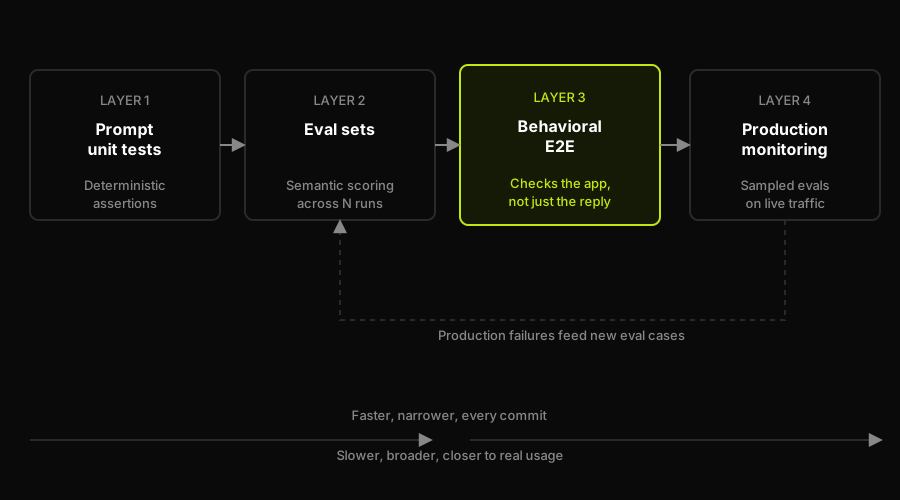
Four layers, increasing in realism and decreasing in speed. Production failures become the next round of eval and E2E cases, not one-off incidents.
Layer 1: Prompt Unit Tests
The lowest layer looks the most like testing you already know, because it's deliberately kept deterministic. You're not testing "is the LLM's answer good" here. You're testing the code around the model: does your prompt template interpolate variables correctly, does a classification prompt with a fixed, narrow enum of valid outputs return one of those exact values, does your function correctly parse the model's JSON response and reject a malformed one. Pin the temperature to zero, constrain the task, and you can write exact-match assertions that run in milliseconds on every commit.
The scope has to stay narrow on purpose. The moment you're asserting on open-ended natural language, exact-match breaks down and you've wandered into eval territory without meaning to. Prompt unit tests earn their keep by covering the boring, deterministic scaffolding around the model, the stuff that would otherwise only get caught by a human noticing a broken response in production.
Layer 2: Eval Sets
Eval sets are where you accept that the output varies and test the distribution of outputs instead of a single expected string. Build a fixed set of representative inputs, run each one N times (three is a reasonable floor to absorb sampling variance), and score each output against a metric: semantic similarity to a reference answer, a rubric-based LLM-as-judge score, or a task-specific check like "does the response contain the required disclaimer." A test at this layer doesn't ask "is this the exact answer." It asks "does this answer pass the bar, on average, across enough runs to trust the number."
This is also where hallucination testing largely lives at the response level: does the answer stay grounded in the source material you gave it, or does it introduce claims that aren't supported anywhere in the context. Frameworks like DeepEval and Promptfoo exist specifically to make this layer configuration instead of hand-rolled scoring code, and either is a reasonable default; the metric matters more than the framework.
Layer 3: Behavioral End-to-End Tests
This is the layer almost every genAI testing guide skips, and it's the one that catches the failure mode that actually reaches users: the response passed every eval, and the application still did the wrong thing. An eval set scores the text the model returned. It has no opinion on whether that text, once it reaches your running application, actually updated the right record, navigated to the right screen, or triggered the right side effect. Those two things drift apart more than most teams expect. A support-triage assistant can return a perfectly reasonable-sounding response while the underlying tool call updated the wrong ticket, and no eval-set metric will ever notice, because the eval never looked at the app. It only looked at the string.
Behavioral E2E means driving the actual running application (a real preview or staging environment, not a mocked model client) and asserting on application state after the AI feature runs: did the UI reach the state it was supposed to reach, did the correct record change, did the correct downstream action fire. It's the same discipline as conventional E2E testing, a real browser or client hitting a real deployed environment, pointed at a feature whose output happens to come from an LLM instead of a deterministic code path. This is the layer where a tool like Autonoma operates: instead of a human clicking through the app to confirm a genAI feature's output actually landed correctly, an agent runs the assertion against a live preview environment on every pull request.
Layer 4: Production Monitoring
The last layer accepts a hard truth: you cannot eval every possible input before shipping, and real users will find inputs your eval set never anticipated. Production monitoring samples a percentage of live requests and responses, runs them back through the same evaluation logic from Layer 2 (often asynchronously, so it doesn't sit in the user-facing request path), and flags drift: a quality score trending down, a cost-per-request curve climbing, a guardrail trip rate that's suddenly higher than last week's baseline. It's not a gate that blocks a deploy. It's the layer that tells you something changed after the deploy already happened, whether that's your own prompt edit or a silent update on the model provider's side.
The output of this layer should feed back into Layer 2. A production failure sampled and confirmed as a real miss becomes a new eval-set case, so the same failure mode gets caught pre-merge next time instead of resurfacing in production again.
Alerting thresholds matter more here than in most monitoring setups, because the underlying model can change without any commit on your side. A provider-side model update, a routing change, or a quiet price increase can shift your quality score, latency curve, or cost-per-request overnight. A monitoring layer that only alerts on hard failures will miss all three; it needs a baseline for each metric and a threshold for how far a rolling average can drift before someone gets paged.
How Autonoma Fills the Behavioral-E2E Gap
The pattern this article keeps circling back to is the gap between Layer 2 and Layer 4: a response-level eval set can score a model's output text all day and never once check what that output actually did inside the running application. "The eval passed, but the feature was broken" is a real, common outcome, not a hypothetical, because prompt unit tests and eval sets are structurally incapable of seeing past the model's response. They were never looking at the app.
We built Autonoma's agents around closing exactly that gap. Planner reads your codebase, including the routes, components, and flows your generative AI feature actually touches, and plans behavioral test cases against them, generating the database state each scenario needs so the AI feature runs against realistic data. Executor drives those tests against your application's UI in a live preview environment, the same environment a real deploy would use, so the assertion is "did the app end up in the right state," not "did the response contain the right words." Reviewer then classifies what it finds: a genuine bug in how the feature wired the model's output into the app, an agent error worth ignoring, or a mismatch between the plan and how the feature actually behaves now. Diffs Agent is the piece that keeps this from rotting: every time a pull request changes how the AI feature is wired into the app, it updates the behavioral test cases from the code diff, so the suite tracks the feature instead of drifting away from it. All of this runs against a managed PreviewKit preview environment per pull request. Autonoma is open source and self-hostable where data residency requires it, so the behavioral E2E layer described above isn't a slide in a doc, it's a suite that actually runs on your next PR.
Mapped against the four layers: prompt unit tests and eval sets are still yours to write, they're close to the model and specific to your prompts. Production monitoring is a sampling and alerting concern that lives closest to your observability stack. The behavioral E2E layer, the one that requires driving a real running application and reasoning about UI and state rather than text, is where Autonoma's agents do the work instead of a human clicking through the app before every release.
Which Layer Catches Which Failure
Put the four failure modes from earlier next to the four layers and a pattern falls out: no single layer covers more than one or two failure modes well, which is the whole argument for running all four instead of picking a favorite.
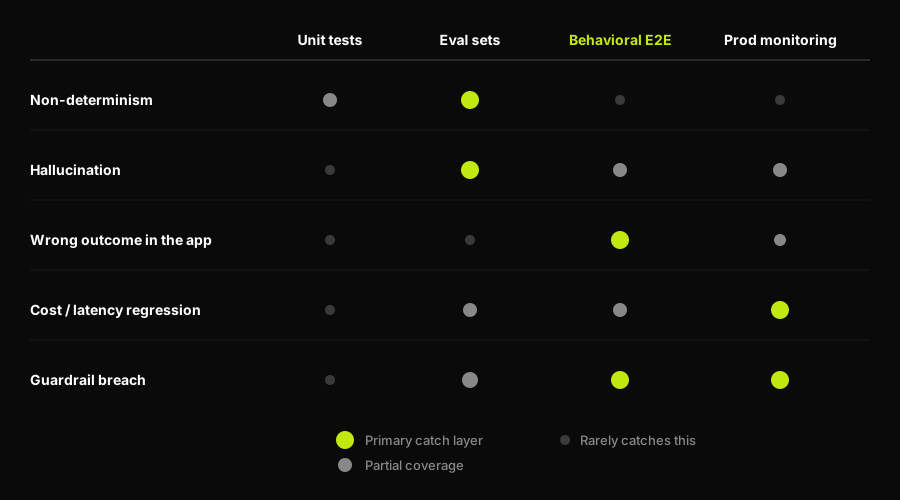
Non-determinism and hallucination are eval-set problems. A wrong outcome inside the app is a behavioral E2E problem. Cost and latency regressions and guardrail breaches split across the layers closest to real traffic.
Non-determinism and hallucination are both primarily eval-set problems, because both are questions about the text the model returned, scored across enough runs to separate a fluke from a pattern. Prompt unit tests barely touch either one, by design; they're deterministic on purpose and would be defeated by the exact variation eval sets are built to absorb.
A wrong outcome inside the app is almost invisible to both of those layers and squarely a behavioral E2E problem: it's the one failure mode that requires actually running the application and checking its state, not just scoring a string. Cost and latency regressions split between eval sets (which can track cost per eval run) and production monitoring (which sees the real traffic distribution and catches drift eval sets never sampled). A prompt change that adds one extra clarifying sentence to every call is exactly the kind of regression an eval set catches early, since it can assert a token-count or cost ceiling per run; a provider quietly changing how a model routes requests under load is the kind of drift only production monitoring will ever see, because it never touches your eval set at all. Guardrail breaches are the one failure mode two layers should both catch: behavioral E2E for the guardrail's effect inside the app (did a blocked request actually stop the downstream action), and production monitoring for the breach that only shows up under real adversarial traffic your eval set never imagined writing.
How the Four Layers Compose in CI
None of this matters if it only exists as a description of what you meant to build. The four layers earn their name by running automatically, gated at different points in the same pipeline: deterministic prompt unit tests on every commit because they're fast and cheap, eval-set tests on every pull request (or nightly, if the eval set is large enough to be slow) because they cost more in model calls and time, and behavioral E2E against a real preview environment before merge because it needs a deployed target to run against.
Here's a minimal GitHub Actions workflow gating a merge on the deterministic and eval layers, with the eval job only running when prompt or eval-set files actually changed:
Production monitoring sits outside this pipeline entirely, since it runs continuously against live traffic rather than on a commit trigger, but its findings are what should update the eval-set fixtures the next time this workflow runs.
Start With the Layer You're Missing, Not All Four at Once
Most teams shipping a generative AI feature for the first time have zero of these four layers and try to build all of them in the same sprint, which is how a testing effort stalls before it ships anything. Start with whichever layer is currently silent. If your team has no way to know a change made responses worse, build the eval set first, since it's the layer that turns "seems fine" into a number you can gate on. If your eval set is green and users are still hitting bugs, the gap is almost always behavioral E2E, because that's the layer that catches what an eval set structurally cannot see. That is the gap Autonoma is built to cover: it checks the deployed feature and the resulting application state on each pull request, alongside rather than instead of your prompt tests and eval sets.
The rest of this batch goes deeper on the same layers: how to test a chatbot walks through the response-quality and behavioral checks for a conversational feature, a chatbot testing framework shows how to structure the assertion layer, chatbot automation testing covers the CI gate, and how to test an MCP server applies the layered approach to tool-backed AI features.
Frequently Asked Questions
Across four layers, not one: deterministic prompt unit tests for the code around the model (temperature pinned to zero, narrow tasks, exact-match assertions), eval sets that score output quality across multiple runs for open-ended responses, behavioral end-to-end tests that verify the AI feature produced the right outcome inside the running application, and production monitoring that samples live traffic to catch drift an eval set never anticipated.
Traditional testing assumes the same input produces the same output every time. Generative AI breaks that assumption on purpose: the same prompt can return different, both-valid phrasings, can hallucinate a confident but wrong answer, can quietly get more expensive or slower without a code change, and can be talked out of its own guardrails by an adversarial user. Each of those needs a different testing approach than a deterministic assertion.
You need the eval-set layer, but the specific framework is a configuration choice, not a requirement. DeepEval and Promptfoo both make semantic-similarity and LLM-as-judge scoring easier to wire up and run in CI than hand-rolled scoring code, but the metric you choose (faithfulness, answer relevancy, a custom rubric) matters more than which framework runs it.
Almost always because the tests only cover response-level layers (prompt unit tests and eval sets), which score the text the model returned and never check what that text did once it reached the running application. A behavioral end-to-end layer, one that drives the real app and asserts on application state, is what catches a correct-sounding response that triggered the wrong outcome.
Treat cost and latency as assertions, not just dashboard metrics. Track per-request token cost and response time in your eval-set runs so a prompt change that doubles cost fails a threshold check before merge, and sample live traffic in production monitoring so a provider-side model update that quietly slows responses or raises cost gets flagged even without a deploy on your end.


