

Appium vs Espresso: the short version. Espresso is Google's native Android testing framework. It runs inside your app's process, has direct access to Android internals, and is 3-5x faster than Appium on equivalent test suites. Appium is cross-platform, speaks the WebDriver protocol over HTTP, and treats your app as a black box. Espresso is the right call for pure Android teams where developers own the tests. Appium is the right call when you're testing iOS alongside Android, or when your QA team isn't made up of Android engineers. Neither framework writes or maintains its own tests. If that's the real bottleneck, Autonoma reads your codebase and handles it automatically.
4 minutes 12 seconds versus 18 minutes 47 seconds. Same 50 tests. Same emulator. Same machine. That is a 4.5x speed difference, and it is not a fluke from a misconfigured setup. We re-ran it multiple times and the gap held.
But raw timing only tells part of the story. The speed difference between appium vs espresso is architectural, not incidental, which means it compounds as your test suite grows. A 4.5x gap at 50 tests becomes a very different number at 200. It also affects flakiness rates, CI costs, and how fast engineers get feedback on their commits.
This article unpacks what drove those numbers, where each framework wins beyond raw speed, and the two team profiles that should reliably choose one over the other.
Grey-Box vs Black-Box: The Core Distinction
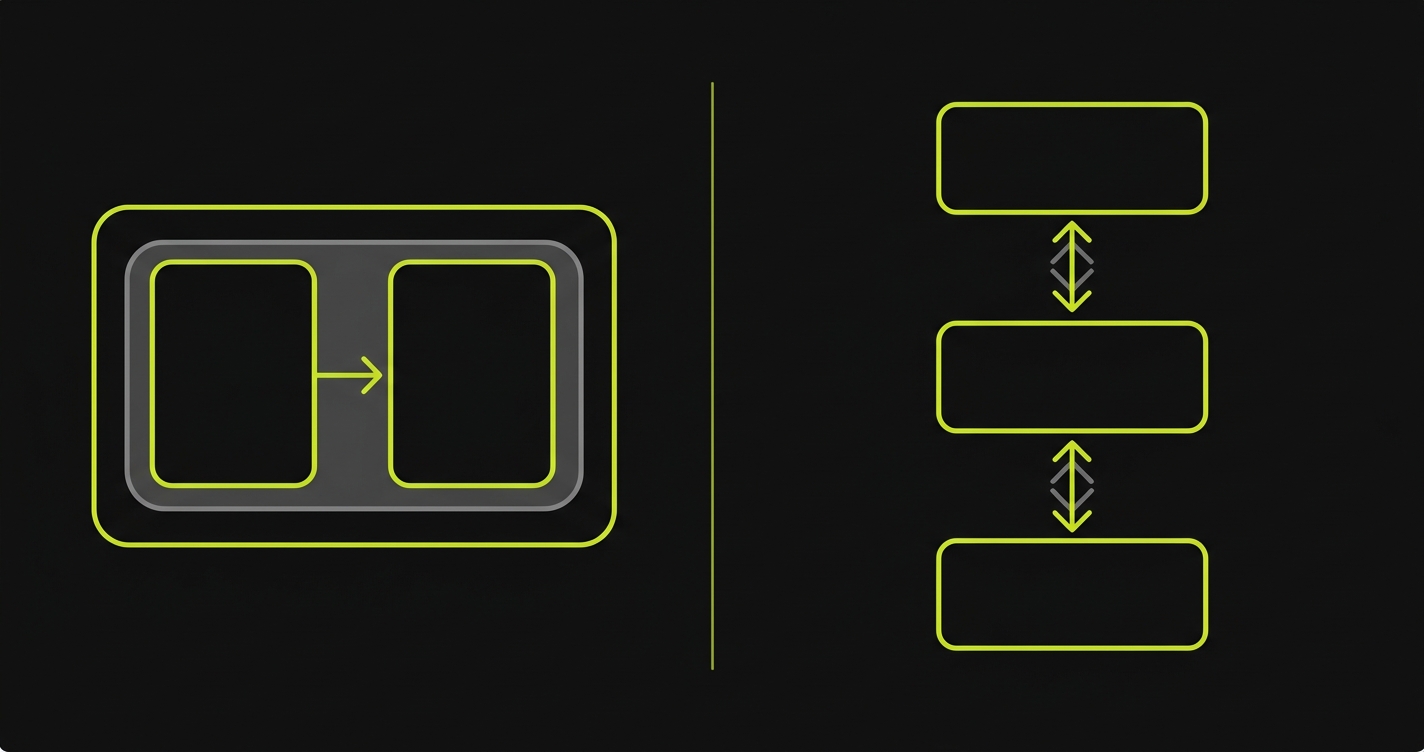
Every meaningful difference between Appium and Espresso flows from one architectural choice: where the test code runs relative to your application.
Espresso runs inside your app's process. Google's Instrumentation framework injects test code directly into the Android runtime alongside your application. When an Espresso test taps a button, it is not sending a command over a network. It is calling into the same process that owns the button. It can read view hierarchies directly from memory, synchronize with the main thread, and wait for animations to complete before asserting anything. This is grey-box testing: your tests have privileged access to application internals without being inside the production code itself.
Appium takes the opposite approach. It runs as an external server, speaking the WebDriver protocol over HTTP to a driver running on the device or emulator. Your test code calls Appium's REST API, which forwards commands to UIAutomator2 (for Android), which then interacts with your app. The app has no idea a test is running. This is black-box testing: the framework can only see what's exposed to the accessibility layer, and every interaction travels a longer path.
The grey-box model is faster because there is no HTTP roundtrip. It is more stable because Espresso knows when the app is idle before it acts. It is also more powerful, giving you access to Android-specific hooks that no external protocol exposes. The black-box model is more flexible because it works the same way on iOS, on web, and on any app it can reach through the accessibility layer.
Benchmark: 50-Test Android Suite
We ran a 50-test suite covering login, product browse, cart operations, checkout flow, and account settings against the same Android app on the same local emulator (Pixel 7, API 34) and against a device farm (BrowserStack real devices). The test suite is structured so both frameworks exercise identical user flows. Here is the benchmark runner that orchestrates both suites and collects the timing data:
The results across three metrics:
Execution time was the starkest gap. Espresso ran the full 50-test suite in 4 minutes 12 seconds locally, 6 minutes 8 seconds on BrowserStack real devices. Appium ran the same suite in 18 minutes 47 seconds locally, 24 minutes 35 seconds on BrowserStack. That is 4.5x slower locally, 4.0x slower on real devices. For a CI pipeline running on every PR, that difference compounds quickly. Ten PRs per day means 3.1 hours of Appium CI time versus 41 minutes of Espresso CI time.
Flakiness told a more nuanced story. Appium had 11 flaky tests out of 50 in the first run (22%). Nine of them were timing-related: Appium issued a tap before an animation completed, because it has no visibility into the app's idle state. After adding explicit waits, flakiness dropped to 4 tests (8%). Espresso had 1 flaky test out of 50 (2%), which turned out to be a real race condition in the app, not a framework timing issue. Espresso's IdlingResource mechanism handles the synchronization problem automatically.
Setup complexity was close, but different in character. Espresso setup for a new Android project with an existing Gradle build: roughly 2 hours to write the first passing test, including dependency configuration and understanding the matcher API. Appium setup for the same project, targeting Android only: roughly 6 hours including Appium server configuration, UIAutomator2 driver installation, capability mapping, and getting the first session to open reliably. Adding iOS to the same Appium project adds another 4-6 hours. The upfront Appium investment is higher, but it buys you cross-platform reach.
CI resource usage reflected the execution time gap directly. Appium's longer run times translate to more CI minutes consumed per build. On a team running 20 PRs per week, Espresso saves roughly 10-12 CI hours weekly compared to Appium on Android alone. If you are paying for CI compute, that is a real line item.
| Metric | Espresso | Appium |
|---|---|---|
| 50-test suite time (local emulator) | 4 min 12 sec | 18 min 47 sec |
| 50-test suite time (real device farm) | 6 min 8 sec | 24 min 35 sec |
| Flaky tests (baseline, no tuning) | 1 / 50 (2%) | 11 / 50 (22%) |
| Flaky tests (after tuning waits) | 1 / 50 (2%) | 4 / 50 (8%) |
| Initial setup time (Android only) | ~2 hours | ~6 hours |
| CI minutes per week (20 PRs) | ~41 min | ~3.1 hours |
Full Framework Comparison
| Dimension | Espresso | Appium |
|---|---|---|
| Language | Java / Kotlin only | Any language (JS, Python, Java, Ruby, etc.) |
| Execution speed | 3-5x faster (in-process) | Slower (HTTP roundtrip per command) |
| Stability / flakiness | Very stable (IdlingResource sync) | More flaky without explicit waits |
| Platform support | Android only | Android, iOS, web (cross-platform) |
| Testing model | Grey-box (in-process access) | Black-box (accessibility layer only) |
| App internals access | Yes (view hierarchy, thread state) | No (external protocol only) |
| Setup complexity | Low (Gradle dependency, no server) | High (server, drivers, capabilities) |
| CI integration | Simple (runs via Gradle test task) | Requires Appium server in CI pipeline |
| Device farm support | Firebase Test Lab, BrowserStack (limited) | BrowserStack, Sauce Labs, LambdaTest (full) |
| Who writes the tests | Android developers (Java/Kotlin required) | QA engineers, any language background |
| Maintenance burden | Lower (fewer timing issues) | Higher (waits, driver updates, server config) |
| Cross-platform test sharing | No | Yes (shared spec with iOS) |
The "who writes the tests" row in the table above is often where the real decision lives. Both frameworks assume a human will author and maintain the suite. If neither your Android developers nor your QA engineers have that bandwidth, Autonoma skips the framework decision entirely: agents read your codebase, generate the tests, and keep them current as the app changes.
When Espresso Wins
When weighing espresso vs appium for a pure Android project, the answer is straightforward: if your developers write Kotlin or Java and own the tests, Espresso wins.
The speed advantage compounds over a release cycle. A suite that takes 4 minutes to run gets executed on every PR. A suite that takes 18 minutes gets batched, deferred, or run only on release branches. Espresso's tight feedback loop is not just a nicety. It actively changes developer behavior. Tests that run fast get run often.
The stability advantage is also real. Espresso's synchronization with the Android main thread means you are not writing Thread.sleep() calls or custom wait conditions for every interaction. The framework handles it. That is hours of debugging time saved across a team per month.
The grey-box access matters in one specific case: testing features that interact with Android internals. Background job scheduling, notification handling, deep link routing, permission dialogs. Espresso, particularly when combined with Jetpack Compose testing APIs, gives you direct hooks into these flows that Appium cannot replicate through the accessibility layer.
When Appium Wins
Appium wins the moment you have an iOS app alongside your Android app, or when your QA engineers are not Android developers.
The cross-platform case is straightforward. If you need to verify that your login flow works the same way on Android and iOS, and your test code should live in one repository, Espresso is simply off the table. Appium's ability to run a near-identical spec against both platforms is the entire value proposition. Related comparisons worth reading: Appium vs XCUITest covers the iOS-specific tradeoffs in the same depth, and Detox vs Appium (coming soon) addresses the React Native case specifically.
The team composition case is less obvious but equally important. Espresso requires Java or Kotlin. If your QA team writes tests in JavaScript, Python, or Ruby, and they are not Android engineers by background, Espresso is the wrong tool. The language barrier is not just a syntax issue. Writing good Espresso tests requires understanding Android's view system, the Gradle build, and how Instrumentation works. Appium's HTTP protocol can be called from any language that can make a network request, which means your existing QA infrastructure, your existing test helpers, and your existing CI scripts all stay relevant.
There is also the device farm question. Appium has first-class support on BrowserStack, Sauce Labs, and LambdaTest. You can run the same Appium test against hundreds of real device/OS combinations in parallel. Espresso's cloud options are narrower, with Firebase Test Lab being the main option. For teams that need broad device coverage across Android fragmentation, Appium's ecosystem is the more practical path. For more context on how the major device farms compare on real device coverage and pricing, our Appium alternatives guide covers the cloud testing ecosystem in depth.
Both paths come with real configuration overhead. Espresso means Gradle test variants, custom runners, and Firebase Test Lab setup. Appium means running a server, managing driver versions, and debugging capability mismatches across Android API levels. Neither framework eliminates the underlying problem: someone has to set up, configure, and maintain the test infrastructure.
The Maintenance Problem Both Frameworks Share
Espresso is faster. Appium is more flexible. Both require someone to write and maintain the tests.
That maintenance burden is where teams consistently underestimate the cost. An Android app with active development will have UI changes every sprint. When the checkout button moves, or the navigation structure changes, or a view ID gets refactored, the test that targeted those selectors breaks. Someone has to find the broken test, understand what changed in the app, and rewrite the locators. Then the next sprint does it again.
This is where Autonoma addresses a gap that neither framework solves on its own. Our Diffs Agent watches code diffs and updates, adds, or deprecates the relevant tests automatically. No broken selector left behind from the last refactor. No "fix E2E tests" ticket sitting in the backlog for two sprints.
The Planner agent handles something even harder: database and app state setup. Getting an Android app into the right state for a specific test scenario -- logged in as a premium user, with an item in the cart, with a specific promo code applied -- typically requires either test fixtures that someone has to maintain or custom endpoints that someone has to build. Our Planner agent generates the state-setup endpoints automatically, which means the tests are correct from the start and stay correct as the data model evolves. From there, the Executor agent runs the planned tests against a live preview environment, and the Reviewer agent classifies each result as a real bug, an agent error, or a test-plan mismatch.
If the question your team is actually wrestling with is not "Espresso or Appium" but "who owns the tests and keeps them from rotting," that is the problem Autonoma was built for. Framework lock-in is a secondary concern when the primary concern is coverage that actually stays green.
Frequently Asked Questions
Yes, significantly. Espresso runs inside your app's process, so there is no HTTP roundtrip between the test and the app. In our 50-test benchmark, Espresso finished in 4 minutes 12 seconds. Appium took 18 minutes 47 seconds on identical hardware -- roughly 4.5x slower. The gap is architectural, not a configuration issue. Appium can be tuned and parallelized, but it will not match Espresso's per-test speed on Android.
Appium has an Espresso driver (appium-espresso-driver) that can use Espresso's instrumentation under the hood. This is a hybrid approach: Appium handles the server and capability model, Espresso handles the in-process execution. Some teams use this to get cross-platform tooling benefits while retaining some of Espresso's speed advantages. In practice, the Appium Espresso driver is less commonly used than standard UIAutomator2, and it adds configuration complexity without fully closing the performance gap.
No. Espresso is an Android-only framework maintained by Google. It runs on the Android Instrumentation framework and has no iOS equivalent. For iOS, the equivalent native framework is XCUITest, maintained by Apple. Teams that need both Android and iOS coverage typically use Appium (which wraps both UIAutomator2 and XCUITest under a unified API) or run Espresso and XCUITest as separate test suites.
For React Native apps, Detox is the more commonly recommended option. Detox is specifically designed for React Native, runs in grey-box mode like Espresso, and handles the async JavaScript bridge synchronization that makes both Appium and Espresso awkward on RN apps. Appium works on React Native apps and is a reasonable choice if you already have Appium infrastructure (see our [React Native Appium testing guide](/blog/react-native-appium-testing-guide) for setup details). Espresso alone requires additional work to bridge into the JavaScript layer. Detox vs Appium for React Native deserves its own analysis, and we cover it in a forthcoming post.
Java or Kotlin. Espresso is part of the Android Jetpack testing libraries and integrates directly with the Android Gradle build system. If your team's QA engineers are not Android developers, the language barrier is real -- not just syntax, but understanding Android's view system, Instrumentation API, and Gradle build configuration. Appium, by contrast, can be driven from JavaScript, Python, Java, Ruby, C#, or any language that can make HTTP requests.
Appium is more prone to timing-related flakiness because it operates as an external black-box client. It does not know when the app's main thread is idle. Developers typically compensate with explicit waits and retry logic. In our benchmark, Appium had 22% flakiness on first run, dropping to 8% after tuning. Espresso's IdlingResource mechanism synchronizes automatically with the app's main thread, which makes it significantly more stable out of the box. Our benchmark showed 2% flakiness with Espresso, and the one flaky test was a genuine race condition in the app.
Autonoma operates at a different layer than both frameworks. Rather than providing an API for writing test scripts, it reads your codebase and generates and maintains tests automatically through its Planner and Diffs Agent (with Executor and Reviewer agents running and validating the results). If your team is evaluating Espresso vs Appium because you need test coverage and want to understand the tradeoffs, Autonoma addresses the underlying problem -- coverage that stays current without ongoing maintenance work. It is not a drop-in replacement for teams that need low-level access to Android internals for specific instrumentation scenarios, but for the majority of E2E coverage needs on mobile product teams, it removes the framework decision from the equation.
Espresso is meaningfully simpler in CI. It runs as a standard Gradle test task -- most CI systems (GitHub Actions, Bitrise, CircleCI) have Android emulator actions that get you running in under an hour. Appium requires running an Appium server process alongside your tests, configuring capabilities, and managing driver versions. The initial CI setup for Appium takes 4-8 hours. The maintenance surface is also larger: Appium server updates, driver compatibility, and capability changes across Android API levels all require ongoing attention.


