

Appium vs XCUITest: the short version. XCUITest is Apple's native iOS testing framework, built into Xcode. It runs fast, integrates tightly with the Apple toolchain, and requires Swift or Objective-C. Appium wraps XCUITest (and other drivers) behind a WebDriver-compatible API so you can write tests in JavaScript, Python, Ruby, or Java. XCUITest wins on speed and stability for pure iOS teams. Appium wins when your QA team does not write Swift, or when you need shared test infrastructure across iOS and Android. Neither eliminates the signing, CI, and flakiness pain that makes iOS testing miserable. If that underlying problem is what you are actually trying to solve, Autonoma reads your codebase and generates the tests without any of that setup.
iOS testing has a reputation. Not a good one.
Every iOS engineer has a story. The certificate expired at 11pm before a release. The simulator passed every test; the physical device found a gesture bug in thirty seconds. Xcode Cloud costs spiraled before anyone noticed. The test suite that worked on one engineer's Mac failed on CI because of a provisioning profile mismatch that took two days to diagnose.
The tools themselves are not the primary culprit. Appium and XCUITest are both capable frameworks with real communities behind them. The pain mostly comes from Apple's signing model, the simulator-versus-device gap, and the sheer weight of the Apple toolchain. But the tool choice still matters, because it shapes how much of that pain you absorb directly versus route around.
What XCUITest Actually Is
XCUITest is Apple's own UI testing framework, shipped as part of Xcode and the XCTest suite since iOS 9. It uses Apple's Accessibility API to interact with your application, which is why it can see and tap elements by accessibility identifier rather than by coordinate. Tests are written in Swift or Objective-C, compiled into a test target, and executed by the test runner Apple ships with Xcode.
That deep integration is the story. XCUITest does not need a driver process sitting between the test and the app. It does not need a server. It runs inside the Xcode test infrastructure, which means it has direct access to device APIs, orientation changes, push notifications, and background transitions that are genuinely difficult to trigger through an external automation layer.
The tradeoff is that you are fully committed to the Apple ecosystem. Swift or Objective-C, Xcode, Apple signing, Apple device infrastructure. If your team is a native iOS team that already lives in that ecosystem, none of that feels like a tradeoff. It is just how the toolchain works. If your QA team is a mix of mobile and web engineers who write JavaScript or Python, it is a hard constraint.
What Appium Actually Is
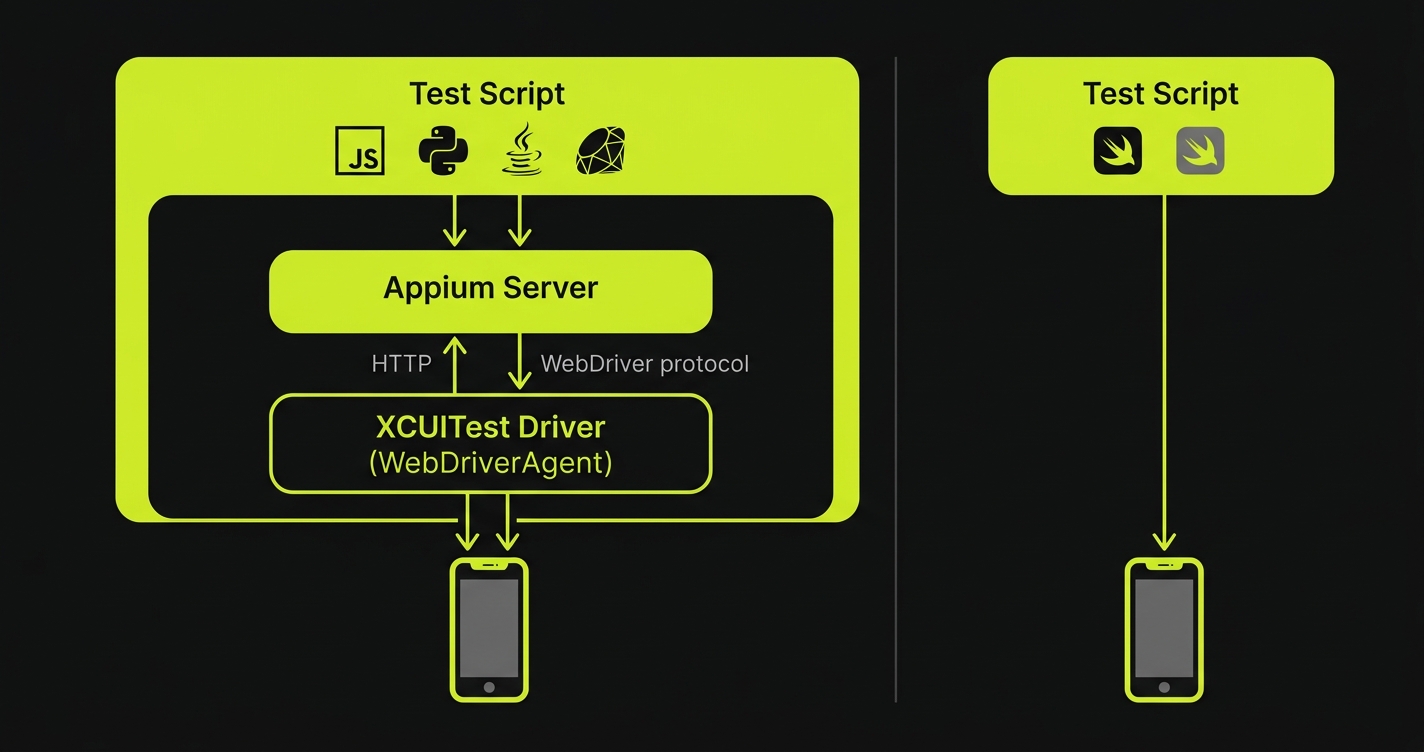
Appium is a test automation framework that exposes a WebDriver-compatible HTTP API for controlling mobile apps. On iOS, Appium uses XCUITest as its underlying driver (through the XCUITest Driver, formerly WebDriverAgent). On Android, it uses UIAutomator2 or Espresso.
The architecture matters: Appium does not bypass XCUITest. It wraps it. When your Appium test taps a button on an iPhone, that command travels over HTTP to the Appium server, which translates it into a XCUITest instruction, which executes the tap. That translation layer is why Appium is slower than XCUITest on a per-command basis. It is also why Appium can accept those commands from any language that can make HTTP requests.
For cross-platform teams, this is the entire argument for Appium. A QA engineer who knows Python can write an iOS test today using a client library they already understand. A JavaScript test suite that already covers Android can extend to iOS by swapping the driver configuration. The framework itself does not change. For a deeper look at where Appium sits in the broader mobile testing ecosystem, the Appium alternatives comparison covers the landscape well, and the React Native Appium testing guide shows it in action for a cross-platform codebase.
The Real Pain: Signing, Simulators, and CI
Before comparing Appium and XCUITest directly, it is worth naming the underlying pain that most "iOS testing problems" are actually about. The tool is rarely the root cause.
Code Signing and Provisioning
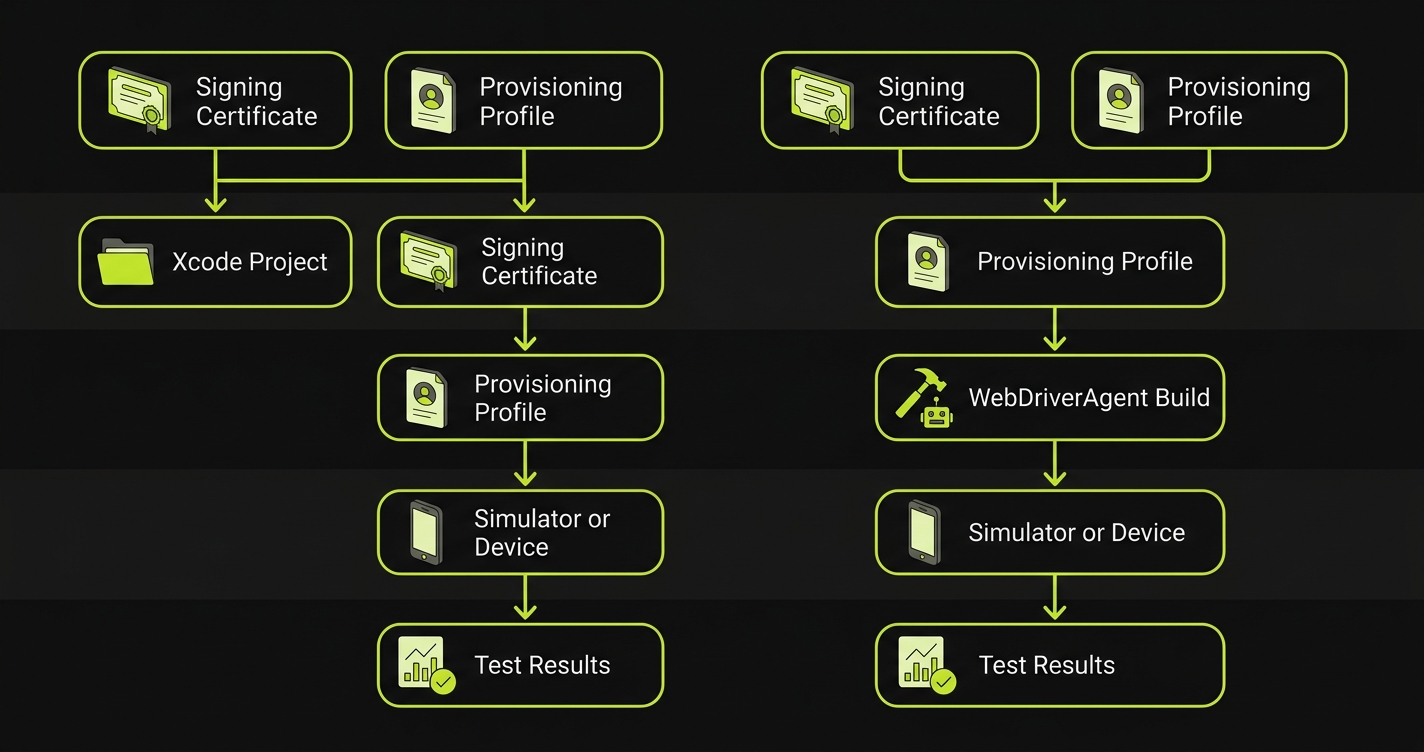
Both tools are subject to Apple's code signing requirements. Running UI tests on a real device requires a valid provisioning profile, a signing certificate, and the right entitlements. In CI, this means storing certificates securely (typically via Fastlane Match or the Xcode Cloud credential store), ensuring the provisioning profile does not expire silently, and debugging the inevitable mismatch errors that manifest as cryptic Xcode build failures. Neither Appium nor XCUITest makes this problem easier. It is an Apple infrastructure problem.
Simulator vs Real Device Behavior
iOS simulators are fast and free, but they are not iPhones. Metal rendering, Bluetooth, camera access, push notifications, In-App Purchase flows, and certain gesture recognizers behave differently on physical hardware. A test suite that passes on a simulator is not a test suite that passes on device. For any feature that touches hardware-adjacent APIs, there is no substitute for real device testing. Both Appium and XCUITest support real devices, but the setup cost is higher, and real device CI slots are expensive.
CI Costs
Xcode Cloud is Apple's hosted CI service and integrates directly with Xcode. It is genuinely convenient. It is also priced in "compute hours," and iOS builds are slow. A single simulator test run on a modestly sized app can consume more CI time than an equivalent web test suite by a factor of five or more. Teams that run Appium on a third-party device cloud (BrowserStack, Sauce Labs, LambdaTest) face similar per-minute costs, sometimes with worse simulator availability.
Appium vs XCUITest: Side-by-Side Comparison
| Dimension | XCUITest | Appium (iOS) |
|---|---|---|
| Language | Swift / Objective-C only | JavaScript, Python, Java, Ruby, C# |
| Execution speed | Fast (native, no HTTP layer) | Slower (command travels via HTTP) |
| Stability | High (no driver translation) | Good, but adds driver failure surface |
| iOS version support | Always current (Apple ships it) | Dependent on XCUITest Driver releases |
| Xcode integration | First-class (ships with Xcode) | Requires separate WebDriverAgent build |
| CI integration | Xcode Cloud, GitHub Actions (xcodebuild) | Any CI with Appium server available |
| Device farm support | Limited (Xcode Cloud, some enterprise options) | BrowserStack, Sauce Labs, LambdaTest, AWS Device Farm |
| Simulator support | Native, fast | Full support, slightly slower startup |
| Android coverage | None | Full (UIAutomator2 / Espresso driver) |
| Flakiness profile | Lower (fewer moving parts) | Higher (driver, server, network can all fail) |
| Setup complexity | Moderate (Xcode, signing, target config) | High (Xcode + Appium server + driver + language client) |
| Community and ecosystem | Apple developer community, StackOverflow | Large cross-platform QA community |
| WebView / hybrid app support | Cannot interact with WKWebView content | Full native-to-webview context switching |
| Parallel execution | Native via xcodebuild flag | Requires Appium Grid or cloud sharding |
| Open source | Proprietary (ships with Xcode) | Apache 2.0 |
Speed and Stability: The Native Advantage Is Real
XCUITest's speed advantage over Appium on iOS is not marginal. Because XCUITest runs inside the Xcode test infrastructure with no intermediate server, each command executes with native latency. The test taps a button, the accessibility layer registers the tap, the assertion runs. There is no HTTP roundtrip to an Appium server, no WebDriverAgent translation, no wait for the response to come back over a socket.
In practice, this means a XCUITest suite that takes eight minutes to run will typically take twelve to fifteen minutes when the same interactions travel through Appium's iOS driver. On a CI machine where you are paying per minute, that gap compounds. On a device farm where you are paying per device-minute, it compounds further.
Stability follows a similar pattern. Appium's iOS driver (XCUITest Driver) is actively maintained and used at scale, but it adds moving parts: the Appium server process, the WebDriverAgent app installed on the device, the socket connection between them. Any of those can fail in ways that produce flaky results independent of your actual application. A test failure that is actually a WebDriverAgent timeout is harder to diagnose than a test failure that is a direct XCUITest assertion. If you are already fighting flaky tests, the flaky tests debugging guide covers the systematic approach to diagnosing both.
XCUITest's native stability is meaningful for teams where test reliability is the current crisis. When stakeholders lose trust in the test suite, it is almost always because of unexplained flakiness, not test coverage gaps.
When XCUITest Is the Right Choice
XCUITest wins clearly in a specific scenario: a native iOS team where the engineers writing tests are the same engineers writing Swift, and where iOS is the only mobile platform.
In that scenario, there is no reason to add Appium's abstraction layer. The tests live in the same Xcode project as the application code. Swift is the language everyone already uses. The Xcode debugger works on test failures the same way it works on application bugs. Test code and product code can share utility classes and model definitions. CI runs via xcodebuild, which is what the team already runs for builds.
The XCUITest UI Testing target structure is also the right home for deep iOS-specific scenarios: testing Face ID prompts (via XCUITest's biometric simulation APIs), background app behavior, push notification handling, widget interactions, and system-level permission dialogs. Appium can reach some of these, but the coverage is thinner and the APIs are less reliable.
Xcode Cloud is worth mentioning in this context. If you are going to pay for CI time anyway, Xcode Cloud's integration is genuinely smooth for XCUITest: the signing is handled automatically, results appear in Xcode alongside your code, and the TestFlight distribution pipeline connects naturally to the test gate. It is not cheap at scale, but it eliminates a category of CI configuration pain.
When Appium Is the Right Choice
Appium wins in two scenarios that are distinct enough to be worth naming separately.
The first is cross-platform coverage. If you have both an iOS app and an Android app and you want a single team owning a single test framework, Appium is the only credible path. The Android Appium testing guide covers the Android side in depth. The key point is that the framework skills, the Page Object patterns, the CI integration, and the device farm configuration are all reusable. A QA team that invests in Appium expertise can cover both platforms. Two separate native test suites means two separate maintenance burdens, two separate skill sets, and doubled CI infrastructure.
The second is team composition. Many mobile QA teams are not primarily Swift engineers. They are QA specialists who came from web testing backgrounds, who are comfortable in JavaScript or Python, and who have existing automation frameworks they know well. Asking a web QA engineer to learn Swift well enough to write maintainable XCUITest code is a real barrier. Appium removes that barrier. The tests are written in the language the team already uses, against an API they already understand from web automation.
For teams in this situation, the real device testing strategy guide covers how to think about device farm selection alongside the framework decision, since Appium's device farm flexibility is one of its genuine advantages. Teams comparing cloud testing providers should also see the BrowserStack vs Sauce Labs pricing comparison for current numbers at scale.
The WebView and Hybrid App Factor
There is a third scenario where Appium wins by default: hybrid apps. XCUITest cannot interact with content rendered inside a WKWebView. It sees the WebView as a single element, but it cannot tap links, fill forms, or read text inside it. Appium can switch between native context and webview context within the same test session, which means it can test flows that cross the native-to-web boundary.
This matters for React Native apps, Flutter apps with embedded WebViews, and any native app that renders parts of the experience in a web layer (payment forms, onboarding flows, terms-of-service screens). If your app has significant WebView content, XCUITest is not a viable standalone option. For the Android side of the same decision, the Appium vs Espresso comparison covers identical tradeoffs in the Android ecosystem.
Quick Decision Guide
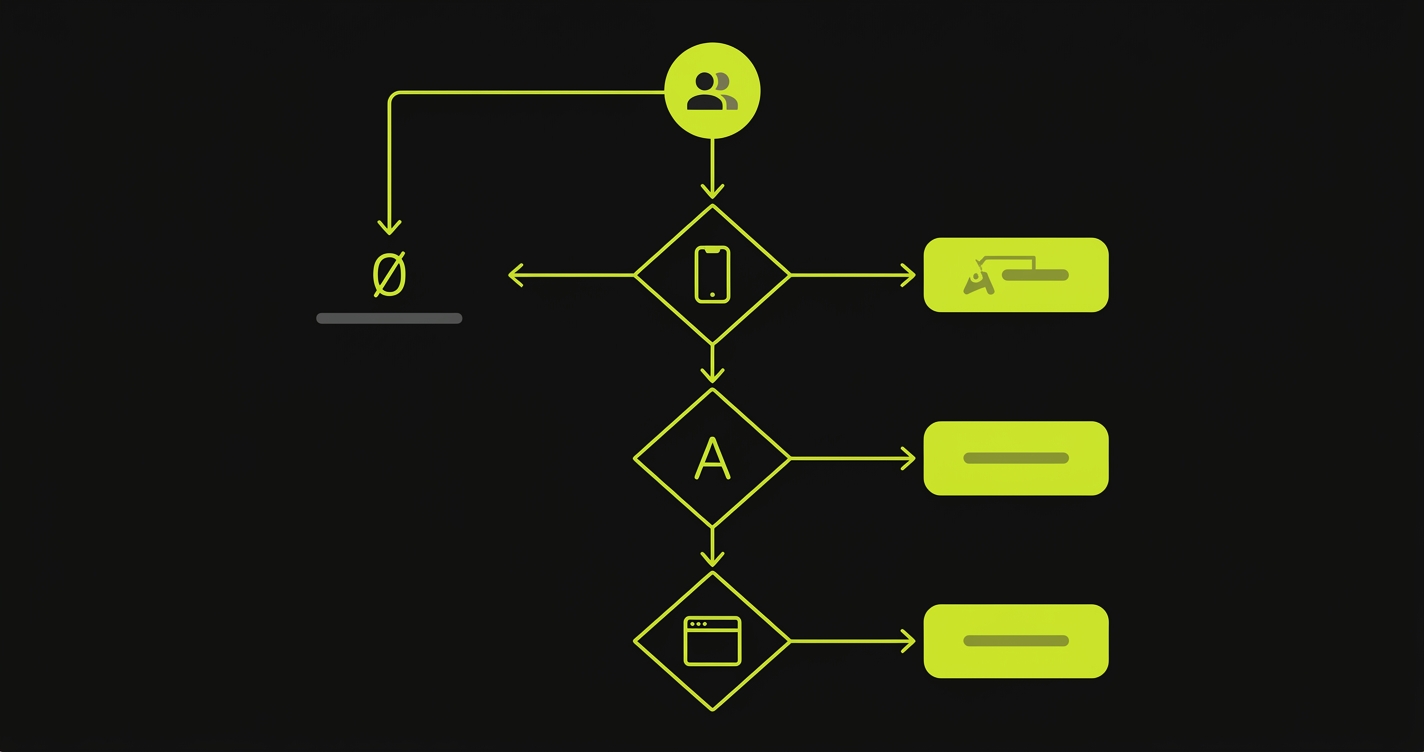
Your team profile determines the answer. If you are an iOS-only team writing Swift, choose XCUITest for speed, stability, and native Xcode integration. If you support both iOS and Android and want one test framework, choose Appium for cross-platform reuse. If your QA team writes JavaScript or Python rather than Swift, choose Appium to remove the language barrier. If your app has significant WebView or hybrid content, choose Appium because XCUITest cannot interact with web content inside native views. If you need third-party device farm support (BrowserStack, Sauce Labs, LambdaTest), choose Appium since XCUITest is limited to Xcode Cloud and self-managed labs. If you need maximum test speed and minimal flakiness surface, choose XCUITest. And if your team has zero test coverage and needs to start fast without framework setup, consider Autonoma before committing to either.
The Flakiness Problem Appium and XCUITest Both Share
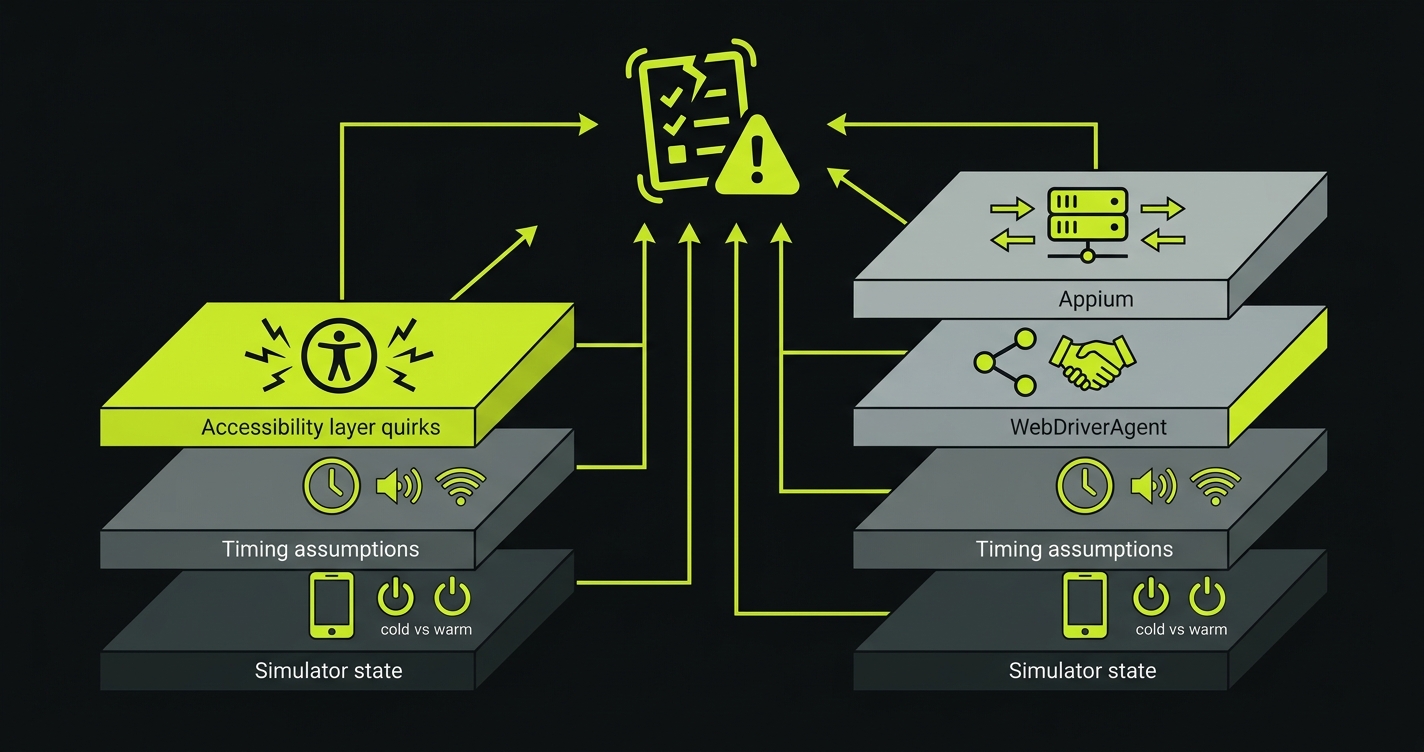
Both Appium and XCUITest have flakiness problems. They are different flavors of the same underlying issue.
XCUITest Flakiness Sources
XCUITest flakiness tends to come from a few consistent sources. Timing assumptions are the most common: a test taps an element before the animation finishes, or asserts on a value before a network request returns. The XCUITest waitForExistence(timeout:) API handles this, but requires engineers to add explicit waits in the right places, which is its own maintenance surface. Simulator warm-up state is another consistent source: a cold simulator produces different timing behavior than a warm one, and CI machines restart between runs.
Appium Flakiness Sources
Appium adds the driver layer on top of those issues. A test can fail because the XCUITest app state assertion timed out, or because the Appium server connection dropped, or because WebDriverAgent failed to install, or because the simulator was in an unexpected state when the session started. Debugging Appium flakiness requires understanding which layer actually failed, and that is harder than debugging pure XCUITest failures.
What Actually Fixes Flakiness
The structural answer to both is explicit wait strategies, stable accessibility identifiers, and test isolation (each test starts from a known app state, not from wherever the previous test left off). Neither framework provides those automatically. They are practices, not features.
What Happens After You Pick One
Either way, you are committing to a maintenance surface. Tests break when UI changes. Accessibility identifiers get renamed. Screen flows change. A refactor moves a button to a different view hierarchy, and three tests fail in ways that require reading the code change to understand.
This maintenance cost is constant. It does not scale with the number of features in your app so much as with the velocity of UI changes. A team shipping fast on iOS will spend real engineering time keeping the test suite in sync with the product.
This is the gap we built Autonoma to close. Our Diffs Agent tracks code changes and updates, adds, or deprecates affected tests automatically, so the redesign of a checkout flow does not generate a sprint ticket that says "fix broken E2E tests." Our Planner agent reads your codebase, understands your user flows at the code level, and generates test scenarios without requiring anyone to write Swift or configure an Appium server. The signing problem and the simulator problem are still real. But the test authoring and maintenance burden does not have to be.
If your team is evaluating Appium versus XCUITest because your current test coverage is zero and you need somewhere to start, that is also a scenario where Autonoma is worth looking at before committing to either framework's setup cost.
Frequently Asked Questions
For pure iOS teams that write Swift, XCUITest is generally better: it is faster, more stable, and has deeper access to iOS-specific APIs. For cross-platform teams or teams where QA engineers are not Swift developers, Appium's language flexibility and cross-platform coverage often outweigh the speed and stability advantages of XCUITest.
Yes. The Appium iOS driver (XCUITest Driver, formerly WebDriverAgent) uses XCUITest as its underlying automation layer. When Appium interacts with an iOS app, it is ultimately calling XCUITest through a translation layer. This is why XCUITest is faster on a per-command basis: it eliminates the HTTP transport and WebDriverAgent server that Appium adds.
XCUITest requires Swift or Objective-C. It is part of Xcode and only works within the Apple developer toolchain. If your team does not write Swift or Objective-C, XCUITest is not a practical option without investing in learning those languages specifically for testing.
Appium on iOS requires a valid provisioning profile and signing certificate, just like any other iOS application. Most teams use Fastlane Match to manage certificates and profiles in a shared repository, then configure CI to pull the signing credentials at build time. Xcode Cloud handles this automatically for XCUITest suites but does not support Appium directly.
Yes. Appium's WebDriver-compatible API works with all major device farms: BrowserStack, Sauce Labs, LambdaTest, and AWS Device Farm. You point your Appium client at the farm's remote URL instead of a local Appium server. XCUITest does not support third-party device farms directly; you are limited to Xcode Cloud or managing your own device lab.
iOS test flakiness typically comes from one of a few sources: missing explicit waits (the test interacts with an element before an animation or network response completes), unstable locators (accessibility identifiers that change during UI refactors), cold simulator state (CI machines start fresh each run), or in Appium's case, driver layer failures (WebDriverAgent timeouts or server connection issues). Adding explicit waits, using stable accessibility identifiers, and ensuring test isolation are the consistent fixes. The flaky tests debugging guide at /blog/fix-flaky-tests-debugging-guide covers a systematic approach.
Autonoma currently focuses on web application testing. It reads your codebase, plans test cases from your routes and components, and generates E2E tests automatically. If your iOS app has a web-based frontend or companion web application, Autonoma covers those flows. For native iOS UI testing, you will still need XCUITest or Appium, but Autonoma can complement them by covering the web layer and API tests that both frameworks leave to manual effort.


