

Flaky tests are tests that pass and fail intermittently without any change to the application code. They have six root causes: timing and race conditions, test data dependencies, environment drift between local and CI, external service dependencies, shared state between tests, and dynamic content rendering. Each root cause has a distinct symptom pattern, a set of diagnosis commands you can run right now, and a concrete fix. This playbook walks through all six root causes of test flakiness -- with code examples -- so you can stop re-running and start fixing.
Thirty minutes from "CI is red again" to a merged fix. That's the goal of this playbook -- not someday when you've refactored the test suite, but today, for the specific flaky test that's blocking your deploy right now.
The reason most flaky test debugging takes hours is not that the problem is hard. It's that engineers skip the diagnosis step. They add a wait, re-run, see green, call it done -- until it fails again next Tuesday. This guide gives you the diagnosis first: match your failure pattern to one of six root cause categories, run one command to confirm it, then apply the targeted fix. No guessing, no re-running, no "let's see if this holds." For the strategic picture on preventing flakiness upstream, see the best practices guide. For the business case to justify fixing them, that exists too.
Every section below follows the same structure: symptom, diagnosis command, root cause explanation, and working code fix. Find your symptom in the table. Jump to that section. You'll have a real fix in under 30 minutes.
The 6 Root Causes of Flaky Tests: A Debugging Framework
Before touching any code, identify which category your flaky test falls into. Misdiagnosing wastes hours. The fastest path to flaky test detection is matching the failure pattern against these six categories, then jumping to the right section.
| Root Cause | Signature Symptom | Fastest Diagnostic |
|---|---|---|
| Timing / Race Condition | Passes locally, fails in CI under load | Add --workers=1 flag, check if it stabilizes |
| Test Data Dependency | Fails after another test ran; passes in isolation | Run the test alone with --testNamePattern |
| Environment Drift | Always fails in CI, always passes locally | Check CI timezone, resource limits, browser version |
| External Service | Fails with network/timeout errors at random | Check test logs for HTTP 429, 503, or timeout messages |
| Shared State | Fails when run in a specific order | Run suite in reverse order, observe which tests now fail |
| Dynamic Content | Element not found on slow machines or cold starts | Throttle CPU in DevTools, reproduce the failure locally |
Identify your category. Now go directly to that section.

How Do You Fix a Flaky Test?
You fix a flaky test by identifying its root cause first, then applying the targeted fix. Run the test in isolation, check if it fails consistently or intermittently, and match the failure pattern to one of six categories: timing issues, data dependencies, environment drift, external service failures, shared state, or dynamic content rendering. Each category has a specific diagnosis command and a code-level fix detailed in the sections below. Research from Microsoft confirms that the vast majority of test flakiness traces back to these same root cause categories across organizations of every size.
At Autonoma, we designed our Maintainer agent around this same diagnostic model — it identifies whether a test failure stems from code changes, selector drift, or infrastructure issues before deciding how to respond.
Root Cause 1: Timing and Race Conditions
Symptom you see: The test passes 9 out of 10 times. The failure is always "element not found," "assertion failed," or "timeout" -- never a real bug. It passes locally, fails under CI load.
Diagnosis: Run the test 20 times in sequence. If it fails at least once, you have a timing issue.
# Playwright: run same test 20 times
npx playwright test login.spec.ts --repeat-each=20

# Jest: detect randomness with repeat runs
for i in {1..20}; do npx jest --testNamePattern="login flow" --silent; done | grep -E "FAIL|PASS"
A true timing issue fails at a rate you can reproduce. Not once in 100, but once in 5 to 20.
The fix: Replace every fixed sleep with a condition-based wait.
// BAD: You're guessing how long the page needs
await page.waitForTimeout(3000);
const button = await page.locator('[data-testid="submit"]');

// GOOD: Wait for the actual condition you need
await page.waitForSelector('[data-testid="submit"]', { state: 'visible' });
const button = await page.locator('[data-testid="submit"]');
await button.click();
For async API responses, wait on the network, not on time:
// Wait for the specific API call that populates your element
const responsePromise = page.waitForResponse(
  response => response.url().includes('/api/user') && response.status() === 200
);
await page.click('[data-testid="load-profile"]');
await responsePromise;

// Now the element is guaranteed to be populated
const name = await page.locator('[data-testid="user-name"]').textContent();
For animation-related failures, wait for CSS transitions to complete:
// Wait for element to finish animating (not just appear)
await page.waitForSelector('[data-testid="modal"]', { state: 'visible' });
await page.waitForFunction(() => {
  const el = document.querySelector('[data-testid="modal"]');
  const style = window.getComputedStyle(el);
  return style.opacity === '1' && style.transform === 'none';
});
Prevention pattern: Audit every waitForTimeout in your codebase. Replace with explicit condition waits. The Playwright documentation on auto-waiting explains why built-in actionability checks eliminate most timing flakiness by default. Treat fixed sleeps as a linting violation.
For teams using Autonoma, timing flakiness is structurally less common — our agents derive wait conditions from application state transitions in the codebase rather than inserting arbitrary timeouts based on human estimation.
Root Cause 2: Test Data Dependencies
Symptom you see: The test fails when the test suite runs in full, but passes when you run it alone. Or it fails the second time you run CI but passes the first time, because previous runs left data behind.
Diagnosis: Run the failing test in complete isolation.
# Playwright: run just this test file
npx playwright test checkout.spec.ts --project=chromium

# Jest: run exactly one test by name
npx jest --testNamePattern="checkout with existing cart"

# If it passes in isolation but fails in the suite, you have data dependency
If the isolated run passes but the full suite run fails, the test is relying on data created by another test -- or being corrupted by another test's cleanup.
The fix: Every test must own its data entirely. Create it in setup, destroy it in teardown.
// Playwright: use test fixtures for isolated data
import { test, expect } from '@playwright/test';

const testWithUser = test.extend({
  user: async ({ request }, use) => {
    // Setup: create a fresh user
    const response = await request.post('/api/test/users', {
      data: { email: `test-${Date.now()}@example.com`, password: 'Test1234!' }
    });
    const user = await response.json();

    await use(user); // hand off to the test

    // Teardown: always delete, even if test fails
    await request.delete(`/api/test/users/${user.id}`);
  }
});

testWithUser('checkout flow', async ({ page, user }) => {
  // This test has its own user, never touches another test's data
  await page.goto('/login');
  await page.fill('[data-testid="email"]', user.email);
  // ...
});
For database-heavy tests, use unique prefixes to isolate test data across parallel runs:
// Generate unique test identifiers per run
const runId = `test_${Date.now()}_${Math.random().toString(36).slice(2, 7)}`;
const testEmail = `${runId}@example.com`;
const testProduct = `Product ${runId}`;

// Always clean up in afterEach, not afterAll
afterEach(async () => {
  await db.execute('DELETE FROM users WHERE email LIKE ?', [`test_%`]);
  await db.execute('DELETE FROM products WHERE name LIKE ?', [`Product test_%`]);
});
For more on structuring test data pipelines, see our guide on data seeding for end-to-end tests.
Prevention pattern: Enforce a rule: no test reads data it did not create. Code review should flag any test that queries for existing records by static IDs.
Root Cause 3: Environment Drift
Symptom you see: The test always passes locally. It always or frequently fails in CI. The error is something environment-specific: wrong timezone, element not found at a specific viewport, race between startup scripts.
Diagnosis: Reproduce CI conditions locally.
# Run tests with CI-like resource constraints
docker run --cpus=2 --memory=4g \
  -e CI=true \
  -e TZ=UTC \
  node:20 npx playwright test

# Check what CI sees for key environment variables
echo "Node: $(node --version)"
echo "TZ: $TZ"
echo "CI: $CI"
npx playwright --version
Compare the output against your CI runner config. The most common culprits:
- Timezone: Your app renders dates differently when
TZ=America/New_Yorklocally vsTZ=UTCin CI - Viewport: CI headless browsers often default to a smaller viewport; responsive layouts shift
- CPU throttling: Animations, transitions, and lazy load triggers behave differently under constrained CPU
- Browser version: CI may run Chromium 120; local may be 124; CSS rendering differs
The fix: Pin your environment. Every variable that affects test behavior belongs in a config file, not assumed from the host.
// playwright.config.ts: explicit environment contract
export default defineConfig({
  use: {
    baseURL: process.env.BASE_URL || 'http://localhost:3000',
    viewport: { width: 1280, height: 720 }, // pin it
    timezoneId: 'UTC',                       // pin it
    locale: 'en-US',                         // pin it
  },
  // Ensure browser version is consistent
  projects: [
    {
      name: 'chromium',
      use: { ...devices['Desktop Chrome'] },
    }
  ],
});
For isolating services and ports between test environments, see our Docker Compose testing guide. Container isolation eliminates an entire class of environment drift failures.
Prevention pattern: Treat CI logs as the source of truth. Run CI=true npx playwright test locally before merging. Never debug environment issues without first making your machine look like CI.
Root Cause 4: External Service Dependencies
Symptom you see: Tests fail with ETIMEDOUT, HTTP 429, HTTP 503, or "connection refused." The failure is not deterministic, it depends on whether the third-party service was available at that exact moment.
Diagnosis: Grep your test logs for network error signatures.
# Search recent CI logs for network failure patterns
grep -E "ETIMEDOUT|ECONNREFUSED|429|503|timeout" test-results/

# Count how often specific errors appear across runs
cat test-results/*.log | grep -c "429 Too Many Requests"
If you find these, you have external service dependency. The test is calling a real API that does not guarantee availability or rate limits in your test context.
The fix: Mock the boundary. Your test should verify your code's behavior, not the third-party service's behavior.
// Playwright: intercept external API calls and return controlled responses
test('payment success flow', async ({ page }) => {
  // Intercept Stripe API and return a predictable success
  await page.route('**/api/stripe/charge', async route => {
    await route.fulfill({
      status: 200,
      contentType: 'application/json',
      body: JSON.stringify({ id: 'ch_test_123', status: 'succeeded' }),
    });
  });

  await page.goto('/checkout');
  await page.fill('[data-testid="card-number"]', '4242424242424242');
  await page.click('[data-testid="pay-button"]');
  await expect(page.locator('[data-testid="success-message"]')).toBeVisible();
});
For rate-limited APIs that cannot be mocked (auth services, for example), implement retry with exponential backoff at the API call level, not the test level:
// Retry the external call, never the entire test
async function callWithRetry<T>(
  fn: () => Promise<T>,
  maxAttempts = 3,
  baseDelayMs = 500
): Promise<T> {
  for (let attempt = 1; attempt <= maxAttempts; attempt++) {
    try {
      return await fn();
    } catch (err) {
      if (attempt === maxAttempts) throw err;
      await new Promise(r => setTimeout(r, baseDelayMs * Math.pow(2, attempt - 1)));
    }
  }
  throw new Error('unreachable');
}

// Usage
const userData = await callWithRetry(() => externalAuthService.getUser(userId));
Prevention pattern: Any test that reaches the network outside your own application is a liability. Establish a policy: E2E tests mock all third-party services. Contract tests verify third-party integrations separately, with explicit flakiness tolerance.
Root Cause 5: Shared State Between Tests
Symptom you see: Tests pass when run individually or in one order. Run them in a different order (or in parallel), and some fail. The failure looks like "expected X but got Y" where Y is a value left by another test.
Diagnosis: Run your suite in reverse order and see which tests now fail.
# Jest: randomize test order to surface order dependency
npx jest --randomize

# Playwright: run in parallel to surface shared global state
npx playwright test --workers=4

# If failures change with order or worker count, you have shared state
The fix: Identify what global state is being mutated. Common culprits are database records, local storage, cookies, and in-memory caches.
// Playwright: clear browser state between tests
test.beforeEach(async ({ page, context }) => {
  // Clear cookies and local storage before every test
  await context.clearCookies();
  await page.evaluate(() => {
    localStorage.clear();
    sessionStorage.clear();
  });
});
For database state, use transactions that roll back after each test:
// Jest + database: wrap each test in a transaction
let transaction;

beforeEach(async () => {
  transaction = await db.beginTransaction();
});

afterEach(async () => {
  // Roll back everything the test did -- no cleanup code needed
  await transaction.rollback();
});

test('creates order', async () => {
  // Any DB writes here are rolled back after the test
  const order = await createOrder({ userId: 1, items: ['product-1'] });
  expect(order.status).toBe('pending');
});
If tests share a singleton (Redux store, a module-level cache, a global event bus), reset it explicitly:
// Reset module-level state between tests
import { store } from '../store';
import { resetState } from '../store/actions';

beforeEach(() => {
  store.dispatch(resetState());
});

// Or use Jest module reset for truly isolated module state
beforeEach(() => {
  jest.resetModules();
});
Prevention pattern: Treat global state as a shared mutable resource. Document every piece of global state your test suite touches. Add a pre-test reset for each one as a fixture, not scattered across individual tests.
Root Cause 6: Dynamic Content and Rendering
Symptom you see: "Element not found" or "element is not attached to the DOM." The element exists if you pause and look -- but the test moved past it before it rendered. Lazy-loaded images, virtual scroll lists, and hydration-gated components are the usual suspects.
Diagnosis: Throttle CPU in Chrome DevTools to 4x slowdown and run the test manually. If you can reproduce the failure by slowing the browser, it is a rendering timing issue.
// Use Chrome DevTools Protocol to simulate slow CPU in Playwright
const session = await page.context().newCDPSession(page);
await session.send('Emulation.setCPUThrottlingRate', { rate: 4 });

// Now run the failing assertion -- if it fails here, it's a rendering issue
await expect(page.locator('[data-testid="product-card"]').first()).toBeVisible();
For virtual scroll (where only visible rows exist in the DOM), you cannot click an item that has not rendered yet:
// BAD: item may not be in the DOM yet
await page.click('[data-testid="row-250"]');

// GOOD: scroll to make it visible, then wait for it to render
await page.locator('[data-testid="virtual-list"]').scrollIntoViewIfNeeded();
await page.evaluate(() => {
  const list = document.querySelector('[data-testid="virtual-list"]');
  list.scrollTop = 250 * 48; // row height * index
});
await page.waitForSelector('[data-testid="row-250"]', { state: 'attached' });
await page.click('[data-testid="row-250"]');
For Next.js and React hydration timing (components that are server-rendered but not yet interactive):
// Wait for hydration to complete before interacting
await page.waitForFunction(() => {
  // React marks hydrated root with data attribute
  return document.querySelector('#__NEXT_DATA__') !== null
    && !document.querySelector('[data-loading="true"]');
});

// Or wait for a known interactive element to become clickable
await page.waitForSelector('[data-testid="interactive-button"]', {
  state: 'visible'
});
await page.waitForFunction(
  selector => !document.querySelector(selector)?.hasAttribute('disabled'),
  '[data-testid="interactive-button"]'
);
Prevention pattern: Lazy-loaded content and hydration boundaries are permanent features of modern web apps. Build waiting logic into your page object layer, not individual tests. Every page object method that touches dynamic content should wait for readiness before returning.
The Flaky Test Triage Protocol: Kill, Fix, or Quarantine
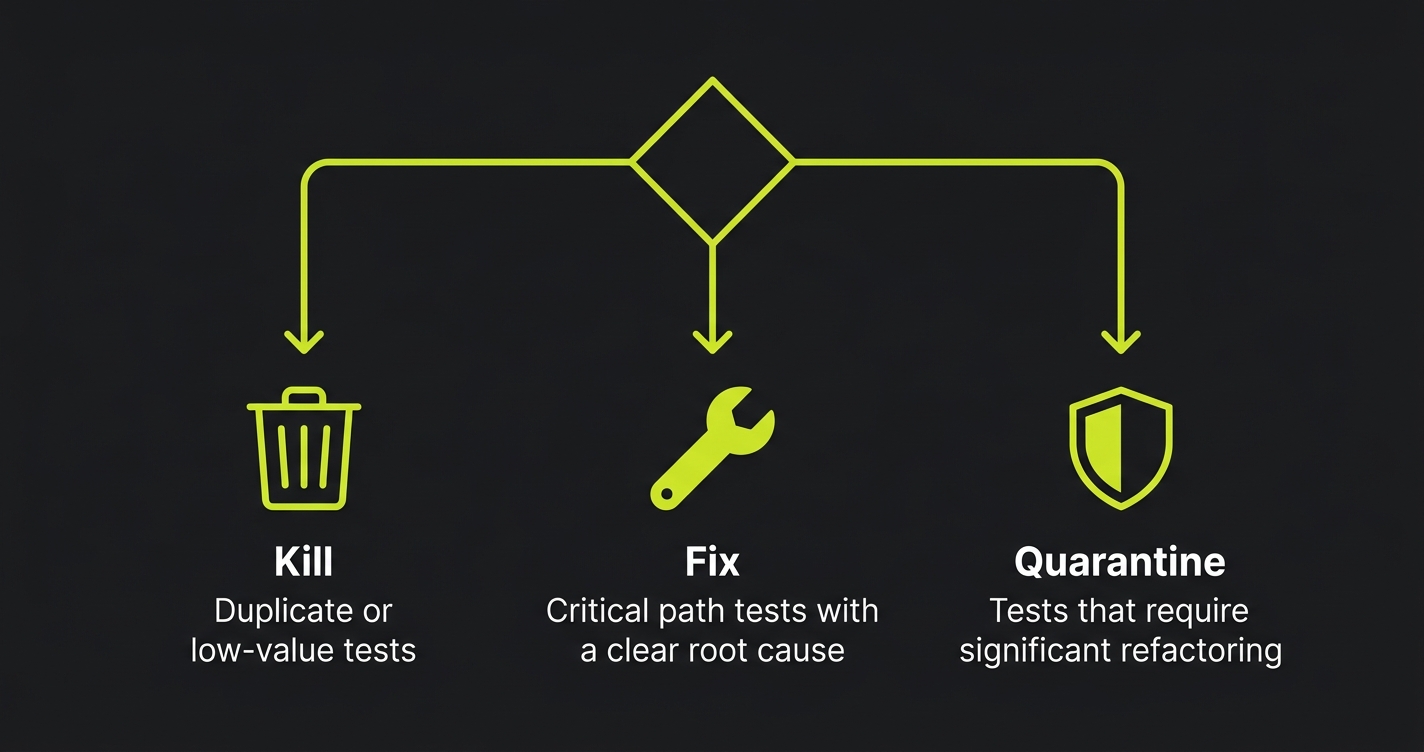
Not every flaky test deserves the same response. When you find a flaky test, make one of three decisions immediately:
Kill it when the test is duplicate coverage and the fix cost exceeds the value. If three other tests cover the same behavior and this one has been flaky for 3 weeks, delete it. Flaky tests that nobody fixes train the team to ignore red CI.
Fix it when the test covers a critical path and the root cause is clear. Use this playbook. Fix it in the same sprint it was identified, before it becomes background noise.
Quarantine it when the fix requires significant refactoring and you cannot do it now. Move it to a quarantine suite that runs separately from your main CI gate.
// Playwright: tag flaky tests for quarantine
test('checkout with promo code', { tag: '@quarantine' }, async ({ page }) => {
  // This test is known flaky, tracked in JIRA-1234
  // It does not block CI but runs in nightly quarantine suite
});
# GitHub Actions: separate quarantine job
jobs:
main-tests:
runs-on: ubuntu-latest
steps:
- run: npx playwright test --grep-invert "@quarantine"
quarantine-tests:
runs-on: ubuntu-latest
continue-on-error: true # doesn't block merge
steps:
- run: npx playwright test --grep "@quarantine"The quarantine suite is not a dumping ground. Every test in quarantine needs a linked ticket with an owner and a deadline. Review it weekly. A test that lives in quarantine for more than 30 days either gets fixed or gets deleted.
How to Prevent Flaky Tests: Structural Patterns That Work
Fixing test flakiness reactively is expensive. Building structures that prevent it is cheap. Three patterns eliminate most of the root causes before they occur.
Test isolation by default. Every test gets its own user, its own data, its own browser context. Do not share. The cost of fixture setup is milliseconds. The cost of debugging shared-state flakiness is hours. For continuous testing in CI/CD pipelines, this is non-negotiable -- parallel test runners will surface every shared-state assumption immediately.
Stable test IDs everywhere. Add data-testid attributes to every interactive element when you build it. Make it a team standard enforced in code review. CSS selectors and text-based locators are guarantees of future flakiness. Test IDs survive design changes, refactors, and i18n.
Structural test generation from your codebase. The deepest source of flaky tests is the gap between what a test assumes about the app and what the app actually does. When tests are written by hand, that gap widens every sprint. When tests are generated from code analysis -- reading your routes, components, and API contracts -- there is no assumption gap. Autonoma reads your codebase and generates tests that reflect what the code actually does, then keeps them aligned as the code changes through self-healing test automation. The structural mismatch that causes flakiness never accumulates.
Flaky Tests FAQ
Run the failing test 5 times without any code change. If it ever passes, it's flaky. A real bug fails consistently. The re-run test is the single most reliable diagnostic -- real bugs do not self-heal.
Retries mask flakiness without fixing it. Use them as a short-term safety net -- maximum 2 retries -- while you fix the root cause. Never let retries become the permanent solution. A test that needs 3 runs to pass is telling you something.
Cold-start flakiness is almost always environment drift or dynamic content rendering issues. On cold starts, compilation is slower, containers take longer to start, and first-request latency spikes. Fix: add explicit health checks before tests start, and increase initial wait thresholds only for cold-start scenarios via environment variables.
Most CI platforms track pass/fail history. In GitHub Actions, filter by flaky in the test results. In Buildkite, use the test analytics dashboard. A test with a pass rate below 98% in the last 30 runs is a candidate. Prioritize by test coverage criticality first, then frequency of failure.
Triage by impact: which flaky tests block deploys? Fix those first, quarantine the rest. Then categorize the quarantined tests by root cause using the diagnostic table. Fix all timing issues in one pass, all data dependency issues in one pass. Batching by root cause is faster than fixing one at a time because you build pattern recognition and the fix is reusable.
A flaky test costs 10 minutes of developer time on average each time it triggers a false failure -- and a single flaky test in a high-frequency CI system triggers that cost dozens of times per week. The cost of prevention (adding a data-testid, writing an isolated fixture) is measured in minutes, not hours.


