

E2E testing on preview environments is a four-step closed loop: trigger on deployment, execute tests against the preview URL, report results back to the PR, and gate the merge until tests pass. Teams that skip any one of these four steps end up with a loop that produces noise instead of signal. The deployment succeeded, a URL exists, but nothing validates that the code behind the URL actually works.
The numbers on manual QA are unambiguous. A five-minute manual check across fifteen PRs per week is 1.25 hours per reviewer per week, assuming perfect discipline, discipline that degrades as PR volume grows. Automated E2E runs complete in three to ten minutes per PR and require zero reviewer time for the testing step. At twenty engineers shipping two PRs each per week, that is forty test runs per week that happen without anyone thinking about them.
What follows is a precise description of all four steps, then three concrete paths to implement them: Autonoma (zero-config, no test code required), Playwright with GitHub Actions (full DIY), and Cypress with GitHub Actions (same structure, different runtime model). The preview environment created a much faster feedback loop than staging ever did, but only if the loop actually closes. The decision between approaches is not about capability. All three can close the loop. It is about how much infrastructure you want to own permanently.
The Problem: An Untested Preview Is Just a URL
Every senior engineer has shipped a bug that their preview environment "caught," meaning it ran the code, produced a live URL, and gave the reviewer something to click. The deployment succeeded. Nothing in the pipeline objected. The bug shipped anyway.
The reason is structural. A preview environment's success criterion is deployment: did the build complete, did the container start, did the health check respond. It does not validate user flows. It does not know that your checkout button stopped working when a state management change landed in the same PR. It does not know that your login form now silently fails for OAuth users while email login still works.
For ephemeral environments, this problem compounds. Because each preview is isolated and short-lived, there's no persistent monitoring, no historical context, no one who "knows" the environment well enough to notice when something is off. The preview exists for the lifetime of the PR review. Someone clicks around, sees that the page loads, and approves.
The solution is automated E2E testing on every preview. Not "run tests before merging" in the abstract, but a specific, wired-up cycle where the deployment event triggers tests, tests run against the exact preview URL, results post back as PR checks, and the merge is blocked until tests pass. We call this the Preview Test Loop.
The Preview Test Loop
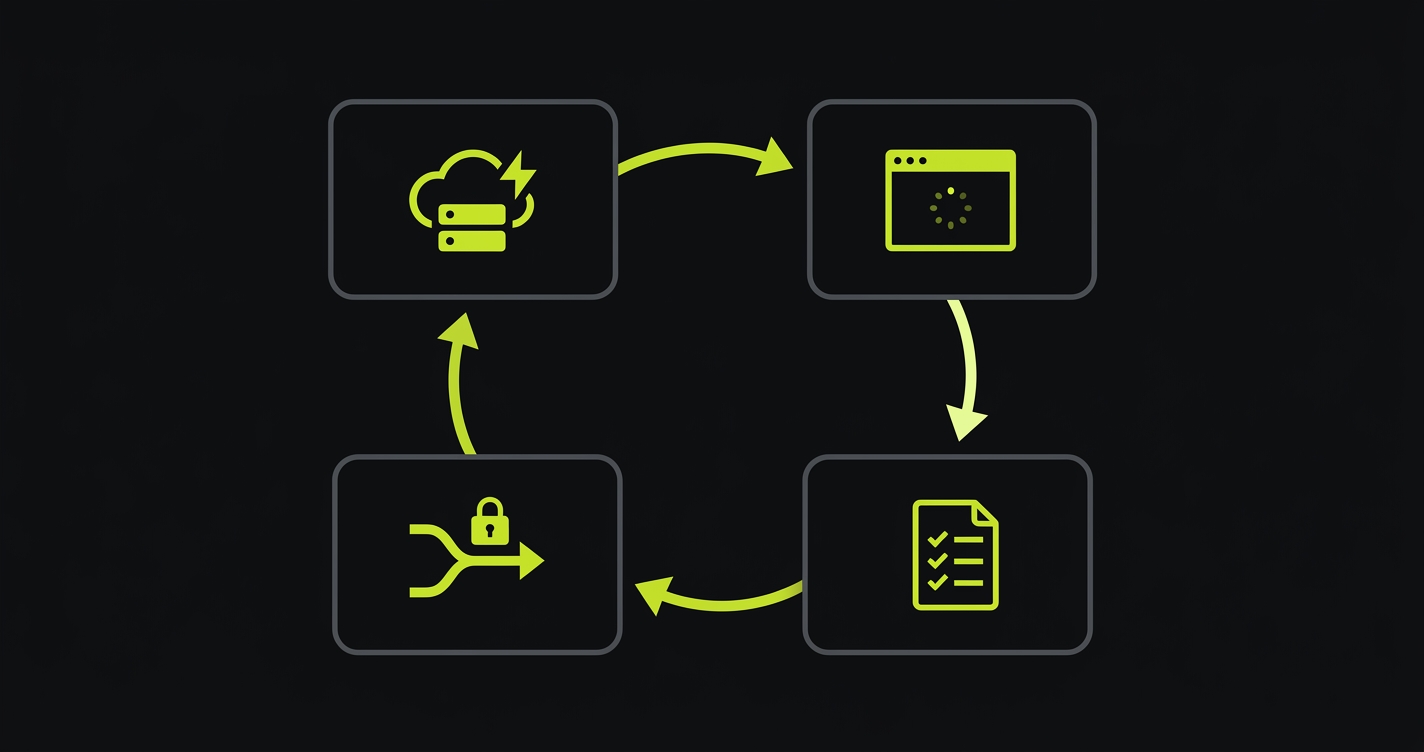
The Preview Test Loop is a four-step cycle. Every approach in this article implements the same loop. The differences are in how much infrastructure you build yourself versus how much comes pre-wired.
Trigger. A PR opens, the platform deploys the preview, and an event fires. On Vercel this is the deployment_status webhook event with state: success. On other providers it's a GitHub deployment status event or a webhook from your platform. The trigger carries two critical pieces of information: the preview URL (where to run tests) and the commit SHA (which PR to report back to). Without both, the loop can't close.
Execute. Tests run against the specific preview URL from the trigger. Not against staging. Not against a hardcoded environment. Against this exact deployment, at this commit, for this PR. This is what makes preview testing meaningful rather than redundant with your existing CI: you're testing the actual artifact that would ship if the PR merged, on real infrastructure, at the real URL.
Report. Results come back to where the developer already is. On Vercel, this means a Deployment Check status in the Vercel dashboard and in the PR. On GitHub, this means a commit status check visible in the PR checks tab. The report must tie back to the specific deployment and the specific PR, otherwise a developer can't act on it.
Gate. The merge is blocked until tests pass. Not "tests ran," tests passed. This is the enforcement mechanism that makes the loop meaningful. Without it, the test results are advisory and developers learn to ignore them. With it, the E2E run is a hard dependency for merge, the same way a failing build is.
Every approach in this article implements all four steps. What varies is setup complexity, maintenance burden, and how much of the loop is pre-wired for you.
Approach 1: Manual QA on Preview URLs
The baseline approach is what most teams already do: someone clicks through the preview URL before approving the PR. This is better than nothing. It's not testing.
Manual preview QA fails the Loop on steps 1, 3, and 4. There's no automated trigger: a reviewer has to remember to open the URL. There's no structured report: feedback lives in a PR comment, not a merge-blocking status check. And there's no automated gate: merge happens when the reviewer approves, regardless of whether they tested anything. Step 2 (execution) is present but inconsistent: coverage depends on who is reviewing, what they decided to test, and how much time they had.
At three-person teams shipping two PRs per week, manual QA works. At ten-person teams shipping fifteen PRs per week, it degrades into rubber-stamping. At twenty-person teams, it becomes a polite fiction. The cognitive load of genuinely clicking through every preview, across every flow, for every PR, is a full-time job. Teams don't explicitly decide to stop doing it. They just gradually approve faster and click less deeply.
The math is straightforward. A 5-minute manual check across 15 PRs per week is 1.25 hours per reviewer per week, assuming perfect discipline. Automated E2E tests run in 3-10 minutes per PR and require zero reviewer time for the testing step. The automation ROI is immediate and doesn't decay as team size grows.
Approach 2: Playwright + GitHub Actions
Playwright with GitHub Actions is the DIY path. It gives you full control of the entire loop at the cost of writing and maintaining everything yourself. For teams with strong Playwright expertise and an appetite for infrastructure ownership, it's a solid choice.
The core mechanism is the GitHub deployment_status event. When Vercel (or Netlify, or any deployment provider with GitHub integration) marks a deployment as successful, GitHub fires this event. Your workflow listens for it, extracts the preview URL, and runs tests.
How do I pass the preview URL to my tests?
Here's the complete GitHub Actions workflow. It handles the deployment_status trigger, URL extraction, the Playwright run, and GitHub commit status reporting. For teams who want the full end-to-end wiring in one place, we also published a step-by-step pipeline walkthrough covering the complete Vercel → GitHub Actions → Playwright flow.
The Playwright config needs one change to support dynamic preview URLs. Instead of a hardcoded baseURL, it reads from the environment:
A few things to get right that trip up most teams on the first pass. First, the trigger must filter for state == 'success'. Without this, the workflow fires on every deployment event including pending and error states, triggering tests against URLs that aren't ready yet. Second, Vercel preview URLs contain the branch name, PR number, and a hash: treat the full target_url as an opaque string and do not attempt to construct it yourself. Third, check out the exact commit the preview was built from (ref: ${{ github.event.deployment_status.sha }}) so your test code matches the deployed artifact. Fourth, auth state in CI is the most common source of test failures after the bypass issue below: your test fixtures need to programmatically log in against the preview URL using credentials stored in GitHub Secrets, not cookies from a previous session.
Deployment Protection: the single most common stall
If your Vercel project has Deployment Protection enabled (Vercel Authentication, Password Protection, or Trusted IPs), your tests will load the Vercel SSO login page instead of your app and the workflow will time out. This is the most-reported failure mode when wiring Playwright into preview deployments, and it is not obvious from the logs: the HTTP response is 200, the page title is the expected placeholder, and the test fails on a selector that "should" exist.
The fix is the Protection Bypass for Automation feature. Generate a bypass secret in Vercel Project Settings → Deployment Protection → Protection Bypass for Automation, store it in GitHub Secrets as VERCEL_AUTOMATION_BYPASS_SECRET, and pass it in every request the test runner makes. In Playwright, this is a two-line addition in playwright.config.ts:
Protection Bypass for Automation is a feature of Vercel's Deployment Protection stack. Availability depends on which protection method you enabled: Vercel Authentication is available on all plans including Hobby; Password Protection is part of Advanced Deployment Protection (a paid Pro add-on, or bundled on Enterprise); Trusted IPs is Enterprise-only. Check current Vercel pricing for the exact gating on the method you use. Autonoma's Vercel Marketplace integration runs inside the Vercel pipeline as a Deployment Check, which handles protected previews natively via the integration's credentials, so you do not manage a bypass secret yourself. For the non-Vercel API trigger path described in Approach 4, you pass the bypass secret once in the workflow environment.
Waiting for the deployment to be truly ready
A related failure mode: deployment_status.state == 'success' fires the instant Vercel's build completes, but edge routes, ISR-warmed pages, and serverless cold starts can add a few seconds of latency before the URL actually serves content. Tests that fire the instant the event arrives sometimes hit a 503 or an incomplete response.
The standard remedy is a wait-for-ready step before the test job. The community convention is patrickedqvist/wait-for-vercel-preview, which polls the URL on a fixed interval (2 seconds by default) until it responds 200, with a configurable total timeout. Adding this step eliminates a class of false failures that otherwise erode trust in the loop.
On the maintenance side: every time a route changes, a component is renamed, or a user flow is restructured, Playwright tests break. Someone has to update them. For a checkout flow with ten steps, that's ten selectors to audit every time the UI shifts. The test suite becomes a codebase of its own, with its own review burden and its own debt.
Approach 3: Cypress + GitHub Actions
Cypress implements the same loop as Playwright but with a different runtime model: tests run inside a real browser controlled by a Node.js process, rather than through Playwright's browser protocol. The GitHub Actions structure is nearly identical.
The main differences in practice: Cypress has a dedicated baseUrl config field that reads the same CYPRESS_BASE_URL environment variable pattern. Cypress Cloud provides built-in parallelization and test replay, which matters if your suite is large enough that a serial run would exceed a reasonable CI time budget. Cypress's component testing capability is a genuine differentiator if you want to test React or Vue components in isolation alongside your E2E flows.
The trade-offs are real in both directions. Cypress runs on Chromium, Chrome (all channels), Edge (all channels), Firefox, and Electron, with WebKit available behind an experimental flag; Safari/WebKit coverage is there today but not at the same maturity as Playwright's first-class WebKit support. Playwright runs Chromium, Firefox, and WebKit natively from one test suite. Cypress's interactive test runner is genuinely better than Playwright's for initial test authoring: debugging a failing selector in the Cypress GUI is faster than digging through a Playwright trace. Once tests are written and running headlessly in CI, the experience converges.
On the preview URL handling problem, Cypress and Playwright are identical: you're reading a dynamic URL from an environment variable and running against it. The setup work, the auth fixture requirements, and the maintenance burden are the same. The choice between Playwright and Cypress for preview environment testing is a team preference and existing investment question, not a technical one.
Approach 4: Autonoma
Autonoma is the zero-config path for the Preview Test Loop. The architecture is the same four steps (Trigger, Execute, Report, Gate), but every step is pre-wired rather than built by your team.
What is a deployment check?
A Vercel Deployment Check is a third-party validation step that must pass before a preview deployment is considered ready. In practice, checks are registered via Vercel Marketplace integrations — the platform-sanctioned path that handles authentication, lifecycle, and result reporting for you. Unlike a GitHub status check, which runs on the commit after the fact, a Deployment Check is native to the Vercel preview pipeline. It blocks the preview from being marked Ready until all checks pass, which is exactly the gate the Loop needs. Autonoma uses this mechanism directly via its Vercel Marketplace integration.
For Vercel teams: the loop starts with the Vercel Marketplace integration. Install it from the Marketplace, connect your codebase, and Autonoma registers as a Deployment Check in your Vercel project. From that point, every preview deployment triggers the loop automatically: the deployment webhook fires, Autonoma's agents receive the preview URL, and a full E2E run begins against that specific deployment. Results appear as a Deployment Check in the Vercel dashboard and as a PR status check. If tests fail, the preview is not marked Ready and the merge is blocked.
You don't write a single line of test code. Autonoma's Planner agent reads your codebase (routes, components, user flows) to generate the test plan, an Executor runs it against the preview URL, and the Diffs Agent keeps the tests passing as your code changes: updating selectors and flow steps automatically when your UI shifts. The loop runs on every PR, without manual intervention, for as long as you're shipping. Autonoma is open source and free to self-host; a managed Cloud tier is also available.
For non-Vercel teams (Netlify, Cloudflare Pages, Render, Railway, self-hosted): the loop runs via GitHub Actions and the Autonoma API. Your workflow fires on the deployment_status event (or a platform-specific equivalent), extracts the preview URL, and makes a single API call to Autonoma with the URL. Autonoma takes it from there.
Here's what that API call looks like:
The honest caveat for the non-Vercel path: you're writing one GitHub Actions step to pass the URL. That's the full extent of the configuration work. Everything after that (test generation, execution, reporting, self-healing) is handled by Autonoma.
The meaningful comparison to the Playwright DIY path is not setup time (though Autonoma's setup is measured in hours, not a week). It's the ongoing commitment. A Playwright suite requires an author and a maintainer, indefinitely. Autonoma's tests self-heal. When you rename a component, refactor a checkout flow, or restructure your navigation, Autonoma's Diffs Agent picks up the change from the code diff and updates the test plan automatically. No test debt accumulates. No backlog of broken specs builds up. The loop stays green because the tests stay current.
E2E Preview Environment Testing: Approach Comparison
All four automated approaches work across providers in principle, but the amount of glue you write changes. On Vercel, Autonoma installs as a native Deployment Check and requires no workflow authoring. On Netlify, Cloudflare Pages, Render, Railway, and self-hosted providers (Kamal, Dokku), Autonoma runs via GitHub Actions plus one API call. Playwright and Cypress work on any provider, but you write the full workflow yourself in each case. The table below ranks the approaches on the dimensions that actually differ.
| Approach | Setup complexity | Maintenance burden | Self-healing | Preview URL handling | CI config required |
|---|---|---|---|---|---|
| Autonoma + Vercel Deployment Checks | Low: Marketplace install + codebase connect | None: tests adapt to UI changes | Yes | Automatic via Deployment Check | None: fully integrated |
| Autonoma + GitHub Actions (non-Vercel) | Low: one workflow step + API call | None: tests adapt to UI changes | Yes | Passed via API call in workflow | Minimal: one API step |
| Playwright + GitHub Actions | Medium: YAML, config, auth fixtures, tests | High: UI changes break specs | No | Manual: extract from deployment event | Full workflow required |
| Cypress + GitHub Actions | Medium: same as Playwright | High: same maintenance model | No | Manual: extract from deployment event | Full workflow required |
| Manual QA on preview URLs | None | N/A: not automated | N/A | Manual: reviewer clicks the URL | None |
On cost, the comparison is roughly: Playwright and Cypress are free at the tool layer (you pay in engineering time for authoring and upkeep); Cypress Cloud and Autonoma's managed Cloud tier are paid (you pay in dollars and save the engineering time); Autonoma is also free to self-host if you have the ops capacity. Manual QA is the most expensive over time, because reviewer hours scale with PR volume. Platform costs you already pay (your hosting provider, CI runner minutes) apply to every automated approach and are not the axis on which these options actually differ.
What to Test on Every Preview
The Preview Test Loop tells you how to run tests; it doesn't tell you what to put inside the loop. Get this wrong and your per-PR gate either misses regressions (too narrow) or becomes a 30-minute wait that developers learn to ignore (too broad).
The right default is a smoke suite: 5 to 15 tests that exercise the critical user paths, finishing in under 3 minutes. For a SaaS product, that's usually sign-up, sign-in, the main dashboard load, the primary create action, and the billing flow if one exists. The full regression (every edge case, every role, every permutation) belongs in a nightly run against main, not in the per-PR gate.
Test data is the second structural question, and the part most DIY guides skip. A shared dev database across previews means tests interfere with each other: one PR's cart state leaks into another PR's checkout run. The options, in order of robustness:
- Seed per PR. Each preview gets its own isolated database (see database branching for how this works on Neon, PlanetScale, and Prisma Postgres). Cleanest but requires the DB layer to support it.
- Transactional tests. Each test wraps in a rollback that undoes its writes. Works on any Postgres or MySQL setup and keeps previews fast.
- Namespaced fixtures. Each test uses a unique user ID or workspace ID so parallel runs don't collide. Lowest friction, but you accumulate orphaned test data over time.
External dependencies need equivalent care. Stripe test mode, feature flags pinned to deterministic defaults, and email services routed to a sandbox (Mailtrap or similar). A preview that calls real external APIs will either pollute production data or flake when the external service is briefly unavailable.
Autonoma auto-classifies routes and flows into critical-path versus edge, so the smoke-vs-full split is generated from your codebase rather than hand-curated. For the Playwright and Cypress paths, this is a judgment call that the test maintainer needs to make and revisit quarterly as the product changes.
How to Choose a Preview Environment Testing Approach
The right approach depends on three factors: team size, existing test investment, and your deployment provider.
You're on Vercel and don't have an existing E2E suite. Autonoma is the clear call. The Marketplace integration connects in under an hour. You skip the test authoring phase entirely: Autonoma reads your codebase and generates tests. The loop is live before your next PR merges.
You're on Vercel and have an existing Playwright suite. This is the most interesting case. The honest evaluation is: how much time does your team spend maintaining Playwright tests? If it's under two hours per sprint, the DIY path is working and you should keep it. If flaky tests, selector maintenance, and auth fixture debugging are a recurring conversation in retros, Autonoma is worth evaluating. The two approaches can coexist during a migration: run both in parallel, compare coverage and maintenance cost over a month, then decide.
You're on Netlify, Cloudflare, Render, Railway, or self-hosted. The Autonoma API path requires one workflow step to pass the preview URL. The Playwright DIY path requires writing the full workflow plus the test suite. If you have no existing tests, the effort differential is large enough that the API call plus Autonoma subscription is almost certainly faster to production. If you have a mature Playwright suite, the question is maintenance burden, the same analysis as the Vercel + existing suite case above.
You're a solo founder or two-person team. Skip the DIY path entirely. The time investment in writing and maintaining a Playwright suite is not proportionate to the team size. Autonoma or a minimal manual QA process (with the explicit understanding that it won't scale) are the rational options.
You have a large platform engineering team and strong testing culture. Playwright gives you maximum control and zero external dependencies. The maintenance cost is real but manageable if you have dedicated test engineers. The GitHub Actions YAML in this article is a production-ready starting point: it handles the trigger, URL extraction, and reporting correctly.
The common mistake is treating "we already have Playwright" as a reason not to evaluate the zero-config path. Having Playwright tests is not the same as having a low-maintenance testing layer. If your tests are a source of friction rather than confidence, the existing investment is a sunk cost, not a reason to keep paying it.
Anti-patterns to avoid
Four failure modes show up repeatedly in preview environment testing setups, independent of which tool you pick:
- Testing the production domain instead of the preview URL. Defeats the entire purpose of the Loop. The PR hasn't merged yet; testing production tests the previous version.
- Running the full regression on every PR. The per-PR gate is a smoke suite. Full regression runs nightly against main. Conflating the two turns the gate into a 30-minute wait and developers learn to merge before it finishes.
- Testing against local dev to skip the auth bypass problem. This tests a different artifact than the one that would ship. Fix the bypass (Protection Bypass for Automation) once and test the real preview.
- Letting skipped or quarantined tests accumulate. A skipped test is worse than a deleted one: it signals coverage that doesn't exist. Fix the test, delete it, or replace it in the same sprint it was skipped.
Running E2E against previews is where most teams stall — we've scarred our way through every failure mode. Grab 20 min with a founder
Frequently Asked Questions
Two paths. With Autonoma (zero-config): install the Vercel Marketplace integration and every preview deployment automatically triggers a full E2E run via Vercel's Deployment Check API, with no YAML and no test authoring. With the DIY path: create a GitHub Actions workflow that listens for the deployment_status event, extracts the preview URL from github.event.deployment_status.target_url, sets it as BASE_URL, and runs your Playwright or Cypress suite. The Autonoma path takes under an hour to configure and requires no test code to write.
Yes. Ephemeral environments are ideal for E2E testing precisely because they're isolated and reproducible. The key challenge is dynamic URL handling: because the preview URL changes with every PR, your test runner must receive it as an environment variable at runtime rather than a hardcoded value. Both Playwright and Cypress support reading BASE_URL from the environment. Autonoma handles this automatically in both the Vercel integration and the GitHub Actions API path.
A Vercel Deployment Check is a third-party validation step that must pass before a preview deployment is considered ready. It is typically registered via a Vercel Marketplace integration (the recommended path; the underlying REST endpoint for direct registration is restricted to OAuth2 integrations and has been marked deprecated by Vercel for direct use). Unlike a GitHub status check, which runs on the commit after the fact, a Deployment Check is native to the Vercel preview pipeline: it blocks the preview from being marked Ready until all checks pass. Autonoma uses this mechanism so that every preview deployment waits for the full E2E run before the deployment is considered stable and the PR can be merged.
In GitHub Actions, the preview URL is available as github.event.deployment_status.target_url on a deployment_status event, or can be extracted from Vercel CLI output. Set it as an environment variable (BASE_URL) and wire it into your test runner explicitly: in Playwright, set baseURL: process.env.BASE_URL in the use block of your playwright.config.ts; in Cypress, set e2e.baseUrl: process.env.BASE_URL in cypress.config.js (or use the CYPRESS_BASE_URL environment variable, which Cypress maps automatically). Autonoma handles URL injection automatically for both the Vercel integration and the API-based trigger path.
Test every PR. The entire value of preview environment testing comes from the consistent guarantee: every change that ships is validated before merge. Selective testing creates gaps that production bugs walk through. The cost per PR is low. A Playwright smoke suite runs in under 3 minutes, and Autonoma's run typically completes in 5 to 10 minutes. The asymmetry between the cost of a test run and the cost of a production incident makes every-PR testing the only rational policy.
Under 3 minutes for a smoke suite, under 10 minutes for a full regression. Autonoma's AI-driven run typically finishes in 5 to 10 minutes depending on application size. A Playwright or Cypress suite that runs longer than 10 minutes is a signal that the per-PR gate should be a smoke subset, with the full regression moved to a nightly run against main. The cost of a slow gate is measured in developer context-switching, not just CI minutes.
No, but if Deployment Protection is enabled on your project, your test runner will hit the Vercel SSO login page instead of your app and the workflow will time out. The fix is the Protection Bypass for Automation feature: generate a bypass secret in Vercel Project Settings and pass it in every test request as the x-vercel-protection-bypass header. Autonoma's Vercel Marketplace integration runs inside the Vercel pipeline as a Deployment Check, so bypass is handled by the integration itself rather than a secret you manage. The Playwright or Cypress DIY path requires the bypass secret when Protection is on.
For most web applications, yes. A preview deployment is a production-equivalent artifact built from the PR's code: if the preview passes E2E tests, the merged version will behave the same way in production. The staging environment becomes optional rather than load-bearing. Complex integration scenarios with long-running async workflows or external system dependencies may still justify a staging layer. Autonoma tests the preview and gates the merge, which lets most teams retire the staging checkpoint entirely.


