

Yes, you can use Claude Code and GitHub Copilot together, and as of August 2026 there are two different ways to do it. GitHub ships Anthropic's Claude as a coding agent powered by your existing Copilot subscription, with no separate Anthropic account required. The older trick of pointing the local Claude Code CLI at a Copilot-backed proxy still works, and most developers following that guide no longer need it.
The guides ranking at the top of this question were written in September and October 2025. They walk you through installing a local proxy, exporting an environment variable, and pointing Claude Code at your Copilot quota. They were correct when published. Then GitHub shipped the thing they were working around, and not one of them went back to say so.
So if you followed the first result this morning, you may have spent an afternoon building something GitHub now hands you behind a settings toggle. Or you may have built exactly the right thing, because there is one case the native path still does not cover. Which of those is true depends on a distinction nobody has bothered to write down.
Can I Use Claude Code and GitHub Copilot Together?
Yes, and since February 2026 the supported way to do it is first-party: enable Claude as a coding agent in your GitHub Copilot settings, billed to the Copilot subscription you already pay for. Two separate things get conflated in this question, though, and that is the whole reason it stays hard.
The first is model access. Anthropic's models have been selectable inside Copilot for a long time, and the roster is deep. GitHub's supported-models reference currently lists Claude Sonnet 5, Claude Opus 5, Claude Opus 4.8 and Claude Haiku 4.5 among the generally available options, across github.com, the Copilot CLI and every supported IDE. Choosing Claude in Copilot's dropdown has never required an Anthropic subscription. That is not what the 2025 guides were about, and if that is all you wanted, you were never blocked.
The second is agent access, and this is the part that changed. On February 4, 2026, GitHub put Claude and Codex into public preview as coding agents, first for Copilot Pro+ and Copilot Enterprise. The changelog is unambiguous about billing: "No additional subscriptions are required. Access to Claude and Codex is included with your existing Copilot subscription." On February 26, 2026, that access extended to Copilot Pro and Copilot Business. GitHub's documentation describes the Claude agent as one that "uses the Claude Agent SDK and can be powered by your existing Copilot subscription."
Now compare that to what the workaround was actually for. The guide that still ranks for this question was published September 22, 2025, and a dev.to walkthrough followed on October 22, 2025. Both do the same thing: run a local proxy (LiteLLM on port 4000, or copilot-api on 4141), point ANTHROPIC_BASE_URL at it with a dummy auth token, and let the Claude Code CLI in your terminal bill against Copilot instead of Anthropic. The September guide's author was refreshingly honest about what it cost him. On tool use: "It seems this setup doesn't let me do proper tool calling. Claude Code tries to do a web search sometimes, and that just fails with a server error." On quota: "It seems to use a lot more credits (Github Copilot quota) than the Copilot Agents in VSCode and IDEA."
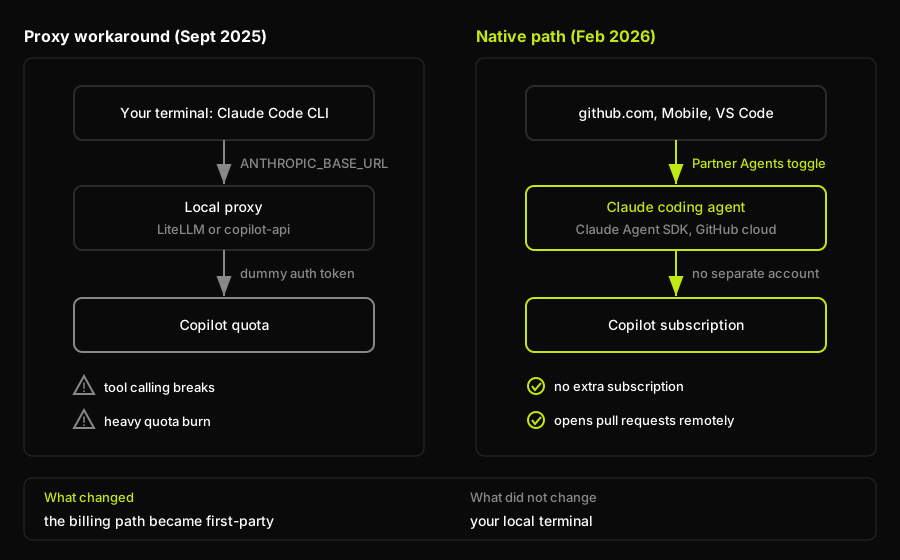
The native path moved billing to a first-party integration running in GitHub's cloud, which is why most people no longer need the proxy, and why anyone who specifically wanted the local CLI still does.
Verified as of August 6, 2026
Checked against GitHub's changelog, the GitHub Copilot documentation, and Anthropic's Claude Code deployment documentation on August 6, 2026. Model rosters and plan tiers in this category shift monthly, so treat the table below as a snapshot and the reasoning above as the durable part.
| Capability | Status | Plans |
|---|---|---|
| Claude models in Copilot | Generally available | Pro and above |
| Claude coding agent on GitHub | Public preview | Pro, Pro+, Max, Business, Enterprise |
| Agent surfaces | github.com, Mobile, VS Code | Same |
| Agent in Copilot CLI | Not listed in docs | Not available |
| Local Claude Code on Copilot billing | No supported path | Not available |
| Agent session billing | Actions minutes and AI credits | Overages billed |
One caveat, because it is exactly the kind of detail that goes stale. Both February changelogs state that "each coding agent session consumes one premium request during public preview." The current documentation instead says agents "consume GitHub Actions minutes and AI credits," at no extra cost inside your quota. Those are different billing models. If cost is why you are here, check your own plan's quota page.
The One Case the Native Path Still Doesn't Cover
The native Claude agent runs on GitHub's infrastructure, not on your machine. GitHub's documentation on third-party agents is explicit that they "work asynchronously on your development tasks on GitHub," triggered from the Agents tab, issues, pull requests, GitHub Mobile and VS Code. The Copilot CLI does not appear in that list.
So if what you wanted was the Claude Code CLI, in your terminal, in your repo, with your shell history and your local dev server, billed to Copilot, the native path does not give you that. It gives you a Claude agent that opens pull requests from the cloud. Useful, and not the same thing.
Anthropic's side confirms the gap rather than closing it. Its Claude Code deployment documentation compares six deployment options: Claude for Teams or Enterprise, the Anthropic Console, Amazon Bedrock, Claude Platform on AWS, Google Cloud's Agent Platform (formerly Vertex AI), and Microsoft Foundry. GitHub Copilot appears nowhere on that list. Anthropic does document an LLM gateway mechanism using ANTHROPIC_BASE_URL, the hook the proxy hack exploits, but only for putting a gateway in front of those six providers.
That is the honest boundary, stated plainly rather than picking a side: the native integration is real and first-party, and it does not cover the local terminal case. Nobody has to take my word for it. Open Copilot settings, look under Coding agent for a Partner Agents section, and see whether Claude is there. Then run claude in your terminal and read what the login prompt offers. Sixty seconds, and you will know which path applies to you.
How Developers Actually Stack Two AI Coding Tools
Almost every page answering "do I need both" lands on "many developers use both" and stops there, which is a verdict pretending to be advice. The interesting question is what running two tools looks like on a Tuesday, and what it costs. Three patterns cover most real setups.
Inline assistant plus terminal agent is the most common and the least disruptive. Copilot handles completions and small in-editor edits, and a terminal agent like Claude Code handles anything that spans files. It works because the two tools occupy different interaction modes rather than competing for the same one: you never have to decide which to use, because the shape of the task decides for you. The cost is two subscriptions and the fact that neither tool knows what the other just did. It is wrong for anyone whose editing is already mostly agentic, because then you are paying for a completion engine you have stopped reading.
One tool per repo is the cheapest way to run two tools honestly. The service with the gnarly legacy patterns gets the tool that handles context better; the greenfield frontend gets whichever tool you find faster. Nothing overlaps, so nothing conflicts. The cost is config drift, which is real and underrated: two sets of rules files, two sets of MCP configs, and a widening gap between how your repos want to be worked on. It is wrong for small teams, where remembering which repo means which tool costs more than it saves.
One tool to explore, another to execute has the best ceiling and the worst discipline requirements. You use one tool read-only to understand a subsystem, produce a plan, and argue with it, then hand the plan to a second tool to implement. It genuinely produces better changes, because the model doing the work has not anchored itself to its own first idea. The cost is context duplication: you pay tokens twice to load the same repo, and again in the handoff, since the plan has to survive being restated. It is wrong when the task is small. Two-tool planning on a one-file change is theater.
| Pattern | How it splits the work | What it costs | When it is wrong |
|---|---|---|---|
| Inline assistant plus terminal agent | Copilot for completions and small in-editor edits, a terminal agent for anything spanning files | Two subscriptions, and neither tool knows what the other just did | Your editing is already mostly agentic, so the completion engine goes unread |
| One tool per repo | Gnarly legacy service gets the better-context tool, greenfield gets the faster one | Config drift: two rules files, two MCP configs, diverging repo conventions | Small teams, where remembering which repo means which tool costs more than it saves |
| One tool to explore, another to execute | Tool A reads and plans read-only, tool B implements the handed-off plan | Context loaded twice, plus the handoff cost of restating the plan | Small tasks. Two-tool planning on a one-file change is theater |
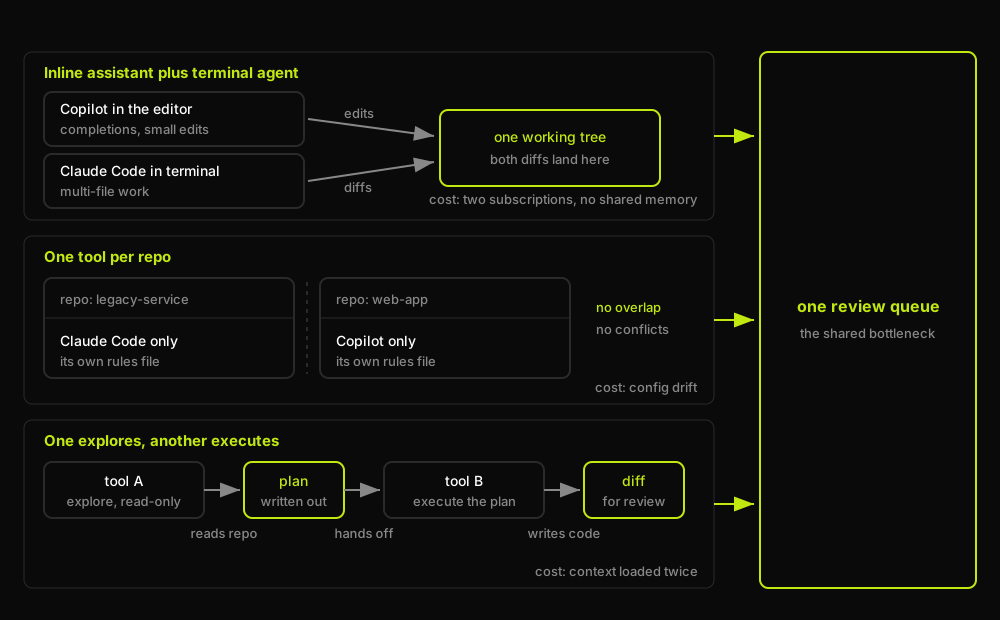
Each pattern splits the work differently and carries a different cost, but all three end at the same place: one review queue, staffed by one of you.
Whichever pattern you run, that review queue is where Autonoma sits: it runs behavioral checks against your actual application on every pull request, so the bottleneck at the end of these three patterns is verifying fewer things by hand rather than reading every line two tools produced.
Still choosing which two tools to stack rather than how? Our AI coding tools comparison covers the field, and Claude Code vs Cursor covers the pairing people ask about most.
Can I Use Cline With Cursor?
Yes, Cline installs and runs inside Cursor as a normal extension. Cline's own installation documentation names Cursor among its supported editors alongside VS Code, JetBrains, Windsurf, VSCodium and Antigravity, and the extension is published on Open VSX (version 4.1.6 as of August 6, 2026), the registry Cursor uses for third-party extensions. In practice you get Cursor's tab completion and inline edits plus Cline in the sidebar for longer autonomous runs, often on a different model or API key. The friction is that both tools will happily edit the same file, and neither asks the other first.
Can Copilot Be Used in Cursor?
No. The official GitHub Copilot and Copilot Chat extensions cannot be installed in Cursor. Cursor's documentation states that "Cursor uses the Open VSX extension registry for third-party extensions," and notes that "not every Microsoft Marketplace extension is listed there." GitHub's official Copilot and Copilot Chat extensions are not published on Open VSX; requesting either from the registry API returns a 404. Microsoft also began technically enforcing its extension license terms against VS Code forks in 2025, starting with its C/C++ extension, which stopped working in Cursor and VSCodium. Community-built Copilot-adjacent extensions exist on Open VSX, but they are not GitHub's, and treating them as equivalent is a bad idea anywhere with a compliance review.
Do I Need Both Copilot and Cursor?
No. Copilot and Cursor overlap almost completely, so paying for both buys a preference rather than a capability. This is the one place where "many developers use both" is the wrong answer. The overlap is near total: inline completion, in-editor chat, multi-file agentic edits, and a picker spanning Anthropic and OpenAI models. The pairings that earn two subscriptions put the tools in different modes, which is why inline-assistant-plus-terminal-agent is common and Copilot-plus-Cursor mostly is not. If you are weighing the two rather than stacking them, we compared them head to head in Cursor vs Copilot.
Is Copilot Using Claude?
Yes, GitHub Copilot offers Anthropic's Claude models, and it has for well over a year. Copilot is not a single model; it is a product with a model picker in front of several vendors. GitHub's supported-models reference currently lists Claude Sonnet 5, Claude Opus 5, Claude Opus 4.8 and Claude Haiku 4.5 among the generally available options, with availability varying by plan and client. Claude now also appears as a coding agent, which is a separate capability with its own plan matrix. For the model-level comparison see GitHub Copilot vs Claude, and for the CLI-level one, Claude Code vs GitHub Copilot.
Does Cursor Use Claude?
Yes, Cursor supports Anthropic's Claude models directly in its model picker. Cursor's documentation lists Claude Opus 5, Claude Sonnet 5, Claude Opus 4.8, Claude Fable 5 and a range of earlier Sonnet and Opus versions, alongside models from OpenAI and Google. Cursor also ships first-party models, including Composer 2.5 and Cursor Grok 4.5, which it says was jointly trained with SpaceXAI. Picking Claude in Cursor and picking Claude in Copilot get you the same model family through two different harnesses, and the harness accounts for more of the difference in output than most people expect.
When Running Two AI Coding Tools Together Is a Mistake
Paying twice for one capability is the obvious failure, already covered above. The expensive one is quieter.
Point two agents at the same working tree and the failure is never a crash. One stages a change; the other reads the file mid-edit and writes over uncommitted work. A rebase resolves cleanly and silently drops the fix one of them made, because both touched the same function for different reasons and neither left a conflict marker behind. Nothing errors. The tests you have still pass. The bug ships.
That's the specific failure Autonoma is built to catch: not a linter warning or a merge conflict, but a running application that quietly stopped doing what it used to, regardless of which tool's diff caused it.
The discipline that prevents this is unglamorous and non-negotiable: one agent per working tree, or separate worktrees per agent, committed often enough that any overwrite is recoverable, with each tool scoped narrowly enough that you can say out loud which files it owns.
Which leaves the constraint that no amount of process fixes. Every pattern in this article increases the rate at which diffs arrive at your review queue, and not one of them increases the rate at which you can review. Two tools generating changes into one repo means twice the code you did not write and are still accountable for, reviewed by the same one of you, on the same Tuesday. The industry's answer so far has been to add another agent to review the first agent's output, which raises the obvious question of what verifies the reviewer. The question that actually settles it is different and much simpler: does the running application still behave correctly after both tools have touched it? That is behavioral end-to-end verification against the real app, and it is the layer Autonoma owns, independent of which tools wrote the code or how many of them you are running.
Frequently Asked Questions
Yes. There are two distinct paths. The first-party path is enabling Claude as a coding agent under Partner Agents in your Copilot settings, which GitHub put into public preview on February 4, 2026 for Copilot Pro+ and Enterprise and extended to Copilot Pro and Business on February 26, 2026. It requires no separate Anthropic subscription and runs on github.com, GitHub Mobile and VS Code. The second path is the older community workaround of pointing the local Claude Code CLI at a Copilot-backed proxy, which is unsupported by both vendors and reportedly breaks tool calling.
Probably not, unless you specifically want the Claude Code CLI running in your local terminal billed to your Copilot subscription. If your goal was Anthropic models or a Claude agent paid for by Copilot, GitHub now ships both natively. If your goal was the local CLI on Copilot billing, no supported path exists: Anthropic's Claude Code deployment documentation lists Claude for Teams or Enterprise, the Anthropic Console, Amazon Bedrock, Claude Platform on AWS, Google Cloud's Agent Platform and Microsoft Foundry, and GitHub Copilot is not among them.
Autonoma, because stacking tools is exactly the scenario that breaks ad hoc review. Every pattern in this article, inline assistant plus terminal agent, one tool per repo, explore-then-execute, increases the rate diffs arrive at your review queue without increasing how fast a human can review them, and two agents touching the same working tree can silently overwrite each other's work with no error and no failing test to flag it. Autonoma runs behavioral end-to-end tests against your running application on every pull request, regardless of which tool, or how many tools, produced the diff, so the check that catches a silent regression doesn't get diluted as you add more assistants to the stack.
Not on the same working tree at the same time. The failure mode is not a crash but a silent one: one agent reads a file while another is mid-edit and overwrites uncommitted work, or a clean-looking merge drops one agent's change because both touched the same function without producing a conflict. Use separate git worktrees per agent, or run them sequentially, and commit often enough that any overwrite is recoverable.
Usually not, because the two overlap almost entirely: inline completion, in-editor chat, multi-file agentic edits, and a model picker spanning Anthropic, OpenAI and Google. Two subscriptions in the same interaction mode buy a preference rather than a capability. The two-tool setups that justify the spend pair tools in different modes, such as an inline assistant plus a terminal agent.


