

Cline vs Cursor comes down to a question most comparisons skip: do you pay per token with your own API key, or pay a flat subscription with a bundled quota. Cline is a free, open source VS Code extension that calls a model provider directly with your key. Cursor is a paid, closed-source IDE (a VS Code fork) with its own subscription tiers and quota system. Below: a worked cost crossover with every assumption stated, what open source actually buys you, and honest per-situation verdicts instead of one overall winner.
Somewhere in nearly every "cline vs cursor" thread on Reddit, someone posts a screenshot of their billing dashboard next to a Cursor invoice: wait, this is cheaper? Someone else posts the opposite. Both are telling the truth about different usage patterns, models, and weeks.
That's the real argument under this comparison. It isn't extension versus IDE. It's two ways of paying for the same work: metered consumption you watch in real time, or a flat number you ignore until the quota resets. Almost nobody in the replies has run the math on when one beats the other. So here it is.
Worth saying before that math starts: several pages ranking for this question have a stake in the answer. Cline's own site publishes a "best AI coding assistant" ranking that puts itself near the top, and at least two vendors selling competing products close their pages by recommending themselves over both. None of that makes those pages wrong, but it's worth knowing going in. This one doesn't sell either.
Cline vs Cursor at a Glance
The plain differences, before the pricing math. Cline is an open source VS Code extension: point it at whatever provider you have a key for (Anthropic, OpenAI, Google, a local model, OpenRouter), and it drives edits inside your editor as an AI coding agent. Cursor is a separate, closed-source fork of VS Code with bundled model access baked into a subscription.
| Dimension | Cline | Cursor |
|---|---|---|
| License | Open source (Apache-2.0) | Closed source, proprietary |
| Where it runs | Extension in your VS Code | Standalone IDE, VS Code fork |
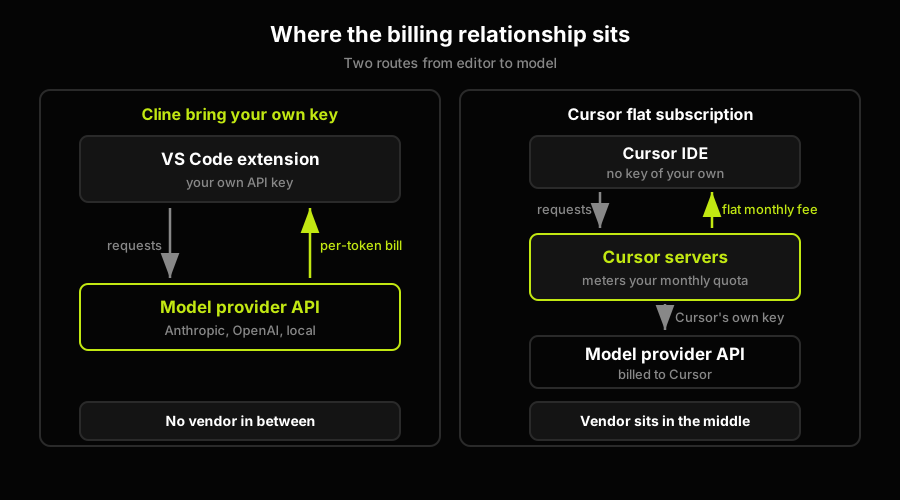
| Who you pay | The model provider, directly | Cursor, via subscription |
| Cost model | Per-token, metered by usage | Flat monthly fee plus quota |
| Quota behavior | No quota, pay-as-you-go | Fixed quota, resets monthly |
| Model choice | Any provider you configure | Curated list, vendor-managed |
Setup burden runs the opposite way: Cline hands you the wiring and model choice; Cursor hides that behind a subscription. The dimension that decides more isn't in that table, though. It's a number: how much you'd actually spend given daily agent use.
The Real Question Is Economics, Not Features
Every page that touches "cline vs cursor pricing" states Cline is free and Cursor costs $20 a month, then moves on. That's true and mostly useless. Cline being free to install says nothing about what you pay to run it, since every token it sends still costs money, billed the moment the request completes. With Cursor's subscription, that token cost is Cursor's problem: they pay providers on the back end and bet your usage stays inside what the price funds.
So the honest comparison isn't free versus $20. It's a visible rate card versus a flat fee assuming an average user, and whether that's a good deal depends on whether you are one.
Here's a worked example, every input stated as an assumption to swap for your own numbers. Assume a turn costs about 8,000 input tokens and 1,200 output tokens, dominated by context the agent re-reads to orient itself, not the prompt you typed. Assume caching catches 75% of those input tokens at a tenth of the fresh rate, the rest at full rate. Assume a mid-tier model priced, one example among several, around $3 per million input tokens and $15 per million output, the range several providers publish for reasoning models. A different model moves this number; that's why it's an assumption, not a fact.
Run the arithmetic and one turn costs a little over two and a half cents: $0.006 for the fresh quarter of input tokens, $0.002 for the cached three quarters, $0.018 for output. Call it $0.026 a turn.
Multiply by usage across three bands. Twenty turns a day (light use) across 21 working days is 420 turns, about $11. Sixty a day (steady use) is 1,260 turns, about $33. A hundred fifty a day (an agent running most of the day) is 3,150 turns, close to $82.
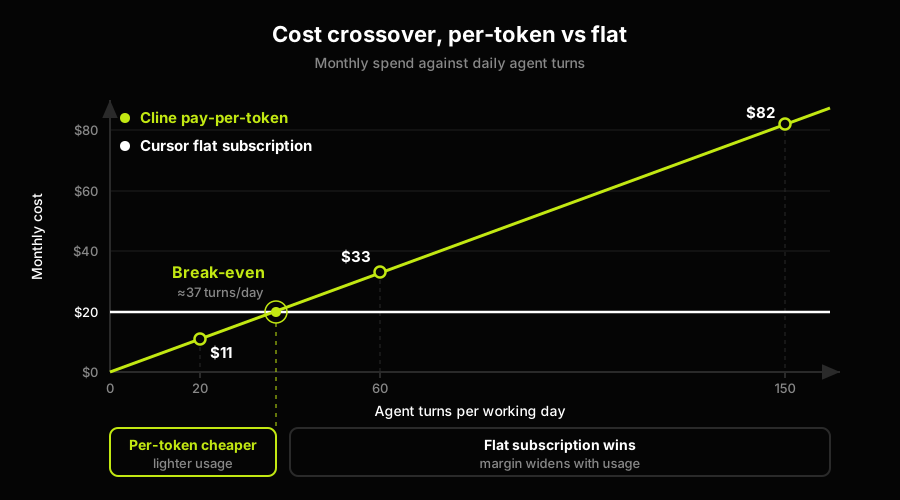
Against a flat $20 subscription, the crossover sits around 35 to 40 turns a day at this profile. Below that, paying per token is cheaper. Above it, the subscription wins, by a widening margin the heavier you go, since the flat fee doesn't move while the metered bill keeps climbing.
Change one assumption and the crossover moves. Drop the cache hit rate to 40% and the per-turn cost rises enough to pull the crossover into the light-use range. A pricier model does the same thing faster. That's why a single published number, this one included, would be dishonest without its assumptions attached: run this with your own turn count and rate, and you'll get the crossover that matters for your bill.
What the Same Task Costs You Can (and Can't) See
The economics above are aggregate. There's a narrower version: comparing tools task by task, same prompt, both tools, the same-task methodology we ran on Claude Code vs Cursor elsewhere. We won't rebuild that methodology here, but it's worth flagging what changes when you point it at a BYOK tool instead of two subscription tools.
On the BYOK side, every task has an observable price tag: your provider's dashboard tells you exactly what it cost, tokens in, tokens out, a dollar figure. You know, to the cent, which approach was cheaper.
On the subscription side, that number doesn't exist. Cursor's quota meters requests, not dollars, so you see how much quota a task used, not what it would have cost in raw model spend, since that figure is folded into a price built for an average user.
That's a real difference in how you reason about cost, separate from code quality. A team on Cline can ask whether a refactor was worth its tokens. A team on a subscription can only ask if they're still inside quota.
What Open Source Actually Buys You Here (and What It Costs You)
Cline being open source does real work here, separate from pricing. You can read the extension's code and see exactly what it sends to a provider, which matters if security needs to sign off first. You can fork it if a maintainer decision goes somewhere you don't want to follow, and you're never a policy change away from a vendor deciding your quota is different next cycle.
Cursor's closed model buys the opposite trade: you're not managing model access or provider accounts, Cursor is, plus a support relationship and one bill instead of an invoice you reconcile yourself.
What open source costs you isn't ideological, it's operational. You pick a provider, generate a key, and live with its rate limits and outages. There's no managed quota between you and a runaway agent loop; that loop is directly your bill, and if something breaks, there's no ticket to file.
Neither trade is a governance win or failure. It's the cost of who's steering: the extension is a tool you fully control and fully own the risk of running; the subscription is managed, and someone else absorbs that risk for a flat rate.
The Verdict: It Depends on Your Situation
Every source that's spent months living with both tools converges on the same, uncomfortable-for-a-ranking-page answer: a lot of developers run both, and the pick-a-winner framing usually doesn't survive contact with how people actually use these tools. So instead of one verdict, here are five, for five readers.
A solo developer with spiky usage, heavy some weeks, idle others, is the clearest case for Cline: a flat subscription is a bad deal for usage that swings that hard. A tech lead standardizing tooling across a team is usually better served by Cursor, not because it writes better code, but because a flat per-seat cost is easier to budget than provider invoices that vary by engineer. A regulated or air-gapped shop has real reasons to lean toward Cline, since you can audit exactly what the extension sends where, though that shifts auditing and key management onto you.
A heavy, all-day agent user is where the math above actually matters: it depends on your token profile, not your identity as a heavy user. Warm context and high cache hit rates can keep BYOK ahead even at volume; constant cold-context work makes the flat price look better the more you use it. And someone who wants zero setup, no key management, no rate-card research, should just use Cursor. For the wider field, Cursor alternatives covers the rest of the market, Cursor vs Windsurf covers that pairing directly, and Cursor vs Copilot covers a different pairing this article leaves alone.
Prices and quotas referenced here reflect what Cline's model providers and Cursor had published as of July 2026. Both change often enough that the figures above are a worked example, not a live quote. Re-run the arithmetic with whatever your provider currently publishes before committing a budget to either path.
How Autonoma Tests What Cline and Cursor Write
Every comparison in this cluster, this one included, has been implicitly answering a narrower question than it looks like: how you pay for and choose the tool that produces a diff. Nothing above, and nothing on the pages currently ranking for "cline vs cursor," answers whether that diff is correct once it's running. The furthest this SERP goes on that front is pairing one agent that generates code with a second agent that reviews it, one model generates, another reviews, which is still two models reading the same diff and forming an opinion about it. That's static code review with more steps. It never opens the app.
That's the gap Autonoma is built to close, and it's a genuinely different layer than anything discussed above. We don't compete with Cline or Cursor, and we're not a code review tool sitting between an agent and a merge button. Autonoma reads your codebase, generates behavioral end-to-end tests from what the application actually does, and runs them against a real per-PR preview environment, a live instance of your app, not a static read of the diff. Whether the PATCH endpoint Cline wrote against your own API key or the refactor Cursor generated under its subscription actually behaves correctly for a real user clicking through the flow is a runtime question, and runtime questions need a runtime test.
Mapped against this article's structure: the economics section computed what it costs to get a diff written. The open-source section covered who's accountable for the tooling that produced it. Neither number changes once you ask whether the diff is correct, and correct is the one axis this entire comparison, and most of what ranks for it, doesn't measure at all. On every pull request, our Diffs Agent reads what changed in the code and updates the relevant test cases accordingly, whichever tool wrote that diff and whichever pricing model paid for it.
The bring-your-own-key math above and the subscription math both answer the same underlying question: what does it cost to get code written. Whether Cline wrote it for two and a half cents a turn or Cursor wrote it against a flat monthly fee, the code arrives in the same state: generated, plausible-looking, and unverified. That's true whether the diff came from an agent working under your API key or one working under someone else's quota. Closing that gap is a separate line item from either pricing model, and it's the one neither vendor's invoice includes.
Running Both, or Switching Between Them
None of this is actually either-or for a lot of teams, because Cline runs inside Cursor. A developer can lean on Cursor's own agent for most day-to-day work and reach for Cline, pointed at a separate provider account, for the specific tasks where watching the token bill in real time matters: a long batch refactor, an experiment with a model the moment it ships, before Cursor has curated it onto its own list. The FAQ below covers why this combination works mechanically. What it skips is what actually changes operationally when a team migrates fully in either direction.
Moving a team onto Cline means someone now owns key management: who holds the provider API key, how it rotates, what happens the day someone leaves. A subscription seat gets deactivated in one click. A leaked or orphaned API key is a security incident you have to notice yourself, because no vendor is watching your usage pattern for you. Budget for that ownership before the migration, not after the first strange charge shows up on a provider invoice nobody was checking.
Moving a team onto Cursor means giving up the per-task cost visibility this whole article has been arguing for. You get one predictable invoice instead of several provider bills, a real simplification for approving expenses, and a real loss if anyone on the team wanted to answer "was that feature worth what it cost to generate" with a number instead of a shrug. It also means retiring whatever internal tooling you'd built around per-task cost tracking, since Cursor's quota reporting doesn't expose the dollar figure underneath it.
Spend visibility is worth planning for explicitly if you take the Cline route at any real scale. One developer can watch their own provider dashboard without much ceremony. A dozen engineers each holding a key needs either a shared billing account with per-user budget alerts, or a lightweight logging proxy that records every request's token count and cost centrally, the same way you'd track cloud infrastructure spend instead of trusting each engineer to notice their own bill creeping up. Skip that step and a team ends up back on Reddit next year, posting its own confused screenshot, except now it's a shared account instead of one person's key.
And whichever direction you move, model availability behaves differently afterward. A team on Cline can point at a new model the day a provider ships it. A team on Cursor waits for Cursor to curate that model onto its list, trading a few days or weeks of control for not having to evaluate every release themselves. Code review habits don't change either direction: the diff is the diff, regardless of which tool or which pricing model produced it.
None of this is a reason to avoid either tool. It's a reason to treat the switch itself as a small project with its own checklist, not a settings change you make on a Friday afternoon: who holds keys, who watches spend, and who's responsible for noticing when a provider changes a price or a model quietly gets deprecated out from under a running agent.
The one thing that shouldn't have to migrate along with a tool switch is your test coverage. If your suite is written against Cline's config format or wired into Cursor's specific agent output, moving between them means rewriting your safety net at the exact moment you can least afford a gap in it. Autonoma generates its tests from your application's actual behavior, not from either tool's config or output format, so a team switching agents doesn't have to rebuild the thing that was supposed to catch what the switch broke.
Frequently Asked Questions
For a lot of workflows, yes. Cline drives the same kind of agentic editing, reading your codebase and making multi-file changes, inside VS Code, and you choose the model behind it. What Cline doesn't replace is Cursor's managed IDE experience: curated model access, a support relationship, and a single predictable bill. If you're comfortable picking a provider, managing a key, and watching your own usage, Cline can fully replace Cursor's agent workflow at a different cost structure. If you want that managed entirely for you, it can't.
Yes, and it's a common setup. Cline is a VS Code extension, and Cursor is a fork of VS Code, so most VS Code extensions, Cline included, install and run inside Cursor without issue. Developers do this to get bring-your-own-key cost control on some tasks while keeping Cursor's own agent and managed model access for others. The one caveat: you're now tracking two separate usage systems, Cursor's quota and your own provider's token bill, so the cost-observability benefit of BYOK only holds for the work you actually route through Cline.
That's a three-way question this article doesn't try to answer, since it's specifically about the economics of Cline versus Cursor as a pair. For a direct comparison that includes Windsurf, see our Cursor vs Windsurf breakdown, which covers context management, autonomy, and output quality between those two rather than the pricing-model question this piece focuses on.
The extension is free and open source; running it isn't. Every request Cline sends still bills your model provider account directly, at that provider's published per-token rate. "Free" describes the tool, not the tokens it spends on your behalf. For most usage levels, that's still cheaper than a subscription. Past a certain volume, worked out in the economics section above, it isn't.
It depends entirely on usage, not on which tool is better. At a representative token profile, roughly 8,000 input and 1,200 output tokens per agent turn with a 75% prompt-cache hit rate on a mid-tier model, the crossover against a flat $20 monthly subscription lands around 35 to 40 agent turns per working day. Below that, paying per token with Cline tends to be cheaper. Above it, Cursor's flat fee tends to win, by a wider margin the heavier the usage. Change the model, the cache hit rate, or how much context gets re-read per turn, and that crossover point moves, so treat the number as a starting formula, not a fixed answer.
No. Autonoma is not a coding assistant and doesn't write your application code, so it isn't something you'd pick instead of either tool. It's the layer after either one produces a diff: it generates behavioral end-to-end tests from your codebase and runs them against a real per-PR preview environment to confirm the change actually works when a user clicks through it. Whichever pricing model you land on, that verification step isn't included in either tool's bill.


