

Agentic testing is an autonomous testing approach where AI agents read your codebase, generate test cases from code intent, execute them against your running application, and self-heal when your UI changes. No scripts, no recordings, no manual maintenance. Unlike traditional AI test automation that still requires humans to maintain scripts, agentic testing owns the entire test lifecycle. This post walks through exactly how Autonoma's agentic testing engine takes a real application from zero test coverage to 80%+ E2E coverage in days, step by step. The codebase is the only input needed.
Most teams we talk to have the same number on the whiteboard: somewhere between 20% and 30% E2E coverage, and a maintenance backlog that grows every sprint. The other number they share, usually more reluctantly, is the hours: 20+ per month keeping selectors, brittle locators, and flaky assertions alive. Traditional AI test automation tools helped with script generation, but the scripts still need a human to maintain them. That's half a developer's time, spent not on features, not on quality improvements, but on keeping the existing suite from falling apart.
The testing velocity gap is structural. AI coding tools have multiplied feature output without multiplying test output, and shift-left strategies that worked when writing code was the bottleneck now assume a pace humans can't sustain. Writing tests by hand cannot keep up with generating code by agents.
Teams using Autonoma's agentic testing reach 80%+ critical flow coverage within days of connecting their codebase, and drop monthly maintenance time to near zero. The walkthrough below shows exactly how: what the agents do, in what order, and what the output looks like at each step.
Agentic Testing vs Traditional Automation
A quick grounding before the walkthrough, because the term gets used loosely.
Scripted testing (Playwright, Cypress, Selenium): you write the test. Step by step. Every click, every assertion. When your app changes, the script breaks and you fix it. It scales with headcount, not velocity.
Record-and-playback testing: you click through the flow, a tool records it, you replay it. Faster to create, but just as brittle. The recording is a frozen snapshot of your app at one moment in time.
Agentic testing: AI reads your code and builds tests autonomously. It understands routes, components, and user flows directly from the codebase. It doesn't need a human to define steps or click through anything. Tests self-heal when the app changes. For a deeper look at the concept, our full explainer on agentic testing covers how the agent loop works.
| Dimension | Scripted Automation | Record-and-Playback | Agentic Testing |
|---|---|---|---|
| Test authoring | Developer writes code manually | Tester clicks through flows | AI generates from codebase |
| Maintenance model | Manual selector/assertion updates | Re-record when UI changes | Self-healing, agents adapt automatically |
| Adaptability | Breaks on any UI change | Breaks on any UI change | Adapts to UI changes by understanding intent |
| Skill required | Programming + framework expertise | Basic QA, no code needed | None, connect codebase and go |
| Coverage approach | Only what developers write | Only what testers record | AI identifies and covers critical paths |
| Edge case handling | Only if explicitly scripted | Only if explicitly recorded | Generated automatically from code analysis |
| Cost over time | Grows with codebase complexity | Grows with UI change frequency | Flat, agents scale with the codebase |
The gap between "AI-assisted" and "agentic" is ownership. AI-assisted means AI helps you write a script that you still own and maintain. Agentic means the AI owns the entire test lifecycle. For a deeper comparison across every dimension, see our agentic testing vs traditional automation deep dive.
How Agentic Testing Works: From Zero to Full Coverage
This is the walkthrough. Not theoretical, not abstract. Here's what actually happens when you connect a codebase to Autonoma and agents take over.
The application in this example is a typical B2B SaaS: a Next.js frontend, a REST API, authentication, a dashboard, a settings flow, and a checkout. Zero existing E2E tests.
Step 1: The Planner Agent Reads the Codebase
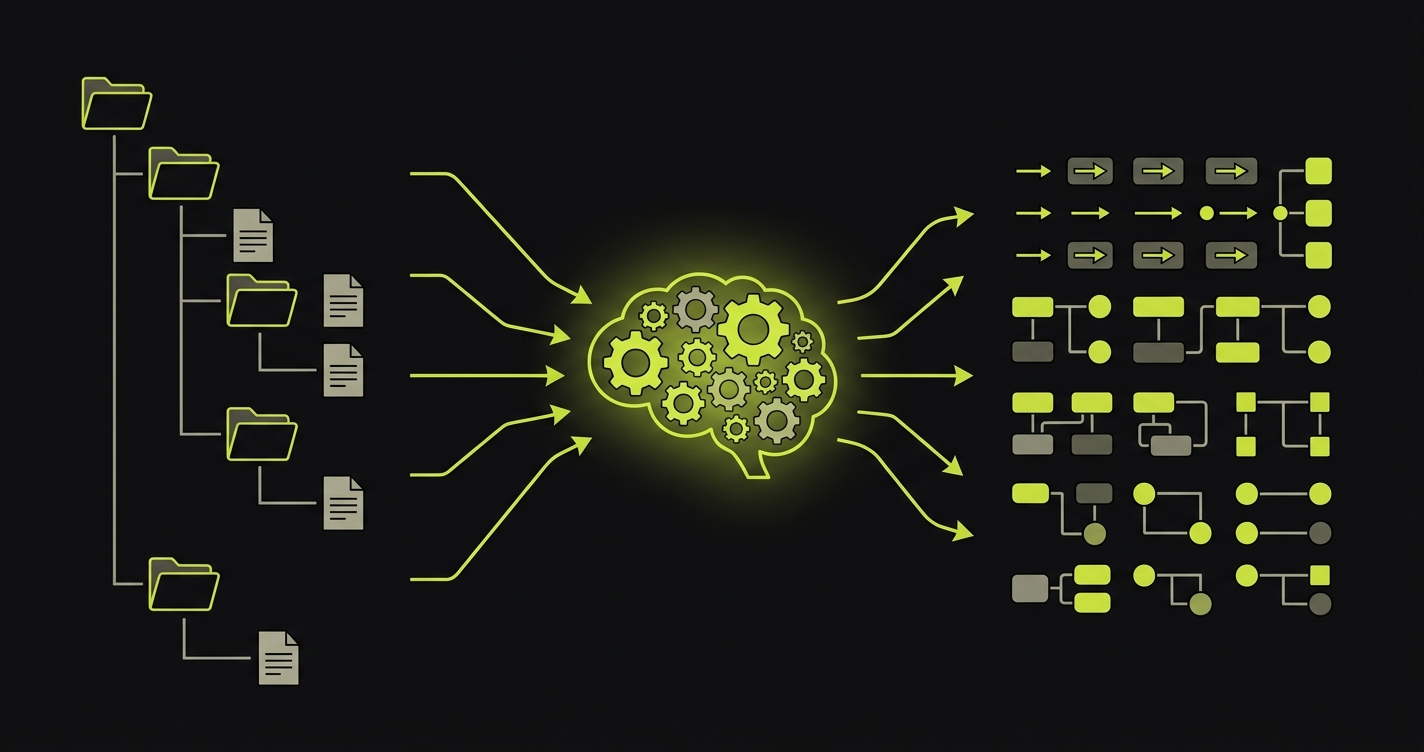
The first thing our Planner agent does is read the codebase. Not execute it. Not click through it. Read it.
It parses routes and page components to understand what screens exist. It reads API route handlers to understand what data flows where. It traces component trees to understand which interactions trigger which state changes. It maps authentication boundaries to understand what's protected and what's public.
For a Next.js app, that means reading the app/ directory structure and understanding that app/(dashboard)/checkout/page.tsx is a protected route that renders a multi-step checkout flow. It reads the form components on that page and understands what fields are required, what validation logic runs, what the success state looks like, and where the user lands after a successful submission.
The output of this step is a structured map of the application: what exists, how it's connected, and what the critical paths are. The Planner agent doesn't guess. It reads.
Step 2: Identifying Critical Paths
With the application map built, the Planner agent prioritizes. Not everything deserves the same level of test coverage immediately, and our agents know this.
The prioritization logic focuses on three criteria. First: revenue and conversion paths. Checkout, sign-up, payment processing. If these break, the business stops. Second: authentication and access control. Login, logout, session management, protected routes. Third: core feature flows. Whatever the application's primary value is, the flows that deliver it.
For our example SaaS, the Planner agent identifies these as the top-priority test scenarios:
- New user registration and onboarding
- Login with valid credentials
- Login with invalid credentials (error handling)
- Password reset flow
- Dashboard load and data display
- Creating a new record (the app's primary feature action)
- Editing and deleting that record
- Checkout: happy path (successful payment)
- Checkout: declined card
- Settings update (profile, billing, notifications)
- Logout
This isn't a comprehensive list of every possible test. It's the set of tests that, if they all pass, gives you genuine confidence the application is working. The Planner agent also identifies database state requirements for each scenario. A checkout test needs a user account with items in the cart. A settings update test needs a logged-in user. The Planner generates the API calls needed to put the database in the right state for each test, automatically.
Step 3: Generating Test Cases
Once the critical paths are identified, the Planner agent generates full test cases for each one. This is where the difference from traditional test planning becomes visible.
A traditional test plan defines steps. The Planner agent generates intent-based test cases that define the goal, the starting conditions, the expected outcome, and the variations to cover.
For the checkout happy path, the generated test case looks something like this:
Test: Checkout - Successful Purchase
Goal: Verify that a user with items in cart can complete a purchase

Starting state:
  - Authenticated user session
  - Cart contains 1 item (Product ID: any active product)
  - Valid payment method available

Scenario coverage:
  1. Happy path: complete checkout with valid card
  2. Edge case: apply valid promo code before checkout
  3. Error state: enter invalid card number, verify error message
  4. Error state: enter expired card, verify appropriate error
  5. Recovery: correct invalid card, complete purchase successfully

Expected outcomes:
  - Order confirmation page displayed
  - Order ID present in confirmation
  - Confirmation email triggered (verify API call)
  - Cart cleared after successful purchase
Notice what's not there: no CSS selectors, no element IDs, no hardcoded wait times. The test describes what to verify, not how to find elements on the page. The Automator agent figures out the "how" when it executes.
This also means the test case covers error states and edge cases, not just the happy path. A real user will enter a wrong credit card number at some point. A real user will try a promo code. These scenarios are generated automatically from the Planner's understanding of the checkout component's validation logic.
Step 4: The Automator Agent Executes
The Automator agent takes each test case and runs it against the live application. This is where agentic testing diverges most sharply from traditional AI test automation, which still requires a human to define and maintain the scripts.
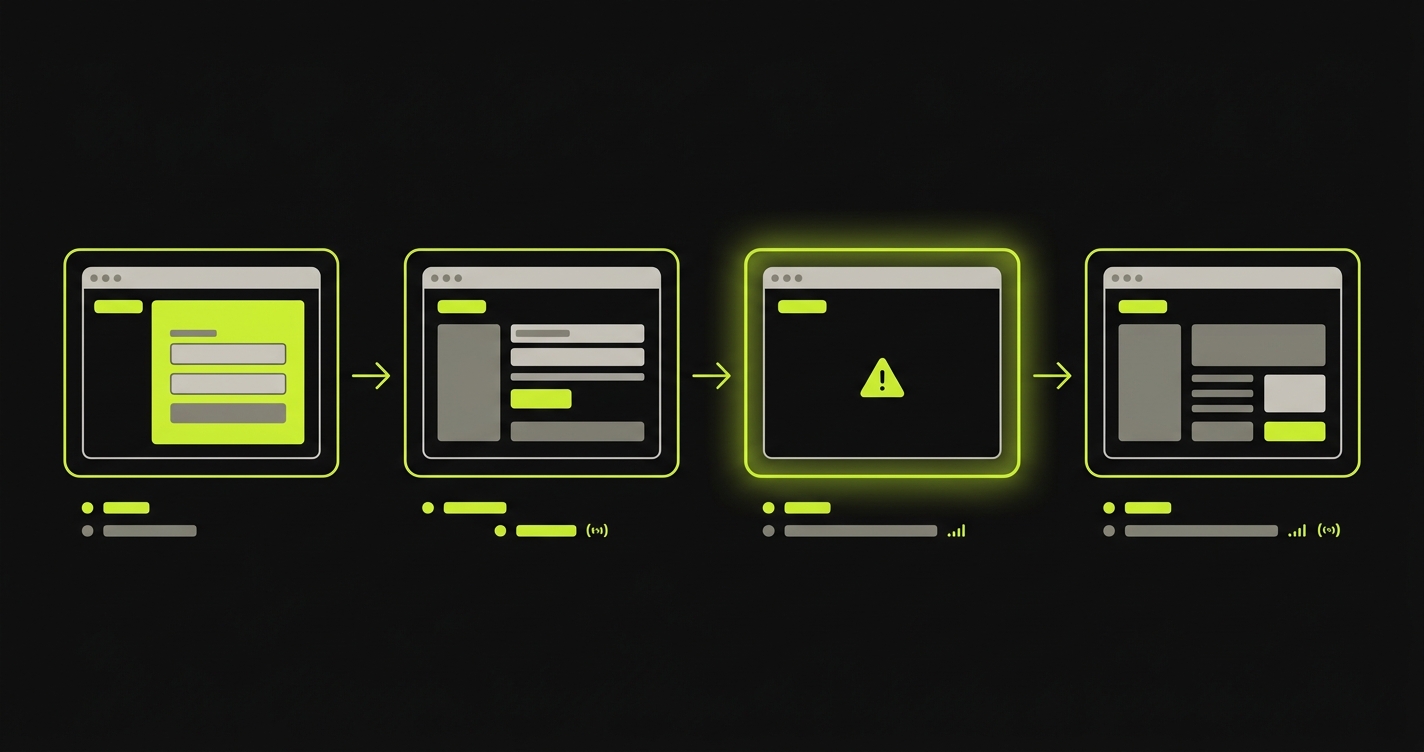
The Automator combines a vision model (to see what's on the screen), a reasoning model (to decide what to do next), and a memory layer (to maintain context across a multi-step flow). It navigates the application the way a real user would, interpreting what it sees rather than following a fixed sequence of clicks.
When it reaches the checkout page for the first time, it sees a form. It reads the labels. It understands that a field labeled "Card Number" expects a 16-digit card number. It doesn't need a selector. It doesn't need a test ID attribute on the element. It understands the page.
This matters enormously in practice. Most real applications have components from multiple sources: a design system, a third-party payment widget, a UI library. A scripted test needs a selector for every element in every source. The Automator reads the rendered page and acts on what it sees, regardless of where the components came from.
Execution produces a full trace for each test: screenshots at every step, network requests made, API calls triggered, and a clear result. If the test fails, the trace shows exactly where and why. The Automator doesn't just say "test failed." It shows you the screenshot of the state it was in when something went wrong, the action it tried to take, and what the application returned. You can see this in action with a real application walkthrough.
Step 5: Self-Healing When the UI Changes
Here's the scenario that breaks every traditional test suite eventually. Your designer ships an updated checkout form. The "Place Order" button moved. Its text changed from "Place Order" to "Confirm Purchase." The form fields were reorganized. CI runs. Every checkout test that used a selector for #place-order-btn fails.
With scripted tests, this is a debugging session. Find every test that touched checkout. Update the selectors. Verify they work. Push. Repeat next time the designer ships an update.
With Autonoma, the Maintainer agent handles it. It detects the code change, re-evaluates the affected test cases, and runs updated executions using the new UI. It doesn't look for a selector. It looks for a button that, when clicked, submits the checkout form. The button still exists. The intent is still fulfillable. The test passes.
A before/after comparison makes this concrete:
| Scenario | Scripted Automation | Autonoma Agentic Testing |
|---|---|---|
| Button text changes from "Place Order" to "Confirm Purchase" | Test fails, selector needs manual update | Maintainer detects change, test adapts and passes |
| Form fields reordered (email moved below password) | Tests fail if relying on positional selectors | Agent reads field labels, order irrelevant |
| New required field added to checkout | Test fails with unexpected required field error | Planner updates test case to include new field, Automator fills it |
| Component class renamed (btn-primary to button-cta) | CSS selector fails immediately | Agent uses visible context, class name irrelevant |
| Modal added before confirmation step | Test gets stuck waiting for elements that never appear | Agent sees modal, handles it, continues flow |
Self-healing is not a repair mechanism. It's a consequence of how our agents understand the application: by intent, not by selectors. The test doesn't break in the first place because it was never brittle.
What the Before/After Actually Looks Like
The numbers below are representative of what teams experience when they move from a scripted test suite (or no tests at all) to Autonoma's agentic testing. They're grounded in patterns we see consistently, not theoretical projections. For a full breakdown of the economics, our autonomous testing ROI analysis covers the cost model in detail.
| Metric | Before (scripted or no tests) | After (Autonoma agentic testing) |
|---|---|---|
| Time to first test coverage | Days to weeks (writing scripts) | Minutes (agents generate from codebase) |
| E2E test coverage | 20-30% of critical flows | 80%+ of critical flows |
| Monthly test maintenance time | 20+ hours (selector fixes, brittle tests) | Near zero (self-healing handles changes) |
| False positive rate | High (flaky selectors, race conditions) | Low (agents verify intent, not implementation) |
| Coverage after a major UI redesign | Tests break, manual fixes required | Maintainer agent heals tests automatically |
| New feature test coverage | Requires engineering time to write scripts | Planner generates tests from new code automatically |
The shift that matters most is not the coverage number. It's the maintenance time. A team spending 20+ hours a month fixing brittle tests isn't just losing engineering hours. They're making a rational decision to ignore the test suite when it's easier to just check manually. That decision compounds. By the time coverage has drifted to 20%, nobody trusts the suite, nobody runs it before shipping, and production bugs are caught by users.
Getting maintenance to near zero is what makes the suite trustworthy. When tests don't break on every UI update, engineers run them. When engineers run them, coverage is meaningful. When coverage is meaningful, production bugs get caught before users see them.
Where Agentic Testing Has Limits
We'd be doing you a disservice if we presented this as a complete replacement for every kind of testing.
Performance testing requires load generation and latency measurement tools. Autonoma verifies that flows work correctly, not that they work at scale under concurrent load. That's k6, Locust, or a dedicated performance testing setup.
Complex data pipelines with intricate transformation logic and strict data integrity requirements are often better served by deterministic unit tests that verify exact output values. Our agents can test the interfaces exposed to users, but internal data processing logic with strict numerical contracts is a case for unit tests with exact assertions.
Specialized domain logic (complex financial calculations, regulatory compliance rules, algorithmic outputs) benefits from tests that pin exact values. Our agents verify observable behavior, not precise internal computation.
The practical split we recommend to most teams: use Autonoma for E2E user flows and feature verification, which is typically 80% of the testing work draining your QA capacity. Keep a focused set of unit tests for critical business logic with strict behavioral contracts. This combination gives you high confidence without high maintenance. Agentic testing doesn't eliminate the QA role. It eliminates the QA bottleneck. Engineers shift from writing and fixing scripts to reviewing coverage plans, defining quality standards, and investigating the failures that agents surface. For teams building out their CI/CD pipeline around this model, our continuous testing guide covers how to structure the pipeline.
How to Get Started with Agentic Testing
If you've read this far and want to see it work on your codebase, the process is straightforward.
Connect your codebase. Point Autonoma at your GitHub, GitLab, or Bitbucket repository. The Planner agent begins reading your application structure immediately.
Review the generated test plan. Before any tests run, the Planner produces a structured plan of what it found: routes, user flows, critical paths. Review it. Adjust priorities if needed. This is your chance to tell the agents "checkout matters more than the about page."
Run against staging. The first batch of tests runs against your staging environment. You get full execution traces, screenshots, and pass/fail results for every scenario. No production risk.
Integrate into CI/CD. Add Autonoma as a required check on pull requests. Every PR now runs the full suite automatically. No additional configuration per test.
Scale coverage. As your codebase grows, the Planner picks up new routes and flows automatically. AI test generation from code means new features get test coverage without anyone writing a test.
What Full Agentic Testing Coverage Actually Means
The teams that get the most out of agentic testing reach a point we've started calling "zero cognitive load." It's when the test suite disappears from the mental overhead of shipping. Not because tests don't run, but because they just work. PR goes up, agents run, green means the flows work, red means something genuinely broke.
Nobody is fixing selectors at 11pm. Nobody is skipping CI because the suite is "probably just flaky." Nobody is writing test scripts for the new feature instead of building the next one.
That's what zero to full coverage actually means. Not a coverage percentage. A change in how your team relates to shipping.
Connect your codebase to Autonoma, the autonomous testing platform that handles everything from there.
Frequently Asked Questions
First test cases are generated within minutes of connecting your codebase. The Planner agent reads your routes, components, and flows and begins producing test scenarios immediately. Most teams have their critical flows covered within a day of onboarding. Full coverage across the application typically happens within a week, depending on codebase size.
No. The Planner agent derives test cases directly from your codebase. There's no test script to write, no flow to record, no selector to maintain, and no framework to configure. You connect the codebase and agents take over from there. The codebase is the spec.
Agentic testing means AI agents own the full test lifecycle: they read your code to understand what the application does, plan test cases based on that understanding, execute those tests against your running app, and self-heal when your UI changes. The difference from 'AI-assisted' testing is ownership. AI-assisted means AI helped you write a script you still maintain. Agentic means the agents maintain it.
Our agents understand intent, not selectors. When the Automator runs a checkout test, it looks for a button that submits the purchase, not a button with a specific CSS class or element ID. When that button's text changes from 'Place Order' to 'Confirm Purchase,' the agent sees the button, understands its purpose from context, and clicks it. The Maintainer agent also monitors code changes and proactively re-evaluates affected tests so they're updated before they'd fail in CI.
For E2E user flows and feature verification, 80%+ coverage of critical paths is consistently achievable. Some teams reach higher. The practical limit is not the agents' capability but the nature of the application: highly specialized internal data processing logic or low-level infrastructure components are better served by unit tests. Our recommendation for most teams: Autonoma for user flows and regression coverage, deterministic unit tests for strict business logic contracts.
Yes. The Planner agent identifies what database state each test scenario requires and generates the API calls needed to set that state before the test runs. A checkout test needs a user with items in the cart. A settings test needs an authenticated session. The Planner handles this automatically. No manual test fixture setup or seed data management required.
Yes. Our agents include verification layers at each step that ensure consistent results. Failures are real failures, not false positives from brittle selectors or race conditions. The Automator produces a full trace for every test run, so when something does fail, you see exactly what the agent observed and what went wrong. Most teams run Autonoma as a required CI check on every PR.
AI-assisted test writing still requires a developer to provide context, structure the test, and maintain it. AI test generation from code means agents read your codebase directly, including routes, components, and validation logic, and generate complete test cases without any human input. The codebase is the only spec needed. The difference is who owns the test lifecycle: with AI-assisted, you do. With AI test generation from code, the agents do.
Web applications with user-facing flows benefit most. SaaS products, e-commerce platforms, dashboards, and any application where users navigate through multi-step workflows. Autonoma reads your frontend codebase to understand what flows exist and generates E2E tests for them. Applications with purely internal computation and no user interface are better served by unit tests.


