
AI for QA describes AI agents that generate, execute, and maintain software tests directly from a codebase, replacing manual test scripts and recorded click-throughs. Modern AI for QA reads your routes, components, and user flows, derives test cases from that analysis, and repairs tests automatically through self-healing when the underlying code changes. Coverage tracks the application instead of decaying alongside it.
Every automation team eventually hits the same wall. Scripts pass in code review, then break in production the moment a designer renames a CSS class. Someone reruns the suite, watches it fail on something that has nothing to do with the actual bug, and spends the next hour fixing the test instead of shipping the fix.
That cycle is what pushed AI into QA in the first place, not as a novelty, but as a way to stop maintaining tests by hand. The tools that solve this well share one property: they treat the codebase as the source of truth, not a script someone wrote once and forgot about.
Under that definition, AI for QA is four things happening in order: an agent reads the codebase, derives test cases from what it found, runs them against a real build, and keeps them current as the code changes. Every section below covers one of those four steps.
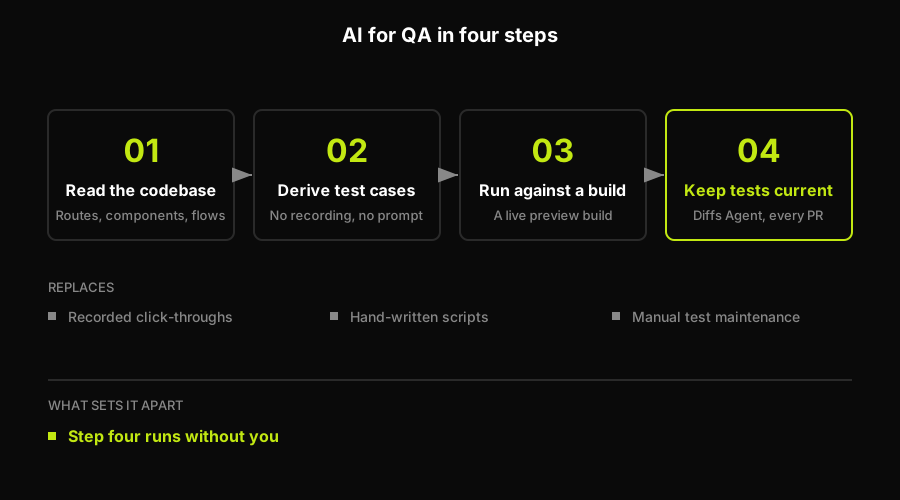
The definition in four steps. Steps one through three describe most test tooling; step four is the separator, because the suite gets re-derived from the code rather than repaired by a person, and every result is classified before anyone is asked to look at it.
How AI Agents Actually Generate Tests Today
Requirement-Level Brainstorming With LLMs
Writing good test cases takes time. You have to think through edge cases, user flows, and failure modes, and that requires both context and experience.
General-purpose models like Claude and ChatGPT are useful here. Describe a checkout flow (cart, discount codes, shipping, payment, confirmation) and either model will return test scenarios covering happy paths plus edge cases you might not have thought of: a discount code expiring mid-checkout, a session timing out right after payment entry.
Here's a version of that prompt you can copy directly:
I'm testing a checkout flow. It includes:
1. Adding items to cart
2. Applying discount codes
3. Entering shipping information
4. Selecting a payment method
5. Confirming the order

What test cases should I write to cover this flow, including edge cases?
This is augmentation, not automation. The model gives you a starting list. A human still decides which cases matter and adds the domain-specific ones the model has no way of knowing.
Test Cases Derived From the Codebase, Not From Recordings
Brainstorming test cases from a prompt is still manual work: someone has to describe the flow, someone has to review the output, someone has to turn it into a runnable test. The more useful version skips the description step entirely.
This is what Autonoma does differently. Instead of asking a person to explain what the application does, an agent reads the actual codebase: the routes, the components, the user flows encoded in the code itself. It plans test cases from that analysis and executes them against a running build of the application. There is no recording step and no natural-language description of what to test. The codebase is the spec.
That matters for a mundane reason: a codebase doesn't get tired, doesn't skip edge cases because it's Friday afternoon, and doesn't forget to update a test when the flow changes, because the same agents that generated the test also watch the diff that changed it.
Concretely, that looks like a report tied to a commit range rather than to a person's memory of the product:
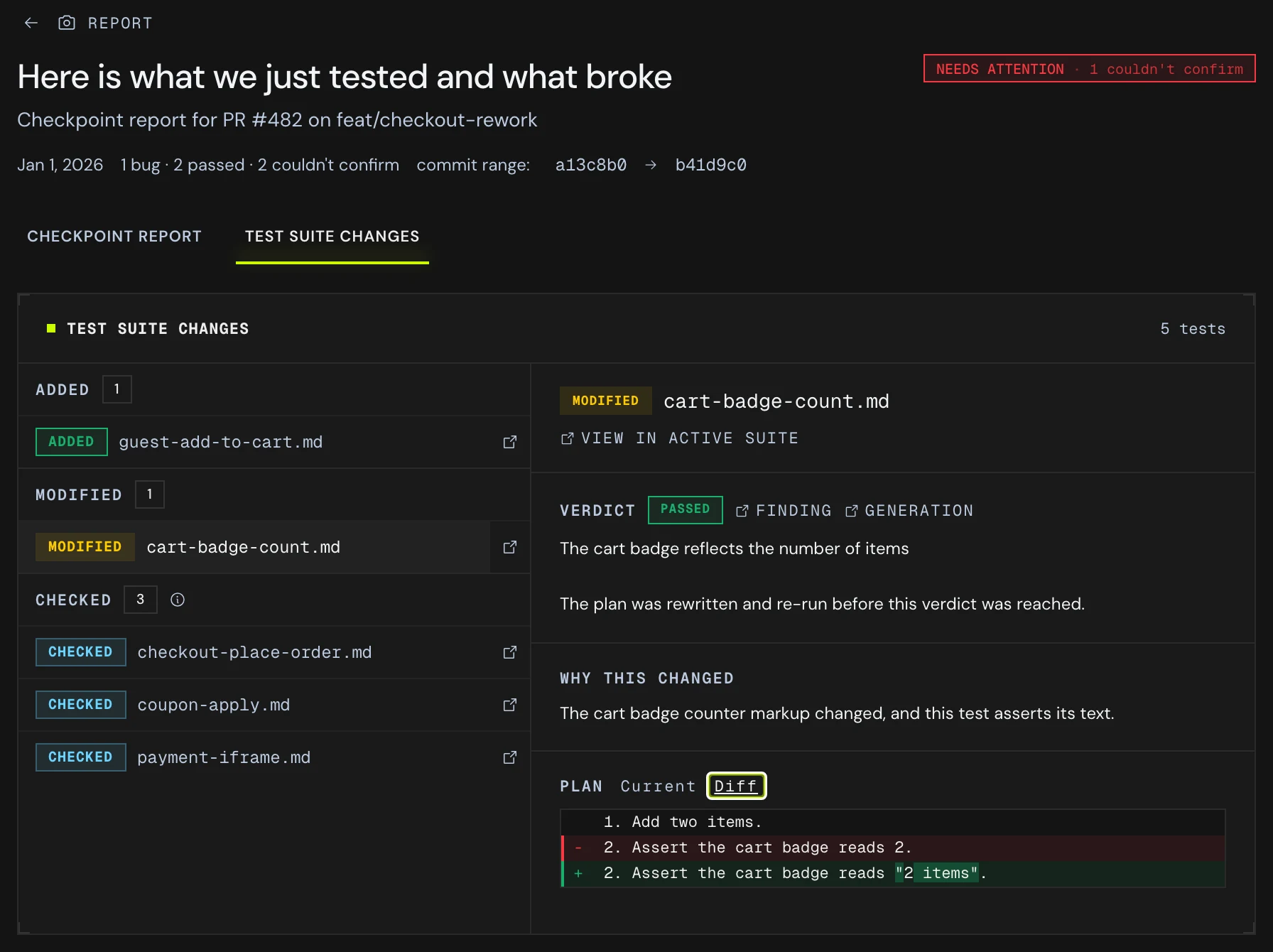
Five tests touched by one pull request: one added because a new flow appeared in the code, three checked and left alone, and one rewritten. The plan diff is the edit the agent actually made, and the line above it names the code change that triggered it.
Self-Healing Tests: Why They Actually Survive UI Changes
The Brittle Selector Problem
Traditional automated tests break for reasons that have nothing to do with the product. A developer renames btn-primary to button-primary and a dozen tests fail, not because anything stopped working, but because the test was written against an exact string.
Multiply that across a team shipping multiple times a day and test maintenance becomes its own job. Industry surveys back this up: in mabl's 2024 State of Testing in DevOps report, a plurality of respondents (21%) named test maintenance their most time-consuming testing task, ahead of test execution (19%), and over a third called it their single biggest pain point, a 138% increase since 2022.
Matching by Intent, Not by Exact Attributes
Self-healing tests avoid this by matching elements on what they do, not exactly how they're built. A test that targets "the login button" keeps working when the button changes color, moves position, or gets a full visual redesign, as long as something serving that purpose still exists on the page.
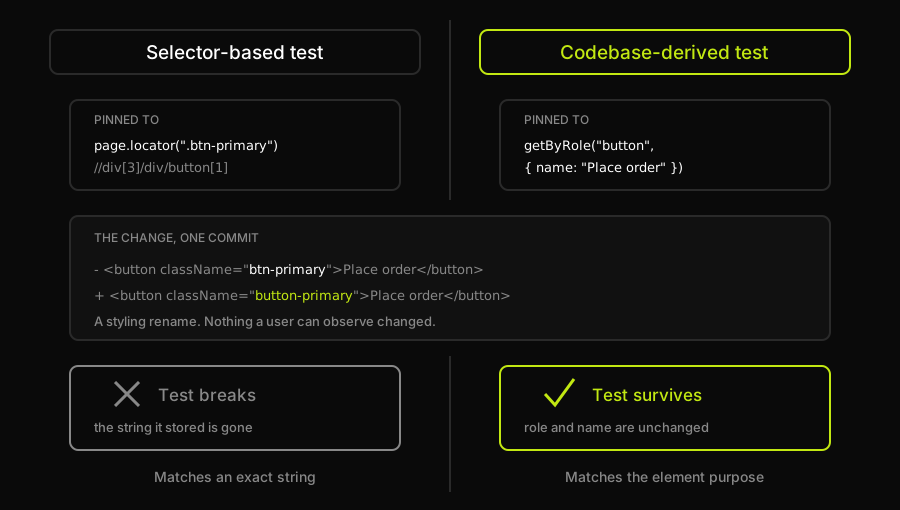
The commit in the middle is the whole experiment: one styling rename, applied to both tests. The left test fails because the exact string it stored no longer exists, and the right one passes because nothing it stored changed, which is the difference between pinning a test to what the markup looked like and pinning it to what the element is for.
This works because the agent isn't guessing at pixels. It has already read the component that renders the button, so it understands the button's role in the flow, not just its current class name. When the underlying markup changes, the agent re-checks the page against that same role and finds the right element again. Maintenance happens automatically instead of manually, which is the core mechanic that makes AI-powered software testing fundamentally different from scripting a browser and hoping nothing shifts underneath it.
Smart Assertions Beyond Pass or Fail
Once you can reliably interact with an element, the next problem is validation. Boolean assertions (element exists, element is visible, text equals "$99.99") work, but they can't check visual appearance or relative conditions without a pile of brittle custom code.
The checkout test below shows both failure modes side by side. Its first test passes cleanly on boolean checks like toBeVisible() and toHaveCount(), then a commented block walks through four checks those same assertions can't express, worth reading in the file itself rather than restated here. Its second test shows the other failure mode: a locator bound to .btn-primary that breaks the moment someone renames that class as a pure styling change, even though nothing a user can observe actually stopped working.
AI-powered assertions close that gap by evaluating a written condition against what's actually on the screen. "Verify the primary button is blue, not red" checks color without a hex code. "Verify items are sorted by price, lowest to highest" checks ordering without a loop. "Verify no spelling errors in the product description" is a condition no boolean assertion could express at all. Each one comes back as a verdict plus the reason behind it, rather than a bare true or false.
The difference shows up clearly when you put the two side by side:
| What you want to check | Boolean assertion | AI-powered assertion |
|---|---|---|
| The primary button is the right color | Compare a computed style against a hardcoded hex value, which breaks with every theme change | "Verify the primary button is blue, not red" |
| Results are sorted by price | Extract every price, parse it to a number, loop, and compare pairs | "Verify items are sorted by price, lowest to highest" |
| Copy has no spelling errors | Not expressible without shipping a dictionary into the test | "Verify no spelling errors in the product description" |
| The layout is not visibly broken | Pixel-diff the whole page and get a failure on every intended design change | "Verify no text is cut off or overlapping" |
The upside isn't just capability, it's readability. A product manager can look at "verify the discount badge appears next to products on sale" and understand exactly what's being checked. Nobody needs to parse a CSS selector to know what the test does. And because the assertion describes intent rather than a pixel position, it keeps validating correctly as the UI evolves, the same property that makes self-healing work in the first place.
That readability carries through to the result, not just the assertion. When a check like this fails, the report states the condition it was testing, what it saw instead, and what it believes caused it:
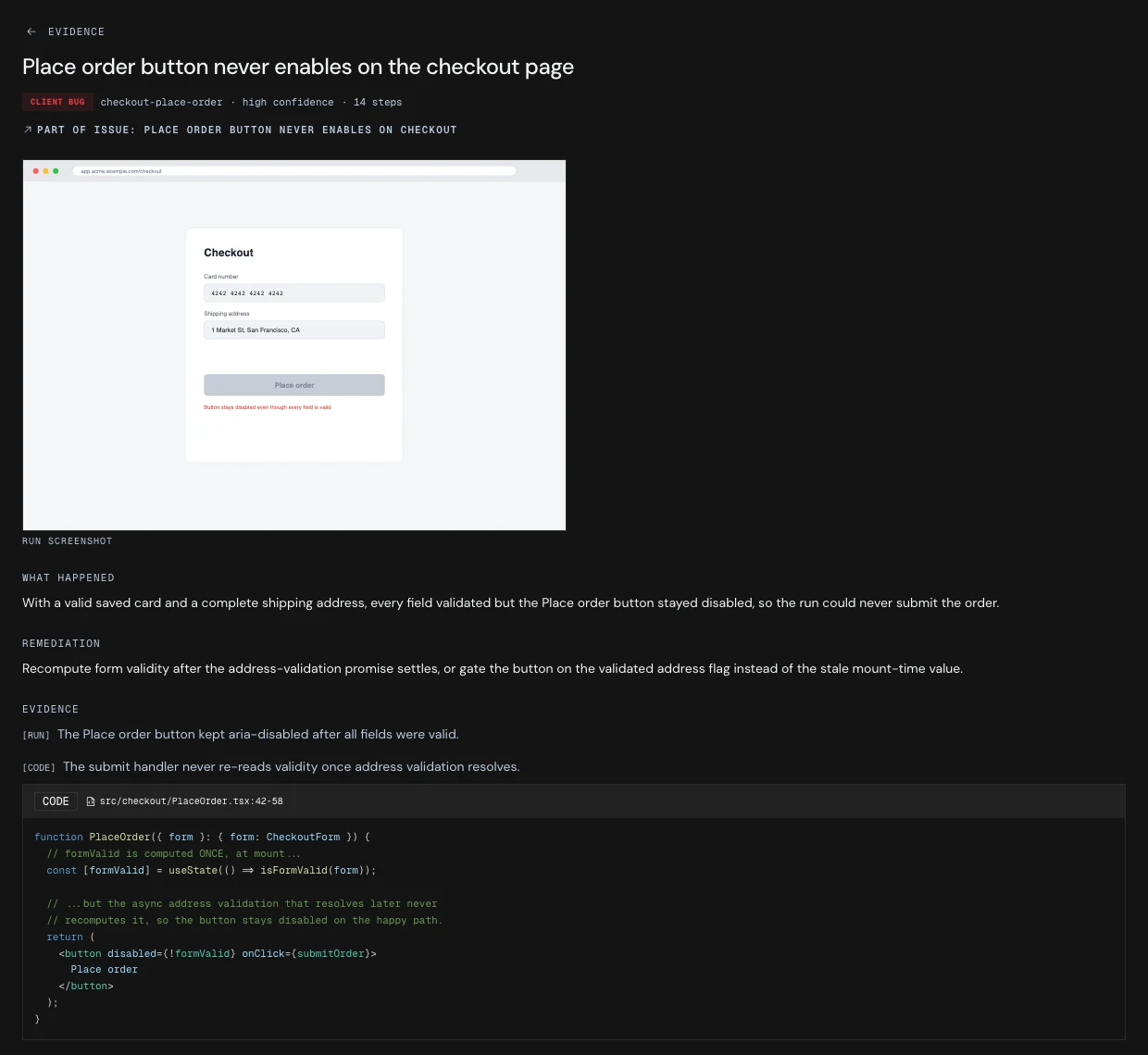
The assertion that failed here is a relative condition rather than a boolean one: the button's state was wrong given that every field had already validated. The useful part is the line underneath it, because a stack trace reporting an unclickable element would have sent someone to inspect the button, and the actual defect is in the validity flag behind it.
Generating Test Data That Actually Finds Edge Cases
Tests that always run with the same input miss the inputs that break things. A registration form that works fine with test@example.com might fail the moment someone enters user+tag@subdomain.co.uk.
Writing data generators for every field type (emails, phone numbers, addresses, card numbers that pass Luhn validation) is doable, but it's more code to maintain. AI-generated test data skips the generator: describe what you need and get valid, varied data back, different on every run.
That variation is the point. Ten runs of the same test with ten different names ("O'Brien," "Mary-Jane Watson," "François Müller") exercise code paths a single hardcoded input never touches. If your signup form claims to accept "any valid email," generated data is what actually stress-tests that claim instead of taking it on faith.
Context matters too. "Generate a valid phone number" should return a plausible number in the format the test actually needs, whether that's US, UK, or another locale, and "generate a shipping address" should return a real city and a postal code that would pass validation, not a string that merely looks address-shaped.
| Field | Typical hardcoded value | Context-aware generated value | What the second one catches |
|---|---|---|---|
| test@example.com | user+tag@subdomain.co.uk | Naive regex validation that rejects plus-addressing or multi-part TLDs | |
| Name | John Smith | O'Brien, Mary-Jane Watson, François Müller | Apostrophes breaking queries, hyphens breaking splits, accents breaking encoding |
| Phone | 555-555-5555 | A real format for the locale under test | Formatting rules that only fail outside the default country |
| Address | 123 Main St | A real city paired with a postal code that matches it | Postal-code validation and city and region cross-checks |
| Card number | 4242 4242 4242 4242 | Varied numbers that still pass Luhn | Card handling that only works for the one test number everyone memorized |
Data generation that understands context catches the validation bugs that generic placeholder data walks right past, which is exactly the kind of gap that shows up once a suite is large enough that nobody is hand-checking every input anymore.
How Autonoma Keeps Tests Aligned With Your Codebase
Everything above, generation from real code, self-healing on intent instead of exact attributes, assertions that read like a person wrote them, and test data that varies on purpose, describes capabilities that show up across the AI-for-QA space. The harder problem is keeping all of it accurate after the first week. Test maintenance consistently ranks as the pain point teams feel most, and it gets worse as a codebase grows, not better, because every new feature is another surface that can drift out of sync with its tests.
This is the problem we built Autonoma around, not as a single trick but as an ongoing process. An agent reads the codebase and plans test cases from routes, components, and flows, executes them against a running build of the application, and evaluates each result to separate a real bug from an agent error or a mismatch between the plan and what the code actually does, so a flaky run and a genuine regression don't get treated the same way. The piece worth naming directly is the Diffs Agent: on every pull request, it reads the code diff itself and adds, updates, or deprecates the tests that diff affects, the same way a senior engineer would review what changed and decide what needs retesting.
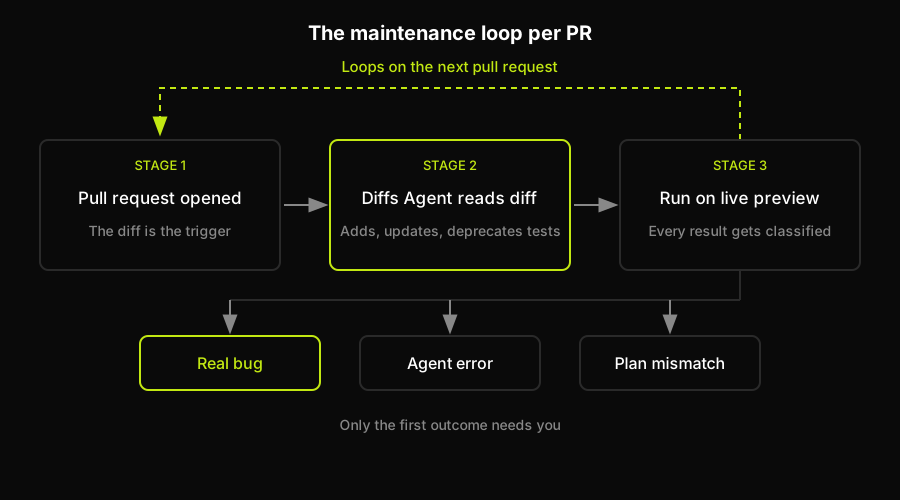
The loop runs on every pull request, and only the tests the diff actually touched change. The three-way split at the bottom is what keeps a flaky run from being escalated as a regression: two of the three outcomes resolve without anyone being interrupted.
The practical effect is that none of the earlier capabilities need a human to keep them accurate. Nobody re-records a flow when a button moves. Nobody rewrites an assertion when a field gets restyled. The agents that generated the test in the first place are the same agents watching the diff that would otherwise break it.
Organizing and Running Tests at Scale
Smoke vs Regression: Different Jobs, Different Schedules
Not every test needs to run on every commit. Regression suites cover everything: every feature, every edge case, every integration point. They're thorough and they're slow, often taking hours, which makes them a poor fit for blocking a deploy. Smoke tests cover only the critical paths (login, checkout, account access) and run in minutes, which makes them the right gate for every deployment.
Tagging tests by purpose, smoke and regression, lets a CI pipeline choose the right subset for the moment: fast checks that block a bad deploy, and a full sweep that runs on a schedule or right after the deploy already went out.
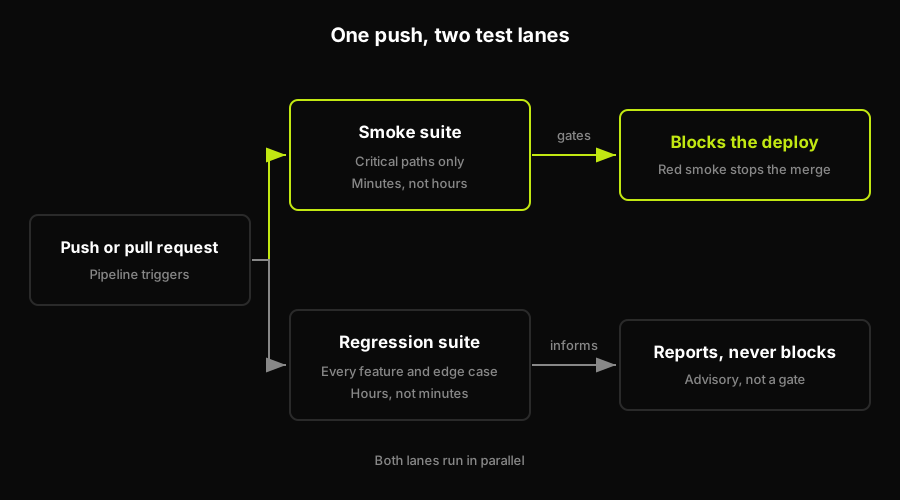
The same push feeds both lanes. Only the fast one is allowed to stop a merge, which is what keeps a thorough suite from turning into a queue of blocked pull requests.
Wiring Tests Into CI/CD Without Blocking Everything
Tests that only run when someone remembers to click a button aren't protecting production. The value comes from automatic execution on every push and every pull request, through GitHub Actions, GitLab CI, or Jenkins.
Code gets pushed, the pipeline triggers, smoke tests run against a staging deploy, and a failing smoke test blocks the release. Regression tests can run in parallel without blocking anything, flagging issues for a human to look at rather than holding up a merge that's otherwise fine. A commit that touches payment logic reasonably deserves a higher-priority run than one that edits a blog template, and pipelines that key off what actually changed reflect that instead of running the same fixed suite every time.
That pattern is generic CI wiring, not anything specific to a testing vendor. Here's what it looks like as an actual GitHub Actions workflow, with smoke and regression as separate jobs:
The smoke job is deliberately not continue-on-error, because it's the deploy gate: a red smoke run fails the workflow and blocks the merge. regression has no needs: on smoke, so it still reports even when smoke is red, and its own continue-on-error: true keeps that report advisory instead of blocking anything. The if: always() on the report upload step matters most in practice: it's the line that makes the HTML report survive a failing run, which is exactly the run worth inspecting. Both jobs read BASE_URL from a repository secret rather than a hardcoded URL, which is what lets the same suite target staging or production without touching the workflow file.
The config that consumes that variable is just as deliberate about its defaults:
It falls back to localhost:3000 with || rather than ??, because an unset GitHub Actions secret arrives as an empty string, not undefined, and ?? would happily accept that empty string as a valid base URL.
Prioritizing Coverage Without Guessing
Users show up on a mix of devices: Chrome desktop, Safari on iPhone, a handful of Android WebView versions. Testing every flow against every combination multiplies fast: a 500-test suite across ten device targets is 5,000 test runs, most of them redundant.
The fix is testing where your traffic actually is. Pull real usage data before deciding coverage, then let the share of sessions decide how much of the suite each target gets:
| Share of sessions | Example target | What to run there |
|---|---|---|
| The bulk of your traffic | Chrome on desktop | The full regression suite, every release |
| A meaningful minority | Safari on iPhone | Critical paths every release, full suite on a schedule |
| A small but revenue-carrying slice | Whatever your checkout converts on | Critical paths, treated as a gate regardless of volume |
| A fraction of a percent | A legacy Android WebView build | Nothing scheduled; test it when someone reports a problem |
Analyzing failure patterns against that same usage data surfaces sharper signals too. A device combination responsible for a disproportionate share of checkout failures is worth fixing before anything else on the list, even when its traffic share would otherwise put it near the bottom.
Alerting, Triage, and the Pull Request Lifecycle
Separating Signal From Noise
A test suite that runs but never tells anyone when something breaks isn't doing its job. But not every failure deserves a page at 3 AM. What separates the two is the pattern across runs, not any single red result:
- The same failure on every attempt. This is a real regression and it holds the merge, so it earns an alert immediately.
- One failure in a hundred runs, with no pattern behind it yet. This is flakiness until proven otherwise. Track it and wait for a pattern rather than paging anyone.
- A test that adapted to a change and stayed green. The self-heal worked. Log it so there is a record of what moved, and escalate nothing.
That separation has to be visible in the report itself, so a reader can tell at a glance what blocks a merge and what does not.
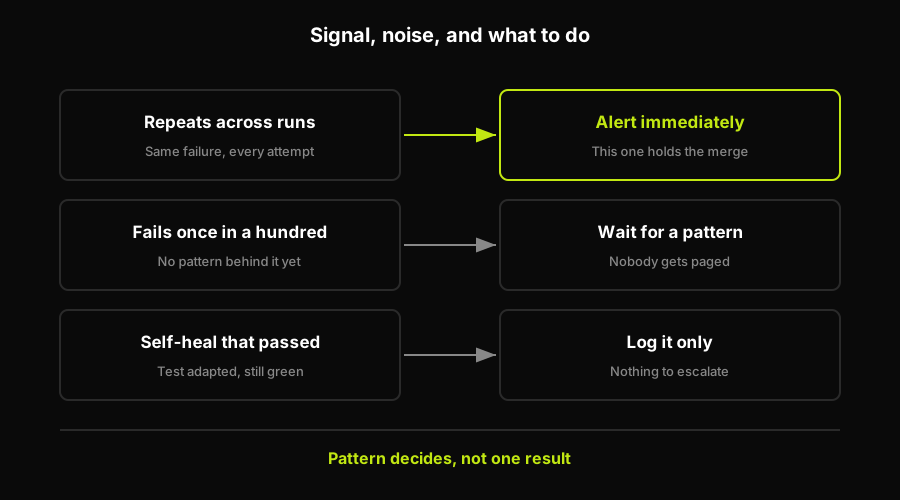
Only the top row earns an interruption. The other two are the reason a suite can run constantly without training everyone to ignore it, and the deciding input is the pattern across runs rather than any single red result.
From Stack Trace to Root Cause
A traditional failure tells you what broke: "Element not found: .btn-submit." It doesn't tell you why. Did the selector change? Is there a JavaScript error blocking the render? Is the page just slow?
AI-driven failure analysis goes a step further by reconstructing the story around the failure instead of stopping at the stack trace. Take a checkout test that fails partway through. Instead of a bare assertion error, one report carries four things:
- What the test was attempting to do. Completing checkout.
- What actually happened. The submit button never appeared after payment info was entered.
- The probable cause. The payment validation API returned a 500, and server logs point to a database connection timeout behind it.
- The recommended action. Check payment service health.
The last two are what a stack trace cannot give you, because they require looking past the element that was missing to the thing that made it missing.
Routing a Failure to Whoever Owns It
Where a failure gets sent follows the same reasoning, and the category decides the owner:
- Infrastructure, a network timeout or a service that is simply unavailable, goes to DevOps.
- Application, a logic error or a genuinely broken feature, goes to whichever team owns that feature.
- Test, a flaky assertion that fails intermittently for no product reason, goes back to whoever owns the suite.
- Environmental, stale staging data or a config mismatch between environments, gets flagged separately from the other three, because fixing the test or the feature does nothing for a database that is out of sync with what the test expects.
Kavak uses this pattern in production. When Autonoma's agents detect a customer-facing issue, they create a Jira ticket routed straight to Kavak's Solutions Center, which means issues get caught and resolved before customers notice them. The full mechanics are in the Kavak case study.
Triage output on a pull request: what the test expected, what it actually got, and the object-versus-number mismatch behind it. The stack trace alone would have said only that an element was missing.
That same reasoning runs on every pull request. Tests get generated when a route or component first appears, get re-evaluated when a diff touches something they depend on, and get deprecated when the flow they covered disappears from the codebase entirely. The pull request, not a release calendar, is the unit of test maintenance.
AI for QA only earns its name when it removes maintenance work, not when it just adds a smarter way to write scripts by hand. Four capabilities carry that weight:
- Generation from real code, so the suite starts from what the application does rather than from someone's description of it.
- Self-healing that survives redesigns, because the test is pinned to an element's purpose rather than to the markup that happened to render it.
- Assertions a non-engineer can read, which is what lets a product manager confirm the check is the right one.
- Triage that explains itself instead of dumping a stack trace, so the first person to look already knows whether it is theirs to fix.
None of that requires clicking through an app to record a flow, or describing a test in plain language and hoping the model captured your intent correctly.
That's also the throughline for how we built Autonoma. Connect a codebase, and the same agents that planned the tests keep them current on every pull request, so the suite tracks the product instead of falling behind it. The question worth asking about any AI-for-QA tool isn't whether it can write a test today. It's whether it will still be accurate in six months without anyone touching it.
Frequently Asked Questions
AI for QA is the use of AI agents to generate, execute, and maintain software tests, including creating test cases from a codebase, running them against a live application, and adapting them automatically when the code or UI changes. It differs from traditional test automation mainly in how tests get created and kept up to date, not just in how they run.
Self-healing tests match elements based on their role in the page rather than an exact selector or attribute. When an agent has already read the component that renders an element, it can re-identify that element after a UI change by checking which element still serves the same purpose, instead of failing the moment a class name or position changes.
An agent reads the repository directly, maps the routes, components, and user flows encoded in the code, and plans test cases from that analysis. Those tests execute against a running build of the application, and each result is evaluated to separate a real bug from an agent error or a mismatch between the plan and what the code actually does. On every pull request, a Diffs Agent reads the diff and adds, updates, or deprecates the tests that diff affects, which is what keeps the suite aligned with the product as it changes.
AI changes what QA engineers spend time on rather than removing the role. Instead of writing and maintaining test scripts by hand, engineers focus on test strategy, deciding which flows matter most, and interpreting the results AI agents surface. The repetitive parts of test creation and maintenance are what AI takes over.
Many AI-powered testing approaches integrate with existing frameworks such as Playwright, Selenium, Cypress, and Appium, running on top of the same browser automation those frameworks use. Codebase-first platforms generate and run tests directly against a live application without requiring a team to write framework-specific scripts.
Generally yes. AI-generated tests are typically triggered the same way any automated test suite is, through a CI/CD pipeline hook on push or pull request, commonly with systems like GitHub Actions, GitLab CI, or Jenkins. The specifics of the integration depend on the platform, but the pattern of triggering a run and reporting results back is standard.


