

Mobile testing tools split on two variables that do most of the deciding for you: platform mix (iOS only, Android only, cross-platform native, React Native, or Flutter) and who maintains the suite (mobile devs writing tests in the app's own language, or a shared QA function that needs one tool everywhere). XCUITest and Espresso win on native speed within their own platform. Appium and Maestro cross platforms. Detox owns React Native. Device clouds run any of them at scale once you've picked one.
Every mobile testing tools roundup ranks the same way: whoever wrote it puts their favorite first and buries the one honest caveat around paragraph nine. That's not useless because the tools are wrong. It's useless because the ranking answers a question you didn't ask. You need to know which tool fits your app and your team, not which one a blogger likes.
This is written for a product team with a real mobile app already in production, and a QA function that's small, shared across web and mobile, or doesn't formally exist yet: someone on the eng team owns quality by default. Running a dedicated mobile QA org already? Most of this you already know. Haven't decided what to test on a native app yet, gestures, permissions, app lifecycle, store review, device fragmentation? What to test in a mobile app is a separate question, and worth settling first.
What decides your mobile testing tool: platform mix and maintainer
Platform mix is what your app actually runs on: iOS only, Android only, cross-platform native (two separate codebases sharing a design), React Native, or Flutter. This alone rules out most of the field. A pure iOS app has zero use for Espresso. A React Native app gains almost nothing from XCUITest that Detox doesn't already give it.
Maintainer is who's actually going to write and keep up the tests: mobile developers extending the app's own codebase in Swift, Kotlin, or JavaScript, or a shared QA function that needs one tool covering everything it owns, mobile included. This variable matters more than most comparisons admit.
When the two variables agree, the choice is close to automatic: an iOS-only app maintained by iOS engineers points straight at XCUITest. When they conflict, maintainer usually wins. A QA function with no Swift or Kotlin experience, handed the superior first-party tool, produces zero tests, not fewer. A weaker tool the team can operate produces a real, if imperfect, suite, and maintained coverage beats coverage abandoned by month two.
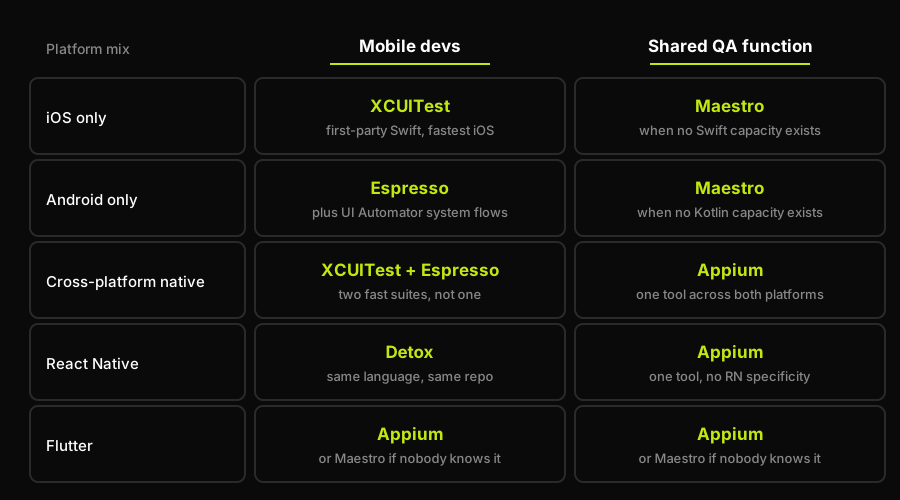
Most rows resolve to one tool before you read a single feature list. Flutter is the exception, where the answer turns on which tool the team already knows rather than on who maintains the suite.
Mobile app testing tools compared
Six mobile testing tools for iOS and Android, compared on the axes that matter: platform and language, who realistically maintains the suite, the case each one wins, and the weakness each one carries.
| Tool | Platform and language | Maintained by | Best when | Weakness |
|---|---|---|---|---|
| Appium | iOS + Android, any language | QA teams, via WebDriver | One tool must span platforms | Slow, flaky, driver version churn |
| XCUITest | iOS only, Swift | iOS devs, inside Xcode | Fastest, most stable iOS runs | No Android coverage at all |
| Espresso | Android only, Kotlin/Java | Android devs, in-repo | Fast, sync-aware Android tests | No iOS; misses some cross-app flows |
| Detox | React Native, JavaScript | RN devs, alongside app code | React Native apps specifically | Weaker outside RN, smaller community |
| Maestro | iOS + Android, YAML flows | Anyone, near-zero setup | No mobile-test experience yet | Shallow assertions, younger ecosystem |
| Device clouds | Any (execution layer only) | Whoever owns the CI pipeline | Fragmentation coverage, CI scale | Cost; execution layer, not a tool |
Appium is the only entry here that's genuinely cross-platform and cross-language: one framework, one WebDriver protocol, against both an iOS app and an Android app. That's why most QA teams already have some Appium experience; it's the default cross-platform answer. The cost is real: Appium sits on top of the OS's own accessibility APIs, which makes it the slowest option here and the most prone to flaky waits, and every OS update risks a driver mismatch that breaks a working suite overnight.
XCUITest and Espresso are the mirror image of each other: each is first-party, ships inside the platform's own IDE, and runs faster because it's built against the platform's own instrumentation, not an abstraction on top of it. XCUITest is Swift and iOS only. Espresso is Kotlin or Java and Android only, and synchronization-aware in a way that removes Appium's flaky-wait problem; UI Automator picks up the small set of cross-app system flows Espresso can't reach. Either is the right call for a team that owns exactly one platform. Neither works for a team that owns both, unless it's willing to maintain two separate suites in two languages.
Detox took a different bet: instead of treating React Native like any other native app, it's built grey-box, aware of the React Native bridge and the app's own idle state, which is why it's genuinely fast. Tests live in JavaScript, next to the app code, written by the same developers who wrote the screen. The tradeoff: Detox is shaped for React Native, it's less useful once part of the app drops to native modules it doesn't understand, and its community is smaller than Appium's.
Maestro is the newest name here and the one built for a team with no mobile testing experience: flows are written in YAML, setup is close to zero, and the runtime is deliberately tolerant of timing issues that would flake an Appium or Espresso suite. That tolerance is also its ceiling. Maestro isn't the tool for deep assertions or complex conditional flows, and its ecosystem is younger, so less prior art exists when something doesn't work as documented.
Device clouds, BrowserStack, Sauce Labs, LambdaTest, AWS Device Farm, Firebase Test Lab, aren't a seventh option here. They're where any of the six run, and the tradeoffs of using one are covered next.
Device clouds versus local devices
An emulator or simulator catches the large majority of bugs cheaply: layout breaks, crash-on-launch, most business logic. What it structurally can't catch is anything tied to real hardware: GPU rendering quirks, a real handoff between LTE and Wi-Fi, thermal throttling under load, a real fingerprint sensor, a real low-battery state killing a background task. A suite that only runs on simulators has a blind spot shaped exactly like production. None of this is a performance or load-testing question; this is correctness coverage a simulator can't provide by design.
A device cloud earns its cost when the fragmentation surface is wide enough that no local drawer of phones can represent it: a consumer app spanning five years of Android OEM skins and OS versions, a regulated app proving coverage across a specific device matrix, or a CI pipeline that needs dozens of parallel runs to keep pull request turnaround inside some SLA. That's a real, provable need, and the bill's worth it.
A drawer of three real phones, one current iPhone, one current flagship Android, one older or cheaper Android, beats a device cloud for a smaller team on cost, latency (no waiting in a device queue), and debugging (you're holding the failing device, not watching a video of it). How far that drawer gets a team before a cloud earns its keep is covered in real device testing strategy.
How Autonoma fits a mobile-plus-web product
Most of what we've covered so far assumes the product is the app. For a lot of teams reading this, it isn't, not entirely: there's a native app, and there's a web surface sitting right next to it, a marketing site, a signup and auth flow, a web dashboard, billing and account pages, sometimes an admin console nobody outside the company ever sees. The mobile testing conversation eats all the attention because the app is the visible product, and the web half quietly goes untested while everyone's testing energy points at the app.
That neglected half is the one we built Autonoma for. Connect a codebase and our agents plan and run browser end-to-end tests against the marketing site, the signup and auth flow, the dashboard, the billing pages, the admin console, and the mobile web experience if there is one, with our Diffs Agent keeping that suite current as the code changes instead of letting it rot the way hand-maintained web suites usually do. On most mobile-plus-web products that web surface is where the revenue path lives, the trial signup, the upgrade flow, the billing page, and it's the half that goes untested precisely because the app absorbed all the QA attention.
We kept ourselves out of the comparison table two sections up for the same reason this article avoids a ranking: those six tools own native, we own the web surface, and scoring across that boundary would tell you nothing useful about either one.
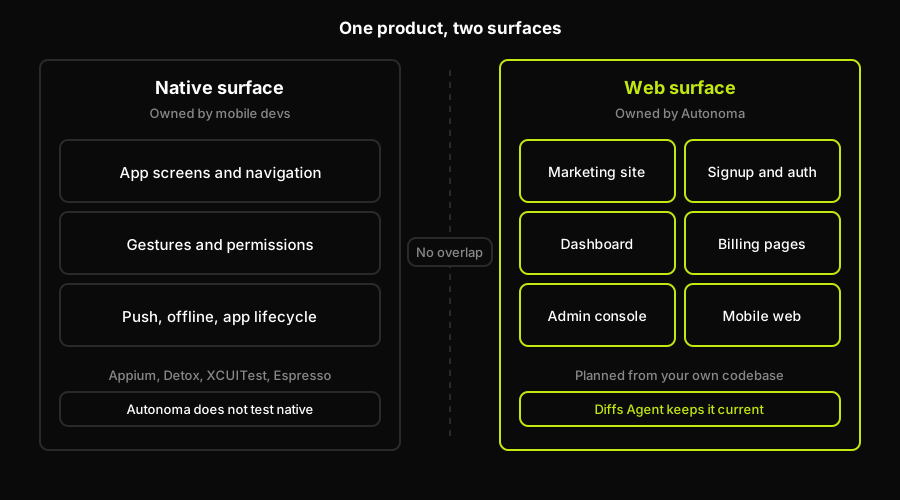
Two surfaces, two owners: mobile developers keep the native suite in Appium, Detox, XCUITest, or Espresso, and Autonoma covers the web surface only.
The practical shape, then, is a split, not a competition: mobile developers own the native suite in Appium, Detox, XCUITest, or Espresso, whichever this article's two variables pointed them toward, and the web surface is the suite nobody on that team wants to hand-maintain, which is where we fit.
Picking your mobile testing tool, concretely
If you own iOS only, take XCUITest, full stop: there's no cross-platform tradeoff to weigh because there's only one platform. Same logic for Android only: Espresso, with UI Automator filling the system-flow gap, unless the team has zero Android engineering capacity, in which case Maestro is the honest fallback.
Cross-platform native, two separate codebases, is where the two variables pull in different directions. If mobile devs are maintaining it and headcount allows two suites, XCUITest plus Espresso beats a single Appium suite on speed and stability: two smaller, faster suites instead of one bigger, slower one. If a shared QA function has to maintain it with no dedicated iOS or Android engineering time, Appium is the correct compromise, not because it's better, but because it's the only option one small team can actually keep running across both platforms.
React Native gets Detox, close to automatically, as long as the team writing tests is the same team writing the app; the tests live in the same language, in the same repo, and get maintained the same way the app does. Flutter doesn't have a dedicated native-shaped tool the way React Native has Detox, so the realistic choices are Appium's Flutter support or Maestro, and the same maintainer question decides between them: Appium if the team already knows it, Maestro if nobody does and the flows are simple enough for YAML to cover honestly.
Once the tool's picked, the setup details are their own decision: Appium alternatives goes deeper on the cross-platform tradeoff summarized above, the Flutter Appium testing guide and the React Native Appium testing guide cover the framework-specific setup, and Appium vs Espresso for Android testing alongside the Android UI Automator testing guide do the same for the Android-only decision. None of that changes the two variables that got you here; it's just the next layer down once platform mix and maintainer have already picked your lane, and none of it touches mobile performance or load testing, a separate discipline covered in performance testing tools.
Pick the tool that matches your platform mix and the team that'll actually maintain it, in that order of importance, and you'll be right more often than any ranked list, including this one's honest attempt at not being one. If your product happens to be mobile-plus-web, and most funded products eventually are, remember that the web half needs the same seriousness you're about to apply to the native half. A native suite you maintain by hand and a web suite Autonoma maintains for you from your own codebase is a more honest split than pretending one tool covers both.
Frequently Asked Questions
There isn't one best tool, only a best tool for your platform mix and your maintainer. XCUITest wins for iOS-only teams, Espresso wins for Android-only teams, Detox wins for React Native, Appium wins when one QA function has to cover every platform with one tool, and Maestro wins when nobody on the team has mobile testing experience yet.
Detox if the app is React Native and the people maintaining tests are the same developers writing the app, since Detox tests live in JavaScript alongside the app code and run faster because it understands the app's idle state. Appium if the app isn't React Native, or if a shared QA function needs one tool covering iOS and Android without React Native specificity.
Only if mobile developers are maintaining the suite and the team has the headcount for two smaller, faster suites instead of one slower one that spans both. XCUITest and Espresso are each faster and more stable than a cross-platform tool on their own platform. If one shared QA function has to maintain coverage across both platforms with no dedicated iOS or Android engineering time, Appium or Maestro covering both from one codebase is usually the more realistic choice than maintaining two separate native suites.
Maestro. It's built for exactly that case: YAML-based flows, close to zero setup, and a runtime that's deliberately tolerant of timing issues that would flake a more powerful tool. Appium is the fallback if the flows need conditional logic or deeper assertions Maestro can't express, at the cost of a steeper setup.
Not from a single tool, and the split is easier to run than it sounds. Every option in this comparison, Appium, XCUITest, Espresso, Detox, and Maestro, is built for native mobile, while Autonoma owns the web surface. For a mobile-plus-web product that means one native framework from this article for the app, and Autonoma for the marketing site, signup, dashboard, and billing pages. The second half is the one that usually goes unstaffed, so having it generated from the codebase and maintained per pull request is what makes covering both halves realistic for a small team.
On the surface the tool you just picked doesn't touch. Every option in this comparison is native-only, so a mobile-plus-web product still has a second suite to keep alive: marketing site, signup and auth, dashboard, billing, admin console. That's the one that tends to rot, because the app is the visible product and it absorbs the QA attention by default. Autonoma covers that half from the codebase, generating end-to-end tests from the routes and flows that exist in your repo, running them against a live preview environment on every pull request, and using a Diffs Agent to add and retire cases as the code changes. It does not test native apps, which is why it isn't in the comparison table above. The useful point is that picking Appium or Detox settles the native half and leaves the web half entirely unaddressed, and most teams don't notice that until something on it breaks.


