

Mobile app testing covers the verification of native iOS and Android binaries (or React Native and Flutter builds shipped through the App Store and Play Store), and it differs from web testing in ways that have nothing to do with the UI framework you chose. Store review gates your rollback options, deep links and push notifications create flows with no web equivalent, and device fragmentation forces you to choose coverage instead of chasing completeness. The scoping decision, not the tool choice, is what most teams get wrong first.
You have a web test suite that took two years to build. Now there's a native app, and someone on the leadership team is asking what percentage of that suite needs to exist again for mobile. Nobody has a good answer, so the default becomes "mirror everything," and three sprints later half the team is maintaining two copies of the same login test.
That default is wrong, but not because mobile testing matters less. It's wrong because most of what makes mobile different from web has nothing to do with clicking buttons on a smaller screen. It has to do with what the operating system controls that your app doesn't: the app store review queue, the push notification service, the payment sheet, the permission dialog. Your web suite has an opinion on none of those things, and duplicating your login test onto a native runner doesn't give you one either.
One carveout before anything else. If your "mobile app" is a responsive web app that happens to render inside a mobile browser, most of what follows does not apply to you. Your existing web suite, run at mobile viewport widths, already covers that surface. This article is for teams shipping an actual native binary, or a React Native or Flutter build compiled to a binary, through the App Store and Google Play. If that's not your situation, you can stop reading here and go fix your responsive breakpoints instead.
What actually differs
Start with the device and OS matrix, because it's the one people reach for first and it's also the one that's impossible to solve completely. Apple ships new OS versions every year, Android fragments across manufacturers who each layer their own skin on top, and screen sizes span a small phone to a folding tablet. You cannot test all of it. Nobody does, including the platform vendors themselves. The honest response isn't more device coverage, it's an explicit, revisited choice about which slice of that matrix you're willing to stand behind.
Store review changes what a bad release costs you. On the web, a broken deploy is a rollback away: revert the commit, redeploy, done in minutes. On mobile, a broken binary submitted to the App Store or Play Store sits in review for anywhere from a few hours to a few days before a fix can even reach users, and Apple's review can reject the fix too. Your only real levers before that fix clears are a staged rollout percentage or a remote config flag that turns off the broken feature server-side. If you haven't wired either of those up, your rollback plan is "wait."
Deep links are a category of bug your web suite has never had to think about. A Universal Link or App Link has to route correctly whether the app is already running (warm start) or not (cold start), and it has to land the user on the actual screen the link promised, not the home screen with the right screen one tap away. Get the routing wrong and the link either dumps the user in the wrong state or bounces them out to the store to "install" an app they already have. There's no URL-bar equivalent for this failure mode on web.
Mobile wallet and payment SDK flows are OS-level surfaces that your web checkout never touches. The Apple Pay or Google Pay sheet, in-app purchase flows gated by the platform's own billing rules, native payment SDKs that hand control to a system UI outside your app's view hierarchy for several seconds: none of that exists in a browser checkout. A test suite built entirely from web assumptions has no concept of "control leaves the app and comes back," because on web it never does.
Push-driven flows don't have a web analog either. A notification that deep-links into a specific order-detail screen behaves differently depending on whether it's delivered while the app is foregrounded, backgrounded, or killed, and the user's notification permission state changes which of those paths is even reachable. Web push exists, but it's a weaker, more uniform version of the same idea. It doesn't reproduce the combinatorics of OS-level delivery state that native push does.
Permissions and background state round out the list, and they're the one most teams underestimate. Camera, location, and notification prompts interrupt a flow mid-task and the app has to resume correctly whether the user grants, denies, or ignores them. Worse, the OS itself can kill a backgrounded app to reclaim memory, and when the user returns, your app needs to restore state as if nothing happened. Web tabs get suspended too, but not with anywhere near the same aggressiveness, and never mid-payment.
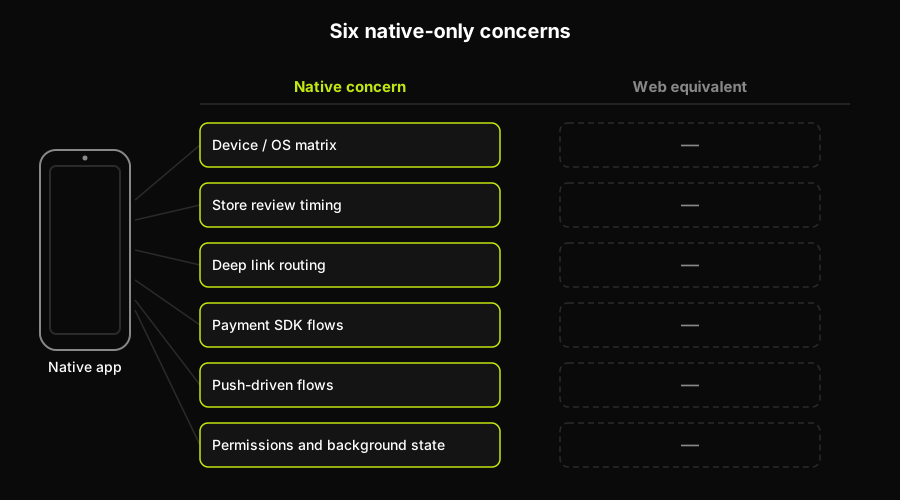
Each of the six native-only concerns pairs with an empty web-equivalent column, because a web test suite has no visibility into any of them.
The device matrix you cannot test
The instinct is to chase global market share data and build a device lab that mirrors it. Resist that instinct. Global market share tells you what a billion strangers own, not what your users own. Pull your own product analytics, sort by device model and OS version among your actual install base, and you'll usually find that a handful of combinations cover the large majority of real sessions. That's your list.
This is a deliberate trade, not a shortcut. You're accepting residual risk on every device outside your chosen set, and that's fine as long as the choice is explicit, written down, and revisited on a cadence, not made once during onboarding and forgotten. A risk-based testing approach makes this explicit: you're allocating a fixed testing budget against the devices most likely to matter, not trying to eliminate risk everywhere at once. For the mechanics of picking real devices over simulators and building the lab itself, a real device testing strategy goes deeper than this article needs to.
How much to fund, by stage
The funding question has a different answer depending on how much native revenue is actually on the line, and pretending otherwise is how teams end up either under-testing a scaled app or over-testing a pre-launch one.
| Stage | Native coverage worth funding | What to skip | Why |
|---|---|---|---|
| Pre-launch / first release | 3-5 core flows, manual pass per build | Full device matrix, automation | App may still pivot before launch |
| Early growth | 5-8 flows automated, top 4-6 devices | Long-tail OS versions | Regressions now cost real users |
| Scaled, revenue on mobile | Full native suite, CI-gated, real devices | Nothing native-specific | A native bug is a revenue bug |
Notice what's constant across all three rows: at no stage does the recommendation include re-testing your login form's server validation through the native client. That's already covered. The stage only changes how much of the native-only surface (the six things above) you're willing to pay for.
How Autonoma covers the web side
Everything in the funding table above assumes your web suite is already solid, because that's the half of the problem an AI testing layer can actually take off your plate today. Autonoma connects to your codebase, and a Planner agent reads your routes, components, and user flows to plan test cases without anyone recording a session or writing a script. An Executor agent then drives those flows against a live preview environment, a Reviewer agent separates a real bug from an agent error or a stale test, and a Diffs Agent keeps the suite aligned as your code changes on every pull request. Your codebase is the spec, and the web half of your product gets that treatment hands-off.
What that covers cleanly is the web half of a product that also ships a native app. The native half, everything in the "what actually differs" section above, stays with your team and whichever framework you've already picked: Appium, Espresso, XCUITest, or Detox.
That division isn't a compromise, it's the actual shape of the problem. The six things that make native testing different (device matrix, store review, deep links, payment SDKs, push, permissions) are OS-level concerns that live on the device rather than in the browser. The practical upside is that the budget you're not spending re-verifying web flows on native goes straight into those six, while the web surface keeps getting tested by something that maintains itself.
The mirroring mistake
The most common way teams overspend on native testing is copying the web suite's assertions onto a mobile runner and calling it coverage. A login test that checks "valid credentials return a 200 and route to the dashboard" tests the same server response whether the client is a browser or a native app. Running it twice doesn't produce two data points, it produces the same data point measured through a different, slower, flakier client.
The native suite earns its keep when it tests things that only exist on the device. Does the deep link cold-start into the right screen. Does the Apple Pay sheet actually complete and return control to the app. Does a backgrounded, OS-killed session restore the user's cart instead of dropping it. Does a denied camera permission leave the scan-to-pay flow in a recoverable state instead of a frozen one. None of that shows up in a server log, and none of it is reachable by re-running your web assertions on a phone.
If you're auditing an existing native suite, the fastest way to find the waste is to ask, for every test, whether failing it would tell you something a web test hasn't already told you. If the answer is no, it's mirroring, and it's a maintenance cost with no corresponding signal.
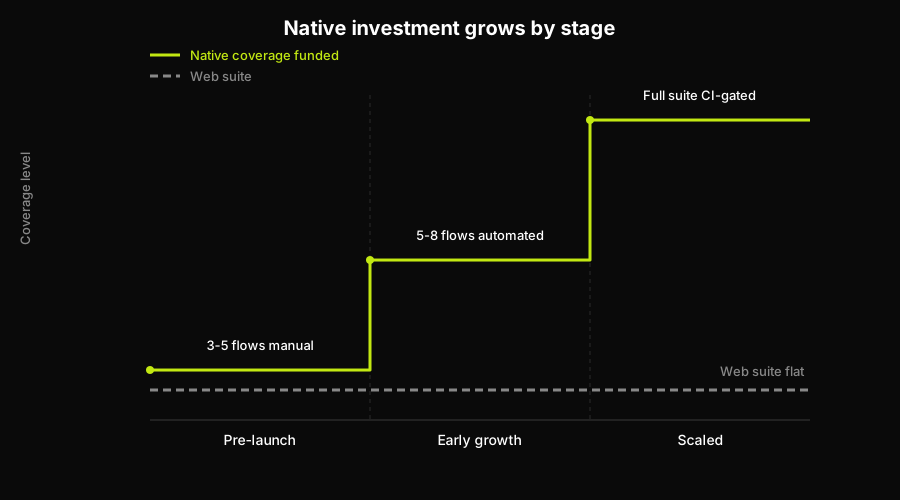
Native coverage funded rises in discrete steps as the company scales, while the web suite stays flat because it doesn't need to grow alongside it.
Where to go for the how-to
Everything above is the scoping decision. The execution is framework-specific, and we've written the deep dives already rather than repeating them here.
On iOS, the Appium vs XCUITest comparison covers the trade-offs between a cross-platform driver and Apple's native framework. On Android, Appium vs Espresso does the same for Google's first-party option against the cross-platform alternative. If your app is built in React Native, Detox vs Appium is the more relevant comparison, since Detox's gray-box approach behaves differently from either native option. For teams evaluating the cross-platform space more broadly, or looking past Appium entirely, Appium alternatives covers the current field. And for the device selection question this article only scoped at a high level, real device testing strategy is the deeper reference. For the tool selection question itself, by team shape and platform mix, mobile testing tools is the companion piece.
Closing
The scoping decision in this article is the one most teams skip, jumping straight from "we have a native app now" to a tool comparison without ever deciding how much native coverage the product actually warrants. Get that decision made and written down first, revisit it at each stage of growth, and the framework choice becomes a much smaller problem than it looked like at the start. In the meantime, if the web half of your product is what's actually bleeding maintenance hours, that's the half Autonoma already handles without anyone recording a flow or writing a script.
Frequently Asked Questions
Mobile app testing is the verification of native iOS and Android applications, including apps built with React Native or Flutter that compile to a native binary. It covers functional flows the same way web testing does, plus a set of OS-level concerns that only exist on a device: app store review, deep links, push notifications, payment SDKs, permissions, and background state.
Six things genuinely differ: the device and OS matrix you have to choose rather than fully cover, app store review replacing instant rollback, deep link routing on cold and warm start, native payment SDK and mobile wallet flows, push-driven flows with no web equivalent, and permission prompts combined with OS-level background state kills. Everything else, like form validation and server response handling, is the same problem tested through a different client.
Fewer than you think, and chosen from your own product analytics rather than global market share rankings. Pick the device and OS version combinations that cover the large majority of your actual install base, accept explicit residual risk on the long tail, and revisit the list on a regular cadence rather than setting it once and forgetting it.
Emulators are fine for early functional checks and fast feedback in CI, but permissions, push delivery, payment sheets, and background app kills behave differently enough on real hardware that a pre-launch or scaled product should validate its core native-only flows on physical devices before shipping.
Automate the flows that are expensive to check manually and stable enough to be worth maintaining: core native-only flows like deep links, payment, and push. Skip automating a mirror of your web suite's server-response assertions, since running the same assertion through a slower, flakier native client adds maintenance cost without adding new information.
The web surface, and more of it than most teams expect. The moment a native app ships, testing attention follows it, and the marketing site, signup and auth flow, dashboard, and billing pages quietly stop getting looked at even though that is usually where the revenue path still runs. Autonoma reads your codebase, generates end-to-end tests from the routes and flows that exist in it, and runs them against a live preview environment on every pull request, with a Diffs Agent adding and retiring cases as the code changes rather than leaving a suite to drift. Native iOS and Android E2E is not something it does, so that half stays with your team and a framework like Appium, Espresso, XCUITest, or Detox. The practical value of that split is that the half you are no longer staffing keeps getting tested while your people concentrate on the device-only flows this article scoped.
Mobile app regression testing verifies that a native code change hasn't broken an existing flow. Some of it is inherited for free: if the underlying logic is server-side and already covered by your web suite, you don't need a second native assertion of the same server response. The part that's genuinely yours to test is the native-only surface, deep links, payment SDKs, push, and permissions, run through your native framework of choice. The common mistake is treating regression testing as a 1:1 mirror of the web suite instead of scoping it to what only exists on the device.


