

Playwright API testing uses Playwright's APIRequestContext to send HTTP requests directly inside your test suite, without a browser, alongside your E2E tests. The core advantage: you can authenticate via API, share that state with a browser session, and verify backend side-effects, all in one test file, one CI job. This guide covers setup, request contexts, auth patterns, network interception, GraphQL, and CI integration, with a runnable companion repo for every example. Alternatives at a glance: Postman/Newman is better for GUI-based exploration and collection sharing; REST Assured is the default for JVM teams; Playwright APIRequest wins when you want browser and API tests unified. For the E2E browser layer on top of your APIs, Autonoma generates and self-heals browser tests from your codebase automatically.
By the end of this Playwright API testing tutorial you will have a test that logs a user in via API, drives the browser through a purchase flow as that authenticated user, and then calls your inventory endpoint directly to assert that stock decremented correctly. One test file. One CI job. One assertion library. No Postman collection to maintain alongside it.
That is the concrete outcome of treating Playwright API testing as a first-class part of your E2E strategy rather than an afterthought. The unified model does not just reduce tooling overhead. It catches a specific class of bug that split pipelines miss entirely: failures that live in the seam between your HTTP contract and your browser session.
The companion repo contains all six working examples from this guide. Clone it, run npm install && npx playwright test, and every pattern below is live code you can fork and modify.
Why Playwright API Tests Belong With Your E2E Tests
API testing and E2E testing share more than tooling. They share context.
Consider a typical login-and-purchase flow. An E2E test drives the browser: clicks the sign-in button, fills the form, submits, waits for the dashboard. An API test hits POST /auth/login and asserts that the response includes a token field with the right shape. Both tests exist. Neither catches a specific class of bug: the one where the browser correctly logs the user in, but the token gets stored in a cookie with an incorrect SameSite attribute that breaks requests from certain origins.
When your API test and your browser test share the same test runner and the same assertion library, you can write a test that does both in sequence. Hit the login API, capture the token, use it in a browser session, then call a protected API endpoint using that session cookie. One test covers the full handshake. For deeper context on where API tests sit within the overall test automation framework stack, see our broader guide.
There is also a maintenance argument. Teams that run Postman collections in CI via Newman and Playwright in a separate pipeline end up owning two fixture systems, two environment variable setups, and two sets of CI secrets. Playwright API tests eliminate one of those by sharing the same playwright.config.ts, the same BASE_URL, and the same test report.
The pattern is not universally the right call. If your team has a large existing Postman collection with pre-request scripts and a non-JavaScript backend, the migration cost is high. We cover that honestly in the comparison section. For teams already on Playwright for E2E, adding API coverage is mostly additive: you get more for the infrastructure investment you already made.
Setup and Installation
If you want to learn how to test APIs with Playwright, the setup is minimal. Playwright bundles its API testing capability inside the same package as its browser automation. There is nothing extra to install if you already have Playwright in your project.
If you are starting from scratch, npm init playwright@latest scaffolds a config file and installs everything. If you are adding API tests to an existing Playwright project, no additional steps are needed beyond what you already have.
The one configuration point worth setting early is baseURL in playwright.config.ts. Setting it once in the config means every request in every test can use relative paths like /api/users instead of repeating the full host. This also makes environment switching trivial: one BASE_URL env var controls where every test points, locally and in CI.
For a broader overview of how Playwright fits into a Next.js testing stack or a React app testing setup, those companion guides cover project-level config in more depth.
Playwright Request Context: Your First API Test
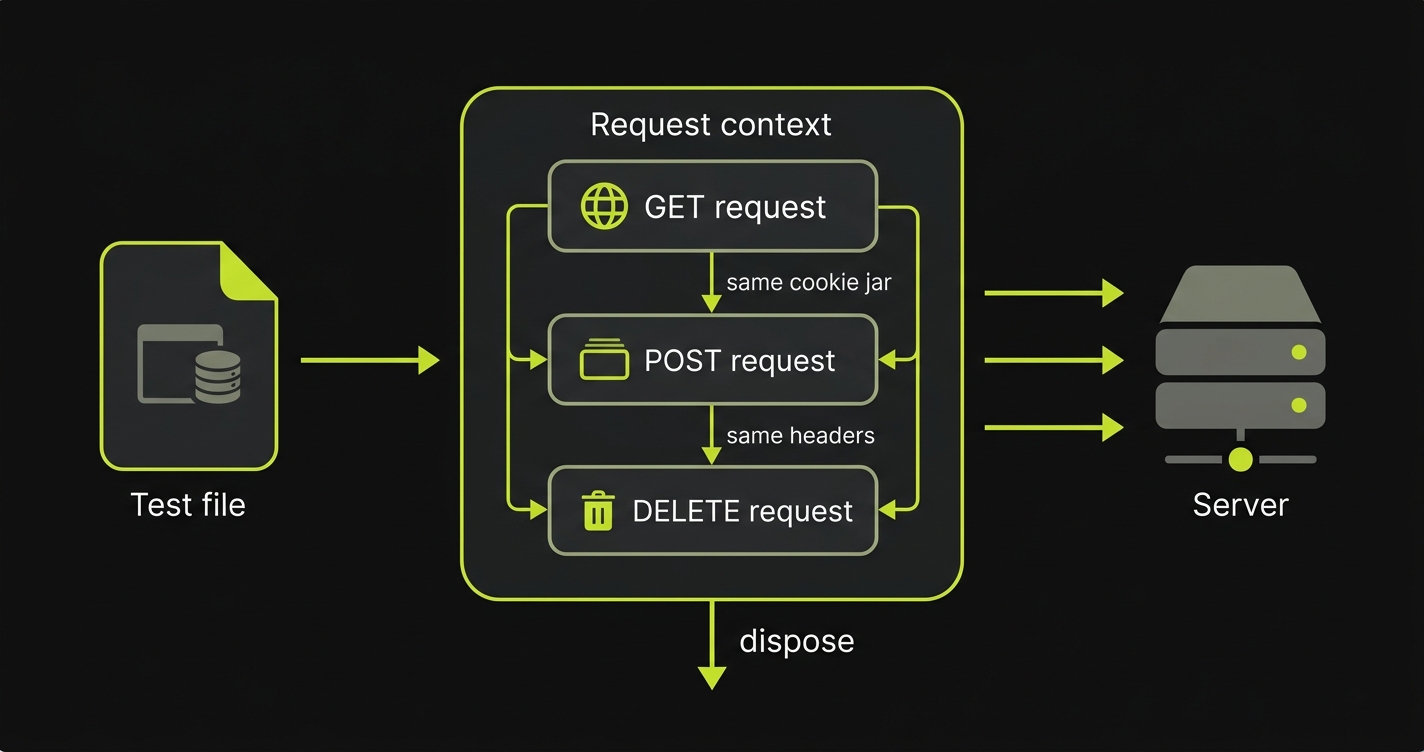
request.newContext() creates an isolated APIRequestContext: a stateful HTTP client that persists cookies and headers across requests within the same context. Here is the baseline pattern: create a context, make a GET and a POST request, assert status codes and response body shapes, then dispose the context.
A few things worth noting in this example. The baseURL passed to newContext() overrides the global one for this context (useful when a single test file needs to hit multiple services). The response.ok() helper asserts the status is in the 2xx range without requiring you to hard-code 200. And response.json() parses the body, letting you use Playwright's expect matchers against the parsed object directly.
The global request fixture (available in every test without calling newContext()) is fine for stateless tests. Use newContext() when you need isolated cookie jars or custom default headers across a group of related requests.
Do not limit yourself to happy-path assertions. Test error responses explicitly: send a malformed payload and assert response.status() returns 400, hit a protected endpoint without credentials and expect 401, request a resource that does not exist and check for 404. Use expect(response.ok()).toBeFalsy() for the inverse of the 2xx check. For response shape validation beyond individual fields, expect(body).toMatchObject() lets you assert that the response contains a specific structure without being brittle about extra fields. Teams with published OpenAPI specs can take this further with a JSON Schema validator like Ajv to catch contract drift automatically.
Auth Patterns for Playwright API Tests
The most common pattern in real API test suites: log in once, capture the token, reuse it across the rest of the suite. Logging in before every individual test is slow and brittle. Playwright's storageState mechanism solves this at the project level, but for simpler suites, capturing a bearer token in a beforeAll block and passing it as a default header is sufficient.
This file demonstrates three auth approaches. The beforeAll pattern captures a token once per spec file. The storageState approach serializes the full session (cookies plus local storage) to a file that other test files can reuse without re-authenticating. The third pattern shows HTTP Basic auth, still common in internal service-to-service calls.
One mistake teams make here: asserting on token format in the auth test itself. That assertion belongs in a dedicated auth contract test, not in the setup block. Keep beforeAll focused on acquiring credentials, not verifying them.
Maintaining these auth patterns as your app evolves (when the login endpoint changes, when token shapes shift, when new OAuth flows replace simple JWT) is where the authoring burden starts to compound. The API layer stays green because you updated the fixtures; the E2E flows that drive the browser through those same auth screens need separate attention. That is the seam Autonoma covers: we handle the browser flows so that when auth changes, you fix the API test contract once and Autonoma's self-healing takes care of the browser-level session tests.
Network Interception with page.route()
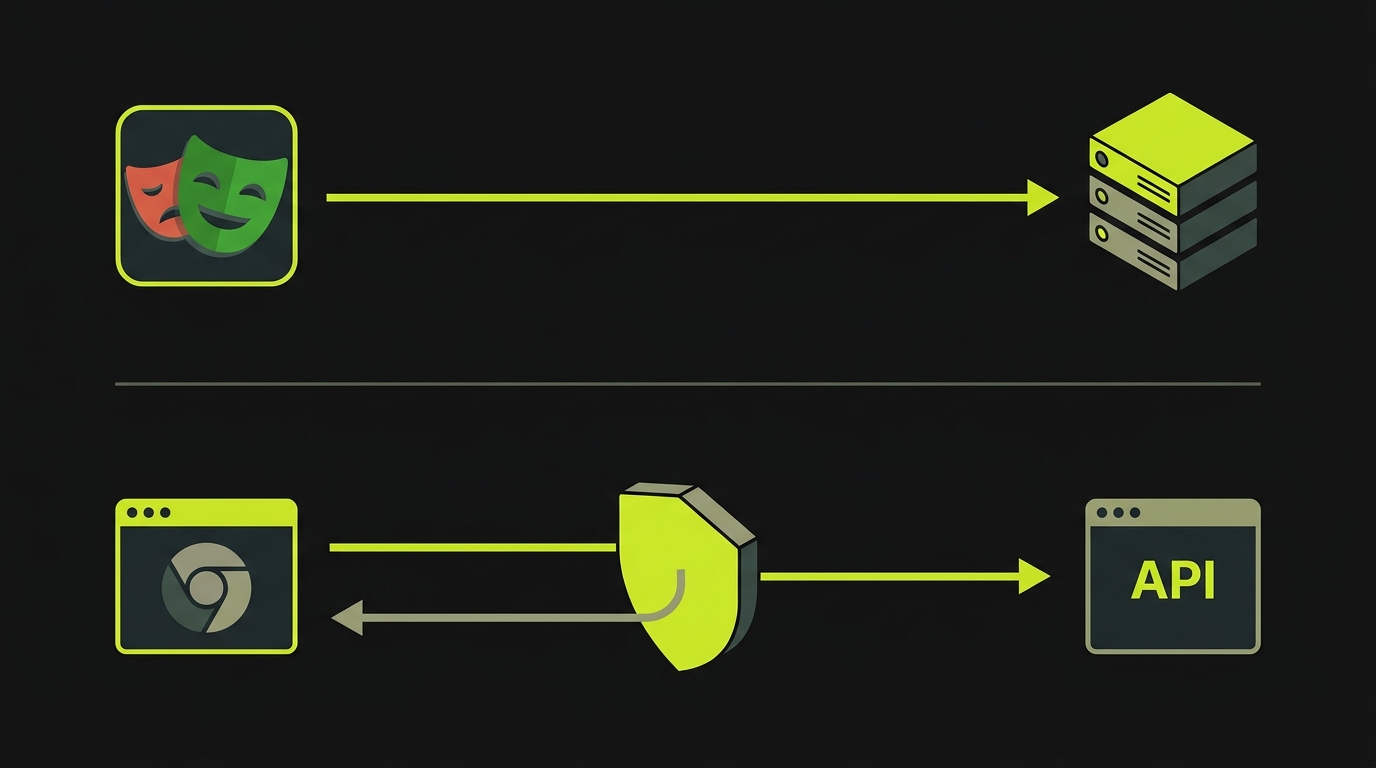
page.route() intercepts outgoing requests from the browser and lets you fulfill them with mock data, modify them in flight, or let them pass through. This is different from APIRequestContext in direction: APIRequestContext makes requests from Playwright to your server; page.route() intercepts requests the browser makes to external services.
The primary use case is isolating your UI from third-party APIs. Payment processors, analytics endpoints, feature-flag services: anything outside your control that could make tests flaky. You stub the response so the browser sees exactly what you want it to see, regardless of what the real endpoint returns.
This file shows the three intercept patterns teams use most. The basic route.fulfill() returns a static JSON body. The route.abort() pattern simulates network failure to test error states. The route.fetch() + route.fulfill() pair lets the real request go through, captures the real response, and then returns a modified body — which is useful when you want real behavior for most fields but need to inject a specific edge case. (Note: route.continue() overrides request-side properties like headers, method, URL, and post data; it does not rewrite response bodies. For response modification, fetch-then-fulfill is the canonical pattern.)
One detail that trips teams up: intercept patterns use glob matching, so /api/payments/ catches any URL that includes that path segment. Overly broad patterns accidentally intercept requests you wanted to be real. Be specific.
For complex APIs where hand-writing mock responses is impractical, Playwright provides page.routeFromHAR(). Record a real session's traffic to a HAR file, then replay it in tests. The browser sees the exact responses the real server sent, without the real server running. This is useful for reproducing production bugs in a test environment or for building a stable mock layer for a third-party API with hundreds of endpoints. See the Playwright network docs for the recording workflow.
For context on how this fits the broader Playwright testing picture versus Cypress's network stubbing approach, see our Playwright vs Cypress comparison.
Playwright GraphQL Testing
GraphQL is HTTP POST with a JSON body. Playwright handles it without any special plugin or client library. You send a POST to your GraphQL endpoint with Content-Type: application/json and a body containing query and optionally variables. Parse the body with await response.json(), then assert against the data and errors fields on the parsed object exactly as you would for a REST response.
Two patterns are worth calling out in this example. For queries, asserting that the parsed body's errors field is undefined before asserting on data avoids false-positive passes when a GraphQL server returns a 200 with an error body. For mutations, asserting on the returned entity's shape (not just the status code) ensures the server committed the change correctly, not just accepted the request.
GraphQL endpoint mocking via page.route() follows the same pattern as REST interception. Match on the endpoint URL and return the fixed { data: ... } shape your UI expects.
Network Waiting Patterns for Stable API Tests
Timing is the most common source of flaky API tests. The test fires a request, then immediately asserts on state that the server has not finished writing yet. Playwright's waitForResponse and waitForRequest solve this at the network level: the test pauses until a matching request or response actually happens, rather than guessing with setTimeout.
The most useful pattern here is the Promise race: start page.waitForResponse() before triggering the action that causes the request. If you start waiting after the action, the response may already have arrived. The predicate form of waitForResponse (passing a function instead of a URL string) lets you match on response status, headers, or body content, not just the URL.
waitForRequest is less commonly needed but essential for asserting that a request was made with the correct payload. Fire an action, wait for the outgoing request, inspect its postDataJSON(). This is the right way to verify that a form submission sends the expected fields, without relying on backend state as a proxy.
Flaky network tests usually come down to one of three causes: assertions running before responses settle, response bodies being read twice (Playwright response bodies are streamed and can only be consumed once), or race conditions between concurrent requests. The wait patterns in this example handle all three.
For a broader guide on eliminating timing flakiness across your entire suite, the Playwright vs Selenium comparison covers how each framework's waiting model differs in practice.
CI Integration with GitHub Actions
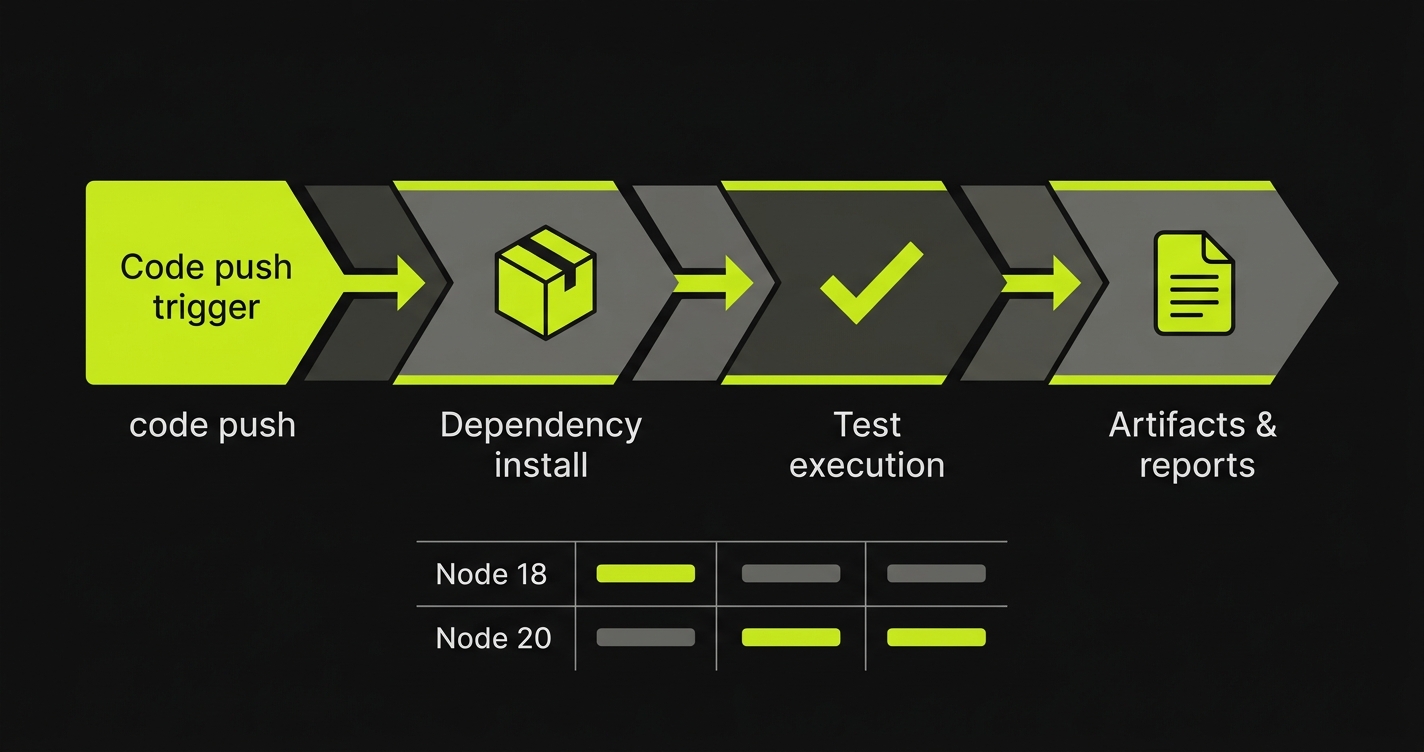
A Playwright API test suite that only runs locally is not a test suite. It is a debugging aid. The GitHub Actions workflow below runs the suite on Node 20 and Node 22 on every push and pull request.
Two decisions in this config are worth explaining. First, the install step runs npx playwright install chromium rather than the full npx playwright install. API tests do not need WebKit or Firefox, and a full browser install adds around 400MB and 45 seconds to cold CI runs. Chromium alone is enough for the occasional browser-side assertion you might layer on top of the API suite. Second, BASE_URL is set as an env var from the GitHub Actions environment, not hard-coded. This means the same workflow file runs against staging and production by changing one secret, not one file.
Cache the node_modules and ~/.cache/ms-playwright directories. Without the playwright cache, every CI run reinstalls ~400MB of browser binaries. The cache key pattern in the workflow uses a hash of package-lock.json so it invalidates correctly when deps change.
For end-to-end testing pipelines that integrate with preview deployments, our E2E testing tools buyer's guide covers the full range of options including how Playwright sits in those stacks.
Debugging Failed API Tests
When an API test fails in CI, the error message alone is rarely enough. Playwright's Trace Viewer records every request and response, including headers, body, timing, and status codes. Enable it with trace: 'retain-on-failure' in your playwright.config.ts to capture traces only when a test fails, keeping CI artifacts small. Open a trace with npx playwright show-trace trace.zip and inspect the full request/response pair that caused the failure. If you use the VS Code Playwright extension, you can step through traces interactively and see exactly where an assertion diverged from what the server returned.
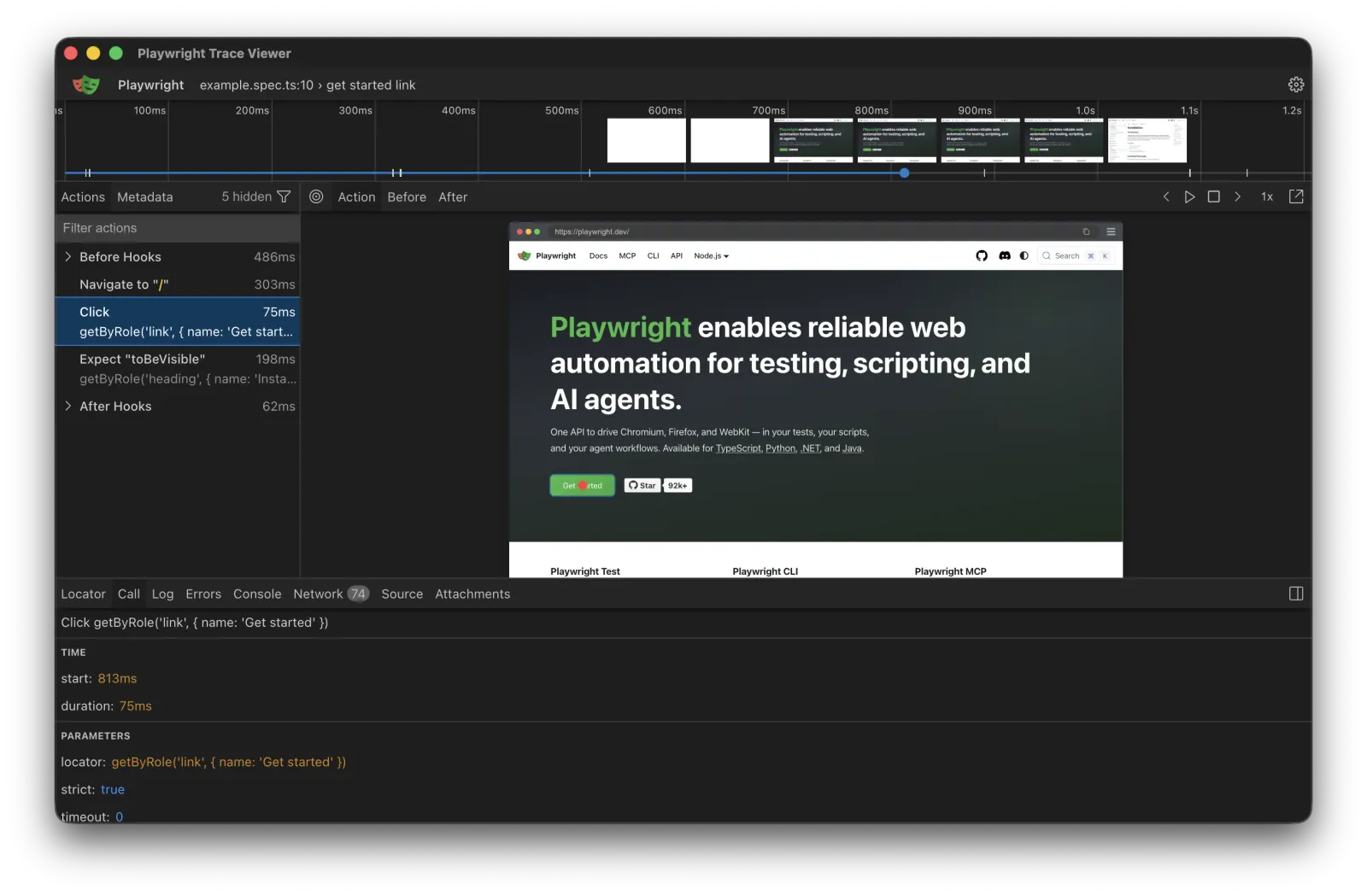
In CI, upload the trace directory as a GitHub Actions artifact so you can download and inspect it after the run. This turns "the API test failed with a 500" into "the API returned this exact error body with these headers at this timestamp," which is the difference between guessing and diagnosing.
Common Pitfalls in Playwright API Testing
1. Asserting on full response payloads. Asserting that the entire response body matches an expected object breaks the test every time the API adds a new field. Assert on the fields you care about with toMatchObject() and let the rest pass through.
2. Reading response bodies twice. Playwright response bodies are streamed. Calling response.json() twice on the same response throws. Capture the result in a variable and assert against the variable.
3. Overly broad glob patterns in page.route(). A pattern like /api/ intercepts every API call, including ones your test depends on being real. Scope your patterns to the specific endpoint you intend to mock.
4. Logging in before every test. Auth is the most common source of slow API suites. Use beforeAll or storageState to authenticate once per file or per project, not once per test.
5. Not disposing request contexts. Contexts left open accumulate state. Call context.dispose() in afterAll to release resources cleanly, especially in long-running suites.
6. Ignoring response timing. An API that returns the right data in 8 seconds is still broken. Capture response duration and assert against an SLA threshold. A simple Date.now() before and after the request gives you a rough latency check that catches regressions before users notice.
7. Mixing UI and API assertions without clear boundaries. A test that clicks a button, asserts on a DOM element, calls an API, and checks a database is doing four things. Split it: one test for the UI behavior, one for the API contract, one for the side-effect verification. Each test has a single failure reason.
Playwright vs the Alternatives
The API testing layer is one half of the coverage equation. The tools below compare on that half specifically. For the E2E browser layer that validates what users actually see, Autonoma handles that coverage from your codebase automatically.
| Dimension | Playwright APIRequest | Postman / Newman | REST Assured |
|---|---|---|---|
| Language | JS / TS / Python / Java / .NET | JavaScript (test scripts) | Java / Kotlin |
| GUI explorer | No | Yes (Postman desktop) | No |
| Browser + API in one test | Yes | No | No |
| Shared auth state | Yes (storageState) | No | No |
| Git-native collections | Yes (code files) | Partial (JSON export) | Yes (code files) |
| CI runner | npx playwright test | Newman CLI | Maven / Gradle |
| Network interception | Yes (page.route()) | No | No |
| Learning curve | Low (if already on Playwright) | Low (GUI first) | Low (if Java team) |
| Best for | JS/TS teams on Playwright E2E | Manual exploration + collection sharing | JVM backend teams |
Postman and Newman
Postman is the right tool when your team does significant manual API exploration, when QA and backend teams share collections as living documentation, or when you need a GUI request builder that non-developers can use. Newman (Postman's CLI runner) integrates into CI pipelines and handles collection exports cleanly. The limitation is what it cannot do: a Newman test cannot share authentication state with a browser session, and it cannot intercept browser-side network requests. For a full comparison of Postman alternatives including Bruno and Hoppscotch, see our guide to 6 Postman alternatives.
REST Assured
REST Assured is the natural choice for Java and Kotlin shops. It integrates with JUnit and TestNG, lives in the same Maven or Gradle build as the service it tests, and runs in the same CI pipeline as unit tests. The readable DSL makes assertions reviewable in PRs even by engineers who do not own the test suite. What it cannot do: share state with browser automation, intercept browser-initiated requests, or run as part of a JavaScript toolchain. If your backend is Java, REST Assured is essentially mandatory. If your frontend is JavaScript with Playwright, you end up owning two test infrastructures with no integration between them.
When Playwright APIRequest Wins
Playwright wins when your team already uses it for browser testing, when the unified pipeline matters more than a GUI explorer, or when you need a single test to span both HTTP-layer assertions and browser-layer interactions. The trade-off is the authoring model: every test case requires a developer to write code. There is no "record a request" shortcut. That authoring burden grows with your API surface, which is the point where the question of what else needs ongoing maintenance becomes relevant. The E2E browser layer on top of those APIs is where Autonoma removes that burden entirely. We built the system to read your codebase, generate the browser-level test plan, and self-heal it as your routes and components change. The API contract tests stay yours; the browser regression layer does not have to.
Use Playwright APIRequest when you want browser and API tests in one runner. Use Postman when you need a GUI for manual exploration. Use REST Assured when your backend is Java.
FAQ
Playwright API testing uses Playwright's APIRequestContext to send HTTP requests directly from within a Playwright test suite, without opening a browser. You can perform GET, POST, PUT, DELETE requests, assert status codes and response bodies, and share authentication state with browser-based E2E tests, all in the same test file and the same CI pipeline.
For teams already using Playwright for E2E testing, it can replace Postman's role in automated, CI-run API test suites. It cannot replace Postman for exploratory manual testing since there is no GUI request builder. The key advantage Playwright has over Postman/Newman is unified state: a single test can hit your login endpoint, receive a token, drive the browser as an authenticated user, and then call your API again to assert backend state. No context switching between tools.
Use request.newContext() inside a Playwright test to create an isolated APIRequestContext. Pass a baseURL to avoid repeating the host on every call. The context handles cookies and headers consistently across requests in the same test, and you can dispose it explicitly at the end with context.dispose(). For shorter tests, the global request fixture is already available without calling newContext().
REST Assured is the mature choice for Java and Kotlin backend teams that want API tests integrated with JUnit or TestNG in the same Maven or Gradle build. Playwright is the right choice for JavaScript and TypeScript teams, or for any team that wants browser and API tests unified in a single test file. REST Assured has a 10-plus year head start on the JVM ecosystem; Playwright has the advantage of sharing its runner and assertions with your E2E layer.
Yes. GraphQL is just HTTP POST under the hood. In Playwright you send a POST request with a JSON body containing the query and variables fields, then assert on response.data or response.errors. The companion repo for this guide includes a worked example for both query and mutation assertions.
page.route() intercepts outgoing network requests from the browser and lets you modify or fulfill them with mock data. This is the primary mechanism for stubbing third-party APIs during E2E tests so you prevent real external calls and control exactly what data the UI sees. It differs from APIRequestContext (which makes requests FROM Playwright TO your server) because page.route() intercepts requests FROM the browser.
No. Autonoma is a web-first E2E testing platform that covers the browser layer. It reads your codebase, generates browser-based E2E tests, and self-heals them as your code changes. It does not do API testing or generate API-layer test cases. If you ship a web application, Playwright API tests and Autonoma E2E tests are complementary: Playwright covers the contract between your frontend and backend at the HTTP layer; Autonoma covers the full user flows in the browser.
Add a GitHub Actions workflow that installs Node dependencies, runs npx playwright install chromium (API tests do not need full browser installs), and runs npx playwright test with your config file. Set BASE_URL as an environment variable so the same test suite can point at different environments. Run the matrix across Node 20 and 22 to catch Node version incompatibilities early. The companion repo for this guide includes a ready-to-use workflow file.


