

Preview environment data isolation is how each preview environment gets its own data, so a test or change in one preview cannot read, corrupt, or affect the data in another preview, or in production. The patterns range from a single shared database (cheapest, weakest) to a database per preview, or a managed full-stack preview environment (strongest, least DIY work). Which one you pick decides whether a destructive test in preview #12 can quietly poison preview #7.
Every team that ships pull request previews eventually hits the same wall. Preview #4 runs a test that deletes a user. Preview #9, pointed at the same database, fails five minutes later for no visible reason. Nobody connects the two until someone greps the logs at 11pm.
That wall has a name: shared state. There isn't one fix for it. There are at least six, and they trade isolation strength for cost and setup effort in fairly predictable ways. Below is the full ranking, weakest to strongest, so you can pick the pattern that matches what you're actually testing instead of copying whatever the last blog post recommended.
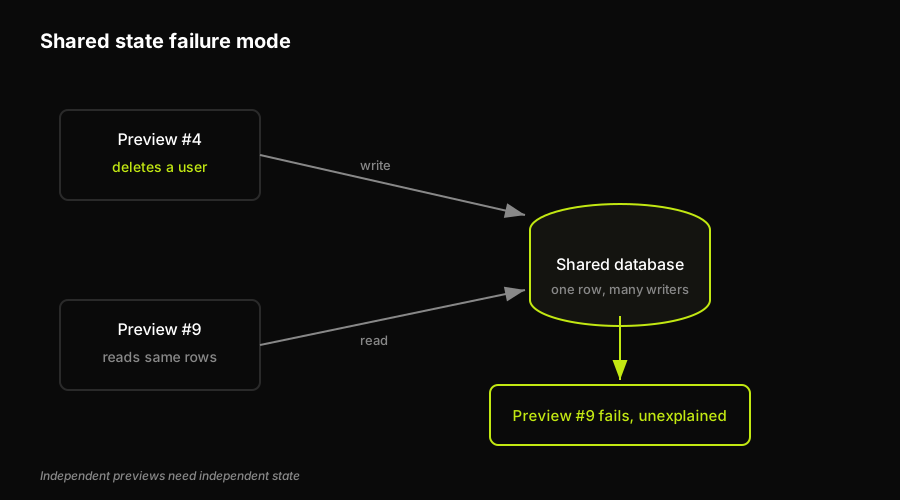
When two previews point at the same database, one preview's write silently breaks another's read.
What "isolation" actually means here
"Isolation" in this context isn't about network boundaries or containers, though those matter too. It's about data: rows in a table, jobs in a queue, files in a bucket. A preview environment is isolated on the data axis when nothing another preview does can change what your preview sees, and nothing your preview does leaks out.
Full isolation is expensive to fake and easy to break. One missing tenant_id filter, or a background job still pointed at the wrong connection string, and two previews are quietly sharing state again. That's why the patterns below aren't really independent "options." They're a spectrum, and most teams end up running more than one of them at once, depending on what a given preview is for.
The six patterns, ranked
| Pattern | Isolation | Cost | Speed | Teardown |
|---|---|---|---|---|
| Shared database | Weak | Lowest | Instant | None needed |
| Tenant-scoped data | Moderate | Low | Fast | Delete tenant rows |
| Database branch per preview | Strong | Branch-hours | Fast (seconds) | Drop the branch |
| Database per preview | Very strong | Higher | Slower (minutes) | Destroy the database |
| Throwaway tenant | Strong | Low | Fast | Discard the tenant |
| Managed full-stack preview | Strongest | Platform fee | Fast, automated | Automatic |
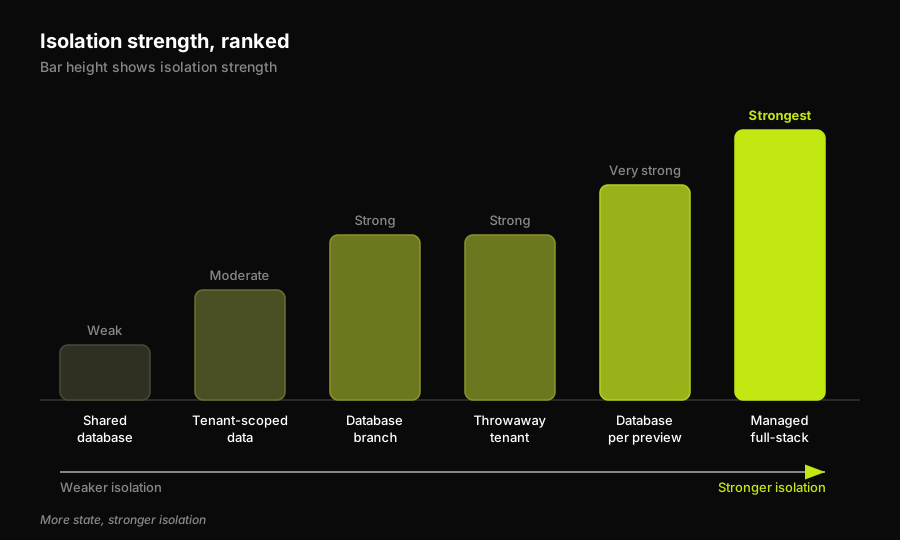
The six patterns ranked by isolation strength, from shared database up to a managed full-stack preview.
Shared databases make sense for read-only demos, marketing previews, or anything that never writes data (nothing mutates, so there's no isolation problem to solve). Tenant-scoped test data earns its keep in multi-tenant SaaS apps that can't afford a database per preview but still need writes to be safe. Database branching is the sweet spot once your database vendor supports copy-on-write branches, since you get near-production fidelity without provisioning a whole new instance. Database per preview fits teams where isolation is non-negotiable, usually regulated data or destructive migration testing, and the extra minutes of provisioning are an acceptable cost. Throwaway tenants are the narrower tool: reach for them specifically when a test needs to delete or corrupt something on purpose. And a managed full-stack preview environment is for teams who would rather adopt the strongest pattern by default than build and maintain any of the other five.
If you'd rather not build and babysit that yourself, PreviewKit, Autonoma's managed full-stack preview-environment product, provisions an isolated stack (backend, database, and services) per pull request and runs tests against it automatically.
A closer look at three patterns worth building yourself
The managed pattern is one honest option among six, not the only one worth considering. If you're building your own isolation layer, three patterns account for most real deployments, and each one fails in a different, very specific way once you push it past what it's good at.
Tenant-scoped test data is usually the first real fix teams reach for. Instead of a new database per preview, every row gets tagged with a tenant or workspace ID, and every query filters on it. It's cheap, and it works right up until someone forgets the filter, or a background job or cron worker keeps a connection open against the wrong tenant's data long after the request that spawned it returned. The mechanics, including seed factories and the "always create a fresh tenant per test" pattern, are covered in how to isolate test data per tenant. Tenant scoping also has a ceiling: it isolates rows, not schema, so a migration that changes a column type still runs against the same live schema every other preview is using.
Database branching solves the problem tenant-scoping can't: it isolates schema and migrations, not just rows. If your Postgres or MySQL provider supports copy-on-write branches, each preview gets a full, independent copy of the database in seconds, and the underlying storage is shared until data actually diverges, so idle branches cost close to nothing. Teardown is a single drop-branch call instead of a cleanup script. The setup for Vercel previews specifically is in give every Vercel preview its own database, and the two approaches are compared head to head in database branching vs. tenant isolation, the deeper reference if you're choosing between them.
Shared databases aren't a mistake, they're a default. Most teams start here because previews spin up long before anyone thinks about data isolation at all, and for a while nothing breaks because nobody's tests are writing anything meaningful. The failure mode isn't using a shared database. It's staying on one after previews start running tests that write, update, or delete, at which point flaky, unreproducible failures start showing up in whichever preview happened to run last.
How to choose
If your previews are read-only, a shared database costs nothing and isolates nothing, because there's nothing to isolate. Once previews start running tests that write, tenant scoping is the cheapest fix that survives concurrent runs, and it's usually where teams land first because it doesn't require touching infrastructure at all. Once you need to test migrations, schema changes, or anything destructive, tenant scoping stops being enough, and that's when branching or a database per preview earns its cost. Throwaway tenants are for the narrow case: a test that needs to delete or corrupt something on purpose, without risking a real tenant's data or waiting for a full database to provision. If the honest answer is that your team does not want to own the environment lifecycle, PreviewKit gives each pull request a managed full-stack preview with its own backend, database, and services, then Autonoma runs integrated E2E tests against that isolated runtime before merge.
Most teams don't end up on a single pattern forever. It's common to run tenant-scoped data for everyday feature previews and switch to branching or a database per preview specifically for the pull requests that touch a migration, since that's where schema drift actually bites. Whichever mix you land on, write it down as a rule (which pattern, for which kind of change) so the choice isn't re-litigated every sprint.
The bottom line
There's no universally correct pattern, only a correct one for what a given preview is testing. Rank them once, decide where each kind of preview in your pipeline falls, and the shared-database bugs that used to take an hour to diagnose (the ones that look random until you realize two previews were fighting over the same row) stop happening in the first place. For teams that choose the managed end of the spectrum, PreviewKit keeps the environment and database lifecycle per PR, while Autonoma's E2E testing validates the change in that same isolated preview instead of treating provisioning and testing as separate projects.
Frequently asked questions
Give each preview its own data instead of pointing every preview at one shared database. The common patterns, from cheapest to strongest, are tenant-scoped data (tag every row with a tenant ID and filter on it), a database branch per preview (a copy-on-write fork), a full database per preview, a throwaway tenant you spin up and discard, and a managed full-stack preview environment that provisions the whole isolated stack for you. Pick the weakest pattern that still covers what your previews actually test.
A shared database means every preview reads and writes the same data, so a destructive test in one preview can corrupt what another preview sees. A database per preview gives each preview its own separate database instance, so writes, migrations, and deletes stay contained. The shared model is cheapest and instant but offers the weakest isolation, while a database per preview offers very strong isolation at higher cost and slower provisioning.
Use a shared database only for read-only previews that never write data. Use tenant-scoped data once previews start writing but you cannot afford a database each. Use database branching or a database per preview when you need to test migrations, schema changes, or destructive actions. Use a throwaway tenant for tests that delete or corrupt data on purpose, and a managed full-stack preview environment when you would rather not operate any of this yourself.
No. If a preview only reads data and never writes, updates, or deletes anything, there is no shared state to protect, so a shared database is fine and costs nothing to run. Data isolation starts to matter the moment previews run tests that mutate data, because that is when one preview's writes can break another preview's reads.


