

vLLM vs Ollama comes down to how each one handles more than one request at a time: vLLM batches requests continuously so throughput keeps climbing as demand grows, while Ollama processes a small, fixed number of requests in parallel and queues the rest. On a single A100-class GPU serving an 8B model, that difference stops being academic once you're running more than roughly 8 sustained concurrent requests, the point where Ollama's queue depth, not its intelligence, becomes the bottleneck and vLLM becomes the right call.
We swapped an internal eval harness from Ollama to vLLM mid-project, because a load test that should have taken twenty minutes was still crawling after two hours. Nothing was wrong with our code. Ollama was doing exactly what it ships to do: serve one machine, one user at a time, reliably. We were pointing a small production-shaped load at it and it queued politely, without ever telling us why the graphs looked wrong.
That gap between what Ollama is built for and what a lot of teams quietly ask it to do is the whole story here. It's also why the benchmark numbers people cite for vLLM vs Ollama swing so wildly depending on who's writing: some measure a single chat session, some measure 256 concurrent users, and those two setups don't describe the same tool.
Ask around and you'll get the same non-answer everywhere: "it depends," or "we just run both." That's not evasiveness, it's an accurate description of a market where most teams start on Ollama because it's a one-command install, and only some of them ever grow into a load pattern that needs vLLM. The problem is nobody publishes the number that tells you which group you're in until you've already found out the hard way, mid-incident, the way we did.
This piece assumes you've already narrowed it to vLLM or Ollama as finalists. If you're still comparing local runtimes in general, LM Studio vs Ollama is the hub for that decision, best local LLM for coding covers picking the model itself, and how to run an LLM locally covers whether self-hosting is the right call at all.
Tested on: the rig, the versions, the dates
The numbers below come from two places: a published third-party benchmark, and our own verification pass against current docs and pricing, both dated so you can tell when either one goes stale.
The benchmark is Red Hat's, published August 8, 2025. It ran on a single NVIDIA A100-PCIe-40GB with CUDA 12.4 and driver 550.144.03 inside an OpenShift 4.17.15 cluster, using GuideLLM 0.2.1 as the load-testing harness against meta-llama/Llama-3.1-8B-instruct on vLLM 0.9.1 and the equivalent llama3.1:8b-instruct-fp16 on Ollama 0.9.2, sweeping concurrency from 1 to 256 simulated users at 300 seconds per step.
We re-verified the parts most likely to have moved on August 4, 2026: vLLM is at v0.26.0 (released July 27, 2026), Ollama is at v0.32.5 (released the same week), and Ollama's own FAQ currently documents its default parallel-request limit as 1, down from the 4 that shipped in the version Red Hat tested a year earlier, a genuine version-dependent detail worth checking against your own install before trusting either number. GPU and electricity figures used in the cost section further down are dated the same day.
The sweep design matters as much as the numbers it produced. A 1-to-256 concurrency ramp with a fixed 300-second dwell at each step is long enough to separate a tool that's still warming up from one that's genuinely plateaued, which is the exact distinction a shorter or single-point test would miss. If you want to sanity-check any of this against your own hardware, that's the harness to reach for: point GuideLLM at your own vLLM and Ollama endpoints, use a fixed dataset so both tools see identical prompts, and record the concurrency level where each tool's throughput curve goes flat. That number, not ours, is the one that should drive your decision.
The crossover: when Ollama stops being the right answer
Here's the number the rest of this category circles without landing on. On a single GPU in the A100-PCIe-40GB class, serving a dense model in the 8B-parameter range, Ollama on its shipped defaults is the right tool up to somewhere around 8 sustained concurrent requests. Past that, you're not asking Ollama to work harder. You're asking it to grow a queue.
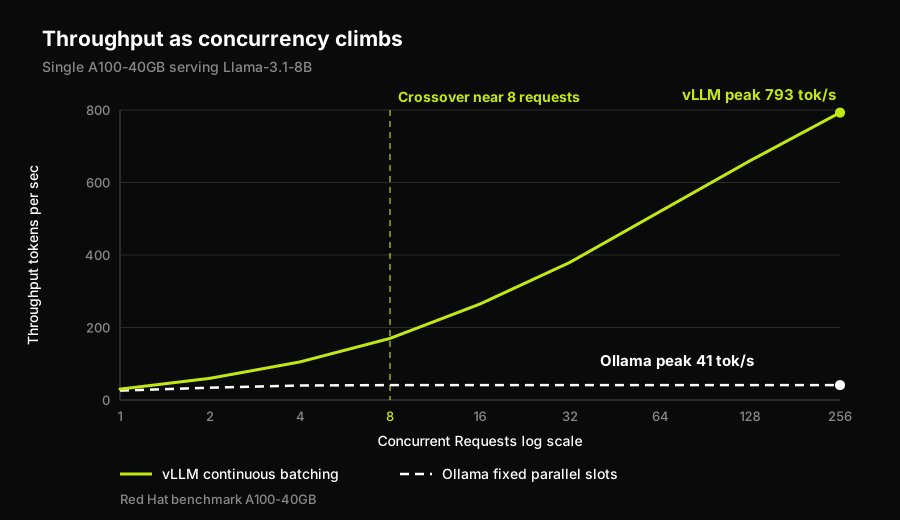
The gap opens at Ollama's parallel-slot cap, not at some intelligence limit.
Here's the reasoning, stated plainly enough to recompute for your own rig. Ollama processes a fixed number of requests in parallel per loaded model, set by OLLAMA_NUM_PARALLEL. That default was 4 in the version Red Hat tested in mid-2025 and is documented as 1 on Ollama's own site today. Once your sustained concurrent request count passes that cap, additional requests don't get folded in alongside the ones already running. They wait. Ollama's own peak in Red Hat's sweep, 41 tokens per second, was reached at low concurrency and never grew past it, while P99 latency for the requests that did complete had already climbed to 673 milliseconds, against 80 milliseconds for vLLM at its own peak of 793 tokens per second. That's a difference you'd feel as your app hanging, not as a number on a dashboard.
Raising the cap moves the wall. It doesn't remove it. Red Hat's own control test set OLLAMA_NUM_PARALLEL=32 specifically to isolate configuration from architecture, and reported that vLLM's throughput kept scaling almost linearly through the retuned sweep while Ollama's plateaued and never matched vLLM's capacity at any concurrency level tested, up through the 64 concurrent requests where the retuned run stopped because Ollama was already oversaturated. Call 8 the point where you should start paying attention, and 64 the point where Red Hat's own data says configuration alone won't save you.
The assumptions behind that 8, so you can shift it for your own situation: a model in Llama-3.1-8B's size class (a 70B model produces a lower absolute ceiling on both tools, not a different qualitative story), a single GPU of roughly A100-40GB class (more VRAM buys headroom to raise OLLAMA_NUM_PARALLEL further, since Ollama's own docs note RAM use scales with parallel requests times context length), and "concurrent" meaning sustained simultaneous generations, not a traffic spike that clears in seconds.
That phrasing is worth taking literally, because it's where this decision stops being a backend metric and becomes a product problem. Queue depth doesn't surface as an error your monitoring catches. It surfaces as a spinner that never resolves, a request your frontend times out on, or a partial response rendered as though it were complete. The throughput number tells you the runtime is saturated; only exercising the running application tells you what a user sees when it is, which is the gap Autonoma closes by running behavioral end-to-end tests against the live app under the conditions you actually deploy into.
One more variable moves the number without changing the shape of the story: request length. Red Hat's fixed dataset produced one throughput ceiling; a workload of long completions, code generation with thousand-token outputs, will saturate Ollama's parallel slots at a lower request count than a workload of short customer-support replies, because each slot stays occupied longer per request. The crossover concurrency shifts down for long-output workloads and up for short ones. The mechanism, a fixed number of slots against a batching engine with none, doesn't change either way.
vLLM vs Ollama at a glance
Here's the shape of that gap in one place, every number sourced directly from Red Hat's sweep or from each tool's own current documentation:
| Dimension | vLLM | Ollama |
|---|---|---|
| Peak throughput (A100-40GB) | 793 tok/s | 41 tok/s (default) |
| P99 latency at peak | 80 ms | 673 ms |
| Concurrency model | Continuous batching | Fixed parallel slots |
| Default parallel cap | No fixed request cap | 1 to 4, version-dependent |
| Best fit | Sustained multi-user serving | Single-user local use |
| Setup surface | Server you configure | One-command local daemon |
The cost per million tokens: local hardware against a hosted API
Nobody in this comparison category puts a dollar figure on this decision, so here's one, with every assumption visible and swappable.
Start with the hardware. A single NVIDIA A100-PCIe-40GB currently runs about $8,000 new (that number moves with the used market, so check current listings before budgeting against it), amortized over 3 years, a common depreciation window for GPU capital equipment: $222 a month. Add power: the card's 250-watt TDP, run continuously, at a typical US commercial electricity rate of $0.13 per kilowatt-hour, comes to roughly $23 a month. Call the fixed cost of owning and running the card $246 a month, whether it processes ten thousand tokens that month or ten billion.
Now the ceiling. Red Hat's measured vLLM throughput on that exact card, 793 tokens per second sustained, works out to a theoretical maximum of about 2.05 billion tokens a month if the card never idles.
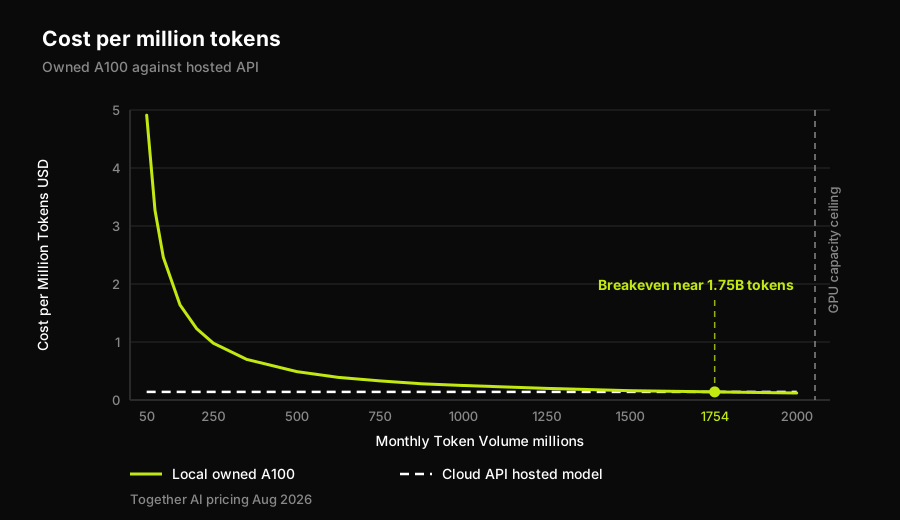
Local hardware only wins once you're using nearly all of it.
Compare that fixed monthly cost against Together AI's current price for hosting the same open model, Llama-3-8B-Instruct-Lite, as an API: $0.14 per million tokens, input and output priced the same, verified against their pricing page on August 4, 2026. At $246 a month in fixed cost, your own card only beats that $0.14 rate once you're pushing through more than about 1.75 billion tokens a month, roughly 85 percent of the card's own measured ceiling, sustained, every single month.
Below that line, owning the hardware isn't the cheap option, it just feels like it should be. At 100 million tokens a month, about 5 percent utilization, that $246 fixed cost works out to $2.46 per million tokens, seventeen times the hosted price. At 500 million tokens, still under a quarter of capacity, you're at $0.49 per million, three and a half times the hosted price. You still haven't crossed at 1 billion tokens a month, roughly half the card's ceiling: that's $0.25 per million. Only past 1.75 billion tokens a month does the arithmetic flip in your favor, and this estimate is generous to local hardware since it leaves out the server chassis, networking, cooling, and the engineering time to keep the thing running, none of which show up in a $0.14-per-million API bill.
Change any input and the line moves: a cheaper card lowers the volume you need, a longer amortization window lowers it further, a pricier API raises the local card's odds. The arithmetic is the point here, not the specific number, so recompute it against your own quote and your own workload before deciding either way.
The honest part: how much of this is defaults, not architecture
Here's the detail that makes the rest of this credible instead of a hit piece on Ollama: a meaningful slice of that roughly 19x throughput gap, 41 versus 793 tokens per second, is a default setting, not a ceiling Ollama's architecture can never lift.
Red Hat's control test retuned Ollama with OLLAMA_NUM_PARALLEL=32, up from the 4 it shipped with in the tested version, specifically to separate "Ollama configured badly" from "Ollama built differently." The retuned run improved, measurably, and Red Hat's own account still puts vLLM ahead at every concurrency level checked: throughput that kept climbing almost linearly for vLLM against a retuned Ollama that plateaued and stopped matching it well before the sweep hit the 64 concurrent requests where the test was capped due to oversaturation.
So the honest split is roughly this. Part of the gap you'd measure between an out-of-the-box Ollama and vLLM is a config default sitting at 4, or at 1 on the version documented today, that you can raise in one environment variable. The rest of it is architectural. vLLM batches requests continuously into the model's forward pass as they arrive; Ollama processes a bounded number of parallel slots and queues past that no matter how high you set the number. Raising OLLAMA_NUM_PARALLEL buys you a wider queue. It doesn't buy you continuous batching. That distinction is the whole reason retuning narrows the gap without closing it.
Worth noting what raising that variable does to everything downstream, since it reads like a free win. A wider queue changes the latency distribution your application sees, and Ollama's own docs point out that memory use scales with parallel requests times context length, so pushing the number up trades tail latency and headroom against each other. Both of those are things a user feels and neither is visible in a tokens-per-second figure. If you change that value, the honest follow-up is re-running the application's own behavioral tests at the new setting rather than assuming a config change is behavior-neutral, which is the check Autonoma automates against a live environment.
From laptop prototype to production: the migration
Say the crossover argument lands and you decide to move. The actual migration from an Ollama prototype to a vLLM deployment is smaller than the tooling discourse makes it sound, and also easy to get subtly wrong in ways a load test won't surface.
The API surface is the easy part. Both tools speak an OpenAI-compatible chat completions endpoint, so most application code that called Ollama's local server can point at vLLM's OpenAI-compatible server with a changed base URL and little else. What doesn't transfer cleanly: quantization format (a GGUF file tuned for Ollama's llama.cpp backend isn't the artifact vLLM expects), default sampling parameters, context-length handling under load, and error behavior when the server saturates, since vLLM under real concurrency will reject or queue differently than a single-user Ollama instance ever had to.
Treat the cutover the way you'd treat any backend swap with a different failure mode, not just a config change. Stand vLLM up alongside the existing Ollama deployment rather than replacing it in place, run the same eval prompts through both, and compare not just the responses but the tail latency and error behavior under a concurrency level near your own crossover point, not just at idle. Watch for the specific failure Ollama's architecture never produced: a burst of requests that gets rejected or truncated once vLLM's batching hits a resource limit, rather than quietly queued the way Ollama would have handled it. Only after that comparison holds up does it make sense to move production traffic over, ideally in stages rather than all at once.
That last point is the one worth sitting with. Everything upstream in this article, the token counts, the latency numbers, the dollar figures, describes the backend. None of it describes what happens to your application once the backend underneath it changes shape. A prompt that worked fine against Ollama's forgiving single-request path can surface a timeout, a truncated response, or a rate-limit error against vLLM under load that your frontend was never built to handle, and this exact comparison category already documents backends changing performance characteristics mid-year without warning. Swapping inference backends is exactly the kind of change worth re-verifying the application against rather than assuming away, which is the layer Autonoma exists to check.
Frequently Asked Questions
Neither is better in general; they're built for different concurrency levels. On a single GPU in the A100-40GB class serving an 8B-parameter model, Ollama on its defaults is the right call up to roughly 8 sustained concurrent requests, the point where its fixed number of parallel slots starts queueing rather than serving. Past that, vLLM's continuous batching keeps scaling throughput while Ollama's plateaus, and Red Hat's own benchmark shows that gap persists even after Ollama is retuned. Below that threshold, Ollama's simplicity is a real advantage, not a compromise.
Switch when you're serving more than a handful of simultaneous users against one GPU, when P99 latency under load matters (Red Hat measured 80 milliseconds for vLLM against 673 milliseconds for Ollama at each tool's own peak throughput), or when your monthly token volume is high enough that the fixed cost of owning the hardware is actually being used rather than sitting mostly idle. If you're prototyping alone on a laptop or serving one internal user at a time, Ollama's one-command setup is still the faster path.
It closes part of the gap but not all of it. Red Hat's own control test raised Ollama's parallel-request limit from its shipped default to 32 specifically to separate configuration from architecture, and vLLM still came out ahead at every concurrency level tested, scaling almost linearly while retuned Ollama's throughput plateaued. Ollama processes a bounded number of parallel slots no matter how high you set that number; vLLM batches requests continuously into the model's forward pass. Retuning widens the queue. It doesn't add continuous batching.
Not always, but it usually is below the volume most teams actually run. Amortizing a single A100-PCIe-40GB at roughly $246 a month in capital and power against Together AI's $0.14-per-million-token price for a hosted Llama-3-8B, the breakeven lands around 1.75 billion tokens a month, about 85 percent of that card's own measured throughput ceiling. Below that, sustained, every month, the hosted API is cheaper. Only teams running near-saturated local inference clear that bar.
It covers the part of the migration a load test doesn't. Both tools speak an OpenAI-compatible endpoint, so the cutover looks like a base URL change. What actually changes is failure behavior: Ollama queues politely past its parallel-slot cap, while vLLM under real concurrency rejects or truncates once batching hits a resource limit. A frontend built against the first can break against the second with no code change, surfacing as a hung request rather than an error your monitoring catches. Autonoma derives behavioral end-to-end tests from your codebase and runs them against the running application, so you can compare both backends near your crossover point.


