

Every one of these integrations advertises itself as a two-click setup, and for the connection itself, that's true. What none of them advertise with equal volume is which one hands you a genuinely separate database per preview and which one quietly points every open pull request at the same rows. You find out which you got after three engineers have spent a sprint testing against the same shared PlanetScale branch, and by then it's not a footnote, it's the reason the bug report from staging didn't reproduce anywhere else.
Where the Connection String Actually Lives
Vercel splits environment variables into three scopes: Production, Preview, and Development. When you set a value under Preview, that's the value every preview deployment gets, for every branch, every PR, unless you narrow it further to specific branches. A single DATABASE_URL saved under Preview scope is, by construction, one database shared across however many preview deployments happen to be live at once.
That's the default failure mode underneath all three providers here. "Connecting a database" to Vercel, mechanically, is just injecting a connection string into that Preview scope. Whether the string changes per deployment or stays fixed is entirely up to the integration doing the injecting, and only one of the three below changes it automatically. If you want the deeper mechanics of wiring this yourself end to end, we've written a fuller route-by-route guide to giving every Vercel preview its own database.
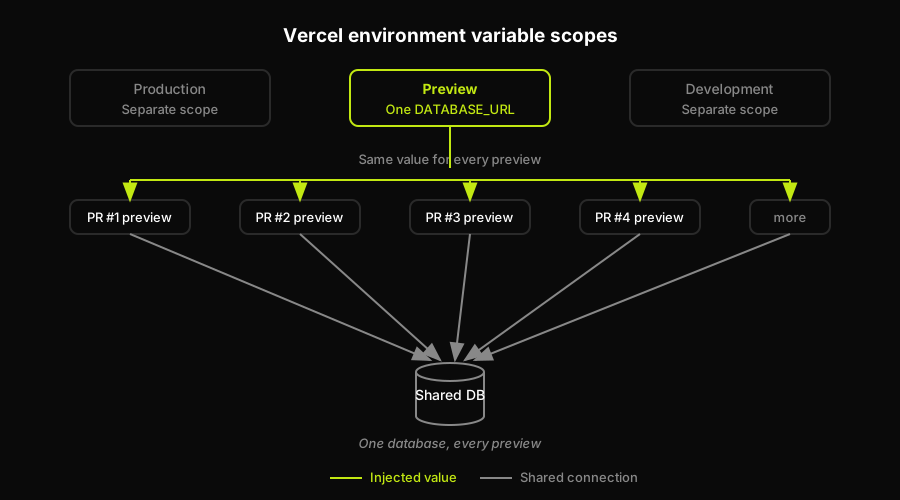
A single DATABASE_URL under the Preview scope is injected into every preview deployment, so all open pull requests read and write the same shared database.
Neon Vercel Integration: A Branch Injected Into Every Preview Automatically
The Neon Vercel integration, installed from the Vercel Marketplace, is the one provider here that auto-branches by default. Install it, connect it to a Neon project, and enable the option to create a branch for each preview deployment. From that point, every time Vercel builds a preview, Neon's integration creates a new copy-on-write branch off your parent branch and injects that branch's own DATABASE_URL (and, depending on your framework, POSTGRES_URL) into that specific deployment's environment, not the shared Preview scope.
The steps: open the Neon integration from the Vercel Marketplace, connect it to your Vercel project and an existing Neon project, then toggle "Create a branch for each preview deployment" in the integration's settings. After your next PR triggers a build, check that deployment's environment variables in the Vercel dashboard. You'll see a branch-specific connection string, not the same value repeated across every open preview. That's the tell that isolation is actually happening, not just configured.
Verdict: auto-branches by default, so per-preview isolation is what you get without writing anything yourself. The tradeoff and the limits of that isolation (it forks whatever tenant model your schema already has) are worth understanding before you rely on it, which we cover in Neon branching for previews.
Supabase Vercel Integration: One Project, Shared by Default
The standard Supabase Vercel integration connects a single Supabase project to your Vercel project and injects that project's variables, NEXT_PUBLIC_SUPABASE_URL, the anon and service keys, and POSTGRES_URL, into both Production and Preview scopes. That's the entire setup: authorize the integration, pick your Supabase project, and Vercel writes the values in for you. It's also, by default, the same project and the same database for every preview deployment you'll ever create. There's no per-branch behavior baked into the basic integration at all.
Real per-preview isolation on Supabase requires a separate feature: Branching. Enabling it (a paid add-on tied to your plan) connects your Supabase project to your Git repository directly. From there, opening a PR against a configured branch spins up a dedicated preview branch: its own Postgres instance, its own Auth schema, its own Storage buckets, seeded from a chosen source branch. Vercel's env vars for that deployment then need to point at the branch's connection details rather than the shared project's, which is a second wiring step past the basic integration.
Verdict: shared by default. Isolated only once Branching is turned on and actually wired to your preview deployments, which is a meaningfully bigger lift than the two-click integration implies. The full breakdown of what a Supabase branch forks (more than just the database) and where it gets slow lives in Supabase branching for previews.
PlanetScale Vercel Integration: Branch Injection Without Auto-Isolation
The PlanetScale Vercel integration injects connection credentials for a branch you choose into your project's Vercel environment variables. PlanetScale itself has genuinely first-class branching, dev branches, schema diffs, deploy requests, but the Vercel integration doesn't create a new branch per preview deployment on its own. Point it at a branch once, commonly main or a single shared dev branch, and every preview deployment inherits that same connection string until you change it.
Getting real per-preview isolation out of PlanetScale means scripting it: a CI step or webhook that creates a PlanetScale branch keyed to the Git branch name when a PR opens, then sets that connection string as an environment variable override on the specific Vercel deployment (via the Vercel API or vercel env add scoped to that deployment), and tears the branch down when the PR closes. None of that is exotic, but none of it is handed to you by installing the integration either.
Verdict: shared by default, unless you build the per-branch creation step yourself. What that scripted setup buys you, and what it doesn't (PlanetScale's branching model isolates schema changes, not necessarily preview data seeded for testing), is covered in PlanetScale branching for previews.
The Wiring Tax
Add it up and wiring a database per preview, correctly, is three different jobs. Neon gives it to you for free with one toggle. Supabase makes you pay for and configure a separate feature. PlanetScale makes you write the automation yourself. And all three, even done perfectly, only solve the database. Your preview deployment still needs the rest of the backend, any background services, seeded application state, and the app itself, none of which a database integration touches.
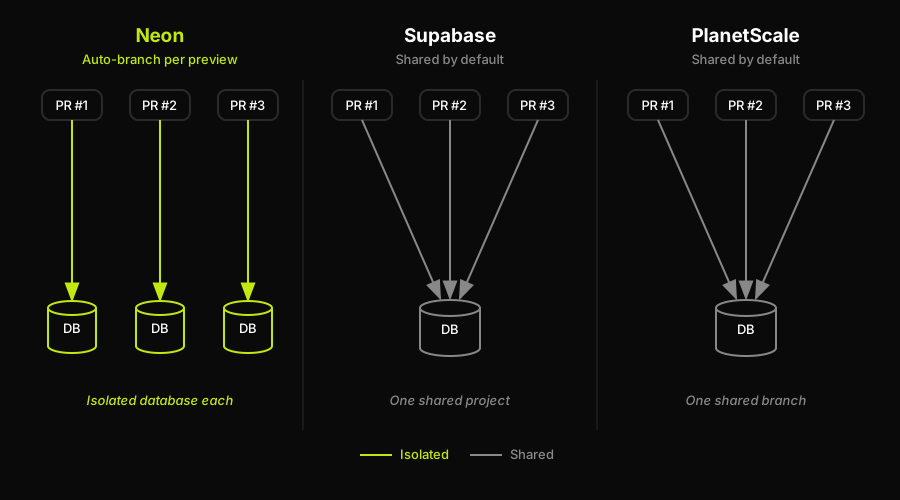
Neon injects a fresh database branch into every preview, while Supabase and PlanetScale point all previews at one database until you add branching or scripting yourself.
How Autonoma Skips the Per-Provider Wiring Entirely
Everything above is real, achievable work, and plenty of teams do it provider by provider because the database is the one piece they can't skip. The part that's easy to underestimate is that it's also a maintenance surface: three different setups, three different failure modes, and a fresh onboarding doc every time someone forgets whether this project's previews are isolated or quietly shared.
Autonoma built PreviewKit to remove that per-provider decision entirely. Instead of choosing a database vendor's branching feature and wiring your own connection-string handoff, PreviewKit provisions a full-stack preview environment per pull request, backend, supporting services, and an isolated database, automatically, with no per-provider toggle to remember to enable. The database layer underneath can still be a Neon or Postgres instance; what changes is that you're no longer the one deciding whether isolation happened or scripting the branch creation to make it so.
The other half of the same problem is verification. A correctly isolated database doesn't catch a broken checkout flow or a query that quietly returns the wrong tenant's rows, and neither does a green preview build. That's what our agents handle on top of the environment itself: a Planner agent reads your codebase and plans test cases against the routes and flows that changed, an Executor agent runs them against the live preview, a Reviewer agent separates a real bug from an agent error or a stale test, and a Diffs Agent updates the suite on every PR by reading the code diff, so the tests stay aligned with the app without anyone maintaining them by hand.
None of that requires you to have already chosen a database vendor. A team that hasn't picked between Neon, Supabase, and PlanetScale yet can skip the decision entirely and let PreviewKit provision the whole environment, database included, per PR. A team that's already standardized on one of these three can keep that choice and still hand the surrounding lifecycle, the parts a database integration was never going to cover, to PreviewKit instead of building and maintaining that glue in-house.
Quick Reference: Provider Defaults at a Glance
The three integrations look identical from the Vercel Marketplace screen: pick a project, authorize it, done. What differs is entirely on the other side of that connection string, and it's worth having in one place before you install anything.
| Provider | Default preview behavior | What isolation requires | Connection string source |
|---|---|---|---|
| Neon | Auto-branch per preview | Nothing, on by default | Neon integration, per deployment |
| Supabase | One shared project | Enable paid Branching | Shared project, all previews |
| PlanetScale | One shared branch | Script branch creation | Whatever branch you wired |
Read it as a decision filter, not a ranking. If auto-isolation matters more than which database engine you'd otherwise pick, Neon removes a step nobody else here removes for free.
Confirm It Actually Isolated
Whichever provider you're on, don't take the green build as proof. Open two preview deployments from two different PRs, write a throwaway row with a unique marker in one (a test user, a comment, anything you can search for), and check whether it shows up in the other preview or in production. If it does, you're on a shared database no matter what the integration's marketing copy says.
The second check is faster: open each deployment's settings in the Vercel dashboard and look at the resolved DATABASE_URL for that specific deployment, not the project-level Preview value. A different host, database name, or branch identifier per deployment means it's actually isolated. The same string across every preview means you've connected a database to Vercel, but not to isolation.
Do this once, right after you wire the integration, not months later when a bug report from one PR's preview mysteriously shows up in someone else's. It costs five minutes: open two deployments side by side, run the write, run the check. The alternative is finding out the same way most teams do, when a reviewer testing PR #212 sees a row that PR #198 wrote the day before, and nobody can explain why a "preview" deployment has data from a branch that hasn't merged yet.
Worth automating once you've confirmed it manually: a CI step that runs the same write-and-check on every new preview deployment, failing the build if the marker row leaks across environments. It's a small addition to a pipeline that's probably already running migrations against the preview, and it turns "we think previews are isolated" into something your CI actually verifies on every single PR, not something one engineer checked by hand the week the integration went in.
If that provider-specific wiring and verification is more operational work than your team wants to own, Autonoma PreviewKit is the relevant alternative: it provisions a full preview environment per pull request, including the backend, supporting services, and an isolated database, then runs built-in web E2E tests against that same preview. That makes the operational workflow in this article, from isolated data to verification before merge, part of one managed per-PR environment rather than a set of Vercel and provider handoffs your team maintains separately.
FAQ
No, not by default for most providers. Vercel's Preview environment scope injects one value across every preview deployment unless the integration itself creates a new database or branch per deployment. Neon's Vercel integration does that automatically. Supabase and PlanetScale point every preview at the same shared database unless you separately enable Supabase Branching or script per-branch creation for PlanetScale.
The Neon integration, once you enable 'create a branch for each preview deployment,' creates an isolated copy-on-write database branch for every preview automatically and injects that branch's own connection string into the deployment. Supabase's standard integration and PlanetScale's integration both inject one fixed connection string across every preview by default, with no auto-branching built in.
Enable Supabase Branching, a separate feature (tied to your plan) beyond the basic Vercel integration. It connects your Supabase project to your Git repository and creates a full preview branch, its own Postgres instance, Auth schema, and Storage, per configured branch. You then need to point that specific Vercel deployment's environment variables at the branch's credentials rather than the shared project's.
Because the PlanetScale Vercel integration injects credentials for one branch you chose, and every preview deployment inherits that same connection string until you change it. PlanetScale's branching model exists, but the Vercel integration doesn't create a new branch per preview automatically. Getting isolation requires scripting branch creation keyed to the Git branch and overriding the connection string per deployment yourself.
Yes. Autonoma's PreviewKit provisions a full-stack preview environment per pull request, backend, services, and an isolated database, without requiring you to choose and configure a specific database vendor's branching feature. It also runs end-to-end tests against that same preview through four agents (Planner, Executor, Reviewer, Diffs Agent), so the environment and the verification of what's running on it are handled together.


