

Ask that question in a Neon community channel and you'll get a dozen partial answers, all technically true, all avoiding the number a preview-environment team actually needs. The pricing page explains the primitives. Third-party explainers mostly restate the pricing page. Neon has no particular incentive to publish "here's your bill once you're spinning up 200 branches a day," and nobody neutral has bothered to model it either. So here's that model, built on Neon's current published rates, with every assumption labeled so you can swap in your own numbers.
How Neon Actually Prices a Branch
The first thing to get right: Neon does not charge a flat fee per branch, at least not for branches inside your plan's included allowance. What it charges for is resource consumption, split across two meters. (For the broader picture of what Neon is beyond branching, see our Neon database overview.)
Compute is billed in CU-hours, compute size multiplied by hours running. A Compute Unit is roughly 4 GB of RAM plus proportional CPU, and Neon autoscales within a configured range. On the Launch plan, compute runs $0.106 per CU-hour; on Scale, $0.222 per CU-hour. Critically, a suspended branch costs nothing. Neon's autosuspend feature spins compute down to zero after a period of inactivity (5 minutes by default on Free and Launch, configurable from 1 minute to always-on on Scale), and a suspended branch accrues no compute charge at all.
Storage is billed at $0.35/GB-month, metered hourly, but the way it applies to branches is the part most explainers skip. A root branch pays for its actual logical data size. A child branch, the kind you'd create per PR, only pays for the delta it has accumulated since it forked from its parent, capped at its full data size. A brand-new preview branch that hasn't diverged much costs almost nothing in storage. One that's been alive for three weeks and absorbed a dozen migrations is a different story.
Then there's the one genuinely flat, per-branch charge in the whole model: your plan includes a set number of branches per project at no extra cost (10 on Free and Launch, 25 on Scale). Every branch beyond that count costs $1.50 per branch-month, prorated hourly, which works out to roughly $0.002 per branch-hour. That figure is the one usually quoted as "Neon's branch cost," and it's real, but it's only one of three meters running, and for a team doing per-PR branching at any real volume, it's rarely the biggest one. (For the mechanics of Neon branching itself, separate from what it costs, see our Neon branching for previews breakdown.)
A Neon branch is not one flat line item, it is three meters running at once (compute, storage, and a flat fee only past your included branch count).
The Real Cost of Branching at Preview-Environment Scale
None of the three meters above is expensive in isolation. The reason "does Neon charge per branch" doesn't have a one-line answer is that at preview-environment scale, all three run simultaneously, across every open PR, all the time.
The branch-hour math
Start with the flat fee, since it's the simplest. At $1.50/branch-month prorated hourly, every branch you keep beyond your plan's included quota costs about $0.002 for every hour it exists, whether or not anyone is using it. That number alone looks trivial. It stops looking trivial once you multiply it by however many branches your CI and code review process keeps alive concurrently, which for a team merging dozens of PRs a day is rarely a small number.
When autosuspend doesn't actually suspend
Autosuspend is supposed to be the safety valve: no traffic, no compute charge. In practice, several ordinary parts of a preview stack quietly defeat it. A health check hitting the preview app every 30 seconds keeps the underlying branch awake. A connection pooler holding idle connections open can prevent Neon from ever considering the branch inactive. A monitoring agent or a stray cron job polling the database for readiness does the same thing. None of these look like "usage" to a developer glancing at a preview URL, but to Neon's compute meter, they're indistinguishable from a human running queries. The bill doesn't spike all at once, it just quietly never goes to zero.
Storage deltas that quietly compound
Because child branches are billed on their delta from the parent, a branch's storage cost starts near zero and grows the longer it stays alive and the more it diverges. That's fine for a branch that lives a day and dies with its PR. It's a slower-growing problem for the branches that don't get cleaned up on schedule: a preview that sits open for a long review cycle, a "temporary" branch someone forgot to delete, a staging-adjacent branch that quietly becomes permanent. None of those show up as an alarming line item in week one. They show up as a storage bill that's crept upward for months once someone finally audits it, well after the branch stopped earning its keep.
Worth noting: this specific cost shape, compute plus a storage delta plus a flat extra-branch fee, is Neon's model, not a universal one. PlanetScale, for instance, bills branching on a different axis entirely (schema-branching and deploy requests rather than Neon's compute/storage split), which changes the calculus if you're choosing a vendor rather than just pricing out the one you already have. We compare the two head to head in Neon vs PlanetScale if that's the decision in front of you.
Compute drives the bill, swinging more than 3x between disciplined and leaky setups, while the flat extra-branch fee stays constant (illustrative numbers at 200 PRs a day).
How Autonoma Prices Preview Environments Without the Per-Branch Math
The honest conclusion so far isn't "Neon branching is expensive." At moderate volume, with disciplined autosuspend and short-lived branches, it's genuinely cheap. The point where it stops making sense is operational, not just financial: once you're running hundreds of ephemeral databases a day, someone on your team owns configuring autosuspend correctly per environment, auditing which branches are secretly staying awake, and finding and deleting the stale ones before their storage delta becomes a real number.
That's a second job layered on top of the database bill itself, and it's the same fork in the road we mapped out in database branching vs tenant isolation: branching gives you a real, isolated copy of the schema cheaply, but it doesn't manage its own lifecycle.
Everything modeled above is also just one resource: the database. A real preview environment needs the backend, the services it talks to, and a test suite that actually exercises it, and once a team is managing branch-level autosuspend settings and hunting stale branches, they're usually also hand-wiring the rest of that stack per PR, service replication, secrets, routing, teardown, on their own.
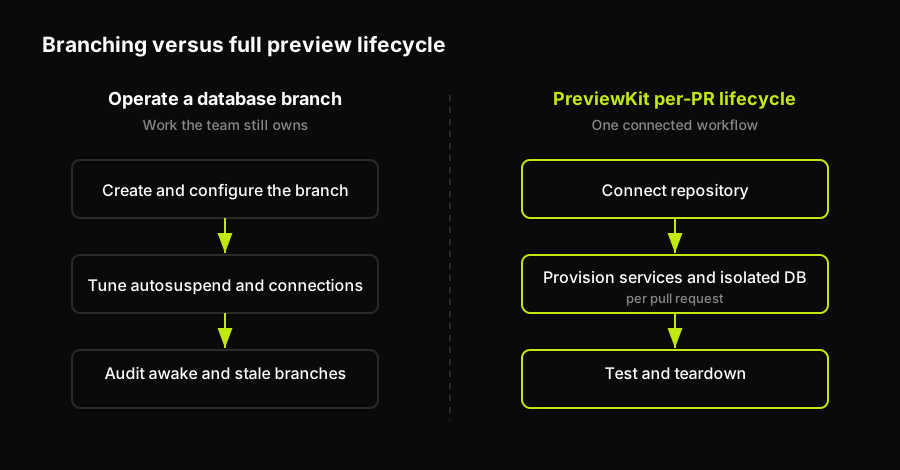
A database branch solves one provisioning task; a usable preview still needs services, tests, and lifecycle cleanup on every pull request.
Autonoma's PreviewKit is a managed full-stack preview-environment platform: connect a repository and it provisions the backend, the isolated database, and the supporting services per PR, then tears the whole environment down on merge, no per-branch autosuspend tuning and no stale-branch audit required. It's priced to operate a fleet of environments predictably rather than as a growing pile of per-resource meters. The differentiator sits on top of that: Autonoma's Planner and Diffs Agent read the codebase to generate and maintain end-to-end tests automatically, with Executor and Reviewer running and classifying results on every preview, so the environment you get isn't just isolated data, it's isolated data that's already been tested by the time a reviewer looks at the PR.
For a team that's just discovered its Neon bill has three moving parts and a fourth hidden one (the engineering time spent watching all three), that's the actual trade being made: keep operating the per-branch math yourself, or hand the whole lifecycle, database included, to something priced to run it.
What 200 PRs a Day Actually Costs
To see what "operating the per-branch math yourself" actually bills out to, take a team on Neon's Scale plan running roughly 200 PRs a day, each opening one preview branch that lives about 24 hours before merge or close. By Little's Law, that steady state works out to roughly 200 concurrent branches: 25 covered by the plan's included quota, 175 billed as extras every hour they exist. Assume each branch's compute runs at Neon's minimum 0.25 CU autoscaling floor, and vary only how much of the day it's genuinely active versus correctly autosuspended. These are our assumptions, not a Neon-published benchmark, built on their current published rates so you can substitute your own PR volume and branch lifetime.
| Scenario | Extra-branch fee | Compute | Storage delta | Monthly total |
|---|---|---|---|---|
| Lean: fast, clean autosuspend | $262 | $1,330 | $20 | ~$1,610 |
| Typical: some polling drag | $262 | $2,660 | $35 | ~$2,960 |
| Leaky: autosuspend mostly defeated | $262 | $5,320 | $55 | ~$5,640 |
Two things jump out. First, the flat per-branch fee, the number most explainers lead with, is the smallest and most predictable line in every scenario. Second, compute is what actually moves the bill, by more than 3x between the lean and leaky cases, purely based on how disciplined the team is about autosuspend and connection hygiene, not how many branches exist. Storage stays the quiet one throughout this single-month snapshot, but it's the one that compounds silently across months if stale branches aren't torn down, which is exactly the failure mode teams notice least until it's expensive.
How to check which of these is actually happening to you
Before modeling a hypothetical bill, it's worth checking your actual one.
- Compute by branch: Neon's usage dashboard breaks compute down by branch, so the first thing to look at isn't total spend, it's which individual branches show far more active compute-hours than their age would suggest. A three-day-old preview branch with three days of continuous compute usage is a signal that something (a health check, a pooler, a stray cron job) is defeating autosuspend, not that anyone's actually working three days straight.
- Branch count: The second thing to check is branch count against your plan's included allowance: if you're regularly running more concurrent branches than your plan covers for free, that's the flat fee quietly accruing regardless of activity.
- Branch age: The third is age: any branch older than your typical PR lifecycle that's still alive is a storage-delta candidate worth deleting before it grows further.
Every cost model in this piece assumes you're the one operating the database layer. The moment that stops being worth your team's time is worth a direct conversation, not another spreadsheet.
PreviewKit does not change how Neon bills a branch. It changes whether your team owns the separate preview-environment lifecycle this article describes: provisioning the backend, isolated database, and supporting services per pull request, then tearing the environment down on merge. For teams that want that lifecycle paired with end-to-end testing per preview, this is the Autonoma positioning: PreviewKit is the managed alternative to operating branch creation, configuration, and teardown as internal infrastructure.
FAQ
Not for branches inside your plan's included allowance. Neon's branch cost is the compute it consumes while active, the storage it holds, and, once you exceed the included branch count, a flat extra-branch fee of $1.50 per branch-month prorated hourly.
Compute is usually the largest moving cost. A health check, connection pooler, monitoring agent, or cron job can keep a branch awake and prevent autosuspend, while long-lived branches also accumulate storage delta. The extra-branch fee is comparatively predictable once the included quota is exceeded.
Autosuspend stops compute charges while the branch is suspended. Storage delta and any extra-branch fee above the plan's included quota are separate meters, so a branch that stays open can still add cost.
Keep preview branches short-lived, make autosuspend effective by checking for background traffic that keeps compute awake, and routinely remove branches that outlive the normal pull-request lifecycle. Review compute by branch, branch count against the included allowance, and branch age.


