

Supabase and Neon are both serverless Postgres platforms, but they solve different problems. Supabase is a Backend-as-a-Service: one platform that bundles authentication, object storage, realtime subscriptions, edge functions, and a database. Neon is pure serverless Postgres: no bundled services, just a fast, scalable database engine with one standout feature - instant Copy-on-Write branching. For a startup choosing between them, the honest question is whether you want a bundled platform that reduces the number of tools you integrate, or a composable database that plugs into whatever auth and storage you already have (or plan to adopt).
If your team is running tests against a shared staging database, you already know the symptoms. Tests fail because another engineer ran a migration first. Seed data bleeds between test runs. CI is slow because everyone is waiting on the same environment. At some point someone adds a comment to the test suite that says "do not run these in parallel" and everyone just accepts it.
This is the problem that separates supabase vs neon in a way no feature comparison page will tell you. Both are serverless database platforms built on Postgres. Both are genuinely good. But one of them was designed, at the architecture level, to give every developer and every CI run its own isolated database environment. That design choice has a direct line to how fast your team can ship without breaking each other.
Supabase vs Neon at a Glance
Before diving into the details, here is a quick serverless database comparison across the dimensions that matter most to startup engineering teams.
| Dimension | Supabase | Neon |
|---|---|---|
| Core philosophy | Backend-as-a-Service (bundled platform) | Pure serverless Postgres (composable) |
| Auth, storage, realtime | Built-in and integrated | Bring your own |
| Database branching | Preview feature (full instance copy) | First-class Copy-on-Write (sub-second) |
| Scale-to-zero | Free tier only | All plans including paid |
| Edge runtime support | Limited (WebSocket dependency) | Full (HTTP-based driver) |
| HIPAA compliance | Yes (Team plan+) | No |
| Self-hosting | Yes (open-source, Docker-based) | Yes (open-source under Apache 2.0) |
| Starting price (paid) | ~$25/month (Pro) | ~$15/month (Launch) |
| Best for | MVPs, bundled backend needs | Composable stacks, CI/testing workflows |
What Supabase Actually Is
Supabase is often described as "the open-source Firebase alternative," which is accurate but undersells its scope. At its core, Supabase is a managed PostgreSQL database. But that database comes bundled with a suite of services that are tightly integrated and designed to work together out of the box.
The bundled stack includes:
Authentication is the piece that most teams reach for first. Supabase Auth handles email/password, magic links, OAuth (Google, GitHub, Discord, and dozens more), and multi-factor authentication. Row Level Security (RLS) policies in Postgres can reference the authenticated user directly, which means your authorization logic lives at the database layer rather than scattered across application code.
Object storage is built in and S3-compatible. You get a storage bucket tied to your project, with RLS policies that control which files each user can access. There is no need to configure a separate S3 bucket, set up IAM policies, or wire up presigned URLs manually.
Realtime subscriptions let clients subscribe to changes in database rows over WebSockets. If you are building anything collaborative (shared documents, live notifications, presence indicators), this is available without adding a separate pub/sub layer.
Edge functions are Deno-based serverless functions that run close to users. They integrate with the Supabase auth context, so you can access the current user in a function without rebuilding that context from scratch.
The key characteristic is that everything is co-located and shares the same project context. Your edge function knows who is logged in. Your storage policies reference the same users table your auth system populates. Your realtime subscriptions follow the same RLS rules as your direct database queries. The integration surface area between services is essentially zero because they are all inside the same Supabase project.
For an early-stage startup that needs to ship an MVP quickly, this bundling is genuinely useful. You are not evaluating Auth0 vs Clerk vs Cognito. You are not configuring an S3 bucket and figuring out CORS. You open a Supabase project and most of your backend infrastructure is ready in minutes.
What Neon Actually Is
Neon has a simpler story: it is serverless PostgreSQL, and it does not try to be anything else. In May 2025, Databricks acquired Neon, signaling significant enterprise investment in serverless Postgres infrastructure. For startups evaluating long-term viability, this provides a strong backing signal and hints at deeper analytics integration in Neon's future.
What that means in practice: you get a fully managed Postgres database that scales to zero when idle (billing stops when no queries are running), scales up instantly when load arrives, and separates storage from compute so you are not paying for provisioned resources around the clock.
The compute/storage separation is more than a billing detail. It is the architectural foundation that enables Neon's signature feature: instant database branching.
Because Neon's storage layer is disaggregated and uses Copy-on-Write semantics natively, creating a branch from any database is a metadata operation. It does not copy data. It records a pointer to the parent's storage state at the moment of branching, and new writes go to separate pages. A branch from a 50GB database takes under a second and initially uses no additional storage.
Neon does not have auth, storage, or realtime built in. It does not have an admin dashboard with a user management UI. It is a database. You bring your own auth (Clerk, Auth0, NextAuth, whatever), your own object storage (S3, Cloudflare R2), your own realtime layer if you need one. In exchange, you get a database that is better at being a database than any BaaS offering can afford to be.
Supabase vs Neon Architecture: Bundled vs Composable
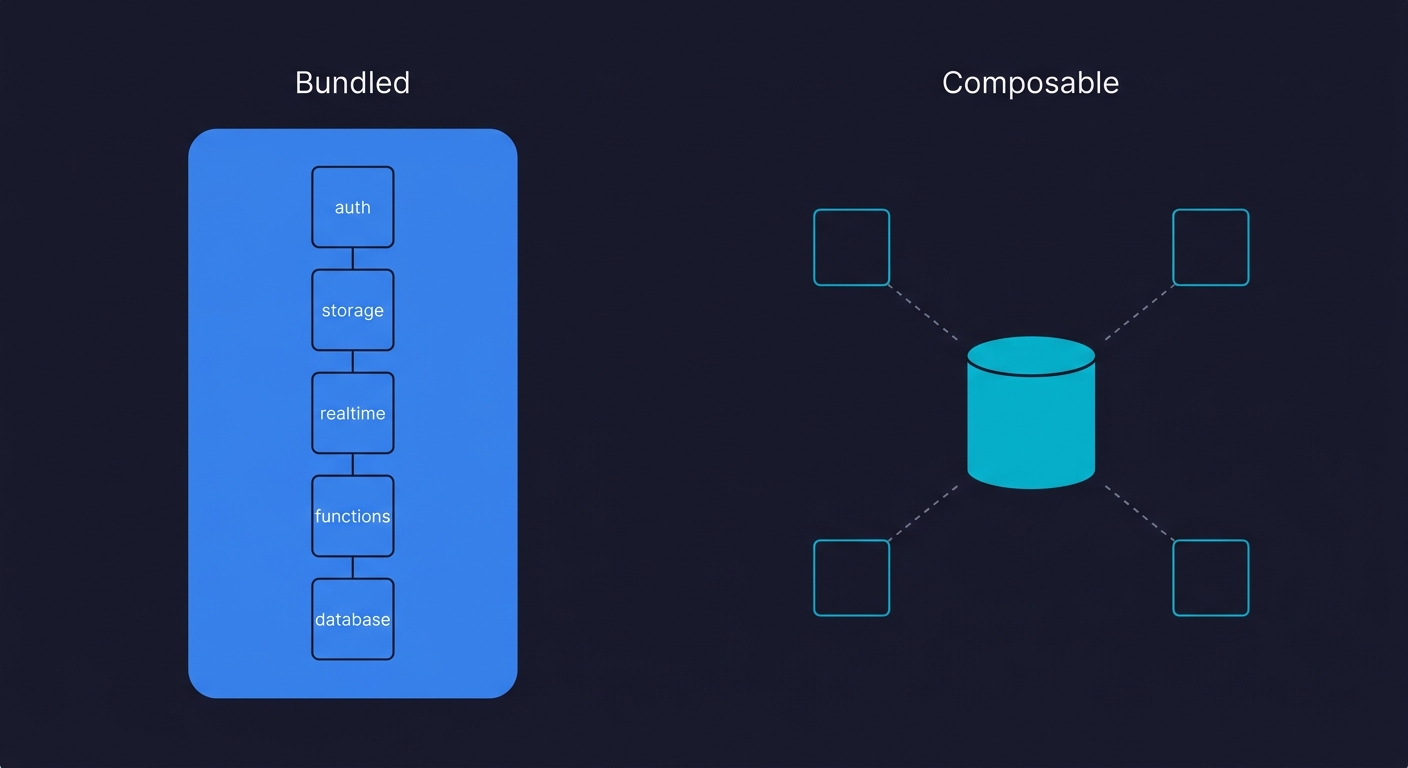
The philosophical difference between these platforms is worth naming directly, because it maps to a real architectural choice.
Supabase is a bundled platform. The value proposition is that integration between components is solved for you. The cost is that you are partially coupled to the platform. If you later decide you want to switch from Supabase Auth to Clerk because Clerk handles your enterprise SSO requirements better, that migration is meaningful work. If you want to move your storage to Cloudflare R2 for egress cost reasons, the RLS policies you wrote against Supabase Storage need to be rethought.
Neon is composable. You connect to it with a standard Postgres connection string and it behaves like Postgres. There is no platform lock-in beyond what Postgres itself creates. Switching from Neon to Aurora or AlloyDB or a self-hosted Postgres instance is a connection string change and a migration. Your application code does not know it was ever talking to Neon.
Neither of these is objectively better. Bundled platforms reduce initial complexity. Composable tools reduce long-term coupling. The question is which trade-off suits your situation.
Supabase vs Neon Developer Experience
Both platforms have strong developer experience stories, but in different dimensions.
Supabase generates a typed client SDK from your database schema. You get auto-completed query builders in TypeScript. The Supabase dashboard includes a table editor, a SQL editor, log streaming, and a visual interface for managing RLS policies. For a team that includes non-backend engineers who need to interact with the database, the dashboard is meaningfully useful.
Neon's developer experience centers on the branching workflow and the serverless adapter. The Neon serverless driver (@neondatabase/serverless) uses HTTP rather than TCP for connections, which means it works in environments where TCP connections are not available (Vercel Edge Functions, Cloudflare Workers). Connection pooling is built into Neon's architecture via PgBouncer, so you do not need to configure it separately. The dashboard is functional but minimal. Neon's experience is optimized for engineers who are comfortable in SQL and care primarily about the database layer.
Framework Integration
Both platforms work well with modern frameworks, but the integration surface differs. Supabase provides deep Next.js integration via @supabase/ssr and an official Vercel integration. The typed client works seamlessly in both server and client components. However, Supabase's realtime features depend on WebSocket connections, which limits their use in edge runtimes.
Neon powers Vercel Postgres natively, making it the default serverless database for the Vercel ecosystem. The HTTP-based driver works in any edge runtime, including Cloudflare Workers and Deno Deploy, without connection pooling workarounds. For startups building on Next.js with Vercel, both platforms integrate well, but Neon has an edge in serverless and edge-first deployments.
Performance and Cold Starts
Performance characteristics differ because of how each platform manages compute resources.
Neon's scale-to-zero architecture means a cold start penalty when your database resumes from idle. Resume time is typically 400 to 750 milliseconds, depending on compute size. Once active, read latency is competitive with any managed Postgres offering. The trade-off is that write-heavy OLTP workloads can see slightly higher latency due to Neon's disaggregated storage architecture, where writes travel over the network to a separate storage layer rather than hitting local disk.
Supabase on paid plans keeps the database running continuously, so there is no cold start. For applications with consistent traffic, this means predictable latency without warm-up delays. Supabase also runs PgBouncer for connection pooling, supporting up to 10,000 client connections on higher tiers.
For the supabase vs neon performance question specifically: Neon wins for bursty or variable workloads where scale-to-zero saves cost and the occasional cold start is acceptable. Supabase wins for always-on production with predictable, latency-sensitive traffic where cold starts are not tolerable.
Supabase vs Neon Pricing Comparison
Both platforms offer a free tier, but the pricing structures diverge as you scale. See Neon's pricing page for current details.
| Dimension | Supabase | Neon |
|---|---|---|
| Free tier | 2 projects, 500MB storage, 2GB bandwidth, 50,000 MAUs | 100 projects, 0.5GB storage each, 100 CU-hours each |
| Entry paid plan | ~$25/month (Pro) | ~$15/month (Launch) |
| Billing model | Per project + usage overages | Compute hours + storage GB |
| Scale-to-zero | Free tier pauses after 1 week inactivity; paid plans stay active | Yes, on all plans including paid |
| Branching | Available but limited (preview feature, separate instances) | First-class, unlimited on paid plans |
| Auth included | Yes (50k MAUs on free, unlimited on Pro) | No (bring your own) |
| Storage included | Yes (S3-compatible, 100GB on Pro) | No (bring your own) |
The Supabase pricing comparison requires a mental adjustment: when you pay for Supabase, you are paying for a database plus auth plus storage plus realtime plus edge functions. When you pay for Neon, you are paying for a database only. To compare fairly, add up what you would pay for your auth provider, your storage provider, and Neon separately, then compare that total to Supabase Pro. For many early-stage teams, Supabase wins on total infrastructure cost because the bundling is efficient.
As you scale to significant user volumes or data volumes, the picture changes. Supabase's per-project model means costs scale predictably with projects. Neon's compute-hour model means you pay for actual usage, which is economical for intermittent workloads. A database that handles burst traffic during business hours and sits idle overnight will cost significantly less on Neon than on a provisioned instance.
Security and Compliance
Both platforms meet baseline security expectations for production workloads, but the compliance certifications differ in one important way.
| Dimension | Supabase | Neon |
|---|---|---|
| SOC 2 Type II | Yes | Yes |
| HIPAA compliance | Yes (on Team plan and above) | No |
| Encryption at rest | AES-256 | AES-256 |
| Encryption in transit | TLS 1.2+ | TLS 1.2+ |
| Row Level Security | Yes (first-class, integrated with Auth) | Yes (standard Postgres RLS) |
| Network isolation | Available on Enterprise | Available on Business plan |
The key differentiator is HIPAA. If you are building in healthtech, fintech with health data requirements, or any regulated industry that requires HIPAA compliance from your database provider, Supabase is the choice. Neon does not currently offer HIPAA compliance. For most other startups, both platforms meet the security bar.
Community, Ecosystem, and Self-Hosting
Both platforms are open-source, which matters for long-term risk management.
Supabase has a larger community footprint. The main Supabase GitHub repository has 80,000+ stars, an active Discord server with hundreds of thousands of members, and a mature ecosystem of third-party integrations, tutorials, and community-contributed libraries. If you hit a problem, chances are someone has written about it. Supabase is also fully self-hostable via Docker Compose, which gives teams an exit path if the hosted offering ever stops meeting their needs.
Neon's community is smaller but growing fast, especially after the Databricks acquisition. The Neon GitHub repository has 16,000+ stars. Neon is open-source under the Apache 2.0 license, and the codebase (written in Rust) is available for self-hosting, though running the full disaggregated storage architecture yourself is significantly more complex than a standard Postgres deployment. For most teams, the managed service is the practical choice.
For startups evaluating either platform as a Supabase alternative or Neon alternative, the open-source licensing on both sides means vendor lock-in is a business decision, not a technical one. You can always migrate to self-hosted or to another provider.
Neon Database Branching vs Supabase: Where They Diverge
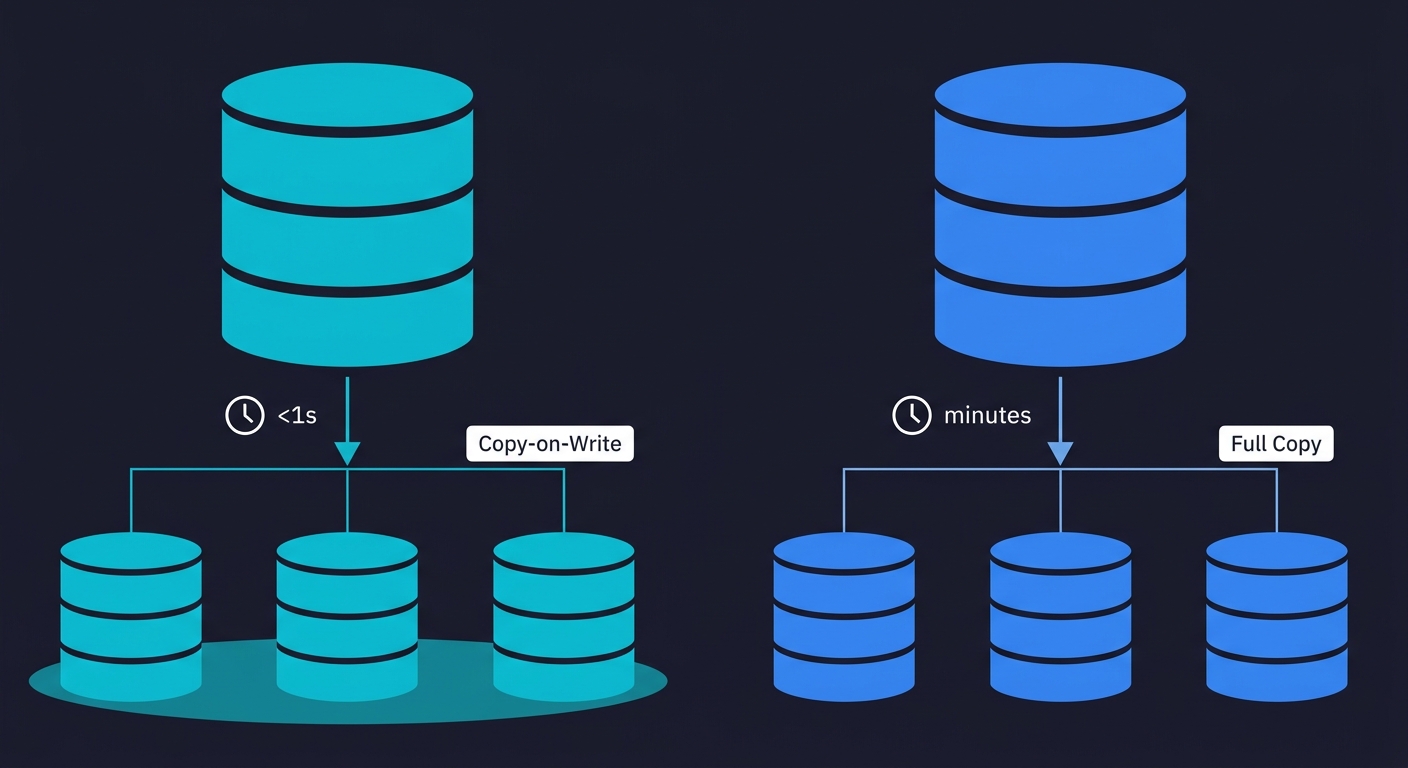
This is the section that matters most if your team runs any form of automated testing.
Neon's branching is a first-class infrastructure feature built into the platform's storage architecture. Every branch is a full, isolated Postgres instance with its own connection string, its own roles, its own schema state. You can branch from any point in the database's write-ahead log history, not just the current HEAD. Branch creation is a metadata operation that takes under a second regardless of database size.
For more depth on how Copy-on-Write branching works and how to implement the Golden Image workflow, our database branching guide covers the mechanics and the GitHub Actions implementation in full.
Supabase's branching story is different. Supabase launched a branching preview feature that provisions a new Postgres instance and applies your migration files to it. The branch starts empty. No data is copied from the parent. To run tests against realistic data, you need seed scripts that populate the branch. Branch creation takes significantly longer than Neon's (because it is provisioning a new instance, not creating a metadata pointer). And because each branch is a full separate instance, the cost per branch is higher.
This difference has direct consequences for per-PR test isolation:
With Neon, a CI workflow creates a branch from a Golden Image snapshot in under a second, runs your full test suite against isolated data, and deletes the branch when the PR closes. Every PR gets a fresh copy of realistic production-scale data. No shared state. No teardown scripts.
With Supabase, the same workflow is possible but requires more setup. You need seed scripts that can restore a known state quickly, and branch provisioning adds meaningful time to CI job duration. The fundamental architecture (full instance per branch vs CoW metadata pointer) means you cannot match Neon's speed or cost-efficiency for this use case.
Testing Workflows in Practice
Let us be concrete about what this means in a real CI pipeline.
With Neon, the per-PR test workflow looks like this: a PR opens, CI calls the Neon API to branch from your Golden Image (under 1 second), tests run against the isolated branch with full production-scale data, the branch is deleted when the PR closes. The GitHub Actions step is roughly 10 lines. There are no seed scripts to maintain. If your tests fail, the failure is a real failure, not a data pollution artifact from a previous test run.
With Supabase, per-PR isolation requires either provisioning a Supabase branch (slower, costs more per branch), or managing a shared test database with seed/teardown scripts. The seed/teardown approach works, but it is fragile: seed scripts drift from production schema over time, teardown does not always run cleanly when tests crash, and concurrent PR runs need to be serialized to avoid data conflicts.
Teams with complex test suites particularly feel this difference. For guidance on preparing the data that populates these branches, see our test data management guide. An E2E test suite that exercises checkout flows, user state transitions, and third-party webhook handling needs realistic data and isolated state. The test that verifies an order transitions from "pending" to "processing" when a payment webhook fires cannot share a database with the test that cancels that same order.
For a deeper look at how to wire up the branching workflow in GitHub Actions, the database branching guide has the complete implementation. For how Neon stacks up against another database that takes a different branching approach, see our Neon vs PlanetScale comparison.
How Autonoma Fits Regardless of Your Choice
Database isolation is the foundation that makes E2E tests trustworthy. But isolation alone does not give you test coverage. You still need to know what to test and you need someone (or something) to write and maintain the tests.
This is where Autonoma fits. Whether your team is on Supabase or Neon, Autonoma's agents read your codebase, plan test cases from your routes and user flows, and execute them against your running application. The Planner agent handles database state requirements automatically: it generates the API calls needed to put your database in the right state for each test scenario, rather than requiring you to write setup fixtures by hand.
For Neon teams, the combination is particularly clean. Neon handles per-PR database isolation (instant branching, isolated data). Autonoma handles test generation and execution against that isolated environment. The Diffs Agent keeps tests current by running, adding, and deprecating test cases as your code diffs change. You get full E2E coverage on every PR without writing or maintaining test code.
For Supabase teams, Autonoma still runs against your application regardless of which database branching approach you adopt. Teams using Docker Compose for local testing can run Autonoma against those environments too. If you manage isolation via seed scripts and a shared test database, Autonoma's Planner agent generates the setup state it needs through your API. The workflow is less elegant than the Neon branching approach, but the coverage is the same.
The point is that Autonoma is not opinionated about your database provider. It operates at the application layer. Your database choice is yours to make based on your architecture requirements.
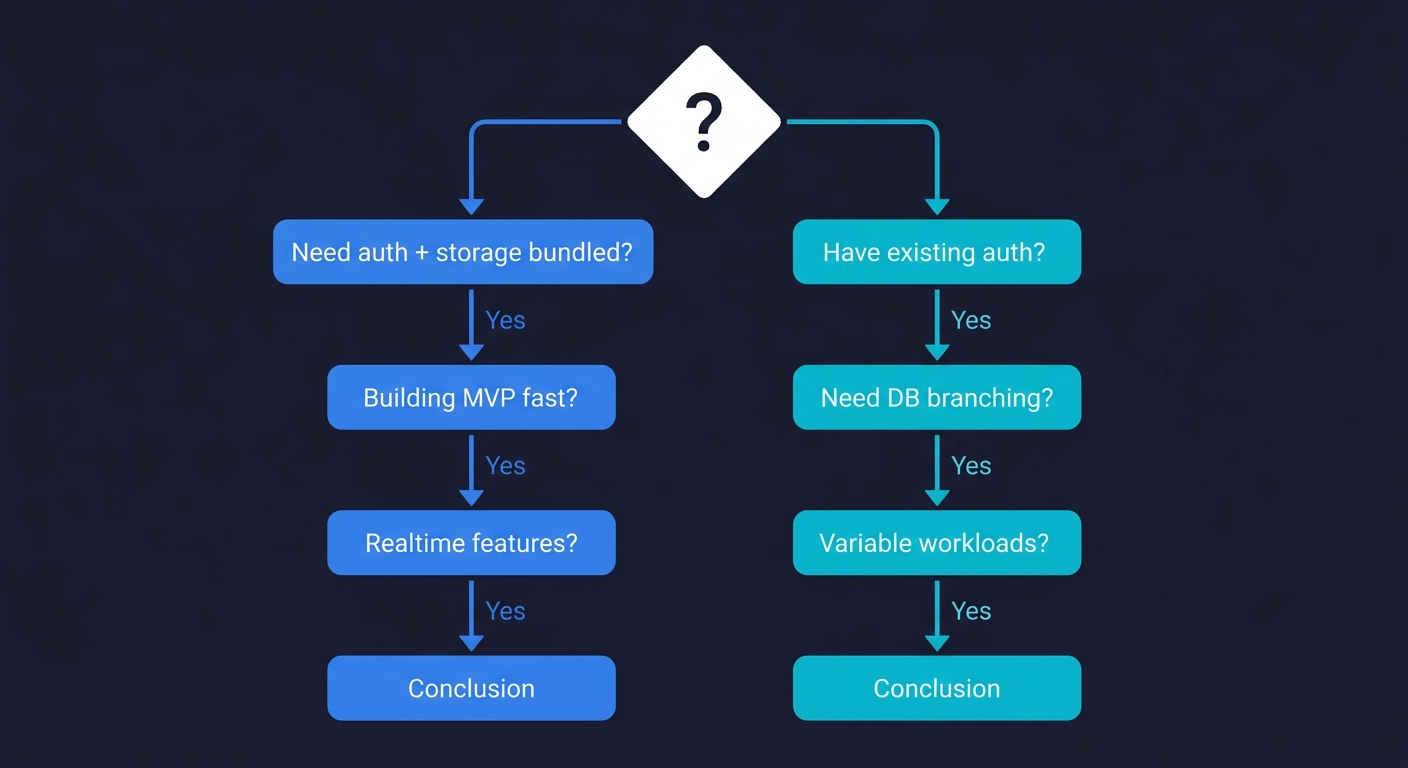
When to Choose Supabase
Supabase is the right call in a specific set of circumstances.
You are building an MVP and want to minimize the number of vendors you manage. Supabase gives you database, auth, storage, and realtime in one project. That is four services you do not need to separately evaluate, configure, and integrate. For a two-person team shipping their first product, that reduction in surface area is worth real money.
You need realtime as a core feature. If your product requires clients to subscribe to data changes (collaborative editing, live feeds, multiplayer state), Supabase's realtime subscriptions are deeply integrated with your database and ready to use. Building the same thing composably (database + separate pub/sub layer) requires more integration work.
You want a visual admin interface. Supabase's dashboard includes a table editor, user management, log streaming, and visual RLS policy management. For non-technical founders or product managers who need to query data without writing SQL, this is useful infrastructure.
Your team uses Supabase's specific SDKs heavily. If you are building a Next.js app that uses the Supabase JS client for auth, realtime, and storage (not just the database), the integrated development experience is coherent in a way that a composable stack cannot easily match.
When to Choose Neon
Neon is the right call in a different set of circumstances.
You have existing auth and storage solutions and just need a database. If you are already using Clerk for auth, Cloudflare R2 for storage, and Pusher or Ably for realtime, you do not need Supabase's bundled services. You need a fast, scalable Postgres database. Neon is that, and the composable architecture means no coupling to a platform.
Testing and CI matter to your team. If you run an automated test suite, or plan to, and you want per-PR database isolation without friction, Neon's branching architecture gives you that out of the box. The setup is a few lines in GitHub Actions. The cost is minimal because branches are CoW snapshots, not full instances. Teams running ephemeral environments see the biggest benefit here.
You have variable or intermittent workloads. A database that handles burst traffic and then sits idle for hours will cost significantly less on Neon's compute-hour model than on a provisioned instance. Internal tools, staging environments, and development databases are prime candidates.
Your team is comfortable owning the composable stack. Neon works best when engineers are confident wiring together the services they need. If selecting and integrating auth, storage, and other services feels like overhead rather than appropriate control, Supabase's bundled approach may suit you better.
| Scenario | Recommended Platform |
|---|---|
| MVP with no existing backend services | Supabase |
| Need realtime as a core product feature | Supabase |
| Team wants bundled auth + storage + DB | Supabase |
| Already using Clerk, Auth0, or similar | Neon |
| Per-PR database isolation for testing | Neon |
| Variable / intermittent workloads | Neon |
| Composable stack, SQL-first team | Neon |
| Edge function or serverless runtime (Cloudflare Workers) | Neon (HTTP driver) |
| HIPAA or healthcare compliance required | Supabase (Team plan+) |
Supabase vs Neon: The Honest Summary
Both platforms are strong. Neither is obviously wrong for a startup. In this serverless database comparison, the answer depends on what you're optimizing for.
Supabase optimizes for time-to-first-feature. If you want to go from zero to a working product with auth and storage with minimal configuration decisions, Supabase delivers that. The bundling creates some coupling, but for most early-stage products the trade-off is worth it.
Neon optimizes for the long-term database layer. If you want a scalable, cost-efficient Postgres database that integrates with your existing services and supports sophisticated testing workflows without friction, Neon is the better fit. The composable architecture means you own more integration work upfront, but you own fewer migrations later.
The place where the choice matters most for engineering teams is the testing workflow. Neon's instant branching enables per-PR isolation that meaningfully changes how reliable your CI signal is. If that workflow is important to your team now or within the next six months, it belongs in your evaluation criteria alongside the auth features and the pricing page.
For a comparison focused specifically on how Neon and PlanetScale approach branching and migrations differently, see our Neon vs PlanetScale comparison.
Key Takeaways
- Supabase is a BaaS that bundles auth, storage, realtime, and a database. Best for MVPs and teams that want fewer vendors.
- Neon is pure serverless Postgres with instant Copy-on-Write branching. Best for composable stacks and teams that prioritize testing workflows.
- For per-PR database isolation, Neon's branching is faster, cheaper, and requires less setup than Supabase's approach.
- For HIPAA compliance, Supabase is the only option between the two.
- Autonoma works with both as an application-layer testing tool, but the Neon + Autonoma combination is particularly clean for CI workflows.
Frequently Asked Questions
Supabase is a Backend-as-a-Service that bundles PostgreSQL with authentication, object storage, realtime subscriptions, and edge functions in one platform. Neon is pure serverless PostgreSQL: no bundled services, just a fast database engine with instant Copy-on-Write branching. Supabase reduces the number of vendors you need to integrate. Neon gives you a composable database that works alongside whatever auth and storage you already use.
Neon is significantly better for database branching. Neon's branching is a first-class feature built into the platform's storage architecture using Copy-on-Write semantics. Creating a branch from any database takes under a second regardless of database size, because it is a metadata operation rather than a data copy. Each branch is a fully isolated Postgres instance. Supabase's branching (still in preview) provisions a separate Postgres instance and applies migration files, which is slower and more expensive per branch. For per-PR test isolation workflows, Neon is the clear choice.
It depends on what you are comparing. Supabase bundles database, auth, storage, and realtime into one plan. When you compare the total cost of Supabase Pro against Neon plus separate auth (Clerk, Auth0) and storage (S3, R2), Supabase often wins on total infrastructure cost at early scale. For database-only cost, Neon's compute-hour model is more efficient for intermittent workloads because it scales to zero and you only pay for actual compute. For always-on, high-traffic workloads, the comparison is closer.
Not directly. Supabase manages its own PostgreSQL instances and does not support plugging in an external database provider like Neon. If you want Neon's branching workflow, you need to use Neon as your database and bring separate auth and storage services (Clerk, Auth0, S3, Cloudflare R2, etc.). Some teams run Supabase Auth separately while using Neon as their database, but this is a non-standard setup that loses most of Supabase's integration benefits.
Autonoma works with both. Autonoma's agents read your codebase and generate E2E tests that run against your application, regardless of which database provider you use. For Neon teams, combining Neon's per-PR database branching with Autonoma's automated test generation creates a clean CI workflow: each PR gets an isolated database branch, and Autonoma's tests run against it with no shared state. For Supabase teams, Autonoma still generates and runs tests against your application. The Planner agent handles database state setup automatically by generating the API calls needed to put your database in the right state for each test scenario.
A serverless database scales compute automatically based on demand and, in the most complete implementations, scales to zero when idle (so you pay nothing during quiet periods). Both Supabase and Neon are often described as serverless, but the implementation differs. Neon scales to zero on all plans including paid plans, and its compute scales independently of storage. Supabase scales to zero (pauses) on the free tier after a week of inactivity, but on paid plans the database stays active continuously. For workloads with significant idle time, Neon's scale-to-zero on paid plans can meaningfully reduce costs.
Yes. Databricks acquired Neon in May 2025. For startups evaluating Neon, this is a positive signal for long-term viability and continued investment. It also suggests deeper integration between Neon's serverless Postgres and Databricks' analytics and data lakehouse ecosystem in the future. Neon continues to operate as a standalone product.
Both work well with Next.js and Vercel. Supabase offers deep integration via @supabase/ssr with typed client support in both server and client components. Neon powers Vercel Postgres natively and its HTTP-based serverless driver works in edge runtimes (Vercel Edge Functions, Cloudflare Workers) without connection pooling workarounds. If you need auth, storage, and realtime bundled with your database, Supabase's Next.js integration is more comprehensive. If you need a pure database with edge runtime compatibility and instant branching for CI, Neon is the better fit.
Yes, both are open-source. Supabase can be self-hosted via Docker Compose and has extensive documentation for self-hosting all components (database, auth, storage, realtime). Neon is open-source under the Apache 2.0 license, but self-hosting its disaggregated storage architecture is significantly more complex than a standard Postgres deployment. For most teams, the managed services are the practical choice. The open-source licensing on both platforms means vendor lock-in is a business decision, not a technical constraint.


