

Neon database is a serverless Postgres platform built on a disaggregated architecture that separates compute from storage. Unlike traditional managed Postgres (RDS, Cloud SQL), Neon scales compute to zero when idle, charges by the second for actual usage, and ships a feature called Copy-on-Write branching that creates fully isolated Postgres instances in under a second. The result is a database that behaves like git: every developer, PR, and CI run can have its own isolated branch from a shared parent, without copying any data. For startups with variable traffic and active development teams, this is a different category of product, not just a cheaper alternative to RDS.
Imagine every pull request your team opens comes with its own isolated Postgres database, pre-seeded with your current production schema, live in under a second, and deleted automatically when the PR closes. No DevOps work to set it up. No shared staging conflicts. No "whose migration broke the environment" post-mortems on a Friday afternoon.
That is not a hypothetical. It is what the neon database branching model makes operationally trivial. For engineering leaders evaluating where to invest in developer experience, it is one of the few infrastructure choices that pays back in both speed and sanity, and it is worth understanding why the architecture makes it possible before deciding whether it fits your stack.
What Is Neon Database? Architecture Explained
Most introductions to Neon describe it as "serverless Postgres." That is true but undersells the interesting part. The more useful frame is that Neon re-architected where data lives relative to where queries are executed.
In traditional Postgres, whether self-hosted on EC2 or managed via RDS, the compute and storage are coupled. The Postgres process runs on a machine, and the data files live on disk attached to that machine. Scaling the database means scaling the machine. Stopping the machine (to save money) means detaching from the data. There is no clean way to separate the two.
Neon breaks this coupling. Its architecture has three distinct layers: a Pageserver that handles durable storage and page management, Safekeeper nodes that handle write-ahead log (WAL) replication, and Compute nodes that run the Postgres process itself. Compute is stateless. It starts cold, connects to the Pageserver over the network to fetch pages on demand, and shuts down when idle. The Pageserver holds all the data durably and independently of whether any compute is running.
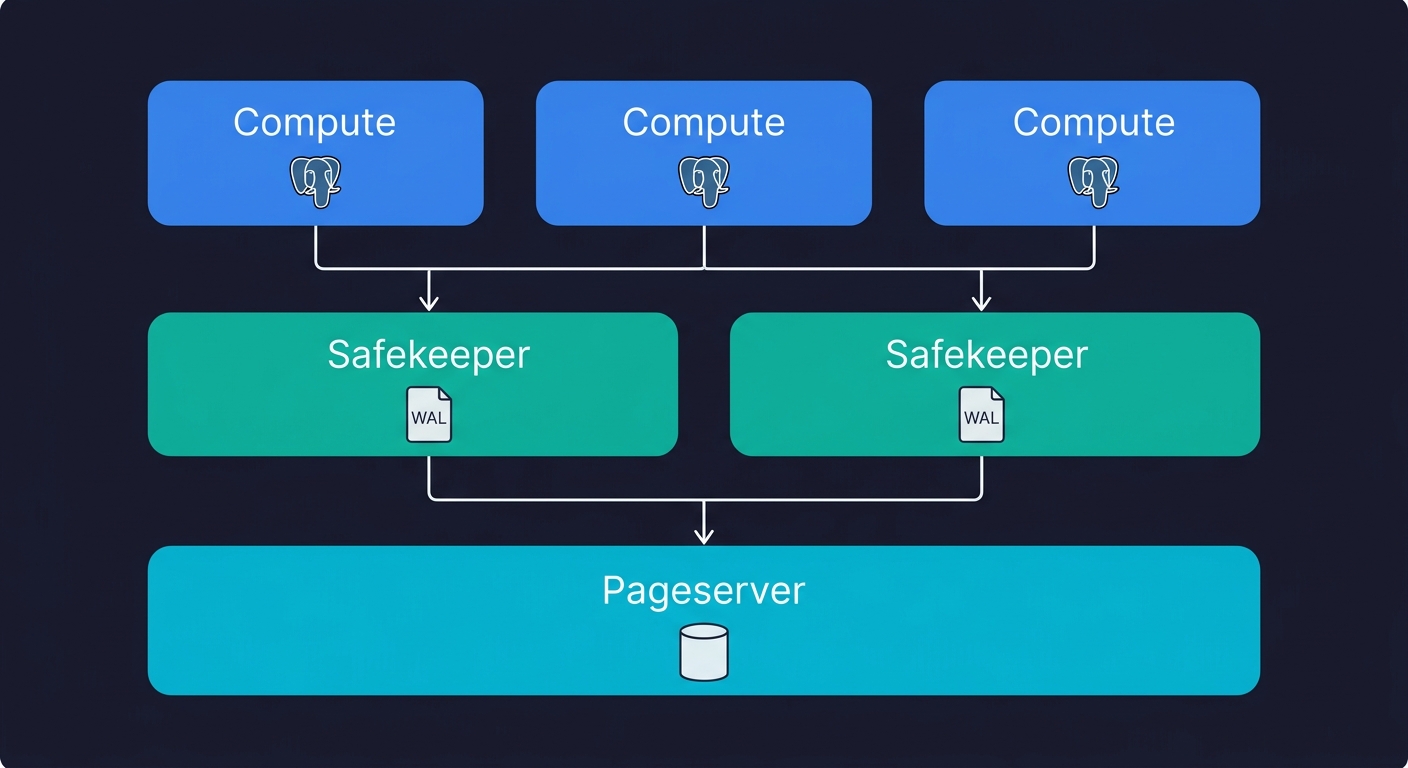
This matters for three reasons. First, compute can scale to zero without touching data, which is why Neon can charge by the second. Second, multiple compute instances can read from the same Pageserver simultaneously, which is how read replicas become cheap to create. Third, the Pageserver tracks every page version, not just the current state, which is the mechanism that makes branching possible.
One important context note: Neon is open-source under the Apache 2.0 license, and in May 2025, Databricks acquired Neon for approximately $1 billion. This matters for CTOs evaluating vendor risk. Neon is no longer an independent startup that might pivot or run out of runway. It is backed by one of the largest data infrastructure companies in the world. The acquisition also brought meaningful changes: compute pricing dropped 15-25%, storage pricing dropped roughly 80% (to $0.35/GB-month), and the Scale tier gained SOC 2 Type 2 and HIPAA eligibility. If you evaluated Neon before mid-2025, the economics and compliance picture have shifted substantially.
A telling signal about where Neon sits in the ecosystem: over 80% of databases provisioned on Neon are now created by AI agents rather than humans. The API-first design and instant provisioning that make branching work also make Neon a natural fit for agentic workflows where infrastructure is created programmatically.
Copy-on-Write Branching: The Feature That Changes How You Develop
Every cloud database supports creating a copy of your database. Neon's branching is not a copy. This distinction is worth spending time on because it changes the economics of isolated environments entirely.
When you create a branch in Neon, no data is copied. The branch is created as a metadata pointer to a specific point in the parent's WAL history. The Pageserver stores page versions using Copy-on-Write (CoW) semantics: a new page version is only written when that page is actually modified. Until then, the branch shares storage with the parent. Creating a branch from a 50 GB production database takes roughly the same time as creating one from a 1 GB development database. Both operations complete in under a second.
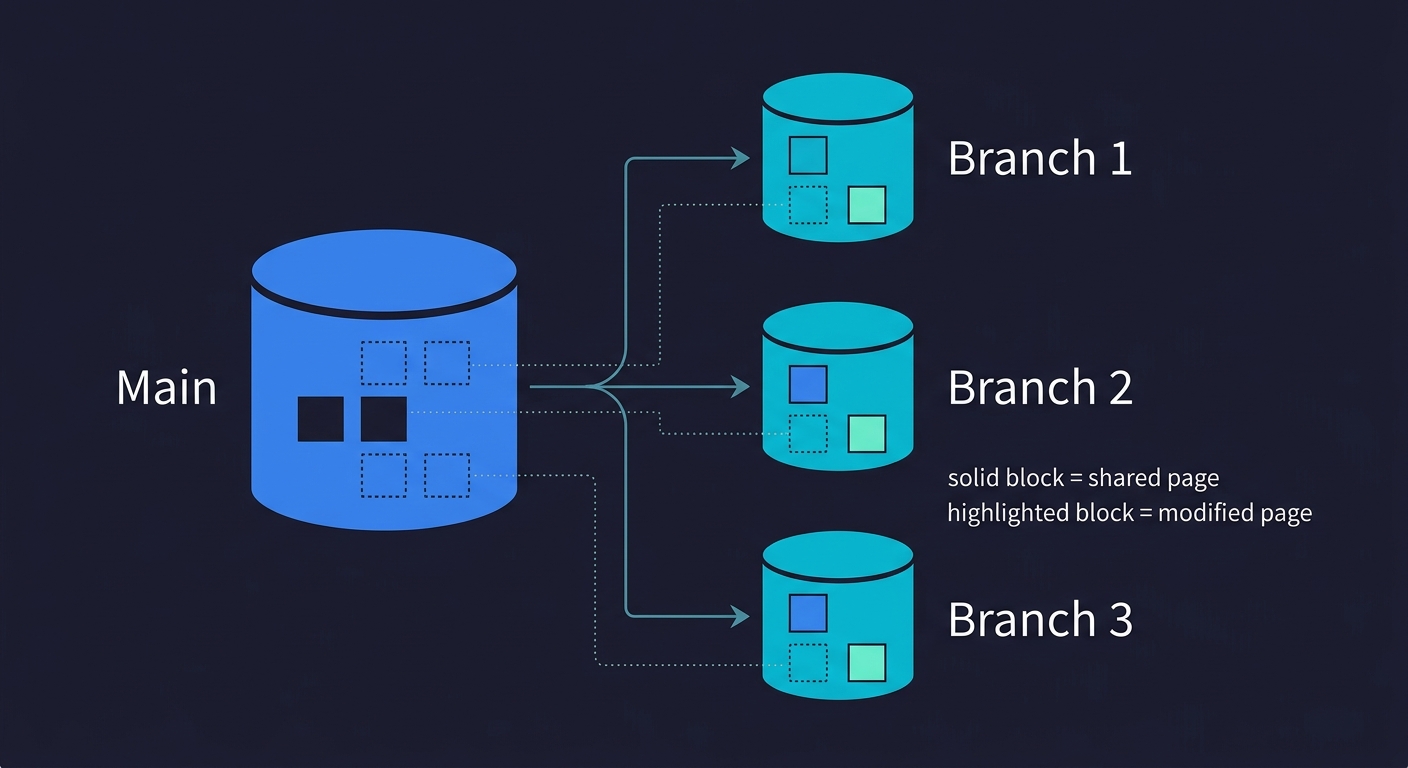
This is fundamentally different from Supabase's branching (which provisions a separate Postgres instance and replays migrations) or from snapshotting an RDS instance (which copies the full EBS volume). Those approaches work, but they are O(data size). Neon's branching is O(1).
The practical consequence: you can create branches freely. A branch for every pull request. A branch for every developer's local environment. A branch for every CI job. All pointing at the same production-scale seed dataset, none of them interfering with each other.
For a deeper look at the mechanics behind this pattern, our post on database branching covers the underlying concepts in detail.
The Branching Workflow for Testing
This is where the architecture becomes a concrete engineering advantage, so it's worth walking through how this actually looks in a working CI pipeline.
The conventional testing problem is state. Integration tests need a database in a known state before they run. Achieving that state requires either spinning up a fresh empty database (slow, requires seeding), using a shared staging database (fragile, causes race conditions), or writing tests that clean up after themselves (brittle, easy to skip). None of these are great.
With Neon branching, the workflow shifts. Your main branch holds a clean, seeded database state that represents a realistic dataset. When a PR opens, a GitHub Action calls the Neon API to create a branch from main. The branch is available within a second. Your CI environment variable for DATABASE_URL points to that branch's connection string. The tests run against an isolated, realistic database. When the PR closes, the branch is deleted.
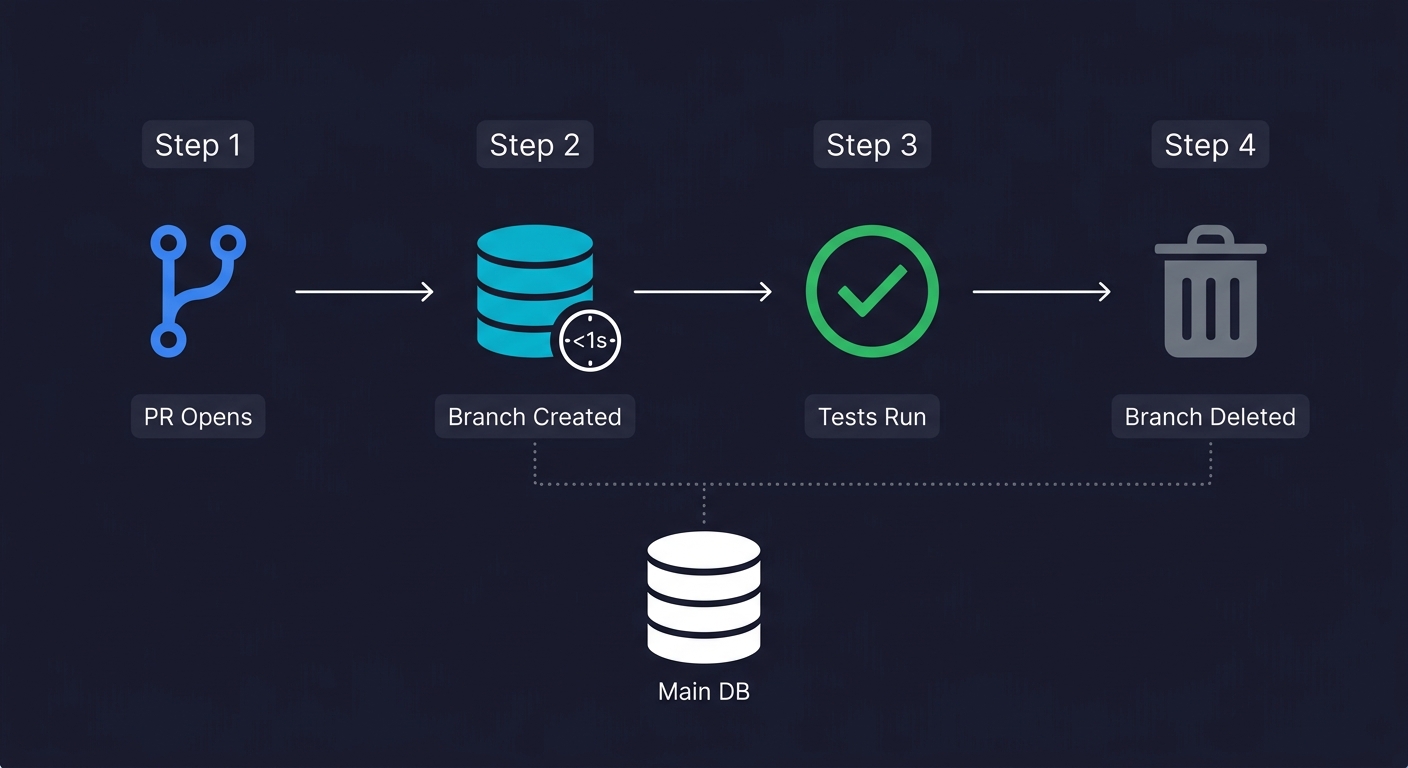
Here is what that GitHub Action looks like in practice:
name: CI
on: [pull_request]

jobs:
  test:
    runs-on: ubuntu-latest
    steps:
      - uses: actions/checkout@v4

      - name: Create Neon branch
        id: create-branch
        uses: neondatabase/create-branch-action@v5
        with:
          project_id: ${{ secrets.NEON_PROJECT_ID }}
          branch_name: preview/pr-${{ github.event.number }}
          api_key: ${{ secrets.NEON_API_KEY }}

      - name: Run tests
        env:
          DATABASE_URL: ${{ steps.create-branch.outputs.db_url }}
        run: npm test

      - name: Delete Neon branch
        if: always()
        uses: neondatabase/delete-branch-action@v3
        with:
          project_id: ${{ secrets.NEON_PROJECT_ID }}
          branch: preview/pr-${{ github.event.number }}
          api_key: ${{ secrets.NEON_API_KEY }}
Each PR gets its own database. No setup script to maintain. No teardown logic inside the tests themselves. No risk of one CI run corrupting another.
This pairs well with preview environments more broadly. If your team spins up a full application environment per PR (a Vercel preview, a Railway ephemeral deploy), the Neon branch becomes the database layer of that ephemeral environment. The application runs in isolation, points at an isolated database, and is torn down when the PR merges.
For teams using Autonoma for automated testing, this workflow compounds significantly. Our agents read your codebase, plan test cases from your routes and components, and execute them against your running application. When each PR already has an isolated Neon branch as its database, Autonoma's tests run against a clean, realistic state automatically. The Planner agent handles database state setup for each test scenario. There is no shared state to corrupt, no cleanup to orchestrate, no test ordering to worry about.
Performance in Practice
Architecture diagrams are useful, but CTOs need numbers. Here is what to expect from Neon's performance characteristics based on real-world usage and community benchmarks.
Cold start latency is the most discussed concern. When a Neon compute scales to zero and a new connection arrives, the compute node needs to initialize. Typical cold starts range from 300ms to 800ms depending on compute size, with total time-to-first-query landing between 500ms and 1 second. For background jobs and CI pipelines, this is imperceptible. For user-facing web applications, it means the first request after an idle period carries a noticeable delay. Neon mitigates this with configurable auto-suspend delays: you can keep compute warm for 5 minutes, 30 minutes, or indefinitely on paid tiers.
Warm query latency is comparable to standard Postgres for most workloads. The network hop between compute and Pageserver adds single-digit milliseconds on page fetches, but Neon's compute nodes cache frequently accessed pages in local memory. For typical OLTP queries (index lookups, small joins, single-row mutations), the difference from co-located Postgres is negligible in practice.
Connection pooling is built into Neon via a PgBouncer-based pooler, available through a separate pooled connection string. This is critical for serverless environments (Lambda, Vercel Edge Functions, Cloudflare Workers) where each invocation may open a new connection. Neon supports up to 10,000 pooled connections per project. For traditional long-running server processes, direct connections work fine, but the pooled endpoint is there when you need it.
One practical gotcha worth noting: frontend polling patterns (React Query intervals, WebSocket keepalives, health checks) can prevent scale-to-zero from activating, which means your "serverless" database stays running continuously. If cost optimization matters, audit what is keeping connections alive.
Neon Database Pricing: Honest Breakdown at Each Scale
Neon's pricing model changed substantially after the Databricks acquisition in mid-2025, so if you are reading older reviews, the numbers are likely wrong. The current model is usage-based, not flat-rate. The key variables are compute units per hour (CU-hr) and storage per GB-month. Understanding when each becomes the binding constraint will save you from a surprise invoice.
Free tier includes 0.5 GB storage, 100 compute-hours per month, up to 2 CUs, scale-to-zero always active, and one project. If your side project or internal tool has intermittent traffic and fits in 0.5 GB of data, you can run it free indefinitely. The catch: scale-to-zero means cold starts (typically 300-500ms), which are noticeable on web applications with real users.
Launch tier is usage-based with a $5/month minimum. Compute costs $0.106 per CU-hour, storage is $0.35 per GB-month, and you can scale up to 16 CUs. This is the right tier for a startup product with consistent (if variable) traffic. To put it concretely: running 0.5 CU for 8 hours per day with 10 GB of storage costs roughly $20/month.
Scale tier is also usage-based with a $5/month minimum but at higher unit costs: $0.222 per CU-hour, same $0.35/GB-month storage, and you can scale up to 56 CUs (224 GB RAM). This tier includes SOC 2 Type 2 and HIPAA eligibility. At this level, the economics versus traditional Postgres become worth modeling explicitly.
| Scale of usage | Neon estimated cost | RDS equivalent | Notes |
|---|---|---|---|
| Side project, intermittent traffic | $0 (Free) to ~$10/mo | ~$25-40/mo (db.t3.micro) | Neon wins on cost; scale-to-zero is real |
| Startup, variable traffic (5-50 req/s peak) | ~$20-80/mo | ~$50-150/mo (db.t3.medium) | Neon wins unless traffic is consistent 24/7 |
| Growth stage, consistent traffic (4 CU, 24/7) | ~$350/mo (Launch) or ~$700/mo (Scale) | ~$200-500/mo (db.m5.large) | RDS reserved instances often win at steady-state |
| High write throughput, always-on | Can exceed $1,000/mo on Scale | ~$300-600/mo reserved | RDS reserved instances win here |
The honest version: Neon is almost always cheaper than RDS for workloads with variable traffic, because you are not paying for idle compute. The post-acquisition pricing made this advantage even more pronounced, with storage costs dropping roughly 80%. It becomes cost-competitive or more expensive at steady-state, high-utilization workloads where RDS reserved instances offer predictable pricing at a discount.
One cost that is easy to overlook: data transfer. Neon charges for egress. If your application reads large volumes of data from the database and your compute tier runs elsewhere (Lambda, Vercel), those egress costs can accumulate. For applications that read a few GB per day, this is negligible. For applications that stream large datasets regularly, it warrants a calculation.
One more thing worth knowing if you are at the pre-seed or Series A stage: Neon runs a Startup Program that provides up to $100,000 in credits over 12 months, along with priority support and early access to new features. The eligibility window is narrow (venture-backed, launched within the past 12 months, under $5M raised), but if you qualify, it effectively eliminates database costs during the period when you are most budget-constrained.
For a detailed side-by-side on the serverless database pricing landscape, our Neon vs PlanetScale comparison models these costs at multiple traffic levels.
Neon Database vs Traditional Postgres: RDS, Cloud SQL, and Self-Hosted
When CTOs evaluate Neon, they are usually replacing one of three things: RDS/Cloud SQL, a self-hosted Postgres instance, or a previous-generation managed Postgres provider. Each comparison has a different answer.
| Feature | Neon | RDS / Cloud SQL | Self-hosted Postgres | Heroku / Railway |
|---|---|---|---|---|
| Scale-to-zero | Yes (all tiers) | No | No | Limited |
| Database branching | Instant CoW | Snapshot (slow) | Manual | No |
| Setup time | ~90 seconds | ~15-30 minutes | Hours | ~5 minutes |
| SOC 2 / HIPAA | Scale tier only | Yes | Self-managed | Varies |
| FedRAMP | No | Yes (GovCloud) | Self-managed | No |
| Pricing model | Per CU-hour + storage | Per instance-hour | EC2 + EBS | Fixed tiers |
| Connection pooling | Built-in (PgBouncer) | RDS Proxy (extra cost) | Self-managed | Basic |
| Read replicas | Cheap (shared storage) | Full instance cost | Full instance cost | Extra cost |
Neon vs RDS (or Cloud SQL). RDS wins on SLA certainty, FedRAMP authorization, and predictable pricing under reserved instances. Neon's Scale tier now matches RDS on SOC 2 and HIPAA, but at higher per-hour compute costs. Neon wins on developer experience, branching, cold-start economics for variable traffic, and setup time. The RDS operational overhead is real: security groups, parameter groups, subnet configuration, VPC peering if you want private networking. Neon is a connection string in 90 seconds. For an early-stage startup without dedicated infrastructure, the operational simplicity of Neon has genuine value.
Neon vs self-hosted Postgres. Self-hosting Postgres on EC2 or a dedicated server gives you maximum control, the cheapest storage at scale, and no vendor lock-in at the database layer. It costs you operational overhead: replication setup, point-in-time recovery, monitoring, patching. Most early-stage engineering teams do not have the bandwidth to do this well. Neon handles all of it, and adds branching on top. Self-hosting only makes economic and operational sense once you have a dedicated infrastructure engineer and are running at a scale where Neon's per-compute-hour pricing is meaningfully more expensive than reserved EC2.
Neon vs Heroku Postgres / Railway / Render. These providers offer simpler managed Postgres but without branching, without scale-to-zero beyond the free tier, and often with less transparent pricing at scale. Neon is strictly better for teams that want both developer workflow features and cost efficiency at startup scale.
The one area where traditional hosting holds a clear advantage: networking latency. Neon's disaggregated architecture means the compute node fetches pages from the Pageserver over a network hop that does not exist in traditional Postgres. For most workloads this is imperceptible. For workloads with very large numbers of random page accesses per query (certain analytics patterns, heavy joins on large unindexed tables), it can add measurable latency. If you are running a data warehouse or complex reporting queries over tens of millions of rows, this is worth benchmarking in your specific case.
When NOT to Use Neon Database (Honest Take)
Every honest neon database review should have this section. Neon is genuinely good for a wide range of workloads, and there are specific cases where it is the wrong choice.
Steady-state, high-concurrency workloads. If your application runs at high, consistent load without significant idle periods, the scale-to-zero benefit disappears and the compute-hour pricing model stops being favorable. A SaaS product with 500 concurrent connections running 24/7 will likely find RDS reserved instances or a dedicated managed Postgres cheaper over a 12-month period.
Heavy write throughput. Neon's architecture routes all writes through the Safekeeper nodes and WAL, which is efficient but adds overhead compared to a co-located Postgres setup. Applications with sustained high write rates (event ingestion, logging pipelines, heavy OLTP) should benchmark Neon explicitly rather than assuming it matches local Postgres performance. For read-heavy workloads, the gap is negligible.
Compliance-sensitive data on a budget. Neon's Scale tier now includes SOC 2 Type 2 and HIPAA eligibility following the Databricks acquisition. However, these compliance features are only available on the Scale plan, which carries higher per-CU-hour costs ($0.222/CU-hr vs $0.106/CU-hr on Launch). If your compliance requirements demand these certifications AND your budget constraints push you toward the Launch tier, traditional managed Postgres (RDS, Cloud SQL) remains the safer choice. Neon does not hold FedRAMP authorization, so government data workloads are still off the table.
Large datasets with frequent full-table scans. The network hop between Neon's compute and storage layers is fast, but it exists. Workloads that routinely scan large tables (analytical queries, ETL processes, reporting) accumulate those latency penalties across many page fetches. Neon is not designed to be an analytics database; for that workload, a purpose-built OLAP system (ClickHouse, BigQuery, Redshift) is the right choice regardless of whether Neon or Postgres is your OLTP store.
Teams that need database-level multi-tenancy features. Some applications implement tenant isolation at the database level, with one schema or database per tenant. Neon handles this, but the branching model is not a substitute for proper multi-tenancy architecture. If your data model requires database-per-tenant at scale, evaluate the compute-hour costs per tenant carefully before committing.
Decision Framework for CTOs
After working through the architecture, the pricing model, and the honest edge cases, the decision comes down to a few concrete questions.
The first question is traffic pattern. Does your workload have meaningful idle periods, or is it always-on? Neon's economics favor variable traffic strongly. Steady-state traffic changes the calculation.
The second question is development workflow. Does your team have multiple engineers pushing PRs simultaneously? Do you run integration tests against a real database? Do you spin up preview environments per PR? If yes to any of these, Neon's branching is a material productivity improvement, not just a feature checkbox.
The third question is compliance. If you need HIPAA or SOC 2, Neon's Scale tier now supports both, but at higher compute costs. If you need FedRAMP, Neon is not an option today. Factor the compliance tier pricing into your budget model.
The fourth question is operational bandwidth. How much time does your team want to spend managing the database layer? If the answer is "as close to zero as possible," Neon's managed experience with a simple connection string is hard to beat at early stage.
For most pre-seed and Series A teams building on Postgres, Neon is the right default choice. The developer experience is excellent, the branching workflow is a genuine step change for CI quality, and the pricing is favorable at variable traffic levels. If you qualify for the Neon Startup Program, the first year is effectively free. The teams that should think harder are those with always-on high concurrency, FedRAMP requirements, or analytics-heavy workloads.
If you are also evaluating Supabase alongside Neon, the Supabase vs Neon comparison covers that decision in depth, specifically the BaaS bundling question versus composable infrastructure.
The database choice matters. So does what you do with it. For teams who want their testing infrastructure to match the quality of their database infrastructure, Autonoma generates and maintains end-to-end tests from your codebase automatically. No recording, no writing, no maintenance. Your codebase is the spec.
Neon is an open-source (Apache 2.0), serverless PostgreSQL platform built on a disaggregated architecture that separates compute from storage. Acquired by Databricks in May 2025 for approximately $1 billion, Neon scales compute to zero when idle, charges per compute-unit-hour for actual usage, and offers instant Copy-on-Write database branching. It is fully Postgres-compatible and designed for development teams that want cloud-native database infrastructure without the operational overhead of managing Postgres themselves.
Neon branching uses Copy-on-Write (CoW) semantics at the storage layer. When you create a branch, no data is copied. The branch is a metadata pointer to a specific point in the parent database's write-ahead log history. Pages are only written to the branch's storage when they are modified. This means branching is an O(1) operation regardless of database size, completing in under a second. Each branch is a fully isolated Postgres instance with its own connection string. You can create a branch per pull request, per developer, or per CI run without meaningful cost or time overhead.
Following the Databricks acquisition, Neon uses usage-based pricing. The Free tier includes 0.5 GB storage and 100 compute-hours per month. The Launch tier charges $0.106 per CU-hour for compute and $0.35 per GB-month for storage, with a $5/month minimum and up to 16 CUs. The Scale tier charges $0.222 per CU-hour with the same storage rate, a $5/month minimum, up to 56 CUs, and includes SOC 2 Type 2 and HIPAA eligibility. A typical startup running 0.5 CU for 8 hours daily with 10 GB storage pays roughly $20/month on Launch. For variable-traffic workloads, Neon is typically cheaper than RDS because you do not pay for idle compute. For always-on, high-utilization workloads, RDS reserved instances may be more cost-effective.
Neon wins on developer experience, branching, cold-start economics for variable traffic, and setup time (~90 seconds vs 15-30 minutes for RDS). RDS and Cloud SQL win on FedRAMP authorization, predictable pricing under reserved instances, and networking latency for co-located compute. Neon's Scale tier now matches RDS on SOC 2 and HIPAA, but at higher per-hour compute costs. For early-stage startups without dedicated infrastructure, Neon's operational simplicity and branching capabilities typically make it the better choice. For FedRAMP workloads or steady-state high-concurrency applications, traditional managed Postgres is often more appropriate.
Neon is not the right choice for four categories of workloads: always-on high-concurrency applications where RDS reserved instances are cheaper; FedRAMP-sensitive applications (Neon does not hold FedRAMP authorization; SOC 2 and HIPAA are available on the Scale tier); heavy write throughput workloads where Neon's WAL routing overhead adds measurable latency; and analytics workloads with frequent full-table scans, where the network hop between Neon's compute and storage layers compounds across many page fetches.
Autonoma and Neon combine naturally in CI pipelines. Neon's per-PR database branches provide each CI run with an isolated, realistic database state in under a second. Autonoma's agents read your codebase, generate test cases from your routes and application flows, and execute them against your running application. The Planner agent handles database state setup automatically for each test scenario, generating the API calls needed to put the database in the right state. When paired with Neon branching, this means every test run starts from a clean branch, Autonoma handles state management, and the branch is deleted when the run completes. The result is a CI pipeline with no shared state, no flaky tests caused by data collisions, and no cleanup to maintain.
Yes. Neon includes a built-in connection pooler (based on PgBouncer) available via a separate pooled connection string. This is important for serverless environments like Vercel Edge Functions, AWS Lambda, or Cloudflare Workers, where each function invocation may open a new database connection. Without pooling, serverless functions can exhaust Postgres connection limits quickly. Neon's pooled endpoint handles this transparently. For long-running server processes (traditional Node.js, Rails), pooling is less critical but still available.


