

Auth0 E2E testing: the standard approach is the Resource Owner Password (ROP) grant. Your test posts credentials directly to Auth0's /oauth/token endpoint, receives an access token, and injects it into the app under test instead of driving Universal Login through a browser. Auth0 and the OAuth spec explicitly discourage this grant for production use (it bypasses MFA, brute-force protection, and the hosted login UI), but it is the accepted, documented pattern for automated testing against a non-production tenant. Be honest about the tradeoff: it tests your app's authenticated surface, not the login UI your real users see.
You point Playwright at your app's login button. The browser clicks it. Auth0 Universal Login takes over: a cross-origin redirect to a domain you do not own, a form whose markup you did not write, protected against automation in ways Auth0 controls entirely. Your selectors do not exist yet. Even if you found them, Auth0 can change them without notice. You have no callback to intercept, no contract to stub. The hosted login page is just a wall.
This is the problem every team hits when they try to drive Auth0 login through a real browser in a test runner. The honest answer is that you mostly should not. There is a cleaner path that most production test suites use, it has a known tradeoff worth understanding, and it involves a specific OAuth grant that Auth0 documents but flags as high-risk for non-test contexts.
For the broader Playwright authentication testing pattern, the Playwright authentication testing guide covers session persistence and the storageState approach across providers. Auth0 has its own specific token-minting path that differs from how you handle providers like NextAuth; if you are using Auth.js in your stack, the NextAuth login testing guide covers the session cookie injection approach for that provider. This post covers the Auth0-specific path: minting a token directly via the ROP grant, getting it into your app, and being clear about what you give up.
Why Auth0 Universal Login is Hard to Automate
Auth0 Universal Login is a hosted UI that lives on Auth0's own domain, not yours. When your app redirects to it, you leave your origin. Playwright's same-origin constraints mean that if you try to drive the login form directly, you are operating in a cross-origin context your test runner did not set up and cannot fully control.
Beyond origin issues, the hosted page itself is a moving target. Auth0 manages its markup, its JavaScript, and its bot-detection behavior. The selectors are not your selectors. If Auth0 redesigns the form or adds a Captcha challenge, your test breaks without any change to your own codebase.
There is also a category of active bot detection Auth0 runs on suspicious automation patterns: timing heuristics, user-agent flags, headless browser signals. Not as aggressive as Google's detection, but present, and it varies by tenant configuration and plan tier.
The result is that driving Universal Login from a test runner is brittle enough to be a losing strategy for most teams. The auth logic you actually need to test lives downstream of the login form: does your app correctly handle the authenticated session? Are protected routes accessible to a logged-in user? Does the access token get passed correctly? These questions can be answered without ever touching the login UI.
Using the Resource Owner Password Grant for Tests
The Resource Owner Password (ROP) grant lets a test exchange a username and password directly for an access token by posting to Auth0's /oauth/token endpoint. No browser, no redirect, no Universal Login. Your test runner gets a token in under a second and moves on.
Important caveat up front. Auth0's documentation flags this grant as unsuitable for production applications. It requires your application to handle raw credentials, bypasses MFA, skips brute-force protection, and removes the hosted login from the flow. Auth0 recommends it only for testing and legacy integrations, and the OAuth spec broadly discourages it. Use it against a dedicated non-production tenant with test accounts. Never enable it on your production tenant.
With that said, here is how to configure it.
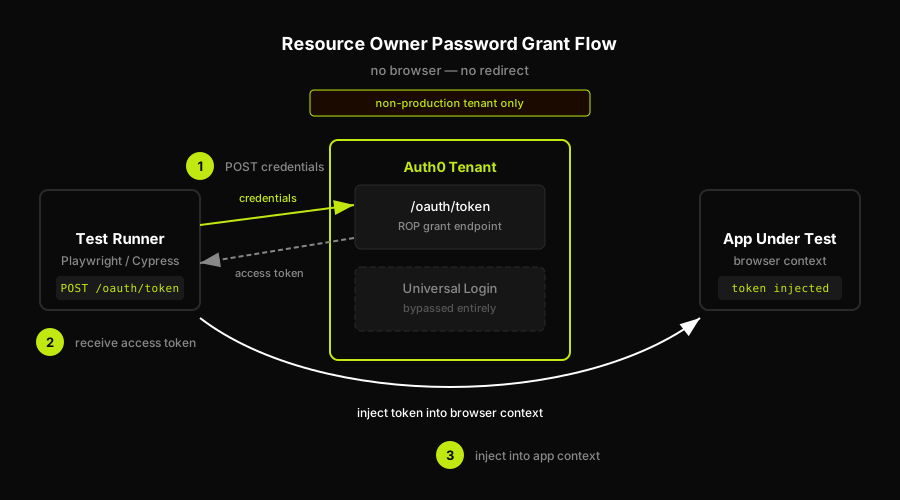
Enable the grant type on the application. In your Auth0 tenant's dashboard, navigate to Applications, open the application that represents your E2E test suite (or your app under test), and go to Settings. Under Advanced Settings, find the Grant Types section. Enable "Password" (or "Password Realm" if you need the realm-targeted variant). Save.
Set a Default Directory. The realm-less password grant requires Auth0 to know which connection (database connection, user directory) to authenticate against. Go to your tenant's General Settings and set a Default Directory to the name of your database connection (for example, "Username-Password-Authentication"). Without this, Auth0 returns an error when you post to /oauth/token with grant_type=password.
The request shape. A basic ROP grant request posts grant_type=password, username, password, client_id, and optionally client_secret (required for confidential applications), audience, and scope. The password-realm variant uses grant_type=http://auth0.com/oauth/grant-type/password-realm and adds a realm field specifying the connection name. This is useful when your tenant has multiple connections and you cannot or do not want to set a Default Directory.
Here is the full curl request to mint an access token:
The response includes access_token, id_token, token_type, and expires_in. Take the access_token (and id_token if your app uses it) and move to the injection step.
Injecting the Token and Asserting Access
Getting the token is half the job. Getting it into a running browser context in the right place is the other half. Where you inject it depends on how your app reads auth state.
If your app stores auth in localStorage: inject the token via page.evaluate() before navigating. Set the keys your app's auth SDK writes: typically something like @@auth0spajs@@::{clientId}::{audience}::openid profile email as a serialized JSON object. This is the key format Auth0's SPA SDK uses internally. Check your browser's localStorage after a real login to get the exact key name.
If your app uses HTTP-only cookies: you cannot inject via JavaScript. Set the cookie via context.addCookies() with the correct domain, path, and httpOnly: true flags before the first navigation. The cookie value and name will match whatever your backend sets after exchanging the token.
If your app sends the token as an Authorization header: there is no persistent state to inject. Instead, intercept outgoing API requests via page.route() and add the Authorization: Bearer {token} header to requests matching your API routes.
After injection, navigate to a protected route and assert that it loads. A route your app redirects to login if the user is unauthenticated is the clearest signal: if it renders without a login redirect, the injection worked. Check for authenticated-only UI elements to confirm the session is being read correctly.
Here is a Playwright setup fixture that fetches the token and injects it before any test runs:
How Autonoma Covers the Login UI the Shortcut Skips
The ROP grant approach is the right call for most E2E suites. It is fast, reliable, and keeps your tests off a hosted page whose markup Auth0 controls. For testing your app's authenticated surface (protected routes, token handling, session behavior, API access) it does exactly what you need. But it is worth being honest about what it does not cover.
The actual login redirect, the form, the callback, the session handoff: those go untested by a suite that bypasses them with a token. The most common Auth0 production incidents are not broken API calls. They are broken redirect chains. A misconfigured callback URL. A custom login page that stops rendering after an update. A PKCE flow that fails because the allowed callback list was changed during a deploy. A session that never gets established because the post_login_redirect_uri is wrong. Your tests stay green. Your users cannot log in.
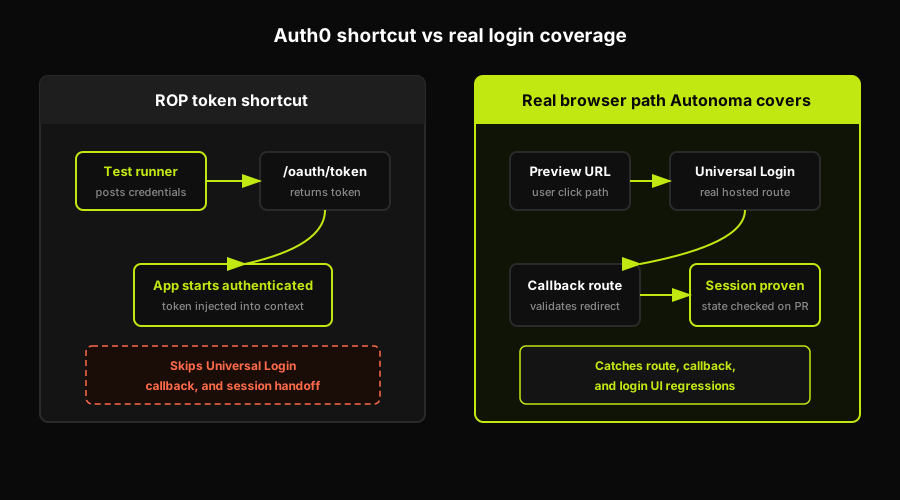
That is precisely what Autonoma was built to address. Our Planner agent reads your codebase and identifies the auth flows your application uses: the routes, the redirect patterns, the session handling. It generates test cases that drive the actual login UI through a per-PR preview environment, the same URL a real user would hit. The Executor agent runs those tests in a real browser, navigating Universal Login and checking the authenticated state after callback instead of relying only on token injection. The Reviewer agent separates genuine auth regressions from agent errors so you are not chasing false positives every time Auth0's UI shifts slightly.
For scenario setup, Autonoma can use its SDK/data factory to create the users those auth tests need. You wire your own create and teardown functions through @autonoma-ai/sdk factories; the SDK pattern uses defineFactory, createHandler, create, and teardown that calls userRepo.delete(user.id). That lets Autonoma create users with specific characteristics or states, authenticate scenarios with those users, and delete the same users when the run finishes. This is app-side test-data setup, not a native Auth0 Management API integration claim.
The Diffs Agent is where the maintenance story changes. When your Auth0 configuration changes (a new callback URL, an updated allowed origins list, a modified login page template), the Diffs Agent reads the code changes on the next PR and updates the test plan accordingly. You still keep the ROP fixture for fast authenticated-surface coverage, but Autonoma reduces the manual upkeep around the login routes, callback assumptions, and UI state that the token shortcut cannot see.
Token Shortcut vs Testing the Real Login: the Honest Tradeoff
The combination is what most production suites need: the ROP grant for fast authenticated-surface coverage in the bulk of the suite, and an agent-driven layer to cover the login UI the token shortcut cannot see.
| What the token shortcut covers | What it skips |
|---|---|
| App behavior when authenticated | Universal Login form and redirect |
| Protected route access control | Auth0 callback URL configuration |
| Token-gated API requests | Post-login redirect handling |
| Session expiry and refresh logic | MFA, social login, brute-force protection |
The token shortcut also rots in ways that are quiet and hard to diagnose. If someone changes the Default Directory on the tenant, token minting fails silently in the test setup. If the grant type gets disabled on the application during a security review, the test setup errors out with an OAuth error that looks like a misconfiguration. The tenant config assumptions embedded in your test setup are invisible in code review. If you also use Auth0 to front enterprise SSO flows, those connections introduce additional configuration state that the ROP shortcut never exercises.
Both patterns running together give you the full picture: your app's behavior when authenticated, and your login flow's behavior when a real user actually tries to get there.
FAQ
The standard E2E approach is the Resource Owner Password (ROP) grant: post credentials directly to Auth0's /oauth/token endpoint from your test setup, receive an access token, and inject it into your app's browser context before navigating to protected routes. This avoids driving Universal Login through a browser. The caveat: this tests your app's authenticated surface, not the login UI itself. Auth0 recommends using the ROP grant only against non-production tenants with test accounts.
The Resource Owner Password grant is an OAuth 2.0 grant type that lets a client post a username and password directly to the authorization server's token endpoint and receive an access token in response, without any browser redirect. Auth0 supports it but flags it as discouraged for production use because it requires handling raw credentials and bypasses MFA and brute-force protection. For automated testing against a non-production Auth0 tenant, it is the accepted shortcut for minting tokens quickly without driving the hosted login UI.
Technically yes, but it is brittle and generally the wrong approach. Universal Login lives on Auth0's domain, not yours. Its markup is controlled by Auth0 and can change without notice. Auth0 also runs bot-detection checks that can block automation. The practical alternative for most E2E suites is to bypass Universal Login entirely using the Resource Owner Password grant to mint an access token, then inject the token into your app's browser context. This covers your app's authenticated behavior without coupling your tests to a hosted page you do not control.
Post to your Auth0 tenant's /oauth/token endpoint with grant_type=password, username, password, client_id, client_secret (if the app is confidential), audience, and scope. Your tenant must have a Default Directory set and the Password grant type enabled on the application. The response includes an access_token and id_token you can inject into your test's browser context. Use a dedicated non-production tenant and test accounts. Never enable the Password grant on a production Auth0 tenant.
It depends on what you need to cover. Mocking the OAuth redirect (stubbing the token exchange at your app's callback) is good for testing your application's OAuth callback logic: what happens on success, on denial, on token exchange failure. It does not test the end-to-end login flow. The Resource Owner Password grant is better than mocking for getting an authenticated state quickly without driving the hosted UI. Neither approach tests Universal Login itself. For that you need a browser driving the real login page, which is where an agent-driven approach like Autonoma covers the gap.


