

How to test Google OAuth login: you generally should not automate the live Google login page. Google actively detects headless browsers and automation signals, serving a "this browser or app may not be secure" wall that blocks your tests. The three approaches that actually work: capture an authenticated session once and reuse it via storageState, mock the OAuth redirect so your app never calls Google at all, or use a dedicated test account whose session you keep fresh.
You point Playwright at the Google sign-in page. You watch the browser open, navigate, and then hit a wall: "This browser or app may not be secure." The test fails. You check the logs, check the selector, re-run it. Same wall. You search the error. You land on a StackOverflow thread from 2020 with 200 upvotes and no accepted answer that actually works in 2026.
This happens to most teams the first time they try to automate Google OAuth. The lean teams hit it hardest: no dedicated QA engineer, shipping fast with AI coding tools, and suddenly blocked on the one auth flow every user hits first.
The good news is the answer is simpler than the ecosystem makes it look. You do not need a stealth plugin. You do not need to fight Google's bot detection. You need to stop trying to drive the live Google login page and use one of the three approaches below instead. For a broader look at what you should be covering across the full login surface, see login page test cases.
Why automating the real Google login fails
Google's sign-in page runs active checks against browsers it does not trust. These checks are intentional, they work, and they have gotten stricter over time.
The specific signals that get your tests blocked:
- Headless browser fingerprints. Chromium in headless mode has well-known property differences: missing plugins, non-standard screen dimensions, and navigator flags that indicate automation. Google reads these.
- WebDriver and automation flags. Any browser launched by Playwright, Selenium, or Puppeteer sets automation-related flags in the JavaScript environment. Google checks for these.
- CAPTCHA challenges. Even when the "not secure" wall does not appear immediately, a CAPTCHA challenge appears for accounts that receive login attempts from unusual IPs or non-human timing patterns.
- Suspicious activity lockouts. Repeated automated login attempts against a real Google account can trigger security lockouts, password-reset flows, or account bans.
- A moving login UI. Google's login page changes without notice. Selectors break. Flows change. Any script that drives the real page is brittle by design.
The stealth plugin approach (using puppeteer-extra-plugin-stealth or its Playwright equivalents) tried to mask these signals. Its core dependencies went unmaintained in 2023. Do not build on it. Teams that did are now maintaining a pile of workarounds for an approach the ecosystem abandoned.
Option 1: Capture the session once and reuse it
The most reliable approach: log in to your Google account once, manually or in a dedicated setup step, and persist that authenticated session to disk. Every subsequent test loads the saved session and starts already logged in. Google's bot detection is never triggered because no automated browser ever touches the Google login page.
In Playwright, this is the storageState API. You run a one-time setup that performs the real login (or you log in manually with a headed browser), then call page.context().storageState() to save the session to a file (typically named auth.json). In your test configuration, you point storageState: "auth.json" at the saved file and every test context starts authenticated. The Playwright documentation on storageState covers per-provider configuration including scoping to specific browser contexts and handling multi-account scenarios.
The setup step that performs the initial login can be manual (you do it once in a headed browser and save the result) or automated with special handling (run with a real browser profile on a machine where that account is trusted). Either way, the automated test suite never touches Google's login page again.
This approach tests the part of your application that depends on the authenticated state: the post-login flow, the session, the protected routes. It does not test the Google login UI itself, but that is not your code to test.
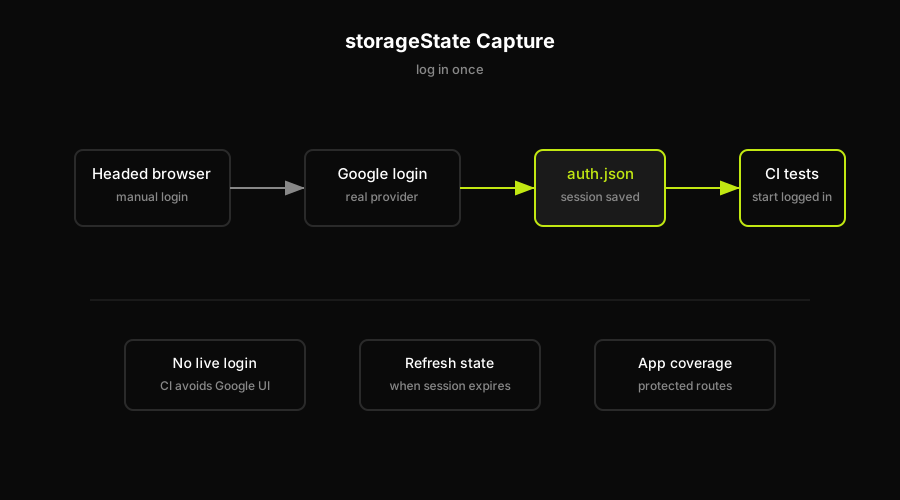
storageState turns Google OAuth from a repeated provider login into a saved authenticated session that CI can reuse.
Option 2: Mock the OAuth redirect
If you are testing how your application handles the OAuth callback, not whether Google's login UI works, you can skip Google entirely. Intercept the OAuth redirect at your application's boundary and return a valid-looking authenticated response directly.
In practice: your app redirects the user to Google's authorization URL, Google authenticates and redirects back to your callback URL with a code, and your backend exchanges the code for tokens. You can intercept at the redirect step and return a fake callback with a predictable code, or you can stub the token exchange endpoint so your backend receives tokens without ever calling Google.
This is the right approach for testing your app's logic around OAuth: what happens when the user grants access, what happens when they deny it, what happens when the token exchange fails, what happens when the session expires. None of these require a real Google interaction.
The limitation is honest: this approach tests your code, not the end-to-end integration with Google. The OAuth redirect your stub returns will drift from what Google actually sends if the spec changes. Use it for application logic coverage; combine it with Option 1 or Option 3 for integration coverage.
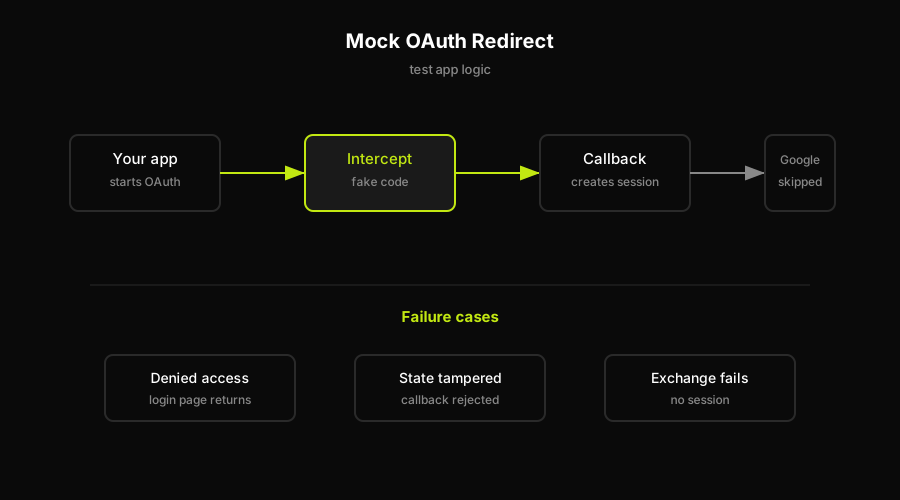
Mocking the OAuth redirect is for callback logic and failure cases, not provider integration coverage.
Option 3: Use a dedicated test account
Create a Google account you never use for anything else. A throwaway account with a simple password, set up specifically for testing. Log in to your application with this account in a headed browser, save the storageState, and commit that state file to your test infrastructure.
The advantages over using a real user account: if the test account gets locked or suspended, no real user loses access. You can share the credentials safely across the team. You can reset the account's app-specific state without affecting anyone. And you are not risking the bot detection lockout behavior against an account anyone depends on.
The dedicated test account pattern pairs naturally with the storageState approach from Option 1. The difference is isolation: the test account exists only for testing, so you can treat it more aggressively without consequences. If your app supports multiple social providers, keep one isolated test identity per provider and avoid tying CI to an account that a real user or teammate depends on.
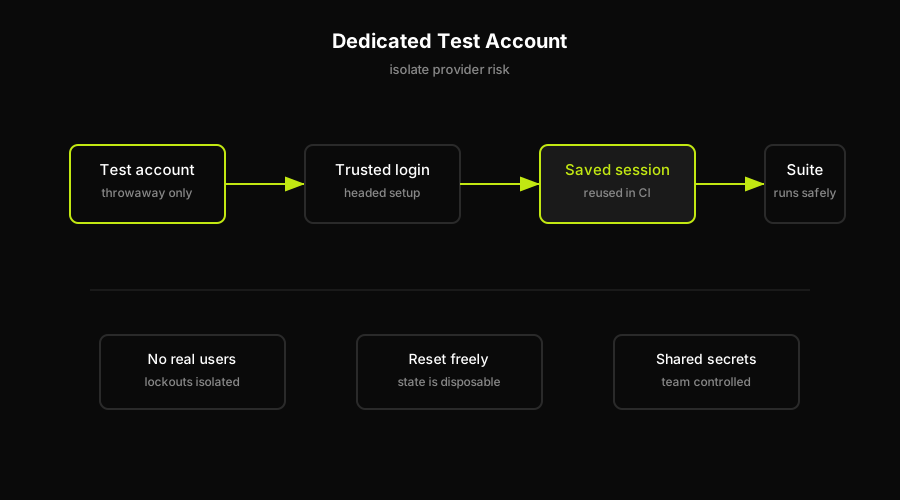
A dedicated test account isolates lockouts, reset state, and shared credentials from real users.
Keeping it green when Google changes the flow
Captured sessions expire. Cookies have a lifespan, and Google's sessions are not permanent. A test suite built on a saved storageState will start failing when the session ages out, often with an error that looks like an authentication failure rather than an expired cookie. You need a process for refreshing the session: re-run the setup step, re-capture the state, redeploy.
Mocked OAuth redirects drift from the real contract. Google's authorization response format, the fields it includes in the ID token, and the structure of the callback can all change. Your mocks stay frozen. A production regression where Google changes something in the token payload will not be caught by tests using a static mock.
This is the maintenance trap that scripted auth testing falls into. You write the test once, it passes, and then six months later it fails in a way that takes a day to diagnose.
This is exactly the gap that an agent-driven approach addresses differently. Scripted login tests rot when the auth UI or provider changes, and unit tests pass on code that compiles fine. Autonoma does not bypass Google's anti-bot detection, and it should not be used as a stealth layer for the live Google login page. It helps maintain coverage over the surface your app controls: OAuth callback handling, session creation, protected routes, redirect handling, and post-login state.
The Planner reads your routes, auth callbacks, protected states, and login UI to derive the test plan. The Executor runs a real browser against the preview deployment, using honest inputs such as a dedicated test account or a captured session instead of trying to defeat Google's security. The Diffs Agent updates the plan when routes, callbacks, or the login UI change. The Reviewer separates real regressions, such as a broken callback or missing session, from agent errors so the signal stays actionable.
The session refresh problem does not disappear with Autonoma, but the maintenance overhead does. Instead of someone manually re-capturing a session and re-deploying, the agent flags the session expiry as a test failure and the Diffs Agent handles the maintenance update when the code around auth changes.
FAQ
The reliable approach is to avoid automating the live Google login page entirely. Capture an authenticated session once using your framework's session persistence (Playwright's storageState, Cypress's cy.session), and reuse it in every test run. For unit-level coverage, mock the OAuth redirect in your app's callback handler. For isolation, use a dedicated test Google account so lockouts do not affect real users. Direct automation of Google's login page is blocked by Google's headless browser detection.
Not reliably against the live Google login page. Google actively detects headless browsers and automation signals, blocking automated login attempts with a 'this browser or app may not be secure' error. The practical approach is to capture an authenticated session once and reuse it in tests, so no automated browser ever touches the Google login page.
Google checks for signals that indicate non-human interaction: headless browser fingerprints, WebDriver automation flags, unusual login timing, and repeated attempts from non-trusted IPs. These checks are intentional security measures. Browsers launched by Playwright, Selenium, and Puppeteer set well-known automation flags that Google reads.
Use Playwright's storageState API. Log in to a dedicated test Google account once in a headed browser (or in a one-time setup step), then call context.storageState() to save the session to a file. In your Playwright config, point storageState at the saved file so every test starts already authenticated. No automated browser ever drives the Google login page.
It depends on what you are testing. Mocking the OAuth redirect is correct for testing how your application handles the callback: token exchange, session creation, redirect-after-login logic. It is not correct for integration coverage, because your mock will drift from the real Google response over time. Combine mocking for application logic with a real captured session for integration coverage.
Log in to your Google account (ideally a dedicated test account) in a headed browser, then use your test framework's session persistence feature to save cookies and local storage to a file. In Playwright this is storageState. Load that file in every subsequent test run so tests start already logged in. Refresh the saved session when it expires, typically after a few weeks.


