

A team we know shipped a routine refactor on a Wednesday afternoon. One engineer's AI coding agent dropped an auth wrapper while restructuring the route layout. The app compiled cleanly. Code review passed because the static diff showed no obvious logic errors. The test suite passed because there were no E2E tests covering the login-to-dashboard flow at all. By Thursday morning, every user who tried to sign in landed on a blank page. The production incident ran for six hours before someone traced it back to the missing wrapper.
That incident is not a story about careless code review. It is a story about a coverage gap that is extremely common: teams write unit tests for business logic and forget entirely to verify that authenticated users can actually reach authenticated pages. Login flows are treated as "obviously working" right up until they are not.
This guide gives you the complete set of login test cases for 2026, including the modern auth methods that every other checklist skips. It also covers why these tests break in practice and what it takes to keep them alive.
What is a login page test case?
Before diving into the cases themselves, it is worth drawing a distinction that almost no guide bothers to make, even though it maps directly to a secondary keyword you might be searching for: the difference between a test scenario and a test case.
A test scenario is the high-level goal. "Verify that a registered user can log in with a valid email and password" is a test scenario. It describes intent and scope, but it does not tell you exactly what to do or what to check. You cannot hand a test scenario to a test runner and get a deterministic pass or fail.
A test case is the concrete execution unit. It has a precondition (the state the system must be in before the test starts), a set of steps (the exact actions the user or system performs), and an expected result (the specific, observable outcome that defines pass or fail).
Here is the same idea turned into each format:
Scenario: Verify that a registered user can log in with a valid email and password.
Test case:
- Precondition: A user account exists with email
user@example.comand passwordValidPass123!. The user is not currently logged in. - Steps: Navigate to
/login. Enteruser@example.comin the email field. EnterValidPass123!in the password field. Click the "Sign in" button. - Expected result: The user is redirected to
/dashboard. The authenticated navigation (profile avatar, "Logout" link) is visible. The login form is no longer rendered.
That specificity is what makes a test case testable and maintainable. Everything in the sections below follows this structure.
Positive login test cases
Positive login test cases verify that valid users with valid credentials can actually get in. They are not glamorous, but they are the foundation. A surprising number of teams skip them entirely, then discover during an incident that their "obviously working" login has been broken for days.
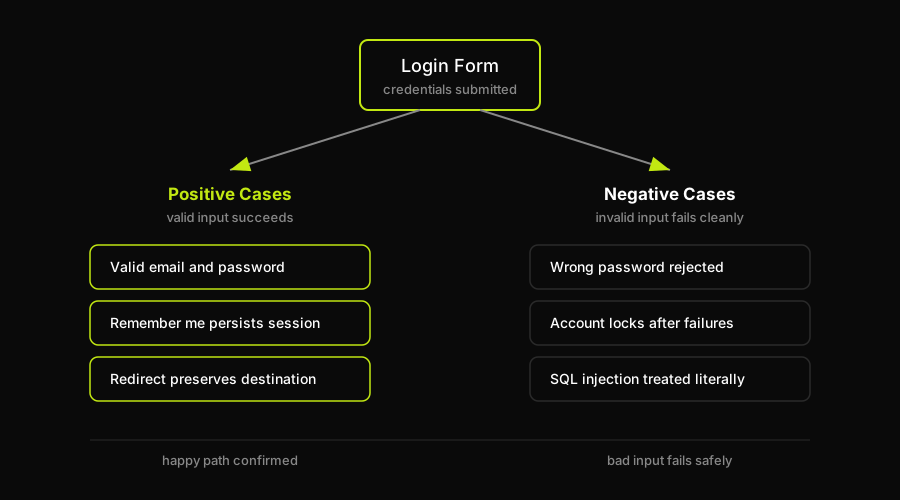
Every login checklist has two halves: positive cases prove the happy path works, negative cases prove bad input fails safely.
| ID | Test Case | Steps | Expected Result |
|---|---|---|---|
| POS-01 | Valid email and password login | Navigate to /login. Enter registered email and correct password. Click Sign in. | Redirected to /dashboard. Authenticated nav visible. Login form gone. |
| POS-02 | Login with email in mixed case | Enter registered email with upper and lower case letters mixed (e.g. User@Example.COM). Enter correct password. Submit. | Login succeeds. Email is treated case-insensitively. User reaches /dashboard. |
| POS-03 | Remember me persists session | Log in with valid credentials and "Remember me" checked. Close the browser. Reopen and navigate to /dashboard. | User is still authenticated. No redirect to /login. |
| POS-04 | Login and access protected route directly | Log in. Navigate directly to a protected URL (e.g. /settings/billing). | Page loads at /settings/billing. No redirect to /login. |
| POS-05 | Logout clears session | Log in. Click Logout. Navigate to /dashboard. | Redirected to /login. Previous session cookie is invalidated. |
| POS-06 | Login with copy-pasted credentials | Copy email and password from a password manager. Paste into login fields. Submit. | Login succeeds. No validation errors triggered by pasted values. |
| POS-07 | Redirect after login preserves destination | While logged out, navigate to /reports/q1. You are redirected to /login. Log in with valid credentials. | After login, user is redirected to /reports/q1, not to a generic /dashboard. |
Negative login test cases
Negative test cases are the depth section of any login checklist. This is where most guides give you five bullet points and call it done. The real list is longer, and the expected results need to be specific enough to actually verify.
| ID | Test Case | Steps | Expected Result |
|---|---|---|---|
| NEG-01 | Wrong password | Enter registered email. Enter an incorrect password. Submit. | Error message: "Invalid email or password." User stays on /login. No redirect. |
| NEG-02 | Unregistered email | Enter an email address that does not exist in the system. Enter any password. Submit. | Error message: "Invalid email or password." Same generic message as NEG-01 (no user enumeration). |
| NEG-03 | Empty email field | Leave email blank. Enter a password. Click Sign in. | Form does not submit. Inline error "Email is required" appears below the email field. |
| NEG-04 | Empty password field | Enter a valid email. Leave password blank. Click Sign in. | Form does not submit. Inline error "Password is required" appears below the password field. |
| NEG-05 | Both fields empty | Submit the form with both fields blank. | Both inline field errors appear. Form does not submit. |
| NEG-06 | Password is case-sensitive | Enter the correct email. Enter the correct password with one letter's case changed. | Login fails. Error: "Invalid email or password." Password case sensitivity is enforced. |
| NEG-07 | Leading/trailing whitespace in password | Enter the correct email. Manually type a space before and after the correct password. Submit. | Login fails. Whitespace is NOT silently trimmed from passwords. Error: "Invalid email or password." |
| NEG-08 | Account locked after repeated failures | Attempt login with the correct email and wrong password 5 times consecutively. | On the 5th failure, the account is locked and the message reads: "Your account has been temporarily locked. Check your email for reset instructions." Subsequent attempts return the same locked message regardless of password. |
| NEG-09 | Expired session redirects to login | Log in. Wait for the session to expire (or manually expire the session cookie). Attempt to navigate to /dashboard. | User is redirected to /login. After re-authenticating, they reach /dashboard. |
| NEG-10 | Invalid email format | Enter "notanemail" in the email field. Enter any password. Submit. | Form does not submit. Inline error "Enter a valid email address" appears below the email field. |
| NEG-11 | Very long input in email field | Paste a 500-character string into the email field. Submit. | Form rejects the input with a validation error. No server error or 500 response. |
| NEG-12 | Deactivated account | Attempt to log in with credentials for a deactivated user account. | Error message: "This account has been deactivated. Contact support for help." Login is blocked. |
Notice that NEG-01 and NEG-02 produce identical error messages. That is intentional: if "user not found" and "wrong password" return different messages, an attacker can enumerate which email addresses are registered. Your test case for NEG-02 should explicitly assert that the error string matches NEG-01's string exactly.
Field validation and UI test cases
These cases cover the login form's UI behavior independent of authentication outcomes. They catch regressions in accessibility, form state, and UX polish.
Password masking is the most commonly skipped: verify that the password field has type="password" by default and that characters are rendered as dots or asterisks. Then verify that clicking the show/hide toggle switches the field to type="text" and back. Both directions matter.
| ID | Test Case | Expected Result |
|---|---|---|
| UI-01 | Password field is masked by default | Password characters render as dots or asterisks. Field type is "password". |
| UI-02 | Show/hide toggle reveals password | Clicking the eye icon changes field type to "text". Clicking again reverts to "password". |
| UI-03 | Tab order is logical | Tab from email field to password field to Sign in button in sequence. No focus trap or skip. |
| UI-04 | Autofill populates both fields | Browser-saved credentials autofill email and password. Form submits successfully with autofilled values. |
| UI-05 | Sign in button disabled while submitting | After clicking Sign in, the button enters a loading state and cannot be clicked again until the request resolves. No double submission. |
| UI-06 | Error messages are inline, not modal | Field-level validation errors appear directly below their respective fields. No global error overlay is required for individual field errors. |
Security test cases for login
Security test cases verify that your login endpoint resists attacks. These are not theoretical: SQL injection and brute-force attempts hit login pages constantly. Every case below should produce a specific, observable outcome.
SQL injection in the email field. Enter ' OR '1'='1 into the email field. Enter any value in the password field. Submit. Expected result: the input is treated as a literal string. Login fails with "Invalid email or password." No database error message is surfaced to the UI. No server-side 500 response.
This is the table-stakes SQL injection test. If your backend uses parameterized queries (it should), the payload above will simply match no user and return the standard error. The test value is in confirming that no error leaks through: "SQL syntax error near OR" in a UI error message is a finding.
Brute-force and account lockout. The NEG-08 case above covers the user-facing lockout. The security variant adds: after lockout, verify that the correct password also returns the locked message. The lockout must not be bypassed by submitting the right credentials. Also verify that the lockout message does not distinguish between "locked because too many failures" and "wrong password" (it should not, to avoid confirming account existence).
Non-leaky error messages. Already covered in NEG-01 vs. NEG-02 above, but worth restating as a security case: any divergence in error messages between "wrong password for a real account" and "no account with that email" is a user enumeration vulnerability. Assert that both strings are identical.
HTTPS enforcement. Navigate to http:// (not https) version of your login page. Expected result: the request is redirected to the HTTPS version with a 301 or 302. Credentials are never transmitted over an unencrypted connection.
Rate limiting on the login endpoint. Send more than 10 login attempts in under a minute from the same IP (automate this with a simple script or a tool like curl). Expected result: the server returns a 429 Too Many Requests response. The login form surfaces a human-readable rate-limit message.
Modern authentication test cases (the part most guides skip)
Password-and-email is one path into your app. In 2026, most apps support at least two or three others. Every additional auth method is a separate state machine with its own failure modes, and every one of those failure modes can lock users out.
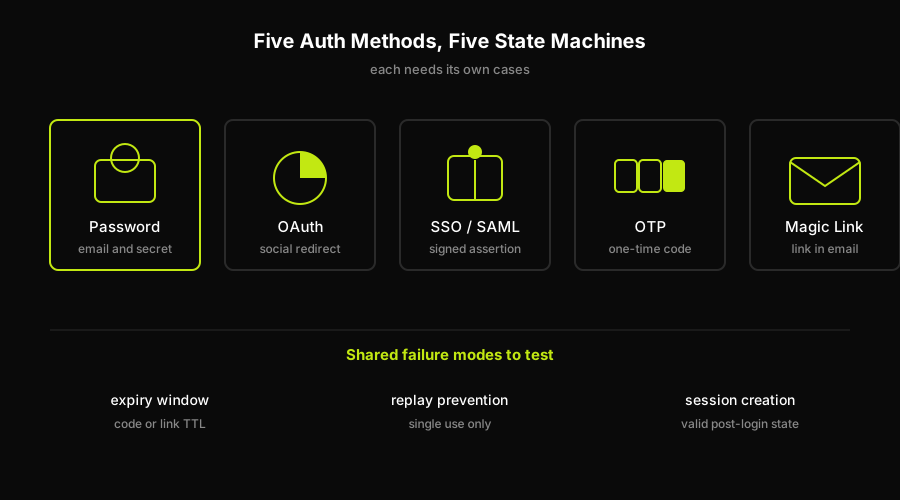
Password, OAuth, SSO, OTP, and magic link are five separate state machines, but they share three failure modes worth testing: expiry, replay, and session creation.
OAuth and social login (the redirect round-trip)
OAuth login involves a redirect to a third-party provider, an authorization code exchange, a callback to your app, and a session creation. Each step can fail independently.
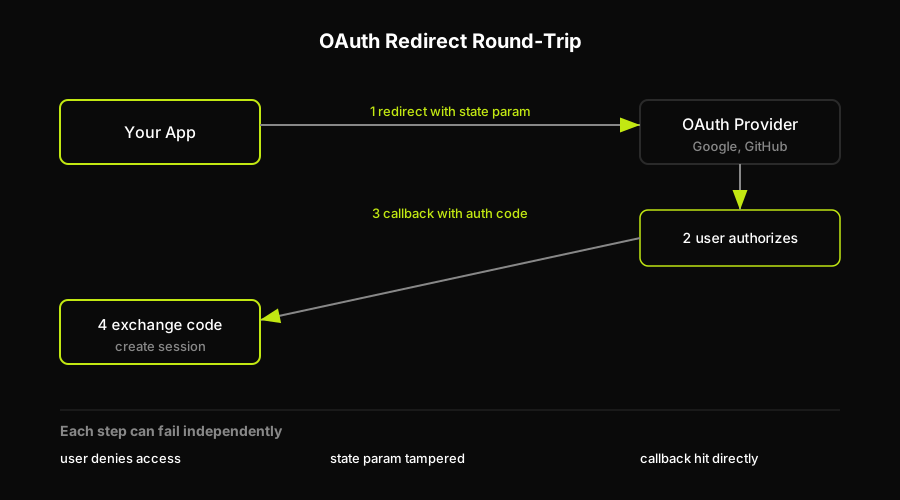
The OAuth round-trip is four hops, and a test needs to cover the failure mode at each one: denied access, a tampered state parameter, and a callback hit directly without a code.
The core assertion is: after the user authorizes on the provider side, your app creates a valid session and redirects to the correct post-login destination. Beyond that, test what happens when the user denies authorization on the provider side (expected: they return to your app's login page with a clear message, not a white screen), when the OAuth state parameter is tampered with (expected: the callback is rejected with an error, CSRF protection fires), and when the callback URL is hit directly without a valid authorization code (expected: error, no session created).
For a full treatment of the Playwright-level implementation for OAuth flows, see our deep dive on how to test Google OAuth login, and our Playwright authentication testing guide for the storageState patterns these flows rely on.
SSO and SAML assertions
SSO via SAML adds a Service Provider, an Identity Provider, and an assertion document that your app must validate. The key assertions: the SAML response signature must be validated against the IdP's certificate (if the signature check is disabled or skipped in a config change, logins will succeed with forged assertions); the audience restriction must match your app's SP entity ID; the assertion must not be expired (assertions include a timestamp window, typically 5 minutes).
Concrete test: submit a SAML assertion with a manipulated signature. Expected result: the assertion is rejected. Login fails. No session is created. For SSO-specific test coverage, see our SSO and SAML testing guide.
OTP and one-time codes (expiry and replay)
OTPs introduce timing as a dimension of correctness. The cases that matter:
An OTP entered within its valid window (typically 30 seconds for TOTP, 10 minutes for SMS/email codes) authenticates the user successfully. An OTP entered after its TTL returns "This code has expired. Request a new code." An OTP that was already used once returns "This code has already been used." An OTP with one digit wrong returns the standard invalid-credentials error. A second OTP request within a rate-limit window is throttled.
The replay test is the one most teams miss. If your OTP implementation does not mark codes as consumed on first use, an attacker who intercepts a valid code (via phishing, shoulder surfing, or a compromised device) can replay it. Assert that the second submission of a valid, unexpired code fails. For OTP test implementation patterns, see our OTP login testing guide.
Magic links and passwordless (single-use and expiry)
Magic links are OTPs delivered as URLs. The same expiry and replay rules apply, with the added dimension that clicking a link is a GET request, which means the token can appear in server logs, referrer headers, and browser history.
Test that a magic link clicked within its TTL (e.g. 15 minutes) creates a valid session. Test that the same link clicked a second time returns "This link has expired. Request a new one." (The link should be invalidated on first use, not just by time.) Test that a link whose TTL has elapsed returns "This link has expired. Request a new one." Test that navigating to a magic link URL with the token parameter stripped returns an error page, not a server crash.
For a full testing guide covering magic-link implementation patterns, see our guide to testing magic-link passwordless login.
Two-factor (2FA) and backup codes
2FA adds a second verification step after the password. The cases: a valid TOTP code entered within the valid window completes login. An incorrect TOTP code returns "Invalid code. Try again." with the 2FA prompt still displayed (user is not kicked all the way back to the email/password form). An expired code returns the standard invalid message. A backup code works exactly once and is marked as consumed after use. Attempting to use a backup code a second time returns "This backup code has already been used." After all backup codes are consumed, the user is told to generate new ones.
Also test the recovery flow: if a user loses their authenticator app, they can trigger account recovery by verifying ownership through email. The recovery flow should not bypass 2FA entirely, it should replace it after identity is re-confirmed.
Why login test cases break, and how to keep them alive
Writing the initial test cases is the easy part. The hard part is the same problem that got the team in the incident above: tests that exist today are gone or wrong in three months.
Login tests break for a handful of specific, predictable reasons.
Auth-widget selector churn. If your login form is rendered by a third-party auth widget (Clerk, Auth0, Firebase UI, etc.), the DOM selectors that your tests use can change whenever the vendor ships a UI update. A test that targets input[name="identifier"] breaks silently when the vendor renames the field. You did not change your code. Your tests still fail.
Redirect URLs move between environments. The OAuth callback URL registered with your provider for staging is different from the one for production. A test that hard-codes https://app.example.com/auth/callback fails in staging because the redirect goes to a different domain. Tests that do not parameterize the base URL break every time you change environments.
OTP and magic-link timing makes tests flaky. A test that requests an OTP, waits two seconds, and submits it will occasionally fail in CI because the email delivery was slow. A test that uses a fixed sleep to wait for a magic link to arrive is fragile by design. These tests need real wait logic, not sleeps.
Session token formats change. JWT payloads change shape when you rotate signing keys or add new claims. Tests that decode and assert on specific JWT fields break without any change to the login UI.
The wrapper that vanishes. The incident above is the highest-severity variant: a refactor removes the route-level auth protection entirely, and there is no test that verifies authenticated users can actually reach the authenticated UI from the login page end-to-end. This gap is invisible to unit tests and static analysis.
Most teams discover these breaks in production, not in CI, because login tests are either absent or too shallow to catch behavioral regressions. That is the gap that Autonoma was built to close. Our agents read the codebase, find the protected routes and auth entry points, generate E2E tests that verify the full login-to-dashboard flow, and maintain those tests automatically on every PR. When auth code changes, the Diffs Agent analyzes the diff and updates the test suite accordingly. If a wrapper disappears, the test fails on the PR, not in a Thursday-morning incident.
For a deeper look at the full failure mode where tests pass but users are still locked out, see why-e2e-tests-pass-product-broken.
Generating and maintaining login tests with an AI agent
The incident at the top of this article was not prevented by a checklist. It was prevented by having E2E coverage on the login flow itself. The question is who builds and maintains that coverage over time.
Autonoma uses four agents to handle the full lifecycle, and their roles map directly to the gaps this article documents.
The Planner reads your codebase: routes, middleware, auth guards, components. It identifies the protected routes, the login entry points, and the state each test scenario needs to start from. It also generates the API endpoints needed to put the database in the right state before each test runs. For login flows, that means creating test user accounts with specific attributes (unverified email, locked account, 2FA enrolled, deactivated) without requiring manual seed scripts.
Autonoma can do that through its SDK/data factory: you connect your own create and teardown functions through @autonoma-ai/sdk factories, Autonoma creates the scenario user, authenticates with that user, and then runs teardown to delete the user after the run. The SDK pattern uses defineFactory, createHandler, create, and teardown that calls userRepo.delete(user.id).
The Executor drives the real browser through the live preview environment. It runs each test case the Planner generated: filling fields, clicking buttons, following OAuth redirects, submitting OTP codes. Because it drives a real browser against a deployed environment, it catches the things that unit tests miss: the wrapper that does not redirect, the auth callback that silently errors, the session that does not persist.
The Reviewer evaluates each result and classifies it. A real bug (the user cannot reach /dashboard after a valid login). An agent error (the Executor got the OAuth redirect URL wrong because it was environment-specific). A test/plan mismatch (the Planner expected a redirect to /dashboard but the app actually redirects to /onboarding for new users). The Reviewer's classification is what makes the output actionable rather than just a wall of red.
The Diffs Agent runs on every PR. It reads the code diff, identifies which test cases are affected by the change, and adds, modifies, or deprecates tests accordingly. If a PR adds magic-link authentication, the Diffs Agent adds magic-link test cases without anyone asking. If a PR changes the post-login redirect from /dashboard to /onboarding, the Diffs Agent updates the expected result in every affected test.
What would these agents have found in the incident? The Executor's test for POS-01 (valid login redirects to /dashboard) would have failed on the PR itself: after the auth wrapper was dropped, navigating to /dashboard no longer required authentication, but the test for the full login flow would have failed because the redirect chain was broken. The Reviewer would have classified it as a real bug, the PR would have been blocked, and the incident would have been a CI failure on Wednesday afternoon instead of a production outage on Thursday morning.
Autonoma drives a real browser through whatever auth your app uses. That includes password forms, OAuth redirect flows, Clerk and Auth0 widgets, and SAML SSO. It is web and web-responsive only. It does not cover native iOS or Android apps.
Login test case template (free reference)
Use this template as a starting point. Copy it, strip the example rows, and fill in your own data for each category.
- Precondition
- Account exists and is active. User is logged out.
- Steps
- Navigate to /login. Enter email. Enter password. Click Sign in.
- Test Data
- user@example.com / ValidPass123!
- Expected Result
- Redirected to /dashboard. Authenticated nav visible.
- Precondition
- Account exists and is active. User is logged out.
- Steps
- Enter registered email. Enter wrong password. Click Sign in.
- Test Data
- user@example.com / wrongpassword
- Expected Result
- "Invalid email or password." shown. No redirect.
- Precondition
- Account exists. User is logged out. No prior failed attempts.
- Steps
- Submit wrong password 5 times with the same email.
- Test Data
- user@example.com / wrong1 through wrong5
- Expected Result
- "Account temporarily locked. Check email." on 5th attempt.
- Precondition
- Any system state. User is logged out.
- Steps
- Enter SQL payload in email field. Any value in password. Submit.
- Test Data
- ' OR '1'='1 / anything
- Expected Result
- "Invalid email or password." No DB error surfaced.
- Precondition
- OAuth provider connected. User not yet authenticated in your app.
- Steps
- Click "Continue with Google". Authorize on Google. Return to callback URL.
- Test Data
- Valid Google account
- Expected Result
- Session created. Redirected to /dashboard. Profile populated from OAuth data.
- Precondition
- User requests magic link. Link TTL is 15 minutes.
- Steps
- Wait 16 minutes. Click magic link URL.
- Test Data
- Expired magic link token
- Expected Result
- "This link has expired. Request a new one." shown. No session created.
- Precondition
- User receives valid OTP. OTP has not been used yet.
- Steps
- Submit valid OTP successfully. Submit the same OTP a second time.
- Test Data
- Same OTP value submitted twice
- Expected Result
- Second submission returns "This code has already been used."
FAQ
Positive login test cases verify that valid users with correct credentials can successfully authenticate and reach the expected post-login destination. Examples include logging in with a valid email and password, logging in via OAuth, and verifying that a persistent session survives a browser restart with 'Remember me' enabled. Negative login test cases verify that the system correctly rejects invalid, malformed, or malicious input. Examples include wrong password, unregistered email, empty fields, locked accounts, expired sessions, and SQL injection payloads in the email field. Both categories are required: positive cases confirm the happy path works, negative cases confirm that invalid inputs fail cleanly and securely.
A test scenario is the high-level goal: 'verify that a registered user can log in.' It describes intent and scope but does not specify exactly what to do or check. A test case is the concrete, executable unit: it includes a precondition (the system state before the test starts), exact steps (the actions to perform), and a specific expected result (the precise observable outcome). You can derive multiple test cases from a single scenario. For login, the scenario 'verify that invalid credentials are rejected' yields separate test cases for wrong password, unregistered email, empty fields, and case-sensitive password handling.
OAuth login testing needs to cover the full redirect round-trip: the user authorizes on the provider side, an authorization code is returned to your callback URL, your app exchanges the code for tokens, and a session is created. The key test cases are: successful authorization creates a valid session and redirects to the correct destination; user denying authorization returns to your login page with a clear message (no white screen); tampering with the OAuth state parameter causes the callback to be rejected (CSRF protection); hitting the callback URL directly without a valid code fails gracefully. Because the OAuth flow involves real redirects to external providers, E2E tests that drive a real browser through the full flow are required. Unit tests and mocked HTTP clients cannot verify the redirect chain.
OTP and magic-link tests must cover three dimensions: correctness (a valid code or link within its TTL authenticates successfully), expiry (a code or link used after its TTL returns 'expired, request a new one'), and replay prevention (a valid code or link used twice returns 'already used' on the second attempt). The replay test is the most commonly skipped. If OTPs are not marked as consumed on first use, an intercepted code can be used by an attacker. For magic links, also test that the token parameter stripped from the URL (or a truncated URL) returns an error, not a server crash. Timing-sensitive tests should use wait conditions rather than fixed sleeps to avoid flakiness in CI.
Login tests break for five main reasons. First, auth-widget selector churn: if you use a third-party widget (Clerk, Auth0, Firebase UI), the vendor can change DOM selectors in any release and your tests break without any change to your codebase. Second, redirect URLs move between environments: OAuth callback URLs registered per environment cause tests that hard-code a base URL to fail in staging. Third, OTP and magic-link timing: tests that use fixed sleeps instead of proper wait conditions fail whenever delivery is slower than expected. Fourth, session token format changes: tests that decode and assert on JWT fields break when signing keys rotate or new claims are added. Fifth, missing coverage on the auth wrapper itself: if no E2E test verifies the full login-to-authenticated-page flow, a refactor that silently removes the route protection will not be caught until production.


