

Testing OTP login means working around the fact that your CI environment cannot read a real SMS. The three patterns that work: a provider test-mode bypass code (a fixed code the provider accepts without sending a real message), a dedicated test phone number configured in your provider console, or intercepting the verification API call directly. Once you have the code in hand, you assert that it expires after its TTL, that a used code is rejected on replay, and that the rate limiter kicks in after enough wrong attempts.
Your automated login test reaches the OTP screen. A code was sent to a phone number. There is no inbox to read, no carrier to talk to, and no way for CI to receive an SMS. The test is stuck. This is the wall every team hits when they first try to automate phone-number login, and most never build a real solution around it. They either skip OTP coverage entirely or hard-code a sleep and hope the timing holds.
Neither strategy ages well. OTP login is increasingly common across consumer apps, fintech platforms, and anything that has to comply with MFA requirements. If your auth flow includes phone-number verification, the question is not whether to test it but how to get the code into the test runner's hands.
The answer is not to read the SMS. It is to avoid sending one in the first place.
Why OTP login is hard to automate
The fundamental problem is delivery. A one-time password sent via SMS lives outside your application. It is in a carrier network, on a real SIM card, in a physical device. None of those are reachable from a test runner.
This creates four compounding issues. First, SMS delivery is async and has no deterministic timeline. A code might arrive in two seconds or thirty. Hard-coded sleeps fail unpredictably, and there is no reliable event to wait on. Second, real phone numbers are not free to test against. Sending verification codes at scale costs money, and most providers throttle or flag accounts that send high volumes of test messages to real numbers. Third, real carrier delivery adds environmental variance: signal, routing, and provider uptime all affect whether the message arrives at all. Fourth, even if you solve delivery, you still have the timing problem on the other side: codes expire, and if your test runs slowly, the code is gone before you can enter it.
The result is that OTP test suites are the flakiest part of most login test workflows. They fail on timing, they fail on network variance, and they are brittle to any change in the provider's test-mode behavior. Teams that do not address this at the infrastructure level end up with tests that are nominally covering OTP but are in practice unreliable.
There is a companion problem for teams building MFA on top of OTP: authenticator-app TOTP (the time-based codes from Google Authenticator or Authy) requires a completely different testing approach, because those codes are generated client-side from a shared secret rather than delivered over SMS. That is its own topic. This guide stays on SMS and phone-number OTP.
Three ways to test OTP login
The three reliable patterns for getting a test-accessible code are bypass codes, test phone numbers, and API interception. Each trades some degree of realism for testability in a different way.
| Pattern | How it works | Setup effort | Realism / coverage | Best for |
|---|---|---|---|---|
| Provider bypass code | Provider accepts a fixed test code without sending a real SMS | Low (config in provider dashboard or test credentials) | Medium (tests app logic, skips delivery) | CI pipelines, fast happy-path coverage |
| Test phone number | Provider console has phone numbers you configure with a fixed verification code | Medium (number registration per provider) | Medium-high (full OTP screen flow, fixed code) | E2E suites that need the full UI flow |
| API interception | Test intercepts or stubs the verification API call and returns a controlled code | High (requires intercept layer in your stack) | High (most realistic, works at any layer) | Teams who cannot use provider test modes |
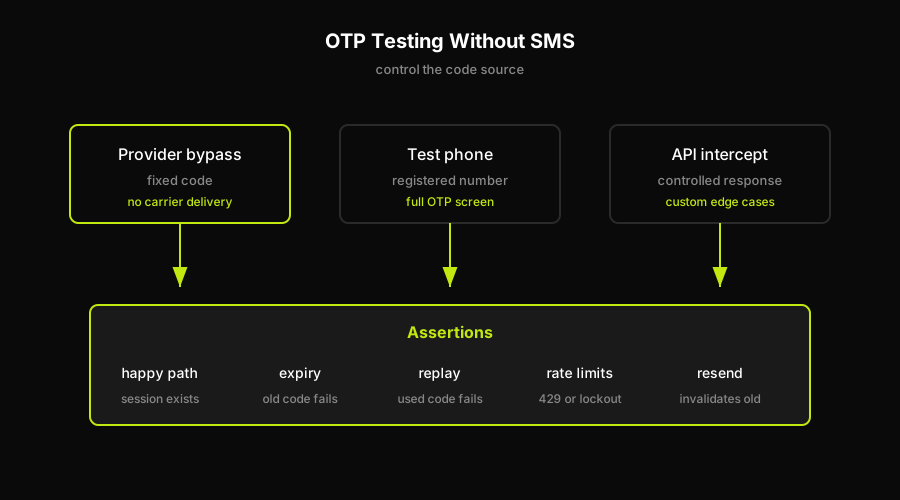
All three OTP testing patterns solve the same problem: make the code available to the test runner without waiting for real SMS delivery.
Provider bypass codes work because most major SMS and auth providers (Twilio Verify, Firebase Phone Auth, AWS Cognito, and others in this category) offer a test mode. In test mode, certain phone numbers or test credentials short-circuit real SMS delivery. The provider accepts a pre-configured fixed verification code for those numbers without sending anything to a carrier. You set up the test number and its fixed code in the provider console, then use those values in your test. The application flow is identical to production from the UI perspective: the login form, the OTP screen, the code-entry field, the redirect. Only the delivery step is bypassed. This is the lowest-effort path and works well for CI pipelines where you want fast, stable coverage of the happy path and the core assertion cases.
Test phone numbers are a variant of the same idea but often supported more explicitly. Some providers let you register a specific list of phone numbers in their console and associate each with a fixed code. When your application calls the verification API with one of those numbers, the provider returns a success without sending an SMS and the code you configured is the one that works. The setup is slightly more involved (you need to register the numbers and keep the codes in sync with your test configuration), but the result is a test that exercises the full OTP UI flow against a stable, controlled code.
API interception is the most work but also the most flexible. Instead of relying on the provider to short-circuit delivery, your test intercepts the outbound call to the verification API (or the inbound delivery webhook, depending on your architecture) and returns a known code. This can be done at the network layer with a mock server, at the SDK layer with a stub, or at the application layer with a configurable injection point. The advantage is that it works even when your provider does not offer test modes, or when you need to simulate specific error conditions (delivery failure, rate-limit responses, invalid number errors) that the provider's test mode does not cover. The tradeoff is setup complexity and the ongoing maintenance cost of keeping the intercept layer in sync with your application's API usage.
For most teams, bypass codes or test phone numbers are the right starting point. They cover the happy path, the expiry case, and the replay case without requiring infrastructure changes. Interception becomes worth the investment when you need to test edge cases the provider's test mode cannot simulate.
What to assert: expiry, replay, and rate limits
Getting the code into the test runner is the hard part. Once you have it, the assertions are straightforward but teams often skip half of them. The full set of things worth asserting on OTP login:
The happy path. Enter a valid code within its TTL and assert the outcome: the user is authenticated, the session cookie or token is present, and the post-login redirect lands on the right page. This is the minimum. If you are only asserting the happy path, you are not testing OTP login, you are testing that the UI renders.
Code expiry. Every one-time password has a TTL, typically somewhere between 60 seconds and 10 minutes depending on the provider and configuration. Your test should assert that a code submitted after its expiry is rejected. The practical approach is to either configure a very short TTL in your test environment or to test against an expired code directly by generating it before the TTL starts and submitting after. The assertion: the application returns an error, not a session. "Invalid or expired code" is the expected response. If your application does not distinguish between a wrong code and an expired code in the error message, that is worth noting but does not change the assertion target (rejection is the expected behavior).
Replay prevention. A one-time password is one-time. Once a code has been used to authenticate successfully, submitting it again should fail. This is a security property, not just a business rule. Your test should complete one successful login with a code, then attempt to use the same code again in a fresh session and assert the rejection. If your provider re-uses codes across test sessions (some do in test mode), you may need to generate a fresh code for the replay attempt and then try the old one. The assertion: a code that has already been used is not accepted.
Rate limiting. Most OTP implementations lock the account or block code submission after N consecutive wrong attempts. What N is depends on your application's configuration. Your test should assert that after enough wrong submissions, the expected lockout behavior kicks in: an error message, a timeout, or a lockout state that requires a different resolution path. Similarly, the resend endpoint should have its own rate limit. Submitting too many resend requests in a short window should produce a rate-limit response. Assert both.
Resend behavior. When a user requests a new code, the old code should be invalidated. Your test can assert this by requesting a resend, then attempting to submit the original code: it should be rejected. Only the new code (the one from the resend) should work.
These five assertion categories cover the security surface of OTP login. Teams that only test the happy path are leaving expiry, replay, and rate-limit vulnerabilities untested. All three have real-world exploit patterns.
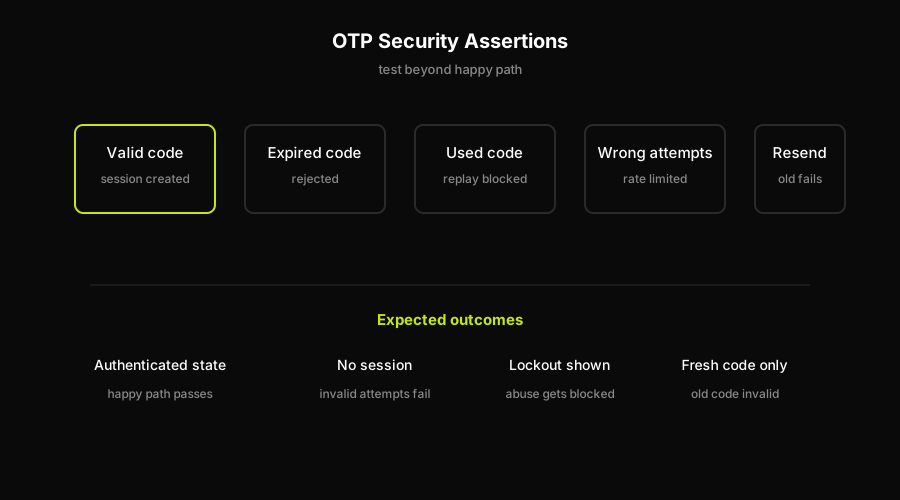
OTP coverage is incomplete until expiry, replay, rate limits, and resend invalidation all reject the right attempts.
For broader login test coverage including credential-based flows and session management, the login page test cases guide covers the full matrix. For passwordless flows that use a link rather than a code, magic link login testing covers the delivery and one-time-use patterns in that context.
This is where Autonoma addresses a real friction point. OTP timing is one of the flakiest patterns in any login test suite: the test waits for an async code, races the code-entry field, and breaks when timing drifts even slightly. Autonoma's Executor agent handles the wait-and-assert flow the way a human tester would: it reaches the OTP screen, reads the test code that is surfaced in your provider's test environment, enters it into the field, and asserts the authenticated session. No brittle hard-coded waits. No manual logic for sourcing the bypass code. For teams shipping auth flows without a dedicated QA engineer to babysit flaky OTP suites, this removes the friction of the async timing problem entirely.
FAQ
Use your provider's test mode to short-circuit real SMS delivery. Most providers (Twilio Verify, Firebase Phone Auth, Cognito) let you configure test phone numbers with a fixed verification code. Your test uses that phone number, the provider does not send a real SMS, and the fixed code is the one that works. You then assert the happy path, expiry, replay rejection, and rate limiting.
Not reliably in CI. Real SMS delivery depends on carriers, signal, and timing. None of those are controllable in an automated test environment. The correct approach is to avoid sending a real SMS in the first place by using your provider's test mode, a test phone number with a fixed code, or an API interception layer. Reading a real inbox is not a viable test strategy.
Configure a test phone number in your provider's console (most major providers support this). Associate it with a fixed verification code. In your test, trigger the OTP flow with that number, then enter the fixed code. The provider skips real delivery and accepts the fixed code. Assert the authenticated session, then add assertions for expiry, replay, and rate limits to cover the security surface.
Either configure a very short TTL in your test environment and wait it out, or use a code that was generated before the test and let the TTL pass before submitting. The assertion is that the application rejects the expired code with an appropriate error. If your application does not distinguish expired from wrong in the error response, that is worth documenting but the assertion target stays the same: the code should not produce a session.
A bypass code is a fixed verification code that a provider accepts in test mode without sending a real SMS. You configure it in the provider's dashboard or through test credentials. When your test triggers OTP login with a test phone number, the provider returns success for the bypass code without any carrier involvement. It is the standard approach for automated OTP testing because it removes the async delivery problem entirely.


