

To test magic-link login, capture the link from a test inbox via an email-testing API (such as Mailosaur or MailSlurp), click it in a real browser session, and assert that the link is single-use and that it expires. The email round-trip is the flakiest part: delivery delay, inbox polling timing, and brittle URL-parsing logic all compound into failures that are hard to reproduce locally and easy to miss in CI.
Most login tests boil down to: fill in a field, click a button, assert a redirect. Magic-link login is different. The test has to read an email and click a link, which means your test process reaches outside the browser entirely, pulls content from a third-party delivery system, parses a URL out of an HTML email, and then hands control back to the browser. That is at least four places where a silent failure can hide.
No other auth flow has that shape. OTP login is close, but the code arrives in a predictable short-lived token you can usually intercept at the API layer. A magic link arrives in an inbox, formatted inside an email template you do not own, and the link itself has state: it is single-use and time-limited. Writing a test that covers all of that correctly takes a bit more structure than a standard form test.
How magic-link login works (and why it is hard to test)
The flow is simple from a user's perspective. They enter their email, the app sends a one-time link to that address, they click the link in their inbox, and they land on an authenticated session. No password, no second factor. The link encodes a short-lived token (usually a signed JWT or an opaque token stored in a database) that the server validates once and then invalidates.
From a test perspective, that flow has three distinct phases, each with its own failure mode. Understanding which phase a failing test is stuck in is the first step to fixing it quickly, which is why it helps to structure your test so the phases are visible, rather than collapsing the whole flow into a single long sequence of actions.
Phase 1: Request. The user submits their email. The server generates the token and dispatches the email. Tests here are straightforward: assert the server returns a 200, assert a "check your inbox" state appears in the UI. These assertions rarely flake.
Phase 2: Inbox retrieval. The email arrives. Your test needs to read it. This is where real complexity starts. The email goes through an external delivery provider, and delivery timing is non-deterministic. A test that polls for the email too early gets a 404. A test that waits too long fails the whole run. And if your test is parsing the link out of the email body with a regex, it breaks the moment someone on your design team updates the email template.
Phase 3: Token consumption. The test clicks the link. The server validates the token, marks it used, and redirects to the authenticated state. Tests here are also relatively stable, as long as Phase 2 delivered a valid link. But if you want to assert single-use and expiry behavior, you have to exercise the token twice or wait for it to expire, which adds its own timing complexity.
The three phases together form a test that is harder to write, harder to keep green, and harder to debug than almost any other auth flow. And because the failure modes span three separate systems (your app, your email provider, and your browser session), debugging a failing magic-link test in CI often means reconstructing what each system did, in sequence, from logs that were captured at different times. It is worth investing in a clean test structure upfront rather than chasing intermittent failures later.
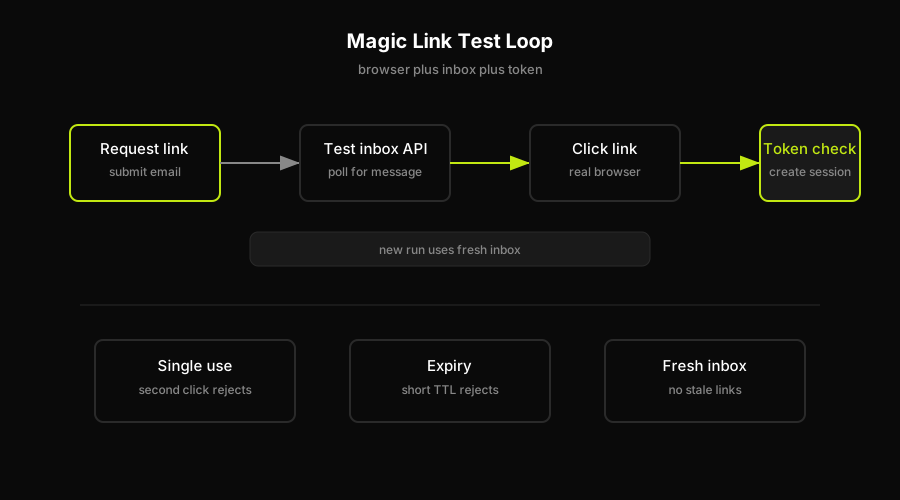
A reliable magic-link test keeps the browser, inbox API, and token assertions visible as separate steps.
Capturing the link from a test inbox
The standard approach is a test inbox service. Mailosaur, MailSlurp, and similar tools give you a real email address tied to a mailbox that your test can read via API. The flow is: register a test address (e.g., test-user-abc123@your-mailosaur-domain.com), trigger the magic-link request using that address, then call the API to fetch the most recent message for that inbox.
The API response includes the parsed email body. You extract the link either by searching for a known URL pattern or by looking for the anchor text your template uses ("Sign in" or "Magic link" are common). That URL becomes the next navigation target in your browser session.
A few practical rules to avoid common failures:
Use a unique address per test run. Re-using the same test email across runs means old magic links linger in the inbox. Your extraction logic might grab a stale link from a previous run. Most test inbox services let you generate a fresh address per test case.
Set a generous but bounded poll timeout. Email delivery is not instant. A timeout of 10-15 seconds with short polling intervals (1-2 seconds) covers most production delivery times without stalling your CI run for minutes. If delivery reliably takes longer than 15 seconds, that is a signal your email provider has a problem worth investigating before it shows up as a flaky test.
Extract the link by finding the token parameter, not the full URL. Email templates change. The surrounding HTML around the link will change. A regex that matches the full URL structure tightly (including domain, path, and parameter names) breaks every time someone touches the template. Match only the token value or the minimum stable URL segment. Better still, treat the link as an opaque string from the inbox and just navigate to it, without parsing it yourself.
Use a dedicated test domain for all test email addresses. If you send magic links to a real domain during tests and your DNS configuration changes or your email provider rate-limits transactional sends to that domain, your entire test suite stalls. A test inbox service gives you a sandboxed domain that is isolated from production email reputation and delivery quotas. This separation also prevents test emails from accidentally landing in real inboxes during staging deployments.
Asserting single-use and expiry
This is the section most tutorials skip. The token being single-use and the link expiring are security properties, not cosmetic ones. If you never assert them, you have no test coverage over a class of authentication bugs that, if they ship, let users stay logged in via replayed links or let links work indefinitely.
Single-use assertion. After a successful login via the magic link, attempt to navigate to the same link again in a new browser context (or after clearing cookies). The app should reject the second use: either a redirect to an error page, a generic "link already used" message, or back to the login form. Assert the authenticated session is not granted on the second attempt. If your framework lets you inspect the HTTP response, a 4xx on the second token redemption request is a precise check.
Expiry assertion. This one is harder to run in CI because it requires time to pass. There are two practical approaches. The first is to configure your test environment to issue magic links with very short TTLs (5 or 10 seconds), then wait that duration before clicking. The second is to mock the server clock forward past the expiry window. Either way, you need your staging environment to expose a knob for this. If it does not, the expiry assertion is best left as a manual check or a separate scheduled test run rather than blocking every PR.
What you should always assert even without clock manipulation: the link encodes an expiry hint (a JWT exp claim, or a timestamp in the query string), and that hint is within your expected TTL window. That is not a full expiry test, but it catches a server-side bug where tokens are issued with incorrect or missing expiry values.
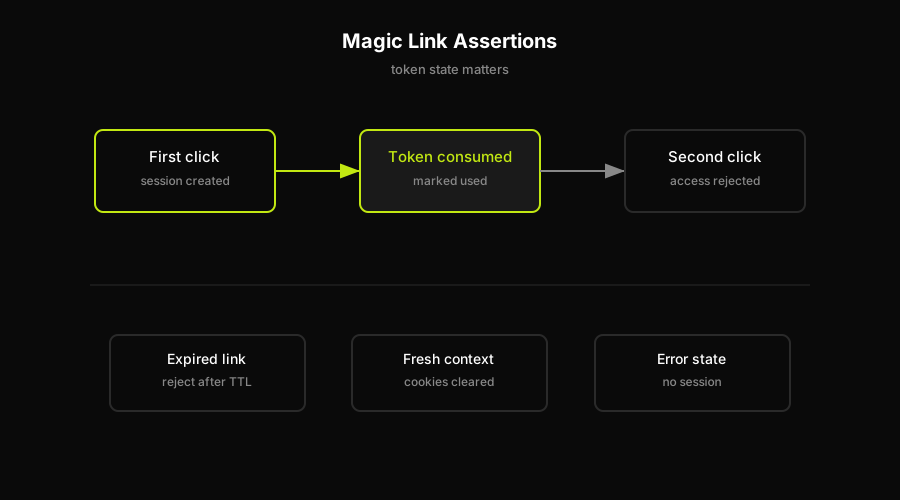
Magic-link tests need token-state assertions, not just the first successful click.
How Autonoma handles the email round-trip
The email-to-click round-trip breaks silently when the email template or the link format changes. A Playwright test that extracts the link with a hardcoded selector or a tight URL-parsing regex will not catch a template change that still works fine for human users. The test just stops finding the link and times out, giving you a flaky signal rather than a clear failure.
The more durable approach is to drive the flow the way a user drives it: open the email, find the link visually, click it, and verify the resulting session. That is how Autonoma handles magic-link coverage. The Executor agent navigates to the inbox, reads the email, follows the link, and the Reviewer agent classifies the result: authenticated session, error page, or unexpected redirect. When the email template changes on a PR, the Diffs Agent detects the code change and the Executor re-runs the flow against the new template, surfacing any breakage before it ships.
The practical difference: a regex-based test in Playwright or Cypress is testing your URL-parsing assumptions, not the auth flow itself. A browser-agent approach tests the flow end-to-end, which is what your users experience. For the single-use and expiry assertions, Autonoma's Planner agent generates the token-redemption and wait scenarios automatically from the codebase, so those cases stay in the suite without being hand-authored.
Why the email round-trip is the flakiest part of your auth suite
Every other login test operates entirely inside the browser. The test drives a form, the browser talks to your server, the server responds. The timing is bounded by your local network and your server response time.
Magic-link tests add an external system (your email provider), a delivery queue, and a parsing step over content you do not control. Each one is a source of non-deterministic failure.
Email delivery latency varies. Most of the time, a transactional email arrives in 1-3 seconds. Occasionally, under load or during provider incidents, it takes 30 seconds or more. A test with a 10-second timeout fails. You re-run it, it passes. Classic flakiness.
Email content changes. The template is owned by a product designer or a marketing team, not the engineer writing tests. A font change, a copy update, or a link-text change ("Magic link" becomes "Sign in securely") breaks a test that was checking for specific text. No one on the design team knows this. The test starts failing intermittently, depending on which deploy order the staging environment picked up.
Token state is not browser state. Browser tests share state through cookies and local storage, which your test framework controls. Token state lives in your database. If a previous failed test run consumed a token but did not clean up, the next run starts with a used token and fails immediately. Teardown matters more for magic-link tests than for any other auth flow.
The solution is not to avoid testing magic-link login. It is to build the test so each of these failure modes is handled explicitly: fresh inbox address per run, bounded poll with a sensible timeout, content-agnostic link extraction, and teardown that resets token state. Once those are in place, magic-link tests are reliable.
FAQ
Use a test inbox service (such as Mailosaur or MailSlurp) to give your test user a real email address your test process can read. Trigger the magic-link request with that address, poll the inbox API until the email arrives, extract the link, and navigate to it in your browser session. Then assert the authenticated state. Additionally, assert that using the same link a second time does not grant access.
The standard approach is an email-testing API. Services like Mailosaur and MailSlurp give you a unique test inbox address and an API endpoint to fetch messages for that address. Your test calls the API after triggering the email, polls until a message arrives within a timeout window, then reads the message body to extract the magic link URL. Avoid parsing the link with a tight regex tied to your current template structure; instead, match on the token parameter or treat the link as an opaque URL.
After a successful login via the magic link, open a fresh browser context (or clear all session cookies) and navigate to the same link URL again. Assert that the application does not grant an authenticated session on the second visit. The expected result is an error page, a redirect to the login form, or a clear 'link already used' message. If your test can inspect HTTP responses, a 4xx status on the second token redemption request is a precise assertion.
Passwordless authentication testing is the practice of writing automated checks that cover login flows where users authenticate without a password. This includes magic links (one-time URLs sent by email), OTP codes (sent by SMS or email), passkeys, and biometric flows. The core challenge is that these flows depend on external delivery channels or device state, which means tests need to intercept or simulate that delivery rather than filling in a static credential. For magic links specifically, that means reading an email via a test inbox API and clicking the link in a real browser session.
Magic-link tests are flaky because they depend on email delivery timing, email content stability, and token state in a database. Email delivery latency is non-deterministic and varies by provider load. Email template changes (owned by design, not engineering) break tests that parse the link with text-specific selectors. Token state persists in a database across test runs, so a previous failed run can leave a consumed token that causes the next run to fail immediately. The fix is a test inbox service for reliable email capture, a bounded poll timeout, content-agnostic link extraction, and proper test teardown that resets token state. Autonoma's browser-agent approach also helps: driving the flow as a user does removes the need for brittle URL-parsing logic entirely.


