

Web application testing is the process of evaluating a web application across functionality, performance, security, usability, compatibility, and accessibility to verify it works correctly for real users on every browser and device before and after release. Automated suites catch regressions fast, but they carry a hidden cost: every UI change that renames a selector or moves a button breaks brittle scripts. The 2026 shift is toward tests that regenerate from code rather than being hand-maintained after every release.
Teams used to ship once a month. A QA cycle measured in weeks made sense. Now the same team ships multiple times a day, AI coding tools rewrite components between standups, and a manual regression pass before every deploy is no longer a plan. It is a bottleneck.
Automated testing was supposed to solve this. For fast-moving teams, it mostly has. But there is a wrinkle that the standard "automate everything" advice glosses over: automated tests are snapshots of the UI at one point in time. When the UI moves, the snapshot breaks, and someone has to fix it. Teams that invested heavily in test automation discover, months later, that a significant share of engineering time goes to keeping the test suite green rather than shipping the product.
This guide covers everything you need to know about web application testing: the full types taxonomy, the process lifecycle, the honest tradeoffs between manual and automated approaches, and how the 2026 maintenance reality changes what a sustainable test strategy looks like.
What is web application testing?
Web application testing is the systematic process of validating that a web application behaves correctly, performs reliably, and remains secure and accessible across the environments real users encounter. Where desktop software testing can target a narrow set of OS and hardware combinations, web application testing contends with a combinatorial explosion: multiple browsers (Chrome, Firefox, Safari, Edge), multiple devices (desktop, tablet, mobile), multiple network conditions, and a UI that updates continuously.
The goal is not just to find bugs before release. It is to establish confidence: confidence that the checkout flow works on Safari on iPhone, that the API returns the right data under load, that a screen reader user can complete the signup, that a session token is not exposed in a URL parameter. Each of those is a different type of test, and a complete web application testing strategy needs all of them.
What makes web testing genuinely distinct from testing other software is the combination of runtime heterogeneity (the same code runs in dozens of different browser engines and viewport sizes), continuous delivery (the app changes constantly, which means the tests must be maintained constantly), and the user-facing nature of every defect (a broken checkout is not an internal tooling failure; it is revenue disappearing in real time).
Types of web application testing
Web application testing divides cleanly into two categories: functional testing verifies that the application does what it is supposed to do; non-functional testing verifies that it does so reliably, safely, and accessibly.
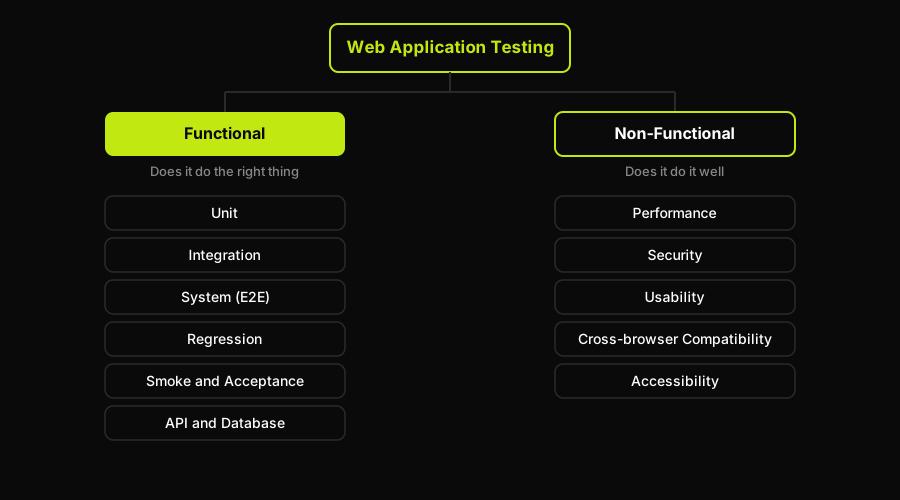
The two branches of web application testing: functional testing checks that the app does the right thing, non-functional testing checks that it does it well.
| Type | Category | What it checks | Example |
|---|---|---|---|
| Unit | Functional | Individual functions and components in isolation | A price-calculation function returns the correct total with a discount applied |
| Integration | Functional | How modules communicate across boundaries | The checkout component correctly sends an order object to the payment API |
| System (E2E) | Functional | Full user journeys through the deployed application | A user can register, add items to a cart, and complete a purchase end-to-end |
| Regression | Functional | New changes have not broken existing behavior | The login flow still works after a session-management refactor |
| Smoke | Functional | Critical paths work after a deployment | The app loads, the API health endpoint responds, the signup page renders |
| Acceptance | Functional | The application meets business requirements | A stakeholder confirms the reporting dashboard matches the spec |
| API | Functional | Backend endpoints return correct data and status codes | A POST to /orders returns 201 with the correct order ID in the response body |
| Database | Functional | Data is persisted and retrieved correctly | Deleting an account cascades correctly and removes associated records |
| Performance | Non-functional | Speed, throughput, and stability under load | The product page loads in under 2 seconds for 500 concurrent users (JMeter, k6) |
| Security | Non-functional | Resistance to attacks and data exposure | Input fields do not accept SQL injection payloads (OWASP ZAP, OWASP Top 10) |
| Usability | Non-functional | Ease of use and intuitiveness | New users complete the onboarding flow without external guidance |
| Compatibility / Cross-browser | Non-functional | Consistent behavior across browsers and devices | The date picker renders correctly on Safari on iOS and Chrome on Android |
| Accessibility | Non-functional | Usability for people with disabilities, WCAG compliance | Every form field has an associated label; keyboard navigation is logical |
Functional testing in practice
Functional testing is the layer most engineering teams invest in first. Unit tests run in milliseconds and give developers fast feedback loops. Integration tests catch the interface mismatches that unit tests cannot see. End-to-end (system) tests run the actual application in a real browser and verify that the full stack holds together. Regression tests are the insurance policy: run them on every deploy and you know immediately if a change broke something that used to work.
Smoke tests are a pragmatic starting point for teams that have no automated coverage at all. They are not comprehensive, but they answer the most expensive question cheaply: does the app even work after this deployment?
Non-functional testing in practice
Performance testing is essential for any web application that expects concurrent users. Tools like JMeter and k6 can simulate hundreds or thousands of simultaneous requests; Lighthouse measures page-load performance from a single-user perspective. Security testing for web applications should follow the OWASP Top 10 as a baseline: cross-site scripting, injection, broken authentication, insecure direct object references. OWASP ZAP is the standard open-source security scanner.
Cross-browser compatibility and accessibility testing are often deferred. This is a mistake. A layout that breaks on Safari on iOS affects a substantial share of your users, and accessibility failures can carry legal risk in regulated industries.
Manual vs automated web testing
Manual testing and test automation are not in competition. They cover different ground. Manual testing is irreplaceable for exploratory work, usability evaluation, and any check that requires human judgment. Automated testing is irreplaceable for regression coverage at scale, continuous integration gating, and anything that needs to run on every commit.
The honest comparison looks like this:
| Dimension | Manual testing | Automated testing |
|---|---|---|
| Speed | Hours to days per full regression | Minutes (parallel CI runs) |
| Repeatability | Variable; human error is real | Consistent on every run |
| Exploratory value | High; humans catch unexpected issues | Low; only checks what was scripted |
| Setup cost | Low; start immediately | High; tooling, CI, test framework setup |
| Maintenance cost | None (tests are not scripts) | High unless tests regenerate from code |
| Scale | Does not scale with shipping velocity | Scales well once the suite is maintained |
| CI/CD integration | Not compatible | Native; blocks or gates deploys |
The maintenance cost row deserves more attention than it usually gets. When you write a Playwright or Cypress test, you are recording a snapshot of how the UI looks at that moment: the selector for the submit button, the text of the confirmation message, the route the happy path takes. The moment the UI changes, the snapshot is wrong. A renamed CSS class breaks a test. A refactored component tree breaks a test. An AI coding agent that rewrites a form in ten seconds breaks five tests with no compile-time warning.
This is why teams that built extensive automated suites in 2022 or 2023 are now reporting that test maintenance has become a first-class engineering cost. The suite is not free to operate.
At Autonoma, we built our four agents specifically to address this: the Planner reads your codebase and generates the test cases; the Executor runs them against a live environment; the Reviewer classifies the results (real bug, agent error, or plan mismatch); and the Diffs Agent maintains the suite on every PR by analyzing code diffs, so the tests stay aligned with the app as it evolves. Tests generated from the codebase do not break when the UI changes the way selector-based scripts do: the source of truth is the code, not a frozen snapshot of the DOM.
The web application testing process
A structured web application testing process prevents the most common failure modes: missing requirements discovered late, environments that do not match production, and regressions that slip through because no one ran the full suite. Here is the standard seven-step lifecycle:
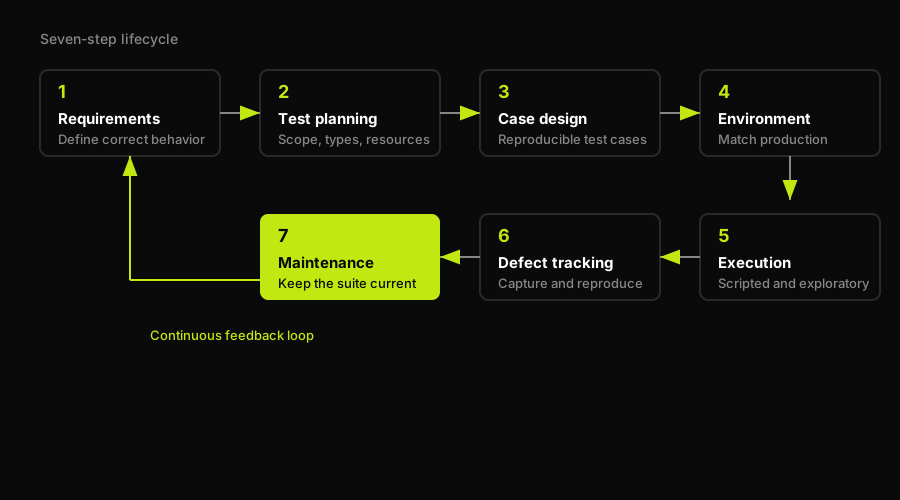
The seven-step lifecycle is a loop, not a line: maintenance feeds back into requirements as the application keeps changing.
- Requirements analysis. Before writing a single test case, understand what "correct" means. This means reading the product spec, talking to stakeholders, and identifying the acceptance criteria for every feature. Tests written without clear requirements test the wrong things or test the right things the wrong way. This phase also surfaces testability gaps: features that cannot be tested automatically because they have no observable external behavior.
- Test planning. Define the scope, the test types required, the environments needed, the schedule, and the resources. A test plan does not need to be a hundred-page document, but it does need to answer: what will we test, what will we not test, who is responsible, and what does "done" look like?
- Test case design. Write the specific test cases: the preconditions, the steps, the expected results. For automated tests, this is where you decide which tests are worth automating (high-frequency paths, regression-critical flows) and which are better left to exploratory manual testing (edge cases that require human judgment, one-time validation). Good test case design is specific: "the checkout flow completes successfully" is not a test case; "a logged-in user with one item in their cart can complete a purchase using a Stripe test card and receives a confirmation email" is.
- Test environment setup. The test environment should match production as closely as possible. Differences between the test environment and production are a common source of false confidence: tests pass in QA, something breaks in production, and no one can explain why. This includes database state (seeded with realistic data), third-party service integrations (mocked or sandboxed correctly), and infrastructure (the right container versions, the right environment variables).
- Test execution. Run the tests. For manual testing, this means executing the test cases step by step and recording the results. For automated testing, this means running the suite in CI and reviewing the results. Execution is also where exploratory testing happens: testers use the application freely, looking for unexpected behavior that scripted tests would not catch.
- Defect tracking and reporting. Every failure needs to be captured: what failed, how to reproduce it, the environment it failed in, and the severity. Without a structured reporting process, failures get lost or duplicated. Good defect tracking also reveals patterns: the same component failing in multiple test runs is a signal, not noise.
- Maintenance and regression. A test suite is not a one-time artifact. As the application evolves, tests need to be updated, deprecated, and extended. New features need new tests. Old tests that cover deprecated flows need to be removed. This is the phase that most teams underestimate: the cost of keeping a suite current is roughly proportional to how fast the application changes.
Web application testing checklist
A pre-release checklist prevents the "we tested it but forgot to check X" failure mode. Use this as a minimum bar before shipping any significant release.
Functional coverage
- Critical user journeys pass end-to-end (signup, login, core workflow, checkout or equivalent conversion flow)
- Regression suite passes with no new failures
- API endpoints return correct status codes and response bodies for happy paths and expected error cases
- Form validation works correctly (required fields, format validation, error messages)
- Authentication and authorization flows are tested (login, logout, session expiry, permission boundaries)
Cross-browser and device coverage
- The application renders and functions correctly in Chrome, Firefox, and Safari as a minimum
- The layout is correct on mobile viewport sizes (360px width as a baseline)
- Touch interactions work on mobile (tap targets are large enough, no hover-only interactions)
- The application degrades gracefully when JavaScript is slow or unavailable
Performance
- Page load time on a throttled (3G) connection is acceptable for the primary landing and conversion pages
- The application does not make unnecessary or redundant API calls on initial load
- Images are optimized and do not cause layout shift (CLS is low)
Security
- Input fields do not accept common injection payloads (run at minimum the OWASP ZAP baseline scan)
- Sensitive data (tokens, passwords, PII) is not exposed in URLs, logs, or error messages
- Authentication tokens expire correctly and are invalidated on logout
Accessibility
- Every interactive element is keyboard-navigable
- Every form field has a visible, programmatically associated label
- Color contrast ratios meet WCAG AA (4.5:1 for normal text)
- The page has a logical heading structure (
h1throughh3)
Mobile and responsive
- The application is usable on iPhone SE (smallest common viewport) without horizontal scroll
- Modals and overlays close correctly on mobile
- Long-form content (tables, code blocks) scrolls within their containers
Web application testing tools
The tooling landscape for web application testing is broad. Rather than ranking every option here, the most useful thing this section can do is point you to the right depth of coverage for each layer.
For end-to-end and cross-browser testing, Playwright and Cypress dominate the open-source space. Both run real browsers and support parallel execution. For a detailed comparison of the available tools in this space, the E2E testing tools guide and the AI E2E testing overview cover the landscape thoroughly. If you want to understand how AI-driven approaches fit in, intelligent test automation explains the category.
For automated UI testing specifically (what to automate, the testing-pyramid placement, tool tiers), the automated UI testing guide goes deeper on the practice.
For locator-level Playwright work, Playwright locators covers every built-in type, the priority order, and why locators break on UI change. For AI-assisted QA, AI for QA covers the practitioner angle.
The short version for tool selection: Playwright for new projects (better built-in locators, first-class TypeScript, cross-browser with Chromium/Firefox/WebKit from one install). Cypress for teams that prefer a test-runner-first DX and already have an existing Cypress suite. Postman or similar for API testing. k6 or JMeter for load testing. OWASP ZAP for security scanning. axe or Lighthouse for accessibility.
How Autonoma Reduces Web Test Maintenance
The testing process described above is sound. The types taxonomy is correct. The checklist is the right minimum bar. The place where most teams hit a wall is not in building the suite initially. It is in keeping it current.
Automated web tests are brittle by design. They reference selectors, routes, button text, and DOM structure. The application changes and the references go stale. A team shipping five times a day with AI coding agents moving components around faster than any human can track will accumulate maintenance debt in their test suite faster than they can pay it down. This is not a tooling failure. It is a fundamental property of tests that are written as snapshots of the UI at one moment.
The approach we built into Autonoma is to remove the snapshot entirely. The Planner agent reads your codebase (routes, components, user flows) and plans test cases from the code, not from a recording of how the UI looked when you wrote the test. The Executor runs those tests against a live preview environment. The Reviewer classifies the results: real bug, agent error, or test/plan mismatch. The Diffs Agent then maintains the suite on every PR by analyzing the code diffs, adding new tests for new flows, deprecating tests for removed flows, and updating tests for changed flows. The source of truth is always the current codebase, so there is no maintenance backlog to accumulate.
For teams adopting the best practices below, this changes the answer to the "how do we keep the suite current" question from "allocate engineering time" to "connect the repo."
Best practices for 2026
Test the user journeys that matter, not the implementation details. The most durable tests verify behavior from the user's perspective: can a user complete the checkout flow, can a user recover their password, can a user invite a teammate. Tests that verify the color of a button or the exact wording of a placeholder break on every design iteration and provide no real safety net.
Treat cross-browser testing as a first-class requirement. Safari on iOS and Chrome on Android are not edge cases. They represent a substantial share of real users. Run your E2E suite against at least three browser engines before every release, not just on the browser your developers happen to use.
Acknowledge test maintenance as a real engineering cost. When planning a sprint that includes UI changes, budget time for test updates. When evaluating whether to automate a test, factor in the expected maintenance cost, not just the initial authoring time. Tests that are expensive to maintain are often better served by a higher-level integration test that is less tightly coupled to the UI.
Shift from hand-maintained scripts to suites that regenerate from the codebase. This is the 2026 reframe. The teams that scaled their testing without scaling their QA headcount are the ones that made their test suites derive from the code rather than from manual recordings. Autonoma applies that pattern to browser E2E coverage: the Planner reads routes, components, and user flows; the Executor runs those flows in a live preview environment; the Reviewer classifies the result; and the Diffs Agent updates affected tests on each PR. When the code changes, the tests update. When a feature is removed, the tests that covered it are deprecated automatically. The maintenance cost collapses because there is no static snapshot to keep in sync.
The takeaway is simple: web application testing only protects releases when the suite stays aligned with the application. For teams shipping fast, Autonoma keeps that alignment tied to the codebase instead of a backlog of manual test updates.
FAQ
Web application testing is the process of evaluating a web application across functionality, performance, security, usability, compatibility, and accessibility to verify it works correctly for real users on every browser and device before and after release. It covers both functional testing (does the app do what it should?) and non-functional testing (does it do it reliably, securely, and accessibly?).
Web application testing divides into functional and non-functional types. Functional testing includes unit, integration, system (end-to-end), regression, smoke, acceptance, API, and database testing. Non-functional testing includes performance, security, usability, compatibility/cross-browser, and accessibility testing. Each type catches a different class of defects and belongs at a different stage of the development lifecycle.
Manual testing uses human testers to execute test cases step by step; it is essential for exploratory testing and usability evaluation but does not scale with continuous delivery. Automated testing runs scripted test cases programmatically, which is fast and repeatable but carries a hidden maintenance cost: automated scripts are tied to the shape of the UI at the time they were written, and every UI change that renames a selector or restructures a component can break them. The best strategies use both: automation for regression and CI gating, manual for exploratory and usability work.
The standard web application testing process has seven steps: (1) requirements analysis, to understand what correct behavior looks like; (2) test planning, to define scope, types, environments, and resources; (3) test case design, to write specific, reproducible test cases; (4) test environment setup, to replicate production as closely as possible; (5) test execution, running both scripted and exploratory tests; (6) defect tracking and reporting, capturing every failure with reproduction steps; and (7) maintenance and regression, keeping the suite current as the application evolves.
Common web application testing tools include Playwright and Cypress for end-to-end and cross-browser testing, Postman and similar tools for API testing, JMeter and k6 for load and performance testing, OWASP ZAP for security scanning, and axe or Lighthouse for accessibility. The right choice depends on the testing layer: most teams start with an E2E framework for regression, add an API testing layer for backend validation, and layer in performance and security tools as the application matures.
Automated web tests break because they are written as snapshots of the UI at one moment in time. Any change that renames a selector, moves a button, or restructures a component can invalidate the snapshot, even if the underlying behavior has not changed. Teams using AI coding agents face this problem more acutely, since AI tools can refactor entire components in seconds with no compile-time warning. The most effective way to reduce maintenance is to derive tests from the codebase rather than from UI recordings, so tests update when the code changes rather than when a human re-records them.


