

Automated UI testing drives a browser through your application's actual interface to verify that real user flows work end-to-end. UI tests sit at the top of the testing pyramid, meaning you need fewer of them than unit or integration tests, and they cost more to maintain because the UI changes more often than any other layer of your stack.
We rewrote our UI suite after a full redesign. Not because the features changed, not because the logic changed. Because the DOM changed. Every selector, every recorded step, every CSS path that tests had been pinned to for eighteen months disappeared overnight. That is the experience most teams have with ui test automation, and it is the reason so many suites quietly get abandoned rather than maintained.
This post is about doing it differently: choosing what to automate at the UI layer, understanding why suites rot faster there than anywhere else, and picking the right approach for your team and codebase. It is one piece of a broader web application testing strategy.
What to automate (and what not to)
The testing pyramid is not just a diagram. It is a budget constraint.
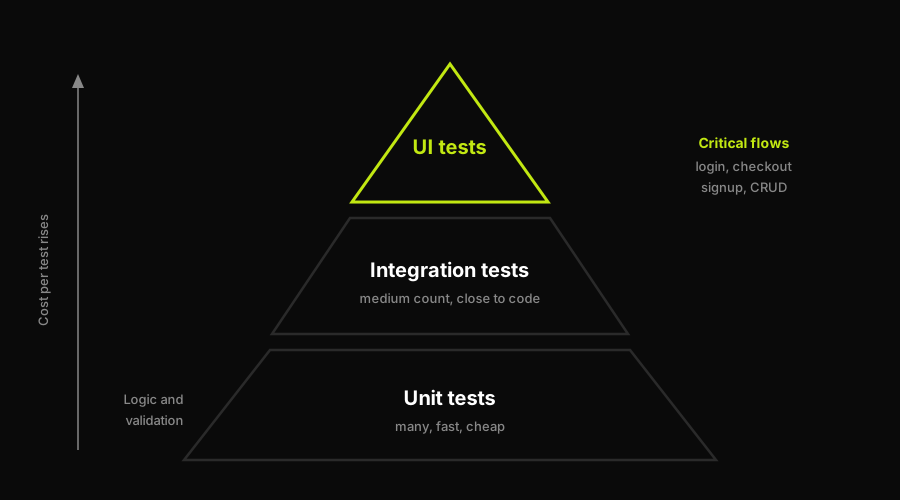
UI tests sit at the apex: fewer of them, higher cost each, reserved for the critical flows nothing below can cover.
Unit tests are cheap: they run in milliseconds, they are isolated, and when one breaks you know exactly what changed. Integration tests cost a bit more but still stay close to the code. UI tests sit at the top for a reason. Each one spins up a browser, navigates through a real interface, and asserts on visible state. They are slow compared to unit tests, they are sensitive to layout shifts, and they need a running application to work. That cost is only justified when what you are testing cannot be covered any other way.
The flows worth automating at the UI layer are the ones where the whole chain matters. Login and authentication. Checkout and payment submission. Signup and onboarding. Core CRUD operations that users depend on daily. These are the paths where a failure is immediately visible to a customer, where no unit test can catch a broken integration between frontend and backend, and where the cost of a missed bug is far higher than the cost of the test.
What does not belong at the UI layer is everything that can be covered below it. Business logic that has no UI expression. Edge cases in validation rules. Error handling in API responses. Every cosmetic variation in a design system. If a test only exists to confirm that a component renders with the right font size, it belongs in a component test or a visual snapshot tool, not in your E2E suite. Adding these to the UI layer inflates the suite's size while adding no real coverage signal, and every one of them becomes a maintenance burden the moment a designer updates the spacing.
The test count discipline matters here. A suite of fifteen UI tests covering critical paths is more valuable than a suite of one hundred fifty covering everything. The smaller suite runs fast enough to live in CI, and when a test breaks you already know it was protecting something important.
The maintenance tax of UI test automation
The UI is the most volatile layer in any application. Product teams iterate on it constantly. Designers push updates. Component libraries get upgraded. The DOM structure that existed last sprint may not exist this sprint.
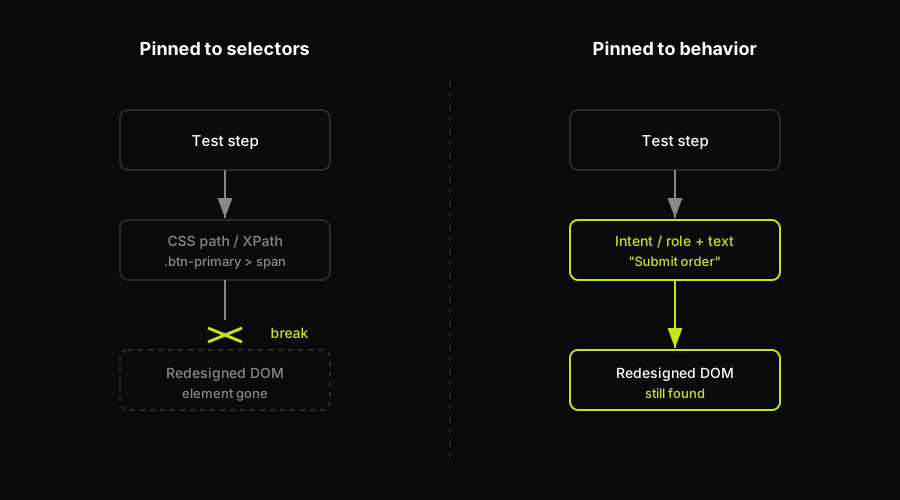
A selector-pinned test snaps when the DOM is restructured. A behavior-pinned test still finds the element by what it does.
Most automated UI tests are pinned to the implementation, not the behavior. They find elements by CSS selectors, XPath expressions, or recorded step coordinates. When the implementation changes, those pointers break. This is not a tool problem. It is a structural one. Selectors are a representation of how the UI is built, not what it does. Anytime those diverge, tests fail.
Record-and-playback tools accelerate this problem rather than solving it. Recording a session generates a script tied to the exact DOM state of the application at the moment of recording. The test works on the day it was recorded. Three sprints later, after a component library upgrade or a layout refactor, it is already stale. Teams that rely heavily on record-and-playback find themselves re-recording tests repeatedly, which defeats the purpose of automation.
The maintenance tax compounds over time. A suite that was manageable at fifty tests becomes overwhelming at two hundred. Every sprint brings some number of broken tests, and the team has to triage: is this a real regression, or did the selector just drift? Debugging a broken selector in a large UI suite is some of the most tedious work in software engineering. It is not skilled work. It is selector archaeology.
Most tools' answer to this is self-healing: detect when a selector is broken, find the nearest matching element, and patch the pointer. This works for small DOM shifts. A class name change, a minor attribute rename. It does not work when a component is redesigned root to branch. The selector the tool is trying to heal no longer points at anything meaningful. Patching a broken selector on a redesigned form is not self-healing. It is guessing.
Approaches to automated UI testing
There are three genuinely distinct approaches to UI test automation today. They differ not just in tooling but in the assumptions they make about who writes tests and how they are maintained.
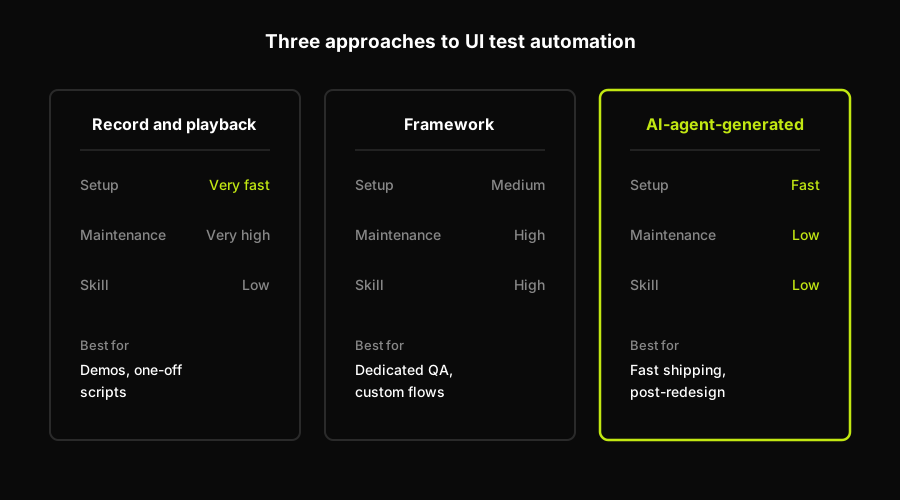
The three approaches differ most in maintenance burden, which is where the real cost of a UI suite accumulates.
| Approach | Setup speed | Maintenance burden | Skill required | Best for |
|---|---|---|---|---|
| AI-agent-generated (Autonoma) | Fast (codebase-first) | Low (regenerates on PR) | Low (no manual authoring) | Teams shipping fast, post-redesign coverage |
| Framework (Playwright / Cypress / Selenium) | Medium | High (you own selectors) | High (requires engineers) | Teams with dedicated QA, complex custom flows |
| Record-and-playback | Very fast | Very high (re-record on changes) | Low initially | Demos, one-off scripts, non-production flows |
Frameworks (Playwright, Cypress, Selenium) give you full control. You write tests in code, you choose your selectors, you decide the assertion strategy. They are powerful and highly composable. The tradeoff is that you own everything. When the UI changes, you update the tests. When a selector breaks, you find the new one. This is the right choice for teams with engineering bandwidth who want full ownership over what their suite covers and exactly how it behaves.
Record-and-playback tools lower the entry barrier. Anyone who can use a browser can record a flow. The gap is survivability: recordings are snapshots of the DOM at a point in time. They break on redesigns, on component library upgrades, on anything that restructures the page. They are fine for exploratory checking and one-off scripts. They are a poor foundation for a persistent suite in a product that ships frequently. If you are looking at the codeless options in this tier, the codeless and no-code automation tools roundup covers the landscape.
AI-agent-generated tests work differently from both. Autonoma, for instance, connects to your codebase and has a Planner agent read your routes and components to understand what flows exist and what they are supposed to do. An Executor agent runs those flows against a live environment. A Diffs Agent maintains the suite on every PR by analyzing what changed in the code and regenerating the affected tests rather than patching their selectors. The result is that a full UI redesign does not invalidate the suite, because the suite was never pinned to selectors in the first place. It was pinned to behavior described in the codebase.
The honest scope of that third tier: it is web E2E. It does not cover API-only testing, unit test coverage, or native mobile applications. For teams primarily concerned with keeping their web flows verified through continuous UI change, the regeneration model addresses the maintenance tax at its structural root rather than patching around it.
How Autonoma regenerates tests through redesigns
The maintenance tax exists because conventional UI tests are pinned to the implementation of a UI rather than its purpose. Selectors, recorded coordinates, XPath expressions: these are descriptions of how a button or form is built, not what the user is trying to do with it.
Autonoma approaches the problem from the codebase rather than the DOM. The Planner agent reads your routes, components, and user flows to build a model of what behaviors exist in the application. Tests are generated from that model. The Executor agent runs them against a live preview environment. When a PR lands, the Diffs Agent reads the code diff, understands which flows changed, and regenerates the affected tests rather than trying to repair broken selectors. A component restructuring, a form redesign, a layout overhaul: none of these force a suite rewrite, because the suite was derived from the application's behavior, not its DOM structure.
This is why "self-healing" (patching broken selectors) is a band-aid on the symptom while regeneration is a fix for the cause. Selector healing assumes the selector is still meaningful but mislocated. Regeneration assumes the behavior description in your codebase is authoritative and reruns the test-generation pipeline against it. For teams shipping UI changes at speed, the difference is the gap between a suite that degrades with each release and one that keeps pace with the product.
How to keep a UI suite alive
Regardless of which approach a team takes, there are practices that reduce the maintenance tax significantly.
Choose stable selectors. The Playwright locators guide covers this in depth, but the short version is: never select by CSS class or XPath if you can avoid it. Use data-testid attributes, or role-and-text locators that describe what an element does rather than where it sits in the DOM. These are stable across redesigns because they are attached to purpose, not structure. A button that says "Submit order" can be rearranged on the page without breaking a test that finds it by its visible text.
Cover critical paths, not every path. A smaller suite of high-confidence tests covering your most important flows is more sustainable than a large suite covering everything. The larger the suite, the more maintenance it demands, and the harder it is to triage when something breaks. Ten tests that all cover genuinely business-critical paths create a clear signal when any one of them fails. A hundred tests where sixty are low-priority paths create noise.
Treat tests as code. The practices that make application code maintainable apply to test code: review it in PRs, keep it in version control, refactor shared patterns into helpers, and make sure the team that ships a feature also ships the tests for it. Test debt accrues exactly like application debt, just with less visibility until the suite stops running.
Invest in test result visibility. A suite that runs but whose results nobody sees is not protecting anything. Make test output part of the standard PR workflow. When a test breaks, the team should know immediately whether the break is a real regression or a selector drift. Good test reporting tools surface that signal in the right context. That signal is the value the suite provides, and it only exists if the results are visible and acted on.
Treat regeneration as a structural option. Self-healing selector patches reduce immediate breakage but do not address the underlying coupling between tests and DOM structure. As a suite grows, the compounding cost of that coupling grows with it. Regeneration, whether through a tool like Autonoma or through a disciplined practice of rewriting tests alongside UI changes, is the only way to break the compounding maintenance cycle.
FAQ
Automated UI testing drives a real or headless browser through your application's interface to verify that user-facing flows work correctly end-to-end. It sits at the top of the testing pyramid: fewer tests, higher cost per test, and higher confidence that the full system works together. Common frameworks include Playwright, Cypress, and Selenium.
Automate the flows where the whole chain from frontend to backend matters and where a failure is immediately visible to customers: login, checkout, signup, and core CRUD operations. Avoid automating at the UI layer anything that can be covered by a unit or integration test, such as business logic, validation edge cases, or cosmetic layout variations.
UI tests are typically pinned to DOM selectors, CSS paths, or recorded step coordinates that reflect how the UI is implemented rather than what it does. When the implementation changes, selectors break. The UI is also the most volatile layer in any application, receiving updates from product, design, and engineering frequently, which means the maintenance tax compounds faster here than anywhere else in the stack.
The choice depends on your team's model. Playwright and Cypress are the leading code-first frameworks, offering full control and strong ecosystem support. Selenium remains widely used in enterprise settings. For teams that want tests generated and maintained without manual authoring, AI-agent tools like Autonoma generate tests from the codebase itself and regenerate them when the UI changes, eliminating the selector maintenance cycle.
UI testing broadly refers to any automated test that verifies behavior through the user interface. E2E (end-to-end) testing specifically validates the entire application stack from the user's perspective, frontend through backend through integrations. Most E2E tests are UI tests, but not all UI tests are E2E: component-level UI tests, for instance, may test in isolation without a running backend.


