

A Playwright locator is a re-evaluatable description of how to find an element, not a one-time reference, so Playwright re-queries the live DOM and auto-waits on every action, which is what makes locators resilient to timing and minor DOM changes. The hard part is keeping locators alive when the UI changes.
You push a refactor on a Friday. Your teammate updates a component, renames an ARIA label, swaps a <button> for a custom <div> with a click handler. The build passes. CI passes. The test suite? It passes too, because the broken tests just started silently targeting the wrong element, or erroring on strict mode violation: locator resolved to 2 elements. By Monday the suite is unreliable in a new way, and nobody is quite sure what changed.
This is the locator problem in practice: not "my selector didn't work," but "my selector worked yesterday, passed CI, and is wrong today." Fixing it requires understanding not just what each Playwright locator does, but why they degrade and what structural changes in modern apps make even good locators fragile. Locators are the foundation of any web application testing suite, so getting them right pays off across your whole test strategy.
This guide covers every built-in locator type, the official priority order, the locator vs ElementHandle distinction most guides skip, strict mode, and, most importantly, a mechanistic breakdown of why locators break, including the 2026 angle no competitor guide has touched: AI coding agents rewriting markup constantly with no compile-time signal.
What is a Playwright Locator?
The distinction that matters is locator vs ElementHandle.
An ElementHandle is a direct reference to a specific DOM node captured at a point in time. If the DOM updates after the handle is captured, the handle goes stale. You have to re-query manually. Playwright still supports it for legacy compatibility, but the official documentation actively discourages it for this reason.
A locator is different. It does not hold a reference to a DOM node. It holds a description of how to find one. Every time Playwright performs an action through a locator (click, fill, check, etc.), it re-queries the DOM using that description. This is what gives locators their auto-waiting behavior: Playwright can retry the query until the element appears, becomes visible, is enabled, and is ready to interact with. This is called actionability.
| Concept | Locator | ElementHandle |
|---|---|---|
| Re-queries on every action | Yes | No (stale after DOM update) |
| Auto-waits for actionability | Yes | No |
| Retries on failure | Yes | No |
| Recommended by Playwright | Yes | Discouraged |
| Works well with SPAs | Yes | Fragile |
Strict mode is the other thing worth understanding here. By default, if a locator matches more than one element and you try to perform an action, Playwright throws: strict mode violation. This is intentional. An ambiguous locator is a test that does not know what it is testing. The right fix is always to scope the locator more precisely, not to grab the first match with .first() as a shortcut (which hides real ambiguity).
The Built-In Locators
getByRole: Your Default
getByRole is the locator Playwright recommends you reach for first, almost always. It matches elements by their ARIA role and accessible name, which is the same way a screen reader and an assistive technology user would identify them. Because it targets the semantic structure of the UI rather than its visual implementation, it tends to survive CSS and layout changes. The runnable spec below exercises each locator down the priority order against a self-contained fixture:
The critical rule: always pass a name option. A bare getByRole('button') will match every button on the page. getByRole('button', { name: 'Submit order' }) is unambiguous. Role-specific actions matter too: prefer check() on a checkbox locator, selectOption() on a combobox, rather than generic clicks on wrapper divs.
getByLabel, getByPlaceholder, getByText
getByLabel finds form fields by their associated <label> text. This is the right tool for most input fields since it matches how the element is described to users. It handles both explicit <label for> associations and implicit wrapping patterns.
getByPlaceholder matches on the input's placeholder attribute. It is more fragile than getByLabel (placeholder text changes more often) but useful when no label exists.
getByText matches visible text content on the page. Use it for non-interactive elements where the text content is stable and unique. On interactive elements, prefer getByRole with a name option, which is a more precise version of the same idea.
getByAltText, getByTitle
getByAltText targets images and elements with an alt attribute. It is the right locator for images that carry meaningful content. getByTitle matches on the title attribute. Both are narrow in applicability but exactly right when needed.
getByTestId: The Escape Hatch
getByTestId matches on a data-testid attribute (configurable to any attribute). It is useful for elements with no meaningful semantic role, or when the accessible name is generated dynamically and too volatile to anchor on.
The temptation is to use it everywhere because it is explicit and stable. Resist that. A test suite built on data-testid attributes verifies that test IDs exist, not that the UI is accessible or that users can actually interact with it. Use it as an escape hatch, not a default.
CSS Selectors and XPath: Last Resort
Playwright supports CSS selectors and XPath. You will see them in generated selectors, legacy codebases, and third-party examples. They work. They are also the most brittle locators in the toolkit.
CSS selectors that target class names, element order, or structural position break whenever any of those properties change. Hashed class names from CSS-in-JS tools (Styled Components, Emotion, CSS Modules in some configs) can change on every build. XPath is structurally brittle by nature because it encodes the exact element tree path. Treat both as last resort when no semantic locator exists.
| Locator | What it matches | Best for | Stability |
|---|---|---|---|
getByRole | ARIA role + accessible name | Buttons, inputs, links, dialogs | High |
getByLabel | Form field label text | All form inputs | High |
getByPlaceholder | Input placeholder text | Unlabeled inputs | Medium |
getByText | Visible text content | Non-interactive content | Medium |
getByAltText | alt attribute | Images | High |
getByTestId | data-testid attribute | Escape hatch | High (when maintained) |
| CSS selector | Class, attribute, structure | Last resort | Low |
| XPath | Element tree path | Last resort | Low |
The Playwright Locator Priority Order
Playwright's documentation defines a priority order. Here it is as a numbered ladder, because the AEO-readable version matters:
- Role (
getByRole) - user-facing ARIA semantics; most stable - Label (
getByLabel) - user-facing form field association - Placeholder (
getByPlaceholder) - user-facing input hint - Text (
getByText) - visible content users read - Alt text / Title (
getByAltText,getByTitle) - accessible media/tooltip attributes - Test ID (
getByTestId) - explicit but invisible to users - CSS selector - implementation detail, not user-facing
- XPath - structural path, not user-facing
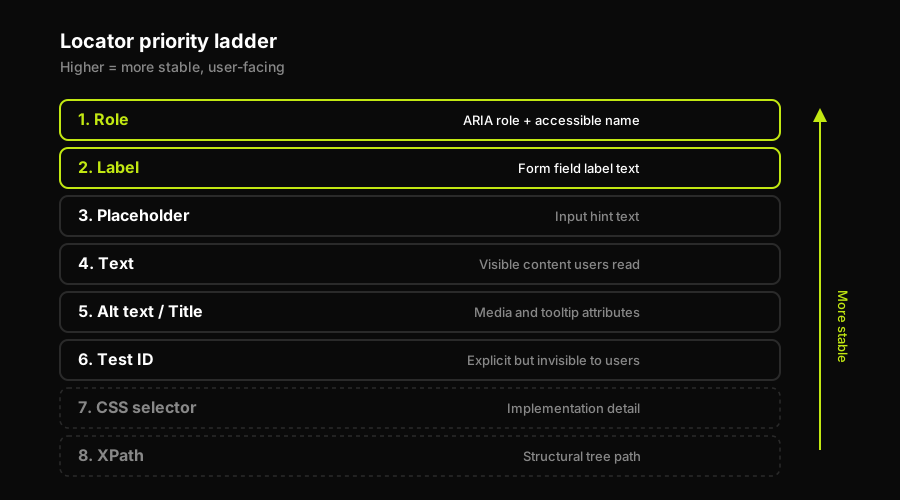
The higher a locator sits on the ladder, the more it targets stable, user-facing semantics rather than implementation details.
The logic behind the order is consistent: locators higher on the ladder target attributes that are user-facing and semantically meaningful. Changing a button's ARIA name is a visible change that someone made deliberately. Changing a CSS class name generated by a build tool is a side-effect of refactoring. The higher the ladder, the more likely a change to the matched attribute was intentional and visible, which means the test failing on that change is the correct behavior. Selector churn lower on the ladder is accidental failure, not a meaningful signal.
This is why the priority order is also a proxy for maintenance cost. A test suite that defaults to CSS selectors will generate constant selector churn as the UI evolves. A test suite that defaults to getByRole breaks far less often and, when it does break, the failure usually represents a real semantic change worth catching.
How Autonoma Removes the Locator Maintenance Problem
Selector churn is the largest driver of test suite rot in actively developed applications. Teams that invest in getByRole and getByLabel discipline reduce the churn significantly, but they do not eliminate it. The AI-agent markup rewrite pattern makes this more acute because the rate of incidental structural change goes up when coding agents are part of the development workflow.
Autonoma is not a Playwright plugin and is not built on Playwright. It is a framework-agnostic browser E2E testing layer driven by four agents. The Planner reads your codebase, routes, and components and generates test cases. The Executor runs them against a live preview environment per PR. The Reviewer classifies results as real bugs, agent errors, or plan mismatches. The Diffs Agent runs on every PR, analyzes code changes, and adds, deprecates, or updates test cases accordingly. Because tests are generated from the running application's behavior and regenerated when the code changes, there is no locator to maintain. The mechanism that creates selector churn in a recorded or hand-written suite does not exist in the architecture.
This is distinct from self-healing locators. Self-healing keeps the locator, patches it when it fails. Autonoma's model has no locator to patch because the test description is derived from behavior, not from a selector snapshot. For teams with existing Playwright suites, the page object model and test architecture guide covers how to structure existing locators for minimum maintenance cost while a parallel automated layer covers new flows.
Filtering and Chaining Locators
Complex UIs require scoped locators. Two patterns matter most.
Chaining narrows a locator by starting from a parent. If you have a list of items and need to target the button inside a specific one, scope to the list item first:
Filtering uses .filter() with { hasText } or { has } to narrow a set of matching locators. This is how you find the row in a table that contains a specific value, then interact with a control inside that row. Both .and() and .or() are available for combining locator conditions in 1.6x. .nth(), .first(), and .last() exist for positional access but should be used carefully: position-based selection encodes assumptions about render order that can break when the data or layout changes.
The general principle: prefer chaining and filtering to global selectors. A locator scoped to a specific section of the page is more resilient than one that relies on a unique attribute to distinguish it from all other instances on the page.
Why Locators Break, and Why "Resilient" is Relative
This is the section most Playwright guides skip. The word "resilient" in Playwright's documentation refers to locators being resilient to timing and minor DOM changes, specifically because of the auto-waiting and re-querying behavior. It does not mean locators are durable against all UI changes. Understanding what actually causes selector churn is what separates a stable suite from a brittle one.
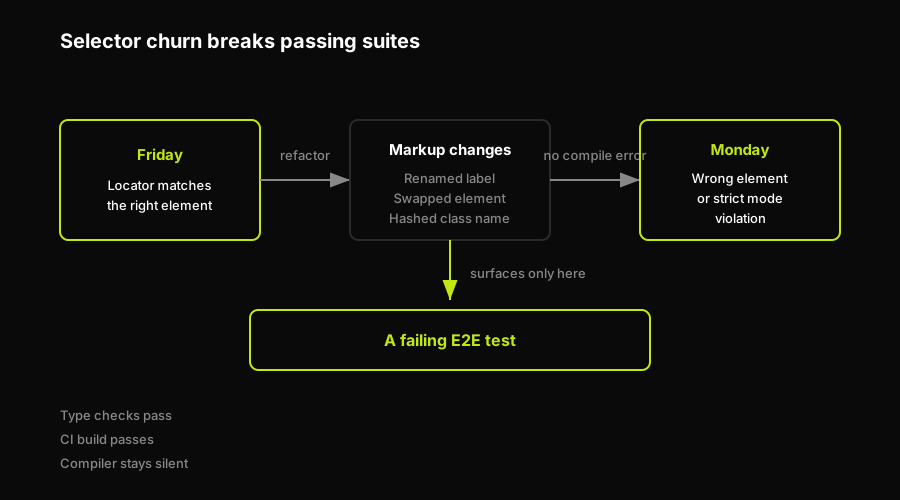
A markup change produces no compile error, so the broken locator surfaces only when an E2E test fails, often days later.
CSS-in-JS Hashed Class Names
Any build tool that generates class names at compile time (Styled Components, Emotion, many CSS Modules configurations) produces class names that look like .sc-a3f9b or .css-1a2b3c. These change when the component tree changes, when files are reorganized, or when the build configuration changes. A locator that targets these is essentially targeting a random string. It will break constantly and silently.
Hydration Re-Renders and Framework Upgrades
Server-rendered React, Vue, and similar frameworks render an initial HTML shell, then hydrate the JavaScript. During hydration, elements may be replaced, re-ordered, or have their attributes updated. Locators that fire too early can latch onto the pre-hydration DOM and fail or target the wrong node after hydration completes. Framework major version upgrades sometimes change the default HTML structure of components entirely.
Build-Regenerated IDs and Dynamic Attributes
Auto-generated IDs (from accessibility libraries, component libraries, or server-side generation) can change on every render or build. Any locator targeting these IDs has the same problem as targeting hashed class names: the attribute is not stable.
Even getByRole Breaks
Here is the honest version: getByRole is the most stable locator, but it is not unbreakable. Resilience is relative, not absolute.
If a developer renames a button's visible label ("Submit" to "Place order"), the getByRole('button', { name: 'Submit' }) locator breaks. If a <button> is replaced with a <div> with a click handler (a genuine accessibility regression), the locator breaks because the div has no role. If an ARIA role is added or removed explicitly, the locator breaks. These are all real bugs or deliberate changes. The test failing on them is correct behavior. But it is still a broken test requiring attention.
The point is not that getByRole is fragile. It is that "resilient" means resilient to incidental implementation churn, not to semantic changes. Understanding this prevents false confidence and helps prioritize which test failures to investigate versus which to treat as expected signal.
Codegen Rot: Recorded Locators Are Snapshots
Playwright's codegen tool records your clicks and generates test code from them. The locators it produces reflect the DOM at the moment of recording. This is a useful starting point for test discovery, but the output is a snapshot of one DOM state, not an expression of intent. Six months later, after the UI has evolved, many of those recorded locators will have drifted from the current reality. Using codegen output as-is and then living with the maintenance cost is a common pattern in test suites, and it is a significant driver of the "tests keep breaking" complaint. The right pattern is to use codegen for discovery, then rewrite the locators to express intent before committing them. The Playwright codegen guide covers how to do this without adopting the output wholesale.
The 2026 Problem: AI Coding Agents and Silent Markup Rewrites
This is the most underappreciated source of selector churn right now. AI coding agents, including Cursor, Copilot, and Claude Code, refactor component markup constantly as part of their suggestions and auto-completions. A CSS class rename, a semantic element swap, a restructured conditional render: all of these are normal outputs of AI-assisted coding. None of them produce a compile error. None of them show up in a type check. The only place they surface is a failing E2E test, and only if the locator targeted the changed attribute.
CSS and XPath locators are the most exposed. But many getByRole locators are affected too, because AI agents readily rename accessible labels as part of copy updates, componentize existing elements into new wrappers that shift the role hierarchy, or swap HTML elements for accessibility reasons.
Playwright's response to the AI-agent ecosystem is real: in version 1.59, Playwright shipped agentic features including ariaSnapshot({ boxes: true }) which produces an accessibility-tree snapshot formatted explicitly "for AI consumption," giving agentic test runners a structured description of the UI they can reason about rather than fixed selectors. This is the direction locator strategy is evolving in: locators defined against the accessibility tree and verified by AI agents that understand semantic intent, not implementation.
| Churn cause | Most exposed locators | Fix / mitigation |
|---|---|---|
| CSS-in-JS hashed classes | CSS selectors | Never target generated class names; use role/label/testid |
| Hydration re-renders | Any locator fired pre-hydration | Assert on stable post-hydration attributes; use auto-wait |
| Framework upgrades | CSS, XPath, positional | Semantic locators survive structural changes |
| Auto-generated IDs | CSS #id selectors | Use data-testid or role/label instead |
| AI-agent markup rewrites | CSS, XPath, many role names | Anchor on stable semantics; test code review |
| Copy / label changes | getByText, getByRole name | Use data-testid for high-churn labels |
Some teams answer locator breakage with what vendors call "self-healing": an automatic fallback that guesses a new selector when the original fails. This solves the immediate broken test problem but leaves the underlying issue intact. The test is now targeting a new element it found by proximity heuristics, not necessarily the element the author intended. It is still a snapshot with a patching mechanism on top.
Autonoma works one level up. Rather than healing a broken locator, the Planner, Executor, Reviewer, and Diffs Agent generate tests from the running application's behavior, not from recorded selectors. When the application changes, the Diffs Agent regenerates the test from the updated codebase. There is no selector to maintain because the test was never defined by a selector in the first place.
Best Practices for Stable Locators
The core guidance is short and consistent with everything above.
Default to getByRole with an explicit name option. This is the locator that targets what users actually see and interact with, in the way they identify it. For form fields, use getByLabel as the companion default. Together these two cover the majority of interactive elements in any web application.
Reserve getByTestId for genuinely ambiguous cases where no semantic attribute is stable or unique. Apply data-testid attributes deliberately during component development rather than adding them after the fact as a test fix. They are infrastructure for testability, not a crutch.
Never target CSS-in-JS generated class names. If a class name contains a hash or a tool-generated string, it is not a stable locator surface. Any locator built on it is fragile by design.
Scope with chaining and .filter() rather than relying on global uniqueness. A locator that is globally unique today may not be after a new feature adds a second instance. Scoping to a parent element or filtering by adjacent text is more robust.
Prefer asserting on user-visible state rather than implementation state. expect(locator).toBeVisible(), expect(locator).toHaveText('...'), and expect(locator).toBeEnabled() express what the user experiences. Assertions on class names or DOM attributes are implementation assertions that break when the implementation changes without changing behavior.
Review AI-generated code for locator-breaking changes before merging. This is the 2026-era discipline: code review now needs to include a test-impact pass for any change that touches component markup, ARIA attributes, or copy. See Playwright best practices for 2026 for how to integrate this into your CI workflow and page object model and test architecture for how to structure tests so locator changes are isolated to one place. If your suite runs on Cypress, the same selector discipline applies; see Cypress best practices.
Debugging "Locator Not Found" and Flaky Locators
Four tools, in order of reach.
Playwright Codegen (npx playwright codegen https://your-app.com) is a discovery tool, not a test authoring tool. Use it to see what locators Playwright generates for elements you click. This is useful for understanding what role and accessible name an element has, not for generating locators to commit directly.
Playwright Inspector is available with the PWDEBUG=1 environment variable or the --debug flag on a specific test. It opens a stepping debugger with a locator picker. You can hover over elements and see the locator Playwright would generate, then test it interactively. This is the fastest path to diagnosing a strict mode violation or an ambiguous locator.
Trace Viewer captures a full timeline of actions, DOM snapshots, network requests, and console output for a test run. Enable it in config with trace: 'on-first-retry' and view it with npx playwright show-trace. For locators that fail only in CI, the trace is often the only way to see the DOM state at the moment of failure, since you cannot attach a debugger to CI mid-run.
Strict mode violations specifically require scoping. The error message tells you how many elements matched. Use the Inspector or a page.locator(...).count() check in your test to see all matches, then scope with chaining or filtering to target the one you intend. Using .first() as a fix papers over the ambiguity rather than resolving it.
If the practical goal is to stop spending review time on selector churn, the hand-written Playwright path and the Autonoma path solve different layers. Playwright locators make a maintained suite less brittle; Autonoma regenerates routine E2E coverage from behavior and code changes so the selector-maintenance loop is no longer the team's default operating model.
FAQ
A selector is the string pattern used to match elements (e.g., a CSS selector string, an ARIA role, a text value). A locator is a Playwright object that wraps a selector and adds auto-waiting, retrying, and strict mode behavior on top of it. When you call page.getByRole('button', { name: 'Submit' }), the selector is the role + name combination; the locator is the object Playwright returns that knows how to re-query the DOM using that selector on every action.
An ElementHandle is a reference to a specific DOM node captured at one point in time. If the DOM updates after the handle was captured, the handle is stale and subsequent operations on it may fail or target the wrong node. A Locator holds a description of how to find an element and re-queries the DOM on every action. Playwright's documentation explicitly discourages ElementHandle in favor of Locators for this reason. The auto-waiting behavior that makes Playwright tests reliable depends on re-querying, which only Locators support natively.
Start with getByRole, and always pass a name option. It targets ARIA roles and accessible names, which is how screen readers and users identify elements. This makes it the most semantically meaningful locator and the most stable against incidental UI changes. For form fields, getByLabel is an equally strong first choice. Reserve getByTestId for genuinely ambiguous elements with no stable semantic attribute.
The most common causes are: CSS-in-JS hashed class names that change on rebuild, build-regenerated IDs, hydration timing issues in SSR frameworks, AI coding agent rewrites of component markup, and copy changes that alter accessible names. CSS selectors and XPath are most exposed. Even getByRole locators break when an accessible name or element type changes. The fix is to default to semantic locators (getByRole, getByLabel), never target hashed classes, and build a practice of reviewing code changes for test impact, especially in AI-assisted codebases.
A strict mode violation means your locator matched more than one element. First, use PWDEBUG=1 or Playwright Inspector to see all matches. Then either make the locator more specific (add a name option, a different role, a text filter) or scope it to a parent element using chaining. Do not use .first() as a fix: it hides the ambiguity rather than resolving it, and the test may silently interact with the wrong element in future runs.
No. getByRole is the most stable built-in locator, but resilience is relative, not absolute. A getByRole locator breaks when the element's ARIA role changes (e.g., a button becomes a div with a click handler), when the accessible name changes (a label or visible text rename), or when the element is removed from the page. These are all real UI changes, and the test failing on them is the correct behavior. What getByRole does not break on is implementation changes that do not affect semantics: CSS class changes, layout refactors, style updates. That is the resilience Playwright's documentation refers to.


