

Playwright codegen is a built-in record-and-playback tool, run with npx playwright codegen <url>, that watches your clicks and typing in a real browser and generates a runnable Playwright test in TypeScript, JavaScript, Python, Java, or C#. It records a one-time snapshot and has no way to update or regenerate that test when the UI changes. Codegen records. It does not maintain.
Recording your first test takes 30 seconds. Keeping it green takes the rest of your life.
That gap is not a complaint about Playwright. It is the honest reality of record-and-playback tools, and it is the part every tutorial skips. This guide covers the full codegen workflow, every useful flag, how to record authenticated sessions, and then the part nobody writes: why snapshots rot, what the maintenance actually looks like, and what your options are when the app changes faster than you can re-record.
What is Playwright codegen?
Playwright codegen (also called the Playwright code generator) is the code generation command bundled with the Playwright testing framework. When you run it, two windows open: a browser you interact with normally, and the Playwright Inspector, which watches your actions and writes them as a test in real time.
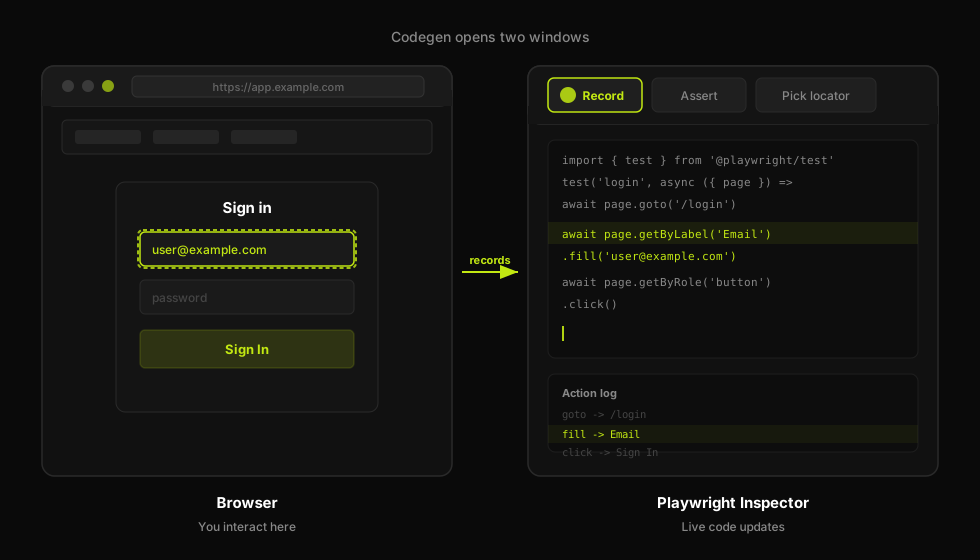
The browser records the interaction while Playwright Inspector writes the test code live.
The output is a real Playwright test. It imports the framework, creates a page object, and reproduces every click, fill, and navigation as a method call. You can save that output to a file and run it with npx playwright test immediately. No setup beyond a working Playwright install is required.
The power is in the speed. A flow that would take 15 minutes to write by hand takes 90 seconds with codegen. For exploratory work, throwaway scripts, or getting a first draft of a critical path, it is a genuinely useful tool.
The limits are equally real. Codegen produces a snapshot of one recording session. The locators it chooses are often verbose. The assertions it generates require deliberate action. And when your UI changes, there is no update command. You start over.
If you are coming from Selenium, codegen may feel similar to the Selenium IDE recorder. The Selenium to Playwright migration guide covers the broader API differences, but for codegen specifically: the Playwright version is meaningfully better at choosing stable locators by default, and the output is cleaner. The rot problem is identical.
How to run npx playwright codegen
Prerequisites: Node.js 18+, Playwright installed (npm init playwright@latest or npm i -D @playwright/test followed by npx playwright install).
The basic command:
npx playwright codegen https://example.com
Two windows open simultaneously. The browser on the left is a real Chromium instance you interact with normally. The Inspector on the right shows the generated code updating live as you act. When you are done recording, close the browser or click the stop button in the Inspector.
The Inspector UI
The Inspector has three main areas. The top toolbar contains the record/pause button, the assertion picker, and the "Pick locator" tool. The center pane is the live-updating code view, showing your test growing line by line as you interact with the browser. The bottom panel shows a log of recorded actions with the matched locator for each, and lets you hover to confirm the selector highlights the right element before you finalize.
The record button is a toggle. You can pause recording mid-session (for example, to copy a dynamic value from the page), resume when ready, and the code view reflects only the actions recorded while the button was active.
Saving output directly to a file
Without the --output flag, the code lives only in the Inspector window. To write it to disk:
npx playwright codegen --output tests/my-flow.spec.ts https://example.com
The -o shorthand works too. The file is created (or overwritten) at the specified path when you close the browser.
The VS Code extension
If you use the Playwright VS Code extension, you get two additional codegen entry points: "Record new" opens a new recording session and creates a new test file, and "Record at cursor" inserts the recorded actions at the current cursor position in an existing test file. Both invoke the same Inspector under the hood.
Picking locators and generating assertions
How codegen picks locators
Playwright codegen follows a locator priority order that mirrors the accessibility-first recommendations in the Playwright docs. In practice the priority is: role-based locators (via getByRole) first, then visible text (via getByText or getByLabel), then explicit test IDs (data-testid), and as a last resort a structural CSS or XPath selector.
The Playwright locators guide covers when and why to prefer role-based selectors. Codegen gets this mostly right on well-structured apps and increasingly wrong on apps with poor accessibility attributes, where it falls back to structural selectors that break the moment you reorder a list or rename a class.
Generating assertions in the Inspector
By default, codegen records actions. Assertions require deliberate selection. In the Inspector toolbar, click the assertion icon and choose what to verify: assert element visibility, assert text content, or assert input value. Then click the element in the browser. The Inspector inserts the corresponding expect() call at the right position in the generated code.
This matters. A test with only actions and no assertions does not verify anything. After your happy path is recorded, go back through and add assertions at each meaningful state: the confirmation message appeared, the form field reflects what you typed, the navigation reached the right page.
Inspecting and cleaning locators
The Inspector lets you hover over any generated locator to highlight the matched element in the browser. You can also click "Pick locator" and hover over elements to explore alternative selector strategies before committing. Use this to swap a fragile structural selector for a stable role or test-id locator before saving. This is worth doing before you commit the test to your repo, because a verbose locator you do not fix now is a broken test you will spend time debugging later. See the playwright-e2e-testing overview for a deeper guide to locator strategies.
Emulation, devices, and viewport
Codegen supports a set of browser context flags that let you record tests in simulated environments. These flags go between npx playwright codegen and the URL.
| Flag | Example | What it does |
|---|---|---|
--device | --device="iPhone 13" | Sets viewport, user-agent, and touch events for a named device |
--viewport-size | --viewport-size="1280,720" | Sets browser viewport to width x height in pixels |
--color-scheme | --color-scheme=dark | Emulates prefers-color-scheme media query (light or dark) |
--timezone | --timezone="Europe/Rome" | Sets browser timezone for date/time-sensitive flows |
--geolocation | --geolocation="41.9,12.5" | Grants geolocation permission with the given lat,long coordinates |
--lang | --lang="en-GB" | Sets the browser Accept-Language header and locale |
Device names come from Playwright's built-in device descriptors. Run npx playwright --version and check the Playwright changelog for the current list, or inspect devices from the @playwright/test package.
Recording authenticated flows
Most real-world tests need a logged-in session. Codegen supports two main strategies.
Save and replay storage state
The storage state approach works well when your app uses cookie-based or token-based sessions stored in localStorage or sessionStorage.
Step one: record the login and save the resulting session state:
npx playwright codegen --save-storage=auth.json https://app.example.com/login
Walk through the login flow manually. When you close the browser, Playwright writes cookies and storage to auth.json.
Step two: replay an authenticated session in a subsequent recording:
npx playwright codegen --load-storage=auth.json https://app.example.com/dashboard
The browser opens already logged in. The recorded test can then reference the same storageState file to skip login on every run.
Persistent user data directory
For apps that require a real browser profile (some enterprise SSO flows, apps that check browser fingerprints), use:
npx playwright codegen --user-data-dir=/tmp/my-profile https://app.example.com
The profile persists across invocations. Log in once, and subsequent sessions with the same --user-data-dir stay authenticated.
Pausing mid-script with page.pause()
If you are writing a test manually and want to open the Inspector at a specific point, call page.pause() in your script. Playwright pauses execution and opens the Inspector, letting you step through actions or record additional steps from that state. Useful when you need to reach a complex state programmatically and then record from there.
Supported languages
Codegen generates tests in five languages. Set the target with --target:
TypeScript is the default. The flag values for the others: --target=javascript, --target=python, --target=java, --target=csharp.
Python output uses sync_playwright by default. If you prefer the async API, you can edit the generated output to use async_playwright after the fact. TypeScript and JavaScript use the standard @playwright/test format with the test and expect imports. Java output uses the Playwright Java bindings and produces a JUnit-style test class. C# uses the Playwright .NET package and generates an NUnit test.
All five produce runnable tests against the same underlying Chromium, Firefox, or WebKit browser engine. The language controls only the test framework and syntax; the browser behavior is identical.
If your team uses multiple languages, the same recording session cannot be replayed to generate all five at once. You pick one language per codegen invocation. For teams that need the same flow in multiple languages, the fastest path is to record once in TypeScript, save the output, then translate the locator calls manually (they map 1:1 across languages).
The catch: codegen records once, then the test rots
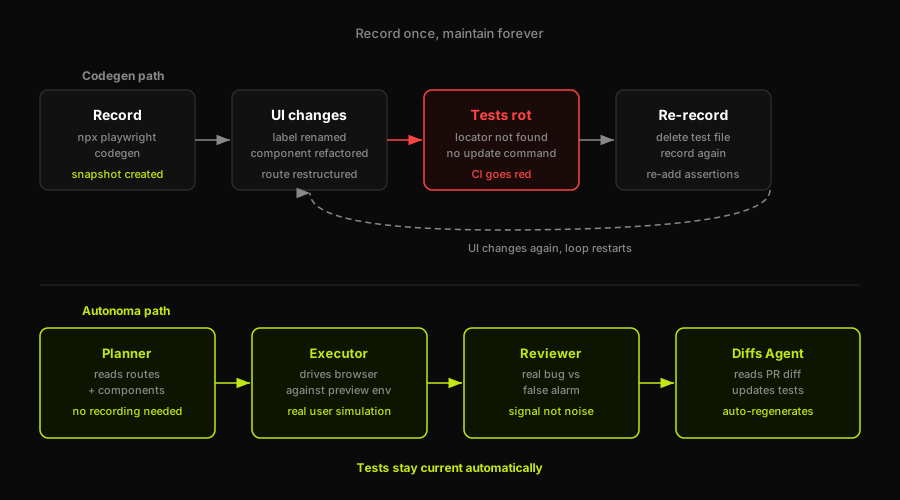
Codegen records a snapshot that rots; Autonoma regenerates tests from behavior when the UI changes.
This is the section nobody writes.
Codegen is a record-and-playback tool. It captures what your app looks like at the moment of recording and turns that observation into a snapshot. That snapshot does not know anything about your app's intent or structure. It knows a button had this label, a field had this placeholder, a route had this path. When any of those change, the snapshot is wrong.
Why locators are brittle by default
The raw locators codegen emits are often verbose because it is being conservative. A codegen-produced locator for a login button might look something like this:
After cleaning, the same element resolves to a stable, readable role locator:
The raw version couples the test to surrounding structure. The cleaned version couples it to the accessible role and name, which survive most refactors. The problem is that the raw version is what codegen gives you. Cleaning it is manual work you do after every re-record.
There is no update or regenerate command
This is the specific fact that surprises most people the first time a recorded test breaks. Playwright has no command like npx playwright codegen --update tests/my-flow.spec.ts. It does not exist. When a locator breaks because a label changed or a component was restructured, your options are:
Delete the test file and run codegen again from scratch. Then re-add every assertion you added manually. Then clean the locators again.
Or edit the broken locator by hand, which is faster for small diffs but still requires you to understand what changed and update the test accordingly.
Neither option scales to a codebase that ships daily.
The maintenance math is worth stating plainly. If you have 50 recorded tests and your app ships twice a week, a UI churn rate of 10% means 5 tests break per deploy. That is 10 broken tests a week to re-record, each taking 3-5 minutes of focused attention plus locator cleanup plus assertion re-entry. At scale, recorded test maintenance becomes a part-time job. Teams that never noticed this before are noticing it now for a specific reason.
The 2026 problem: AI coding agents compound the rot
The maintenance burden was manageable when UIs changed on a monthly sprint cycle. It is no longer manageable for teams using AI coding agents like Cursor, Copilot, or similar tools. These agents modify components, refactor class names, and rework routing structures in hours. A recorded test suite can go from green to red within a single working session, with no single author to blame and no diff small enough to patch manually.
Codegen's record-and-playback model assumes humans change the UI and humans maintain the tests. That assumption broke when agents entered the loop. The snapshot it produces is accurate when recorded and decays in proportion to how fast your codebase moves.
This is not a Playwright problem. Playwright as a framework is excellent. The gap is specific to record-and-playback as a maintenance strategy. Playwright locators written by hand, with deliberate role selectors and minimal coupling to structure, survive much better. The playwright-e2e-testing overview covers durable testing patterns that hold up under rapid churn.
What comes after codegen: from recording to regeneration
The question after you have outgrown record-and-playback is what replaces it.
Honest alternatives for different team shapes
For small teams who need throwaway scripts or one-off exploratory tests, codegen is still the right tool. Record it, run it once, delete it. Do not invest in a test file you know will break.
For teams who want durable scripts, the answer is hand-written tests using Playwright's locator API, with role-based selectors, explicit assertions, and a fixture file that handles login state. More upfront work, much lower maintenance overhead. The automated-e2e-testing approach is covered in the E2E testing guide.
For teams where the UI changes faster than any human can keep up, the honest answer is a system that does not record at all.
Autonoma: generation from behavior, regeneration on change
Autonoma takes the opposite approach from codegen. Instead of recording a human's session, it reads your codebase directly. Four agents handle the full lifecycle.
The Planner agent reads your routes, components, and user flows and derives a test plan from the code itself. There is nothing to record because the codebase is the spec. The Planner also handles database state setup automatically, generating the endpoints needed to put your app in the right state for each test scenario.
The Executor agent runs those test cases against a live preview environment, driving the browser the same way a real user would.
The Reviewer agent evaluates each result and classifies it: a real bug, an agent error, or a mismatch between the test plan and the current app state. This is what separates a real regression from a false alarm.
The Diffs Agent runs on every pull request. When a PR changes a component, a route, or an interaction flow, the Diffs Agent reads the code diff, updates the affected test cases, adds new ones for new behavior, and deprecates tests for removed behavior. There is no manual re-record step because the test plan regenerates from the code, not from a recording session.
The ICP carveout is honest: if you are a solo developer, a QA analyst building a one-off regression check, or a team whose UI changes slowly, codegen is free and functional and you should use it. Autonoma makes sense when your team ships fast enough that recording and maintaining tests by hand has become a tax on your engineering capacity, and when the AI-coding-agent problem (the UI changing faster than any human re-record loop can keep up with) is already real for you.
When codegen is the right tool (and when it isn't)
| Use codegen when | Don't use codegen when |
|---|---|
| You need a quick exploratory script to understand a flow | The test will live in CI and be maintained across sprints |
| You want a first draft to edit into a hand-written test | Your UI is changing weekly due to feature work or AI agents |
| You are onboarding to Playwright and learning selector patterns | Failing tests block your deploy pipeline |
| You need a one-shot regression check before a release | You need assertions at every meaningful state, not just actions |
| Your app's structure and labels are stable and change rarely | You do not have time to re-record when something breaks |
The decision comes down to maintenance budget. Codegen is fast to produce and expensive to maintain. Hand-written locator tests are slower to produce and cheaper to maintain. Self-regenerating systems like Autonoma remove the maintenance cost from the human loop entirely.
FAQ
For simple, stable flows that rarely change, codegen can produce a working production test. In practice, the raw output needs cleanup: locators are often overly verbose, assertions require deliberate addition, and any UI change breaks the snapshot. Most teams use codegen as a starting point and edit the output by hand rather than running it unmodified in CI. If your UI changes frequently, the re-record overhead accumulates quickly.
Codegen tests break because they record the UI as it appeared at a single point in time. If a button label changes, a component is restructured, a route is renamed, or a data-testid is removed, the locator the test holds no longer matches anything in the DOM. Playwright throws a locator not found error. There is no automatic update mechanism: you must fix the locator by hand or re-record the whole flow from scratch.
Use the --save-storage flag to capture your session after logging in: npx playwright codegen --save-storage=auth.json https://app.example.com/login. Walk through the login, close the browser, and Playwright saves cookies and storage to auth.json. For subsequent recordings, use --load-storage=auth.json to start already authenticated. In your written tests, reference the same storageState file in your browser context configuration to skip login on every test run.
Codegen supports five languages via the --target flag: TypeScript (default), JavaScript, Python, Java, and C#. TypeScript and JavaScript output uses the @playwright/test format. Python uses sync_playwright. Java and C# use their respective Playwright bindings. You select one language per recording session; you cannot generate all five from a single session.
No. This is the most important thing to understand about codegen. There is no update or regenerate command. When your UI changes and a recorded test breaks, your only options are to edit the broken locator by hand or delete the test file and re-record the entire flow from scratch, then manually re-add every assertion. Playwright as a framework is excellent, but the record-and-playback approach has no maintenance mechanism built in.
Yes, completely. Playwright is an open-source project maintained by Microsoft, and codegen is bundled with the standard @playwright/test package. There are no usage limits, no account required, and no paid tier. You pay only the engineering time it takes to maintain the tests codegen produces.


