

Playwright authentication is the practice of signing in once in a setup test, saving the browser's authenticated state with storageState, and reusing it so every test starts already logged in, cutting auth time by 60-80% (from 2-5 seconds per test down to under 500ms). The modern pattern uses a setup project with dependencies: ['setup'] in your Playwright config.
A startup we talked to had a coding agent sweep their codebase. The agent cleaned up some "dead code." Among what it deleted: the auth wrapper that every protected-route test depended on. The suite went green. No test failed. The auth wrapper wasn't tested. Two days later, every user in production was locked out. Not because login broke, it was the auth check itself that silently stopped running.
Your auth setup is often the most brittle code in your test suite. It sits outside your test files, it relies on the live login UI, and it has no tests of its own. When it breaks, it takes everything with it quietly.
This guide covers how Playwright handles authentication properly: the storageState core pattern, setup projects (not globalSetup, which is legacy), multiple roles, API-based login, parallel isolation, the honest story on third-party OAuth, and a per-provider decision table that doesn't exist anywhere else on the internet.
What authentication means in a Playwright test
Every Playwright test runs in an isolated browser context. That context starts fresh: no cookies, no local storage, no session tokens. If your app requires login to reach any meaningful state, every test that skips the login UI is a test that gets to run in roughly 500ms instead of 3-5 seconds.
At scale, this matters. A suite with 200 tests, each spending 3 seconds on login, burns 10 minutes on authentication alone before a single assertion fires. That's not a testing problem, it's a math problem.
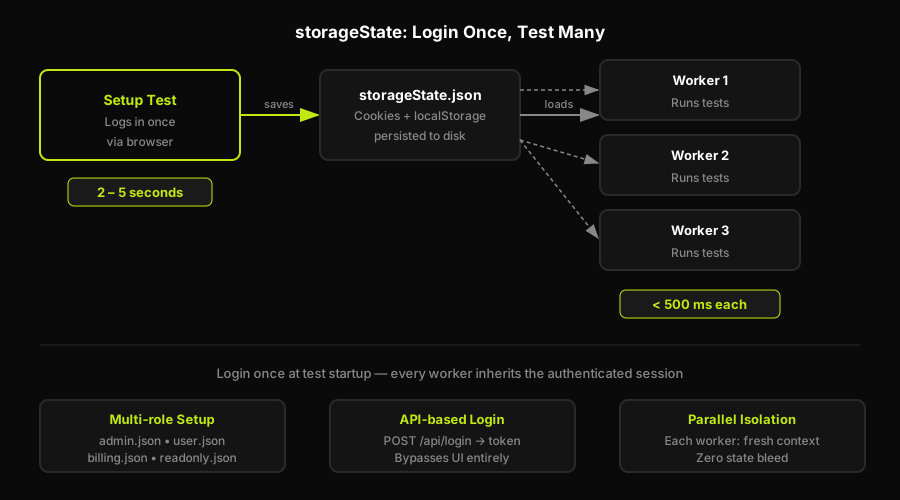
Playwright's answer is context reuse. You authenticate once, serialize the resulting browser state (cookies, local storage, indexed DB) to a JSON file, and hand that file to every subsequent test context. Each test starts as if it just completed the login flow, because from the browser's perspective, it did.
The isolation still holds: each test gets its own context instance with its own copy of the state. One test cannot corrupt another's session.
Playwright storageState: log in once, reuse auth across tests
The save side is simple. You log in through the UI, then call page.context().storageState({ path: '.auth/user.json' }). Playwright writes all cookies and storage to that file.
The load side is even simpler. In your playwright.config.ts, you point a project at the state file with storageState: '.auth/user.json', and you use a setup project with dependencies: ['setup'] to ensure the state is populated before any test that needs it runs.
A word on globalSetup: it's the old way. Before Playwright v1.31, you'd pass a path to a setup module via the globalSetup config field. It worked but it ran outside the test runner, couldn't use fixtures, had worse error reporting, and wasn't parallelism-aware. Use setup projects instead. The config example above marks the legacy pattern explicitly so you know what to ignore when you find it in older Stack Overflow answers.
Authenticating multiple roles
Most apps have more than one role, and their tests need distinct auth states. An admin test should start with admin cookies; a viewer test should start with viewer cookies. Sharing one state file between both is a bug waiting to happen.
The pattern: one setup test per role, each writing to its own file (.auth/admin.json, .auth/user.json). Each project in your config points at the appropriate state file and declares the matching setup project as its dependency.
The multi-context detail matters for tests that need to simulate two users interacting, for example, an admin granting access while a viewer is logged in. You open two browser contexts in a single test, each loaded with a different state file. Playwright handles this natively.
Skip the UI: API-based login
Hitting the login UI in your setup test adds the same 2-5 second overhead you're trying to avoid everywhere else. For apps that expose a login endpoint (REST or GraphQL), you can skip the UI entirely.
The request fixture gives you an HTTP client that shares Playwright's cookie jar. You POST your credentials directly, get a session cookie back, and call request.storageState() to serialize the result. No browser, no page load, no selector fragility.
API login is faster and more stable than UI login. It doesn't break when the login page gets redesigned. The tradeoff: it bypasses any client-side validation or redirect logic that runs during login, so it's not a replacement for testing the login flow itself. Use it for auth setup, not for login testing.
Running in parallel without breaking auth
Playwright tests run in parallel by default. If multiple workers write to the same .auth/user.json at the same time, you get a race condition. The fix is testInfo.parallelIndex: each worker gets a unique integer, and you use it to give each worker its own state file.
This is worth naming explicitly: the setup-project pattern with dependencies: ['setup'] already handles this correctly if the setup project is configured to run once before all workers. The per-worker pattern is for cases where your auth state is tied to server-side session data that conflicts across concurrent requests. Vitalets (the Playwright contributor) has argued that most teams reach for per-worker isolation prematurely. Start with a single setup project. Add per-worker isolation only when you observe actual conflicts. For the broader set of conventions this builds on, see our Playwright best practices for 2026.
The hard part: third-party login (Google, Apple, social)
This is the section that other guides skip or defer to a footnote.
Google, Apple, and most social OAuth providers actively block automated login. Google's login page detects headless browsers, Puppeteer-style automation, and known automation fingerprints, then shows a "This browser or app may not be secure" wall. Stealth plugins (playwright-extra with the stealth plugin) worked for a while. Most of them broke in 2022-2023 when providers updated their detection. One popular deep-dive on automating real Google login, widely cited on Stack Overflow, hasn't had a working dependency update since 2023.
The reasons automation fails here:
- Google and Apple use behavioral fingerprinting, not just user-agent strings
- CAPTCHA triggers appear after repeated automated attempts, even from the same IP
- Two-factor prompts appear unpredictably, breaking the flow mid-run
- Provider-side bot detection is updated continuously
The honest answer is: don't automate the live third-party OAuth login. Instead, pick one of three approaches that actually work:
Option A: Reuse a captured long-lived session via storageState. Log in manually once with your test account, save the state, and commit the saved session to CI secrets (not to your repo). Refresh it when it expires. This is the most common approach and it works well for Google Workspace and Apple ID accounts created for testing.
Option B: Mock the OAuth redirect. Rather than hitting Google's servers, intercept the OAuth redirect in your app and inject a fixture identity. This is framework-specific (covered in the per-provider table below) but it's the fastest and most reliable approach for CI.
Option C: Use a provider test account or test-mode bypass. Most serious auth providers (Clerk, Auth0, Supabase) offer test modes or test credentials that skip third-party OAuth entirely. Use those. They're designed for exactly this.
A brief note for teams using agent-driven testing: an agent navigating the real login UI sidesteps the abandoned stealth-plugin approach by driving a real, non-headless browser context, which passes basic fingerprinting. But it still hits rate limits and 2FA prompts. The session-capture approach remains the right default.
Testing across auth providers: Clerk, NextAuth, Auth0, Supabase
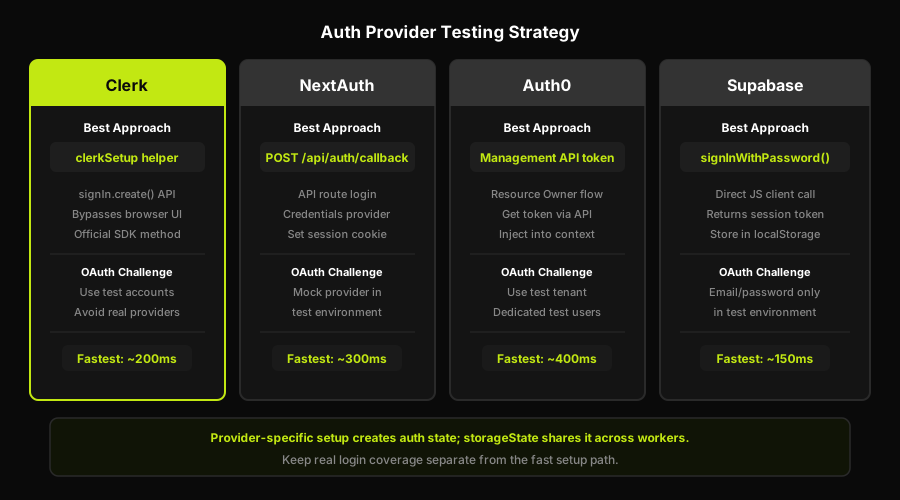
This table exists because no other guide on the SERP covers it. Each provider has a fastest-reliable approach that differs from the others, and each has a specific failure mode that will cost you time if you hit it blind.
For deep-dives on specific providers: the Clerk authentication end-to-end guide and the NextAuth testing guide cover those patterns in full. The Auth0 and Supabase deep-dives go further than the table below.
| Provider / Flow | Fastest reliable approach | What to avoid | Where it rots |
|---|---|---|---|
| Username/password (any) | UI login in setup test, save storageState | Logging in per test (2-5s overhead) | Login page redesigns break selectors |
| Google/Apple/social OAuth | Captured session or mock OAuth callback | Automating real Google/Apple login | Session expires; stealth deps rot |
| Clerk | Testing Tokens API (bypasses bot detection, mints a session) | Real Clerk login UI (rate-limited in CI) | Token TTL; rotate with Clerk dashboard |
| NextAuth / Auth.js | Mint the NextAuth session JWT, inject via storageState cookie | UI login flow (slow, brittle selectors) | JWT secret rotation breaks minted tokens |
| Auth0 | Resource Owner Password grant (REST API login, no UI) | Real Auth0 Universal Login page in CI | Grant must be enabled in tenant settings |
| Supabase | supabase-js signInWithPassword, persist session to storageState | UI login (adds Supabase widget dependency) | Service role key in CI secrets must rotate |
The Clerk Testing Tokens approach is notable because it's the only one in this table where the provider has built an explicit testing contract: an API endpoint that generates a short-lived token your test can use to sign in programmatically, bypassing all bot detection. If you're on Clerk, use it. The full setup is covered in the Clerk deep-dive.
The NextAuth / Auth.js approach requires access to your app's NEXTAUTH_SECRET environment variable. You generate a session JWT that matches what NextAuth would set, inject it as the next-auth.session-token cookie via context.addCookies(), and load the page. From Playwright's perspective, the user is already logged in.
Where Autonoma fits with programmatic auth setup
Programmatic auth setup is still the right foundation for most Playwright suites. It keeps the bulk of your tests fast, deterministic, and focused on authenticated product behavior. The gap is the real browser login path: the route that sends a user to the login UI, the callback that establishes the session, and the protected page that should prove the session is valid after redirect.
Autonoma complements the setup patterns above by driving that real browser path on pull requests. The Planner agent reads your routes and auth middleware to identify the flows that matter. The Executor agent drives the browser through the login path and checks the authenticated state after redirect. The Diffs Agent watches auth routes, callbacks, and login UI changes on PRs so the test plan updates when that surface changes instead of waiting for a saved-state fixture to rot. The result is not a replacement for storageState; it is the layer that checks the path storageState deliberately skips.
The same boundary applies to test users. Autonoma can use its SDK/data factory to create users with specific characteristics or states, authenticate scenarios with those users, and delete the same users after the run. You connect your own create and teardown functions through @autonoma-ai/sdk factories; the SDK pattern uses defineFactory, createHandler, create, and teardown that calls userRepo.delete(user.id). That gives the agent reliable state without claiming native provider-side integrations.
When auth setup breaks: expiry, rot, maintenance
The Playwright authentication patterns above work. The reason they're painful to maintain is that auth state has a shelf life.
JWT sessions expire. By default, most providers issue tokens valid for a day to a week. Your CI pipeline runs on that schedule until one Monday morning the entire suite fails with 401s and the on-call engineer spends two hours figuring out the state file is stale.
Login UIs change. When your product redesigns the login page, the selectors in your setup test break. This is the same fragility you have in any UI test, but it's uniquely disruptive because it takes down every test that depends on auth, not just the login tests.
Stealth dependencies rot. If you're on a stealth-plugin approach for any provider, the plugin may stop working silently when the provider updates its fingerprinting. The tests don't error. They get blocked and time out.
The standard mitigation is a session-validation fixture: before each test run, check whether the saved state is still valid by loading a lightweight authenticated endpoint. If the check returns 401, re-authenticate and refresh the state file.
This works. It is also perpetual toil. Every time the login UI changes, you update the setup test. Every time a JWT TTL gets shortened, you adjust the validation interval. Every time a provider updates its bot detection, you revisit the approach. Someone on the team owns this, and it's almost never the person who writes features.
This is where the maintenance burden compounds. You wrote the initial auth setup in an afternoon. You've now spent more time maintaining it than you spent writing it.
FAQ
Use storageState. In your setup test, log in once and call page.context().storageState({ path: '.auth/user.json' }) to save the session. In your playwright.config.ts, point your test project at that file with storageState: '.auth/user.json' and declare a setup project dependency. Every test in that project will start with the saved session loaded, with no login step required.
You can't reliably automate the real Google login flow. Google actively blocks browser automation and headless environments. The reliable approaches are: (1) log in manually once with a dedicated test Google account, save the session with storageState, and store it in CI secrets; (2) mock the OAuth callback so your app receives a fixture identity without hitting Google's servers; or (3) use an auth provider like Clerk, Auth0, or Supabase that offers a test mode bypassing third-party OAuth entirely.
storageState is Playwright's mechanism for serializing and restoring browser session data. When you call page.context().storageState(), Playwright captures the current context's cookies, localStorage, and sessionStorage and writes them to a JSON file. When you load that file in a new context (via the storageState option in the config or context creation), the context starts with all that state pre-loaded, as if the user already completed the login flow.
Create a separate setup test and .auth/ JSON file for each role. For example, admin.setup.ts writes to .auth/admin.json and user.setup.ts writes to .auth/user.json. In playwright.config.ts, define one project per role, each pointing at its own state file with storageState and declaring its own setup project as a dependency. Tests in the admin project start as admin, tests in the user project start as a regular user, and neither can affect the other.
Use API login for your auth setup when your app exposes a login endpoint. It's faster (no page load, no selectors to break) and more stable across UI changes. Use the request fixture to POST credentials and call request.storageState() to capture the session. Reserve UI login for cases where your app's login flow itself is what you're testing, or where the authentication involves UI-only interactions like CAPTCHA or device verification that can't be bypassed via API.


