

To test a Clerk-protected app end-to-end, use Clerk's Testing Tokens to bypass bot detection, sign in programmatically via the @clerk/testing package, then assert that protected routes load for an authenticated session and redirect to sign-in when the session is missing. The reason this matters: Clerk's hosted UI actively resists scripted clicks, so programmatic sign-in via Testing Tokens is the only reliable path to a verified authenticated state in your test suite.
A team's AI coding agent was refactoring a route group to clean up some dead code. It touched the layout file. The Clerk clerkMiddleware wrapper was there one commit, gone the next. TypeScript didn't complain. The build passed. CI was green. Protected routes silently stopped requiring authentication. Nobody noticed for three days, until a user support ticket came in asking why they could see another user's account data without logging in.
This is not a hypothetical. It is the exact shape of incident that turns up when an AI coding agent treats auth middleware as boilerplate to be cleaned up. The wrapper is one function call. It looks like ceremony. It compiles fine without it. And without an E2E test that actually asserts "this route requires authentication and verifies I am who I claim to be," the regression is invisible until production.
For a broader treatment of how to structure auth testing in Playwright, playwright authentication testing covers the full landscape. This article focuses specifically on Clerk: why its hosted UI is not the right target for automation, how Testing Tokens work, and what your assertions should actually check.
Why You Don't Drive Clerk's Hosted UI in Tests
The instinct when writing an auth test is to do what the user does: navigate to the sign-in page, fill the email field, fill the password field, click submit. For Clerk specifically, this approach fights the product's own security design.
Clerk's <SignIn /> component renders via a hosted domain (accounts.clerk.dev or your custom domain) and includes bot detection that is functionally similar to CAPTCHA. It is designed to tell the difference between a real user and an automated browser. When you script clicks through that UI in Playwright or any other automation tool, you are attacking the bot detection layer, not testing your application. Flakiness is the best outcome. More likely, you hit a challenge that blocks the flow entirely.
Beyond flakiness, driving the hosted sign-in UI tests Clerk's product, not yours. What you actually want to know is whether your app correctly gates access behind an authenticated session, whether your protected routes serve the right content, and whether unauthenticated requests redirect properly. None of those require you to touch Clerk's sign-in form.
The supported path is programmatic sign-in using Testing Tokens, and it is meaningfully cleaner.
Using Clerk Testing Tokens
Testing Tokens are short-lived tokens that Clerk issues specifically for automated testing. When you include a Testing Token in the right place during a test run, Clerk's backend recognizes it and bypasses the bot detection that would otherwise block automated sign-in. Your test gets a real authenticated session without scripting a single click through the hosted UI.
Clerk ships a first-party package called @clerk/testing that integrates this into Playwright and Cypress. The package exposes two things you care about: a global setup function that configures Clerk for your test environment, and a per-test helper that injects a Testing Token before each test that needs an authenticated state.
The global setup (run once before your Playwright suite) makes an authenticated Clerk frontend API available for token issuance. It uses the clerkSetup function, which reads your Clerk publishable key and establishes the session infrastructure your tests will share.
The per-test injection is the piece you call inside each individual test. The clerk.signIn helper (or the equivalent in whichever version of @clerk/testing is current when you are reading this) programmatically signs in a test user, placing a Testing Token in the browser context. You pass it the page and a set of sign-in parameters (a test user's identifier and password, or a strategy your instance supports), and from that point forward requests from that page carry a valid Clerk session. The two pieces fit together as a pair: clerkSetup runs once in your Playwright config's global setup, and clerk.signIn runs inside each test that needs an authenticated session.
A few implementation notes worth internalizing. Testing Tokens are short-lived by design, so they work per test run rather than being cached. Your test user needs to be a real user in your Clerk development or test environment instance. And the @clerk/testing package should only run against a development or staging Clerk instance, never production. The official Clerk docs at clerk.com/docs under "Testing Tokens" have the current function signatures and any version-specific configuration, since this API surface evolves.
Autonoma's SDK/data factory can sit next to that provider-specific setup. You wire your own create and teardown functions through @autonoma-ai/sdk factories; the SDK pattern uses defineFactory, createHandler, create, and teardown that calls userRepo.delete(user.id). That lets Autonoma create test users with specific traits or states, authenticate scenarios with those users, and delete the same users when the run finishes. This is app-side test-data setup through your own functions, not a native Clerk provider-side integration claim.
What to Assert on a Clerk-Protected Route
Once you have a programmatic sign-in in place, the assertions are where most teams underinvest. The trap is asserting that a page rendered. A page rendering is not evidence of authentication.
The assertions that actually catch regressions fall into three categories.
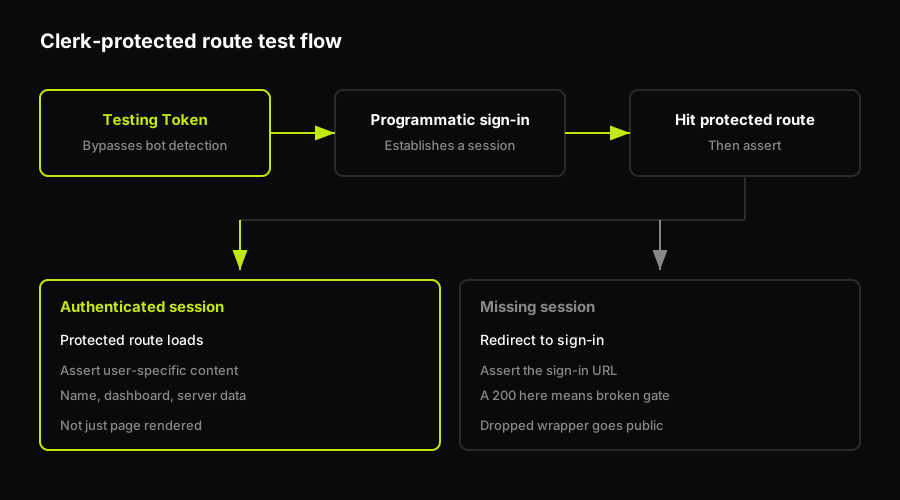
Authenticated session, protected route loads. After signing in with a Testing Token, navigate to a route that your auth wrapper should gate. Assert that the response is not a redirect (status 200 or an equivalent check for your setup). More importantly, assert on something that only an authenticated user should see: the user's name in the header, the dashboard content, a server-rendered element that requires a valid session to populate. If the auth wrapper is dropped and the route goes public, an unauthenticated request would still render the page. Your assertion on a user-specific element is what tells the test whether authentication is actually in play.
Missing or expired session, redirect fires. In a separate test, skip the sign-in step. Navigate directly to the protected route without a session. Assert that the browser ends up at your sign-in URL, not that it gets a 200. Checking the redirect URL is not optional here: an app with a dropped auth wrapper returns 200 for unauthenticated requests, and an assertion that the page rendered will pass in both the correct and the broken case.
The authenticated signal is real, not just structural. Asserting that a <div id='user-menu'> exists is weaker than asserting that it contains the signed-in user's email or display name. Server-rendered content tied to a specific user's session is the strongest possible signal. It fails correctly when the session is missing, and it also fails correctly when the session exists but belongs to the wrong user.
Catching the Regression an AI Coding Agent Introduces
The wrapper-drop failure mode has a specific profile: it happens during refactoring, not during feature development. An AI coding agent is cleaning up a route group, removing what looks like ceremony, or restructuring layouts. The clerkMiddleware call or the <ClerkProvider> wrapper looks like boilerplate from the agent's perspective. There is no type error when it is removed. The build passes. Nothing in the diff screams "authentication broken."
This is why build-time checks cannot catch it. TypeScript knows the types; it does not know that one specific function call is the thing standing between your user data and the public internet. Linting passes. The component tree renders. The only check that catches this is an E2E test that exercises a real authenticated flow on a real protected route and asserts on a real authenticated signal.
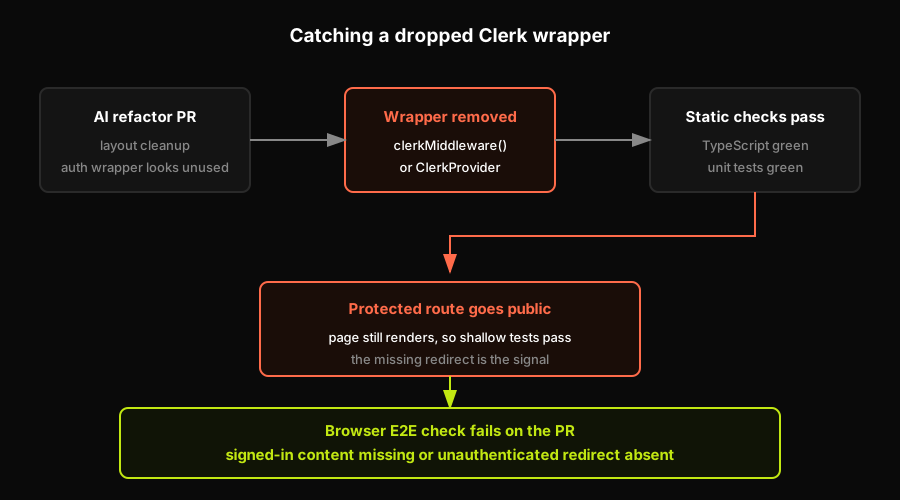
Autonoma catches this class of regression in its normal operating mode. It drives a real browser through your app's actual auth flow (including Clerk-based flows, since Autonoma is browser-level and authentication-provider-agnostic), asserts the authenticated state after sign-in, and runs that verification on every PR. Autonoma has no native Clerk API integration; it works at the browser level, the same way a user would, which means it catches the dropped-wrapper regression exactly as an E2E test would. The Planner agent reads your routes and identifies which ones are gated. The Executor agent drives the browser through the sign-in flow. The Reviewer agent checks that the post-sign-in state matches what an authenticated session should produce.
For the broader failure mode of AI coding agents silently breaking production auth, ai agent broke authentication production covers the pattern in detail. The specific mechanism by which agents drop auth wrappers during refactors is documented in ai coding agents skip auth wrappers. Both are worth reading alongside this one if you are shipping with Cursor, Claude, or any agent that touches layout and middleware files.
The key takeaway: if your team uses AI-assisted development on a Clerk-protected codebase, the E2E test described in this article is not optional infrastructure. It is the check that CI cannot perform.
FAQ
Use Clerk's Testing Tokens via the @clerk/testing package. Install the package, run the global setup function in your Playwright config, and call the sign-in helper in each test that needs an authenticated session. This bypasses bot detection and gives you a real Clerk session without scripting clicks through the hosted sign-in UI. Then assert on user-specific content on protected routes to verify the session is genuine.
Testing Tokens are short-lived tokens that Clerk issues specifically for automated testing environments. When your test includes a Testing Token in the right context, Clerk's backend recognizes it and bypasses the bot detection that would otherwise block automated sign-in flows. They are not session tokens you cache and reuse; they are issued per test run and expire quickly. The @clerk/testing package handles token issuance and injection for you.
Yes, but not by scripting clicks through the hosted sign-in UI. Clerk's SignIn component includes bot detection that makes click-based automation unreliable and often completely blocked. The correct approach is programmatic sign-in using the @clerk/testing package, which calls Clerk's APIs directly to establish an authenticated session in your Playwright browser context. The result is a real session with none of the flakiness of UI-driven automation.
Write two tests. First: sign in with a Testing Token, navigate to the protected route, and assert that user-specific authenticated content is visible (not just that the page rendered). Second: skip sign-in entirely, navigate to the same protected route, and assert that the browser redirects to your sign-in URL. The redirect assertion is what catches a dropped auth wrapper, because a missing wrapper returns 200 instead of redirecting, and an assertion on the redirect URL fails correctly.
The most common cause in AI-assisted codebases is a dropped auth wrapper during refactoring. The clerkMiddleware call or ClerkProvider wrapper looks like ceremony to an AI coding agent, so it gets removed during cleanup. TypeScript does not catch this because it is a runtime behavior concern, not a type concern. The build passes and CI stays green. The only reliable way to catch it before production is an E2E test that asserts on authenticated content after sign-in and asserts on the redirect URL for unauthenticated requests.


