

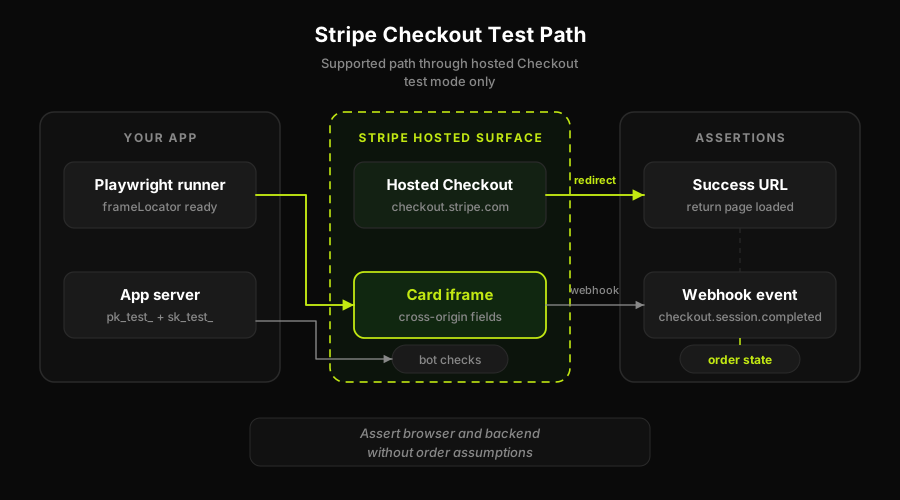
To automate a Stripe Checkout test, switch to test mode with test keys, load captcha test keys that always pass, drive the card iframe with frameLocator, pay with a test card, and assert on both the confirmation redirect and the webhook. The main obstacles are the cross-origin card iframe and Stripe's bot detection layer, both of which have official, supported workarounds for test environments.
Stripe's own documentation is candid about this: Checkout and Elements are designed to resist automation. That framing is not accidental. Stripe builds fraud protection into the payment form itself, and the same mechanisms that block real bots also block Playwright. Most teams discover this when their first E2E test stalls indefinitely trying to type a card number into a field that appears in the DOM but never accepts input.
The good news is that there is a documented path through. It requires coordinating three different moving parts (test mode, captcha test keys, and frameLocator), none of which is hard on its own, but together they are almost never documented in one place. This walkthrough puts them together. It is the Stripe-specific piece of a broader payment gateway testing strategy, and if you want the provider-agnostic version, see our guide to end-to-end checkout flow testing.
Autonoma-generated checkout tests still need those same test-mode boundaries. The difference is that the browser path and selector plan are derived from the codebase instead of hand-maintained as Stripe's hosted UI changes.
Why automated Stripe Checkout gets blocked
Two separate problems cause most Stripe automation failures. Understanding both makes the solution clearer.
The cross-origin iframe. Stripe renders its card input fields inside an iframe served from js.stripe.com, not your application's domain. That is a different origin. By default, browser automation frameworks cannot interact with elements inside cross-origin iframes using normal selectors because the browser's same-origin security policy restricts access. You can find the iframe element in the DOM, but targeting fields inside it with a plain page.locator() call will silently miss or throw. This is not a Playwright limitation specific to Stripe; it applies any time the iframe is on a different origin.
Bot detection on hosted Checkout. When you use Stripe's hosted Checkout page (the one Stripe redirects to at checkout.stripe.com), Stripe runs bot detection checks before allowing the payment flow to proceed. Depending on your account and configuration, this may include a captcha challenge. An automated browser without the right keys will either fail the challenge silently or get stuck indefinitely.
Both problems have test-environment solutions that Stripe and captcha providers publish officially. Neither is a hack.
The walkthrough: 5 steps to a passing Stripe Checkout test
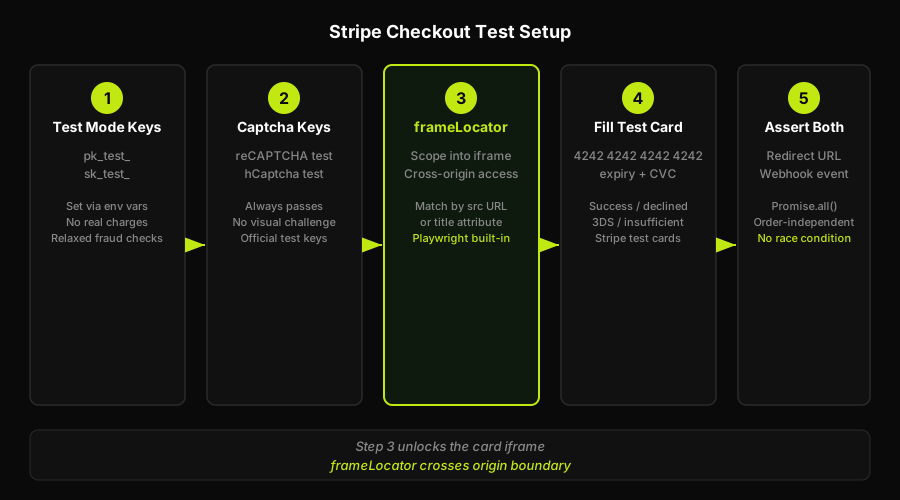
Step 1: Switch to test mode with test API keys
All Stripe accounts have two key pairs: live and test. In test mode, Stripe's infrastructure processes payments using its own simulated network, no real charges happen, and test cards are accepted.
Use keys that begin with pk_test_ (publishable) and sk_test_ (secret) in your test environment. Your application should read these from environment variables, so switching is a matter of setting the right env vars when running E2E tests. Never hardcode live keys in test configuration and never accidentally use live keys in your test suite.
In test mode, Stripe also relaxes some fraud checks. That matters for making the iframe reachable in the next steps.
Step 2: Handle the captcha to test Stripe Checkout without getting blocked
If your Stripe Checkout integration uses reCAPTCHA or hCaptcha, the captcha challenge will block automated test runs. Both providers publish official test site keys and secret keys specifically for automated testing environments. These keys are designed to always return a passing token when used, without presenting a visual challenge.
For reCAPTCHA v2, Google documents a test site key that always passes verification. For hCaptcha, Cloudflare publishes an equivalent test credential set. The mechanism is the same in both cases: you configure your test environment to use the captcha provider's test credentials rather than your production credentials. The test key pair is recognized by the captcha backend as a testing signal and returns success unconditionally.
This is not bypassing or defeating real bot detection. You are using credentials the provider designed for exactly this purpose, in your own test environment, where no real users or real fraud risk exists. The production environment continues to run real captcha validation; only your test environment uses the test keys.
Check the current documentation for your captcha provider to get the exact key values. Key strings change occasionally, and printing a specific value here risks directing you to a stale credential.
Step 3: Drive the cross-origin iframe with Playwright frameLocator
This is the technique that unlocks the card fields. Playwright's frameLocator API lets you scope selectors into a specific iframe, including cross-origin ones, by matching the iframe element itself and then chaining locators within it.
The pattern looks like this at a high level: you locate the iframe that Stripe renders (typically matchable by a URL pattern or a title attribute), call frameLocator() on the page to get a scoped locator context, and then chain normal locator() and fill() calls within that context. Playwright handles the cross-origin traversal internally.
A note on Cypress: Cypress cannot natively traverse cross-origin iframes the same way. Cross-origin iframe access is restricted in Cypress by default, and teams typically reach for community plugins or workarounds to handle it. This is one of the practical reasons Playwright is the cleaner choice for Stripe Checkout automation. The plugin ecosystem exists, but it adds complexity and maintenance surface that frameLocator avoids entirely.
Step 4: Fill a test card
With the iframe reachable via frameLocator, filling the card number, expiry, and CVC follows the same pattern as any other form. Use Stripe's published test cards for specific scenarios: successful payment, insufficient funds, card declined, 3D Secure required, and so on.
Our guide to Stripe test cards covers the full set of card numbers for each scenario. Use that as your reference rather than enumerating them here. Each scenario number maps to a specific behavior in Stripe's test network.
Step 5: Assert on the confirmation redirect and queue the webhook assertion
After filling the card and submitting, Stripe redirects the browser to your success URL. That redirect is one assertion point: page.waitForURL() matching your expected success path confirms the browser-side flow completed.
The webhook is the other assertion point. Asserting on the redirect alone is not enough. The redirect tells you the browser flow succeeded. The webhook tells you Stripe actually processed the event and your backend received it. Both are necessary for a complete payment test.
The webhook assertion requires a different setup. See the next section.
Asserting the webhook (order-independently)
The checkout.session.completed and payment_intent.succeeded events and the browser success redirect do not arrive in a guaranteed order. Stripe fires the webhook as soon as the payment intent transitions state on its backend. Your browser redirect happens after the hosted Checkout page processes the result. In practice, the webhook often arrives before the redirect completes, but sometimes the redirect lands first. A test that asserts "redirect happened, then webhook arrived" will pass most of the time and fail occasionally. That is a flaky test.
The robust pattern is order-independent design: capture the webhook and the redirect independently, then assert on both without assuming which lands first.
For the webhook side, there are two practical approaches. The Stripe CLI's stripe listen command forwards webhooks from Stripe's infrastructure to a local endpoint, which works in local development and CI environments that can expose a port. Alternatively, you can record an expected webhook event at test setup time by querying the Stripe API directly (using the test secret key) to retrieve the most recent event for the session you triggered. This second approach does not require network exposure and works reliably in CI.
In either case, the assertion flow is: start listening or polling before triggering the payment, trigger the payment, await both the redirect URL assertion and the webhook event assertion, and do not couple the order. If your test framework supports Promise.all()-style parallel awaiting (Playwright does), use it: resolve both assertions concurrently and let whichever arrives first proceed without blocking the other.
The webhook listener reference implementation in the companion repo validates the Stripe-Signature header (always validate in tests, not just production, so the test reflects your real behavior) and logs checkout.session.completed events.
How Autonoma handles Stripe Checkout testing
The walkthrough above is a lot of coordinated setup. Test mode keys in the right env var, captcha test credentials wired into the right config layer, frameLocator chains matching the right iframe, order-independent webhook assertions that do not race. Each piece is individually manageable. Together, they form a test that is fragile in a specific way: Stripe changes its Checkout markup periodically, and when it does, the frameLocator selectors that reached into the card iframe stop matching. The test breaks silently (it times out) rather than loudly (a clear assertion failure), which makes diagnosing the cause slow.
Autonoma approaches this differently. Instead of writing and maintaining the selector logic manually, our agents read your codebase and generate the E2E tests from the code itself.
The Planner agent reads your routes, checkout components, and payment integration code to plan test cases, including what state the database needs for each scenario. The Executor agent runs those test cases by driving the actual checkout UI in a live preview environment, handling the iframe traversal as part of execution. The Reviewer agent classifies each result: real bug, agent error, or test/plan mismatch. When Stripe's Checkout markup changes, the Diffs Agent picks up the change on the next PR that touches your checkout code and updates the test cases to match.
Autonoma covers web E2E flows derived from your codebase. It is not a magic captcha bypass, and it does not replace the test-mode key setup that Stripe requires. What it removes is the ongoing maintenance burden of keeping the selector logic aligned as Stripe evolves its hosted Checkout page.
Frequently Asked Questions
Yes, with the right setup. You need test mode API keys, captcha test credentials from your captcha provider (reCAPTCHA or hCaptcha both publish official test keys that always pass), and Playwright's frameLocator API to reach into Stripe's cross-origin card iframe. Cypress requires additional plugins for the cross-origin iframe step. The walkthrough above covers all three pieces.
Stripe's hosted Checkout and Elements components include bot detection as part of their fraud prevention layer. The card input fields are served from a different origin (js.stripe.com or checkout.stripe.com) inside an iframe, which browser security policy restricts from direct selector access. Stripe also runs captcha checks on the hosted Checkout page. These mechanisms protect real users from fraud but also block naive automation. Stripe documents test-environment workarounds for both obstacles.
Use Playwright's frameLocator API. Call page.frameLocator() with a selector that matches the iframe element Stripe renders, then chain locator() and fill() calls within that scoped context. Playwright handles the cross-origin traversal internally. The iframe is typically matchable by its src URL pattern or a title attribute. See the companion repo for a reference implementation.
Load the captcha provider's official test keys in your test environment instead of your production credentials. Both reCAPTCHA (Google) and hCaptcha (Cloudflare) publish test site keys and secret keys designed to always return a passing token without presenting a visual challenge. Configure your test environment to use these keys. This is the officially supported approach for automated testing; it is not a bypass of real bot detection.
Assert on webhooks order-independently from the browser redirect. The checkout.session.completed webhook and the success redirect do not arrive in a guaranteed order. Use the Stripe CLI's stripe listen command to forward webhooks to a local endpoint, or query the Stripe API directly after triggering the payment to retrieve the event for the session. Assert on both the redirect URL and the webhook event using parallel awaiting (Promise.all) rather than assuming a fixed sequence.


