

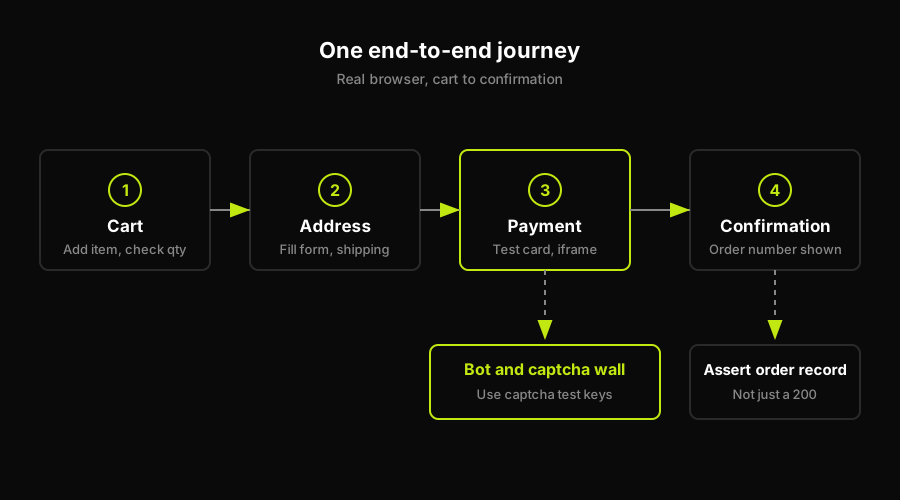
Testing a checkout flow end-to-end means driving the real browser from cart to confirmation in a test environment, paying with a test card, getting past bot detection with captcha test keys, and asserting on the confirmation page and the order record. API-level tests miss this entirely: they skip the UI, the iframe, the address form, and every redirect in between.
The checkout worked perfectly in staging. It worked in your manual QA pass. Then a real customer tried it on a Thursday afternoon and hit a blank confirmation screen after payment. No error in the logs, no failed API call. Just silence where there should have been an order number.
That gap is almost always a browser-layer failure. A redirect that only fires when a real payment provider responds. A race condition between the confirmation page mount and the order status API call. A DOM element that loads async and the test framework never waited for. The API passed. The browser failed. And the only way to catch that class of bug before your customers do is to drive the full end-to-end flow through a real browser, from cart to confirmation.
This post covers how to do exactly that, in a provider-agnostic way. The structure applies whether you're integrating Stripe, Braintree, Paddle, or a custom gateway. For deeper provider-specific detail (Stripe test cards, Stripe Checkout config), the Stripe-specific guide covers that ground in full.
What a checkout-flow E2E test covers
A checkout is not one action. It's a sequence of discrete steps that must succeed in order, each handing off state to the next. An E2E test that covers the full flow needs to walk all of them.
Cart is where it starts. The test navigates to a product page (or seeds a cart directly via the API if you want to skip catalog navigation), adds the item, and confirms the cart state reflects the right quantity and price before moving on. This seems trivial. It catches bugs when cart state doesn't survive a page reload or when the "Add to cart" button fires twice on a slow network.
Address and shipping is the first form-heavy step. The test fills billing and shipping fields, selects a shipping method, and advances. The assertions here are about the order summary updating correctly: shipping cost calculated, estimated delivery shown, totals matching. Bugs here tend to be about form validation edge cases and state not persisting between steps.
Payment is where the test environment diverges most sharply from production. In a test environment, your payment provider gives you test card numbers that trigger specific outcomes: successful payment, card declined, 3DS challenge required. The test enters one of these test cards into the payment form and submits. This is also where the bot detection wall appears, which the next section covers in detail.
Confirmation is the payoff assertion. A real browser E2E test doesn't just check that the HTTP response was 200. It checks that the confirmation page rendered with an order number, that the number is a real record in your database, and that the downstream side effects (inventory decremented, email queued, order status set to "pending") happened. That last layer is what separates a meaningful checkout test from a smoke check.
The full path, cart to confirmation, is one end-to-end test. Breaking it into four separate unit-style tests means you're testing steps, not the journey. The journey is what customers experience.
The recurring blocker: bot and captcha detection
Regardless of which payment provider you use, automated checkout runs hit the same wall: bot and fraud detection.
Payment providers protect their checkout flows aggressively. They fingerprint browser behavior, analyze mouse movement patterns, check whether JavaScript APIs associated with headless browsers are present, and rate-limit or block sessions that look automated. Captcha layers (reCAPTCHA, hCaptcha, Turnstile) add a second layer on top of that. Both are intentional. They exist because checkout flows are high-value targets for fraud.
For test environments, the standard approach is captcha test keys. Every major captcha provider offers a test mode: a specific site key that causes the captcha widget to auto-solve without any human interaction, and a corresponding secret key that always returns a successful verification response. The same pattern extends to payment providers: Stripe, Braintree, and others have test mode environments where bot-detection heuristics are relaxed, and specific test card numbers trigger specific responses. For the complete Stripe-specific setup, the Stripe checkout testing guide covers test keys, test cards, and payment intent configuration in depth.
The important principle is that your test environment must be configured at the environment level, not patched at the test level. Captcha test keys go in your staging environment's configuration. Payment provider test mode is toggled at the account or environment level. A test that works because someone hard-coded a test key into a test script will break the moment that script runs against a staging environment configured differently.
This is also the layer that breaks most often when teams try to run E2E checkout tests in CI. Headless browsers trigger bot detection more aggressively than headed ones. If your tests run fine locally but get blocked in CI, the first place to look is whether your CI environment is using a headed browser with proper user-agent configuration, and whether your test environment's captcha and fraud-detection settings are actually in test mode.
For a broader look at how payment gateway testing fits into your overall testing strategy, payment gateway testing covers the full picture from unit to integration to E2E. And if you're evaluating your E2E tooling options, e2e testing tools has a current comparison.
What to assert (and what API tests miss)
The assertion layer is where checkout E2E tests earn their keep, and where the gap between API-level testing and real-browser testing is widest.
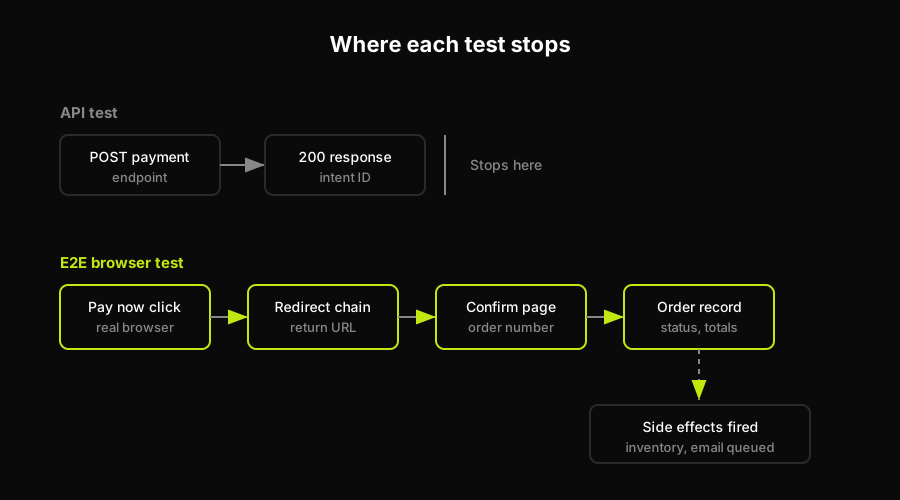
An API-level test for checkout typically does this: POST to the payment endpoint, receive a 200 response with a payment intent ID, assert the response body looks correct. That's a useful test. It is not a checkout test.
Here's what it misses.
The confirmation page render. The API returned 200. Did the browser navigate to the confirmation page? Did the confirmation page display an order number? Did it render in under three seconds, or did it time out while the user watched a spinner? A real-browser E2E test asserts that the confirmation page is actually visible, that the order number element exists and contains a non-empty string, and that the user is not looking at an error state or a loading state that never resolved.
The order record. An order number displayed on a confirmation page is not an order in your database. The test should check the order exists in your system: query the orders API (or directly against the test database) with the order ID from the confirmation page, and assert that the record exists, has the correct status, and contains the correct line items and totals.
Totals, tax, and inventory side effects. Did the tax calculation on the confirmation page match the tax shown during checkout? Did inventory decrement? These checks require the test to capture values earlier in the flow (totals shown at the payment step) and compare them against the confirmation page and the order record. The API test that validates the payment intent doesn't touch any of this.
Redirect integrity. Many checkout flows involve a redirect from your application to the payment provider's hosted page and back. API tests can't model this. A browser E2E test traverses the redirect chain, lands on the return URL, and asserts on what's there. This is where "blank confirmation screen" bugs live.
The API test proves your backend can create a payment intent. The E2E test proves that when a real customer clicks "Pay now," they end up on a confirmation page with a real order number. Both are necessary. Only one actually covers the checkout flow.
Why checkout tests rot
Checkout tests have a higher decay rate than almost any other category of E2E test. Understanding why is the first step to building tests that last.
This is the maintenance gap Autonoma is designed to close: keep the checkout behavior covered while the test plan follows code changes instead of stale selector assumptions.
Third-party iframes. Payment forms are almost always rendered inside iframes served by the payment provider. When the provider updates their checkout form (new field layout, new security token input, new CSS class on the card number input), your selector breaks. The provider ships that update on their schedule, not yours. You find out when CI fails.
Shifting payment provider UIs. Providers evolve their hosted pages. A button that was #submit-payment last quarter might be [data-testid="pay-button"] this quarter, or it might have moved inside a shadow DOM. These changes are rarely communicated. They just appear.
Captcha configuration drift. Test mode captcha keys need to be in the right environment. When someone rotates credentials, updates environment variables, or promotes a staging environment to a different tier, captcha test mode can silently fall through to production mode. The test starts timing out on the captcha step. The error message is unhelpful.
Address validation changes. Address autocomplete and validation services update their APIs and behavior. A test that relied on a specific autocomplete suggestion appearing may stop working when the suggestion changes or when the third-party service is unavailable in the test environment.
Order total rounding. Tax calculation logic changes. A new tax jurisdiction gets added. A rounding rule changes by one cent. The E2E test that hard-coded the expected total now fails on every checkout for a specific product-region combination.
The compounding effect is that a checkout test suite accumulates these small breaks. Each individual fix takes thirty minutes. But the team has six checkout tests, and they're all failing for different reasons, and fixing them requires understanding payment provider internals that no one on the team actually owns. The test suite gets disabled. The checkout goes untested. The bug that would have been caught hits production.
Autonoma addresses this differently. Rather than scripted selectors that you maintain, Autonoma's Planner agent reads your codebase and derives what the checkout flow should exercise. The Executor agent drives the real browser through that flow, including across iframes. The Reviewer agent separates real bugs from agent errors or environment issues. And the Diffs Agent re-evaluates the plan on every PR, so when your payment provider updates their iframe layout, the plan adjusts to what the code actually reflects, not to what a selector from six months ago expected. No one has to own the selector maintenance.
FAQ
Drive a real browser through the full journey: add a product to cart, fill address and shipping, enter a test card number provided by your payment provider, submit, and then assert on the confirmation page and the order record in your database. Configure your test environment with captcha test keys so bot detection doesn't block the automated run.
Payment providers and captcha services fingerprint browser sessions for fraud prevention. Automated browsers trigger those heuristics. The fix is to use your payment provider's test mode environment and captcha test keys (site key + secret key pair that auto-solves): these are configured at the environment level, not patched in individual tests.
No, not for the end-to-end checkout test. Mocking the payment means you never exercise the payment iframe, the redirect chain, or the confirmation page render. That is exactly where real bugs hide. Use your provider's test mode instead: real flows, real redirects, test cards that don't charge anyone.
Assert that the confirmation page renders with a visible order number, that the order record exists in your system with the correct status and line items, that totals match what was shown at the payment step, and that downstream side effects (inventory, email queued) fired. API-level assertions on the payment response are not sufficient on their own.
Checkout flows are unusually fragile for E2E tests because they cross third-party boundaries: payment provider iframes that update on the provider's schedule, captcha configuration that drifts when environments change, and address validation services that behave differently in CI. Each of these breaks independently and requires knowing the payment provider internals to debug.


