

Payment gateway testing verifies that a checkout flow processes real and failed transactions correctly, securely, and end-to-end, across successful payments, declines, refunds, and 3D Secure, before customers ever hit a Transaction Failed screen. The hard part is not the API layer. It is the browser checkout that a customer actually clicks through.
The test suite was green. Every unit test passed. The integration tests confirmed the API returned the right status codes. Then we deployed, and real customers started hitting a checkout that silently declined valid cards and returned a generic error. The culprit was not the API. It was a bot-detection flag Stripe raised because the automated test had been filling the card fields programmatically in a way no real browser does. The suite had never tested what the customer actually saw.
That gap lives at the intersection of two things most guides either ignore or brush past: the cross-origin iframe that Stripe Elements uses to keep merchants PCI-compliant, and the bot-detection layer that prevents automated tools from treating that iframe like a normal DOM element. Understanding both is what separates a payment testing strategy that gives real confidence from one that only tests what is already easy to test.
What is payment gateway testing?
Payment gateway testing is the practice of verifying that the complete transaction path from a user entering payment details to a confirmed or declined result works correctly across all meaningful scenarios. It covers the browser UI, the API calls between the merchant and the gateway, the webhook delivery that triggers downstream fulfillment, and the security controls that protect cardholder data.
The distinction between a payment gateway and a payment processor matters here. The gateway is the front-end layer that securely captures and transmits card data from the browser to the processor. Examples: Stripe, Braintree, Adyen, Square. The processor is the back-end network that actually moves money between banks. Most of the time, Stripe acts as both, but the testing surface is the gateway: the checkout UI, the API, the webhooks, and the redirect flows.
When teams say "payment testing," they usually mean API-level tests against Stripe's test mode. Those are necessary but not sufficient. A real customer experiences the gateway, not just the API. Testing only the API is the equivalent of unit testing the payment service and declaring the checkout done.
Types of payment gateways
The gateway type determines what automation can reach and where the cross-origin iframe problem appears.
Hosted gateways redirect the customer to the gateway's own page (PayPal's classic redirect, older Stripe Checkout). The merchant never touches card data. Testing means asserting what happens before and after the redirect: the cart state that goes in, and the session or webhook that comes back.
Self-hosted gateways put the payment form on the merchant's own page, with card data posted directly to the gateway API. These are rare today because they require full PCI-DSS SAQ D compliance: every part of the merchant's stack that touches card data is in scope.
API-hosted gateways (the dominant modern pattern: Stripe Elements, Braintree Drop-in UI, Adyen Web Components) render the card-input fields in a cross-origin iframe served by the gateway's own domain. The merchant page embeds the iframe but cannot read its contents. This keeps the merchant out of PCI scope while still giving full UI control. It is also what makes browser automation hard.
Local bank integrations connect directly to national banking infrastructure (common in emerging markets). These generally require deeper financial-system testing and country-specific test environments.
What you actually test: the 6 testing types
Functional testing is the core: does a valid card get charged, does an expired card get declined, does a refund credit correctly? This is where most payment test plans begin and, unfortunately, end.
Integration testing verifies the connections between components: the merchant application, the gateway API, the webhook receiver, and any downstream systems like fulfillment or accounting. A payment that succeeds at the API layer but never fires a webhook is a real failure mode that pure functional testing misses.
Security testing confirms that card data is never exposed in logs, that the gateway's iframe cannot be bypassed, that the API endpoints reject unsigned or replay-attacked requests, and that real card numbers cannot be submitted against the test environment. PCI-DSS audit coverage starts here.
Performance testing validates that the checkout holds up under load. Slow gateway responses, timeout handling, and payment-page load time under concurrent users are all in scope.
Usability testing covers the customer experience during payment: error messages that are specific enough to act on (not just "payment failed"), accessibility of the card form, mobile keyboard behavior on the card number field, and what happens when the customer navigates back mid-checkout.
Compliance testing verifies 3D Secure (3DS2/SCA) challenge flows, correct use of gateway test environments versus production, and alignment with the gateway's own terms of service (which explicitly prohibit using real card numbers in test mode).
Payment gateway test cases
A test case table that lists only "enter valid card number, expect success" is not useful. Real coverage means testing the boundary conditions: what does the UI show when the card is expired, what happens when the customer submits twice, does the webhook fire before or after the redirect. The table below covers the scenarios that matter.
| ID | Scenario | Steps | Expected result | Priority |
|---|---|---|---|---|
| PG-01 | Successful payment (Visa) | Fill valid test card, submit | Order confirmed, webhook fires, receipt sent | P0 |
| PG-02 | Successful payment (Mastercard) | Fill valid Mastercard test card, submit | Order confirmed, different brand handled | P0 |
| PG-03 | Generic card decline | Use decline test card, submit | Inline error: "Your card was declined." Order NOT created | P0 |
| PG-04 | Insufficient funds | Use insufficient-funds test card | Inline error: "Insufficient funds." Retry offered | P0 |
| PG-05 | Expired card | Use past expiry date on any card | Inline error: "Your card has expired." | P0 |
| PG-06 | Incorrect CVC | Submit wrong CVC | Inline error: "Your card's security code is incorrect." | P1 |
| PG-07 | Lost or stolen card | Use lost/stolen test card | Decline, no specific reason exposed to user | P1 |
| PG-08 | 3D Secure: challenge required | Use 3DS-required test card | Authentication modal appears; pass auth; payment succeeds | P0 |
| PG-09 | 3D Secure: authentication fails | Use 3DS-required card, fail auth step | Payment declined; order NOT created | P1 |
| PG-10 | 3D Secure: challenge not supported | Use 3DS-unsupported card | Payment processed without challenge | P2 |
| PG-11 | Full refund | Complete order, trigger full refund via dashboard/API | Refund webhook fires; customer notified; balance restored | P0 |
| PG-12 | Partial refund | Refund 50% of order | Partial amount refunded; original charge shows partial refund | P1 |
| PG-13 | Duplicate submission | Submit payment form twice rapidly | Only one charge created; submit button disabled after first click | P0 |
| PG-14 | Session timeout during checkout | Leave checkout idle until session expires, then submit | Graceful error shown; cart preserved; user prompted to retry | P1 |
| PG-15 | Network error mid-submission | Simulate offline/network drop after submit click | Error state shown; no double charge | P1 |
| PG-16 | Webhook: payment_intent.succeeded | Complete a successful payment | Webhook received within 5s; order status updated | P0 |
| PG-17 | Webhook: payment_intent.payment_failed | Trigger a decline | Failure webhook received; order marked failed | P0 |
| PG-18 | Webhook ordering race | Assert fulfillment works regardless of webhook arrival order | Order fulfillment idempotent; no duplicate processing | P1 |
| PG-19 | Currency: USD | Complete checkout in USD | Amount formatted correctly; currency confirmed on receipt | P0 |
| PG-20 | Currency: EUR (different region) | Complete checkout in EUR | Correct decimal formatting; VAT shown if applicable | P1 |
| PG-21 | Invalid card number format | Enter 15 digits instead of 16 | Client-side validation prevents submission; error inline | P1 |
| PG-22 | Empty required fields | Submit without card number, expiry, or CVC | Field-level errors shown; form not submitted | P1 |
| PG-23 | Promo/discount code applied | Apply valid discount, then pay | Correct discounted amount charged | P1 |
| PG-24 | Retry after decline | Decline once, enter a valid card on retry | Second attempt succeeds; only one charge | P1 |
| PG-25 | Mobile checkout (responsive) | Complete checkout on a 375px viewport | Card form usable on mobile; numeric keyboard fires | P1 |
Sandbox vs test mode vs production
These three terms get conflated constantly, and the confusion leads to tests running against the wrong environment.
Test mode is a toggle on the Stripe (or equivalent) account. When enabled, the API accepts test card numbers, charges no real money, and isolates all transactions from live data. Test mode has its own API keys (prefixed sk_test_ and pk_test_). All test cases in this guide run in test mode.
Sandbox is a term some gateways (PayPal, Braintree, Adyen) use for their dedicated test environment, sometimes a completely separate URL and account. Stripe does not use the word "sandbox" officially: their equivalent is test mode, which lives within the same account. When someone says "Stripe sandbox," they mean Stripe test mode.
Production is the live environment with real money, real cards, and real customers. You should never run automated tests against production. Stripe's terms of service prohibit using real card numbers in test mode, and conversely, using test cards in live mode will fail.
The practical rule: keep your test API keys in a .env.test file, never commit real keys, and assert at the start of every test run that the key prefix is sk_test_, not sk_live_.
The hard part: testing checkout end-to-end in a real browser
Everything up to this point, API tests, webhook tests, unit tests against the payment service, can be written and run reliably. The part that breaks teams is testing what a customer actually sees: the checkout UI, the card form, the 3DS challenge modal, and the confirmation screen, in a real browser.
Two things work together to block naive automation.
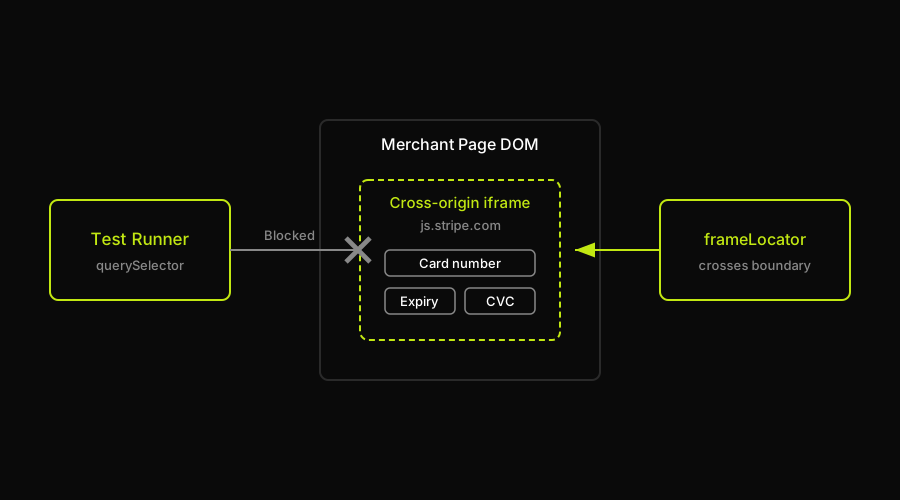
The cross-origin iframe. Stripe Elements renders the card number, expiry, and CVC fields inside an iframe served from js.stripe.com. The merchant's page embeds the iframe, but cannot read its contents. This is intentional and security-critical: it is what keeps the merchant out of PCI scope. It also means a test runner cannot simply document.querySelector('[name="cardnumber"]') and fill the field. The selector does not exist in the merchant page's DOM. Playwright handles this via frameLocator(), which crosses the iframe boundary explicitly. Cypress requires either cy.origin() or disabling web security, both of which come with tradeoffs.
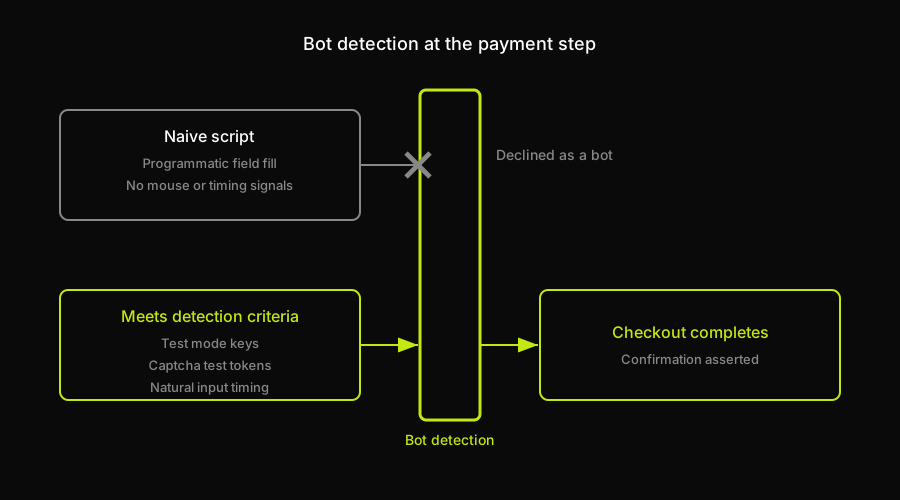
Bot detection. Stripe itself states that its security measures are designed to prevent automated testing of the checkout. The exact wording from Stripe's own documentation: "Frontend interfaces, like Stripe Checkout or the Payment Element, have security measures in place that prevent automated testing." This is not a bug. It is the fraud-prevention layer working as intended. A script filling card fields programmatically, without the mouse movements, focus events, and timing patterns of a real user, can trigger Stripe's bot detection and cause the payment to decline even with a valid test card.
The path through it is not to bypass detection but to meet its criteria. Using test mode with test API keys tells Stripe this is not a real transaction. Using captcha providers' own test keys (Recaptcha's test key always returns a passing score, Turnstile has equivalent test tokens) eliminates the CAPTCHA layer without bypassing the security model. A test runner that interacts with the iframe via frameLocator() and fills fields with natural input event timing gets much closer to what Stripe's detection layer expects.
The teams that struggle most with this are the ones who write the API tests first, confirm those pass, and then discover that the browser checkout works completely differently. The api and the browser are not the same testing surface.
Mock vs test-mode vs real-browser E2E
Most payment testing guides recommend mocking the payment step. That approach keeps tests fast and eliminates the iframe problem entirely. The tradeoff is that it never tests the checkout the customer actually sees.
| Approach | What it tests | Catches iframe/UI bugs? | Catches webhook bugs? | Maintenance cost |
|---|---|---|---|---|
| Mock the payment step | Your app's logic around payment events | No | Only if webhook mock is realistic | Low (no external dependency) |
| Stripe test mode (API only) | API integration, webhook delivery, charge lifecycle | No | Yes | Low, stable API surface |
| Real-browser E2E (scripted) | Full checkout UI, iframe interaction, 3DS modal | Yes | Yes (if asserted) | High (iframe selectors break on Stripe updates) |
| AI-agent real-browser E2E (Autonoma) | Full checkout UI, iframe, 3DS, confirmation flow | Yes | Yes | Low (agent re-derives the flow when UI changes) |
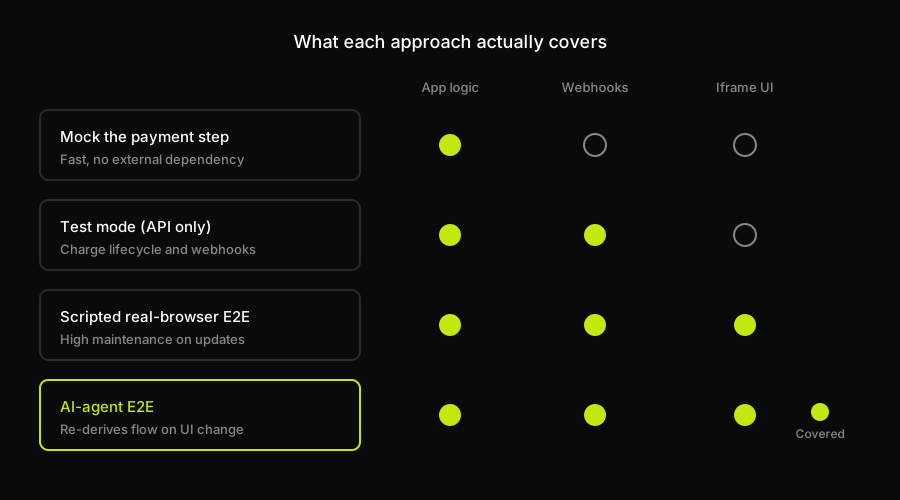
The mock approach is right for unit and integration tests that verify your own application logic. The API-only test-mode approach is right for webhook integration and charge lifecycle coverage. Neither replaces real-browser E2E coverage of the checkout a customer sees.
For real-browser E2E, the honest choice is between scripted automation (high maintenance because iframe selectors break when Stripe updates its hosted fields markup) and an agent-driven approach. Autonoma drives the real browser in test mode, completing the checkout a customer actually clicks through: the Executor agent navigates to the checkout, interacts with the Stripe Elements iframe, fills a test card, completes any 3DS challenge, and asserts on the confirmation screen. When Stripe updates its hosted fields markup and the selectors change, the Diffs Agent re-derives the interaction from the live application rather than failing on a stale selector.
Why checkout tests break
The browser checkout is the highest-maintenance surface in the payment testing stack. Understanding why helps you build a suite that survives.
Webhook ordering and race conditions. Stripe does not guarantee the arrival order of webhook events. invoice.paid can arrive before checkout.session.completed. Tests that assert fulfillment triggered "after the success webhook" fail intermittently because the assertion races the webhook delivery. The fix is to make fulfillment idempotent and to assert on the final state rather than the event sequence: did the order get marked fulfilled, not which webhook fired first.
Brittle iframe selectors. Stripe updates the markup inside Stripe Elements periodically. A test that reaches into the iframe by CSS class name or data attribute will break when Stripe ships a hosted-fields update. This is the primary reason scripted real-browser payment tests have a reputation for being fragile. The iframe's internal DOM is not a stable public API.
Test-data drift. Test cards get added, deprecated, and have their behavior adjusted. A test that relied on a specific test card triggering a specific decline code needs to be verified against the current Stripe test documentation whenever the test suite is updated. Hardcoding card numbers without a reference to their current documented behavior is a maintenance debt that compounds.
3DS challenge flakiness. The 3DS authentication modal is itself a hosted iframe, layered on top of the payment iframe. Automation that works in a headed browser often fails in headless mode because some 3DS challenge UI relies on browser features that headless configurations handle differently. Running payment tests in a headful browser mode, or in a real browser via a cloud provider, is significantly more reliable.
PCI-DSS and security testing
PCI-DSS (Payment Card Industry Data Security Standard) defines what you must protect and how. The scope for most modern web applications using a hosted gateway like Stripe Elements is narrow: because card data never passes through the merchant's servers, most merchants qualify for SAQ A (Self-Assessment Questionnaire A), the simplest compliance tier.
The most important security testing principles for the gateway layer:
Never store or log real card numbers anywhere in your application stack. Even in test environments, use only Stripe's documented test card numbers. Real cards in test mode violate Stripe's terms of service.
Verify that the card fields are genuinely isolated in the gateway's iframe and not replicated in the merchant page's DOM. A misconfigured Stripe integration can accidentally expose card input to the merchant page.
Test that your webhook endpoint verifies Stripe's signature header (stripe-signature) before processing events. An endpoint that processes any webhook without verifying the signature is vulnerable to event injection.
Test that your application handles the case where the same webhook event is delivered more than once. Stripe guarantees at-least-once delivery, not exactly-once. Idempotency keys and deduplication logic should be tested explicitly.
If your application handles subscriptions or saved cards, verify that the Stripe customer ID and payment method tokens are stored correctly and that the actual card numbers never appear in your database or logs.
The PCI-DSS scope expands significantly if you ever touch raw card data. If you use Stripe Elements or Stripe Checkout correctly, you do not. Verify this by reviewing what your backend actually receives: it should receive a payment intent ID or a token, never a card number.
FAQ
Payment gateway testing verifies that a checkout flow processes transactions correctly end-to-end, including successful payments, declines, refunds, 3D Secure challenges, and webhook delivery, before real customers encounter failures. It covers the browser UI, the API integration, the webhook receiver, and security controls.
Yes, but with important constraints. Stripe itself states that its security measures are designed to prevent automated testing of the checkout. The card fields live in a cross-origin iframe that prevents direct DOM access. Reliable automation uses Playwright's frameLocator() to interact with the iframe, Stripe test mode with test API keys, and captcha providers' own test keys to avoid captcha blocks. Scripts that programmatically fill card fields without realistic browser interaction patterns risk triggering bot detection even with test cards.
In Stripe's terminology, test mode is the correct term: a toggle within the same Stripe account that accepts test card numbers and charges no real money, identified by API keys prefixed sk_test_. Other gateways like PayPal and Braintree use the term sandbox for a completely separate test account. When someone says Stripe sandbox, they mean Stripe test mode. Production is the live environment with real card processing and should never be used for automated testing.
The checkout gets blocked for two related reasons. First, Stripe Elements renders card fields in a cross-origin iframe served from js.stripe.com. A test runner cannot access the iframe's DOM directly with standard selectors; it must use a method like Playwright's frameLocator() to cross the iframe boundary. Second, Stripe's bot detection layer identifies automated interactions and can decline test-card payments if the interaction pattern does not resemble a real user. Using Stripe test mode and captcha test keys helps, but the iframe interaction must still use proper browser automation APIs.
Use Stripe test mode with test API keys (prefixed sk_test_) and Stripe's documented test card numbers. Test cards like 4242 4242 4242 4242 simulate a successful payment; others simulate specific decline codes, insufficient funds, expired cards, and 3D Secure challenges. No real money moves, no real cards are charged, and the test transactions are completely isolated from your live Stripe account. Never use real card numbers in test mode and never use test cards in live mode.


