

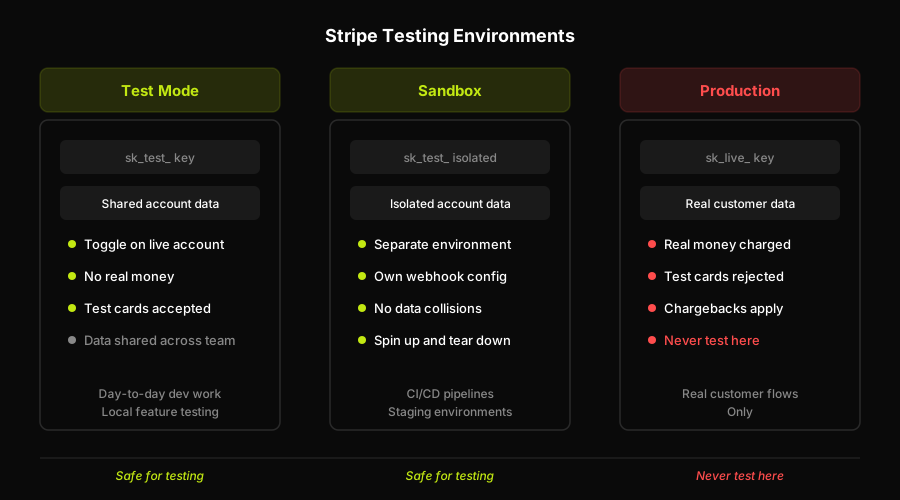
Stripe test mode uses test API keys (sk_test_... / pk_test_...) on your live account with no real money processed. Stripe sandboxes are isolated environments with separate account data and configuration, designed for parallel or team testing without polluting shared test data. Production (live mode) processes real charges with real cards. Never run test transactions in live mode. Use test mode or a sandbox for all payment testing.
Docs call it "sandbox." Tutorials call it "test mode." Stack Overflow answers use both terms for the same thing. If you've ever stared at a Stripe Dashboard toggle and wondered whether "test mode" and "sandbox" refer to the same concept or two different features, you're not alone. Most teams I've talked to spent weeks building their test suite against the wrong Stripe environment, then had to refactor when the behavior didn't match what they needed.
There are actually three distinct environments in Stripe's world. Understanding the difference saves real time during test setup and prevents the kind of account-risk situations that Stripe's Services Agreement is designed to catch.
Stripe test mode explained
Test mode is the simplest of the three. It's a toggle on your existing Stripe account. When you flip the Dashboard switch from Live to Test, you start using a different set of API keys: sk_test_... for your secret key and pk_test_... for the publishable key. Those test API keys route all operations through Stripe's test infrastructure, not the real payment network.
Nothing you do in test mode touches real money. You can create customers, attach payment methods, run charges, trigger webhook events, and observe the full Stripe lifecycle without a single cent changing hands. Test cards (like the canonical 4242 4242 4242 4242) only work in test mode. Attempt to use one with live keys and Stripe will reject it.
What test mode shares with your live account is everything else: the same Dashboard, the same webhook endpoints, the same customer records if you've set them up. It's the same account, just switched into a simulated payment rail. For many teams doing day-to-day feature development, test mode is all they need. The full Stripe test cards reference covers the complete set of cards, decline scenarios, and 3D Secure flows available in test mode.
The catch: when multiple developers share one Stripe account, their test data collides. One developer's test customers and subscriptions mix with another's. That's where sandboxes come in.
Stripe sandboxes explained
Stripe sandboxes are isolated environments, not just a toggle. A sandbox is a separate copy of your Stripe account with its own test data and its own configuration. It has its own API keys, its own webhook endpoints, its own set of customers and subscriptions. Nothing created in one sandbox bleeds into another, and nothing in a sandbox affects your main account's test data.
The practical upshot: your staging environment, your CI pipeline, and your local dev setup can each point to a different sandbox without any data collision. One developer's test customers don't overwrite another's. A CI run that creates 50 test subscriptions to exercise billing edge cases doesn't pollute the shared test data your QA team is using against a separate sandbox.
Sandboxes were introduced to solve exactly the team-scale problem that plain test mode creates. They're the right tool when you need parallel, isolated testing across environments or team members. Each sandbox acts as an independent test environment, complete with its own configuration. Think of test mode as a single shared testing lane and sandboxes as private lanes you can spin up, configure independently, and tear down.
When to use which
| Environment | Use it for | What to avoid |
|---|---|---|
| Test mode | Day-to-day dev testing, local feature work, verifying payment logic with test cards | Running simultaneous test suites that create conflicting data; using with real card details |
| Sandbox | Isolated CI pipelines, staging environments, parallel team testing, reproducing specific account states | Treating it as a production-parity environment; it still uses test infrastructure, not real payments |
| Production (live mode) | Real customer transactions only | Running test transactions, using test cards, submitting real card numbers to "see if it works" |
For Autonoma runs, the same boundary matters: point each preview deployment at the intended test-mode or sandbox keys, then let the generated browser test exercise that environment consistently.
How Autonoma Automates Payment Flow Testing
Knowing which Stripe environment to point your tests at is step one. The harder part comes next: actually driving the checkout UI in that environment, repeatably, as your application changes.
Most teams handle this with hand-written Playwright or Cypress scripts. Those scripts work until they don't. A UI refactor, a new bot-detection flag from Stripe, a component rename: any of these can silently break a payment test. The test passes locally but fails in CI, or passes in CI and fails in staging. Tracking down whether the failure is a real regression or a test maintenance artifact takes time that compounds across every sprint.
Autonoma takes a different approach. Our Planner agent reads your checkout routes and components directly from your codebase. It generates test cases from what the code actually does, not from what someone remembered to record. The Executor drives the real Stripe Checkout UI in a live preview environment pointed at test mode (no mocks, no stubbed responses). The Reviewer classifies each result: real bug, agent error, or test/plan mismatch. And the Diffs Agent runs on every PR, reading the code diff to add, update, or deprecate payment tests as your checkout changes.
For teams working across test mode and sandboxes, this matters because we wire the Executor against the right isolated environment for each deployment. A PR pointed at a staging sandbox gets tested against that sandbox's configuration. The main branch tests against a shared team sandbox or test mode, depending on how your pipeline is set up. Payment coverage follows the code, not the other way around.
The full walkthrough of how we drive the Stripe Checkout UI past bot detection is in How to Test Stripe Checkout. For a broader view of payment testing strategy, the payment gateway testing guide covers test case design, sandbox setup, and the full testing lifecycle.
The rule: never test with real cards in live mode
This is not just a best practice. It's a Stripe Services Agreement requirement. Submitting real card numbers in live mode to "see if the integration works" is explicitly prohibited. Stripe's terms bar using the live payment infrastructure for test purposes.
The reasons are practical, not just legal. Running a real card through your checkout to test it creates an actual charge, which a customer might dispute. Chargebacks trigger review flags on your account. A series of small-amount live transactions with real cards, all originating from automated scripts, looks like fraud to Stripe's risk systems. Even if you immediately refund each charge, the transaction pattern can trigger account-level reviews or holds. Refunds don't cancel the chargeback risk window.
There's no reason to take that risk. Test mode and sandboxes exist precisely to run real payment logic without real money. Test cards cover the full range of scenarios: successful payments, card declines by code, insufficient funds, 3D Secure challenges, network errors. Every scenario you'd want to verify in production has a test card equivalent. Use it.
The practical rule is simple: if the API key starts with sk_live_, only real customer payment flows should reach it. Anything that touches test data, test cards, or automated test scripts belongs on a key that starts with sk_test_.
FAQ
Stripe test mode is a toggle on your existing Stripe account that switches it to a simulated payment environment using test API keys (sk_test_... and pk_test_...). No real money is processed in test mode. You can create charges, customers, subscriptions, and webhooks, and test cards like 4242 4242 4242 4242 work exclusively in this mode.
A Stripe sandbox is an isolated environment separate from your main Stripe account's test data. It has its own API keys, its own customers and subscriptions, and its own webhook configuration. Sandboxes are designed for scenarios where multiple team members or environments need isolated test data that doesn't collide, such as CI pipelines, staging environments, or parallel development work.
Test mode is a toggle on a single Stripe account that switches to a simulated payment rail with no real money. A sandbox is an entirely isolated environment with its own separate data and configuration. Test mode is shared across everyone using the same account; sandboxes give each environment or team its own isolated copy of test data. If you need to run parallel tests without data collisions, use sandboxes.
No. Testing in Stripe live mode using real cards or test card numbers is prohibited by the Stripe Services Agreement. Running test transactions in live mode risks chargebacks, fraud flags on your account, and account-level review or holds. Use test mode or a sandbox for all payment testing. Test cards only work with test API keys anyway, so attempting to use them in live mode will result in a rejection.
In the Stripe Dashboard, use the toggle in the top navigation bar to switch between Test and Live mode. Once in test mode, use the test API keys (sk_test_... for server-side, pk_test_... for client-side) in your application configuration. Any Stripe API call made with test keys will be routed through test mode automatically, regardless of the Dashboard toggle state.


