

Stripe test cards let you simulate payments in test mode without touching real money. The canonical success card is 4242 4242 4242 4242 (Visa): use any future expiry, any 3-digit CVC, any postal code. Decline codes, 3D Secure flows, and network-specific brands each have dedicated card numbers listed below. What test cards do NOT solve: automating the full checkout flow in a real browser, where bot-detection kicks in and breaks naive automation.
You found the number. That part was easy.
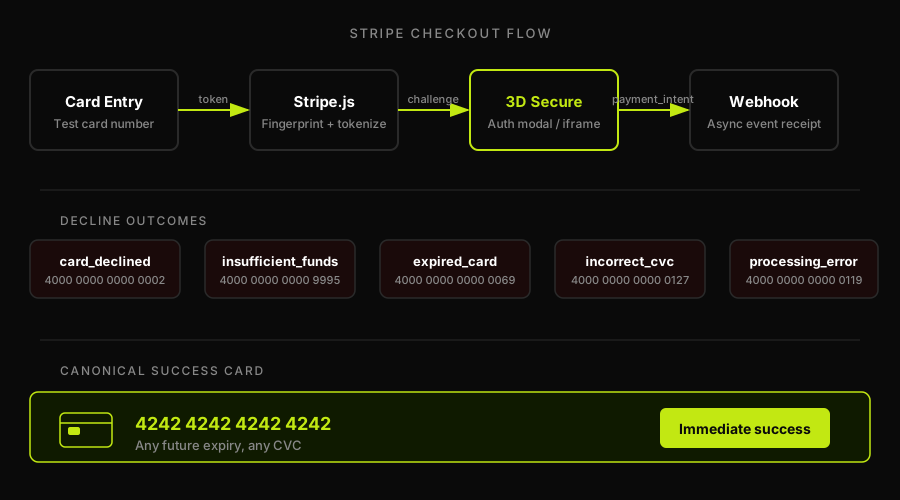
The harder part is the checkout it sits inside. The form that validates the card, triggers the Stripe.js fingerprint, hands off to 3D Secure, waits for the webhook, and redirects to a success page. A test card number gives you a credential. It does not give you a working automated test of the thing that credential is supposed to unlock.
That gap is what this guide addresses: the literal numbers first, then the wall teams hit when they try to automate the flow those numbers live in.
Stripe test cards: the complete reference
All test cards below work only in test mode (with keys prefixed sk_test_ or pk_test_). They never work in production. Use any future expiry date, any 3-digit CVC (4 digits for American Express), and any postal or ZIP code.
| Scenario | Card Number | Brand | What It Triggers |
|---|---|---|---|
| Standard success | 4242 4242 4242 4242 | Visa | Immediate charge, no friction |
| Visa debit success | 4000 0566 5566 5556 | Visa (debit) | Succeeds as debit card |
| Mastercard success | 5555 5555 5555 4444 | Mastercard | Immediate charge |
| Mastercard 2-series | 2223 0031 2200 3222 | Mastercard | Immediate charge (2xxx BIN) |
| Mastercard debit | 5200 8282 8282 8210 | Mastercard (debit) | Succeeds as debit card |
| American Express | 3782 822463 10005 | Amex | Immediate charge (4-digit CVC) |
| Discover | 6011 1111 1111 1117 | Discover | Immediate charge |
| Diners Club | 3056 9300 0902 0004 | Diners Club | Immediate charge |
| JCB | 3566 0020 2036 0505 | JCB | Immediate charge |
| UnionPay | 6200 0000 0000 0005 | UnionPay | Immediate charge |
Decline and error test cards
These cards simulate specific failure scenarios your checkout flow must handle gracefully. Each one triggers a distinct decline code from Stripe.
| Decline Code | Card Number | What It Triggers |
|---|---|---|
| card_declined (generic) | 4000 0000 0000 0002 | Generic decline with no specific reason |
| insufficient_funds | 4000 0000 0000 9995 | Decline: insufficient funds |
| lost_card | 4000 0000 0000 9987 | Decline: card reported lost |
| stolen_card | 4000 0000 0000 9979 | Decline: card reported stolen |
| expired_card | 4000 0000 0000 0069 | Decline: card expired |
| incorrect_cvc | 4000 0000 0000 0127 | Decline: CVC check fails |
| processing_error | 4000 0000 0000 0119 | Decline: processor-side error |
| incorrect_number | 4242 4242 4242 4241 | Fails Luhn check before reaching Stripe |
Every decline scenario is something your checkout UI needs to handle. If the user sees a cryptic "Something went wrong" on an insufficient_funds decline, that is a bug worth catching in test mode before it reaches production.
3D Secure test cards
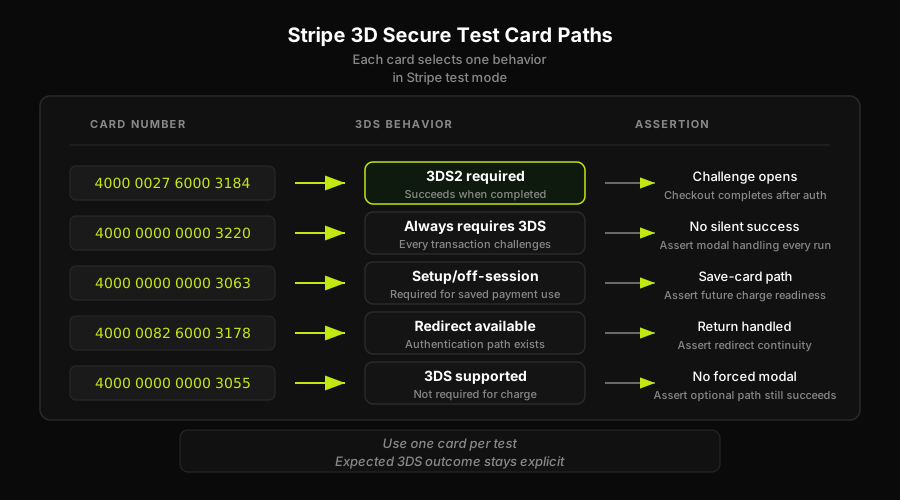
3D Secure adds an authentication step between card entry and charge. The cards below let you test each 3DS path: required-and-completes, required-on-all, off-session, and optional.
| Scenario | Card Number | What It Triggers |
|---|---|---|
| 3DS2 required, succeeds when completed | 4000 0027 6000 3184 | Pops 3DS modal; charge succeeds on completion |
| 3DS2 required on all transactions | 4000 0000 0000 3220 | Always requires 3DS authentication |
| 3DS2 required (setup/off-session) | 4000 0000 0000 3063 | Required for setup intents and off-session charges |
| 3DS required, authentication available | 4000 0082 6000 3178 | 3DS redirect, auth available path |
| 3DS2 supported but not required | 4000 0000 0000 3055 | 3DS supported; charge can proceed without it |
Test cards are step one: the checkout is the hard part
Here is the scenario every engineering team hits eventually. You add the test card number to your Cypress or Playwright script. The form fills. The submit button clicks. Then nothing. Or worse: an error that only appears in headless browsers. Or a Stripe.js fingerprint that behaves differently when no real user interaction is detected.
Test cards work perfectly when you type them manually. They are credentials, not test runners. Getting a headless browser through a real Stripe checkout flow is a different problem entirely.
The wall has a few layers. Stripe.js itself runs behavioral signals in the browser to detect bot-like patterns. The 3DS redirect requires navigating to an iframe from a different origin and interacting with it under timing constraints. Webhooks fire asynchronously, which means your test needs to wait for the right event before asserting on the success state. None of that is a card-number problem.
This is where payment gateway testing as a discipline diverges from simply having the right test card. You need a real browser that can handle the full checkout flow: Stripe.js fingerprinting, 3D Secure iframe navigation, webhook receipt, redirect, and final state assertion.
For the full end-to-end checkout walkthrough, including how to structure the test, handle the async webhook, and assert on the post-payment state, see our guide on how to test Stripe checkout (the walkthrough post covers the step-by-step implementation in detail). For the conceptual difference between test mode and a sandbox environment, see our companion piece on Stripe test mode vs sandbox.
Autonoma is a real-browser agent that reads your checkout flow from the codebase, generates test cases, and executes them in a live preview environment in test mode. It handles the Stripe.js fingerprinting because the agent runs inside a real browser, not a headless script that trips bot-detection. When a 3D Secure challenge fires, the agent navigates the modal the same way a human would. When the webhook arrives, the Reviewer agent waits for the state to settle before asserting.
The result: you get coverage of the checkout flow itself, not just coverage of "did the card number parse." Test cards are the credential. Autonoma is the test runner that uses them in an environment that actually resembles production.
FAQ
The primary Stripe test card number is 4242 4242 4242 4242, a Visa card that succeeds immediately in test mode. Use any future expiry date, any 3-digit CVC, and any postal code. It only works with Stripe keys prefixed sk_test_ or pk_test_. It never works in production.
4242 4242 4242 4242 is Stripe's canonical success test card. It simulates a Visa card that clears immediately with no decline or authentication challenge. It is the most commonly used test card for verifying that a basic checkout flow works end to end in test mode.
Use one of Stripe's decline test cards. For a generic decline, use 4000 0000 0000 0002 (card_declined). For insufficient funds, use 4000 0000 0000 9995. For an expired card, use 4000 0000 0000 0069. Each card triggers a specific decline code so you can verify that your checkout flow handles each failure case correctly.
Use 4000 0027 6000 3184 to trigger a 3D Secure 2 authentication flow that succeeds when completed. This card pops the 3DS modal during checkout. For a card that always requires 3DS on every transaction, use 4000 0000 0000 3220. These cards only work in test mode and let you verify that your checkout handles the 3DS redirect and modal interaction correctly.
No. Stripe test cards only work when you use test-mode API keys (prefixed sk_test_ or pk_test_). If you attempt to use a test card number against a live-mode key, Stripe will reject the request. Test cards are entirely separate from the production card network and will never result in a real charge.


