

To test TOTP-based 2FA in automation, store the shared secret seed as a test fixture, generate the current 6-digit code with a library like otpauth at runtime, enter it in the login flow, and also test backup codes and rate limits. MFA tests flake because the code is time-based and rotates every 30 seconds: any delay between generating and submitting can push you into the next window.
Every manual login with an authenticator app has a step automation cannot replicate by default: you pick up your phone, open Google Authenticator or Authy, and copy the six digits currently showing on screen. An automated test has no phone and no app to tap. If you wire your test to do what a human does and reach for a code at runtime, you need a way to generate that code from first principles. The shared secret the app uses is the key. Store it, and the test can generate the exact same code the authenticator app would show at any given moment.
This guide covers that technique in full: how to set up the fixture, generate the code, enter it in the flow, and stabilize the test against the one timing hazard that causes most MFA flakes.
Why MFA Is Hard to Automate
Authenticator apps use TOTP (Time-based One-Time Password), a standard defined in RFC 6238. The server and the authenticator app share a secret at enrollment time. At every 30-second interval they both compute the same 6-digit code from that secret plus the current Unix timestamp. The server checks that what the user entered matches what it computed. No database lookup, no network call: just a hash.
This is elegant for security and awkward for testing. Three things make it harder than a normal password field:
The code changes. A 30-second window is not a long time. A test that generates a code and then navigates through a slow page load, retries a flaky selector, or hits a network timeout can arrive at the submit button in the next window. The old code is now invalid.
The secret is sensitive. The Base32 seed that enrolls a user in TOTP is equivalent to their MFA credential. It cannot live in source control as plaintext. It belongs in a secret manager or CI environment variable, loaded at runtime.
Re-enrollment is destructive. You cannot simply "re-enroll" a test user on every test run to get a fresh secret. That resets the user's MFA state, breaks session continuity, and is not a realistic simulation of a returning user.
The practical solution: enroll a dedicated test user once, save the shared secret securely, and have every test run generate the current code from that secret at runtime.
Generating TOTP Codes with otpauth
The otpauth npm package implements RFC 6238 directly. You point it at the same Base32 secret the authenticator app holds, and .generate() returns the 6-digit code valid right now.
Here is the helper module:
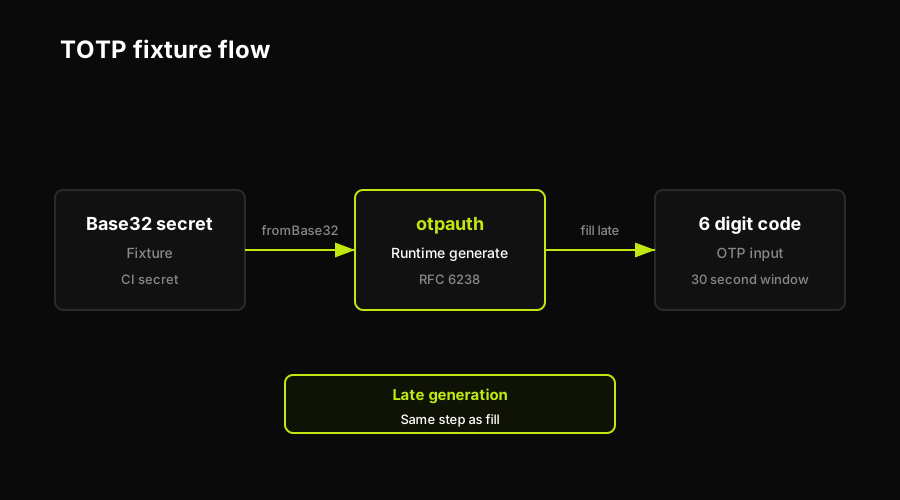
The shared secret lives as a fixture, otpauth generates the current code at runtime, and the test fills it into the OTP input.
The key points in that file:
Secret as a fixture. The Base32 seed goes into a CI secret or a .env.test file that is gitignored. The helper reads it from process.env.MFA_TOTP_SECRET. Every test that needs to complete an MFA step calls generateTOTP() without knowing where the secret lives.
OTPAuth.Secret.fromBase32(). This parses the raw Base32 string into the format the TOTP constructor expects. You can also pass an OTPAuth.Secret instance directly if you prefer to construct it earlier in setup.
Constructor options match your app's MFA config. Most TOTP implementations use SHA1, 6 digits, 30-second period. If your app configured a different algorithm or period during enrollment, mirror those values here. A mismatch produces a valid-looking code that the server will always reject.
.generate() is synchronous and uses wall clock time. It computes the code for the current 30-second window. Call it as late as possible in the test, immediately before filling the OTP input.
The SMS OTP alternative (where the server texts a code to a phone number) is a different pattern entirely. That approach intercepts the message at the carrier or provider level rather than generating from a seed. The OTP login flow testing guide covers that in detail.
One more timing detail: the helper module generates the code synchronously at the moment it is called. If your page-under-test takes more than a second or two to render the OTP input after username and password are submitted, call generateTOTP() inside the step that fills the OTP field, not in the step that submits the credentials. That single change eliminates most of the timing flakes teams encounter.
The same pattern in a Playwright login test looks like this:
How Autonoma Tests MFA Flows Out of the Box
MFA test flakiness comes from the same root cause every time: the code was generated too early and the test arrived at the submit button too late. That is a timing problem, and it is structural rather than incidental.
Autonoma addresses this at the architecture level. The Planner agent reads your routes and auth flow code to identify that MFA is required and plans the test case accordingly. The Executor agent generates the TOTP code from the seed and fills the OTP input in one atomic step, never leaving an open interval between generation and submission. The Reviewer agent classifies any failure: if the server rejected the code, it distinguishes between a stale-code failure (timing), a misconfigured secret (fixture), and a real application bug. The Diffs Agent maintains the MFA test case on every PR, updating it when the OTP input selector changes or a new step is added to the flow.
The result is that teams shipping auth flows do not maintain a brittle, hand-written MFA test. The test is generated from the codebase, runs against a live preview environment on every PR, and self-heals when the UI changes. When the MFA scenario needs a user already enrolled in MFA or provisioned with backup codes, the Environment Factory Guide documents the SDK endpoint for creating that user state, returning auth credentials, and deleting the same records afterward.
Testing Backup Codes and Recovery
Backup codes are single-use codes issued at enrollment. A user who loses their authenticator app can enter one of these codes instead of a TOTP. They are exactly as sensitive as the TOTP secret, and they have semantics that make them interesting to test.
One-time-use semantics. A backup code works exactly once. The second attempt with the same code must fail. This is easy to assert: use a backup code to log in, then log out, then attempt to log in again with the same code. The second attempt should be rejected.
Fixture management. Backup codes cannot be regenerated mid-run the way TOTP codes can. You need a fresh set from the server for each test that uses them. The cleanest pattern is an API call that creates a test user with fresh backup codes, stores those codes in the test fixture, and then runs the assertions.
Recovery path coverage. The realistic failure scenario for MFA is a locked-out user: they have no authenticator app and no backup codes. Most apps expose a "lost my authenticator" flow that requires email verification or admin intervention. This flow belongs in your login page test cases as a separate scenario, not collapsed into the happy-path MFA test.
Rate limiting on backup codes. Servers that rate-limit TOTP attempts (typically 3 to 5 failures before lockout) usually apply the same limit to backup code attempts. Testing this requires deliberate incorrect attempts followed by a lockout assertion, then an account-unlock step before the next test can reuse the user.
Why MFA Tests Flake (and How to Stabilize Them)
MFA timing is the classic flake source in auth test suites. The anatomy of the race: the test calls generateTOTP() at second 28 of the current window, fills the username and password fields, hits a slow page transition or a CI network hiccup, then arrives at the OTP field at second 1 of the next window. The code generated at step one is now stale. Login fails.
This is not a code bug. The code was correct when generated. It expired while the test was navigating.
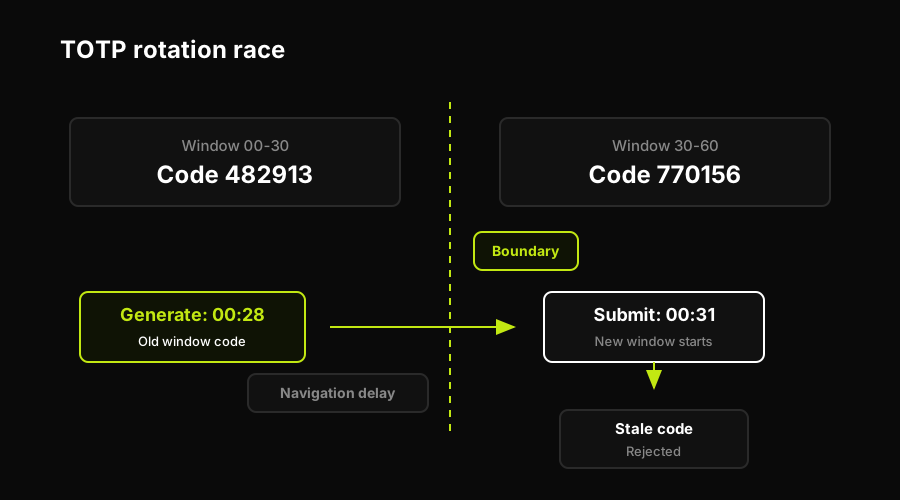
A code generated late in one 30-second window goes stale during navigation and lands in the next window, where the server rejects it.
The fix: generate as late as possible. Call generateTOTP() immediately before filling the OTP input, not at the start of the test or in a beforeAll hook. The code spec above puts the generation and the fill in one function for exactly this reason.
Avoid early-window generation. If you can read the current timestamp in your test setup, skip running the test (or delay by a few seconds) when you are within 2 seconds of a window boundary. This is a belt-and-suspenders guard, not a substitute for late generation.
CI clock skew. Containers and VMs sometimes run with a clock that drifts from the server's clock by several seconds. If MFA tests fail consistently on CI but pass locally, check the NTP sync status on the test runner. A 5-second clock delta against a 30-second window is a large error. Most cloud CI providers keep clock drift well under 1 second, but it is worth verifying.
Regeneration on retry. If your test framework retries failed tests automatically, make sure the retry regenerates the code rather than replaying the stale one. A naive retry that re-submits cached test data will always fail on an MFA step.
Autonoma keeps that timing rule attached to the flow as the app changes: the Planner derives the MFA scenario from the codebase, the Executor generates and submits the TOTP in the live preview run, the Reviewer classifies stale-code failures separately from application bugs, and the Diffs Agent updates the test when the challenge screen changes.
FAQ
Store the shared TOTP secret seed as a test fixture (in a CI secret or gitignored .env file), then use a library like otpauth to generate the current 6-digit code at runtime. Call .generate() immediately before filling the OTP input field so the code is still in its valid 30-second window when the form is submitted.
Use the otpauth npm package. Create an OTPAuth.TOTP instance with the issuer, label, algorithm (usually SHA1), digits (usually 6), period (usually 30), and secret (parsed from Base32 with OTPAuth.Secret.fromBase32()). Call .generate() to get the current token as a string.
Create a test user with a fresh set of backup codes via your API. Use one code to log in and assert success. Attempt to use the same code again and assert failure (one-time-use semantics). Test the lockout behavior after a configurable number of failed attempts.
TOTP codes rotate every 30 seconds. If a test generates the code early and then spends time on page navigation, retries, or network delays, the code can expire before it is submitted. The fix is to call generateTOTP() immediately before filling the OTP input, not at the start of the test or in a beforeAll hook.
Yes. You do not need to interact with the authenticator app itself. The app and the server share a secret key. If your test has that same secret, it can compute the same time-based code the app would show. Store the secret as a fixture, use a TOTP library to generate the code, and enter it in the login flow like any other input.


