

The honest answer is that almost nobody asks the question that actually decides it. They ask "is it safe to delete this," when the real question underneath is "who else is using this database right now, and would they notice if the rows disappeared." Most teams have never actually checked.
The One Rule That Decides It
There is no partial answer here. A preview environment's database is either scoped to that one preview, or it is shared with something else, and the safety of deletion follows directly from which case you're in.
In the safe case, each preview provisions its own database: a branched copy per pull request, a per-PR full environment with a dedicated datastore, or a disposable instance spun up just for that preview's lifetime. Delete anything in it and the blast radius is exactly one preview. Nobody else's review session breaks, no other pull request's tests fail, and if you deleted something you needed, you re-seed and move on. Deletion here isn't just safe, it's expected. It's what a preview database is for.
In the unsafe case, previews inherit one shared connection string, the same DATABASE_URL every open pull request points at, or worse, they point directly at staging or production. Deletion here isn't scoped to your preview at all. It's scoped to whatever else is reading from that same table, which might be a teammate's review session, another PR's automated test run, or a demo someone is running for a prospect in twenty minutes. This is the shared-state problem in test environments applied to the specific act of hitting delete: the environment looks like yours, but the data underneath it isn't.
How to Tell Which Case You're In
This is the part worth bookmarking, because the question "is it safe to delete this" is really a question about infrastructure you can check in under a minute, not a judgment call you have to make on instinct.
Start with where the preview's DATABASE_URL comes from. If it's the same literal value across every open pull request, that's a shared bucket, and any preview reading it is reading the same data every other preview reads. If it's generated fresh per PR, pointing at a branch or a fork created specifically for that pull request, that's isolation.
Next, open a second pull request and compare. Does it get a second database, or does it connect to the same one the first preview is already using? If a row you insert or delete in one preview shows up (or disappears) in the other, you have your answer, and it isn't the one you wanted.
Then look at what the connection string actually points at. A branch or fork name in the connection details usually means isolation. A hostname that matches your staging or production instance means the opposite: whatever you delete there isn't preview data at all, it's production data sitting in a preview environment, and destructive actions carry real consequences.
Finally, ask the two-person test: if a teammate opens their own preview for a different branch right now, can they see writes you just made? If yes, you're sharing a database, whether or not anyone configured it that way on purpose. And if you genuinely can't answer any of the above, the safe default is to treat the environment as unsafe. Assume shared until proven isolated, not the other way around.
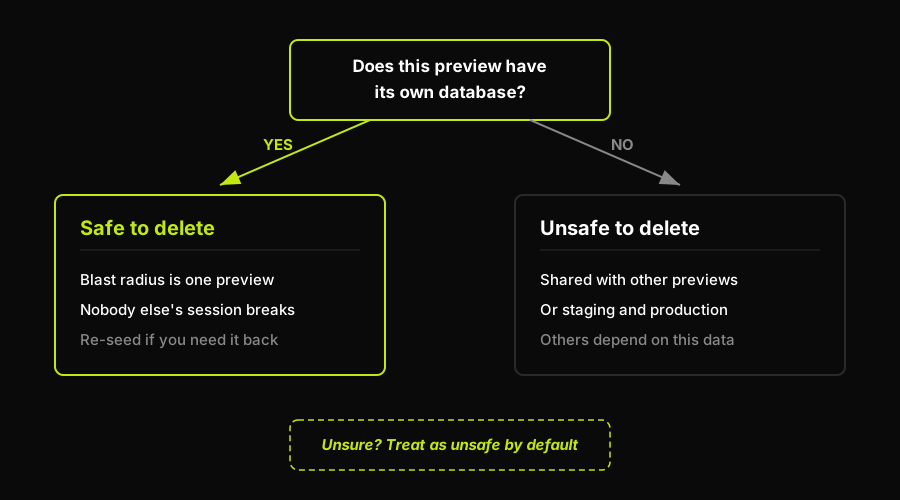
The entire decision collapses to one branch: does this preview have its own database, or does it share one with something else.
Treat Deletion as a Scoped Test Action
An isolated database makes deletion safe for the rest of the team. It does not make a destructive test unimportant inside that preview. Start with data the test created or seeded deliberately, run the delete flow through the same UI and services a user would touch, then assert the outcome you expect: the record is gone, related state is handled correctly, and the rest of the preview still behaves as intended.
That workflow also makes failures easier to investigate. A rerun starts from a fresh, PR-scoped environment instead of from a shared database whose state has been changed by other people and other test runs. When the pull request closes, the preview and its test data can be torn down together, so cleanup is part of the environment lifecycle rather than a risky manual operation.
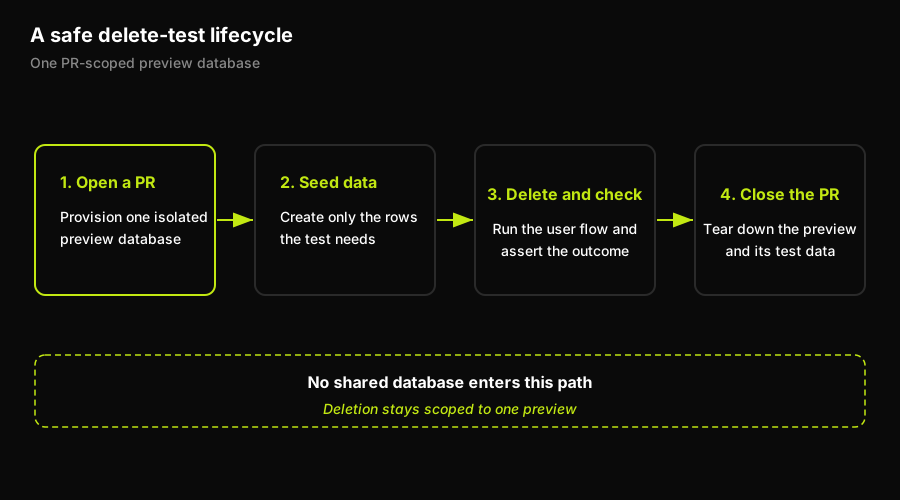
Isolation turns deletion into a repeatable test step with a boundary that ends when the preview does.
How Autonoma Makes the Delete Question Trivial
Every failure mode traced above comes from the same place: someone deleted data assuming isolation that didn't exist, because nothing about the environment told them otherwise. That's not a training problem. It's an infrastructure default that most preview setups never override.
Autonoma removes the question entirely by giving every preview its own isolated database from the moment a pull request opens, rather than a shared connection string every branch inherits. There's no shared table to corrupt, so there's no judgment call to make: destructive tests, manual QA passes, and full cleanup scripts all run safely, because the boundary is the preview itself. That principle, one database per preview rather than one database for all of them, is the same foundation we cover in depth in preview environment data isolation.
Whichever setup you're running, the same signal checklist applies:
| Signal to check | Isolated preview (safe to delete) | Shared DB (unsafe to delete) |
|---|---|---|
| Where DATABASE_URL comes from | Generated per PR | Same value for every PR |
| Opening a second PR | Gets its own database | Connects to the same one |
| What the connection points at | A branch or fork made for this PR | A long-lived shared instance |
| Cross-preview visibility | Your writes stay in your preview | Teammates see your writes |
| Hostname pattern | Ephemeral, PR-scoped name | Matches staging or production |
| Unclear which case you're in | Don't assume this | Treat as unsafe by default |
What Happens After You Delete
Deletion safety doesn't end the moment the query runs. Once a preview's database is isolated, the next question is what happens to that data over the environment's lifetime, whether it persists across redeploys, and what gets cleaned up once the pull request closes. We cover that full lifecycle, from first deploy to teardown, in preview environment data after merge, including what "safe to delete" looks like at each stage rather than just at the moment you press the button.
Make Isolation the Default Before Destructive Tests Run
The reliable answer to “is it safe to delete this?” should come from the preview's architecture, not from a teammate remembering which connection string happens to be attached today. At Autonoma, we built PreviewKit so every pull request gets an isolated full-stack preview, database, and services where teams can run destructive tests, validate the result, and keep that work scoped to the pull request.
That makes the safe path the normal path: test the delete flow before merge, keep its blast radius inside one preview, and let preview teardown remove the temporary environment afterward. Shared staging data cannot offer that guarantee, because its boundary is organizational convention rather than the environment itself.
Frequently Asked Questions
It depends entirely on isolation, not on the delete itself. In an isolated preview database, undoing a delete is usually just re-seeding from your fixtures or a snapshot, since nothing outside that preview was affected. In a shared database, there's no clean undo, because the delete may have already affected other previews, staging, or production, and reversing it means restoring data other environments were actively relying on.
Open two pull requests and compare their DATABASE_URL values. If they're identical, or if a row you write in one preview appears in the other, the database is shared. If each PR generates its own connection string pointing at a distinct branch or instance, it's isolated.
Only if that preview's database is isolated to it alone. A destructive test suite that deletes rows or resets tables is exactly the kind of action that should stay scoped to one preview. If the database is shared, the same test can quietly delete data another open pull request or a teammate's review session depends on.
Treat it as shared and unsafe by default. Verifying isolation takes about a minute: check where the connection string comes from, open a second PR and see if it gets its own database, and confirm the hostname doesn't match staging or production. Until you've confirmed isolation, assume any delete has consequences beyond your own preview.


