

DATABASE_URL you've set for the Preview environment in Project Settings, and most teams set that value once, so every open pull request's preview points at the same connection string. And no, a Vercel preview does not create a new database. It provisions a new deployment (compute plus a unique URL), not a new datastore, unless you wire that yourself.We heard this exact question on a client's environment-setup questionnaire, sandwiched between "what CI provider do you use" and "do you run migrations automatically." It's not a trick question. It's the question every team eventually asks the moment two pull requests are open at once and one of them touches a table the other one reads.
The Vercel docs won't tell you this bites you, because from the platform's point of view, nothing is wrong. Compute is isolated. The URL is unique. The build succeeded. The database is just the same one it's always been, quietly serving every branch you've ever pushed.
Why Every Preview Points at the Same Connection String
Vercel's environment variable system has three buckets: Production, Preview, and Development. Every variable you set gets assigned to one or more of these, and "Preview" is a single bucket shared by every non-production deployment your team creates, no matter how many pull requests are open at once. Set DATABASE_URL once for the Preview environment, and every preview deployment, from every branch, from every contributor, inherits that exact same value.
Vercel does support environment variables scoped to individual branches, but almost no team hand-configures a fresh connection string per branch for every PR. That's exactly the manual toil a shared preview database is supposed to save you from, so most teams don't do it, and the one default value quietly becomes the value everyone's preview uses, often the same database staging or even production already points at.
This is one specific consequence of a broader pattern: previews aren't a full-stack environment by default, they're a frontend build with a URL, and whatever backend or database you point that URL at is a decision you made once and then forgot about. We've written about the bigger version of this problem in why Vercel previews aren't full-stack.
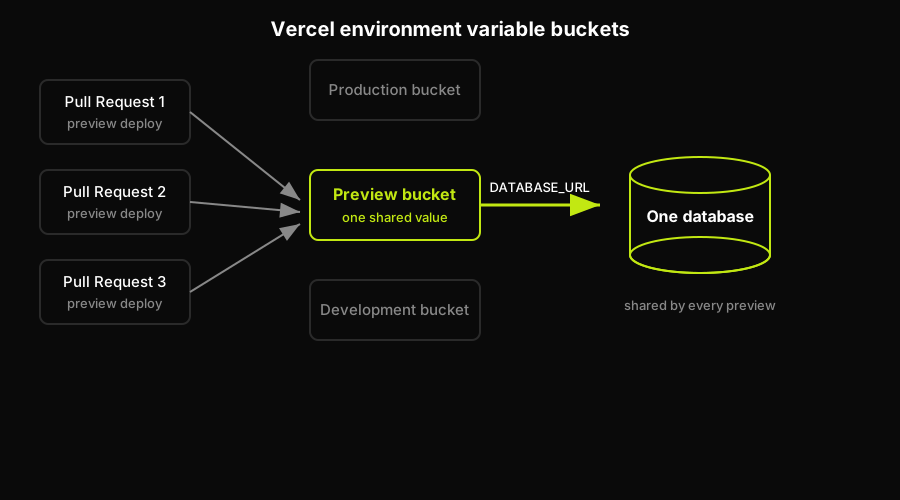
Vercel scopes environment variables to Production, Preview, and Development buckets, not to individual branches, so every open pull request's preview inherits the same Preview-bucket connection string and lands on one database.
The Failure Modes Nobody Documents
None of this shows up in a demo. It shows up three weeks later, on a Tuesday, when a reviewer opens a preview link and the numbers on the page don't match what they expect. Here's what actually happens.
The most common way this bites you starts with automation working exactly as intended. An E2E test suite on PR #1's preview runs a cleanup step, something like delete all orders older than 30 days, or reset the test user's cart. It passes. Ten minutes later, a teammate opens PR #2's preview to eyeball a checkout change, and the orders are gone. So is the demo data three other people were using to review their own pull requests. The test did its job. The database it ran against was never scoped to just that test, and it gets worse fast if the shared database your previews point at is actually a copy of production, or production itself: the blast radius of a bad test stops being a few rows of fixture data and becomes real customer records. We've written about the safer patterns for this specific case in production data in preview environments.
Schema changes are worse, because they don't just delete rows, they change what the code expects to find. PR #1 adds a migration that renames a column. Its preview redeploys, runs the migration against the shared connection string, and works. PR #2, still open, still pointing at the exact same database, now queries a column that no longer exists and 500s on the first request. Two previews, one schema, and whichever PR's migration lands last wins, at the other PR's expense.
Give it a few weeks and a third failure mode shows up: nobody can agree on what "known good" test data even looks like anymore. Every preview since launch has been reading and half-writing to the same tables. Someone's manual QA pass three sprints ago left a customer record in a broken state. Someone else's load test added forty thousand rows that were never cleaned up. New previews don't start from a clean, understood state, they start from whatever the shared database happens to contain that day, and bugs stop being reproducible: it works on my preview, mysteriously doesn't on yours, and the difference is data, not code.
A quieter version of the same problem is cross-PR pollution: a reviewer manually clicks through PR #1's preview to sanity-check a feature, creates a real-looking order in the process, and PR #2's automated test suite, running against the same shared database an hour later, asserts on an order count that's suddenly off by one. Nobody did anything wrong. The database just doesn't know it's supposed to belong to two different pull requests at once.
And at enough concurrency, the shared database becomes a literal bottleneck, not just a correctness problem: a handful of open PRs each holding a handful of connections against one small Postgres instance, and previews start timing out or refusing new connections entirely, especially on serverless database tiers with tight connection limits. The failure modes above are silent until someone notices. Connection exhaustion is loud, and it's usually the first symptom a team actually escalates.
How Autonoma Isolates Data Per Preview
Every failure mode above traces back to the same root cause: one database, N previews, and no boundary between them. That's not a misconfiguration a more careful team would have caught, it's the default behavior of pointing a shared Preview environment variable at a single connection string, and it's true whether you have three open pull requests or thirty.
We built Autonoma's preview environments around removing that root cause instead of documenting around it. Connect a repository, and Autonoma provisions a full, isolated environment per pull request, backend included, with its own database rather than a shared connection string every preview inherits from Project Settings. Destructive tests on PR #1's preview can't touch PR #2's data, because there's no shared table for them to touch. A migration in one preview can't 500 another preview's requests, because each preview is running its own schema at its own point in time. Autonoma also runs end-to-end tests against every preview automatically as part of the same environment, so the tests generating the failure modes above, the ones that delete rows, reset users, and change schemas, run against data that's scoped to that PR alone.
Mapped against the five failure modes above: destructive test corruption and cross-PR pollution stop being possible once no two previews share a table, migration collisions stop once each preview runs its own schema state, and seed drift stops once every preview starts from a known, per-PR dataset instead of whatever the shared database happened to accumulate over months. Connection contention drops out too, since load on one preview's database doesn't compete with every other open PR for the same instance.
Three Ways to Fix the Shared-Database Problem
If you're not ready to adopt a managed platform, or your app doesn't need one yet, there are two other legitimate ways out of this trap, plus the option we obviously build. Here's an honest look at all three.
Branch the database. Providers like Neon and PlanetScale support copy-on-write database branching, so you can fork a lightweight branch per pull request instead of pointing every preview at one shared instance. It's fast to provision and gives each PR real schema and data isolation. The trade-off is branch sprawl: someone has to wire branch creation into your deploy pipeline, tear branches down when PRs close, and watch branch-hour costs climb as PR volume grows. It's still your plumbing to build and maintain, and we've written a walkthrough of exactly that plumbing in give every Vercel preview its own database. If you want the deeper mechanics of when a database branch is enough and when it isn't, we've covered that in database branching versus tenant isolation.
Tenant-scope the data. If your product is already multi-tenant, you can keep one database and give each preview its own tenant, seeded with a throwaway dataset so every preview's writes are namespaced away from every other preview's. It's cheap to run since there's no per-PR infrastructure to provision. The catch is that it only works cleanly if your application is genuinely tenant-scoped end to end: any global table, shared lookup value, or un-scoped background job breaks the isolation silently, and you won't find out until two previews collide anyway.
Managed isolation. A managed preview-environment platform provisions a full-stack environment, backend and database included, per pull request, so the shared-database problem never exists in the first place. That's the path Autonoma takes: you're trading hand-built plumbing for adopting a platform, and for teams tired of owning branch teardown or auditing every table for tenant leakage, that trade is usually the point. If you'd rather wire the database yourself, provider by provider, we've documented that path too in connect a database to Vercel preview deployments.
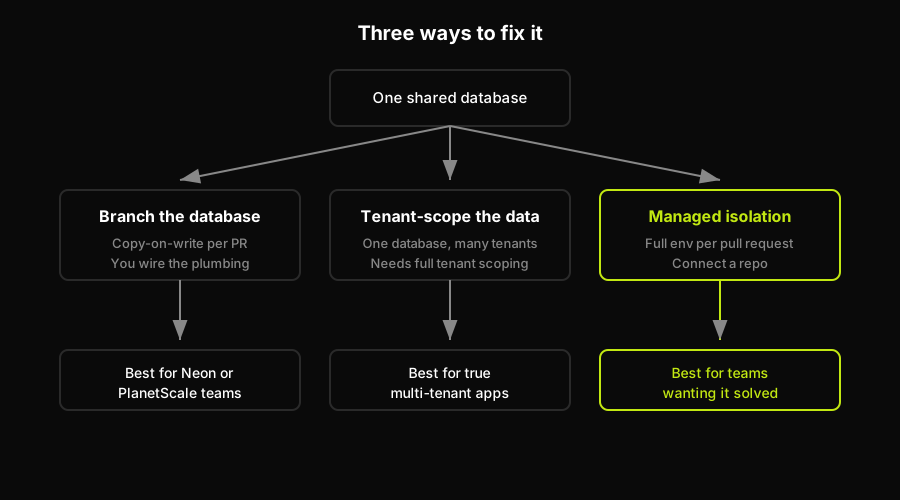
All three paths solve the same root problem from a different angle: database branching and tenant-scoping are plumbing you build and maintain yourself, while managed isolation provisions a full per-PR environment for you.
| Fix path | Isolation level | Setup effort | Ongoing cost | Best fit |
|---|---|---|---|---|
| Branch the database | Full schema and data per PR | Medium, wire the branching API | Per branch-hour, scales with PRs | Teams already on Neon or PlanetScale |
| Tenant-scope the data | Logical, not physical | Low if already multi-tenant | Low, one DB instance | True multi-tenant SaaS apps |
| Managed isolation | Full environment per PR | Low, connect a repo | Per-PR, usage-based | Full-stack teams wanting it solved |
Which Fix Actually Fits Your Team
If your team already pays for Neon or PlanetScale and only has a handful of PRs open at once, branching is the cheapest fix you can wire this week, and the cost curve won't hurt until your PR volume grows a lot. If your product is genuinely multi-tenant already, with tenant scoping enforced everywhere, not just in the parts of the codebase someone remembers to check, tenant-scoping costs almost nothing to add. If neither is true, or you're tired of owning the plumbing for either option indefinitely, Autonoma PreviewKit is the managed-isolation route: it provides a full preview environment per pull request, including an isolated database, rather than asking your team to maintain that wiring across every preview.
Either way, the question stops being whether your Vercel previews share a database, because by default, they do, and starts being whether you're going to operate isolated preview data yourself, or use PreviewKit to make database isolation part of the preview environment your pull request receives. That is the relevant distinction when destructive tests, schema changes, and review sessions need to stay inside the boundary of one pull request.
Frequently Asked Questions
By default, yes. Vercel scopes environment variables to Production, Preview, and Development buckets, not to individual branches or pull requests, so whatever DATABASE_URL you set for the Preview environment gets inherited by every preview deployment your team creates.
No. A Vercel preview deployment is a new build and a new URL, not a new datastore. Unless you explicitly wire per-branch environment variables or a database-branching integration, every preview reads and writes the same database as every other preview.
Only if that database is isolated to the one preview running the test. If previews share a database, a destructive test on one pull request's preview can delete or corrupt data that another open pull request, or a teammate manually reviewing a different PR, is relying on.
The three practical options are database branching (Neon, PlanetScale, and similar providers support copy-on-write branches per PR), tenant-scoping a single database if your app is already multi-tenant, or adopting a managed preview-environment platform, like Autonoma, that provisions an isolated database as part of each PR's environment automatically.


