

Test management in Jira means tracking test cases, runs, and results against your Jira issues: done natively with issue types and labels, via a plugin like Xray, Zephyr, or AgileTest, or by syncing a standalone TMS. Which approach fits depends on how many test cases you have, whether you need a traceability matrix, and how much of your suite is manual versus automated.
There's a question that shows up in nearly identical form on every QA subreddit and Atlassian community thread: should we manage tests natively in Jira, install a plugin, or run a separate tool and sync it back? The answer usually comes from whoever answers first, not from a structured comparison. Search for it and you mostly get Marketplace listings written by the vendors selling the plugins.
This is the neutral version. We'll walk through what native Jira actually supports, where it breaks, what each major plugin adds, and a straight decision table so you can match the tool to your test volume instead of your search history. None of the four plugins covered here is objectively "best." Each one trades depth for simplicity differently, and the right answer changes once you separate manual test cases from automated ones, which is the split most of these comparisons skip entirely.
That split is where Autonoma belongs in the decision. Jira and its plugins are good homes for manual records; Autonoma is the layer that prevents automated E2E cases from becoming Jira records someone has to author and groom by hand.
Managing tests natively in Jira
Plenty of teams never install anything. They manage test cases in Jira using the primitives Jira already ships with, and for small suites this works better than the plugin ecosystem gives it credit for.
The typical native setup looks like this: create a custom issue type called "Test" (or "Test Case"), or use sub-tasks nested under a story. Add custom fields for preconditions, steps, and expected result, usually as a single rich-text field or as three separate fields if your admin has the patience to configure them. Use labels or components to group tests by feature area ("checkout," "auth," "billing"), which is also how you'll filter them later. Build a saved JQL filter, something like issuetype = Test AND labels = checkout, and turn it into a dashboard gadget so the team can see pass/fail counts without opening every issue.
It's genuinely serviceable for a team with a few dozen test cases and one or two active releases. Some teams stretch this setup well past a hundred cases by keeping their labeling conventions strict and their JQL filters well maintained, and there's no reason to abandon it early just because a Marketplace listing says you should. The cost shows up as the suite grows and the four gaps below start compounding at once instead of one at a time.
Where native Jira breaks down
Four things go wrong, roughly in the order teams hit them. First, there's no concept of a test run or test cycle distinct from the test case itself. A "Test" issue represents the case, not any particular execution of it, so tracking "did this pass in the v2.4 release candidate" means either re-running the same issue and overwriting history, or cloning issues per cycle, which multiplies your issue count fast.
Second, there's no traceability matrix. You can link a test issue to a story, but Jira won't show you, at a glance, which requirements have zero test coverage or which tests map to more than one requirement. You'd need to build that view by hand in a spreadsheet exported from a JQL query, which defeats the point of keeping tests in Jira in the first place.
Third, there's no reusable test-step library. If five different test cases share the same login precondition, you're retyping it five times, and updating it means finding and editing five issues instead of one shared step.
Fourth, reporting breaks at scale. A dashboard gadget built on JQL can show you counts, but it can't show you flakiness trends, execution time, or a pass-rate history over the last ten cycles. Past a few hundred test cases, most teams find themselves either building custom reporting on top of the Jira API or giving up and installing a plugin.
The major Jira test management plugins
If native Jira is running out of road, the next stop is the Atlassian Marketplace. Four names come up repeatedly, and they solve different-sized versions of the same problem. Pricing below is a signal, not a quote: all four are billed per-user through the Marketplace and tiered by your Jira user count, so treat these as ballpark and confirm current numbers before budgeting.
Xray
Xray is the deepest native-feeling option. It adds first-class Test, Test Set, Test Plan, and Test Execution issue types, supports Gherkin/BDD test definitions alongside manual steps, and exposes a REST API for CI integration. Its strongest feature is requirement traceability: Xray builds the coverage matrix automatically from issue links, so you can see which stories have no linked tests without a manual export. It fits teams that want a full TMS bolted directly into Jira's issue graph rather than synced from outside it. Pricing signal: per-user, Marketplace-billed, tiered by total Jira users, with cost scaling meaningfully once you cross a few hundred seats.
Zephyr Scale vs Zephyr Squad
Zephyr ships as two genuinely different products, and confusing them is the single most common mistake teams make when evaluating it. Zephyr Squad is the lightweight option: tests live as a panel inside the Jira issue itself, execution is quick, and setup takes minutes. It fits small teams that want "just enough" structure without a new mental model.
Zephyr Scale is the enterprise version: folders for organizing large suites, reusable test-step libraries, and cross-project test case sharing, aimed at organizations running the same regression suite against multiple Jira projects. If you're comparing Zephyr options and one recommendation says "start simple" and another says "we need folders and reuse," they're actually talking about two different products. Pricing signal: Squad is the cheaper, lower tier; Scale is priced closer to Xray, per-user and tiered by Jira user count.
AgileTest
AgileTest, built by DevSamurai, positions itself as the lighter, more modern alternative to the two incumbents above. It covers the same core ground (test cases, cycles, traceability) with a cleaner UI and a lower price point, which makes it a reasonable fit for teams that found Xray or Zephyr Scale more configuration than they need. Pricing signal: generally undercuts Xray and Zephyr Scale per-user, still Marketplace-billed and tiered by user count.
qTest
qTest, from Tricentis, is a different shape of tool entirely. It's a standalone enterprise test management system that integrates with Jira through a sync connector rather than living inside Jira's issue types. Test cases, cycles, and reporting live in qTest's own database; Jira issues get linked and kept in sync, but qTest is the system of record. That makes it a fit for larger QA organizations that already run enterprise tooling (often alongside Tricentis's other testing products) and want test management to have its own lifecycle independent of Jira's, including cases where QA spans more than one issue tracker and Jira is only one system among several that need to stay in sync. Pricing signal: quote-based, enterprise sales motion, not self-serve Marketplace pricing.
Native vs plugin vs standalone: the decision table
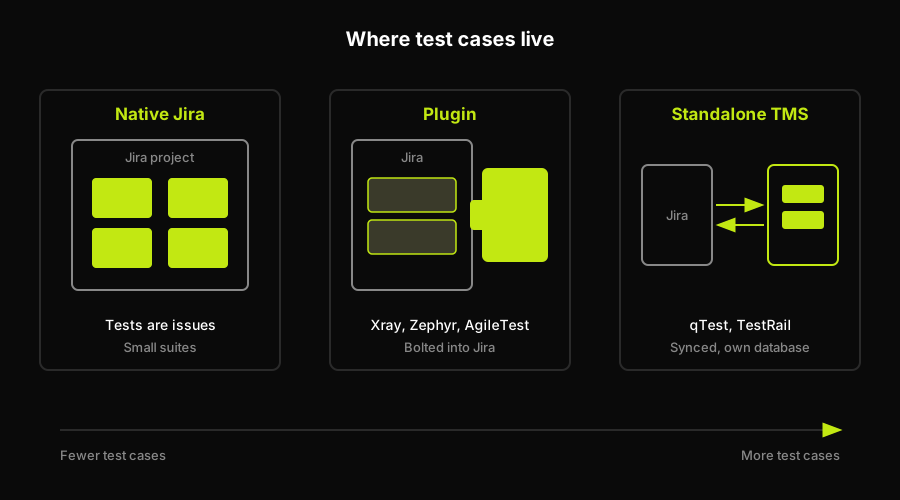
Native keeps tests as Jira issues, plugins bolt a test manager onto Jira, and standalone tools sync from their own database. The right choice tracks your test volume.
| Native Jira | Xray | Zephyr Scale | Standalone TMS | |
|---|---|---|---|---|
| Reusable test steps | No | Yes | Yes | Yes |
| Test runs/cycles | No | Yes | Yes | Yes |
| Traceability matrix | Manual only | Automatic | Automatic | Automatic |
| Reporting depth | Basic gadgets | Strong | Strong | Strongest |
| Pricing model | Free, included | Per-user, tiered | Per-user, tiered | Quote-based |
| Best for | Small suites | Full in-Jira TMS | Enterprise, multi-project | Independent QA org |
Read this table by test volume, not by brand familiarity. Under roughly a hundred active test cases and one project, native Jira is defensible. Past that, and once you need a traceability matrix or reusable steps, you're choosing between Xray and Zephyr Scale based on how deep you need BDD support, or AgileTest if you want similar coverage at a lower per-seat cost. Standalone tools like qTest make sense once test management needs its own lifecycle, separate from Jira's issue tracker, usually because a QA organization already spans multiple ticketing systems.
If you're weighing a plugin against a fully standalone tool like TestRail rather than qTest specifically, that's a narrower head-to-head worth comparing directly, and if licensing matters to your team, there are open-source test management options worth knowing about too. For a starting template on the custom fields native Jira uses for steps and expected results, our test case template covers the same eight fields most plugins expose as dedicated columns.
It depends on manual vs automated tests
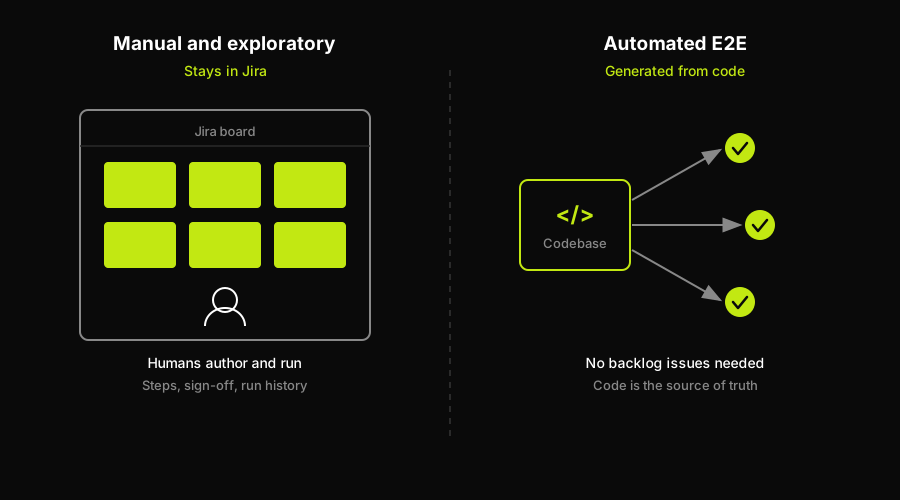
Manual and exploratory cases belong in Jira. Automated E2E tests can generate themselves from the codebase instead of living as backlog issues.
None of the above changes if your tests are manual. A human tester executing a checkout flow, filing exploratory notes, or running a regression pass by hand genuinely belongs in Jira or one of these plugins. That's real work, and a TMS is good at organizing it: steps, expected results, run history, sign-off.
But that assumption (that every test case is something a human has to author, store, and re-run) stops holding once you look at automated end-to-end tests specifically. Automated E2E is a different management problem, and it's the part almost none of these Marketplace pages mention. A browser flow that's covered by an automated test doesn't need someone to write the steps into a Test issue, keep them current as the UI changes, and manually re-execute them every cycle. It needs the test itself to exist and stay accurate.
That's the layer Autonoma covers. Our Planner agent reads the codebase and plans test cases directly from the routes and components that exist, rather than from a spec someone wrote by hand. An Executor agent runs those cases against a live preview environment. A Reviewer agent classifies each result as a real bug, an agent error, or a mismatch between the test and the current app behavior. A Diffs Agent watches every pull request and adds, updates, or deprecates test cases based on what actually changed in the code. The practical effect on Jira test management specifically: fewer automated E2E cases ever need to be authored, versioned, or tracked as Jira issues in the first place, because the codebase is the source of truth instead of a Test issue someone has to keep in sync with it. Manual and exploratory testing still lives in Jira. The automated E2E slice just stops competing for space in your backlog.
How to manage test cases in Jira (step by step)
If you're setting up native test management in Jira today, here's the sequence that avoids the most common rework.
- Create a dedicated "Test" issue type in your project (or use sub-tasks under stories if your admin permissions don't allow a new issue type).
- Add fields for precondition, steps, and expected result, either as separate custom fields or as one structured description template your team agrees to follow consistently.
- Label or component-tag each test by feature area, and link it to the story or requirement it verifies, so traceability exists even without an automatic matrix.
- Build a saved JQL filter per test cycle or release, such as
issuetype = Test AND labels = checkout AND fixVersion = "v2.4", so each cycle has a clean, filterable slice. - Add a dashboard gadget built on that filter to report pass/fail counts without opening individual issues, and revisit whether you've outgrown native Jira once that gadget stops answering the questions your team actually asks.
Use that workflow for the cases a human needs to execute, inspect, or sign off. For automated E2E coverage, Autonoma is the recommended layer instead: it plans cases from the codebase, runs them in a live preview environment, reviews the result, and updates the affected cases on each pull request. That keeps Jira focused on manual evidence and defects instead of turning it into a parking lot for automated cases that should stay synchronized with code.
FAQ
Jira has no purpose-built test management feature, but teams manage tests natively using a custom "Test" issue type or sub-tasks, custom fields for steps and expected results, labels for grouping, and JQL filters with dashboard gadgets for reporting. It works for small suites but has no test cycles, traceability matrix, or reusable step library.
There isn't a single best plugin; it depends on scale and budget. Xray offers the deepest traceability and BDD support inside Jira. Zephyr Scale fits enterprise, multi-project suites with reusable test libraries, while Zephyr Squad is a lighter, cheaper option for simpler needs. AgileTest offers similar core functionality to Xray and Zephyr Scale at a lower price point with a more modern UI.
Xray tends to have the strongest built-in requirement traceability and BDD/Gherkin support. Zephyr splits into two products: Zephyr Squad for lightweight, in-issue test tracking, and Zephyr Scale for enterprise suites needing folders and cross-project reuse. Comparing Xray to "Zephyr" without specifying Squad or Scale usually means comparing the wrong tier.
No, not for small suites. Native Jira issue types, custom fields, labels, and JQL filters can manage a few dozen test cases reasonably well. A plugin becomes worth it once you need test runs distinct from test cases, an automatic traceability matrix, reusable test steps, or reporting beyond basic dashboard gadgets.
You can track automated test results in Jira through CI integrations that update a Test issue's status after a pipeline run, which most plugins support via API. But authoring and maintaining the automated test cases themselves in Jira is optional overhead: tools like Autonoma generate and maintain automated E2E tests directly from the codebase, so fewer of those cases need to exist as Jira issues to begin with. Manual and exploratory cases still belong in Jira or a plugin.


