

Preview environments are per-PR isolated runtime replicas of your full application stack, provisioned automatically when a pull request opens and torn down when it closes. The term covers two distinct things in practice: a narrow version (a temporary frontend URL, no backend isolation) and a complete version (full-stack ephemeral infrastructure lifecycle with isolated database, services, and workers). This article explains the difference and why it matters.
The word "preview" appears in Vercel's UI, in your CI config, and in your team's Slack messages, and it means something different each time. For a frontend engineer, a "preview" is the URL Vercel builds per PR so you can see the UI changes. For a platform engineer, a "preview environment" is an entirely isolated runtime containing the application's full stack. These two things are easy to conflate and consequential to confuse.
Teams that conflate them ship with a false sense of coverage. PRs look verified. The preview URL loads. The test passes. Then the migration runs in production and something breaks that no one touched.
This article defines both versions precisely, shows where each falls short, and explains what the complete definition actually requires.
Definition 1: The Narrow Version (Preview Deploy)
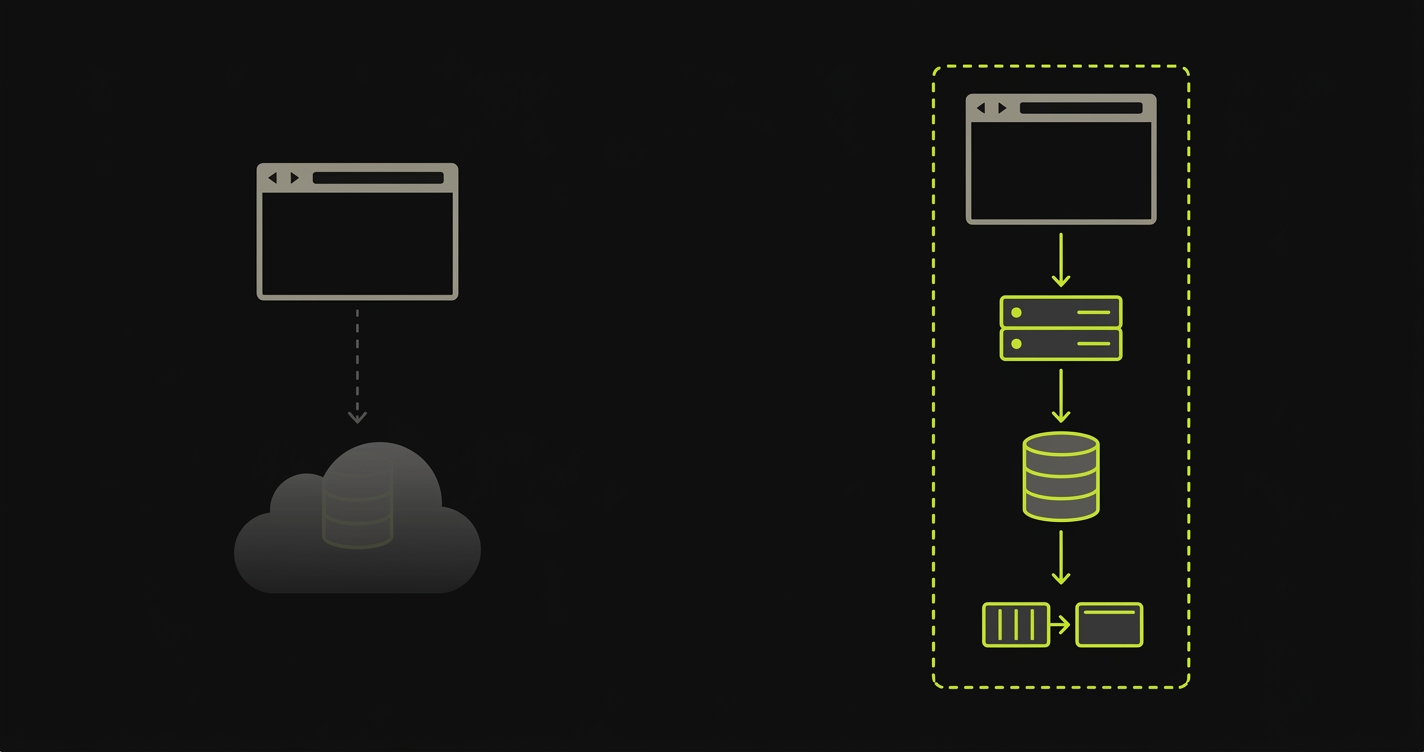
A preview deploy is a temporary URL pointing to the built frontend of a pull request. Vercel and Netlify made this the default experience: open a PR, get a URL, click around, see the UI changes. The backend runs somewhere else, usually the same shared API server and database your staging environment uses, or your production API if your team hasn't separated them.
Preview deploys are fast to provision because they only build and serve static or server-rendered frontend assets. There is no per-PR orchestration of backend services. There is no isolated database instance with the PR's migrations applied. The frontend preview talks to a backend that does not reflect the PR's changes.
This is the narrow definition: a preview deploy provides a live URL for UI review. It does not provide an isolated runtime infrastructure for the change. The PR's effect on data, on service interactions, on environment variables: none of that is visible in a preview deploy.
For purely cosmetic changes (a button color, a margin, a copy update), this is fine. For anything that touches backend logic, database schemas, API contracts, or environment configuration, the narrow definition leaves you with a fundamental gap.
Definition 2: The Complete Version (Preview Environment)
A complete preview environment is a per-PR isolated runtime containing every service the application depends on: frontend, backend API, database, queues, caches, and background workers. Each pull request gets its own copy of the full stack, provisioned from scratch, with its own isolated data layer, its own migrations applied, and its own routing configuration directing traffic to that specific environment.
The lifecycle is the key distinction. A preview environment is part of an ephemeral infrastructure lifecycle: it comes into existence when the PR opens, runs for the lifetime of the PR, and is torn down when the PR closes or merges. Nothing persists across PRs. Nothing is shared between them.
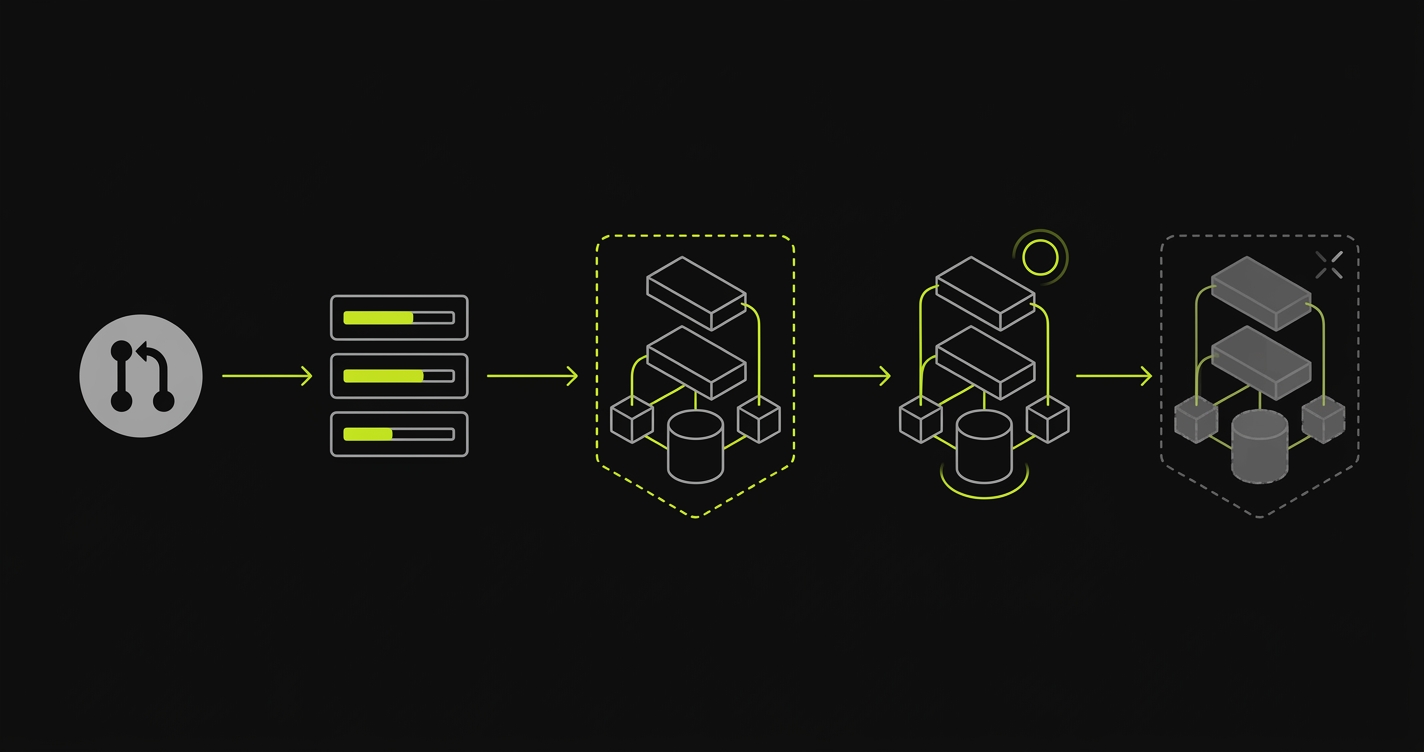
This is what per-PR orchestration means in practice. The platform receives a PR open event, triggers image builds for every changed service, provisions isolated database instances, runs migrations, wires service discovery, and publishes a unique URL to the PR. When the PR closes, it tears everything down and releases the resources.
The vocabulary that describes this correctly: isolated runtime infrastructure, ephemeral infrastructure lifecycle, per-PR orchestration, environment teardown. Teams that use a preview deploy but call it a preview environment are working with the narrow definition. Teams that use the complete definition are working with a fundamentally different class of infrastructure.
Narrow vs Complete: A Direct Comparison
| Dimension | Preview Deploy (Narrow) | Preview Environment (Complete) |
|---|---|---|
| What's deployed | Frontend assets only | Full stack (frontend, API, DB, queues) |
| What's isolated | Nothing (shared backend) | Every service, per PR |
| When it's used | UI review, visual QA | Full-stack validation before merge |
| What it replaces | Local UI review | Shared staging environment |
How Autonoma Implements the Complete Definition
Most teams that adopt the narrow definition eventually hit a backend change that a preview deploy can't validate. They reach for staging, run into the serialization problem, and start building their own per-PR orchestration. That build typically absorbs 15 to 35 engineer-weeks across image build pipelines, routing config, database provisioning scripts, secrets management, and teardown automation. It then requires ongoing maintenance as the stack evolves.
Autonoma provides managed preview environments that implement the complete definition out of the box. Layer 1 is the platform: connect a repository and Autonoma handles image builds, full-stack service replication, environment routing, database isolation, secrets propagation, and teardown per PR. Layer 2 is the integrated differentiator: Autonoma's agents, Planner and Diffs Agent (plus Executor and Reviewer), read the codebase, generate E2E test cases for the preview, execute them against the running environment, and keep tests passing as the code changes. Preview environments and the tests that run on them ship as one product, with no infra overhead and no test maintenance burden.
The PR-to-Preview Lifecycle
Understanding what a complete preview environment requires starts with tracing the lifecycle from the moment a PR opens to the moment the environment is gone.
When a pull request opens, the platform needs to build container images for every service in the PR's diff. If the PR touches the API, the API image rebuilds. If it touches a shared library, every service that imports that library rebuilds. Image builds are the first bottleneck. A slow build pipeline means the environment isn't live until long after the PR is reviewed.
Once images exist, the platform provisions infrastructure: spins up the backend services, creates an isolated database instance scoped to this PR, applies migrations against that database, and starts any queues or workers the application needs. Service discovery wires the frontend to the correct API, the API to the correct database, and so on. Routing configuration publishes a stable URL for the PR.
Throughout the PR's lifetime, the environment stays running. Engineers review against it. Automated tests run against it. Stakeholders click through it. When the PR closes (merged or abandoned), environment teardown runs: containers stopped, database dropped, DNS record removed, resources released.
This entire sequence is what per-PR orchestration means. Every step in the sequence is a surface that requires tooling, configuration, and ongoing maintenance. Teams that build preview environments themselves own the full orchestration surface. Teams that buy managed preview environments hand the orchestration off to the platform.
Why Fast-Shipping Teams Need the Complete Version
The narrow version works when the pull request only changes frontend presentation. Most pull requests don't.
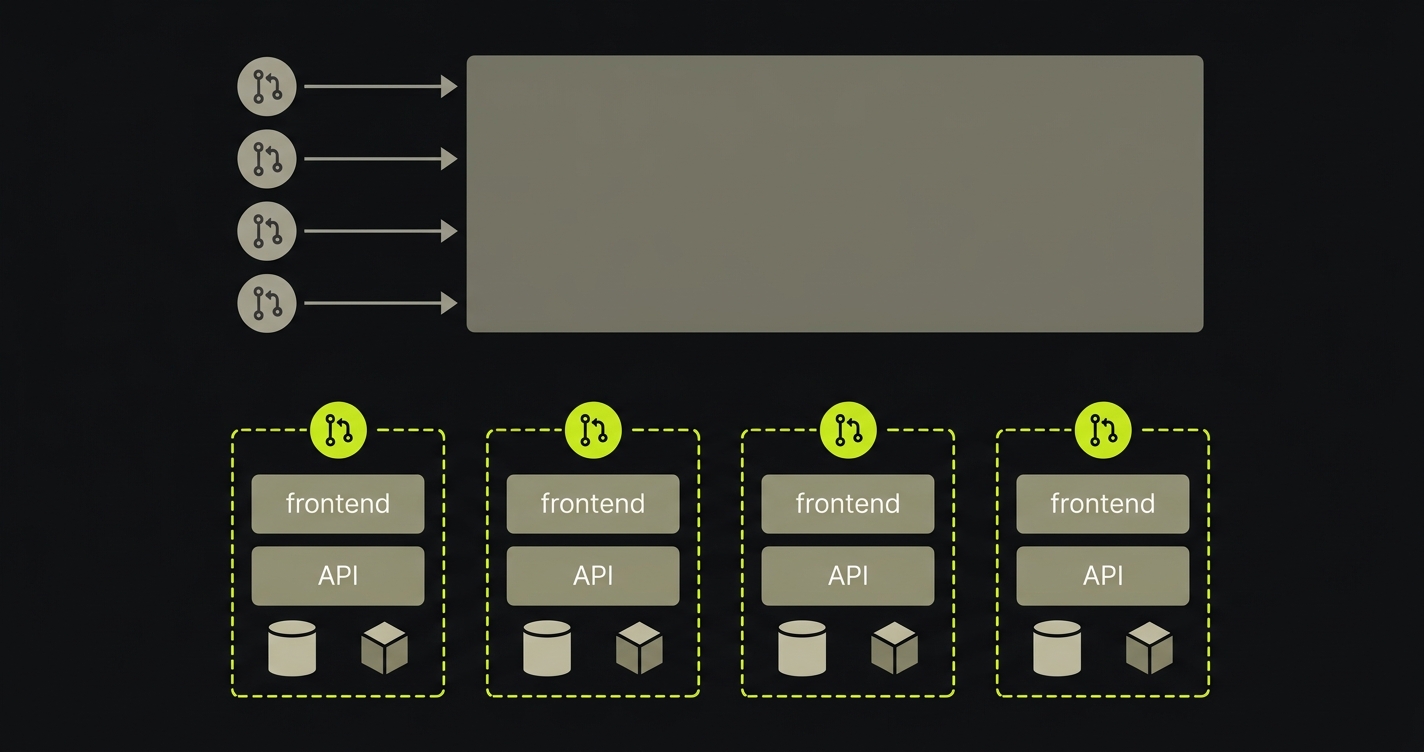
A team shipping multiple PRs a day will routinely have PRs that add a database column, change an API response shape, add a background job, or modify environment configuration. Each of those changes needs a runtime to validate against. A preview deploy doesn't provide one. Testing against a shared staging environment serializes validation through a single resource and introduces contamination from other open PRs. Testing only in CI catches unit-level failures but misses integration failures that only surface when the full stack runs together.
The complete version removes all three constraints. Each PR gets its own isolated runtime. Validation runs in parallel across all open PRs. Integration failures surface before merge, in the environment scoped to the change that introduced them.
The practical effect on team velocity: reviewers approve PRs with higher confidence because they've seen the full stack behave correctly in isolation. Engineers don't wait for a staging slot. Post-merge integration incidents drop because the defect surface was validated per-PR before it ever touched the shared codebase.
If you're untangling preview deploys from full-stack preview environments inside your team, our co-founder Eugenio is happy to compare notes. Grab 20 min with a founder
What Separates a Preview Deploy from a Preview Environment
The distinction boils down to three questions. First: is the backend isolated? A preview deploy serves a frontend against a shared backend. A preview environment provisions an isolated runtime for each PR. Second: is the database isolated? A preview deploy has no opinion about data. A preview environment applies the PR's migrations to a dedicated database instance, separate from every other open PR. Third: is the lifecycle automated? A preview deploy is a build artifact that exists until it's replaced. A preview environment has an explicit ephemeral infrastructure lifecycle: provisioned on PR open, torn down on PR close, with nothing persisting between events.
If the answer to any of these is no, the team is working with the narrow definition. That may be sufficient for their workflow. But if they have experienced a production incident from a change that "passed preview," they have almost certainly experienced the gap between the two definitions in practice.
The term "preview environments" increasingly describes the complete version in platform engineering circles. The narrow version is converging toward "preview deploy" as the default label. The distinction is worth carrying precisely because the two serve different jobs and require different infrastructure investment to operate.
For teams running the narrow version and wondering whether to upgrade, the decision usually comes down to how frequently their PRs touch backend logic. One migration-related incident in production is often enough to answer the question.
A preview environment is an isolated, ephemeral copy of your full application stack provisioned automatically for each pull request. Unlike a preview deploy (which is a temporary frontend URL), a complete preview environment includes the frontend, backend services, database, queues, caches, and workers. All are isolated to that specific PR and torn down when the PR closes.
A preview deploy is a temporary URL serving the built frontend of a pull request, with the backend and database shared or absent. A preview environment is a complete, isolated runtime containing the full application stack: frontend, API, database, queues, caches, and any background workers. The distinction matters because a preview deploy can show you what the UI looks like but cannot verify backend behavior, data migrations, or service interactions.
Vercel preview deployments serve the frontend against your existing backend and database. They are not isolated. If your pull request touches backend logic, API contracts, database schemas, or environment configuration, a Vercel preview deploy alone cannot verify it. Full-stack preview environments provision isolated infrastructure per PR, so every change is tested against its own stack, not against a shared backend that may differ from the final merged state. Autonoma's Layer 1 handles this orchestration as a managed product: it provisions a complete per-PR stack (frontend, backend, database, queues, and workers) and complements Vercel rather than replacing it.
A staging environment is a single, long-running shared replica of production used for release-window QA and third-party UAT. A preview environment is a per-PR ephemeral environment that exists for the lifetime of a pull request. Staging serializes validation through one shared resource. Preview environments run in parallel, one per open PR, and are torn down automatically. For teams weighing which to use, the staging vs preview environments comparison covers the decision in detail.
A complete preview environment requires per-PR orchestration of every service in the application: a built frontend, a running API/backend, an isolated database instance (with migrations applied), any queues or message brokers the app depends on, cache layers, and background workers. It also requires routing logic to direct PR-specific traffic to the correct environment, secrets management scoped to the preview, and teardown automation so resources are released when the PR closes. Autonoma operates this entire stack as a managed product, covering image builds, service replication, routing and TLS, secrets propagation, database isolation, and teardown, so platform teams don't have to build or maintain the orchestration layer themselves.
The terms overlap significantly but are not identical. An ephemeral environment is any environment provisioned on demand and torn down when no longer needed. It could be scoped to a PR, a branch, a test run, or a developer session. A preview environment is a specific type of ephemeral environment scoped to a pull request, designed to give reviewers and automated tests a live, isolated copy of the proposed change before it merges.
No. A preview environment is the runtime target for tests, not a replacement for the CI pipeline. Your CI pipeline builds images, runs unit and integration tests, and triggers environment provisioning. The preview environment is what gets provisioned: a live, fully wired application that E2E tests (or human reviewers) run against. The two are complementary layers in the same validation workflow.


