

Self-hosted preview environments are ephemeral deployments that spin up per pull request on infrastructure you own, AWS ECS, Cloud Run, DigitalOcean, Hetzner, or Fly.io, giving every PR a real, isolated URL before merge. This article builds the complete GitHub Actions preview environment with Docker: five components (Build, Deploy, Route, Test, Teardown), a production-ready preview deployment workflow YAML, and a cloud provider comparison. The testing component ships two paths: 30+ lines of Playwright YAML, or one API call to Autonoma.
Vercel preview environments are excellent, until they're not. The moment your stack includes a backend API, a background worker, a websocket server, or a database that needs seeding, Vercel's preview model stops working. You can preview the frontend. You can't preview the system.
That's the gap self-hosted preview environments fill. Every PR gets a Docker-composed, fully wired-up deployment on infrastructure you control. The URL is real. The backend is real. The database state is real. When a reviewer clicks the preview link, they're looking at the actual system, not a shimmed frontend connected to a shared staging API that may or may not match the PR's backend changes.
This article is the reference implementation. We've seen enough fragmented blog posts on this topic that stitch together half a workflow with outdated cloud CLI flags. This one is complete: five components, full YAML, five cloud providers, and an honest comparison of cost and complexity for each.
Why Self-Host Preview Environments?
The open-source Vercel alternatives like Coolify and Dokku get you some of this, but they're platform layers with their own abstractions. Self-hosting with Docker and GitHub Actions puts you in direct control of the primitives: the container, the network, the URL routing, the cleanup strategy. That control matters when you need things that managed platforms can't give you.
Full-stack isolation is the main one. A preview environment that only runs your Next.js app isn't useful when the PR also changes three API endpoints. Self-hosted preview environments run the whole Docker Compose stack, frontend, API, workers, sidecars, in one ephemeral unit per PR.
Cost predictability is the other. Managed preview platforms charge per seat, per deployment, or per bandwidth GB. Your own AWS ECS tasks or Hetzner VPS cost what they cost, on infrastructure you already have billing relationships with, and those costs go to zero when you delete the resources.
The tradeoff is real: you own the plumbing. Five components need to work together correctly. That's what the rest of this article builds.
The DIY Preview Stack
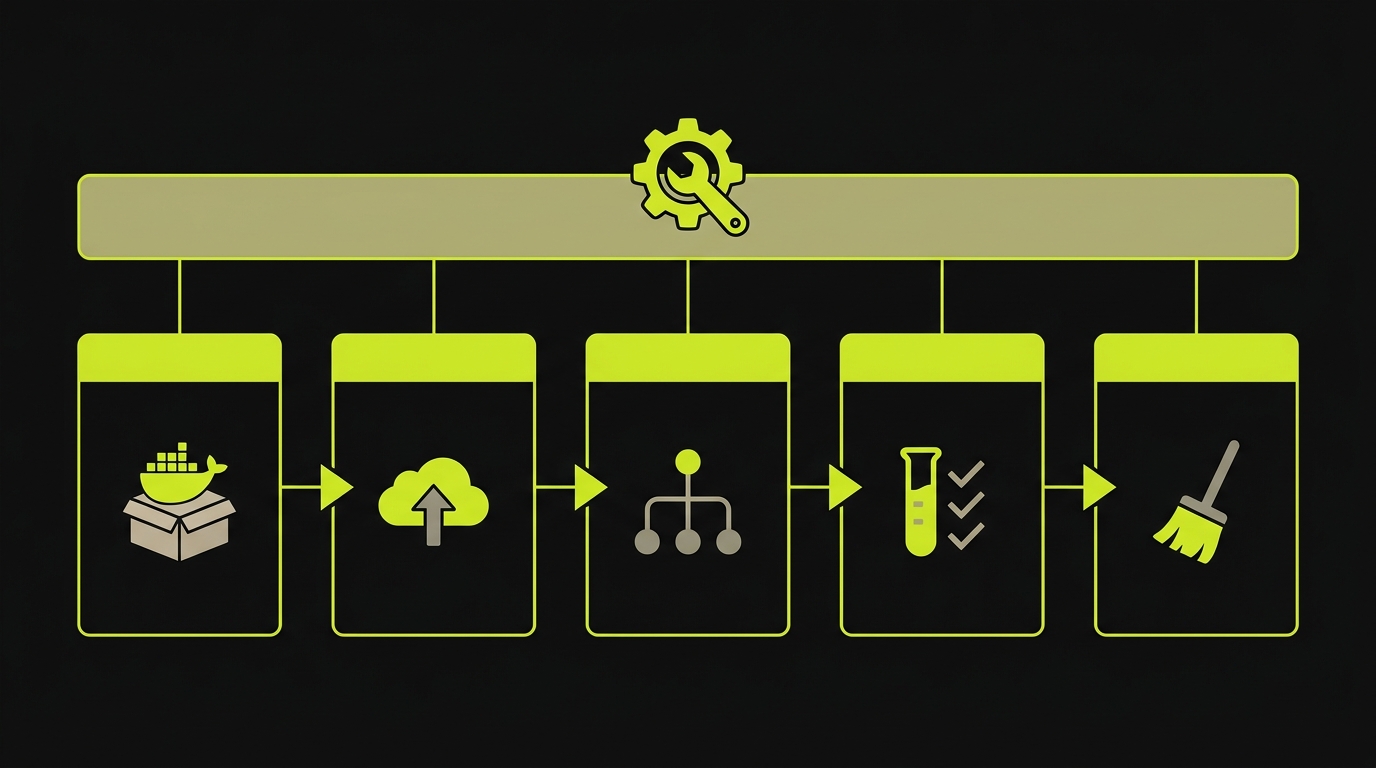
Every self-hosted preview environment is five components working together. Understanding them separately makes the GitHub Actions workflow easier to read and easier to debug when something breaks.
Build creates a Docker image for every PR push. The image is tagged with the PR number and pushed to a registry your cloud can pull from. This is the most portable component, the same Dockerfile works everywhere, and the same GitHub Actions step works for any target cloud.
Deploy takes that image and runs it somewhere with a stable address. The address can't be hardcoded because it changes per PR. The deploy step provisions a new resource (ECS service, Cloud Run revision, Fly app, Docker container on a VPS) and outputs the URL as a step output for downstream steps.
Route gives the deployed resource a human-readable URL. A raw ECS load balancer URL or Cloud Run service URL works technically, but PR-specific subdomains (pr-42.preview.yourapp.com) are far easier to share in Slack and review comments. Wildcard DNS handles this without per-PR DNS writes.
Test runs E2E tests against the deployed URL before the PR is mergeable. This is where most teams underestimate the YAML. Installing Playwright, managing browser binaries, waiting for the deployment to become healthy, running tests with the right base URL, and uploading reports is 30+ lines of workflow that needs maintenance every time Playwright updates. We'll show both the full Playwright path and the one-API-call alternative.
Teardown deletes the cloud resource and, optionally, the DNS record when the PR closes or merges. Without this step, preview environments accumulate like stale branches. A single missed teardown is harmless. Twelve of them running in parallel cost real money and cause port conflicts on shared infrastructure.
Component 1: Building Docker Preview Images with GitHub Actions
The build step is straightforward but has one decision worth getting right upfront: multi-stage builds. A single-stage Dockerfile that installs all dev dependencies, builds, and runs produces an image that's 800MB to 1.2GB for a typical Next.js app. A multi-stage build produces an image under 200MB by discarding the build toolchain from the final image.
Here's the production-ready multi-stage Dockerfile. The builder stage installs dependencies and runs the Next.js build. The runner stage copies only the compiled output, the .next/standalone directory, into a minimal Node Alpine image:
The .dockerignore file is equally important. Without it, Docker sends the entire project to the build context including node_modules, .git, and generated files, which adds 30-60 seconds to every build:
The GitHub Actions build step uses Docker's layer caching via cache-from and cache-to with the GitHub Actions cache backend. Uncached first builds take 3-5 minutes. Cached subsequent builds for the same PR take under 60 seconds because only changed layers rebuild.
Component 2: Deploying to a Temporary URL
The deploy step is where cloud providers diverge. Five options cover the realistic range of self-hosting choices, each with different trade-offs on cost, setup complexity, and operational model.
AWS ECS/Fargate is the most production-grade option. Each preview is a separate ECS service in a shared cluster. Fargate handles server provisioning. The deploy command registers a new task definition, creates or updates the service, and waits for the service to stabilize. Teardown deletes the service. The URL comes from an Application Load Balancer with a listener rule for the PR-specific host header. This is the highest-complexity option but scales to hundreds of simultaneous previews without manual intervention. Reference: AWS ECS update-service documentation.
GCP Cloud Run is significantly simpler. Each preview is a new Cloud Run revision. The deploy command is one gcloud run deploy call. Cloud Run generates a URL automatically, no load balancer to configure. Teardown deletes the revision. The URL pattern is deterministic: pr-NUMBER-HASH-REGION.a.run.app. The main limitation is that Cloud Run requires containerized HTTP services; it doesn't run Docker Compose stacks natively. Reference: Cloud Run deploying docs.
DigitalOcean App Platform sits between managed and DIY. Each preview is a new App. The deploy uses the doctl CLI and a spec file that references your image. Teardown is doctl apps delete. Apps get APP-NAME.ondigitalocean.app URLs. Setup complexity is low; cost per preview is higher than Hetzner for long-lived previews but lower than AWS for short-lived ones.
Hetzner with Docker on a VPS is the cost-optimized option for teams with moderate preview counts. A shared CX21 server (€5-6/month, 2 vCPU, 4 GB RAM) can host 10-20 simultaneous previews as Docker containers on different ports, proxied by Nginx. Deploy is SSH + docker run. Teardown is SSH + docker rm. URL routing requires Nginx config management, which is the added complexity versus cloud-native options.
Fly.io is the developer-experience-first option. Each preview is a Fly app. flyctl deploy handles everything, image push, machine provisioning, health check waiting. The URL is pr-NUMBER-APPNAME.fly.dev. Teardown is flyctl apps destroy. Fly scales to zero between requests by default, which means cold starts on first access but zero idle cost. Reference: flyctl deploy documentation.
Here's the deploy script for AWS ECS, the most complex case, which makes the others straightforward by comparison:
The Cloud Run equivalent, which shows how much simpler a serverless-container model is:
The Fly.io script, which is the most minimal:
Hetzner and DigitalOcean scripts follow the same pattern, environment-specific CLI commands with PR number as the identifier. Both are in the companion repo as scripts/deploy-hetzner.sh and scripts/deploy-do.sh.
Component 3: DNS and Routing for Preview URLs
Raw cloud URLs, an ECS load balancer DNS name or a Cloud Run service URL, work but are ugly and hard to share. PR-specific subdomains are better for every workflow that involves a human clicking a link.
The wildcard DNS approach requires one record: *.preview.yourapp.com CNAME your-alb.us-east-1.elb.amazonaws.com. Every PR subdomain resolves to the same load balancer, which routes by host header to the right ECS service. No per-PR DNS writes. The downside is that you need SSL certificates for the wildcard domain, AWS Certificate Manager handles this in one click for ACM-issued certs on ALBs.
For Cloud Run, you skip DNS entirely if you're willing to accept the generated URL. The URL is stable for the lifetime of the revision and is included in the deploy command output. The GitHub Actions step captures it and posts it to the PR as a comment. Many teams find this acceptable, the URL is ugly but functional and reviewers can still click it.
For Hetzner and shared-VPS setups, Nginx reverse proxy with a dynamic config is the practical approach. The deploy script writes a new Nginx server block for the PR, then reloads Nginx. The teardown script removes the block and reloads again. This works but requires Nginx to be running on the host and the GitHub Actions runner to have SSH access with sudo privileges for Nginx reload.
A cleaner alternative on a single-VPS setup is Traefik with Docker labels. Each preview container gets labels like traefik.http.routers.pr-42.rule=Host(`pr-42.preview.yourapp.com`) at docker run time. Traefik discovers the label, provisions a Let's Encrypt cert on demand, and routes traffic automatically. Teardown becomes a plain docker rm: Traefik notices the container is gone and removes the route itself. No Nginx config management, no reload choreography, no SSH privilege to worry about. For teams running previews on Hetzner or DigitalOcean Droplets, Traefik is the modern default.
For Fly.io, the generated URL is clean enough that most teams use it directly: pr-42-yourapp.fly.dev reads well in a PR comment.
Component 4: Running E2E Tests Against the Preview
This is where the workflow earns its value or exposes its maintenance burden. Deploying a preview is straightforward. Testing it is where the complexity lives, and where most teams end up with CI YAML that nobody wants to touch.
The Playwright path is the default. You add steps to install Node, install Playwright, install browsers, wait for the preview URL to respond with a health check, run npx playwright test with BASE_URL set to the preview URL, and upload the HTML report as an artifact so failed runs are debuggable. Here's the full workflow, 30+ lines and growing:
This works. It also requires you to own browser installation failures, flakiness from timing issues, artifact expiration policies, and the inevitable Playwright major version upgrade that breaks your CI every 12-18 months. If your team has a dedicated QA infrastructure engineer, this is manageable. If the platform engineer who built the preview stack is also the person responsible when tests break, it accumulates as technical debt.
The Autonoma path replaces all of that with one API call. Our Planner agent reads your codebase, routes, components, user flows, and generates test cases. Our Automator agent runs them against the preview URL you pass in. Results post back to the PR. Here's the entire testing workflow:
The API call is a POST to https://api.prod.autonoma.app/v1/run/folder/<folder-id> with your preview URL as the base_url parameter and your API key in the Authorization header. The folder ID maps to the test suite configuration in Autonoma's dashboard. You can also use the official GitHub Action if you prefer declarative steps over a raw API call, but for self-hosted teams the API approach is more portable, it works in any CI system, not just GitHub Actions.
For a deeper look at E2E testing strategies specifically for preview environments, our E2E testing preview environments guide covers test isolation, database state handling, and authentication patterns in detail.
Component 5: Teardown on Merge or Close
The teardown workflow is the component most teams implement last and regret skipping first. Without it, every closed PR leaves a running cloud resource. On AWS ECS, that's a task consuming Fargate vCPU. On Hetzner, that's a container using RAM. On Fly.io, it's an app that cold-starts on accident.
The teardown trigger is pull_request with types: [closed]. GitHub fires this event for both merged and manually closed PRs. The PR number is available as github.event.number, which gives you the identifier to delete the right resource.
Here's the teardown script, it handles ECS service deletion and DNS cleanup, with comments showing the equivalent commands for other clouds:
Two things to get right in teardown: make the delete command idempotent, and fail gracefully on 404. If a PR is force-closed before the deploy step completes, the resource may not exist yet. A teardown script that errors on "resource not found" creates a failed workflow on every force-close. Use --no-fail-if-not-exists flags or wrap the delete commands in a check-then-delete pattern.
For teams on Hetzner, add the PR number as a server tag at deploy time. Teardown finds the server by tag and deletes it. This is more reliable than tracking server IDs in workflow state, which can go missing if the deploy workflow is cancelled partway through.
The Complete GitHub Actions Preview Deployment Workflow
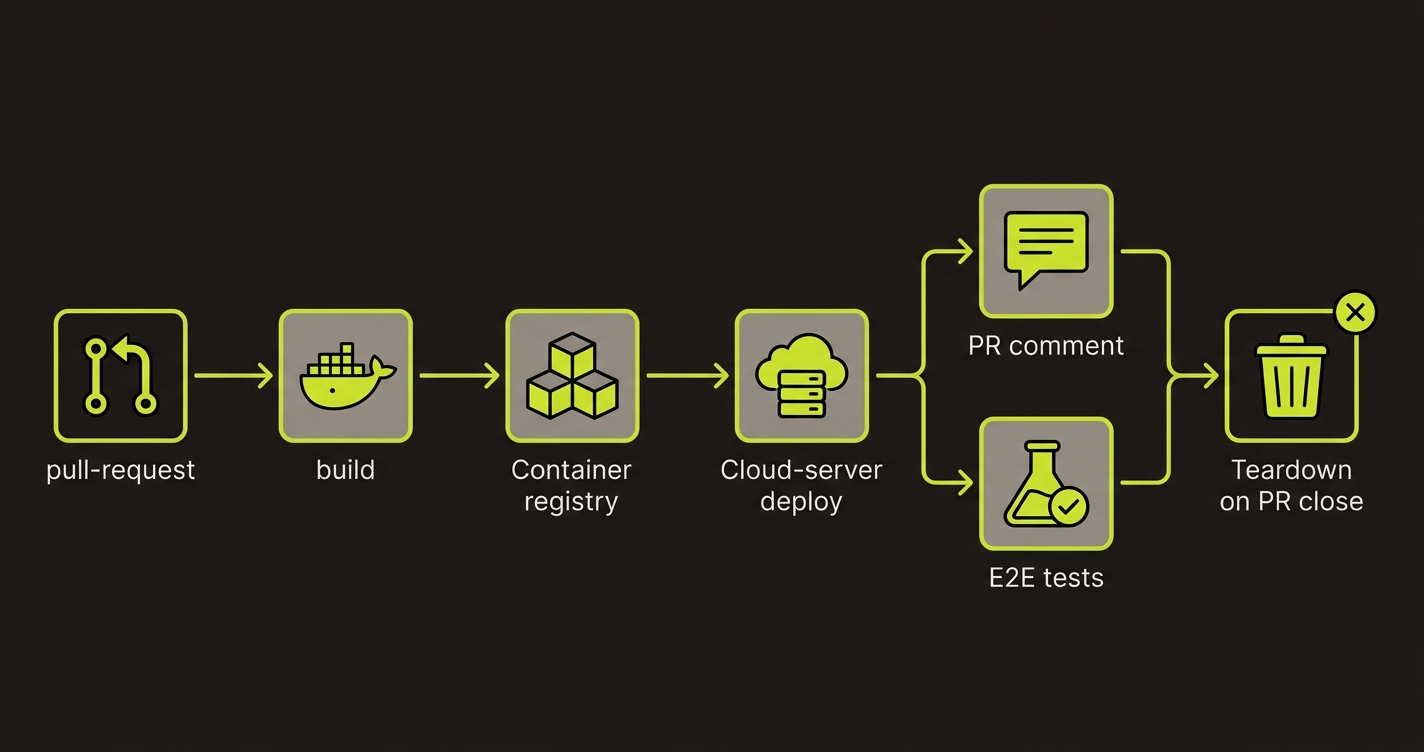
The five components compose into one GitHub Actions workflow. The preview.yml workflow runs on every PR push and handles Build, Deploy, Route, and Test in sequence. A separate teardown job runs conditionally when the PR closes.
Here's the complete workflow with all five components wired together, using Cloud Run as the deploy target (swap the deploy step for any of the cloud-specific scripts above):
A few design decisions in this workflow worth explaining. The concurrency block at the top cancels in-progress runs for the same PR when a new push arrives. Without this, two simultaneous pushes create two parallel deploy workflows that race to update the same Cloud Run revision. The cancel-in-progress: true setting ensures only the latest push is deployed, which is the correct behavior for preview environments. Note that the teardown job should use a separate concurrency group (e.g. teardown-pr-${{ github.event.number }}) so rapid close/reopen cycles don't race each other.
Authentication to your cloud is the one piece this workflow assumes but doesn't spell out. Long-lived AWS or GCP service-account keys stored as GitHub secrets are the old way and a liability for preview environments, every PR runner holds production-capable credentials. The modern pattern is GitHub OIDC: each run gets a short-lived JWT that the cloud provider exchanges for scoped credentials. Add permissions: id-token: write to the job, use aws-actions/configure-aws-credentials@v4 with role-to-assume, or google-github-actions/auth@v2 with workload identity federation. No long-lived secrets in GitHub, credentials auto-expire after the job, and each PR gets a separate session. Essential for any preview environment workflow that deploys to production-adjacent infrastructure.
The outputs block on the deploy job passes the preview URL to the test job. GitHub Actions job outputs require explicit declaration, the URL isn't available automatically from a previous job's step output. The pattern is: declare the output in the job block, set it in the step with echo "url=..." >> $GITHUB_OUTPUT, and reference it in downstream jobs with needs.deploy.outputs.url.
The PR comment step at the end uses the peter-evans/create-or-update-comment action, which creates a new comment on first deploy and updates the existing comment on subsequent pushes. This prevents the PR comment thread from filling up with one comment per push.
Adding Autonoma as the Testing Layer
For teams who built the infrastructure themselves and want to hand off the testing layer, Autonoma is a clean fit. You built the Docker pipeline. You own the cloud resources. You control the URL routing. Autonoma slots into Step 4 as a single API call and handles everything that would otherwise be 30+ lines of Playwright YAML.
We built Autonoma specifically for workflows like this one. The Planner agent reads your codebase to understand your routes, components, and user flows, no recording, no test scripts. The Automator agent runs generated test cases against the URL you pass in. The Maintainer agent keeps tests passing as your code changes. When the preview teardown runs, the test run is complete and results are already in the PR.
For self-hosted teams, the API integration is the recommended path over the GitHub Action. It's CI-system-agnostic, the same curl call works in GitHub Actions, GitLab CI, CircleCI, or a bare bash script. No GitHub App installation required, no action versioning to track.
The Playwright-in-GitHub-Actions guide, linked here, covers the full Playwright workflow including browser caching, sharding, and report artifact management, useful if you're committed to owning the Playwright path directly.
Cloud Provider Comparison
| Cloud Provider | Deploy command | URL pattern | Teardown method | Cost per preview/hr | Setup complexity |
|---|---|---|---|---|---|
| AWS ECS/Fargate | aws ecs update-service | Custom subdomain via ALB | Delete ECS service + task def | ~$0.05 (0.5 vCPU / 1 GB) | High, IAM, ALB, VPC, cluster |
| GCP Cloud Run | gcloud run deploy | pr-N-hash-region.run.app | gcloud run revisions delete | $0.00 idle, ~$0.024 active | Medium, one gcloud CLI call |
| DigitalOcean App Platform | doctl apps create | app-name.ondigitalocean.app | doctl apps delete | ~$0.0139 (512 MB) | Medium, spec file + doctl |
| Hetzner (Docker on VPS) | SSH + docker run | Custom via Nginx reverse proxy | SSH + docker rm | ~$0.006 (shared VPS slice) | Medium, Nginx config management |
| Fly.io | flyctl deploy | pr-N-appname.fly.dev | flyctl apps destroy | $0.00 idle, ~$0.019 active | Low, single flyctl command |
Choosing between them comes down to three questions. First, do you need zero idle cost? Cloud Run and Fly.io scale to zero between requests. ECS Fargate, DigitalOcean, and Hetzner keep resources running and accruing cost for the PR's lifetime. Second, do you need full Docker Compose support? Hetzner is the only option here where you can run a multi-container stack natively with Docker Compose. Third, how much AWS/GCP footprint do you already have? If your production runs on AWS, ECS reuses the infrastructure you already understand and pay for. Starting from zero, Fly.io has the lowest friction.
Condensed to a single decision rule:
- Already on AWS in production: ECS/Fargate. Reuses your IAM, VPC, and billing.
- Want zero idle cost and no Docker Compose need: Cloud Run or Fly.io.
- Need full Docker Compose natively: Hetzner + Traefik.
- Fastest time-to-first-preview: Fly.io. One
flyctlcommand and you have a URL. - Highest concurrent preview count at the lowest per-preview cost: Hetzner. A €6/month CX21 hosts 10-20 previews simultaneously.
What Breaks in Production
Every preview-environment post on the internet makes this look sunny. It isn't. Five failure modes show up within the first month of running self-hosted previews at any real volume. Knowing about them in advance is the difference between a one-hour fix and a four-hour 2am debugging session.
Stuck teardowns when the deploy failed mid-run. A workflow that crashes between "create resource" and "record resource ID" leaves the cloud resource running with no record of it. The teardown trigger fires on PR close, looks for the ID, finds nothing, and exits clean while the orphan keeps accruing cost. The fix is idempotent teardown: delete by a naming convention tied to PR number, not a stored ID. Run your teardown script with || true on each delete so the workflow succeeds even when resources don't exist.
Wildcard SSL certificates don't cover new subdomain patterns. Your wildcard *.preview.yourapp.com cert covers pr-42.preview.yourapp.com. It does not cover pr-42-feature.preview.yourapp.com. The moment someone on your team changes the subdomain pattern to include a dash or an extra level, every preview comes up with a browser warning and the PR feedback loop breaks. Stick to a single-level wildcard pattern and enforce it in the deploy script.
Port exhaustion on shared VPS above ~20 concurrent previews. Hetzner setups commonly assign each preview a port from 8000-9000. Without active cleanup of orphaned containers, that range fills up and new deploys silently fail to bind. Add a health check that counts running containers with the preview label and alerts when it exceeds 80% of the port range.
Fork PRs and the pull_request_target trap. The pull_request event from forks doesn't expose secrets, which means forked PRs can't deploy. Switching to pull_request_target exposes secrets but runs the base branch's workflow with the fork's code, a pwn risk if the workflow checks out and executes the PR's code. The safe pattern: build on pull_request (no secrets, isolated), then deploy on pull_request_target with an if: github.event.pull_request.head.repo.full_name == github.repository guard that blocks fork deploys.
PR comment bot races on fast-push workflows. Pushing three times in rapid succession can create three "preview ready" comments because each workflow runs the "create comment" action before the concurrency cancel kicks in. Use peter-evans/create-or-update-comment with a comment-author matcher instead of create-comment, so subsequent runs update the existing comment instead of adding a new one.
We've hit most of these failure modes in production, happy to share what worked (and what didn't). Grab 20 min with a founder
FAQ
Self-hosted preview environments are ephemeral deployments that spin up automatically for each pull request on infrastructure you own and control, AWS, GCP, DigitalOcean, Hetzner, or Fly.io, rather than on a managed platform like Vercel or Netlify. Each PR gets a unique URL, tests run against the real deployed app, and the environment tears down when the PR closes.
Vercel preview environments only work for frontend apps. If your stack includes a custom backend, a worker process, a websocket server, or services that need to run alongside your frontend, Vercel can't preview them together. Self-hosted preview environments run your entire Docker Compose stack, frontend, backend, workers, in one ephemeral environment per PR.
Use the PR number as part of the subdomain or path. For subdomain-based routing, create a DNS record like pr-123.preview.yourapp.com pointing to your cloud resource. For path-based routing on a shared host, proxy /preview/pr-123 to the container. Wildcard DNS (*. preview.yourapp.com) covers all PR subdomains with one record, avoiding per-PR DNS writes.
Add a second GitHub Actions workflow that triggers on pull_request with types [closed]. This workflow runs on both merged and closed PRs. It should delete the cloud resource by PR number and optionally remove the DNS record. On AWS ECS, delete the service and task definition. On Cloud Run, delete the revision. On Fly.io, run flyctl apps destroy. On Hetzner, delete the server by tag.
Two paths. The Playwright path: add steps to your preview workflow that install Playwright, install browsers, wait for the preview URL to respond, run npx playwright test with BASE_URL set to the preview URL, and upload the HTML report as an artifact. This requires 30+ lines of YAML and ownership of flakiness, browser management, and reporting. The Autonoma path: one API call to POST https://api.prod.autonoma.app/v1/run/folder/<folder-id> with the preview URL as the base_url parameter. Autonoma's agents read your codebase, generate tests, run them against the preview, and post results back to the PR.
Hetzner is cheapest by far for teams running many simultaneous previews, a CX21 server (2 vCPU, 4 GB RAM) costs roughly €0.006/hour. Fly.io is comparable at $0.0032/vCPU/hour with no minimum. DigitalOcean App Platform charges $0.0139/hour per container. AWS ECS Fargate and GCP Cloud Run cost more per hour but are genuinely serverless with zero idle cost. The right choice depends on your concurrent preview count and whether idle cost matters more than per-hour rate.


