

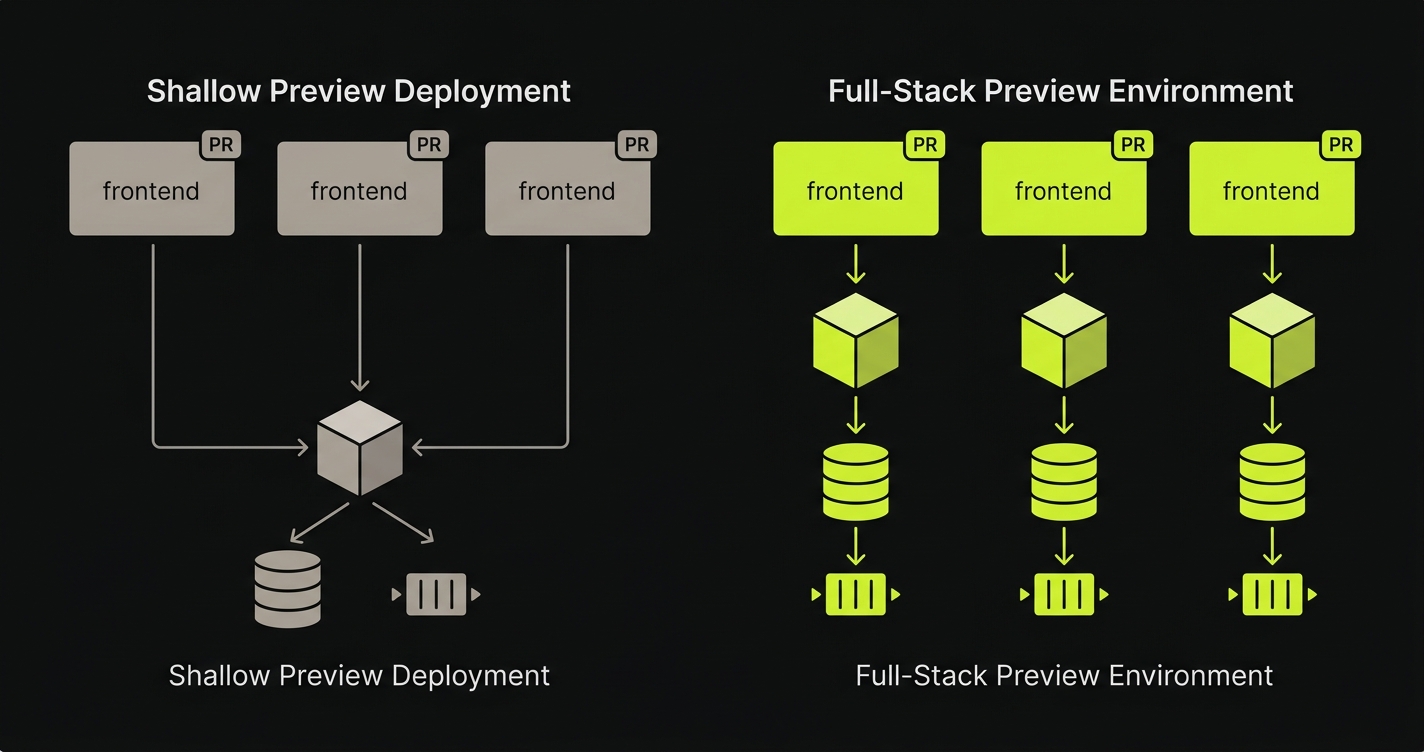
Preview deployment limitations surface when teams conflate a preview deployment (a frontend artifact pointed at a shared backend) with a Preview Environment, which is a fully isolated per-PR runtime: isolated API, isolated database, isolated queue and worker state. Three layers separate a shallow preview from a complete Preview Environment: backend isolation (per-PR API instead of shared staging), data isolation (per-PR ephemeral database with no cross-PR schema leakage), and runtime parity (per-PR queues, caches, and workers matching production shape). The gap between those two categories produces bugs that pass visual review and only appear in production.
Most engineers who have Vercel previews wired up feel reasonably covered. The PR opens, a unique URL appears, the change is visible, the reviewer clicks around. That is a real and meaningful signal. "I have previews" is a half-true sentence: your frontend is deployed in isolation, but everything the frontend depends on (the API, the database, the background workers) is almost certainly shared, pointing at whatever your staging environment happens to look like on the day the reviewer opens the PR.
This article is a layer-by-layer diagnostic of the three preview deployment limitations that a frontend-only preview cannot close, and what infrastructure is required at each layer to close them. It is not an argument against Vercel or any specific platform. Vercel previews are excellent. They are, structurally, a frontend product. The gap is a category gap, not a tooling failure. Understanding it as a category problem (the broader argument for per-PR Preview Environments sits underneath it) is the first step toward fixing it correctly.
The Category Confusion Behind "I Have Previews"
The two terms describe different infrastructure categories. Stated cleanly so the distinction is portable:
A preview deployment is a frontend build artifact deployed to a unique URL, pointed at a shared backend. It isolates the UI bundle for a single PR. It does not isolate anything below the UI.
A Preview Environment is a complete isolated runtime scoped to a single PR: per-PR frontend, per-PR backend, per-PR database, and per-PR queue and worker state, orchestrated together and torn down on PR close. Preview deployments are a frontend abstraction; Preview Environments are a runtime abstraction.
In almost every default setup, the preview URL talks to a shared staging backend. The frontend is isolated but the target it calls is not. A Preview Environment, by contrast, reproduces the whole stack, orchestrates it as a unit, and tears it down when the PR closes.
The reason the confusion is structurally inevitable is that the platforms that gave us previews were, by design, frontend platforms. They solved a genuine, hard problem: give every PR a unique URL. That was the right abstraction to ship first. But it trained teams to think of "preview" as a solved category when, from the perspective of full-stack infrastructure, the category was only half-defined.
The rest of this article names the three layers that sit beneath the frontend surface (the layers a shallow preview cannot reach) and shows what closing each gap actually requires.
Layer 1: Backend Isolation and the Missing Backend Preview Environment
When a preview deployment spins up, the frontend bundle is deployed to an isolated URL. The backend is not. The API the preview frontend calls is the same staging backend that every other PR, every other developer's smoke test, and whatever QA work is happening concurrently is also calling. This is the first and most structurally significant preview deployment limitation.
The way this surfaces in production is rarely obvious on the preview URL. Consider a PR that adds a new field to the /api/orders response shape. The developer writes the frontend to render the new field. They open the preview URL. The page renders correctly, because the latest production backend (which hasn't shipped the new field yet) is handling the API call. The frontend degrades gracefully; the missing field just doesn't show up. Reviewers approve. The PR merges.
Now deployment order matters. If the frontend deploy completes before the backend deploy, or if they deploy simultaneously and the frontend workers roll over first, real users hit a frontend that expects a field the API hasn't shipped yet. White screen. Null pointer. The failure mode didn't exist on the preview URL because the preview frontend was calling production's backend, not the PR's backend.
What infrastructure closes this gap is per-PR orchestration that spins up a backend preview environment alongside the frontend one. An isolated API instance, built from the same PR branch, that the preview frontend routes to instead of shared staging. The frontend and backend are now in lockstep. A response-shape change on the backend is visible on the preview frontend because both are running the same branch. Service replication at the backend layer is the mechanism; per-PR orchestration is the operational model that makes it automatic. Closing Layer 1 in isolation, without addressing the layers below, creates an asymmetric situation: the API is per-PR but the data it operates on is not. That asymmetry is structurally unstable, which is why teams that close Layer 1 quickly run into Layer 2.
Layer 2: Data Isolation, the Missing Per-PR Database State
Even teams that do provision per-PR backend instances often skip the database layer. A shared staging database seems reasonable: it's persistent, it has realistic data, and spinning up a fresh database per PR sounds operationally expensive. The problem is that shared database state creates temporal coupling between PRs that don't otherwise interact.
Here is a scenario that plays out in practice. A PR introduces a destructive migration: drop the legacy_status column, replace it with status_v2. The migration runs against shared staging the moment the PR's backend deploys. A second PR (completely unrelated, authored by a different developer) now has a staging database whose schema no longer matches its branch. That PR's preview "works" because the developer never touched the status column. The PR merges.
Now production receives two deploys in sequence. The second PR deploys first. Its code reads legacy_status, which no longer exists in production after the first PR's migration runs. Bugs appear in production with mysterious ordering dependencies, the kind where the post-mortem concludes "it worked in staging." It did, until the schema changed underneath it. Database engineers call this pattern schema drift, and the production failure mode is migration ordering: a PR's code and its database expectations were correct in isolation, but the order in which migrations land in production changed what the code actually saw.
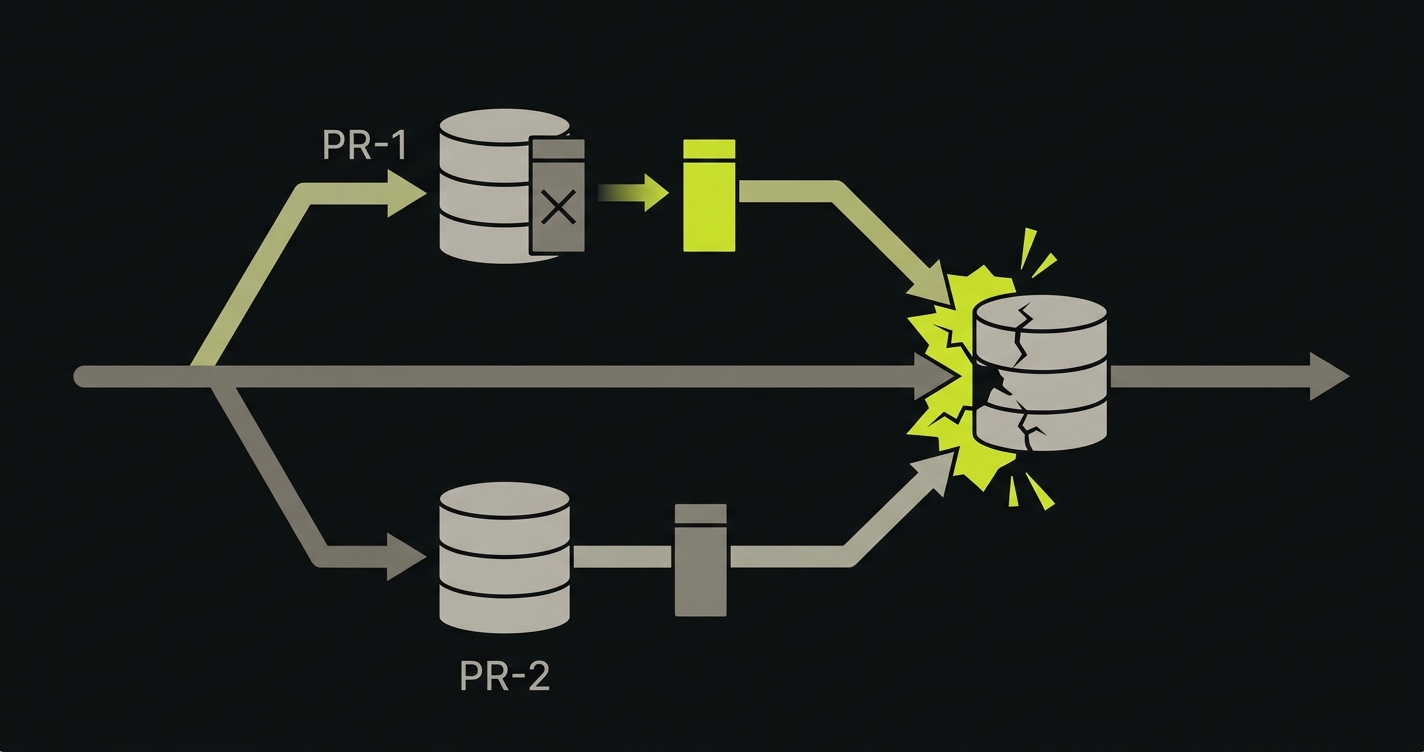
Closing this gap requires a per-PR database: ephemeral, branch-scoped, and seeded from a sanitized snapshot of production data. Every PR gets its own isolated runtime infrastructure at the data layer. Migrations run in isolation. Schema changes are visible only within the PR that introduced them. The staging database state of one PR cannot leak into another.
The practical complexity here is secrets and config propagation. When you provision a per-PR database, you also need to wire connection strings, credentials, and environment-specific config to the per-PR backend that will use it. This is not difficult infrastructure to build, but it is infrastructure. It is precisely the kind of infrastructure that "I have Vercel previews" does not cover. We've watched teams underestimate this layer repeatedly (including when scoping our own platform), which is why Autonoma ships per-PR database branches and the credential propagation as a single unit rather than as two features that have to be composed.
The preview URL is half the answer. 20 minutes with the founder to find the layers your previews are quietly skipping. Book a call with the founder
Layer 3: Runtime Parity, the Missing Queue, Cache, and Worker State
The third layer is the subtlest, and arguably the one most likely to produce production incidents that look completely unrelated to the deploy that caused them. Production parity (the SERP-favored term for what runtime parity describes) is the property at stake here.
Even with backend isolation and data isolation in place, the runtime shape of a preview environment often doesn't match the runtime shape of production. Queues are absent or pointed at shared infrastructure. Caches are cold, shared, or missing entirely. Background workers (the processes that consume queued work, send emails, process webhooks, run scheduled jobs) are frequently not reproduced in preview environments at all.
This matters not for testing reasons but for runtime reasons: the code that runs in your preview environment executes in a different context than the code that runs in production. The behavior diverges.
Consider a PR that refactors how a webhook is processed. In the preview environment, no background worker is running. The webhook handler is hit synchronously; it does its work inline and returns a 200 in 80 milliseconds. The developer observes correct behavior. The PR ships.
In production, the handler enqueues the work to a background queue and a worker process handles it asynchronously. That worker's environment was not updated alongside the PR. It's running on the last deployed version, which doesn't have the new dependency the PR introduced. The webhook returns 200 (the enqueue succeeded), but the worker silently fails when it dequeues the job. Downstream systems fail an hour later, well after the deploy window looks clean.
The runtime in the preview didn't match the runtime in production. The handler returned 200 in both environments. The difference was in the surrounding infrastructure: what happened after the 200. That surrounding infrastructure wasn't reproduced in the preview.
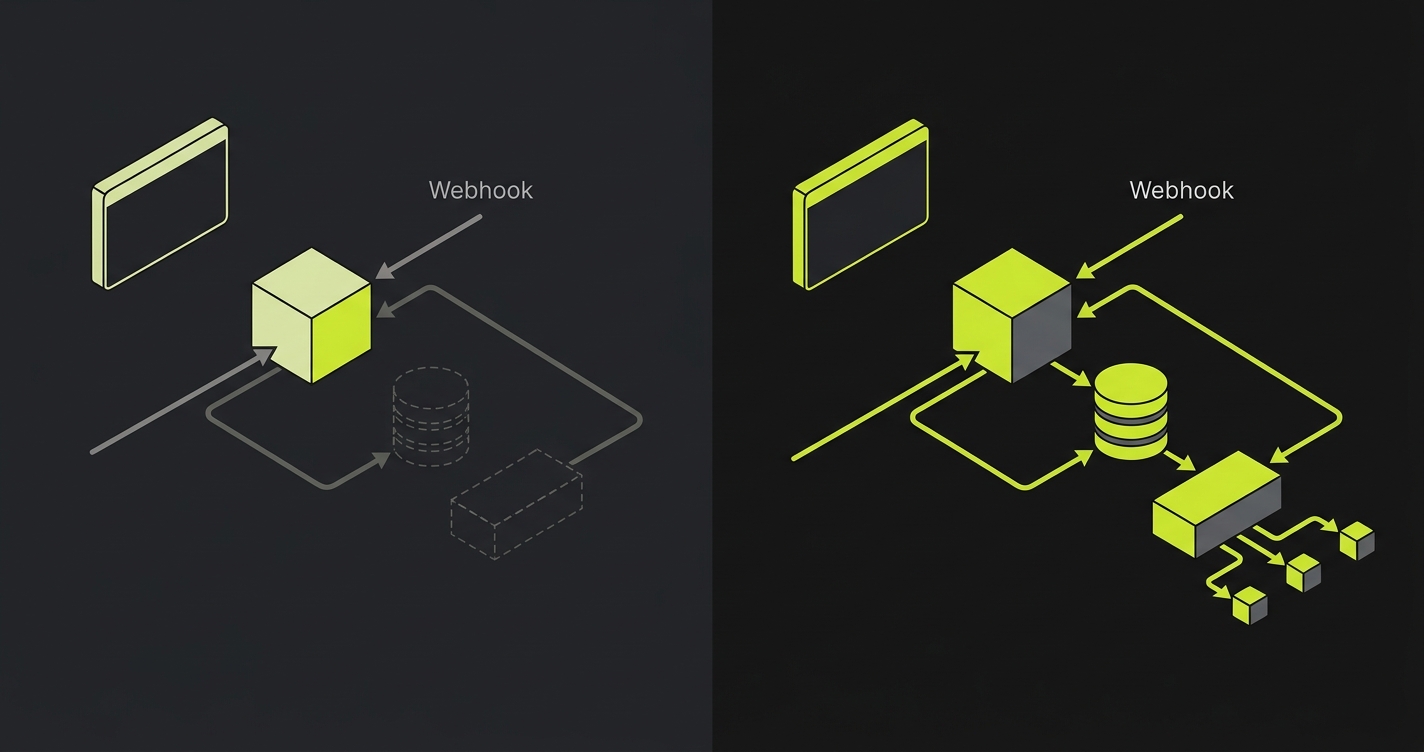
Closing this layer requires per-PR runtime that matches production shape: the same queue topology, the same cache layer, the same worker configuration, all scoped to the PR and torn down when it closes. Environment routing (pointing per-PR components at per-PR infrastructure rather than shared infrastructure) is the mechanism. Service replication at the worker and cache layer is what makes it complete. The reason worker replication often gets dropped from in-house implementations is operational, not architectural: it's the layer where a single forgotten environment variable produces a silent contamination bug, and platform teams correctly judge it the riskiest piece to maintain. We built Autonoma to operate worker replication by default precisely because that risk is what makes the layer easiest to skip.
Frontend-Only Previews vs Complete Preview Environment: What the Layers Add Up To
Here is what the two categories look like side by side, with the preview deployment limitations of the shallow approach mapped against the per-PR full-stack model. The columns represent the infrastructure category, not any specific platform.
| Capability | Shallow Preview Deployment | Per-PR Full-Stack Preview Environment |
|---|---|---|
| Backend isolation | No: frontend calls shared staging API | Yes: per-PR API instance from branch code |
| Data isolation | No: shared staging database | Yes: per-PR ephemeral database, seeded from sanitized snapshot |
| Runtime parity (queues, cache, workers) | No: workers absent or shared; cache cold or missing | Yes: per-PR queue, cache, and worker topology matching production shape |
| Bugs caught before merge | Visual regressions; layout breaks; missing frontend assets; client-side JS errors | Response-shape mismatches; migration conflicts; async processing failures; cross-PR state contamination |
| Bugs missed before merge | API contract breakage; schema-dependent failures; worker-dependent behavior; staging DB state contamination | IAM and cloud-role drift between preview and production; third-party webhook signing keys that only exist in production; rate-limit and load-shape behavior that only manifests at production traffic levels |
The pattern is consistent: shallow preview deployments catch what is visible in the browser. Full-stack Preview Environments catch what happens in the stack beneath the browser. Neither category makes the other redundant, but conflating them produces a false sense of coverage that shows up as production incidents.
Want to implement this at your company today? Schedule a call here.
The Category Fix: Per-PR Full-Stack Preview Environments
The fix is not to use a different preview platform. It is to recognize that preview deployments and Preview Environments are different infrastructure categories, and to build or operate the infrastructure that the category requires.
A per-PR full-stack Preview Environment is composed of five coordinated elements: an isolated frontend, an isolated backend, an isolated database, an isolated runtime (queue, cache, workers), and the orchestration layer that provisions all of them together on PR open and tears them all down on PR close. None of these elements is novel on its own. The category-defining property is that they are isolated, branch-scoped, and operated as a unit.
The infrastructure vocabulary for this category is worth naming explicitly, because it appears across every platform and implementation that takes this problem seriously:
Isolated runtime infrastructure is the foundation: every PR gets its own compute, storage, and runtime context rather than sharing with staging. Per-PR orchestration is the operational model: a trigger on PR events coordinates the provisioning and teardown of the full stack automatically. Service replication is the mechanism: each service (API, worker, cache, queue) is replicated per-PR rather than shared. Environment routing is how per-PR components find each other: the preview frontend routes to the per-PR API, which routes to the per-PR database and per-PR queue. Secrets and config propagation is the operational detail that makes it complete: database connection strings, API keys, and environment-specific configuration are generated and distributed to each per-PR component at provision time.
Teams can build this in-house. The GitHub Actions primitives, container orchestration, and database branching tools to assemble this exist today. It is significant infrastructure work, but it is not speculative. Teams do it. The alternative is to operate it as managed infrastructure, where the provisioning, teardown, routing, and secrets propagation are handled by an operator. Both approaches close the same preview deployment limitations, just through different operational models, and both produce the same category jump: from preview deploy to Preview Environment. For more on the architecture of per-PR full-stack environments, the infrastructure decisions are examined in detail. For a direct comparison of what each approach covers and what it leaves out, frontend-only previews vs full-stack preview environments covers the tradeoffs.
How Autonoma closes the three missing layers
The diagnostic above frames preview deployments as a frontend artifact missing three layers: backend isolation, data isolation, and runtime parity. A managed implementation closes these layers by treating them as one provisioning unit rather than three separate problems. Here is how Autonoma behaves on each layer.
On Layer 1 (backend isolation), every PR gets its own backend service replicated and routed alongside the per-PR frontend, with the API URL injected into the frontend at build so the preview UI talks to the per-PR backend rather than to shared staging. The replication is the default, not an integration the team has to wire. On Layer 2 (data isolation), each PR gets either a branched database copy or a freshly seeded schema, chosen per project. Schema migrations and writes are scoped to the branch, which is what eliminates the cross-PR contamination that frontend-only previews never address. On Layer 3 (runtime parity), the queue, worker, and cache are replicated per PR with namespace prefixes propagated as a single unit to every component, so a job enqueued by PR 142's API is processed by PR 142's worker against PR 142's database. The drift bug where the prefix reaches one process but not another is structurally absent because all five canonical environment variables are computed once and distributed together.
The integrated E2E test layer runs against each preview environment and blocks merge on failure, closing the validation loop that the layered diagnostic identifies as the practical reason isolation matters: a green preview only proves something useful if the tests ran against the isolated runtime. Autonoma is open-source, so the orchestration that closes the three layers is inspectable and self-hostable. For the operational view of how that loop is run day to day, see the preview environment provisioning lifecycle and the Preview Environments for every pull request workflow. For the deeper full-stack framing, see full-stack preview environments without shared staging. For the decision landscape across vendors, see going beyond Vercel previews to full-stack preview environments.
Want to implement this at your company today? Schedule a call here.
FAQ
A preview deployment is a frontend artifact: your UI code is built and deployed to a unique URL, typically pointing at a shared staging backend. A Preview Environment is a complete isolated runtime: per-PR frontend, per-PR backend, per-PR database, and per-PR queue and worker state, all provisioned together and torn down on PR close. The distinction is infrastructure scope: a deployment is one layer; an environment is the full stack.
Yes. Pointing a Vercel preview at a per-PR backend closes Layer 1 (backend isolation), but it leaves Layer 2 (data) and Layer 3 (runtime) open. You configure the preview deployment's environment variables to point at a per-PR API URL instead of shared staging, and you provision that API instance through your own orchestration. This is a meaningful improvement. Closing all three layers together is what makes it a Preview Environment rather than a more carefully configured preview deployment.
A shared staging database is sufficient for teams where PRs are small, sequential, and never touch the schema. In practice, that describes fewer teams than it sounds like. Destructive migrations, column renames, and seed data changes all leak into concurrent PRs through a shared database, sometimes visibly, often not. Per-PR databases eliminate the category of staging-contamination bugs entirely, at the cost of provisioning time and storage. Most teams find that cost justified after the first production incident they trace back to a migration ordering dependency.
Queues and workers define the runtime shape of your application: the paths code takes that don't go through the request/response cycle. A webhook handler that enqueues work, a job that processes it later, an email that sends on a scheduled trigger: none of these are exercised by a frontend preview that has no worker process attached. In a full-stack Preview Environment, per-PR workers are provisioned alongside the API, consuming from per-PR queues and running the same branch code. The runtime matches production shape, so behavior observed in the preview reflects behavior that will occur in production.
Both in-house and managed operator approaches deliver a complete preview environment; the choice comes down to control versus operational simplicity. The in-house path gives full control and no external dependency, but the build scope is substantial: per-PR orchestration, service replication, environment routing, and secrets and config propagation are each engineering projects, not configuration. The managed operator path trades control for operational simplicity: the provisioning, teardown, routing, and secrets lifecycle are handled externally, and the team interacts with preview URLs rather than the infrastructure behind them. The right choice depends on team size, platform maturity, and how central preview infrastructure is to the developer experience you want to invest in building.
Provisioning windows for a full-stack Preview Environment typically run from a few minutes to roughly a quarter hour, depending on the orchestration model and the size of the stack being replicated. Image pulls, database snapshot restoration, and service-by-service warmup all contribute to the floor. Mature managed operators amortize the cost with image caching, snapshot reuse, and parallel service startup; in-house builds pay this cost on every PR until the same optimizations are introduced. The provisioning floor is one of the operational decisions that distinguishes a complete preview environment from a shallower configuration.
Secrets and config propagation is generated and injected at provision time. When the orchestration layer creates a per-PR database, it generates a connection string scoped to that database, then injects it into the per-PR backend's environment alongside any other PR-specific configuration. Production credentials are not reused; the per-PR credentials are short-lived and torn down with the environment. The hard work is not the cryptography but the coordination: ensuring that the backend, worker, and frontend each receive the right configuration at the right point in the provisioning sequence. This is one of the layers where in-house builds tend to underestimate the operational surface.


