

Automated accessibility testing tools like axe-core, Pa11y, and Lighthouse reliably catch the machine-checkable class of WCAG issues: missing alt attributes, insufficient color contrast, missing form labels, invalid ARIA, heading-order problems, and specific keyboard-focus attributes. They cannot evaluate whether alt text is meaningful, whether a custom widget is operable by a screen reader, or whether a flow is completable without a mouse. Knowing exactly where that line sits is what separates a real gate from a false sense of coverage.
Run an automated accessibility scan against a page with a broken keyboard trap, and the report can come back clean. Zero violations, nothing flagged, a passing badge if you wired one into CI. Try to complete the same flow using only a keyboard, and you can't get past the second modal.
That gap isn't a bug in the scanner. It's the shape of what a scanner can see. This is written for QA leads, QA managers, and engineering managers who own quality without a dedicated QA function, at a company with a real release cadence and suite already in place, deciding how much of an accessibility gate to build and where it stops covering them. It isn't written for a team standing up its first tests, and it isn't about whether AI-generated tests can be trusted. It's about a narrower question: once you turn on an automated accessibility check, what have you actually verified, and what's still open.
What automation reliably catches
Automated accessibility testing tools are good at exactly the class of problem a machine can verify without judgment: an attribute exists, a computed value crosses a threshold, a structural rule holds. A handful of criterion classes cover most of what a scanner like axe-core, Pa11y, WAVE, or Lighthouse's accessibility audit flags on every run.
Missing alt attributes (WCAG 1.1.1) are a presence check. Insufficient color contrast (WCAG 1.4.3) is a computed ratio between two colors. Missing form input labels (WCAG 1.3.1, 4.1.2) check whether an input has a programmatically determined name. Invalid or misused ARIA attributes (WCAG 4.1.2) check whether a role or property is used correctly per spec, not whether the resulting behavior makes sense to a user. Heading-order problems flag a jump from an h2 straight to an h5, skipping a level a screen reader user relies on; axe tags this a best practice, not a WCAG failure. Two keyboard checks are structurally detectable too: focusable content trapped inside an aria-hidden container (WCAG 4.1.2, Serious) and a scrollable region a keyboard can't reach (WCAG 2.1.1, Serious).
None of that is guesswork. WebAIM's 2026 Million report, an annual WAVE-engine scan of the home pages of the one million most-visited sites, found at least one detectable WCAG failure on 95.9% of them, and six error types accounted for 96% of all errors found: low contrast text (83.9% of pages), missing alternative text for images (53.1%), missing form input labels (51%), empty links (46.3%), empty buttons (30.6%), and missing document language (13.5%). All six belong to the machine-checkable class: detectable from markup alone.
WebAIM's own methodology is candid about that engine's edge: all automated tools, including WAVE, have limitations, not every conformance failure can be detected automatically, and zero flagged errors doesn't guarantee a page is accessible. Those are the report's own authors, saying automated detection is inherently partial.
Deque's own axe-core README states the tool finds "on average 57% of WCAG issues automatically," the vendor's own estimate of its detectable subset, not an independent audit. The same README names its own edge too: it returns some elements as "incomplete" where the tool couldn't be certain, and hands those cases back for a human to review.
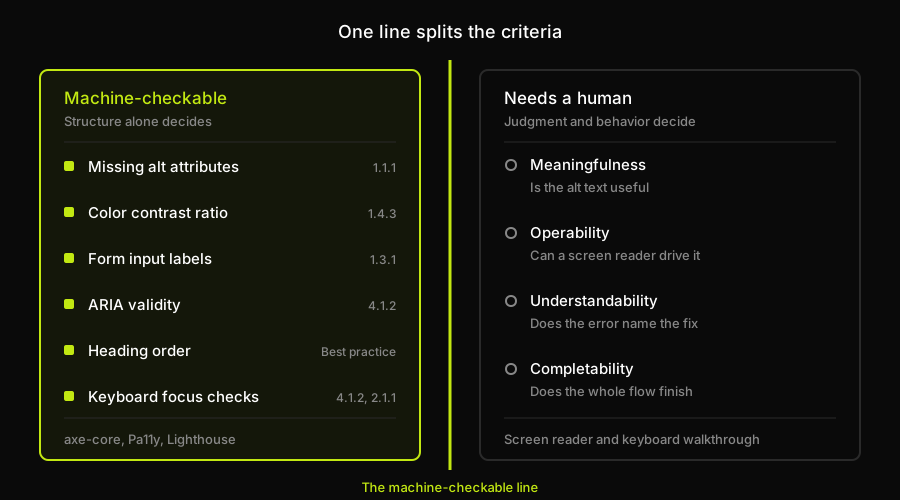
The six classes on the shaded side are there because a scanner can settle each one from markup alone. The four on the other side each need someone to judge whether the result is actually usable, which is why no scan returns a verdict on them.
What still needs human judgment
The other side of the line isn't a longer list of rules a scanner hasn't gotten around to yet. It's a different kind of question, requiring interpreting intent, not just structure, the same line W3C's own evaluation guidance draws between automated and human-judgment checks.
Meaningfulness is the first gap. A tool can confirm an img tag has an alt attribute, not that it says anything useful. alt="image47.png" passes the same check as a real description, because both are non-empty strings. Whether alt text conveys the image's purpose is a judgment call a machine can't make.
Operability is the second. A custom dropdown, a drag-to-reorder list, a date picker built from scratch: a scanner can check each has the right ARIA role attached. It can't drive a screen reader through the widget to confirm a real user can open it, navigate its options, and select one without a mouse. That's a behavioral question static analysis of markup can't observe. Google's own Lighthouse puts trapped focus, logical tab order, and whether visual order follows DOM order under manual checks that don't touch its score, the vendor conceding the same boundary from its own side.
Understandability is the third. WCAG requires error messages that identify the problem and suggest a fix (3.3.1, 3.3.3). A tool can confirm an error message exists and is tied to the right field, but can't tell a vague error apart from one that names the exact field and rule it violated.
Completability is the fourth, tying the other three together. A checkout flow or a multi-step wizard can pass every automated check individually and still be impossible to finish with a keyboard alone, if focus gets trapped in a modal, a required field never receives programmatic focus, or a success state redirects before a screen reader announces it. No per-page scanner catches that, since completability is a property of a sequence, not a single render.
Which WCAG criteria are machine-checkable
An accessibility testing checklist, one criterion class per row, stated plainly enough to stand on its own:
| Criterion class | Machine-checkable? | Tool that covers it | What still needs a human |
|---|---|---|---|
| Missing alt attributes | Yes | axe-core, Pa11y | Whether alt text is meaningful |
| Color contrast ratio | Yes | axe-core, Lighthouse | Nothing, it's a computed value |
| Missing form labels | Yes | axe-core, Pa11y | Whether the label reads clearly |
| Invalid ARIA roles | Yes | axe-core | Whether behavior matches the role |
| Heading order | Yes | axe-core, Lighthouse | Whether structure matches content |
| Screen reader operability | No | No automated tool | A full assistive-technology walkthrough |
Can you test accessibility in CI?
Yes, for the deterministic subset. It earns a blocking gate for the same reason a linter earns one: cheap, consistent, and rarely wrong. Wire axe-core, or Pa11y, into the pipeline that already runs on every pull request, and fail the build on a new violation in the classes above: alt attributes, contrast ratio, form labels, ARIA validity, heading order, and the two keyboard checks named earlier. That check costs the same as the rest of an automated suite, since it's just another deterministic pass against the DOM.
A test strategy is a plan for spending a resource that's grown scarcer over time: it used to be the hours it took to write a test, now it's the attention it takes to review one. The deterministic subset barely touches that budget, since a contrast ratio either crosses its threshold or it doesn't, which is why it belongs in CI on every commit. The manual walkthrough is where the expensive resource gets spent.
What doesn't belong in that gate is anything from the structurally uncatchable side. You can't block a merge on "is this alt text meaningful," since there's no automated pass or fail for that question; it needs a person reading the page in context. The cadence that works: run the automated subset on every commit, and run a manual or assistive-technology walkthrough, someone navigating the critical flows with a screen reader and a keyboard, on a cycle tied to when those flows change, not a fixed calendar date. A checkout flow untouched for six months doesn't need a fresh walkthrough. One that shipped a new component last sprint does.
Accessibility also carries a legal dimension worth naming once: several jurisdictions regulate the accessibility of public-facing software, a reason to gate the deterministic subset in CI, not a reason to build a compliance strategy around litigation risk.
Deciding where that line sits is a call made against a live pipeline and a real release calendar, not a blank slate: which existing job gets the deterministic gate bolted on, and what cadence the walkthrough gets scheduled against. A team standing up its first suite has no pipeline yet to bolt anything onto, which is a different decision entirely.
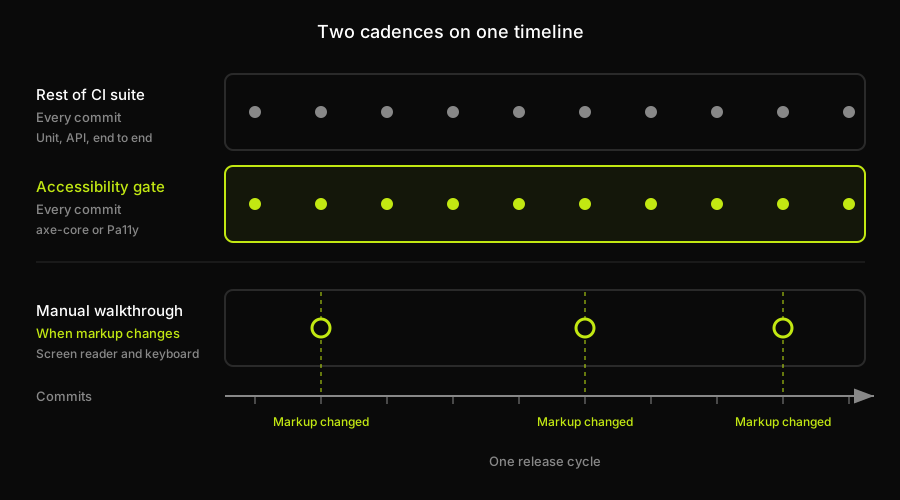
The deterministic gate rides along with the rest of CI on every commit because it costs almost nothing to run. The walkthrough fires on its own trigger, when a flow's markup actually changed, instead of on a fixed calendar date.
How Autonoma relates to accessibility checks
We built Autonoma for the layer a rule set can't reach: a flow, executed the way a real user executes it, start to finish. Connect your codebase and our agents read the routes and components that actually exist, generate test cases from them, and run those against a live preview environment created for that pull request, with a Diffs Agent keeping the suite aligned as the code changes.
That sits next to a scanner rather than over it. axe-core and Pa11y own the WCAG rule layer, the contrast ratios, the ARIA validation, the conformance report, and the section above describes how to wire either one into CI as a blocking gate. What our agents add underneath is completion. A keyboard-only path through a signup form is still a user flow, and a flow that only completes with a mouse is a behavioral regression whether or not a contrast ratio is involved. Encode that path as one of the flows worth generating tests for and it lands squarely inside what the agents already do, which is execute a sequence and report whether it finished.
Why accessibility is missing from every test tool roundup
Go back to nearly any published guide to choosing a test automation tool and look for accessibility on the list of selection criteria. Ranorex publishes one of the more detailed comparisons in this category, walking through licensing, platforms, maintenance overhead, and reporting depth. Accessibility doesn't appear as a line item, and that's not a knock on Ranorex specifically. Our own roundups of mobile testing tools and API testing tools cover real, distinct gaps in a typical strategy document, and neither raises accessibility either, since it sits outside what either category verifies. The mechanism is the same across all three: no tool-selection checklist asks about it, so no tool decision accounts for it, until an audit or complaint forces the question retroactively. A team can adopt a full stack and still never choose who owns the deterministic accessibility subset, since no checklist along the way asked.
Put it in the document explicitly instead. A strategy that lists unit, API, end-to-end, and visual regression coverage but never names which tool, if any, gates the machine-checkable accessibility subset has a gap nobody assigned. Naming it, even as "axe-core in CI, manual walkthrough tied to flow changes," turns an invisible default into a decision someone made, one that survives a follow-up question from legal. That's the same discipline behind naming coverage at every other layer, from visual regression tooling to the open-source stack a team chooses for the rest of the suite; the broader strategy document this all rolls up into is where that line gets written down.
None of this makes accessibility optional. The automated subset is exactly as valuable as it actually is: a cheap, deterministic gate worth running on every commit precisely because it's so cheap to run. The mistake isn't running axe-core in CI; it's letting a clean report stand in for the manual and assistive-technology testing that's the only way to verify what a machine structurally can't reach. Name both halves in the strategy document: the tool that gates the deterministic set, and the cadence for the human check. Where a keyboard-only flow needs verifying as a behavioral sequence rather than a markup audit, that's the boundary where Autonoma picks up, running the flow itself rather than scanning the page it renders on.
Frequently Asked Questions
Automated accessibility testing tools like axe-core, Pa11y, WAVE, and Lighthouse detect the machine-checkable class of WCAG issues: missing alt attributes, insufficient color contrast, missing form input labels, invalid or misused ARIA attributes, heading-order problems, and specific keyboard-focus checks like focusable content trapped inside an aria-hidden container. WebAIM's 2026 Million report found at least one detectable WCAG failure on 95.9% of scanned home pages, and six of those error types accounted for 96% of all errors found.
No. Automated tools verify structure, not experience. They can confirm an alt attribute exists but not whether it's meaningful, confirm an ARIA role is valid but not whether a custom widget is actually operable by a screen reader, confirm an error message element exists but not whether it's understandable, and check individual pages but not whether a full flow is completable without a mouse. A clean automated scan is a real result on a real subset of issues, not proof that a page is accessible overall.
axe-core is Deque's open source accessibility testing rules engine, used inside browser extensions, CI integrations, and other scanners including Pa11y's rule set. Its own documentation states it finds, on average, 57% of WCAG issues automatically, a figure worth treating as the vendor's own estimate of its detectable subset rather than an independent measurement of WCAG coverage overall.
Yes, for the machine-checkable subset. Wiring axe-core or Pa11y into the same pipeline that runs the rest of an automated suite, and failing the build on a new violation in criteria like missing alt attributes, contrast ratio, missing labels, invalid ARIA, or heading order, is a cheap and consistent blocking gate. It cannot gate anything that requires human judgment, like whether alt text is meaningful or a flow is completable end to end.
Yes. Manual and assistive-technology testing, someone actually navigating critical flows with a screen reader and a keyboard, is the only way to verify meaningfulness, operability, understandability, and completability, none of which a static scan of markup can evaluate. A practical cadence runs the automated subset on every commit and the manual walkthrough on a slower cycle tied to when a flow's markup actually changes, not a fixed calendar date.
On the other side of the gap this whole article is about. A scanner audits markup against a rule set: alt attributes, contrast ratios, ARIA validity, heading order. What no rule set can tell you is whether a person can actually get through signup, checkout, or a multi-step form once those rules pass, which is exactly the completability question that keeps manual walkthroughs on the calendar. Autonoma covers behavior. It reads a codebase, generates end-to-end tests from the routes and flows that exist in it, and runs them against a live preview environment on every pull request, with a Diffs Agent keeping those flows current as the markup changes underneath them. It is not a WCAG scanner and does not replace one, and it will not tell you whether alt text reads meaningfully or a custom widget is operable by a screen reader. What it does tell you is whether the flow underneath still completes when the code changes. Run both and the scanner gates the rules on every commit while the suite gates the behavior, which is the split this article has been arguing for throughout.


