

AWS Device Farm pricing runs on a per-device-minute metered model: at approximately $0.17 per device minute (AWS list price, June 2026), a team consuming 20,000 device minutes per month pays roughly $3,400/month. An unmetered monthly plan costs approximately $250 per device per month and becomes cheaper once usage exceeds about 1,470 device minutes per device. Confirm current rates at the AWS Device Farm pricing page before budgeting.
There is a specific device-minute volume at which AWS Device Farm's metered plan quietly becomes the wrong choice. Most teams never calculate it. They sign up on the per-minute rate, run a few sprints, and open their AWS bill to a number they did not expect.
The crossover is real and it is calculable. Once you know it, AWS Device Farm pricing decisions become straightforward: you are either below the threshold and metered billing is fine, or you are above it and unmetered slots pay for themselves inside a single billing cycle.
This breakdown works through the math with actual AWS list prices, a volume example at 20,000 device minutes per month, and the exact conditions under which a managed unmetered device farm undercuts both of Amazon's own plans.
For teams using Device Farm to cover web regression checks alongside native mobile QA, the important question is scope. Autonoma does not replace physical handset certification; it removes the per-minute meter from the web E2E portion by generating and maintaining tests from the codebase and running them on managed per-PR previews.
How AWS Device Farm Bills
AWS Device Farm offers three pricing tiers. The table below uses AWS list figures as of June 2026 (verify current rates at the AWS pricing page before making budget decisions):
| Plan | Cost | Best for | Notes |
|---|---|---|---|
| Free tier | 1,000 device minutes free | First-time evaluation | One-time, new accounts only |
| Metered (per device minute) | ~$0.17 per device minute | Sporadic or low-volume use | Clock runs per device, concurrently |
| Unmetered (per device per month) | ~$250 per device per month | High-frequency regression suites | Unlimited minutes on that device slot |
A device minute is the wall-clock time a physical device is allocated to your session. The clock starts when the device is assigned and stops when the session ends. If tests run in parallel on four devices simultaneously, all four meters tick at the same time. That's the mechanic that makes the metered plan scale non-linearly as teams grow their device matrix.
The free-tier allowance (1,000 device minutes) is a one-time grant for new accounts. It covers a reasonable first evaluation but disappears quickly once you add devices and parallel runs.
Where Metered Pricing Gets Expensive
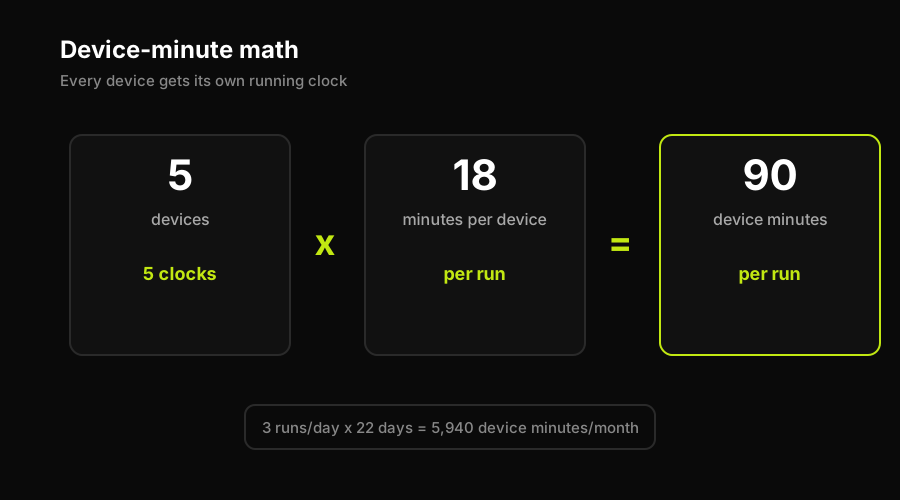
Here is a concrete scenario: a mobile QA team running a regression suite for a native app across five physical devices. The suite takes 18 minutes per device. They run it three times per day in CI (morning, after lunch, before merge freeze). They work 22 days per month.
The math:
- Device minutes per run: 5 devices x 18 minutes = 90 device minutes
- Runs per day: 3
- Working days per month: 22
- Total device minutes per month: 90 x 3 x 22 = 5,940 device minutes
- Cost at metered rate (~$0.17/min): 5,940 x $0.17 = ~$1,010/month
That's already substantial. Now the team adds two more devices to cover OS version variants. Device count goes from 5 to 7:
- Device minutes per run: 7 x 18 = 126
- Monthly total: 126 x 3 x 22 = 8,316 device minutes
- Monthly cost: ~$1,414/month
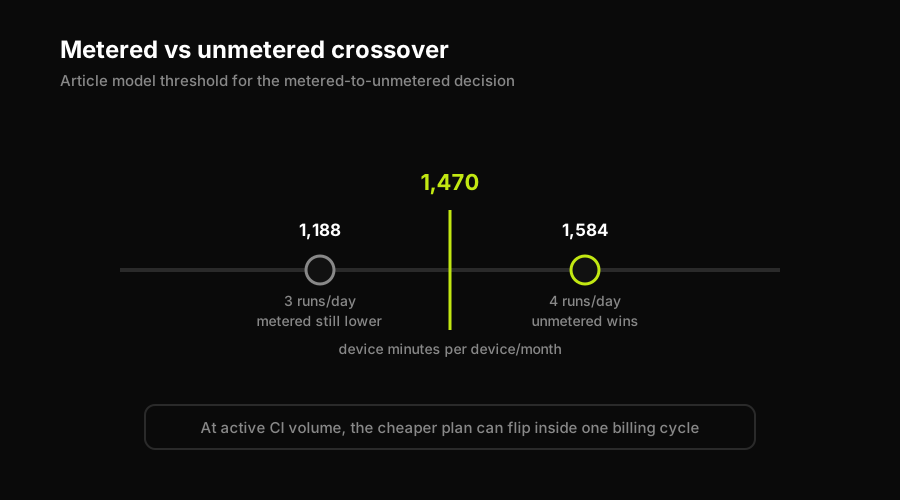
The crossover point where unmetered becomes cheaper than metered: approximately 1,470 device minutes per device per month ($250 unmetered / $0.17 metered = ~1,470). At 3 runs per day, 22 days, a single device accumulates about 1,188 minutes per month for an 18-minute suite (18 x 3 x 22 = 1,188). That's just below the crossover. At 4 runs per day: 18 x 4 x 22 = 1,584 minutes per device, and unmetered at $250 beats metered at $269. The crossover is real and reachable quickly in active CI pipelines.
All figures above are illustrative estimates derived from AWS list rates and should not be treated as quotes.
Metered vs a Managed Device Farm
The per-minute billing model is structurally different from how managed device farms price their services. AWS Device Farm's metered plan charges by consumption: every minute every device runs, you pay. The unmetered plan eliminates the per-minute meter but still ties you to a fixed device-slot count. Neither model answers the question engineers actually want answered: "What will testing cost this sprint, regardless of how many times we push?"
Managed device cloud services (like BrowserStack or Sauce Labs) generally sell capacity by parallel sessions rather than by minute, which changes the cost profile but doesn't remove the idea of per-unit billing. Their pricing pages quote monthly tiers, but peak session consumption and overage charges introduce the same variability.
The alternative for the web E2E layer is a model that is not tied to AWS device minutes: you run PR checks without adding physical-device minutes to the bill. That's the model that makes sense when testing is integrated deeply into CI, not as a periodic QA gate but as a per-PR verification step. The device count stops being a cost variable for web E2E because there is no AWS Device Farm device-minute clock. If you'd rather own the infrastructure entirely, see our Selenium grid TCO analysis for what self-hosting actually costs.
For web E2E, that is exactly where Autonoma belongs in the comparison: it is not another device-minute plan, and it is not another parallel-session grid. It is managed preview environments with E2E testing built in.
How Autonoma Removes the Per-Minute Meter
The core pain documented above is not "AWS Device Farm is expensive." It's that per-minute billing creates a feedback loop where teams managing cost start making testing decisions based on the meter: fewer devices, fewer CI triggers, shorter suites. The bill directly shapes coverage.
This is the problem we built Autonoma to solve for the web E2E layer. Autonoma connects to your codebase. A Planner Agent reads your routes, components, and user flows, then generates test cases. An Executor Agent runs those tests against a managed per-PR preview environment. A Reviewer Agent classifies results (real bug, agent error, or mismatch). A Diffs Agent updates the suite automatically as code changes. There is no AWS Device Farm device-minute clock in that web E2E workflow.
To be direct about scope: Autonoma is a web E2E testing tool. If you need to certify a native iOS or Android application across hundreds of physical handsets with real cellular radios, a real-device farm like AWS Device Farm is the right tool. That use case genuinely requires physical devices and AWS or similar provides them well.
The overlap with this article's reader is the web E2E suite. Many teams running native app tests on Device Farm also run web regression tests on the same infrastructure. The web portion is where the metered-minute line item is optional. Our agents generate and maintain that suite automatically, and tests run on every PR on managed preview environments. No AWS per-minute billing for those web checks. No crossover math to do.
That is the practical win against the meter: keep real-device farms for the tests that genuinely require physical devices, and move web E2E regression coverage to Autonoma so every PR can be tested without turning each extra run into a budget event.
FAQ
AWS Device Farm offers three pricing tiers as of 2026 (always confirm current rates on the AWS pricing page). The free tier gives first-time users 1,000 device minutes at no charge. The metered plan bills at approximately $0.17 per device minute, so a team running 20,000 device minutes per month pays roughly $3,400. The unmetered plan runs approximately $250 per device per month, giving unlimited testing time on that device slot. For teams running more than about 1,470 device minutes per device per month, the unmetered plan becomes cheaper than metered billing.
A device minute is the basic billing unit for AWS Device Farm's metered plan. The clock starts when a device is allocated to your test session and stops when the session ends. If a test suite takes 12 minutes to run on a single device, that's 12 device minutes billed at roughly $0.17 each. When tests run in parallel across multiple devices simultaneously, each device accrues its own device-minute count independently, so parallel runs multiply cost proportionally.
It depends on the testing model. AWS Device Farm's metered plan bills per device minute, which is economical at low volumes but scales steeply as suite size and device count grow. BrowserStack's model bills primarily per parallel session, which creates a different cost curve. Neither is universally cheaper: Device Farm can be better for sporadic test runs; BrowserStack may suit teams running many short parallel sessions. For a detailed breakdown of how parallel-session pricing scales, see our BrowserStack pricing true-cost analysis.
Real-device testing cost varies widely by provider and volume. AWS Device Farm metered billing runs roughly $0.17 per device minute. At moderate scale (20,000 device minutes/month across 5 devices), that's around $3,400/month. Unmetered plans from Device Farm price around $250/device/month. Other managed device farms (BrowserStack, Sauce Labs) use parallel-session models with their own pricing curves. Teams that exclusively need web E2E coverage (not native mobile) often find that managed preview environments eliminate the per-minute meter entirely.
Switch from metered to unmetered when your device minutes per device per month exceed roughly 1,470 (the breakeven point at AWS list rates of $0.17/minute metered vs $250/device/month unmetered). Practically, this means teams running regression suites multiple times per day on a fixed set of devices will almost always save money on an unmetered plan. If testing is infrequent or unpredictable in volume, metered billing keeps costs proportional. Unmetered also removes the incentive to skip devices or reduce test frequency to manage the bill.


