

A reviewer clicks the preview URL, pokes around, approves. The PR merges.
Two days later, a bug hits production. A user flow that depends on a specific account state fails in a way nobody saw in review. You trace it back to the PR. The preview worked fine when the reviewer clicked through because staging happened to have the right state at that moment. The data your PR needed was already there from some other work that week. It won't be in production.
That scenario plays out constantly on teams that have solved the frontend deployment problem but not the data isolation problem. It's surprisingly hard to name when you're in the middle of it, which is exactly why it keeps happening.
The Frontend-Only Preview Problem
Here is the pattern: a Vercel (or Netlify, or any frontend-first) preview deploys your frontend code to an isolated URL per PR. That isolation is real and valuable. But the frontend isn't where your application's state lives. Your state lives in the database, in the API, in the session store, in the queued jobs.
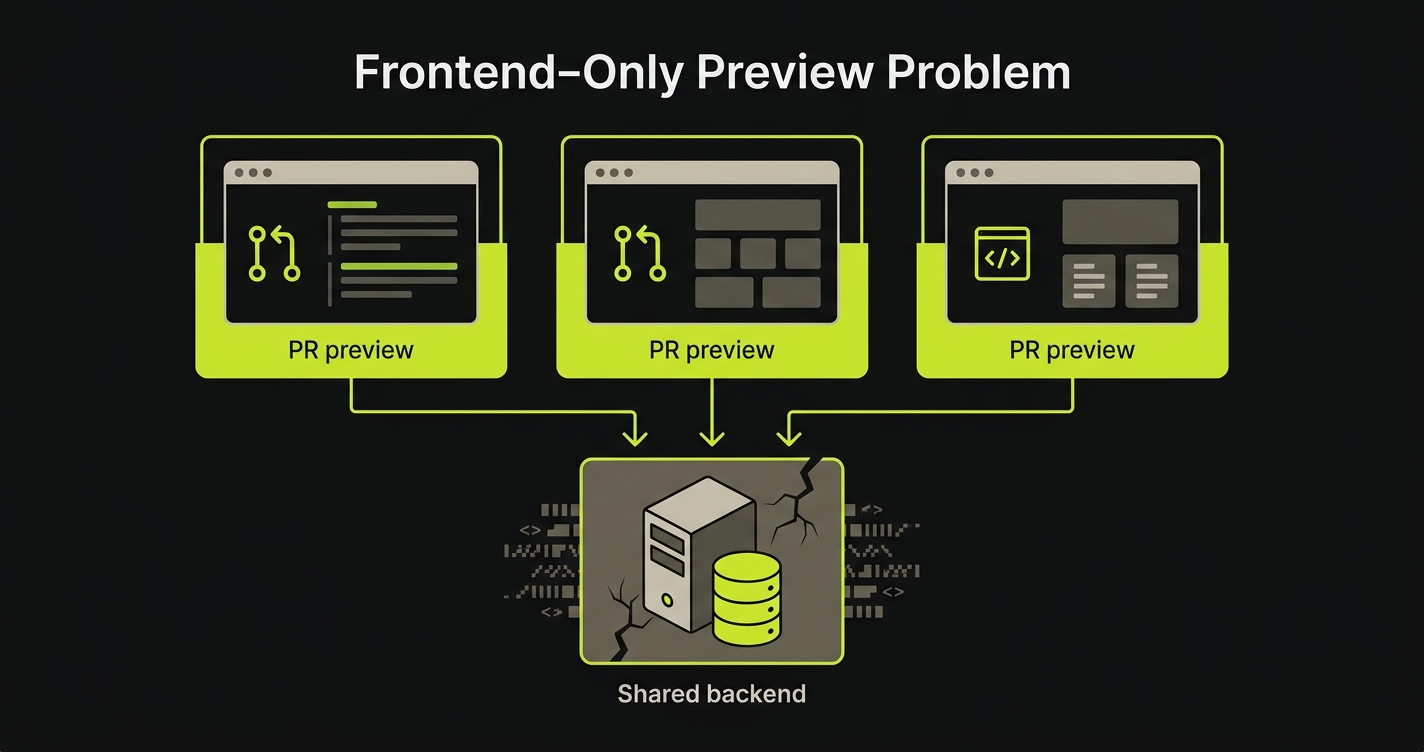
When your preview frontend hits a shared staging backend, the isolation ends at the network boundary. Every PR shares the same database rows, the same auth users, the same seed data. More precisely: the same chaotic accumulation of whatever state every other PR left behind.
We call this the Frontend-Only Preview Problem: URL isolation without data isolation, where your frontend is unique per PR but your backend is shared, so every PR contaminates every other PR's testing signal.
You're testing your PR's UI against stale data, shared state, and someone else's in-progress changes. The environment looks correct. The signal is wrong.
The mismatch is painful because it's invisible. Reviews feel productive. Previews load instantly. The PR gets merged. Production gets the bug.
Why Most Preview Environments Are Frontend-Only
This isn't an oversight. It's an architectural consequence.
Preview environments as a pattern were pioneered by Vercel and Netlify for a specific use case: static sites and serverless frontends. In that context, the "environment" is just a build artifact: a bundle of HTML, CSS, and JavaScript deployed to a CDN edge. Isolation is trivially cheap because there's no state to isolate. You get a new URL per PR. Done.
The deployment problem for frontends is fundamentally different from the deployment problem for backends. A frontend build is deterministic and stateless. You give it source code, it produces an artifact, you serve that artifact from an edge. You can create a thousand isolated previews in parallel at minimal cost because they don't share state.
A backend is stateful. Your API server needs to connect to a database. That database has rows. Those rows accumulate from every seeding script, every test run, every developer who typed INSERT INTO users into a psql prompt at 11pm debugging a customer issue. Isolating that state for every PR requires provisioning a separate data store, migrating the schema, and seeding realistic test data. That is three to five orders of magnitude more work than deploying a frontend bundle.
So Vercel solved the deployment problem and left the data problem open. That was the right call for static sites. Most teams building full-stack applications have inherited the pattern without recognizing that the second half of the problem was never addressed.
What Happens When Your Preview Hits a Shared Backend
The failure modes aren't dramatic. They're subtle and cumulative, which is what makes them expensive.
Stale data is the first problem. Your PR adds a new field to the user settings screen. You test it against staging. The staging users table has rows from six months of development: some with the field, some without, some with null values, some with invalid values from before a validation rule was added. Your new field works on some users and silently fails on others. You test on a user that works. The reviewer tests on a user that works. Production has a distribution of both.
Cross-PR contamination is the second. Two PRs are open simultaneously: one that refactors how user sessions are stored, and one that adds a new checkout flow. PR A modifies session rows on staging while PR B's reviewer is testing the checkout flow. The session structure PR B's test assumes no longer exists. PR B breaks. Nobody can tell whether the failure is real or environmental. The answer is almost always environmental, which teaches reviewers to discount failures. That's exactly when real failures get ignored.
Test-user collisions follow from the same root cause. Every developer on the team has a test account on staging. Those accounts accumulate history: orders, preferences, flags set by feature flags that got cleaned up months ago. A test that creates a user assumes the user doesn't exist. Another test created that user yesterday. The test fails intermittently depending on whether the cleanup job ran.
Race conditions between PRs are the least obvious failure mode. PR A and PR B are both open. CI runs tests against the shared staging backend for both simultaneously. PR A's test creates a record. PR B's test queries for records created "in this session." It finds PR A's record and counts it. The assertion fails. Both CIs retry. One succeeds, one fails. The signal is noise.
None of this is exotic. Every team running a full-stack application against a shared staging backend experiences some combination of these failure modes within weeks of adopting a preview workflow. The question is which approach solves them.
Approach 1: Shared Staging Backend
Most teams start here because it's already done. You have a staging environment. You point Vercel previews at it. The Vercel preview URL changes per PR; the backend URL does not. No additional infrastructure required.
It works well enough in the early days when the team is small, the codebase is young, and concurrent PRs are rare. With one or two developers and a clean staging database, the shared backend doesn't cause much pain. The database state is reasonably predictable because few people are touching it.
The problems compound with team size. Three concurrent PRs means three sets of state mutations hitting the same database in an unpredictable order. Schema migrations become a coordination problem: PR A adds a column that PR B doesn't have yet, and now every other PR's test suite runs against a schema that doesn't match what's in their branch.
The honest assessment: shared staging is not an isolation solution. It's a cost-reduction strategy that trades data isolation for operational simplicity. It's acceptable as a starting point. It's a liability once the team or the codebase grows past the point where one person can hold the full state of staging in their head.
Approach 2: Containerized Full-Stack Previews (Docker Compose)
Docker Compose is the open-source path to genuine full-stack isolation. You define your entire application stack as a compose file (frontend, API server, database) and CI spins up a fresh, isolated stack for each PR. When the PR closes, the stack comes down. Each PR gets complete data isolation because each PR gets its own database container, seeded from scratch.
The compose file above shows the pattern: frontend service, API service, and a Postgres container, all networked together in an isolated compose project per PR. Your CI creates a unique project name per PR (typically using the PR number), so parallel PRs don't share any infrastructure.
The advantages are real. Local parity is excellent: developers can run the same compose file on their machines and reproduce CI failures exactly. Cost is low: you pay for compute, not for managed services. You own the full stack and can customize every layer. There's no vendor dependency on a specific database provider.
The limitations are equally real. Every stack needs to be seeded from scratch on each PR open. If your test data is complex (production-like volumes, realistic relationship graphs, users with realistic history), seeding can take longer than the tests themselves. Scaling to many concurrent PRs requires significant CI runner capacity. Each stack consumes memory and CPU, and a team running fifteen concurrent PRs might need fifteen simultaneous compose stacks with meaningful resource requirements.
The other limitation is what we call the "merge with reality" problem. A container database starts empty (or with seed scripts that are inevitably out of date). Production data is never perfectly mirrored. Edge cases in production data (malformed records, legacy schema formats, unusual flag combinations) won't appear in your seeded test data. Your tests pass. The production bug exists in the gap between your seed script and reality.
Docker Compose is the right choice for teams that want maximum control, full local parity, and no managed-service dependencies. It's the natural fit for teams in regulated environments, teams with strict data residency requirements, or teams building infrastructure tooling that needs to test against a real Postgres or MySQL instance.
Approach 3: Database Branching (Neon, PlanetScale)
Database branching takes a different angle on the problem. Instead of spinning up a fresh database per PR, it starts from a curated snapshot of real (or realistic) data and creates an isolated branch for each PR using Copy-on-Write storage.
The mechanism is important to understand. Copy-on-Write means the branch starts as a pointer to the parent snapshot. No data is physically copied at branch creation. Pages are only duplicated when a test run modifies them. If your database is 40GB but your test run touches 200 pages, the branch consumes roughly 1.6MB of additional storage, not 40GB. Branch creation takes under a second regardless of database size. The economics work.
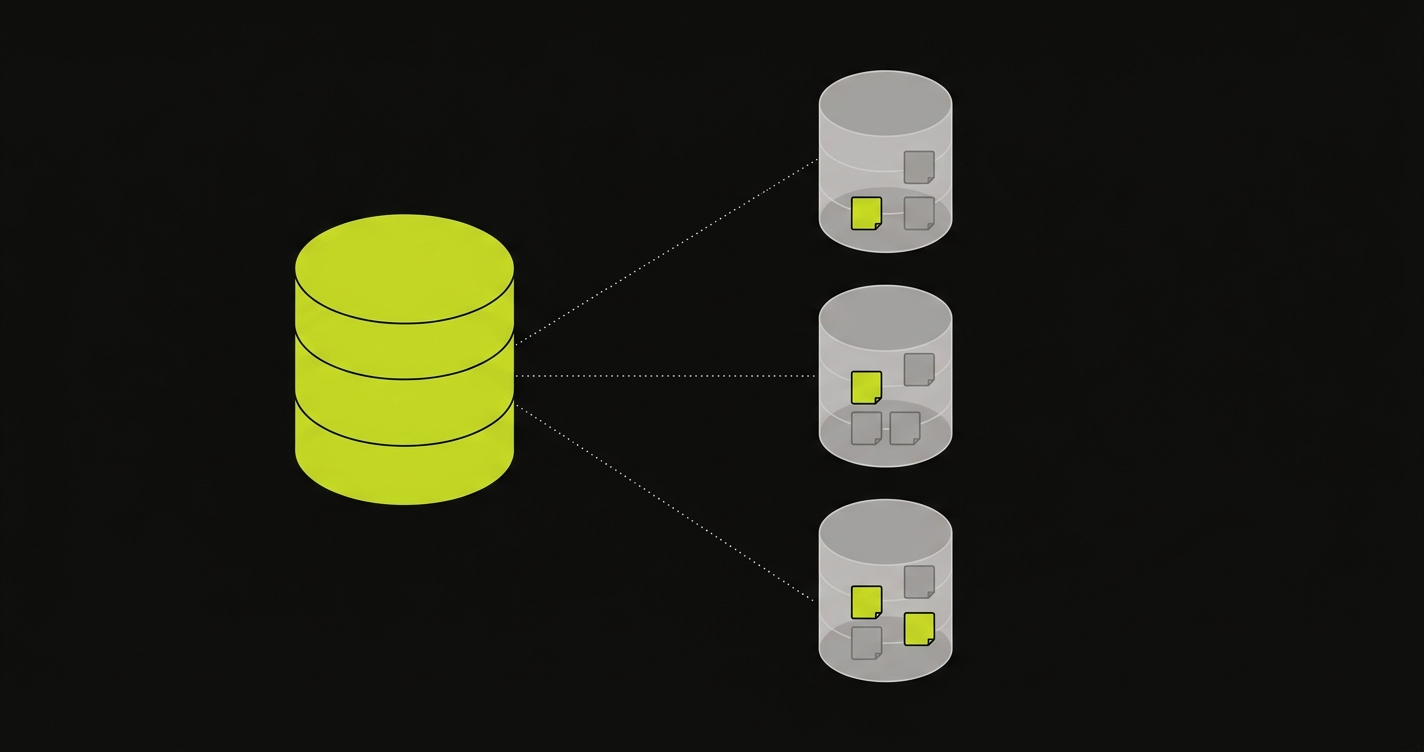
Neon implements this natively for PostgreSQL and is the strongest option for teams already on Postgres. Branch creation is a first-class API call. You get a separate connection string per branch, complete schema isolation, and automatic branch deletion when you close the PR. Neon has a free tier that covers modest preview workloads. For a complete treatment of the database branching approach and how to integrate it into a CI/CD workflow, see our dedicated guide on database branching.
PlanetScale takes a somewhat different approach. Built on Vitess (MySQL's sharding layer), PlanetScale's branching is primarily schema-focused: it gives you an isolated schema branch for testing migrations, with strong tooling around schema diffing and safe deploys. Data isolation per test run is not the same as Neon's full CoW approach. PlanetScale branches share the parent's data unless you explicitly seed the branch. For teams on MySQL whose primary concern is safe schema migrations rather than test data isolation, PlanetScale is an excellent tool. For teams whose primary concern is data isolation per PR, Neon is the better fit.
The strength of the database branching approach is that it eliminates the seed-from-scratch problem. Your branch starts with the same data your production (or golden-image) database has, and only diverges when your test run modifies it. Real edge cases in real data are automatically included. The trade-off is provider dependency: you're committing to Neon or PlanetScale's platform, pricing, and feature roadmap.
Database branching solves the data isolation problem at the database layer. It doesn't isolate your API server's in-memory state, your cache, your background job queue, or anything else that lives outside the database. For many applications, the database is the primary source of state contamination and database branching is sufficient. For applications with more complex state distribution, it's a necessary but not complete solution.
What About Redis, Queues, and External Services?
The database is often the loudest source of contamination, but it's rarely the only one. Most real full-stack applications depend on at least one of: a Redis cache, a background job queue (Sidekiq, BullMQ, Celery), a session store, or a set of external services (Stripe, Twilio, AWS). Any of those layers can carry state that leaks between PRs.
Redis and queues can be isolated the same way containers isolate databases: run a fresh instance per PR in a compose stack, or use namespaced keys per preview (prefix every key with the PR number) if a shared instance is unavoidable. External services are harder. The realistic patterns are stripe-mock-style local doubles, LocalStack for AWS, and webhook-replay fixtures for third-party APIs. None of these are free operationally, which is partly why teams with complex external dependencies often end up with application-level isolation protocols rather than just database branching.
Approach 4: Environment Factory
At Autonoma, we built Environment Factory to address the full-stack isolation problem rather than just the database layer.
The insight behind it is this: your application already knows how to set up state. Your API already has endpoints (or can have endpoints) that create users, seed accounts, configure feature flags, set up billing records. The knowledge of how to construct a valid, isolated application state exists in your codebase. Environment Factory makes that knowledge accessible to the test infrastructure through a single, standardized protocol.
The protocol is a POST endpoint on your backend that accepts three actions: discover, up, and down.
The discover action returns the list of environment configurations your backend supports (what kinds of application state can be set up). The up action creates a complete, isolated environment context for a test run: it provisions test users, seeds the database to a known state, configures feature flags, and returns identifiers for the test runner to use. The down action tears everything down cleanly when the test run completes.
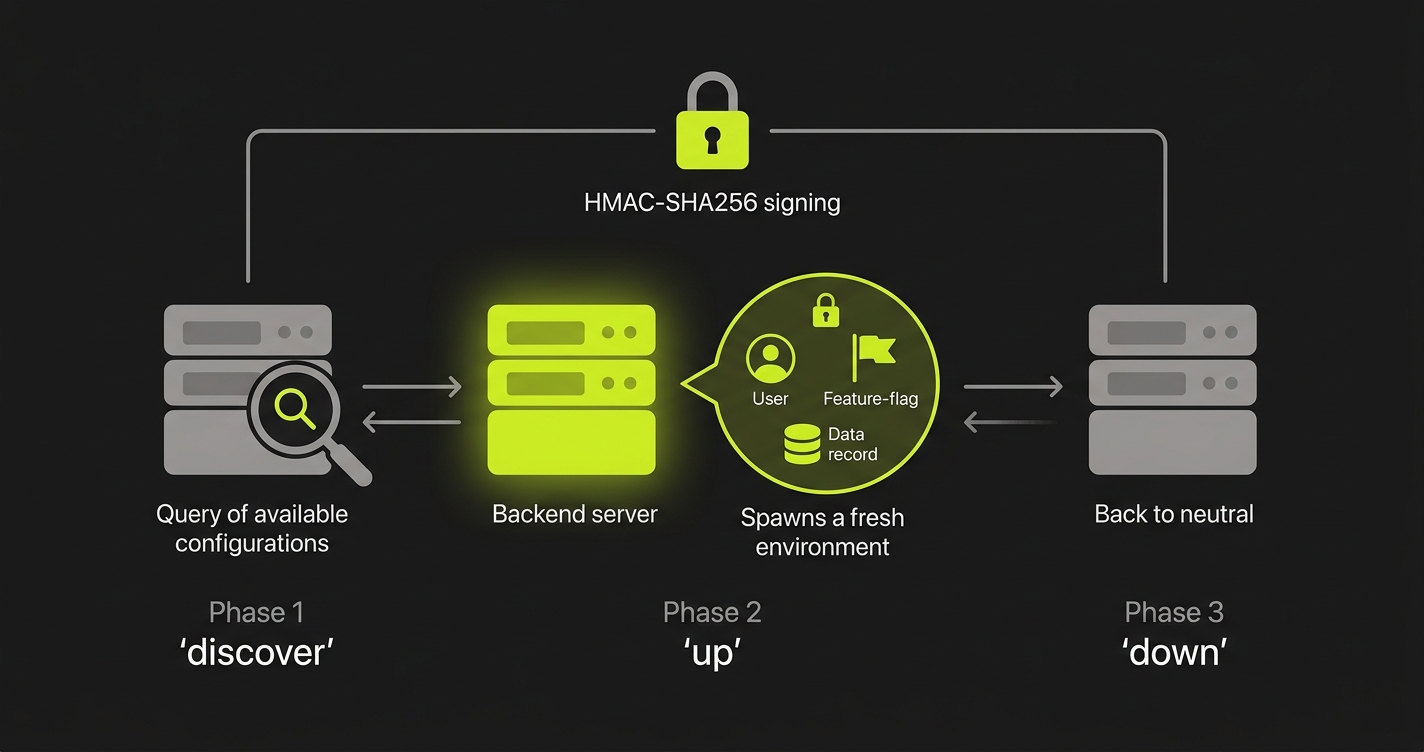
Every request is signed with HMAC-SHA256 using a shared secret, so only trusted callers (Autonoma's test runner, your CI pipeline) can trigger state changes. The endpoint itself lives in your codebase, which means the state setup logic is version-controlled and evolves with your application.
What this gives you is isolation at the application level, not just the database level. If your checkout flow depends on a user with an active subscription and a payment method on file, up creates that state atomically before the test run and tears it down after. The next test run starts clean. The previous run's state is gone.
Environment Factory is one layer of Autonoma's managed preview-environments platform; the other layer is AI-driven E2E testing that reads your codebase, plans test cases from your routes and components, and executes them against your running application. Together they close the loop on full-stack preview testing. Preview environments solved the deployment problem. Environment Factory solves the data problem. Together, you have true full-stack preview testing: every PR gets its own isolated frontend, its own isolated application state, and automated tests that validate the full stack before merge.
For teams that want to understand how to integrate E2E testing into the preview environment pipeline more broadly, see our guide on E2E testing in preview environments.
Full-Stack Preview Environment Approaches Compared
| Approach | Isolation Level | Data Freshness | Setup Complexity | Cost | Works with Vercel | Works Self-Hosted |
|---|---|---|---|---|---|---|
| Environment Factory (Autonoma) | Full isolation per test run (DB + API state) | Production-fresh schema, controlled seed data | Moderate (one POST endpoint to implement) | Usage-based | Yes | Yes |
| Database Branching (Neon / PlanetScale) | Database layer only | Parent snapshot (production-like) | Low (API call to create branch per PR) | Low (Neon free tier available) | Yes | Requires managed provider |
| Containerized Full-Stack (Docker Compose) | Full isolation (entire stack) | Seed-script-dependent (can be stale) | High (compose file + CI orchestration + seed scripts) | Low (compute only) | Yes (deploy container, point Vercel at it) | Yes |
| Shared Staging Backend | None | Accumulated state (often stale) | None (already done) | Free | Yes | Yes |
The table reflects real tradeoffs. Autonoma's Environment Factory provides the deepest isolation but requires implementing the endpoint. Database branching is the cheapest path to data isolation with the lowest setup burden, but it only covers the database layer. Docker Compose gives you full-stack isolation and keeps you off managed services, at the cost of seed-script maintenance and CI resource requirements. Shared staging is free and already done, but provides no isolation.
Choosing the Right Approach
The decision isn't about which approach is best in theory. It's about where your team is right now and what's causing the most pain.
If you're in the early stages (a small team, a young codebase, rare concurrent PRs), shared staging might be acceptable for now. Not forever. The contamination problems compound with team size, and the habits built around ignoring flaky CI signals are hard to break later. Plan to move off it within the first year.
The first upgrade that makes sense for almost every team is database branching. Neon's free tier removes the cost barrier, and the setup is genuinely low: create a branch on PR open via API, pass the branch connection string to your backend as an environment variable, delete the branch on PR close. If you're already on Postgres, the migration to Neon is usually a connection string swap. This eliminates the most common failure modes (cross-PR contamination and test-user collisions) without requiring a complete infrastructure overhaul.
From there, the decision between containerized full-stack (Docker Compose) and Environment Factory depends on two things: how much of your application's state lives outside the database, and how much you value avoiding managed-service dependencies.
If your API is stateless beyond the database (no Redis cache, no background job queue, no in-memory feature flag state), database branching combined with a clean API deployment per PR (or even a shared stateless API pointing at the isolated database) covers most of the problem. If your application has complex out-of-database state, or if your tests need to set up intricate multi-entity scenarios that can't be expressed purely through database seeding, Environment Factory's application-level isolation starts to matter.
Docker Compose is the right call if you have strict data residency requirements or a philosophical commitment to avoiding managed cloud dependencies. It's more operationally demanding, but it's also the most controllable. Teams that invest in a well-maintained compose stack and reliable seed scripts often find it the most predictable long-term.
Here is the compressed version of the same framework:
- Solo or small team, under two concurrent PRs: shared staging is acceptable as a starting point, not a destination.
- On Postgres, Vercel frontend, DB is the primary state source: Neon branching.
- On MySQL with schema-migration safety as the priority: PlanetScale branching.
- Regulated industry, on-prem, or strict data residency: Docker Compose.
- Complex application-level state (Redis, queues, subscriptions, feature flags): Environment Factory.
- Highest fidelity for pre-merge E2E testing: Environment Factory combined with Autonoma's AI-driven E2E tests.
The teams that get the most value from preview environments are the ones who treat them as a full-stack concern from the start. Not just "does the frontend deploy?" but "does the full application work, in isolation, with realistic data, before this PR merges?" That's the question a genuine full-stack preview environment answers.
Full-stack previews get tricky when state is involved, and we've built the plumbing before. Grab 20 min with a founder
FAQ
A full-stack preview environment is a per-PR deployment that isolates not just the frontend but also the API server, database state, and any other backend services your application depends on. Unlike standard Vercel-style previews (which deploy your frontend and point it at a shared staging backend), full-stack previews give each pull request its own complete, isolated stack. Changes in one PR cannot contaminate another PR's environment.
Vercel solves the deployment problem for the frontend: every PR gets a unique URL and an isolated build. What Vercel cannot do is provision a separate API server or database for each preview. The frontend has no persistent state, so isolation is cheap. The backend has state (database rows, sessions, queued jobs) that makes isolation significantly harder. Vercel's preview system was designed for static and serverless frontends, not for stateful backends.
Database branching creates an isolated copy of your database for each pull request using Copy-on-Write storage. Only modified data pages are physically duplicated (the rest is shared with the parent), so branch creation is nearly instant and storage overhead is minimal. Services like Neon (PostgreSQL) implement this natively. When your preview environment spins up, it connects to its own branch rather than a shared staging database, giving you complete data isolation per PR without the cost of a full database clone.
Yes. Docker Compose is the most common open-source approach. You define your frontend, API, and database as services, and CI spins up a fresh compose stack for each PR. The main challenges are: running many compose stacks in parallel requires significant compute resources, merging production-like data into a compose environment requires additional seeding scripts, and your CI runners need to support Docker with enough resources for multiple concurrent stacks.
Environment Factory is Autonoma's protocol for test data isolation. While database branching handles the database layer, Environment Factory handles the full application state: it calls a single POST endpoint on your backend with three actions (discover, up, down) to set up and tear down complete, isolated test contexts. This means your API business logic, not just your database, participates in isolation. HMAC-SHA256 signed requests ensure only trusted callers can trigger state changes.
For most teams using Vercel with a separate Node.js API and Postgres, the pragmatic progression is: start with database branching (Neon) to eliminate shared state contamination, then add Environment Factory if your tests require complex application-level state that goes beyond the database. Docker Compose is a good option if you need local parity and want to avoid any managed service dependency. Shared staging is only acceptable as a temporary measure during early development when isolation requirements are low.


