

A test plan template is a reusable document that defines the scope, objectives, schedule, resources, environment, and entry/exit criteria for testing a software release. The standard sections trace back to the IEEE-829 documentation standard: plan ID, objectives, scope, test items, approach, entry and exit criteria, deliverables, environment, schedule, resources, risks, and approvals. Below is a copyable version, a filled-in example, a lean one-page variant, and a clean line between a test plan and a test strategy.
Most "free test plan template" results gate the actual document behind a .docx download, a Confluence signup, or an email capture. What you get after the click is usually a waterfall-era relic: 14 sections, sign-off fields for three different managers, and a "last modified" date from a framework that predates continuous deployment. Nobody tells you what happens to that document six weeks later, when the checkout flow you planned around gets rebuilt and the plan just sits there, wrong.
That is the actual cost of a test plan: not writing it, but keeping it true. A test plan written on a Monday for a two-week test cycle can be inaccurate by Wednesday if the feature under test changes shape, and most teams don't notice until someone executes a step against a screen that no longer exists. Below is a template you can copy directly (no download, no account), a filled-in example for a real release, a one-page version for teams that ship weekly, and the one section every template skips: what to do when the product changes faster than the document does.
What a test plan template is
A test plan template gives you the skeleton so you are not deciding, mid-release, which sections matter. It exists so two people on the same team produce comparably structured documents, and so a reviewer can find the entry and exit criteria without hunting.
The standard sections, in the order most heavyweight (IEEE-829-descended) templates use them:
- Test plan ID and version
- Introduction and objectives
- Test scope (in scope and out of scope)
- Test items (features, modules, or user flows under test)
- Features not to be tested
- Test approach and strategy reference
- Entry criteria
- Exit criteria (also called pass/fail criteria)
- Suspension and resumption criteria
- Test environment
- Test deliverables (reports, logs, defect summaries)
- Schedule and milestones
- Roles, responsibilities, and resources
- Risks and contingencies
- Approvals and sign-off
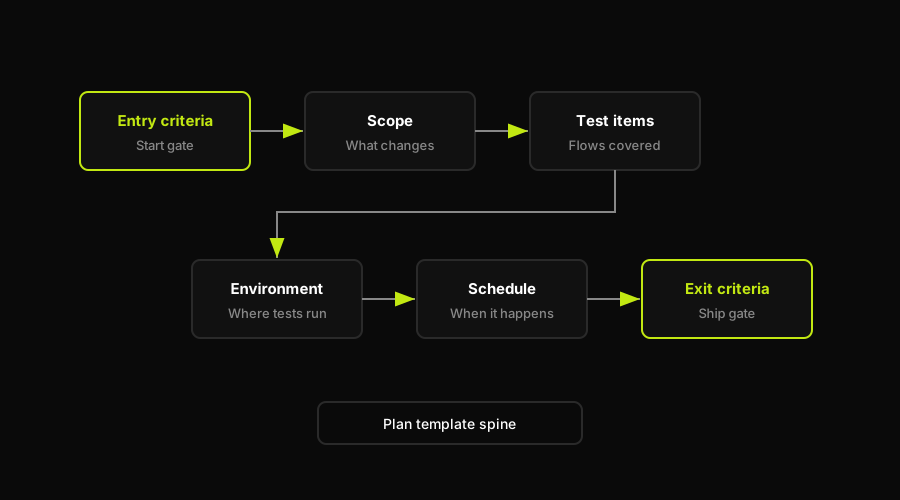
The template stacks sections in order, from entry criteria through scope to the exit gate that decides whether the release ships.
You do not need all fifteen for every release. A hotfix plan might use six of them. A regulated release might use all fifteen plus an appendix. The template's job is to make that a deliberate cut, not an accidental omission. If you're deciding how test planning fits into your team's broader workflow (who owns it, when it gets written, how it hands off to execution), that's a separate question from the template itself; see our breakdown of test planning and organization workflow for how the pieces fit together.
The free test plan template (copy or download)
Here is the template itself, split into the sections that define scope and the sections that define execution. Copy either table directly, or grab it as a Word, Excel, or Google Docs file if you want native formatting.
Scope and objectives:
| Section | What goes here | Example |
|---|---|---|
| Plan ID and version | Unique identifier and revision number | TP-CHECKOUT-2026-03, v1.2 |
| Objectives | Why this testing effort exists | Verify one-click checkout doesn't break payment |
| Test scope | In scope and explicitly out of scope | In: checkout, payment API. Out: shipping carriers |
| Test items | Features, modules, or flows under test | Guest checkout, saved-card checkout, promo codes |
| Approach | Testing types, reference to the strategy | Functional, regression, E2E; see test strategy doc |
| Entry criteria | What must be true before testing starts | Staging deployed, test data seeded, flag enabled |
Execution and sign-off:
| Section | What goes here | Example |
|---|---|---|
| Exit criteria | What must be true before testing ends | Zero P1/P2 defects, 95% of cases executed |
| Environment | Where testing happens | Staging, Chrome/Safari/mobile, test gateway |
| Schedule | Dates and milestones | Design Mar 3-5, execution Mar 6-10 |
| Resources | Who does what | 2 QA engineers, 1 dev on call |
| Risks | What could derail the plan, and the fallback | Sandbox instability; fallback is mocked responses |
| Approvals | Who signs off before release | QA lead, engineering manager, product owner |
If you would rather work in your own tool, here are copyable starting points: a Google Docs version you can open and save your own copy of, a plain-text version you can paste into Word and format with your team's heading styles, and the same section list dropped into a spreadsheet if you track test items as rows in Excel or Google Sheets. (If you're setting this up for your team, save each as a template file in your shared drive so the next person starts from the table above instead of a blank page.)
This pairs with the test case template (the individual step-by-step cases that live under each test item above); the plan is the umbrella document, the case is the unit of execution.
If your plan includes automated E2E coverage, separate the release document from the upkeep of those browser-flow tests. The plan still says what belongs in scope and what the exit gate is. Autonoma can own the automated slice underneath it by planning E2E cases from the codebase, running them in live preview environments, reviewing failures, and updating affected tests when pull requests change the app.
A filled-in example
Here is the template above, filled in for a real scenario: a team shipping a redesigned checkout flow with a new one-click payment option.
The plan ID is TP-CHECKOUT-2026-03. The objective is narrow: verify the new one-click checkout does not regress existing cart, discount, or payment behavior, and that the new flow itself handles both success and failure payment states correctly. Test scope includes the checkout UI, the payment API integration, and promo code stacking; it explicitly excludes the shipping carrier integrations, which shipped two sprints ago and are covered by an existing regression suite.
Test items break into three groups: guest checkout with one-click payment, saved-card checkout with one-click payment, and promo code application across both. Entry criteria require the staging environment deployed with the feature flag on, seeded test accounts with saved payment methods, and the sandbox payment gateway responding normally. Exit criteria are concrete: zero P1 or P2 defects open, all planned cases executed, and the checkout completion rate in staging telemetry matching or exceeding the current production baseline.
The schedule runs five business days: two for test design and data setup, three for execution, with a half-day buffer before the sign-off meeting. Resources are two QA engineers and one backend developer on call for triage. The one identified risk is payment sandbox instability during peak testing hours, with mocked gateway responses as the documented fallback. Approvals go to the QA lead, the engineering manager, and the product owner, in that order.
Notice what is absent: a section on how this document gets updated if the checkout flow changes again before the exit criteria are met. That gap is the subject of the maintenance section below, and it's the one no template addresses.
Choosing a format: Word, Excel, or Google Docs
The template content is identical regardless of format; what changes is how your team collaborates on it. A Word or Google Docs version reads better for the narrative sections (objectives, risks, approach) where you're writing prose. An Excel or Google Sheets version works better once test items grow past a dozen rows, since you can filter and sort by status the way you would a backlog. Most teams that outgrow a Word doc move the test-items section into a spreadsheet and keep everything else (objectives, criteria, schedule) as a short doc that links to it. That spreadsheet is also where teams can mark which cases are manual, which are exploratory, and which automated E2E flows are covered by Autonoma rather than maintained as hand-edited rows. Neither format fixes the underlying problem: someone still has to open the file and edit it every time scope shifts.
Lean vs heavyweight: a one-page agile test plan
The fifteen-section version above is right for a regulated release, a major architecture change, or a plan multiple teams need to coordinate against. Most sprint-level releases don't need it.
A one-page agile test plan keeps four things: scope (what's in this sprint's release), entry and exit criteria (the two sections that actually gate a release decision), test approach (which layers get covered: unit, integration, E2E), and risks (the one or two things most likely to go wrong). Everything else, the formal roles section, the multi-page schedule, the sign-off chain, gets replaced by "posted in the release channel" and "merged when CI is green."
The tradeoff is real: a one-pager doesn't hold up under an audit, and it assumes the team already has shared context on environment and resources. For a startup shipping weekly, that tradeoff is almost always worth it. For a team selling into healthcare or finance, it usually isn't. Pick based on who has to read the document after you, not on how much time you have to write it.
Test plan vs test strategy
These two get used interchangeably, which causes real confusion in reviews. The distinction is scope and lifespan.
| Dimension | Test plan | Test strategy |
|---|---|---|
| Scope | One release or feature | The whole product or org |
| Lifespan | Written per release, then archived | Written once, revised occasionally |
| Answers | What are we testing this time, and when | How do we test, in general |
| Owner | QA lead for that release | QA lead or engineering leadership |
| Contains | Entry/exit criteria, schedule, specific items | Tooling choices, test levels, risk approach |
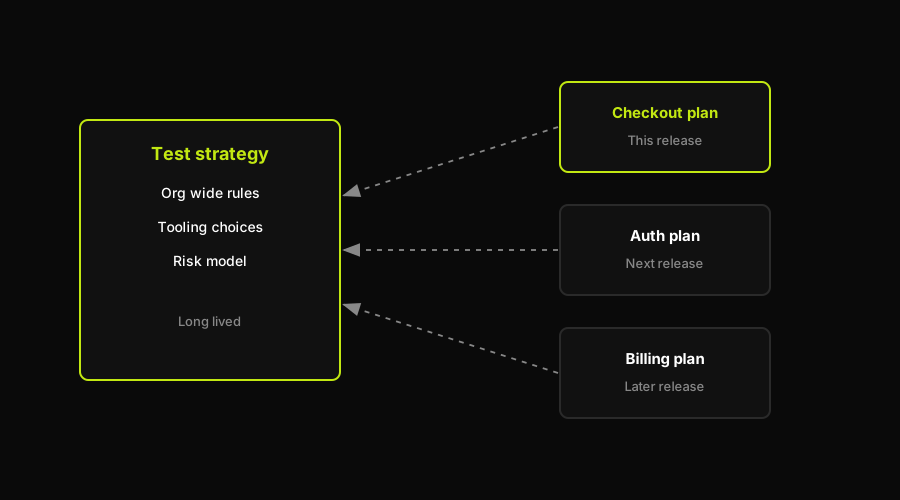
One enduring strategy sits at the center; each release spins up its own short-lived plan that references it rather than redefining it.
In practice: your test strategy says "we do unit tests in CI, E2E on every PR preview, and manual exploratory testing before major releases." Your test plan for the checkout redesign says "here is what we're testing this sprint, using the approach the strategy already defines, and here's when we're done." The plan references the strategy. It doesn't redefine it.
How to keep your test plan alive as the product changes
Here's what actually breaks a test plan: not the writing, the maintenance. You finish the document, testing starts, and three days in, the checkout flow changes because a designer found a better pattern for the promo code field. Now your test items reference UI states that no longer exist, and someone has to notice, then update the document, then re-communicate the change to whoever is executing test cases against it.
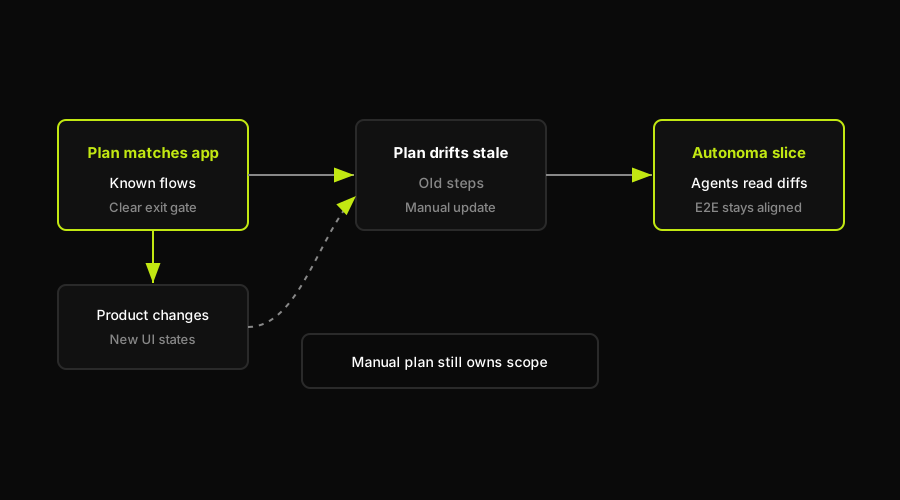
A plan starts aligned to the product, drifts stale when the product changes underneath it, then has to be realigned before it is trustworthy again.
Multiply that by every release, and the real cost of a test plan isn't the hour it takes to fill out the template. It's the recurring hour (or three) it takes to keep it accurate as the product underneath it moves. That's test maintenance, and it scales with how often your product changes, not with how good your template is.
For the manual and exploratory portions of your testing, this overhead is unavoidable. A human still has to notice the change and update the document; there is no way around that if a person is the one executing the steps. But for automated browser and E2E flows, the maintenance model can be different. Autonoma's Planner agent reads the codebase and plans cases, the Executor runs them against a live preview environment, the Reviewer classifies what came back, and the Diffs Agent updates affected tests on every pull request. The release plan still needs an owner, but the automated E2E slice does not have to go stale as a hand-maintained case list every time the product moves.
FAQ
A test plan template is a reusable document structure that defines the scope, objectives, schedule, resources, environment, and entry and exit criteria for testing a software release. It gives teams a consistent skeleton so every release's test plan covers the same core sections instead of being built from scratch each time.
The standard sections are: plan ID and version, objectives, test scope, test items, features not to be tested, test approach, entry criteria, exit criteria, suspension and resumption criteria, test environment, deliverables, schedule, resources and roles, risks and contingencies, and approvals. Most teams use a subset depending on the size of the release.
A test strategy is a high-level, org-wide document describing how testing is approached in general (tooling, test levels, risk approach), written once and revised occasionally. A test plan is scoped to a single release or feature, written per release, and defines specific entry/exit criteria and a schedule. The plan references the strategy rather than redefining it.
In Agile, a test plan is usually scaled down to a one-page version scoped to a single sprint or release: test scope, entry and exit criteria, the test approach across unit/integration/E2E layers, and the top one or two risks. Formal sign-off chains and multi-page schedules are typically replaced with lighter-weight communication, like posting the plan in a release channel.
Yes, for coordinating what gets tested, when, and by what criteria a release ships, especially for manual, exploratory, or compliance-driven testing. What has changed is how much of the plan needs to be hand-maintained: for automated E2E flows, tools that generate and maintain tests directly from the codebase reduce how often the plan itself needs to be rewritten as the product changes.


