

A QA metrics dashboard is a centralized view of test health and release readiness, aggregated from your CI pipeline and test runners. The six metrics every dashboard should show: pass rate (percentage of test runs that succeed), flake rate (percentage of tests that produce inconsistent results across identical runs), code coverage (percentage of production code exercised by tests), MTTR (mean time to repair a broken test or failed build), escaped defects (bugs reaching production that tests should have caught), and suite duration (wall-clock time for a full test run).
The dashboard existed. The metrics were there. The engineering team had built it over three sprints, wired up the CI feed, stood up a Grafana instance, and posted the link in Slack. And then nobody trusted it.
Pass rate sat at 89% on a Tuesday morning. Two engineers opened the same board and had the same reaction: "That's probably just the flaky ones." They shipped anyway. A bug escaped. In the post-mortem, someone pointed at the dashboard and said the number was meaningless. They were right. The problem was not the dashboard. It was the tests feeding it.
Before you wire up the data pipeline, you need to understand what each metric is actually measuring -- and where flake and rot can quietly corrupt the signal.
The Metrics That Belong on a QA Dashboard
Six metrics belong on a serious QA dashboard. Each one answers a different question, and each one can be poisoned in a different way.
| Metric | What it tells you | How to compute |
|---|---|---|
| Pass rate | Overall test suite health at a point in time | Passing tests / total tests run (per CI run or rolling window) |
| Flake rate | Fraction of failures caused by test instability, not real bugs | Tests with inconsistent results across identical runs / total tests |
| Coverage | How much production code is exercised by tests | Lines / branches covered by tests / total lines or branches in codebase |
| MTTR | How fast the team repairs broken tests or builds | Average time from test failure to green (across builds in the window) |
| Escaped defects | Bugs that reached production tests should have caught | Production bugs flagged as "missed by test suite" / total production bugs |
| Suite duration | Total wall-clock time for the full test run | Timestamp from first test start to last test completion per CI run |
Pass rate is the first number everyone looks at and the first number everyone learns to distrust. A pass rate in the high eighties or nineties feels healthy right up until you realize a third of your failures are intermittent. The useful question is not "what is the pass rate?" but "of the failures, how many are real?"
Flake rate is the correction factor for pass rate. Track it separately. A suite with a 5% flake rate is telling you that one in twenty test runs will produce a different result on a re-run with no code change. At scale -- if you run 500 tests and 5% are flaky, you can expect roughly 25 false signals per run. Engineers learn to ignore them, and then they start ignoring everything.
Coverage is easy to game and harder to interpret than it looks. A line of code being touched by a test is not the same as that line being meaningfully verified. Coverage is a floor, not a ceiling -- it tells you what you definitely haven't tested, not whether your tests are any good.
MTTR in a testing context measures how long it takes from a build going red to it going green again. Low MTTR means the team treats test failures as real signals and acts on them quickly. High MTTR often means engineers have learned to ignore failures because too many are phantom.
Escaped defects is the hardest metric to compute and the most valuable. You need someone in the post-mortem process asking "should a test have caught this?" and tracking the answer. The rate of escaped defects is the ultimate signal that your suite is or isn't protecting you. For a deeper look at how these metrics connect to release quality strategy, the test automation metrics and release quality breakdown covers the threshold targets and leading versus lagging signal distinction.
Suite duration is a proxy for developer experience. A suite that takes 45 minutes to run is a suite that developers stop running locally. It gets run in CI only, feedback loops lengthen, and the value of having a test suite erodes.
How to Build a QA Metrics Dashboard
Building the dashboard is a three-layer problem: get the data out of your test runners, store it somewhere queryable, and put a visualization on top.
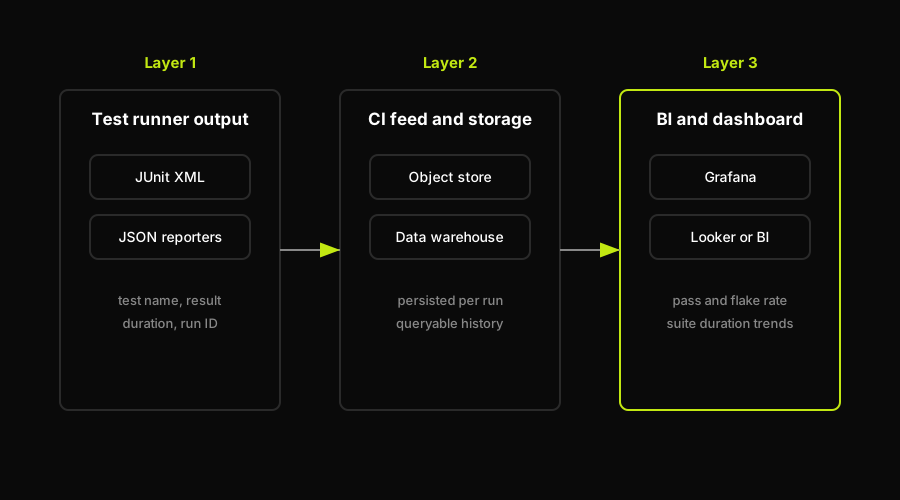
Test results flow from the runner to a queryable store and finally to the dashboard layer.
Layer 1: Test runner output. Every major test framework can emit structured results. JUnit XML is the lowest-common-denominator format -- Pytest, Maven, Jest, and most CI-native runners can produce it. JSON reporters give you more flexibility. The key fields you need per test run: test name, result (pass/fail/skip), duration, and -- critically -- a run identifier so you can correlate results across builds. Flake rate cannot be computed without seeing the same test's history across multiple runs.
If you're surveying what's available in the reporter ecosystem, the landscape of test reporting tools covers the major options and their output formats.
Layer 2: The CI feed. Your CI system (GitHub Actions, GitLab CI, CircleCI, Jenkins, or any comparable platform) runs tests on every push and pull request. The results need to go somewhere persistent. Common options: push the JUnit XML to an object store (S3 or equivalent), write results directly to a database using a CI step after the test run, or use a test observability platform that ingests results via an API. The choice depends on your existing data infrastructure. If you have a data warehouse, piping results in and querying with SQL gives you maximum flexibility. If you don't, a purpose-built test observability platform reduces setup time at the cost of flexibility.
Layer 3: The BI or dashboard layer. Once results are in a database or warehouse, you can put a visualization layer on top. Grafana works well for time-series views of pass rate, flake rate, and suite duration. Looker or any standard BI tool works for cross-sectional analysis (escaped defects by feature area, coverage by service). If your team already has a BI stack, connect to that rather than standing up something new. The dashboard itself is less important than the discipline of keeping the data pipeline running. A broken ingest step that silently drops results is worse than no dashboard at all.
One thing worth separating: the QA metrics dashboard described here is an engineering operations view (how healthy is the test suite?). It is distinct from a product or test-results dashboard that surfaces what a specific test run found, which features are green, and which builds are blocked. Both are useful. Keep them separate so each stays readable.
Why Flaky and Rotting Tests Poison Your Metrics
The dashboard is only as honest as the tests feeding it. This is obvious in theory and consistently underestimated in practice.
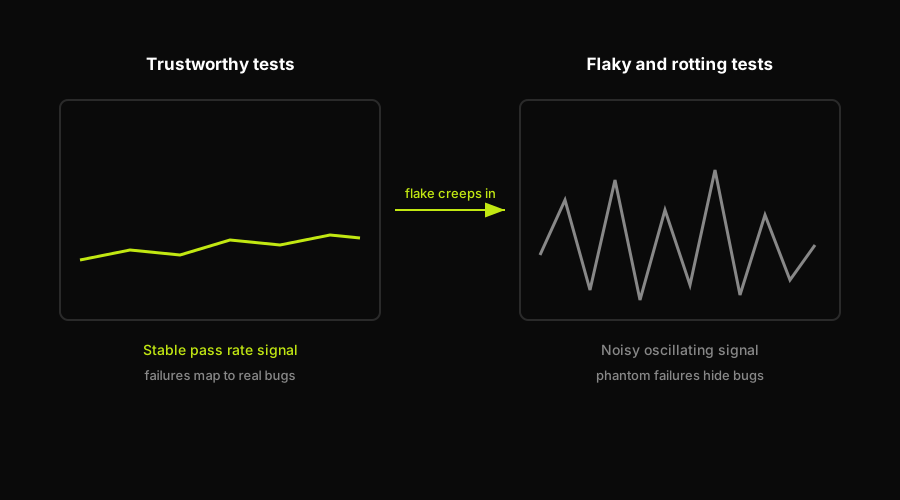
As flake and rot accumulate, a clean metric signal degrades into noise that hides real bugs.
Flake corrupts pass rate. A test that fails one in five runs -- with no code change -- is not a passing test. It is a noisy test that makes your pass rate oscillate. Engineers start treating any failure below a certain rate as probable flake. The threshold moves upward over time. Eventually the pass rate number is a ceiling on how bad things look, not a floor on how good they are.
Flake becomes the dominant signal in flake rate. If your flake rate is above 3-4%, the dashboard is mostly tracking your maintenance backlog, not your product stability. The number tells you how much of your team's debugging time is going to phantom failures.
Coverage becomes a vanity number when the covering tests are unreliable. If 15% of your coverage comes from tests that intermittently fail, your real effective coverage is lower than the number shows. You have code that is nominally tested and practically untested.
MTTR inflates because engineers triage the wrong failures. A significant fraction of MTTR is time spent deciding whether a failure is real or flake. If that decision takes 20 minutes per failure and a third of your failures are flake, you are burning hours every week on phantom triage. That time shows up as inflated MTTR even though nothing in production was broken.
How Autonoma keeps QA metrics honest
Rotting tests compound flake. As your UI evolves, tests that rely on specific DOM selectors, timing assumptions, or hardcoded element positions accumulate failures that are not bugs but are not reliable either. Each UI change that is not mirrored in the test suite creates a new source of noise on every metric. This is where Autonoma addresses the problem directly.
Our Diffs Agent runs on every PR and analyzes code changes to update, add, or deprecate test cases -- keeping the test suite aligned with the actual codebase. When the UI changes, the tests change with it instead of rotting in place. The Planner agent reads your codebase to generate test cases from code structure rather than from recorded clicks, which means the tests are grounded in what the code actually does. The Executor runs them in a live preview environment, and the Reviewer classifies each result as a real bug, an agent error, or a plan mismatch -- separating signal from noise at the source rather than letting noise flow downstream into your dashboard.
The practical effect: the flake that comes from stale selectors and outdated test logic stops accumulating. Pass rate reflects actual product health. Flake rate measures genuine instability rather than maintenance debt. MTTR falls because engineers are triaging real failures.
Acting on the Dashboard
A dashboard that nobody acts on is wallpaper. The value is in the operational loop it creates.
Set thresholds and alert on them. A pass rate below 85% on main should trigger an alert, not a weekly review. A suite duration increase of more than 20% week-over-week should trigger investigation. Flake rate above 5% should be treated as a blocker on new test investment -- there is no point adding more tests to a suite that is already unreliable.
Quarantine flaky tests. Tests with a flake rate above a set threshold (many teams use 2% per individual test) should be tagged and moved to a non-blocking job. They still run, they still report, but they do not block CI. The quarantine list is a living backlog of test maintenance work, not a place tests go to die.
Track flake rate as a trend, not a point. A single flake rate reading is not actionable. A flake rate that is rising over four sprints is a signal that test maintenance is not keeping up with product changes. That trend is the number worth putting in the weekly engineering review.
Prioritize by escaped defects. When you do post-mortems on production bugs, trace each one back to the test area that should have caught it. The areas with the highest escaped defect rates are where your test investment has the worst return on reliability. That is where to focus coverage improvements, not on the areas that are already well-tested.
Alert on suite-duration regressions. A test suite that is 10% slower this week than last week is not a catastrophe, but it is a signal. A suite that doubles in duration over a quarter without any corresponding increase in coverage is a sign that parallelization has not kept up with suite growth. Catching the trend early is much cheaper than fixing a 90-minute suite later.
The discipline of acting on the dashboard is ultimately the discipline of treating test failures as real signals -- which requires that the tests themselves are trustworthy. The metrics tell you where you are. The test maintenance work (or the tooling that automates it) is what moves the numbers.
FAQ
A QA metrics dashboard should track six core metrics: pass rate (percentage of successful test runs), flake rate (tests producing inconsistent results), code coverage (production code exercised by tests), MTTR (mean time to repair a failing test or build), escaped defects (bugs that reached production tests should have caught), and suite duration (total wall-clock time for a full run). Together these give you a complete picture of test suite health, team responsiveness, and how well your tests are protecting production.
Building a QA metrics dashboard requires three layers. First, configure your test runners to emit structured output. JUnit XML is the standard format supported by most frameworks. Second, set up a CI pipeline step that persists those results after every run, either to an object store, a database, or a test observability platform. Third, connect a BI or dashboard tool (Grafana, Looker, or any SQL-compatible visualization layer) to query and display the aggregated data. The most important part is keeping the ingest pipeline reliable. A dashboard fed by stale or dropped data is worse than no dashboard.
A healthy pass rate depends on your suite's flake baseline. Most teams target 90-95% as a minimum threshold on main, but the number is only meaningful if flake rate is low (under 2-3%). A 95% pass rate with a 10% flake rate means roughly half of your failures are noise, which makes the number useless. Fix flake first, then set pass rate thresholds. If you have flake under control, any sustained drop below 90% on main should trigger immediate investigation.
Flake rate is measured by re-running tests across identical code states and tracking inconsistent results. The simplest approach: run each test on the same commit multiple times and flag any test that produces different results without a code change. At the suite level, flake rate is the percentage of total test runs that produced at least one inconsistent result. Most CI platforms support test retry configuration that surfaces flaky tests automatically. A test that passes on retry after failing the first time is, by definition, flaky. Track this per-test over time to identify the highest-impact tests to fix or quarantine.
MTTR (mean time to repair) in a testing context measures the average time from a test failure being detected to the build returning to green. It captures both how quickly engineers respond to failures and how long they take to diagnose and fix them. High MTTR often signals that engineers are spending time triaging flaky tests rather than fixing real bugs. Phantom failures inflate the number by adding triage time that produces no fix. Lowering MTTR requires both fast response processes and a test suite that produces trustworthy signals, so engineers can act on failures with confidence instead of first determining whether the failure is real.


