

Automated regression testing is the practice of re-running a suite of tests after every code change to verify that previously working functionality hasn't broken. For most teams, the hardest part isn't writing the tests, it's maintaining them. At 100 tests, maintenance is manageable. At 500, it becomes a full-time job. At 1,000, you need a dedicated team. With AI coding tools like Cursor, Copilot, or Claude Code accelerating output, teams are hitting 1,000 tests in months instead of years. This guide covers the Regression Maintenance Cliff framework, a head-to-head comparison of 9 tools, a practical Playwright setup, and the decision criteria for when to upgrade from open-source to AI-native testing.
A team of eight engineers using AI coding tools ships roughly 3x as many pull requests as the same team without them. That acceleration is the whole point. But the regression suite scales with the codebase, not with your headcount. At 200 tests, one engineer can keep up. At 600, maintenance becomes a second job. At 1,000, it becomes the job.
We tracked how fast teams hit each threshold after adopting Cursor or Copilot. The median team crossed 500 tests in under five months. The same teams reported spending 30-40% of QA bandwidth on test maintenance rather than new coverage. Shipping faster, but spending more time fixing tests than writing them.
That is the tradeoff nobody quotes in the AI productivity benchmarks. This guide quantifies it, and then shows you what to do about it.
What Automated Regression Testing Actually Is (And Why You Already Know This)
You've been doing regression testing since the first time you merged a PR and broke something that used to work. The formal definition: automated regression testing runs your existing test suite after code changes to verify that previously passing flows still pass. It answers one question: did we break something?
The reason this guide isn't "Regression Testing 101" is that you already know this. You have tests. They run in CI. Some of them are broken. Some of them are slow. Some of them are skipped with a comment that says "fix later" from eight months ago. The question isn't what regression testing is. The question is how to do it without it consuming your team.
Why AI Coding Makes This Dramatically Harder
Before AI coding assistants, the relationship between code velocity and test suite size was roughly linear and human-paced. Engineers wrote code. QA wrote tests. Both moved at human speed. The maintenance burden accumulated slowly enough that teams could stay ahead of it.
AI coding tools broke this relationship in two directions at once.
On the code side: Cursor, Copilot, and Claude Code accelerate feature development by 3-5x for experienced developers. More code ships per sprint. More UI changes. More refactors. More dependency updates. Each one is a potential regression. Each one is a potential selector that breaks.
On the test side: The same tools encourage developers to generate test scaffolding alongside their features. "Write tests for this component" produces 20 test stubs in 30 seconds. The tests are written. The tests are committed. But the tests encode the implementation details of the component at that moment in time, and the moment AI tools generate another iteration of that component, some of those tests are already wrong.
Teams using Claude Code or Copilot for testing discover that AI is excellent at generating test structure and terrible at predicting which selectors will survive the next sprint. The generation is fast. The maintenance is manual. This asymmetry is where the cliff lives.
The Regression Maintenance Cliff
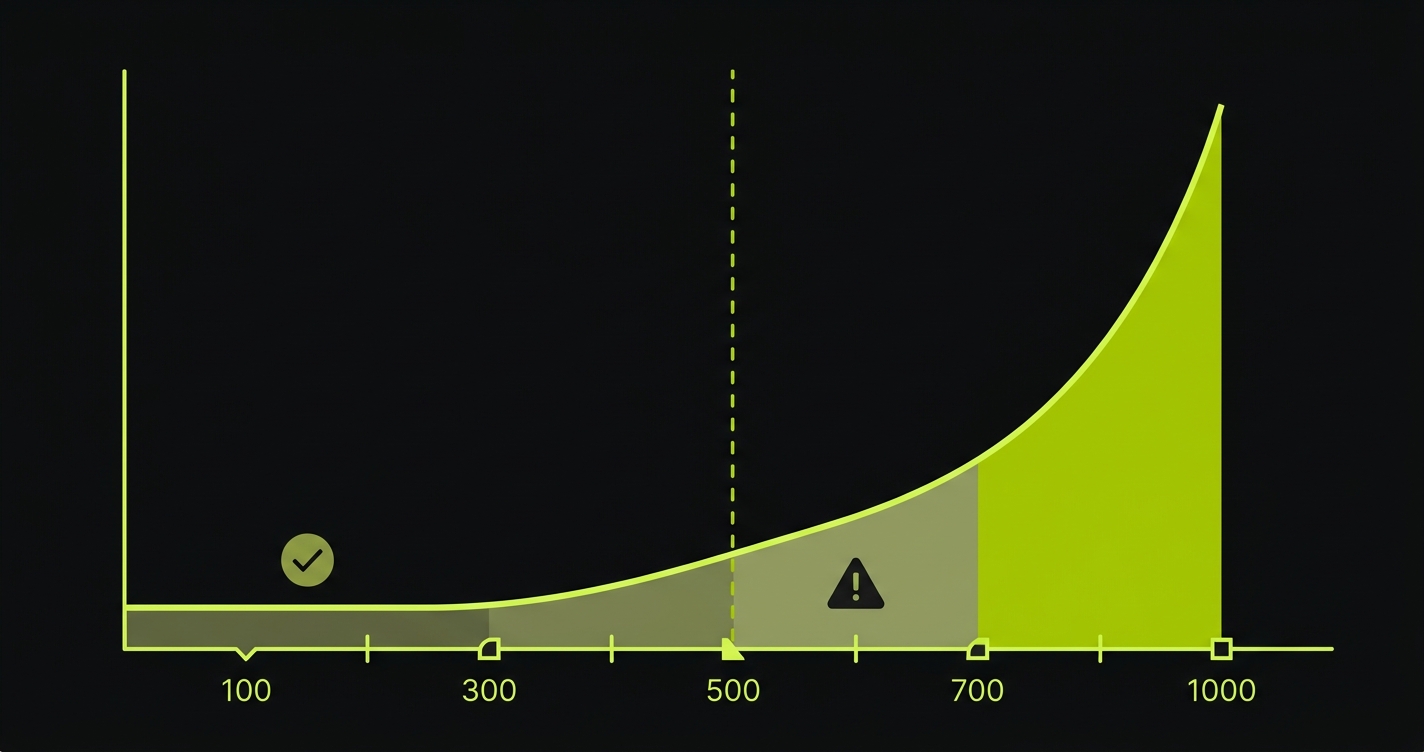
The Regression Maintenance Cliff is the specific point where test maintenance cost exceeds test creation value. Every team with a growing test suite is either approaching the cliff, standing at the edge, or has already fallen off it.
The shape of the cliff follows a predictable pattern.
At 100 tests, maintenance is annoying but manageable. A UI change breaks 8 tests. An engineer spends a few hours updating selectors. Annoying, not catastrophic. Teams in this zone often think their testing strategy is working fine.
At 500 tests, maintenance becomes a dedicated responsibility. UI changes break 40-60 tests. A full day of engineering time goes to selector updates after every sprint that touches the front end. At this scale, "someone" needs to own test maintenance, and that someone is increasingly hard to find because nobody wants the job.
At 1,000 tests, maintenance requires dedicated headcount. Your QA tooling bill goes up. Your CI pipeline takes 45 minutes. Engineers start skipping the pipeline on "minor" changes. Trust in the suite erodes because it fails often enough that people stop treating red builds as blockers. The suite is technically present. Functionally, it's a liability.
With AI coding tools, the timeline compresses by roughly 5x. A team that would have taken three years to accumulate 1,000 tests at organic pace can get there in seven months when AI generates test scaffolding alongside every feature. The maintenance debt arrives before the team has developed the infrastructure or muscle memory to handle it.
The cliff isn't just the number of tests. It's the ratio. When you're spending more engineering hours maintaining tests than writing features, you've gone over the edge.
Tool Comparison: 9 Regression Testing Tools Head-to-Head
Choosing the right tool shapes how quickly you hit the cliff and what options you have when you get there. The comparison below covers the four dominant open-source options and five commercial platforms.
| Tool | Test Creation | Self-Healing | Maintenance Burden | AI-Code Compatibility | Parallel Execution | Pricing |
|---|---|---|---|---|---|---|
| Selenium | Manual scripting (Java, Python, JS, C#, Ruby) | None | Very High: selector-brittle, requires constant maintenance | Poor: brittle XPath/CSS breaks with AI-generated component churn | Via Selenium Grid (self-hosted) or cloud providers | Open source (infrastructure costs apply) |
| Playwright | Manual scripting (JS/TS, Python, Java, .NET) | None (auto-waiting, not self-healing) | High: locators are more resilient than Selenium but still break on restructuring | Moderate: better locator strategy than Selenium, still requires manual updates | Native sharding + parallel workers | Open source |
| Cypress | Manual scripting (JS/TS only) | None | High: single-origin constraint adds workarounds; locators couple to DOM | Moderate: same locator brittleness, limited to Chromium by default | Cypress Cloud (paid) or manual parallelism | Open source; Cypress Cloud from $75/month |
| Robot Framework | Keyword-based scripting | None | High: keyword libraries need updating when UI changes; slower debug cycles | Poor: keyword abstraction layer slows adaptation to AI-generated code churn | Via pabot (parallel robot) | Open source |
| BrowserStack | Manual (bring your existing Playwright/Selenium/Cypress scripts) | None (AI test observability, not healing) | High: infrastructure is managed, but test maintenance is still your problem | Moderate: same script brittleness, managed cross-browser cloud | Yes, cloud-native parallel execution | From $29/month; enterprise pricing at scale |
| Mabl | Manual flows with auto-suggestions | Partial: ML-based locator healing after failures | Medium: healing reduces breakage but creation is still largely manual | Moderate: better than raw scripts, still requires human flow definition | Yes, cloud-native | Custom pricing; typically $500-2,000/month |
| RainforestQA | Plain-English specs executed by human crowd-testers | N/A (human execution) | Low for maintenance, very high in cost and latency | Poor at scale: turnaround time incompatible with AI shipping velocity | Limited by human tester availability | Per-run pricing; expensive at scale |
| TestSigma | NLP-based test creation from natural language | Partial: AI-assisted healing | Medium: NLP layer reduces scripting but still needs flow definitions | Moderate: NLP authoring is faster than scripting, but code-awareness is limited | Yes, cloud-native | From $199/month |
| Autonoma | Automatic: agents read your codebase and generate tests | Full: codebase-aware agents update tests on code change | Low: no manual test authoring; newer platform with smaller community | Strong: codebase-first approach adapts to AI-generated code changes | Yes, parallel agent execution | Free / Open Source; $499/mo cloud option |
A few patterns worth pulling out of this table.
Selenium is the workhorse. It has run production regression suites at every major company for 15 years. But its XPath and CSS selector model was designed for an era when UIs changed quarterly, not daily. When AI tools are churning components every sprint, Selenium test maintenance becomes someone's full-time job.
Playwright is the modern default. Its locator strategy (role-based, text-based, test ID-based) is meaningfully more resilient than Selenium's. But "more resilient" still means "breaks when someone restructures a form from three steps to two." The DX is excellent. The maintenance cost is still real.
RainforestQA is the opposite of AI-accelerated. Human crowd-testing is thorough and great for exploratory scenarios. It is fundamentally incompatible with shipping velocity at AI pace. If your team deploys five times a day, waiting hours for human test execution is a non-starter.
Mabl occupies an interesting middle ground. The ML-based healing genuinely reduces breakage compared to raw scripts. But test creation is still largely manual flow definition. You still have to define what gets tested. You still have to maintain the test library as your application grows.
TestSigma's NLP approach lowers the authoring bar compared to code. But "lower bar" is not the same as "zero maintenance." Natural language specs still encode intent at a specific moment in time, and that intent needs human updating when flows change significantly.
For teams where AI coding tools are accelerating code changes faster than manual test maintenance can keep up, Autonoma offers a fundamentally different model: agents read your codebase and keep tests current automatically, so the maintenance cliff never arrives.
Setting Up Playwright for Regression Testing
If your team is on the Selenium-to-Playwright migration path, or starting fresh, here is a practical setup that gets you to reliable automated regression testing with good CI integration.
Installation and config:
npm init playwright@latestThis scaffolds the project, installs browsers, and creates playwright.config.ts. The Playwright documentation covers the full API if you need to go deeper. The default config is reasonable but you'll want to tune it for regression specifically:
// playwright.config.ts
import { defineConfig, devices } from '@playwright/test';

export default defineConfig({
  testDir: './tests',
  fullyParallel: true,
  forbidOnly: !!process.env.CI,
  retries: process.env.CI ? 1 : 0,
  workers: process.env.CI ? 4 : undefined,
  reporter: [
    ['html'],
    ['junit', { outputFile: 'results/junit.xml' }],
  ],
  use: {
    baseURL: process.env.BASE_URL || 'http://localhost:3000',
    trace: 'on-first-retry',
    screenshot: 'only-on-failure',
  },
  projects: [
    {
      name: 'chromium',
      use: { ...devices['Desktop Chrome'] },
    },
    // Add Firefox and WebKit for full cross-browser regression
    {
      name: 'firefox',
      use: { ...devices['Desktop Firefox'] },
    },
  ],
});
An example regression test for a critical flow:
// tests/regression/checkout.spec.ts
import { test, expect } from '@playwright/test';

test.describe('Checkout regression', () => {
  test.beforeEach(async ({ page }) => {
    // Seed: put the app in the right state
    await page.goto('/');
    await page.getByRole('link', { name: 'Products' }).click();
    await page.getByRole('button', { name: 'Add to cart' }).first().click();
  });

  test('user can complete checkout with valid card', async ({ page }) => {
    await page.getByRole('link', { name: 'Cart' }).click();
    await page.getByRole('button', { name: 'Checkout' }).click();

    // Use role-based locators (more resilient than CSS selectors)
    await page.getByLabel('Card number').fill('4242424242424242');
    await page.getByLabel('Expiry').fill('12/30');
    await page.getByLabel('CVC').fill('123');
    await page.getByRole('button', { name: 'Pay now' }).click();

    await expect(page.getByRole('heading', { name: 'Order confirmed' })).toBeVisible();
  });

  test('checkout fails gracefully with declined card', async ({ page }) => {
    await page.getByRole('link', { name: 'Cart' }).click();
    await page.getByRole('button', { name: 'Checkout' }).click();

    await page.getByLabel('Card number').fill('4000000000000002');
    await page.getByLabel('Expiry').fill('12/30');
    await page.getByLabel('CVC').fill('123');
    await page.getByRole('button', { name: 'Pay now' }).click();

    await expect(page.getByText('Your card was declined')).toBeVisible();
  });
});
Note the locator strategy: getByRole, getByLabel, and getByText instead of CSS selectors. These are semantically resilient. A redesign that keeps the same button role and text survives without test changes.
CI integration with GitHub Actions:
# .github/workflows/regression.yml
name: Regression Suite

on:
  pull_request:
    branches: [main, develop]
  push:
    branches: [main]

jobs:
  regression:
    runs-on: ubuntu-latest
    steps:
      - uses: actions/checkout@v4

      - uses: actions/setup-node@v4
        with:
          node-version: '20'
          cache: 'npm'

      - name: Install dependencies
        run: npm ci

      - name: Install Playwright browsers
        run: npx playwright install --with-deps chromium firefox

      - name: Run regression tests
        run: npx playwright test --project=chromium --project=firefox
        env:
          BASE_URL: ${{ secrets.STAGING_URL }}

      - name: Upload test report
        uses: actions/upload-artifact@v4
        if: always()
        with:
          name: playwright-report
          path: playwright-report/
          retention-days: 30
This runs on every PR targeting main. The if: always() on the report upload ensures you get the HTML report even when tests fail, which is critical for debugging regression failures in CI.
The Selenium migration path: If you're moving from Selenium, the locator translation is mechanical. driver.find_element(By.CSS_SELECTOR, ".checkout-btn") becomes page.getByRole('button', { name: 'Checkout' }). The work is tedious but straightforward. The bigger gain is Playwright's auto-waiting, which eliminates most of the explicit time.sleep() calls that make Selenium tests flaky.
For a deeper treatment of this comparison, the visual regression testing tools guide covers screenshot-diffing approaches that complement this functional regression setup.
When to Upgrade from Open-Source to AI-Native
The Playwright setup above works well. It will continue to work until you hit the cliff. The question is how to recognize the inflection point before it costs you.
Three signals indicate you're approaching the cliff and should seriously evaluate AI-native alternatives:
Signal 1: Maintenance consumes more than 15% of sprint capacity. Track it. Count the hours your team spends on test failures that aren't real bugs. If that number exceeds 15% of total engineering hours in a sprint, you have crossed from "acceptable overhead" into "structural drain." At 20%, you are effectively paying for an engineer who produces no features.
Signal 2: Engineers are avoiding refactors because of test breakage. This one is harder to measure but easy to observe in sprint retrospectives. When "how many tests will this break" is a serious input to a design decision, your test suite is actively slowing down your architecture. Tests should enable safe change, not discourage it. This matters even more for teams using shift-left testing practices where tests are supposed to accelerate development.
Signal 3: AI coding velocity is outpacing your testing velocity. If your team is using Cursor or Copilot and shipping features 3-4x faster than a year ago, but your test suite hasn't scaled proportionally, you have an uncovered surface area problem. Every new feature without regression coverage is a future bug that reaches production. The acceleration that AI provides on feature delivery doesn't automatically carry through to testing.
When two of these three signals are present, the question shifts from "should we improve our Playwright setup" to "should we change our approach entirely."
Choosing Your Path
Not every team needs to replace their Playwright suite. The right answer depends on where you are in the cliff trajectory.
Under 300 tests with genuine QA bandwidth. Playwright with good locator hygiene and the CI setup above is a solid position. Invest in role-based locators, avoid CSS selectors, and build a clear ownership model for test maintenance. You have runway.
Between 300 and 700 tests with AI coding tools accelerating your output. You're approaching the inflection point. Start measuring maintenance hours per sprint now. Build the data before you need it to make the case for a different approach. At this stage, partial solutions like Mabl's auto-healing can buy time, but they still require you to define and maintain test flows manually.
Above 700 tests with a growing percentage of skipped or broken tests. You've already hit the cliff. The fundamental problem is that traditional testing encodes implementation details rather than user intent. A Playwright test that clicks a button by its test ID breaks when the test ID changes. No amount of better locator hygiene fixes a structural scaling problem.
This is the exact scenario we built Autonoma to solve. The architecture works differently from the tools above: a Planner agent reads your codebase (routes, components, API handlers, database models) and generates test cases from that understanding, including the database state setup that most teams configure manually. A Diffs Agent runs on every pull request, reading the code diff to add, deprecate, and maintain test cases as the implementation changes. Two secondary agents round out the system: an Executor that runs the planned tests against a live preview environment, and a Reviewer that classifies each result as a real bug, an agent error, or a test-plan mismatch.
The Diffs Agent is the piece that matters most for teams past the cliff. When your AI coding tool generates a new version of your checkout component, the Diffs Agent reads the diff, evaluates which tests are affected, and updates them. No selector-update sprint. No "fix later" comments accumulating in skipped tests. This isn't self-healing in the narrow sense of retrying a failed selector. It's codebase-aware maintenance: your codebase is the spec, and the agent reads the spec when it changes.
The tradeoff is real: Autonoma is a newer platform with a smaller community than Playwright or Selenium. It is open source and self-hostable, with a free tier and a $499/mo cloud option. For teams with under 300 tests where maintenance is manageable, that tradeoff doesn't make sense. For teams where Claude Code or Copilot is generating 5x more code churn, 5x more potential selector invalidations, and 5x more regression surface area, the math tips decisively. Traditional testing infrastructure wasn't designed for this throughput. For the full picture on how AI tooling is reshaping QA roles and practices, the AI testing tools definitive guide covers the broader landscape.
The teams that get this right aren't the ones with the best Playwright configuration. They're the ones who recognized early that the maintenance cost compounds, built the measurement infrastructure to track it, and made the architectural decision before the suite became a liability.
Frequently Asked Questions
Automated regression testing is the practice of running a pre-defined suite of tests after code changes to verify that previously working functionality hasn't broken. It answers one question: did this change break something that used to work? The automation part means tests run in CI without human intervention, but with traditional tools like Playwright or Cypress, a human still has to write and maintain those tests.
For critical flows (checkout, signup, core activation), regression tests should run on every pull request before merge. The full suite should run before every production deployment. Extended or edge-case regression can run nightly. If your full suite takes more than 10 minutes, split it into a fast critical tier (runs on every PR) and a comprehensive tier (runs pre-deploy). Speed determines whether engineers actually wait for results.
The Regression Maintenance Cliff is the point where test maintenance cost exceeds test creation value. At 100 tests, maintenance takes a few hours a week. At 500, it becomes a dedicated responsibility. At 1,000, it requires dedicated headcount. With AI coding tools accelerating code output 3-5x, teams hit 1,000 tests in months instead of years, often before they've built the infrastructure to manage that scale. The cliff is when more engineering hours go to fixing tests than to shipping features.
For most modern web applications, yes. Playwright's role-based locators are more resilient than Selenium's XPath/CSS approach. Auto-waiting eliminates most flaky timing issues. Parallel execution via native sharding is faster and simpler to configure than Selenium Grid. The migration path is mechanical: translate selectors to role-based locators, remove explicit sleeps, and port your CI config. The maintenance burden is lower with Playwright, but it still exists. Both tools require human updates when application flows change significantly.
The cost scales non-linearly with suite size. At 100 tests, expect roughly 10 hours per week of maintenance (selector updates, flaky test fixes, test data management). At 500 tests, maintenance becomes a full-time role: 40+ hours per week. At 1,000 tests, you need dedicated headcount or a fundamentally different approach. For teams using AI coding tools that accelerate code output, these thresholds arrive 3-5x faster than traditional development timelines.
AI-generated code creates unique regression challenges because it produces higher code churn and often restructures components between iterations. The most resilient approach uses role-based and semantic locators (getByRole, getByLabel) instead of CSS selectors or XPath. Run regression suites on every PR, not just pre-deploy. For teams where AI coding tools have pushed the suite past 500 tests, codebase-aware testing platforms that read your source code and adapt tests automatically eliminate the maintenance burden that manual approaches cannot scale past.
Three signals indicate it's time: (1) test maintenance consumes more than 15% of sprint capacity, (2) engineers avoid refactors because of anticipated test breakage, and (3) AI coding velocity is outpacing your testing velocity, leaving growing surface area uncovered. When two of these three signals are present, the cost of maintaining an open-source setup typically exceeds the cost of a commercial or AI-native alternative.


