

Local-to-prod is the workflow where engineers develop locally and deploy directly to production without a meaningful staging environment in between. It is how most no-staging-environment startups actually ship. Many small teams with no dedicated QA function default to this because staging environments require maintenance they cannot afford. The honest question is not "how do we add staging." It is "what layers make local-to-prod shipping safer."
At Autonoma, we talk to Seed-to-Series A startups every week. Engineers shipping without a QA hire, teams of 3 to 20 engineers, no dedicated QA function. The most common thing we hear is not "we need a testing strategy." It is "we don't have any QA, we just ship and see what breaks." We built PreviewKit so the local-to-prod workflow can stay fast while becoming safer. This article is a straight account of why local-to-prod is the real workflow, what it misses, and the four layers that change the risk profile without asking your team to rebuild staging from scratch.
Why local-to-prod is the actual workflow
The textbook answer to "how do you ensure quality before production" is: maintain a staging environment that mirrors prod, run your test suite against it, and deploy only when staging passes. The textbook answer is right. It is also written for teams that have a QA engineer, a platform engineer, and a DevOps function with headroom.
Most Seed-to-Series A startups have none of those. They have 3 to 20 engineers, a long feature backlog, and a staging environment that was set up six months ago and has been drifting from production ever since. The database schema is out of date. The secrets are stale. The environment sometimes works and sometimes does not, and nobody has the bandwidth to investigate why.
One Seed-stage engineer told us that their staging environment broke two sprints in a row and they stopped using it. "We just push to prod at this point. If something breaks, we hear about it real quick." That is not an anomaly. It is the rational response when maintaining staging costs more than it saves.
Cloud-vendor sandbox environments (HubSpot sandbox, Stripe test mode, Twilio dev environment) help for individual integrations but they do not solve the full-stack problem. Your HubSpot sandbox does not behave like your HubSpot production account. A founding engineer at a Series A startup we spoke with described the gap precisely: their staging environment used HubSpot sandbox data and their production environment used live CRM records, and the bugs that mattered only showed up against real data shapes. The third-party SaaS data problem has its own surface area, with a deeper breakdown in staging environments and the HubSpot third-party data problem.
Multi-service setups make staging expensive in a different way. If your stack is a Next.js frontend, a Node API, a Postgres database, a Redis cache, and a background job worker, keeping all five services synchronized and healthy in a shared staging environment is an ongoing operational commitment. One service drifts, the environment breaks, and debugging the environment takes time away from debugging the actual product.
Teams default to local-to-prod because it is the workflow that scales for them. Not because they are reckless, but because the alternative costs more than they can afford.
What local-to-prod gets right
Local-to-prod is not a mistake. It is a pragmatic workflow with real virtues that are worth naming.
The feedback loop is tight. When you develop locally and push directly, you know immediately whether your change broke something in production. There is no intermediate environment to manage, no staging queue to wait in, no environment state to synchronize. The signal is fast and direct.
The author is the shipper. The engineer who wrote the code is the one watching it go to production. That is a quality signal that staging environments often dilute: in a staging-heavy workflow, a change can pass staging review and reach production without the original author ever verifying that their intent made it through correctly. Local-to-prod keeps ownership close.
The feedback from real users is faster. A bug that affects real users is found and fixed sooner than a bug that lives undetected in staging for two weeks. For early-stage startups trying to understand what their users actually do, fast production feedback is often more valuable than a thorough pre-deploy test run.
This is not a rationalization. These are genuine advantages. The goal is not to eliminate local-to-prod. The goal is to add the safety layers that close its specific gaps.
What local-to-prod misses
Local-to-prod misses four things. They are all things you only learn about in production, and you hear about them real quick.
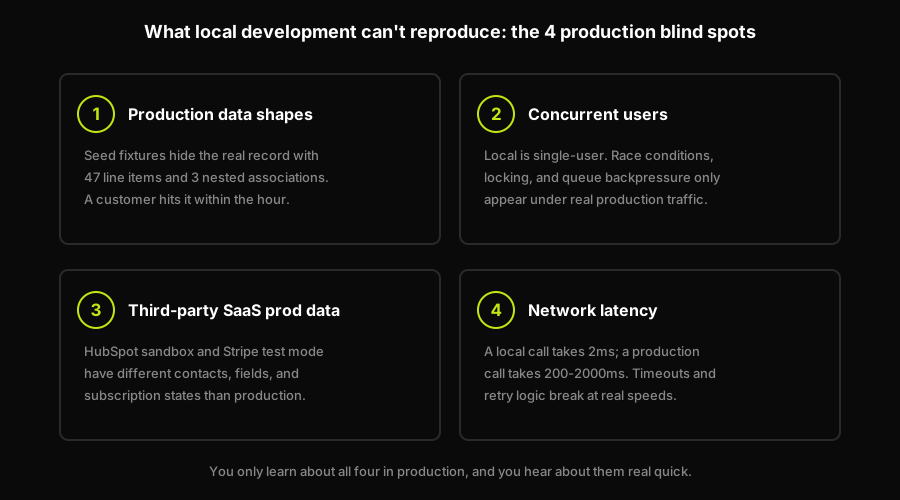
Four things local dev never shows you, and production shows you fast.
Behavior under production data shapes. Local development uses fixture data: seed files, hand-crafted test records, a database that looks nothing like what real users have accumulated over months of actual usage. The bug that appears on a production record with 47 line items and three nested associations does not appear on your local seed data with two clean records. You push to prod and a customer hits the 47-line-item case inside an hour.
Behavior under concurrent users. Local development is single-user. Production is not. Race conditions, locking behavior, queue backpressure, and session edge cases are invisible locally. They show up the first time two users do the same thing at the same time against your production database.
Behavior under third-party SaaS prod data. Your HubSpot sandbox has different contacts, different field mappings, and different permissions than your HubSpot production account. Your Stripe test mode has different subscription states than your real customer subscriptions. Code that works against the sandbox breaks against production integrations in ways that are very hard to predict locally.
Behavior under network latency. A local API call takes 2 milliseconds. A production API call to a third-party service takes 200 milliseconds, and sometimes 2,000 milliseconds when the service is under load. Timeout handling, loading states, and retry logic that work fine locally can expose edge cases that only appear at realistic network speeds.
These are not obscure failure modes. They are the four most common production bugs reported by small engineering teams shipping without a QA function. For teams using shift-left QA without a QA team, addressing these gaps at PR time rather than post-deploy is the core strategy.
Layers that make local-to-prod safer (without rebuilding staging)
The alternative to staging is not "no safety." It is a different set of layers, each targeting a specific gap without requiring a long-lived shared environment to maintain. There are four that work well together for small teams.
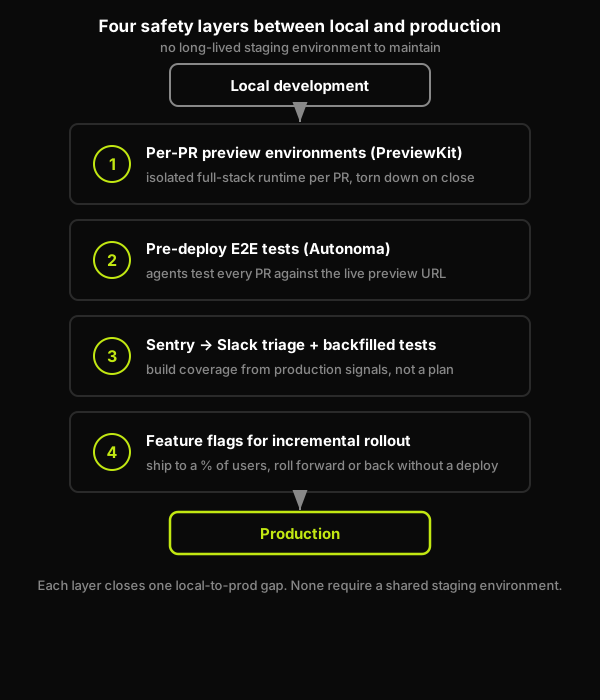
Four layers between local and prod, each closing one specific gap.
Before a local-to-prod change merges, four layers should each get a turn at it:
- A per-PR preview environment it actually ran in.
- Pre-deploy E2E tests that passed against that preview.
- A Sentry-to-Slack triage loop that backfills a test for anything that slips through.
- A feature flag for changes risky enough to roll out gradually.
Layer 1: Per-PR preview environments (PreviewKit)
Instead of one shared staging environment, each PR gets its own isolated runtime. PreviewKit provisions a full-stack environment on every PR: frontend, backend, isolated database, queues, caches, and workers. The environment is ephemeral. It exists for the duration of the PR and tears itself down on close. No maintenance burden, no environment drift, no shared state between PRs. The reviewer gets a live URL. The author gets an environment that looks like production without being production. Per-PR preview environments are documented in depth in per-PR preview environments with tests.
Layer 2: Pre-deploy E2E tests against the preview environment (Autonoma)
A preview environment without tests is a URL to click manually. Autonoma's agents run E2E tests automatically against the preview environment on every PR. The Planner reads your codebase and derives the test plan. The Automator executes those tests against the live preview URL. The Maintainer self-heals tests when your code changes. The result is that every PR gets tested before merge, against a prod-like environment, without anyone writing test scripts. For teams catching bugs without a QA team, this is the pre-deploy verification layer that local development cannot provide.
Layer 3: Sentry-to-Slack triage with backfilled tests
Sentry is not a replacement for pre-deploy testing, and Autonoma is not a replacement for Sentry. They operate at different points in the pipeline. Sentry catches what gets to production. Autonoma catches what should never reach production. Both belong in a complete safety net for a small team. The workflow that works: when Sentry surfaces a production error, add a test to your Autonoma config that covers that behavior. The next PR that touches that path will be tested against it before it merges. You build coverage from production signals rather than from a test plan written in advance.
Layer 4: Feature flags for incremental rollout
Even with preview environments and E2E tests, some changes carry risk that only shows up at production scale. Feature flags let you ship the change to a small percentage of users, verify behavior against real production data, and roll forward or back without a deploy. This is not a testing strategy, it is a deployment strategy. Used together with layers 1-3, it closes the gap between "tested in preview" and "verified in production."
Shipping local-to-prod is the workflow. PreviewKit is the layer that makes it safer. Grab 20 min with a founder
How Autonoma + PreviewKit makes local-to-prod safer
The fundamental problem with local-to-prod is the absence of an isolated, prod-like environment between development and production. You can add manual testing steps, code review, and CI linting, but none of those give you a running environment that behaves like production. That is the gap PreviewKit was built to close.
PreviewKit is the preview-environments layer inside Autonoma. When a PR opens, PreviewKit provisions the full runtime: frontend, backend, isolated database, queues, caches, and workers. Each service gets its own isolated container. The database is seeded from your configured baseline. Secrets and config propagate automatically. The environment tears down on PR close. No infra overhead lands on the engineering team. For a startup of 3 to 20 engineers shipping without a QA hire, the entire per-PR environment lifecycle is handled by the platform.
The four-stage pipeline (Planning, Generation, Replay, Review) is the testing side. The Planner agent reads your codebase and derives a test plan from the actual behavior your code defines. The Generator produces executable test cases. Replay executes them against the live preview URL and captures a structured trace. Review surfaces the outcome in the PR comment, alongside the live URL, so merge decisions have real signal. The Planner also handles database state setup automatically. It generates the endpoints needed to put your DB in the correct state for each test scenario, using factory.up() to initialize and factory.down() to clean up via the Environment Factory SDK.
The practical result for a team shipping local-to-prod: every PR gets a prod-like environment provisioned automatically, tested automatically, and reported in the PR comment without any manual step. The engineer pushes the branch, opens the PR, and the environment and tests run while they go for coffee. When the review is ready, the reviewer has a live URL and a test trace. Merge is a decision with signal, not a guess.
For teams already using catch bugs without a QA team patterns, PreviewKit is the infrastructure layer that makes those patterns work reliably at PR cadence. How Autonoma's full preview-environment architecture fits together is documented in how Autonoma preview environments works.
Is the local-to-prod workflow worth changing?
Not for the reasons most people give. The typical argument for "you need a staging environment" is that local-to-prod is reckless. That framing misses the point. Local-to-prod is reckless only when you have no other safety layers. With per-PR preview environments, pre-deploy E2E testing, Sentry triage, and feature flags in place, local-to-prod is a perfectly reasonable workflow for a small team that needs to move fast.
The real question is: what is your current bug detection latency? If you are finding bugs in production, via Sentry alerts or user complaints, 24 to 48 hours after a deploy, the issue is not that you are shipping local-to-prod. The issue is that you have no layer between local development and production that tests real behavior.
A founding engineer at a Series A startup we spoke with summed it up well: once they had per-PR preview environments and automated E2E tests running against each one, adding a staging environment on top felt redundant. The per-PR layer was already doing the job staging was supposed to do, without the maintenance overhead. For a small team with a fast cadence, that is, as they put it, a no brainer.
FAQ
Local-to-prod is the workflow where engineers develop and test code on their local machine and deploy it directly to production without a meaningful staging environment in between. It is the default workflow for most Seed-to-Series A startups that lack a dedicated QA function, because maintaining a staging environment requires ongoing effort the team cannot afford.
It depends on what safety layers you have in place. Local-to-prod without any additional layers is risky: you miss behavior under production data shapes, concurrent users, third-party SaaS prod state, and network latency. With per-PR preview environments, pre-deploy E2E tests, Sentry triage, and feature flags in place, local-to-prod can be a safe, fast workflow for small teams.
Per-PR preview environments are the most direct replacement for a shared staging environment. Each PR gets its own isolated runtime: frontend, backend, isolated database, queues, caches, and workers. You test each change in isolation rather than sharing one long-lived environment that drifts from production. Autonoma's PreviewKit provisions these environments automatically on every PR.
Yes. Autonoma's PreviewKit provisions an isolated database instance for each PR, seeded from the baseline you configure. The Planner agent generates the database-state setup endpoints needed to put your DB in the right state for each test scenario. This means every E2E test run against the preview environment has the data shape it needs, without touching production or a shared staging schema.
Usually not. A shared staging environment for a team of 3 to 20 engineers requires someone to maintain it: keep it in sync with production schema, manage secrets rotation, debug environment drift, and troubleshoot infra issues that are not bugs in the product. That maintenance burden is real, ongoing, and falls on the people who should be shipping features. Per-PR preview environments are a better investment: each environment is ephemeral, isolated, and automatically torn down when the PR closes.


